Science Score: 49.0%
This score indicates how likely this project is to be science-related based on various indicators:
-
○CITATION.cff file
-
✓codemeta.json file
Found codemeta.json file -
✓.zenodo.json file
Found .zenodo.json file -
✓DOI references
Found 6 DOI reference(s) in README -
✓Academic publication links
Links to: arxiv.org, sciencedirect.com, springer.com, mdpi.com, ieee.org -
○Committers with academic emails
-
○Institutional organization owner
-
○JOSS paper metadata
-
○Scientific vocabulary similarity
Low similarity (13.2%) to scientific vocabulary
Keywords
Keywords from Contributors
Repository
NFStream: a Flexible Network Data Analysis Framework.
Basic Info
- Host: GitHub
- Owner: nfstream
- License: lgpl-3.0
- Language: Python
- Default Branch: master
- Homepage: https://www.nfstream.org
- Size: 115 MB
Statistics
- Stars: 1,175
- Watchers: 30
- Forks: 135
- Open Issues: 34
- Releases: 76
Topics
Metadata Files
README.md

NFStream is a multiplatform Python framework providing fast, flexible, and expressive data structures designed to make working with online or offline network data easy and intuitive. It aims to be Python's fundamental high-level building block for doing practical, real-world network flow data analysis. Additionally, it has the broader goal of becoming a unifying network data analytics framework for researchers providing data reproducibility across experiments.
| Live Notebook |

|
| Project Website |

|
| Discussion Channel |

|
| Latest Release |

|
| Supported Versions |


|
| Project License |

|
| Continuous Integration |



|
| Code Quality |


)
|
Table of Contents
- Main Features
- How to get it?
- How to use it?
- Encrypted application identification and metadata extraction
- System visibility
- Post-mortem statistical flow features extraction
- Early statistical flow features extraction
- Pandas export interface
- CSV export interface
- Extending NFStream
- Machine Learning models training and deployment
- Training the model
- ML powered streamer on live traffic
- Building from sources
- Contributing
- Ethics
- Credits
- Publications that use NFStream
- License
Main Features
- Performance: NFStream is designed to be fast: AFPACKETV3/FANOUT on Linux, multiprocessing, native CFFI based computation engine, and PyPy full support.
- Encrypted layer-7 visibility: NFStream deep packet inspection is based on nDPI. It allows NFStream to perform reliable encrypted applications identification and metadata fingerprinting (e.g. TLS, SSH, DHCP, HTTP).
- System visibility: NFStream probes the monitored system's kernel to obtain information on open Internet sockets and collects guaranteed ground-truth (process name, PID, etc.) at the application level.
- Statistical features extraction: NFStream provides state of the art of flow-based statistical feature extraction. It includes post-mortem statistical features (e.g., minimum, mean, standard deviation, and maximum of packet size and inter-arrival time) and early flow features (e.g. sequence of first n packets sizes, inter-arrival times, and directions).
- Flexibility: NFStream is easily extensible using NFPlugins. It allows the creation of a new flow feature within a few lines of Python.
- Machine Learning oriented: NFStream aims to make Machine Learning Approaches for network traffic management reproducible and deployable. By using NFStream as a common framework, researchers ensure that models are trained using the same feature computation logic, and thus, a fair comparison is possible. Moreover, trained models can be deployed and evaluated on live networks using NFPlugins.
How to get it?
Binary installers for the latest released version are available on Pypi.
bash
pip install nfstream
Windows Notes: NFStream does not include capture drivers on Windows (license restrictions). It is required to install Npcap drivers before installing NFStream. If Wireshark is already installed on Windows, then Npcap drivers are already installed, and you do not need to perform any additional action.
How to use it?
Encrypted application identification and metadata extraction
Dealing with a big pcap file and want to aggregate into labeled network flows? NFStream make this path easier in a few lines:
```python from nfstream import NFStreamer
We display all streamer parameters with their default values.
See documentation for detailed information about each parameter.
https://www.nfstream.org/docs/api#nfstreamer
mystreamer = NFStreamer(source="facebook.pcap", # or live network interface decodetunnels=True, bpffilter=None, promiscuousmode=True, snapshotlength=1536, idletimeout=120, activetimeout=1800, accountingmode=0, udps=None, ndissections=20, statisticalanalysis=False, spltanalysis=0, nmeters=0, maxnflows=0, performancereport=0, systemvisibilitymode=0, systemvisibilitypoll_ms=100)
for flow in my_streamer: print(flow) # print it. ```
```python
See documentation for each feature detailed description.
https://www.nfstream.org/docs/api#nflow
NFlow(id=0, expirationid=0, srcip='192.168.43.18', srcmac='30:52:cb:6c:9c:1b', srcoui='30:52:cb', srcport=52066, dstip='66.220.156.68', dstmac='98:0c:82:d3:3c:7c', dstoui='98:0c:82', dstport=443, protocol=6, ipversion=4, vlanid=0, tunnelid=0, bidirectionalfirstseenms=1472393122365, bidirectionallastseenms=1472393123665, bidirectionaldurationms=1300, bidirectionalpackets=19, bidirectionalbytes=5745, src2dstfirstseenms=1472393122365, src2dstlastseenms=1472393123408, src2dstdurationms=1043, src2dstpackets=9, src2dstbytes=1345, dst2srcfirstseenms=1472393122668, dst2srclastseenms=1472393123665, dst2srcdurationms=997, dst2srcpackets=10, dst2srcbytes=4400, applicationname='TLS.Facebook', applicationcategoryname='SocialNetwork', applicationisguessed=0, applicationconfidence=4, requestedservername='facebook.com', clientfingerprint='bfcc1a3891601edb4f137ab7ab25b840', serverfingerprint='2d1eb5817ece335c24904f516ad5da12', useragent='', contenttype='') ```
System visibility
NFStream probes the monitored system's kernel to obtain information on open Internet sockets and collects guaranteed ground-truth (process name, PID, etc.) at the application level.
```python from nfstream import NFStreamer mystreamer = NFStreamer(source="Intel(R) Wi-Fi 6 AX200 160MHz", # Live capture mode. # Disable L7 dissection for readability purpose only. ndissections=0, systemvisibilitypollms=100, systemvisibility_mode=1)
for flow in my_streamer: print(flow) # print it. ```
```python
See documentation for each feature detailed description.
https://www.nfstream.org/docs/api#nflow
NFlow(id=0, expirationid=0, srcip='192.168.43.18', srcmac='30:52:cb:6c:9c:1b', srcoui='30:52:cb', srcport=59339, dstip='184.73.244.37', dstmac='98:0c:82:d3:3c:7c', dstoui='98:0c:82', dstport=443, protocol=6, ipversion=4, vlanid=0, tunnelid=0, bidirectionalfirstseenms=1638966705265, bidirectionallastseenms=1638966706999, bidirectionaldurationms=1734, bidirectionalpackets=98, bidirectionalbytes=424464, src2dstfirstseenms=1638966705265, src2dstlastseenms=1638966706999, src2dstdurationms=1734, src2dstpackets=22, src2dstbytes=2478, dst2srcfirstseenms=1638966705345, dst2srclastseenms=1638966706999, dst2srcdurationms=1654, dst2srcpackets=76, dst2srcbytes=421986, # The process that generated this reported flow. systemprocesspid=14596, systemprocessname='FortniteClient-Win64-Shipping.exe') ```
Post-mortem statistical flow features extraction
NFStream performs 48 post-mortem flow statistical features extraction, which includes detailed TCP flags analysis, minimum, mean, maximum, and standard deviation of both packet size and inter-arrival time in each direction.
python
from nfstream import NFStreamer
my_streamer = NFStreamer(source="facebook.pcap",
                         # Disable L7 dissection for readability purpose.
                         n_dissections=0,
                         statistical_analysis=True)
for flow in my_streamer:
    print(flow)
```python
See documentation for each feature detailed description.
https://www.nfstream.org/docs/api#nflow
NFlow(id=0, expirationid=0, srcip='192.168.43.18', srcmac='30:52:cb:6c:9c:1b', srcoui='30:52:cb', srcport=52066, dstip='66.220.156.68', dstmac='98:0c:82:d3:3c:7c', dstoui='98:0c:82', dstport=443, protocol=6, ipversion=4, vlanid=0, tunnelid=0, bidirectionalfirstseenms=1472393122365, bidirectionallastseenms=1472393123665, bidirectionaldurationms=1300, bidirectionalpackets=19, bidirectionalbytes=5745, src2dstfirstseenms=1472393122365, src2dstlastseenms=1472393123408, src2dstdurationms=1043, src2dstpackets=9, src2dstbytes=1345, dst2srcfirstseenms=1472393122668, dst2srclastseenms=1472393123665, dst2srcdurationms=997, dst2srcpackets=10, dst2srcbytes=4400, bidirectionalminps=66, bidirectionalmeanps=302.36842105263156, bidirectionalstddevps=425.53315715259754, bidirectionalmaxps=1454, src2dstminps=66, src2dstmeanps=149.44444444444446, src2dststddevps=132.20354676701294, src2dstmaxps=449, dst2srcminps=66, dst2srcmeanps=440.0, dst2srcstddevps=549.7164925870628, dst2srcmaxps=1454, bidirectionalminpiatms=0, bidirectionalmeanpiatms=72.22222222222223, bidirectionalstddevpiatms=137.34994188549086, bidirectionalmaxpiatms=398, src2dstminpiatms=0, src2dstmeanpiatms=130.375, src2dststddevpiatms=179.72036811192467, src2dstmaxpiatms=415, dst2srcminpiatms=0, dst2srcmeanpiatms=110.77777777777777, dst2srcstddevpiatms=169.51458475436397, dst2srcmaxpiatms=409, bidirectionalsynpackets=2, bidirectionalcwrpackets=0, bidirectionalecepackets=0, bidirectionalurgpackets=0, bidirectionalackpackets=18, bidirectionalpshpackets=9, bidirectionalrstpackets=0, bidirectionalfinpackets=0, src2dstsynpackets=1, src2dstcwrpackets=0, src2dstecepackets=0, src2dsturgpackets=0, src2dstackpackets=8, src2dstpshpackets=4, src2dstrstpackets=0, src2dstfinpackets=0, dst2srcsynpackets=1, dst2srccwrpackets=0, dst2srcecepackets=0, dst2srcurgpackets=0, dst2srcackpackets=10, dst2srcpshpackets=5, dst2srcrstpackets=0, dst2srcfinpackets=0) ```
Early statistical flow features extraction
NFStream performs early (up to 255 packets) flow statistical features extraction (referred to as SPLT analysis in the literature). It is summarized as a sequence of these packets' directions, sizes, and inter-arrival times.
python
from nfstream import NFStreamer
my_streamer = NFStreamer(source="facebook.pcap",
                         # We disable l7 dissection for readability purpose.
                         n_dissections=0,
                         splt_analysis=10)
for flow in my_streamer:
    print(flow)
```python
See documentation for each feature detailed description.
https://www.nfstream.org/docs/api#nflow
NFlow(id=0, expirationid=0, srcip='192.168.43.18', srcmac='30:52:cb:6c:9c:1b', srcoui='30:52:cb', srcport=52066, dstip='66.220.156.68', dstmac='98:0c:82:d3:3c:7c', dstoui='98:0c:82', dstport=443, protocol=6, ipversion=4, vlanid=0, tunnelid=0, bidirectionalfirstseenms=1472393122365, bidirectionallastseenms=1472393123665, bidirectionaldurationms=1300, bidirectionalpackets=19, bidirectionalbytes=5745, src2dstfirstseenms=1472393122365, src2dstlastseenms=1472393123408, src2dstdurationms=1043, src2dstpackets=9, src2dstbytes=1345, dst2srcfirstseenms=1472393122668, dst2srclastseenms=1472393123665, dst2srcdurationms=997, dst2srcpackets=10, dst2srcbytes=4400, # The sequence of 10 first packet direction, size and inter arrival time. spltdirection=[0, 1, 0, 0, 1, 1, 0, 1, 0, 1], spltps=[74, 74, 66, 262, 66, 1454, 66, 1454, 66, 463], spltpiatms=[0, 303, 0, 0, 313, 0, 0, 0, 0, 1]) ```
Pandas export interface
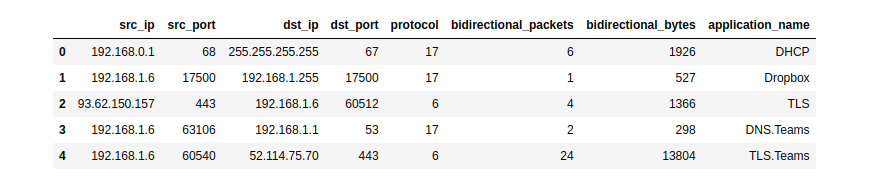
NFStream natively supports Pandas as an export interface.
```python
See documentation for more details.
https://www.nfstream.org/docs/api#pandas-dataframe-conversion
from nfstream import NFStreamer mydataframe = NFStreamer(source='teams.pcap').topandas()[["srcip", "srcport", "dstip", "dstport", "protocol", "bidirectionalpackets", "bidirectionalbytes", "applicationname"]] mydataframe.head(5) ```
CSV export interface
NFStream natively supports CSV file format as an export interface.
```python
See documentation for more details.
https://www.nfstream.org/docs/api#csv-file-conversion
flowscount = NFStreamer(source='facebook.pcap').tocsv(path=None, columnstoanonymize=(), flowsperfile=0, rotate_files=0) ```
Extending NFStream
Didn't find a specific flow feature? add a plugin to NFStream in a few lines:
```python from nfstream import NFPlugin
class MyCustomPktSizeFeature(NFPlugin): def oninit(self, packet, flow): # flow creation with the first packet if packet.rawsize == self.customsize: flow.udps.packetwithcustomsize = 1 else: flow.udps.packetwithcustom_size = 0
def on_update(self, packet, flow):
    # flow update with each packet belonging to the flow
    if packet.raw_size == self.custom_size:
        flow.udps.packet_with_custom_size += 1
extendedstreamer = NFStreamer(source='facebook.pcap', udps=MyCustomPktSizeFeature(customsize=555))
for flow in extendedstreamer: # see your dynamically created metric in generated flows print(flow.udps.packetwithcustomsize) ```
Machine Learning models training and deployment
The following simplistic example demonstrates how to train and deploy a machine-learning approach for traffic flow categorization. We want to run a classification of Social Network category flows based on bidirectionalpackets and bidirectionalbytes as input features. For the sake of brevity, we decide to predict only at the flow expiration stage.
Training the model
```python from nfstream import NFPlugin, NFStreamer import numpy from sklearn.ensemble import RandomForestClassifier
df = NFStreamer(source="trainingtraffic.pcap").topandas() X = df[["bidirectionalpackets", "bidirectionalbytes"]] y = df["applicationcategoryname"].apply(lambda x: 1 if 'SocialNetwork' in x else 0) model = RandomForestClassifier() model.fit(X, y) ```
ML powered streamer on live traffic
```python class ModelPrediction(NFPlugin): def oninit(self, packet, flow): flow.udps.modelprediction = 0 def onexpire(self, flow): # You can do the same in onupdate entrypoint and force expiration with custom id. topredict = numpy.array([flow.bidirectionalpackets, flow.bidirectionalbytes]).reshape((1,-1)) flow.udps.modelprediction = self.mymodel.predict(topredict)
mlstreamer = NFStreamer(source="eth0", udps=ModelPrediction(mymodel=model)) for flow in mlstreamer: print(flow.udps.modelprediction) ```
More NFPlugin examples and details are provided in the official documentation. You can also test NFStream without installation using our live demo notebook.
Building from sources 


To build NFStream from sources, please read the installation guide provided in the official documentation.
Contributing
Please read Contributing for details on our code of conduct and the process for submitting pull requests to us.
Ethics
NFStream is intended for network data research and forensics. Researchers and network data scientists can use this framework to build reliable datasets and train and evaluate network-applied machine learning models. As with any packet monitoring tool, NFStream could be misused. Do not run it on any network that you do not own or administrate.
Credits
Citation
NFStream paper is published in Computer Networks (COMNET). If you use NFStream in a scientific publication, we would appreciate citations to the following article:
latex
@article{AOUINI2022108719,
  title = {NFStream: A flexible network data analysis framework},
  author = {Aouini, Zied and Pekar, Adrian},
  doi = {10.1016/j.comnet.2021.108719},
  issn = {1389-1286},
  journal = {Computer Networks},
  pages = {108719},
  year = {2022},
  publisher = {Elsevier},
  volume = {204},
  url = {https://www.sciencedirect.com/science/article/pii/S1389128621005739}
}
Authors
The following people contributed to NFStream:
- Zied Aouini: Creator and core developer.
- Adrian Pekar: Datasets generation and storage.
- Romain Picard: MDNS and DHCP plugins implementation.
- Radion Bikmukhamedov: Initial work on SPLT analysis NFPlugin.
Supporting organizations
The following organizations supported NFStream:
- SoftAtHome: Supporter of NFStream development.
- Technical University of Koice: Hardware and infrastructure for datasets generation and storage.
- ntop: Technical support of nDPI integration.
- The Nmap Project: Technical support of Npcap integration (NPCAP OEM installer on Windows CI).
- Google OSS Fuzz: Continious fuzzing testing support of NFStream project.





Publications that use NFStream
- A Hierarchical Architecture and Probabilistic Strategy for Collaborative Intrusion Detectionn
- Open-Source Framework for Encrypted Internet and Malicious Traffic Classification
- ConFlow: Contrast Network Flow Improving Class-Imbalanced Learning in Network Intrusion Detection
- Continual Learning for Anomaly based Network Intrusion Detection
- A self-secure system based on software-defined network
- Robust Variational Autoencoders and Normalizing Flows for Unsupervised Network Anomaly Detection
- RADON: Robust Autoencoder for Unsupervised Anomaly Detection
- A Generic Machine Learning Approach for IoT Device Identification
- Ranking Network Devices for Alarm Prioritisation: Intrusion Detection Case Study
- Network Flows-Based Malware Detection Using A Combined Approach of Crawling And Deep Learning
- Network Intrusion Detection Based on Distributed Trustworthy Artificial Intelligence
- Generative Transformer Framework For Network Traffic Generation And Classification
- Multi-Class Network Traffic Generators and Classifiers Based on Neural Networks
- Using Embedded Feature Selection and CNN for Classification on CCD-INID-V1 A New IoT Dataset
- An Approach Based on Knowledge-Defined Networking for Identifying Video Streaming Flows in 5G Networks
- Knowledge Discovery: Can It Shed New Light on Threshold Definition for HeavyHitter Detection?
- Collecting and analyzing Tor exit node traffic
- Analysis and Collection Data from IP Network
License
This project is licensed under the LGPLv3 License - see the License file for details
Owner
- Name: NFStream
- Login: nfstream
- Kind: organization
- Website: https://www.nfstream.org/
- Repositories: 13
- Profile: https://github.com/nfstream
A Flexible Network Data Analysis Framework
GitHub Events
Total
- Issues event: 5
- Watch event: 80
- Issue comment event: 5
- Pull request event: 3
- Fork event: 17
Last Year
- Issues event: 5
- Watch event: 80
- Issue comment event: 5
- Pull request event: 3
- Fork event: 17
Committers
Last synced: about 1 year ago
Top Committers
| Name | Commits | |
|---|---|---|
| aouinizied | a****d@g****m | 1,765 |
| Zied AOUINI | z****i@s****m | 13 |
| Schwaggot | t****n@p****e | 10 |
| Piotr Krawiec | p****3@g****m | 6 |
| Zied Aouini | z****i@d****m | 6 |
| dependabot[bot] | 4****] | 4 |
| Adrian Pekar | a****r@g****m | 4 |
| Radion Bikmukhamedov | r****v@p****e | 4 |
| Romain Picard | r****d@s****m | 4 |
| Arun | a****9@g****m | 2 |
| Evan.Lai | E****i@g****w | 2 |
| Stanislav (Stanley) Modrak | 4****8 | 2 |
| Rasheed Elsaleh | r****d@r****m | 1 |
| hallelujah-shih | h****h@g****m | 1 |
| ssrtw | p****9@g****m | 1 |
| David Korczynski | d****d@a****m | 1 |
| Adrian Pekar | 1****r | 1 |
| “Zied | “****i@s****” | 1 |
Committer Domains (Top 20 + Academic)
Issues and Pull Requests
Last synced: 10 months ago
All Time
- Total issues: 90
- Total pull requests: 47
- Average time to close issues: about 1 month
- Average time to close pull requests: about 2 months
- Total issue authors: 67
- Total pull request authors: 15
- Average comments per issue: 2.89
- Average comments per pull request: 1.26
- Merged pull requests: 16
- Bot issues: 0
- Bot pull requests: 21
Past Year
- Issues: 6
- Pull requests: 6
- Average time to close issues: about 13 hours
- Average time to close pull requests: N/A
- Issue authors: 6
- Pull request authors: 3
- Average comments per issue: 0.17
- Average comments per pull request: 0.0
- Merged pull requests: 0
- Bot issues: 0
- Bot pull requests: 0
Top Authors
Issue Authors
- imagineTh4t (5)
- frkn4129 (4)
- aouinizied (3)
- ImmEve (2)
- SugiuraAyano (2)
- Schwaggot (2)
- stanpao (2)
- lowoodz (2)
- SoerenBusse (2)
- vsvs5667 (2)
- KSGJ-CLOUD (2)
- missyoyo (2)
- sooualil (2)
- smith558 (2)
- finloop (2)
Pull Request Authors
- dependabot[bot] (27)
- drnpkr (10)
- Schwaggot (3)
- EvanLai88 (2)
- arunppsg (2)
- jogecodes (2)
- ssrtw (2)
- kxxt (2)
- smith558 (2)
- DavidKorczynski (1)
- praetoriannero (1)
- rasheed-rd (1)
- finloop (1)
- stefanDeveloper (1)
- hallelujah-shih (1)
Top Labels
Issue Labels
Pull Request Labels
Packages
- Total packages: 2
-
Total downloads:
- pypi 3,201 last-month
- Total docker downloads: 8
-
Total dependent packages: 0
(may contain duplicates) -
Total dependent repositories: 6
(may contain duplicates) - Total versions: 151
- Total maintainers: 1
- Total advisories: 1
pypi.org: nfstream
A Flexible Network Data Analysis Framework
- Homepage: https://www.nfstream.org/
- Documentation: https://nfstream.readthedocs.io/
- License: LGPLv3
-
Latest release: 6.5.3
published over 3 years ago
Rankings
Maintainers (1)
Advisories (1)
proxy.golang.org: github.com/nfstream/nfstream
- Documentation: https://pkg.go.dev/github.com/nfstream/nfstream#section-documentation
- License: lgpl-3.0
-
Latest release: v6.5.3+incompatible
published over 3 years ago
Rankings
Dependencies
- actions/cache v3 composite
- actions/checkout v3 composite
- actions/setup-python v4 composite
- codecov/codecov-action v1 composite
- actions/cache v3 composite
- actions/checkout v3 composite
- actions/setup-python v4 composite
- codecov/codecov-action v1 composite
- actions/checkout v3 composite
- actions/setup-python v4 composite
- codecov/codecov-action v1 composite
- msys2/setup-msys2 v2 composite
- actions/checkout v3 composite
- actions/upload-artifact v3 composite
- docker/setup-qemu-action v2 composite
- msys2/setup-msys2 v2 composite
- pypa/cibuildwheel v2.11.1 composite
- actions/upload-artifact v3 composite
- google/oss-fuzz/infra/cifuzz/actions/build_fuzzers master composite
- google/oss-fuzz/infra/cifuzz/actions/run_fuzzers master composite
- actions/checkout v3 composite
- github/codeql-action/analyze v1 composite
- github/codeql-action/init v1 composite
- cffi >=1.15.0 development
- cibuildwheel ==2.12.0 development
- codecov >=2.1.12 development
- dpkt >=1.9.7 development
- numpy >=1.19.5 development
- pandas >=1.1.5 development
- pandas <=1.2.5 development
- psutil >=5.8.0 development
- setuptools >=57.4.0 development
- termcolor >=1.1.0 development
- tqdm >=4.63.0 development
- twine >=3.4.2 development
- wheel >=0.37.0 development
- cffi >=1.15.0
- dpkt >=1.9.7
- numpy >=1.19.5
- pandas >=1.1.5
- pandas <=1.2.5
- psutil >=5.8.0