topicwizard
Powerful topic model visualization in Python
Science Score: 44.0%
This score indicates how likely this project is to be science-related based on various indicators:
-
✓CITATION.cff file
Found CITATION.cff file -
✓codemeta.json file
Found codemeta.json file -
✓.zenodo.json file
Found .zenodo.json file -
○DOI references
-
○Academic publication links
-
○Committers with academic emails
-
○Institutional organization owner
-
○JOSS paper metadata
-
○Scientific vocabulary similarity
Low similarity (12.9%) to scientific vocabulary
Keywords
Repository
Powerful topic model visualization in Python
Basic Info
- Host: GitHub
- Owner: x-tabdeveloping
- License: mit
- Language: Python
- Default Branch: main
- Homepage: https://x-tabdeveloping.github.io/topicwizard/
- Size: 104 MB
Statistics
- Stars: 132
- Watchers: 2
- Forks: 15
- Open Issues: 3
- Releases: 0
Topics
Metadata Files
README.md

topicwizard
Try in :hugs: Spaces
Pretty and opinionated topic model visualization in Python.





https://github.com/x-tabdeveloping/topicwizard/assets/13087737/9736f33c-6865-4ed4-bc17-d8e6369bda80
New in version 1.1.3
You can now specify your own font that should be used for wordclouds. This makes topicwizard usable with Chinese and other non-indo-european scripts.
python
topicwizard.visualize(topic_data=topic_data, wordcloud_font_path="NotoSansTC-Bold.ttf")
New in version 1.1.0 🌟
Easier Deployment and Faster Cold Starts
If you want to produce a deployment of topicwizard with a fitted topic model, you can now produce a Docker deployment folder with easy_deploy().
```python import joblib import topicwizard
Load previously produced topic_data object
topicdata = joblib.load("topicdata.joblib")
topicwizard.easydeploy(topicdata, dest_dir="deployment", port=7860) ```
This will put everything you need in the deployment/ directory, and will work out of the box on cloud platforms or HuggingFace Spaces.
Cold starts are now faster, as UMAP projections can be precomputed.
python
topic_data_w_positions = topicwizard.precompute_positions(topic_data)
You can try a deployment produced with easy_deploy() on :hugs: Spaces
Features
- Investigate complex relations between topics, words, documents and groups/genres/labels interactively
- Easy to use pipelines for classical topic models that can be utilized for downstream tasks
- Sklearn, Turftopic, Gensim and BERTopic compatible :nutandbolt:
- Interactive and composable Plotly figures
- Rename topics at will
- Share your results
- Easy deployment :earth_africa:
Installation
Install from PyPI:
Notice that the package name on PyPI contains a dash:
topic-wizardinstead oftopicwizard. I know it's a bit confusing, sorry for that
bash
pip install topic-wizard
Classical Topic Models
The main abstraction of topicwizard around a classical/bag-of-words models is a topic pipeline,
which consists of a vectorizer, that turns texts into bag-of-words
representations and a topic model which decomposes these representations into vectors of topic importance.
topicwizard allows you to use both scikit-learn pipelines or its own TopicPipeline.
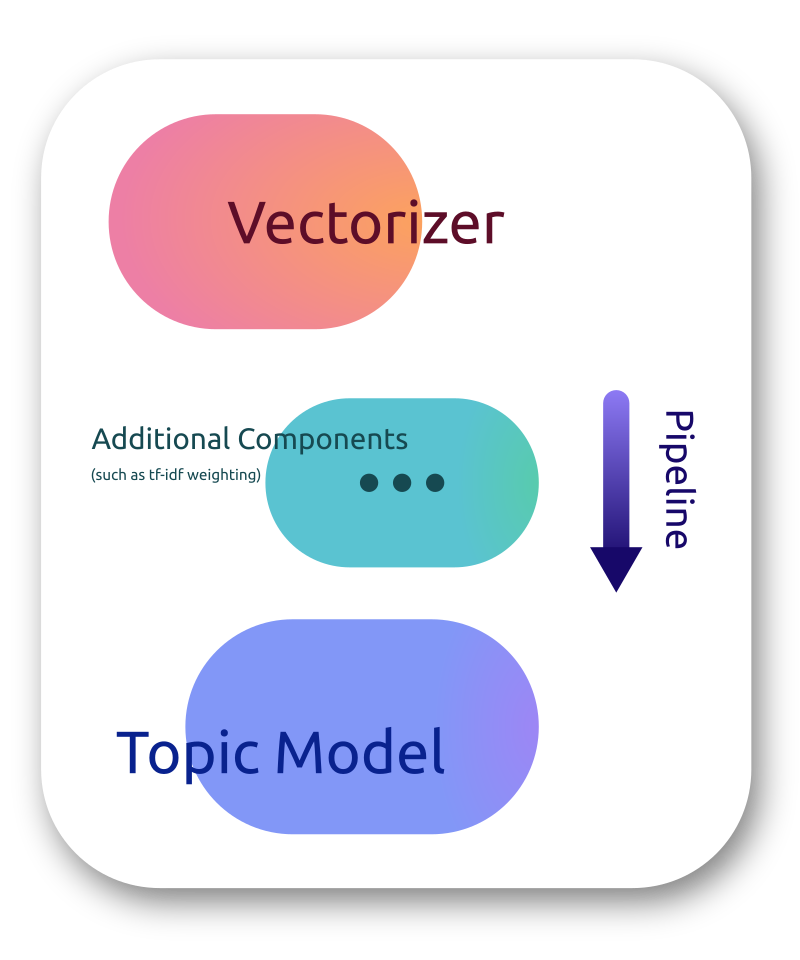
Let's build a pipeline. We will use scikit-learns CountVectorizer as our vectorizer component: ```python from sklearn.feature_extraction.text import CountVectorizer
vectorizer = CountVectorizer(mindf=5, maxdf=0.8, stop_words="english")
The topic model I will use for this example is Non-negative Matrix Factorization as it is fast and usually finds good topics.
python
from sklearn.decomposition import NMF
model = NMF(ncomponents=10)
Then let's put this all together in a pipeline. You can either use sklearn Pipelines...
python
from sklearn.pipeline import makepipeline
topicpipeline = makepipeline(vectorizer, model) ```
Or topicwizard's TopicPipeline
```python from topicwizard.pipeline import maketopicpipeline
topicpipeline = maketopic_pipeline(vectorizer, model) ```
You can also turn an already existing pipeline into a TopicPipeline.
```python from topicwizard.pipeline import TopicPipeline
topicpipeline = TopicPipeline.frompipeline(pipeline) ```
Let's load a corpus that we would like to analyze, in this example I will use 20newsgroups from sklearn.
```python from sklearn.datasets import fetch_20newsgroups
newsgroups = fetch_20newsgroups(subset="all") corpus = newsgroups.data
Sklearn gives the labels back as integers, we have to map them back to
the actual textual label.
grouplabels = [newsgroups.targetnames[label] for label in newsgroups.target] ```
Then let's fit our pipeline to this data:
python
topic_pipeline.fit(corpus)
Models do not necessarily have to be fitted before visualizing, topicwizard fits the model automatically on the corpus if it isn't prefitted.
Then launch the topicwizard web app to interpret the model.
```python import topicwizard
topicwizard.visualize(corpus, model=topic_pipeline) ```
Gensim
You can also use your gensim topic models in topicwizard by wrapping them in a TopicPipeline.
```python from gensim.corpora.dictionary import Dictionary from gensim.models import LdaModel from topicwizard.compatibility import gensim_pipeline
texts: list[list[str]] = [ ['computer', 'time', 'graph'], ['survey', 'response', 'eps'], ['human', 'system', 'computer'], ... ]
dictionary = Dictionary(texts) bowcorpus = [dictionary.doc2bow(text) for text in texts] lda = LdaModel(bowcorpus, num_topics=10)
pipeline = gensim_pipeline(dictionary, model=lda)
Then you can use the pipeline as usual
corpus = [" ".join(text) for text in texts] topicwizard.visualize(corpus, model=pipeline) ```
Contextually Sensitive Models (New in 1.0.0)
topicwizard can also help you interpret topic models that understand contextual nuances in text, by utilizing representations from sentence transformers. The package is mainly designed to be compatible with turftopic, which to my knowledge contains the broadest range of contextually sensitive models, but we also provide compatibility with BERTopic.
Here's an example of interpreting a Semantic Signal Separation model over the same corpus.
```python import topicwizard from turftopic import SemanticSignalSeparation
model = SemanticSignalSeparation(n_components=10) topicwizard.visualize(corpus, model=model) ```
You can also use BERTopic models by wrapping them in a compatibility layer:
```python from bertopic import BERTopic from topicwizard.compatibility import BERTopicWrapper
model = BERTopicWrapper(BERTopic(language="english")) topicwizard.visualize(corpus, model=model) ```
The documentation also includes examples of how you can construct Top2Vec and CTM models in turftopic, or you can write your own wrapper quite easily if needed.
Web Application
You can launch the topic wizard web application for interactively investigating your topic models. The app is also quite easy to deploy in case you want to create a client-facing interface.
```python import topicwizard
topicwizard.visualize(corpus, model=topic_pipeline) ```
From version 0.3.0 you can also disable pages you do not wish to display thereby sparing a lot of time for yourself:
```python
A large corpus takes a looong time to compute 2D projections for so
so you can speed up preprocessing by disabling it alltogether.
topicwizard.visualize(corpus, pipeline=topicpipeline, excludepages=["documents"])
```
| Topics | Words |
| :----: | :----: |
|  |
|  |
|
Documents | Groups |
| :----: | :----: |
|  |
|  |
|
TopicData
All compatible models in topicwizard have a prepare_topic_data() method, which produces a TopicData object containing information about topical inference and model fit on a given corpus.
TopicData is in essence a typed dictionary, containing all information that is needed for interactive visualization in topicwizard.
You can produce this data with TopicPipeline
python
pipeline = make_topic_pipeline(CountVectorizer(), NMF(10))
topic_data = pipeline.prepare_topic_data(corpus)
And with contextual models: ```python model = SemanticSignalSeparation(10) topicdata = model.preparetopic_data(corpus)
or with BERTopic
model = BERTopicWrapper(BERTopic()) topicdata = model.preparetopic_data(corpus) ```
TopicData can then be used to spin up the web application.
```python import topicwizard
topicwizard.visualize(topicdata=topicdata) ```
This data structure can be serialized, saved and shared.
topicwizard uses joblib for serializing the data.
Beware that topicwizard 1.0.0 is no longer fully backwards compatible with the old topic data files. No need to panic, you can either construct
TopicDatamanually from the old data structures, or try to run the app anyway. It will probably work just fine, but certain functionality might be missing.
```python import joblib from topicwizard.data import TopicData
Save the data
joblib.dump(topicdata, "topicdata.joblib")
Load the data
(The type annotation is just for type checking, it doesn't do anything)
topicdata: TopicData = joblib.load("topicdata.joblib") ```
When sharing across machines, make sure that everyone is on the same page with versions of the different packages. For example if the inference machine has
scikit-learn==1.2.0, it's advisable that you have a version on the server that is compatible, otherwise deserialization might fail. Same thing goes for BERTopic and turftopic of course.
In fact when you click the download button in the application this is exactly what happens in the background.
The reason that this is useful, is that you might want to have the results of an inference run on a server locally, or you might want to run inference on a different machine from the one that is used to deploy the application.
Figures
If you want customizable, faster, html-saveable interactive plots, you can use the figures API.
All figures are produced from a TopicData object so that you don't have to run inference twice on the same corpus for two different figures.
Here are a couple of examples:
python
from topicwizard.figures import word_map, document_topic_timeline, topic_wordclouds, word_association_barchart
| Word Map | Timeline of Topics in a Document |
| :----: | :----: |
| word_map(topic_data) | document_topic_timeline(topic_data, "Joe Biden takes over presidential office from Donald Trump.") |
|  |
| |
| Wordclouds of Topics | Topic for Word Importance |
| :----: | :----: |
| topic_wordclouds(topic_data) | word_association_barchart(topic_data, ["supreme", "court"]) |
|  |
| |
Figures in topicwizard are in essence just Plotly interactive figures and they can be modified at will. Consult Plotly's documentation for more details about manipulating and building plots.
For more information consult our Documentation
Owner
- Name: Márton Kardos
- Login: x-tabdeveloping
- Kind: user
- Location: Aarhus, Denmark
- Company: Center for Humanities Computing
- Repositories: 1
- Profile: https://github.com/x-tabdeveloping
Citation (citation.cff)
cff-version: 0.1.0
message: "When using this package please cite us."
authors:
- family-names: "Kardos"
  given-names: "Márton"
  orcid: "https://orcid.org/0000-0001-9652-4498"
title: "topicwizard: Pretty and opinionated topic model visualization in Python"
version: 0.5.0
date-released: 2023-11-12
url: "https://github.com/x-tabdeveloping/topic-wizard"
GitHub Events
Total
- Issues event: 1
- Watch event: 24
- Issue comment event: 5
- Push event: 6
- Pull request event: 5
- Fork event: 1
- Create event: 4
Last Year
- Issues event: 1
- Watch event: 24
- Issue comment event: 5
- Push event: 6
- Pull request event: 5
- Fork event: 1
- Create event: 4
Committers
Last synced: 12 months ago
Top Committers
| Name | Commits | |
|---|---|---|
| Márton Kardos | p****3@g****m | 257 |
| Teemu Sidoroff | t****f@h****i | 1 |
| Paul-Louis NECH | 1****h | 1 |
| KitchenTable99 | 6****9 | 1 |
| jinnyang | j****g@1****m | 1 |
Committer Domains (Top 20 + Academic)
Issues and Pull Requests
Last synced: 10 months ago
All Time
- Total issues: 23
- Total pull requests: 24
- Average time to close issues: 3 months
- Average time to close pull requests: 1 day
- Total issue authors: 14
- Total pull request authors: 5
- Average comments per issue: 3.22
- Average comments per pull request: 0.13
- Merged pull requests: 24
- Bot issues: 0
- Bot pull requests: 0
Past Year
- Issues: 4
- Pull requests: 7
- Average time to close issues: 8 days
- Average time to close pull requests: about 6 hours
- Issue authors: 3
- Pull request authors: 1
- Average comments per issue: 4.0
- Average comments per pull request: 0.0
- Merged pull requests: 7
- Bot issues: 0
- Bot pull requests: 0
Top Authors
Issue Authors
- x-tabdeveloping (7)
- umarIft (1)
- MaggieMeow (1)
- jsnleong (1)
- dschwarz-tripp (1)
- avisekksarma (1)
- vshourie-asu (1)
- aleticacr (1)
- DobromirM (1)
- firmai (1)
- lbluett (1)
- Karrol (1)
- rdkm89 (1)
Pull Request Authors
- x-tabdeveloping (30)
- PLNech (2)
- jinnnyang (2)
- KitchenTable99 (1)
Top Labels
Issue Labels
Pull Request Labels
Dependencies
- actions/checkout v4 composite
- actions/setup-python v4 composite
- actions/checkout v3 composite
- actions/configure-pages v2 composite
- actions/deploy-pages v1 composite
- actions/upload-pages-artifact v1 composite
- Pillow ^10.1.0
- dash ^2.7.1
- dash-extensions ^1.0.4
- dash-iconify ~0.1.2
- dash-mantine-components ~0.12.1
- joblib ~1.2.0
- numpy >=1.22.0
- pandas ^1.5.2
- python >=3.8.0
- scikit-learn ^1.2.0
- scipy >=1.8.0
- umap-learn >=0.5.3
- wordcloud ^1.9.2