rf-detr
RF-DETR: Rethinking Feature Shrinking for Real-Time Object Detection with Dual-Path Feature Refinement
Science Score: 54.0%
This score indicates how likely this project is to be science-related based on various indicators:
-
✓CITATION.cff file
Found CITATION.cff file -
✓codemeta.json file
Found codemeta.json file -
✓.zenodo.json file
Found .zenodo.json file -
○DOI references
-
✓Academic publication links
Links to: arxiv.org -
○Academic email domains
-
○Institutional organization owner
-
○JOSS paper metadata
-
○Scientific vocabulary similarity
Low similarity (9.9%) to scientific vocabulary
Repository
RF-DETR: Rethinking Feature Shrinking for Real-Time Object Detection with Dual-Path Feature Refinement
Basic Info
- Host: GitHub
- Owner: kurzgesagtcraft
- License: apache-2.0
- Language: Python
- Default Branch: main
- Size: 9.36 MB
Statistics
- Stars: 0
- Watchers: 0
- Forks: 0
- Open Issues: 0
- Releases: 0
Metadata Files
README.md
RF-DETR: SOTA Real-Time Object Detection Model








RF-DETR is a real-time, transformer-based object detection model architecture developed by Roboflow and released under the Apache 2.0 license.
RF-DETR is the first real-time model to exceed 60 AP on the Microsoft COCO benchmark alongside competitive performance at base sizes. It also achieves state-of-the-art performance on RF100-VL, an object detection benchmark that measures model domain adaptability to real world problems. RF-DETR is comparable speed to current real-time objection models.
RF-DETR is small enough to run on the edge using Inference, making it an ideal model for deployments that need both strong accuracy and real-time performance.
Results
We validated the performance of RF-DETR on both Microsoft COCO and the RF100-VL benchmarks.
RF100-VL benchmark results
| Model | params
(M) | mAPCOCO val
@0.50:0.95 | mAPRF100-VL
Average @0.50 | mAPRF100-VL
Average @0.50:95 | Total Latency
T4 bs=1
(ms) |
|------------------|--------------------|--------------------------------|-----------------------------------|---------------------------------------|---------------------------------------|
| D-FINE-M | 19.3 | 55.1 | N/A | N/A | 6.3 |
| LW-DETR-M | 28.2 | 52.5 | 84.0 | 57.5 | 6.0 |
| YOLO11m | 20.0 | 51.5 | 84.9 | 59.7 | 5.7 |
| YOLOv8m | 28.9 | 50.6 | 85.0 | 59.8 | 6.3 |
| RF-DETR-B | 29.0 | 53.3 | 86.7 | 60.3 | 6.0 |
RF100-VL benchmark notes
- The "Total Latency" reported here is measured on a T4 GPU using TensorRT10 FP16 (ms/img) and was introduced by LW-DETR. Unlike transformer-based models, YOLO models perform Non-Maximum Suppression (NMS) after generating predictions to refine bounding box candidates. While NMS boosts accuracy, it also slightly reduces speed due to the additional computation required, which varies with the number of objects in an image. Notably, many YOLO benchmarks include NMS in accuracy measurements but exclude it from speed metrics. By contrast, our benchmarking—following LW-DETR’s approach—factors in NMS latency to provide a uniform measure of the total time needed to obtain a final result across all models on the same hardware. - D-FINE’s fine-tuning capability is currently unavailable, making its domain adaptability performance inaccessible. The authors [caution](https://github.com/Peterande/D-FINE) that “if your categories are very simple, it might lead to overfitting and suboptimal performance.” Furthermore, several open issues ([#108](https://github.com/Peterande/D-FINE/issues/108), [#146](https://github.com/Peterande/D-FINE/issues/146), [#169](https://github.com/Peterande/D-FINE/issues/169), [#214](https://github.com/Peterande/D-FINE/issues/214)) currently prevent successful fine-tuning. We have opened an additional issue in hopes of ultimately benchmarking D-FINE with RF100-VL.News
2025/03/20: We release RF-DETR real-time object detection model. Code and checkpoint for RF-DETR-large and RF-DETR-base are available.2025/04/03: We release early stopping, gradient checkpointing, metrics saving, training resume, TensorBoard and W&B logging support.2025/05/16: We release an 'optimizeforinference' method which speeds up native PyTorch by up to 2x, depending on platform.
Installation
Pip install the rfdetr package in a Python>=3.9 environment.
bash
pip install rfdetr
Install from source
By installing RF-DETR from source, you can explore the most recent features and enhancements that have not yet been officially released. Please note that these updates are still in development and may not be as stable as the latest published release. ```bash pip install git+https://github.com/roboflow/rf-detr.git ```
Inference
The easiest path to deployment is using Roboflow's Inference package. You can use model's uploaded to Roboflow's platform with Inference's infer method:
```python import os import supervision as sv from inference import get_model from PIL import Image from io import BytesIO import requests
url = "https://media.roboflow.com/dog.jpeg" image = Image.open(io.BytesIO(requests.get(url).content))
model = get_model("rfdetr-base")
predictions = model.infer(image, confidence=0.5)[0]
detections = sv.Detections.from_inference(predictions)
labels = [prediction.class_name for prediction in predictions.predictions]
annotatedimage = image.copy() annotatedimage = sv.BoxAnnotator().annotate(annotatedimage, detections) annotatedimage = sv.LabelAnnotator().annotate(annotated_image, detections, labels)
sv.plotimage(annotatedimage)
annotatedimage.save("annotatedimage_base.jpg")
model = get_model("rfdetr-large")
predictions = model.infer(image, confidence=0.5)[0]
detections = sv.Detections.from_inference(predictions)
labels = [prediction.class_name for prediction in predictions.predictions]
annotatedimage = image.copy() annotatedimage = sv.BoxAnnotator().annotate(annotatedimage, detections) annotatedimage = sv.LabelAnnotator().annotate(annotated_image, detections, labels)
sv.plotimage(annotatedimage) ```
Predict
You can also use the .predict method to perform inference during local development. The .predict() method accepts various input formats, including file paths, PIL images, NumPy arrays, and torch tensors. Please ensure inputs use RGB channel order. For torch.Tensor inputs specifically, they must have a shape of (3, H, W) with values normalized to the [0..1) range. If you don't plan to modify the image or batch size dynamically at runtime, you can also use .optimize_for_inference() to get up to 2x end-to-end speedup, depending on platform.
```python import io import requests import supervision as sv from PIL import Image from rfdetr import RFDETRBase from rfdetr.util.cococlasses import COCOCLASSES
model = RFDETRBase()
model = model.optimizeforinference()
url = "https://media.roboflow.com/notebooks/examples/dog-2.jpeg"
image = Image.open(io.BytesIO(requests.get(url).content)) detections = model.predict(image, threshold=0.5)
labels = [ f"{COCOCLASSES[classid]} {confidence:.2f}" for classid, confidence in zip(detections.classid, detections.confidence) ]
annotatedimage = image.copy() annotatedimage = sv.BoxAnnotator().annotate(annotatedimage, detections) annotatedimage = sv.LabelAnnotator().annotate(annotated_image, detections, labels)
sv.plotimage(annotatedimage) ```
Video inference
```python import supervision as sv from rfdetr import RFDETRBase from rfdetr.util.coco_classes import COCO_CLASSES model = RFDETRBase() def callback(frame, index): detections = model.predict(frame[:, :, ::-1], threshold=0.5) labels = [ f"{COCO_CLASSES[class_id]} {confidence:.2f}" for class_id, confidence in zip(detections.class_id, detections.confidence) ] annotated_frame = frame.copy() annotated_frame = sv.BoxAnnotator().annotate(annotated_frame, detections) annotated_frame = sv.LabelAnnotator().annotate(annotated_frame, detections, labels) return annotated_frame sv.process_video( source_path=
Webcam inference
```python import cv2 import supervision as sv from rfdetr import RFDETRBase from rfdetr.util.coco_classes import COCO_CLASSES model = RFDETRBase() cap = cv2.VideoCapture(0) while True: success, frame = cap.read() if not success: break detections = model.predict(frame[:, :, ::-1], threshold=0.5) labels = [ f"{COCO_CLASSES[class_id]} {confidence:.2f}" for class_id, confidence in zip(detections.class_id, detections.confidence) ] annotated_frame = frame.copy() annotated_frame = sv.BoxAnnotator().annotate(annotated_frame, detections) annotated_frame = sv.LabelAnnotator().annotate(annotated_frame, detections, labels) cv2.imshow("Webcam", annotated_frame) if cv2.waitKey(1) & 0xFF == ord('q'): break cap.release() cv2.destroyAllWindows() ```
RTSP stream inference
```python import cv2 import supervision as sv from rfdetr import RFDETRBase from rfdetr.util.coco_classes import COCO_CLASSES model = RFDETRBase() cap = cv2.VideoCapture(
Batch Inference
[!IMPORTANT] Batch inference isn’t officially released yet. Install from source to access it:
pip install git+https://github.com/roboflow/rf-detr.git.
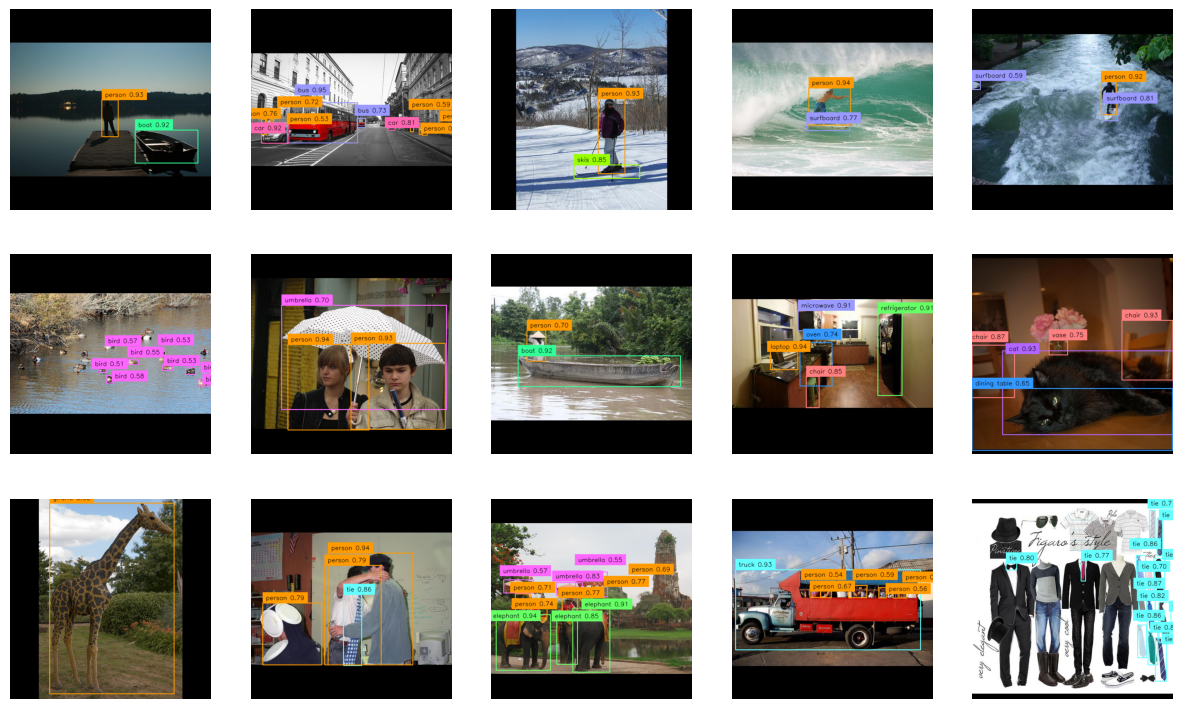
You can provide .predict() with either a single image or a list of images. When multiple images are supplied, they are processed together in a single forward pass, resulting in a corresponding list of detections.
```python import io import requests import supervision as sv from PIL import Image from rfdetr import RFDETRBase from rfdetr.util.cococlasses import COCOCLASSES
model = RFDETRBase()
urls = [ "https://media.roboflow.com/notebooks/examples/dog-2.jpeg", "https://media.roboflow.com/notebooks/examples/dog-3.jpeg" ]
images = [Image.open(io.BytesIO(requests.get(url).content)) for url in urls]
detections_list = model.predict(images, threshold=0.5)
for image, detections in zip(images, detectionslist): labels = [ f"{COCOCLASSES[classid]} {confidence:.2f}" for classid, confidence in zip(detections.class_id, detections.confidence) ]
annotated_image = image.copy()
annotated_image = sv.BoxAnnotator().annotate(annotated_image, detections)
annotated_image = sv.LabelAnnotator().annotate(annotated_image, detections, labels)

sv.plot_image(annotated_image)
```
Model Variants
RF-DETR is available in two variants: RF-DETR-B 29M RFDETRBase and RF-DETR-L 128M RFDETRLarge. The corresponding COCO pretrained checkpoints are automatically loaded when you initialize either class.
Input Resolution
Both model variants support configurable input resolutions. A higher resolution usually improves prediction quality by capturing more detail, though it can slow down inference. You can adjust the resolution by passing the resolution argument when initializing the model. resolution value must be divisible by 56.
python
model = RFDETRBase(resolution=560)
Training
Dataset structure
RF-DETR expects the dataset to be in COCO format. Divide your dataset into three subdirectories: train, valid, and test. Each subdirectory should contain its own _annotations.coco.json file that holds the annotations for that particular split, along with the corresponding image files. Below is an example of the directory structure:
dataset/
├── train/
│   ├── _annotations.coco.json
│   ├── image1.jpg
│   ├── image2.jpg
│   └── ... (other image files)
├── valid/
│   ├── _annotations.coco.json
│   ├── image1.jpg
│   ├── image2.jpg
│   └── ... (other image files)
└── test/
    ├── _annotations.coco.json
    ├── image1.jpg
    ├── image2.jpg
    └── ... (other image files)
Roboflow allows you to create object detection datasets from scratch or convert existing datasets from formats like YOLO, and then export them in COCO JSON format for training. You can also explore Roboflow Universe to find pre-labeled datasets for a range of use cases.
Fine-tuning
You can fine-tune RF-DETR from pre-trained COCO checkpoints. By default, the RF-DETR-B checkpoint will be used. To get started quickly, please refer to our fine-tuning Google Colab notebook.
```python from rfdetr import RFDETRBase
model = RFDETRBase()
model.train(datasetdir=<DATASETPATH>, epochs=10, batchsize=4, gradaccumsteps=4, lr=1e-4, outputdir=
Different GPUs have different VRAM capacities, so adjust batchsize and gradaccumsteps to maintain a total batch size of 16. For example, on a powerful GPU like the A100, use `batchsize=16andgradaccumsteps=1; on smaller GPUs like the T4, usebatchsize=4andgradaccum_steps=4`. This gradient accumulation strategy helps train effectively even with limited memory.
More parameters
| Parameter | Description |
|---|---|
dataset_dir |
Specifies the COCO-formatted dataset location with train, valid, and test folders, each containing _annotations.coco.json. Ensures the model can properly read and parse data. |
output_dir |
Directory where training artifacts (checkpoints, logs, etc.) are saved. Important for experiment tracking and resuming training. |
epochs |
Number of full passes over the dataset. Increasing this can improve performance but extends total training time. |
batch_size |
Number of samples processed per iteration. Higher values require more GPU memory but can speed up training. Must be balanced with grad_accum_steps to maintain the intended total batch size. |
grad_accum_steps |
Accumulates gradients over multiple mini-batches, effectively raising the total batch size without requiring as much memory at once. Helps train on smaller GPUs at the cost of slightly more time per update. |
lr |
Learning rate for most parts of the model. Influences how quickly or cautiously the model adjusts its parameters. |
lr_encoder |
Learning rate specifically for the encoder portion of the model. Useful for fine-tuning encoder layers at a different pace. |
resolution |
Sets the input image dimensions. Higher values can improve accuracy but require more memory and can slow training. Must be divisible by 56. |
weight_decay |
Coefficient for L2 regularization. Helps prevent overfitting by penalizing large weights, often improving generalization. |
device |
Specifies the hardware (e.g., cpu or cuda) to run training on. GPU significantly speeds up training. |
use_ema |
Enables Exponential Moving Average of weights, producing a smoothed checkpoint. Often improves final performance with slight overhead. |
gradient_checkpointing |
Re-computes parts of the forward pass during backpropagation to reduce memory usage. Lowers memory needs but increases training time. |
checkpoint_interval |
Frequency (in epochs) at which model checkpoints are saved. More frequent saves provide better coverage but consume more storage. |
resume |
Path to a saved checkpoint for continuing training. Restores both model weights and optimizer state. |
tensorboard |
Enables logging of training metrics to TensorBoard for monitoring progress and performance. |
wandb |
Activates logging to Weights & Biases, facilitating cloud-based experiment tracking and visualization. |
project |
Project name for Weights & Biases logging. Groups multiple runs under a single heading. |
run |
Run name for Weights & Biases logging, helping differentiate individual training sessions within a project. |
early_stopping |
Enables an early stopping callback that monitors mAP improvements to decide if training should be stopped. Helps avoid needless epochs when mAP plateaus. |
early_stopping_patience |
Number of consecutive epochs without mAP improvement before stopping. Prevents wasting resources on minimal gains. |
early_stopping_min_delta |
Minimum change in mAP to qualify as an improvement. Ensures that trivial gains don’t reset the early stopping counter. |
early_stopping_use_ema |
Whether to track improvements using the EMA version of the model. Uses EMA metrics if available, otherwise falls back to regular mAP. |
Resume training
You can resume training from a previously saved checkpoint by passing the path to the checkpoint.pth file using the resume argument. This is useful when training is interrupted or you want to continue fine-tuning an already partially trained model. The training loop will automatically load the weights and optimizer state from the provided checkpoint file.
```python from rfdetr import RFDETRBase
model = RFDETRBase()
model.train(datasetdir=<DATASETPATH>, epochs=10, batchsize=4, gradaccumsteps=4, lr=1e-4, outputdir=
Early stopping
Early stopping monitors validation mAP and halts training if improvements remain below a threshold for a set number of epochs. This can reduce wasted computation once the model converges. Additional parameters—such as early_stopping_patience, early_stopping_min_delta, and early_stopping_use_ema—let you fine-tune the stopping behavior.
```python from rfdetr import RFDETRBase
model = RFDETRBase()
model.train(datasetdir=<DATASETPATH>, epochs=10, batchsize=4, gradaccumsteps=4, lr=1e-4, outputdir=
Multi-GPU training
You can fine-tune RF-DETR on multiple GPUs using PyTorch’s Distributed Data Parallel (DDP). Create a main.py script that initializes your model and calls .train() as usual than run it in terminal.
bash
python -m torch.distributed.launch --nproc_per_node=8 --use_env main.py
Replace 8 in the --nproc_per_node argument with the number of GPUs you want to use. This approach creates one training process per GPU and splits the workload automatically. Note that your effective batch size is multiplied by the number of GPUs, so you may need to adjust your batch_size and grad_accum_steps to maintain the same overall batch size.
Result checkpoints
During training, two model checkpoints (the regular weights and an EMA-based set of weights) will be saved in the specified output directory. The EMA (Exponential Moving Average) file is a smoothed version of the model’s weights over time, often yielding better stability and generalization.
Logging with TensorBoard
TensorBoard is a powerful toolkit that helps you visualize and track training metrics. With TensorBoard set up, you can train your model and keep an eye on the logs to monitor performance, compare experiments, and optimize model training. To enable logging, simply pass tensorboard=True when training the model.
Using TensorBoard with RF-DETR
- TensorBoard logging requires additional packages. Install them with: ```bash pip install "rfdetr[metrics]" ``` - To activate logging, pass the extra parameter `tensorboard=True` to `.train()`: ```python from rfdetr import RFDETRBase model = RFDETRBase() model.train( dataset_dir=
Logging with Weights and Biases
Weights and Biases (W&B) is a powerful cloud-based platform that helps you visualize and track training metrics. With W&B set up, you can monitor performance, compare experiments, and optimize model training using its rich feature set. To enable logging, simply pass wandb=True when training the model.
Using Weights and Biases with RF-DETR
- Weights and Biases logging requires additional packages. Install them with: ```bash pip install "rfdetr[metrics]" ``` - Before using W&B, make sure you are logged in: ```bash wandb login ``` You can retrieve your API key at wandb.ai/authorize. - To activate logging, pass the extra parameter `wandb=True` to `.train()`: ```python from rfdetr import RFDETRBase model = RFDETRBase() model.train( dataset_dir=
Load and run fine-tuned model
```python from rfdetr import RFDETRBase
model = RFDETRBase(pretrainweights=<CHECKPOINTPATH>)
detections = model.predict(
ONNX export
[!IMPORTANT] Starting with RF-DETR 1.2.0, you'll have to run
pip install rfdetr[onnxexport]before exporting model weights to ONNX format.
RF-DETR supports exporting models to the ONNX format, which enables interoperability with various inference frameworks and can improve deployment efficiency. To export your model, simply initialize it and call the .export() method.
```python from rfdetr import RFDETRBase
model = RFDETRBase(pretrainweights=<CHECKPOINTPATH>)
model.export() ```
This command saves the ONNX model to the output directory.
License
Both the code and the weights pretrained on the COCO dataset are released under the Apache 2.0 license.
Acknowledgements
Our work is built upon LW-DETR, DINOv2, and Deformable DETR. Thanks to their authors for their excellent work!
Citation
If you find our work helpful for your research, please consider citing the following BibTeX entry.
bibtex
@software{rf-detr,
  author = {Robinson, Isaac and Robicheaux, Peter and Popov, Matvei},
  license = {Apache-2.0},
  title = {RF-DETR},
  howpublished = {\url{https://github.com/roboflow/rf-detr}},
  year = {2025},
  note = {SOTA Real-Time Object Detection Model}
}
Contribution
We welcome and appreciate all contributions! If you notice any issues or bugs, have questions, or would like to suggest new features, please open an issue or pull request. By sharing your ideas and improvements, you help make RF-DETR better for everyone.
Owner
- Login: kurzgesagtcraft
- Kind: user
- Repositories: 1
- Profile: https://github.com/kurzgesagtcraft
Citation (CITATION.cff)
cff-version: 1.2.0
title: "RF-DETR"
message: >-
  If you use this software, please cite it using the
  metadata from this file.
type: software
authors:
  - family-names: Robinson
    given-names: Isaac
    email: isaac@roboflow.com
    affiliation: Roboflow
  - family-names: Robicheaux
    given-names: Peter
    email: peter@roboflow.com
    affiliation: Roboflow
  - family-names: Popov
    given-names: Matvei
    email: matvei@roboflow.com
    affiliation: Roboflow
repository-code: 'https://github.com/roboflow/rf-detr'
abstract: 'A state-of-the-art, real-time object detection model developed by Roboflow.'
date-released: 2025-03-20
keywords:
  - object detection
  - computer vision
  - rf-detr
  - detr
license: "Apache-2.0"
GitHub Events
Total
- Watch event: 1
- Push event: 4
- Create event: 7
Last Year
- Watch event: 1
- Push event: 4
- Create event: 7
Dependencies
- actions/checkout 11bd71901bbe5b1630ceea73d27597364c9af683 composite
- astral-sh/setup-uv 22695119d769bdb6f7032ad67b9bca0ef8c4a174 composite
- pypa/gh-action-pypi-publish 76f52bc884231f62b9a034ebfe128415bbaabdfc composite
- actions/checkout 11bd71901bbe5b1630ceea73d27597364c9af683 composite
- astral-sh/setup-uv 22695119d769bdb6f7032ad67b9bca0ef8c4a174 composite
- pypa/gh-action-pypi-publish 76f52bc884231f62b9a034ebfe128415bbaabdfc composite
- onnx *
- onnx_graphsurgeon *
- onnxruntime *
- onnxruntime-gpu *
- onnxsim *
- polygraphy *
- pycuda *
- tensorrt >=8.6.1