Science Score: 44.0%
This score indicates how likely this project is to be science-related based on various indicators:
-
✓CITATION.cff file
Found CITATION.cff file -
✓codemeta.json file
Found codemeta.json file -
✓.zenodo.json file
Found .zenodo.json file -
○DOI references
-
○Academic publication links
-
○Academic email domains
-
○Institutional organization owner
-
○JOSS paper metadata
-
○Scientific vocabulary similarity
Low similarity (15.2%) to scientific vocabulary
Keywords
Repository
Trying to make sense of the EU's DSA Transparency DB
Basic Info
Statistics
- Stars: 2
- Watchers: 3
- Forks: 0
- Open Issues: 0
- Releases: 4
Topics
Metadata Files
README.md
Shantay
Shantay is a permissively licensed, open-source, Python-based command line tool for analyzing the European Commission's DSA transparency database. That database collects the anonymized statements of reasons for online platforms' content moderation decision. Even though the database is huge, almost 2 TB and growing, shantay runs on consumer hardware. All you need is a USB drive, such as the 2 TB Samsung T7, that is large enough to store the full database and, for some tasks, patience, as they may take a day, or two.
I've written a blog post about my initial impressions of the DSA transparency database. Let's just say that, Brussels, we've got, uhm, problems (plural)!
1. Getting Started
Shantay's Python package is distributed through PyPI. Hence, you can use a Python tool runner such as pipx or uvx for executing shantay without even installing it:
bash
$ pipx shantay -h
or
bash
$ uvx shantay -h
In either case, shantay will output its help message, which describes command line options and tasks in detail. But to get you acquainted, here are some choice examples.
The EU started operating the database on the 25th of September, 2023. To download the daily releases for that year and determine their summary statistics, execute:
$ uvx shantay --archive <directory> --last 2023-12-31 summarize
Except, you want to replace <directory> with the path to a directory suitable
for storing the complete database.
The previous command will run for quite a while, downloading and analyzing release after release after release. Depending on your hardware, using more than one process for downloading and analyzing the data may be faster. The following invocation, for example, uses three worker processes for downloading and analyzing data:
$ uvx shantay --archive <directory> --last 2023-12-31 --multiproc 3 summarize
Don't forget to replace <directory> with the actual path.
When running with parallel worker processes, shantay's original process serves
as coordinator. Notably, it updates the status display on the console and writes
log entries to a file, by default shantay.log in the current working
directory.
Once shantay is done downloading and summarizing the daily releases for 2023,
you'll find a db.parquet file in the archive's root directory. It contains the
summary statistics at day-granularity. To visualize that same data, execute:
$ uvx shantay --archive <directory> visualize
Once finished, you'll find an
db.html document with all
charts in the default staging directory dsa-db-staging. (The linked version
covers far more data.)
Alas, three months of data from the beginning of the DSA transparency database aren't particularly satisfying. Shantay ships with a copy of the summary statistics for the entire database. To visualize them, execute:
$ uvx shantay visualize
Now look at the db.html again:
Much better!
2. Using Shantay
The summarize and visualize tasks cover almost all of Shantay's
functionality. Nonetheless, Shantay supports a few more tasks for fine-grained
control and data recovery. Here are all of them:
download makes sure that daily distributions are locally available, retrieving them as necessary. This task lets your prepare for future
--offlineoperation by downloading archives as expediently as possible and not performing any other processing.distill extracts a category-specific subset from daily distributions. It requires both the
--archiveand--extractdirectories. For a new extract directory, it also requires a--category. That category and other metadata are stored inmeta.json.recover scans the
--extractdirectory to validate the files and restore (some of the) metadata inmeta.json.summarize collects summary statistics either for the full database or a category-specific subset, depending on whether
--archiveonly (for the full database) or both--archiveand--extract(for a subset) are specified. If you specify neither, Shantay materializes the builtin copy of the summary statistics in staging.info prints helpful information about Shantay, key dependencies, the Python runtime, and operating system, as well as the
--archiveand--extractdirectories and their contents. If you specify neither, Shantay prints information about the builtin copy of the summary statistics.visualize generates an HTML document that visualizes summary statistics.
--archiveand--extractdetermine the scope of the visualization, just as forsummarize. If you specify neither, Shantay visualizes the builtin copy of the summary statistics. In addition to generating an HTML report, Shantay also saves all charts as SVG graphics.
Unless the --offline option is specified, the distill and summarize tasks
download daily distributions as needed.
Unless the date range is restricted with --first and --last, the distill
task also extracts category-specific data as needed. By default, the --first
date is 2023-09-25, the day the DSA transparency database became operational,
and the --last date is three days before today—one day to allow for the
Americas being a day behind Europe for several hours every day and another two
days to allow for some posting delay.
Summary statistics are stored in db.parquet for the full database and in a
file named after the category, such as protection-of-minors.parquet, for
category-specific data. The HTML documents follow the same naming convention.
Shantay's log distinguishes between summarize-all, summarize-category, and
summarize-builtin when identifying tasks. Furthermore, even when executing a
category-specific summarize task, Shantay's log distinguishes distill from
summarize-category. For multiprocessing, it schedules both tasks separately.
3. Organization of Storage
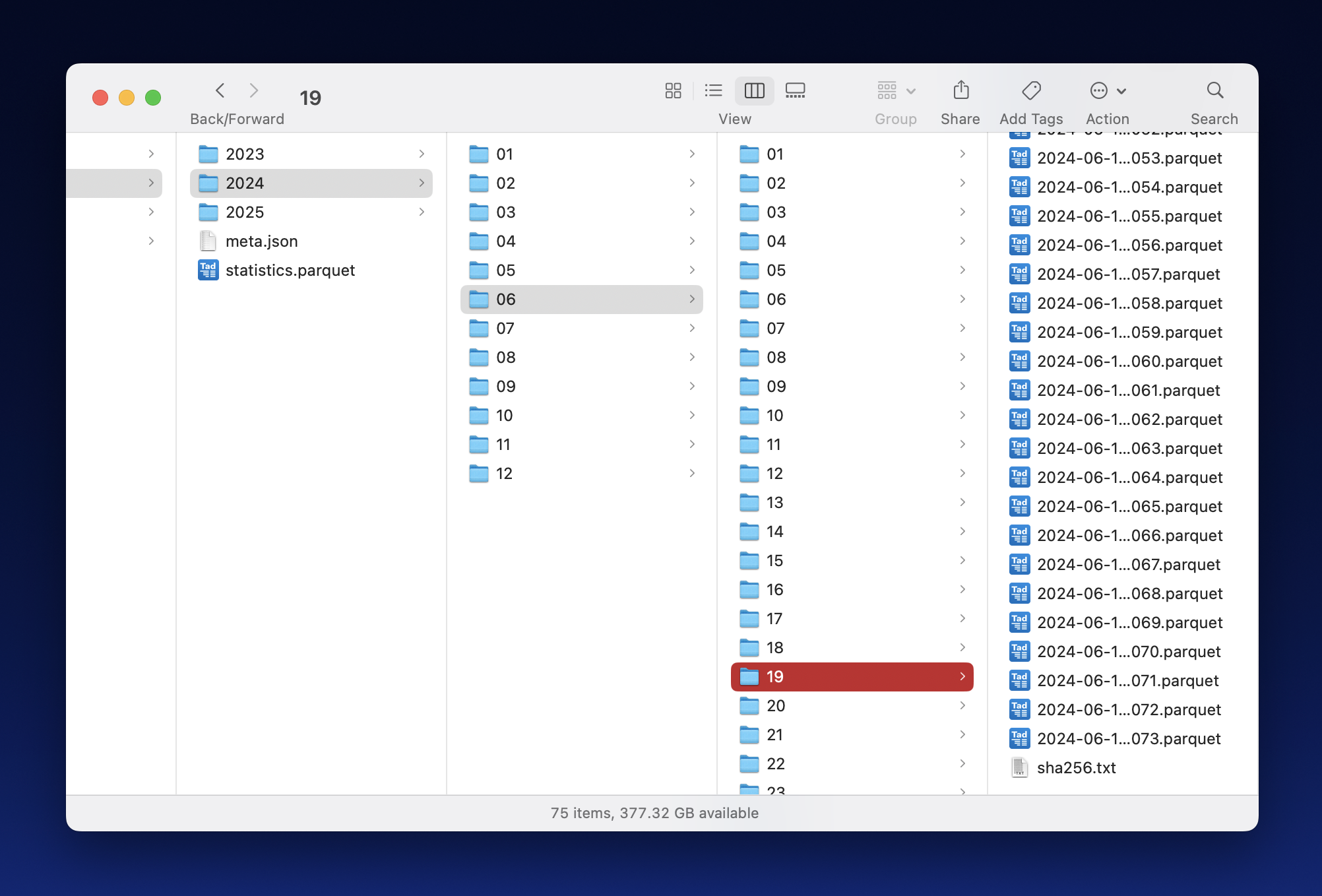
The screenshot below shows an example directory hierarchy under the --extract
root. It illustrates the directory levels discussed in 3.2 as well as the files
with digests and summary statistics discussed in 3.3.
3.1 Three Root Directories: Staging, Archive, Extract
Shantay distinguishes between three primary directories, --staging as
temporary storage, --archive for the original distributions, and --extract
for a category-specific subset:
- Staging stores data currently being processed, e.g., by uncompressing, converting, and filtering it. You wouldn't be wrong if you called this directory temp or tmp instead. This directory must be on a fast, local file system; it should not be on an external disk, particularly not if the disk is connected with USB.
- Archive stores the original, daily ZIP files and their SHA1 digests. It is treated as append-only storage and holds the ground truth. This directory must be on a large file system, e.g., 2 TB just about holds all data from 2023-09-25 into May 2025. This directory may be on an external drive (such as the already mentioned T7).
- Extract stores parquet files with a (much) smaller subset of the database. Like archive, extract is treated as append-only storage. Unlike archive, which is unique, different runs of shantay may use different extract directories representing different subsets of the database.
3.2 Three Levels of Nested Directories: Year, Month, Day
Under the three root directories, shantay arranges files into a hierarchy of
directories, e.g., resulting in paths like
2025/03/14/2025-03-14-00000.parquet. The top level is named for years,
followed by two-digit months one level down, followed by two-digit days another
level down. Finally, daily archive files have their original names, whereas
files with category-specific data are named after the date and a zero-based
five-digit index (as illustrated earlier in this paragraph).
For the extract root, shantay maintains a per-day digest file named
sha256.txt. It contains the SHA-256 digests for every parquet file in the
directory: Each line contains one hexadecimal ASCII digest, a space,and the
file's name.
3.3 Summary Statistics
In addition to yearly directories, shantay also stores the following two files inside root directories.
A JSON file named after the category, e.g.,
protection-of-minors.jsoncontains an object with thecategoryused for selecting the data extract and some statistics aboutreleases.batch_countmust be the number of daily data files andsha256must be the (recursive) digest of the digests in thesha256.txtfile.db.parquetcontains the summary statistics about the full database. Statistics for category-specific subsets are named after their categories. Each file basically is a non-tidy, long data frame that uses up to seven columns for identifying variables and up to four columns for identifying values. While an encoding with fewer columns is eminently feasible, the schema is optimized for being easy to work with (e.g., aggregations are trivial) and compact to store (e.g., a column with mostly nulls requires almost no space).The individual columns are:
start_dateandend_datedenote the date coverage of a row.tagis the category for filtered source data.platformis the online platform making the disclosures.columnis the original transparency database column, with a few virtual column names added.entitydescribes the metric contained in that row.variantcaptures values from the original database, encoded as a very large enumeration.textdoes the same for transparency database columns with arbitrary text.count,min,mean, andmaxcontain the eponymous descriptive statistics.
If
meancontains a value, thencountalso contains a value, thus enabling correct aggregation with a weighted average.
4. Big Data in the Small
Unlike most big data tools, Shantay is designed to run on consumer-level hardware, e.g., a reasonably fast laptop or desktop with an external flash drive, such as the Samsung T7, will do. In fact, that's my own setup: My primary development machine is a four-year-old x86 iMac and all data is stored on a 2 TB Samsung drive—though I'll have to upgrade to the next larger size soon enough.
Shantay targets consumer-level hardware because transparency as an accountability mechanism mustn't be limited to people who have access to compute clusters, whether locally or in the cloud. No, for a transparency database to be effective, anyone with a reasonable computer should be able to do their own analysis.
That seeming limitation also is a blessing in disguise. Notably, the EU's official tool uses the Apache Spark engine, which has excellent scalability but also very high resource requirements for every cluster node. In other words, while the EU's tool does run on individual machines, it also runs very slowly. In contrast, Shantay builds on the Pola.rs data frame library, which is much simpler and faster when running on a single computer. In addition, Shantay makes the most of available resources and supports parallel execution across a (small) number of processes, which does make a difference in my experience.
(C) 2025 by Robert Grimm. The Python source code in this repository has been released as open source under the Apache 2.0 license.
Owner
- Name: Robert Grimm
- Login: apparebit
- Kind: user
- Location: New York City
- Website: https://apparebit.com
- Twitter: apparebit
- Repositories: 5
- Profile: https://github.com/apparebit
Software engineer by day. Apocalyptic prophet at night.
Citation (CITATION.cff)
# This CITATION.cff file was generated with cffinit.
# Visit https://bit.ly/cffinit to generate yours today!

cff-version: 1.2.0
title: Shantay
message: >-
  If you use this software, please cite it using the
  metadata from this file.
type: software
authors:
  - given-names: Robert
    family-names: Grimm
    orcid: 'https://orcid.org/0000-0002-8300-2153'
repository-code: 'https://github.com/apparebit/shantay'
repository-artifact: 'https://pypi.org/project/shantay/'
abstract: >-
  Shantay is a command line tool for analyzing the EU's Digital Services Act
  Transparency Database. Said database collects so-called statements of reasons
  for each content moderation decision by internet platforms and search engines.
  In contrast to the EU's own tooling, which isn't developed in the open and is
  targeted at cluster environments, Shantay is designed to run on consumer-level
  hardware. A consumer laptop with a suitably large external drive suffices,
  with the first two years of statements taking up almost 2T. Shantay downloads
  daily distributions, extracts comprehensive statistics either for the entire
  database or a topic-specific subset, and visualizes those statistics in HTML
  reports.
keywords:
  - DSA
  - Digital Services Act
  - European Union
  - EU
  - Transparency Database
  - Content Moderation
  - Digital Platform
  - Search Engine
  - Statement of Reason
license: Apache-2.0
GitHub Events
Total
- Create event: 4
- Issues event: 3
- Release event: 3
- Watch event: 1
- Issue comment event: 1
- Push event: 90
Last Year
- Create event: 4
- Issues event: 3
- Release event: 3
- Watch event: 1
- Issue comment event: 1
- Push event: 90
Issues and Pull Requests
Last synced: 11 months ago
All Time
- Total issues: 1
- Total pull requests: 0
- Average time to close issues: 8 minutes
- Average time to close pull requests: N/A
- Total issue authors: 1
- Total pull request authors: 0
- Average comments per issue: 0.0
- Average comments per pull request: 0
- Merged pull requests: 0
- Bot issues: 0
- Bot pull requests: 0
Past Year
- Issues: 1
- Pull requests: 0
- Average time to close issues: 8 minutes
- Average time to close pull requests: N/A
- Issue authors: 1
- Pull request authors: 0
- Average comments per issue: 0.0
- Average comments per pull request: 0
- Merged pull requests: 0
- Bot issues: 0
- Bot pull requests: 0
Top Authors
Issue Authors
- yonatanlou (1)
- apparebit (1)
Pull Request Authors
Top Labels
Issue Labels
Pull Request Labels
Packages
- Total packages: 1
-
Total downloads:
- pypi 118 last-month
- Total dependent packages: 0
- Total dependent repositories: 0
- Total versions: 5
- Total maintainers: 1
pypi.org: shantay
investigating the EU's DSA transparency database
- Documentation: https://shantay.readthedocs.io/
- License: Apache Software License
-
Latest release: 0.5.0
published 12 months ago
Rankings
Maintainers (1)
Dependencies
- altair *
- great_tables *
- ipykernel *
- ipython *
- polars *
- pyarrow *
- fsevents 2.3.3
- pyright 1.1.396
- pyright ^1.1.389