pyGCodeDecode
pyGCodeDecode: A Python package for time-accurate GCode simulation in material extrusion processes - Published in JOSS (2024)
Science Score: 100.0%
This score indicates how likely this project is to be science-related based on various indicators:
-
✓CITATION.cff file
Found CITATION.cff file -
✓codemeta.json file
Found codemeta.json file -
✓.zenodo.json file
Found .zenodo.json file -
✓DOI references
Found 7 DOI reference(s) in README and JOSS metadata -
✓Academic publication links
Links to: joss.theoj.org, zenodo.org -
✓Committers with academic emails
5 of 5 committers (100.0%) from academic institutions -
✓Institutional organization owner
Organization fast-lb has institutional domain (www.fast.kit.edu) -
✓JOSS paper metadata
Published in Journal of Open Source Software
Keywords
Repository
Generate time dependent boundary conditions from a .gcode file.
Basic Info
Statistics
- Stars: 13
- Watchers: 0
- Forks: 2
- Open Issues: 0
- Releases: 17
Topics
Metadata Files
README.md
pyGCodeDecode










What is this repository for?
For the analysis of GCode, slicers or dedicated analyzer tools, such as Prusa Slicer or gCodeViewer, merely display target process parameters. The actual process velocity however is determined by the firmware of the printer. Velocities are expected to deviate significantly from the target velocity at times of acceleration and deceleration. pyGCodeDecode aims to model the machine's actual behavior and visualize its influence. A visual comparison between the simulated acceleration approach and the raw GCode target velocity is shown below.
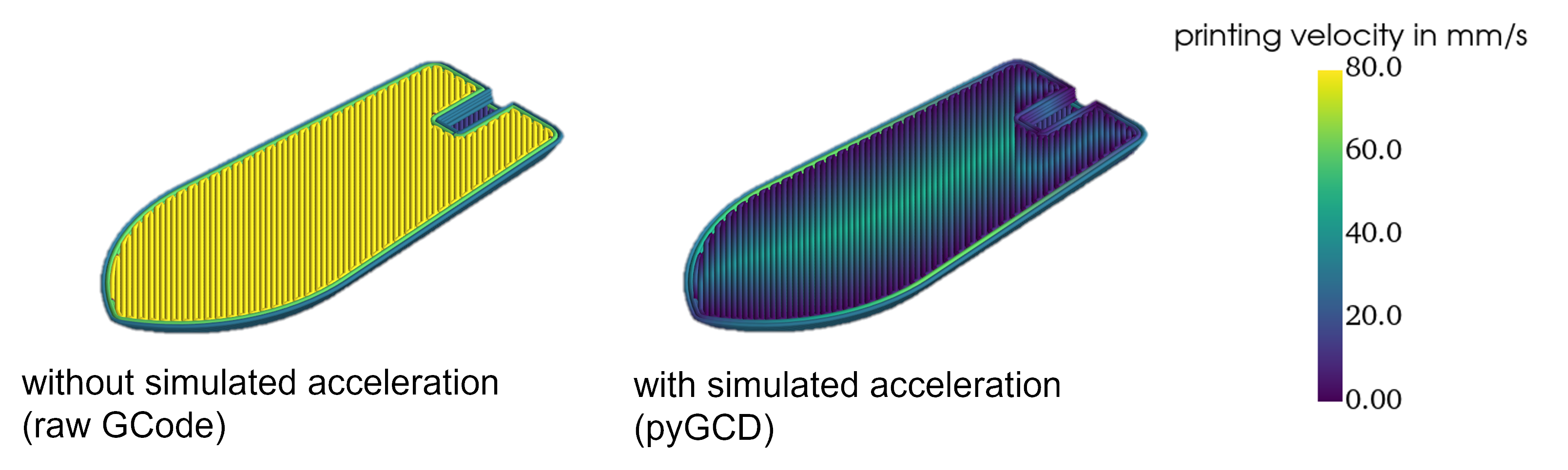
This package reads the target trajectory firmware settings changes from a GCode file. Subsequently, it simulates a motion planner with acceleration and jerk or junction control respectively. The more accurate modeling is achieved by replicating grbl's and its derivatives' firmware-specific movement planner solutions, such as "Classic Jerk" and "Junction Deviation", as an interpretation for Jerk. The simulation result is a description of the nozzle and extrusion axis position and velocity over time and is easily accessible for further analysis. For example it can be used to generate time dependent boundary conditions, needed in additive manufacturing simulations for the Fused Filament Fabrication (FFF) process. The package includes 3D plotting functions, so it can be used to visualize local velocities before printing to improve your process understanding.
Install pyGCodeDecode
It is recommended that you first create a virtual Python-environment, e.g. using the venv-module built into Python. You can clone the repository and run
shell
pip install .
from inside the root directory. Alternatively you can simply install from PyPI:
shell
pip install pyGCodeDecode
If you plan to contribute to the development, install in development mode and with the additional dependencies:
shell
pip install -e .[DEVELOPER]
You may want to verify the installation and version. Inside your environment, just run:
shell
python -c "import pyGCodeDecode
print(pyGCodeDecode.__version__)"
This should return the correct version.
Running the CLI
pyGCD comes with a simplistic CLI to quickly run the provided examples or plot some G-Code without writing a script first. If you want to see something quickly, activate the venv where pyGCD is installed and run:
shell
pygcd run_example brace
You can also run and plot your own G-Code with:
shell
pygcd plot --gcode <PATH>
Creating a script using pyGCD
Example simulations are provided in ./examples/ and can be modified to suit your needs. If you want to start from scratch, the following instructions will help you setup and run a simulation.
Define your printer defaults in a .yaml file
For example, the definition may look like this: ./pyGCodeDecode/data/defaultprinterpresets.yaml:
yaml
prusa_mini:
        # general properties
        nozzle_diam: 0.4
        filament_diam: 1.75
        # default settings
        p_vel: 35
        p_acc: 1250
        jerk: 8
        # axis max speeds
        vX: 180
        vY: 180
        vZ: 12
        vE: 80
        firmware: prusa
The default settings usually are machine specific and often can be read from the printer using a serial connection by sending a GCode command. You can use M503 for Marlin, Prusa and some other firmwares.
Use pyGCD to run a GCode Simulation
An easy way to use pyGCD is by creating a .py file to set up and run the simulation.
- Import the package and modules you want to use:
python
from pyGCodeDecode import gcode_interpreter
- Load your setup
.yamlfile through:
python
setup = gcode_interpreter.setup(filename=r"./pyGCodeDecode/data/default_printer_presets.yaml", printer="prusa_mini")
- You can optionally set or modify custom properties after loading the setup:
python
setup.set_property({"layer_cue": "LAYER_CHANGE"})
- Finally, run the simulation by providing a
GCodeand passing the setup defined before:
python
simulation = gcode_interpreter.simulation(filename=r"example\example.gcode", initial_machine_setup=setup)
Access the Results
The simulation object contains the simulation results, you can access them through various methods:
Get the individual axis values (position and velocity) at a certain time (e.g. after 2.6 s) to use it in further simulation by:
python
simulation.get_values(t=2.6)
You can visualize the GCode by plotting it in 3D:
python
from pyGCodeDecode.plotter import plot_3d
plot_3d(simulation)
pyGCD can also be used to create files defining an event series for ABAQUS simulations.
```python from pyGCodeDecode.abaqusfilegenerator import generateabaqusevent_series
generateabaquseventseries( simulation=simulation, filepath="path/to/eventseries.csv" ) ```
For more in depth information have a look into the documentation.
Supported GCode commands
Fully supported commands:
python
"G0": {"E": None, "X": None, "Y": None, "Z": None, "F": None},  # non extrusion move
"G1": {"E": None, "X": None, "Y": None, "Z": None, "F": None},  # extrusion move
"G4": {"P": None, "S": None},  # Dwell
"M82": None,  # E absolute
"M83": None,  # E relative
"G20": None,  # inches
"G21": None,  # millimeters
"G90": None,  # absolute positioning
"G91": None,  # relative positioning
"G92": {"E": None, "X": None, "Y": None, "Z": None},  # set position
";": None,  # comment
Only partially supported commands:
python
"M203": {"E": None, "X": None, "Y": None, "Z": None},  # max feedrate *read only
"M204": {"P": None, "R": None, "S": None, "T": None},  # starting acceleration *P only
"M205": {"E": None, "J": None, "S": None, "X": None, "Y": None, "Z": None},  # advanced settings *X only
"G10": {"S": None}, # read only
"G11": None, # read only
Known unsupported commands that may cause issues:
python
"G2" : {-}, # clockwise arc/circle move, please disable this command in your slicer's settings
"G3" : {-}, # counter-clockwise arc/circle move, please disable this command in your slicer's settings
<!-- REFERENCES -->
Owner
- Name: FAST Lightweight Engineering @ KIT
- Login: FAST-LB
- Kind: organization
- Email: lt-github@kit.fast.kit.edu
- Location: Karlsruhe, Germany
- Website: https://www.fast.kit.edu/english/lbt/index.php
- Repositories: 1
- Profile: https://github.com/FAST-LB
Doing research for the development and process simulation of lightweight structures. 🏎️🚀✈️🩼➡️🪶
JOSS Publication
pyGCodeDecode: A Python package for time-accurate GCode simulation in material extrusion processes
Authors

Institute of Vehicle System Technology - Lightweight Engineering, Karlsruhe Institute of Technology (KIT), Rintheimer Querallee 2, Karlsruhe, 76131, Germany
Institute of Vehicle System Technology - Lightweight Engineering, Karlsruhe Institute of Technology (KIT), Rintheimer Querallee 2, Karlsruhe, 76131, Germany
Institute of Vehicle System Technology - Lightweight Engineering, Karlsruhe Institute of Technology (KIT), Rintheimer Querallee 2, Karlsruhe, 76131, Germany
Institute of Vehicle System Technology - Lightweight Engineering, Karlsruhe Institute of Technology (KIT), Rintheimer Querallee 2, Karlsruhe, 76131, Germany
Institute of Vehicle System Technology - Lightweight Engineering, Karlsruhe Institute of Technology (KIT), Rintheimer Querallee 2, Karlsruhe, 76131, Germany
Editor
Bonan Zhu
Tags
GCode Simulation Material Extrusion Fused Filament Fabrication Fused Deposition Modeling Additive Manufacturing 3D Printing Machine Code Firmware FFF FDM MEX Process Simulation EngineeringCitation (CITATION.cff)
# This CITATION.cff file was generated with cffinit.
# Visit https://bit.ly/cffinit to generate yours today!

cff-version: 1.2.0
title: pyGCodeDecode
message: >-
  This package reads the target trajectory firmware settings
  changes from a GCode file. Subsequently, it simulates a
  motion planner with acceleration and jerk or junction
  control respectively. The more accurate modeling is
  achieved by replicating grbl's and its derivatives'
  firmware-specific movement planner solutions, such as
  "Classic Jerk" and "Junction Deviation", as an
  interpretation for Jerk. The simulation result is a
  description of the nozzle and extrusion axis position and
  velocity over time and is easily accessible for further
  analysis. For example it can be used to generate time
  dependent boundary conditions, needed in additive
  manufacturing simulations for the Fused Filament
  Fabrication (FFF) process. The package includes 3D
  plotting functions, so it can be used to visualize local
  velocities before printing to improve your process
  understanding.
type: software
authors:
  - given-names: Jonathan
    family-names: Knirsch
    email: jonathan.knirsch@student.kit.edu
    affiliation: >-
      Institute of Vehicle System Technology - Lightweight
      Engineering, Karlsruhe Institute of Technology (KIT),
      Rintheimer Querallee 2, Karlsruhe, 76131, Germany
    orcid: 'https://orcid.org/0009-0008-8663-8721'
  - given-names: Felix
    family-names: Frölich
    email: felix.froelich@kit.edu
    affiliation: >-
      Institute of Vehicle System Technology - Lightweight
      Engineering, Karlsruhe Institute of Technology (KIT),
      Rintheimer Querallee 2, Karlsruhe, 76131, Germany
    orcid: 'https://orcid.org/0000-0002-2575-4752'
  - given-names: Lukas
    family-names: Hof
    orcid: 'https://orcid.org/0009-0000-4931-2409'
    affiliation: >-
      Institute of Vehicle System Technology - Lightweight
      Engineering, Karlsruhe Institute of Technology (KIT),
      Rintheimer Querallee 2, Karlsruhe, 76131, Germany
    email: lukas.hof@kit.edu
  - given-names: Florian
    family-names: Wittemann
    email: florian.wittemann@kit.edu
    affiliation: >-
      Institute of Vehicle System Technology - Lightweight
      Engineering, Karlsruhe Institute of Technology (KIT),
      Rintheimer Querallee 2, Karlsruhe, 76131, Germany
    orcid: 'https://orcid.org/0000-0001-8693-7264'
  - given-names: Luise
    family-names: Kärger
    email: luise.kaerger@kit.edu
    affiliation: >-
      Institute of Vehicle System Technology - Lightweight
      Engineering, Karlsruhe Institute of Technology (KIT),
      Rintheimer Querallee 2, Karlsruhe, 76131, Germany
    orcid: 'https://orcid.org/0000-0002-6534-6518'
identifiers:
  - type: doi
    value: 10.5281/zenodo.12663658
    description: Zenodo archive
repository-code: 'https://github.com/FAST-LB/pyGCodeDecode'
repository-artifact: 'https://pypi.org/project/pyGCodeDecode/'
abstract: >-
  For the analysis of GCode, slicers or dedicated analyzer
  tools, such as Prusa Slicer or  gCodeViewer, merely
  display target process parameters. The actual process
  velocity however is  determined by the firmware of the
  printer. Velocities are expected to deviate significantly
  from  the target velocity at times of acceleration and
  deceleration. pyGCodeDecode aims to model the  machine's
  actual behavior and visualize its influence.
keywords:
  - GCode
  - Simulation
  - Material Extrusion
  - Fused Filament Fabrication
  - Fused Deposition Modeling
  - Additive Manufacturing
  - 3D Printing
  - Machine Code
  - Firmware
  - FFF
  - FDM
  - MEX
  - Process Simulation
  - Engineering
license: MIT
GitHub Events
Total
- Release event: 4
- Watch event: 5
- Delete event: 2
- Push event: 4
- Fork event: 3
- Create event: 4
Last Year
- Release event: 4
- Watch event: 5
- Delete event: 2
- Push event: 4
- Fork event: 3
- Create event: 4
Committers
Last synced: 11 months ago
Top Committers
| Name | Commits | |
|---|---|---|
| Lukas Hof | l****f@k****u | 232 |
| usmfi | u****i@s****u | 206 |
| Felix Frölich | f****h@k****u | 34 |
| usmfi | u****i@k****u | 18 |
| usmfi | j****h@s****u | 16 |
Committer Domains (Top 20 + Academic)
Issues and Pull Requests
Last synced: 10 months ago
All Time
- Total issues: 1
- Total pull requests: 1
- Average time to close issues: about 2 hours
- Average time to close pull requests: 4 minutes
- Total issue authors: 1
- Total pull request authors: 1
- Average comments per issue: 1.0
- Average comments per pull request: 0.0
- Merged pull requests: 1
- Bot issues: 0
- Bot pull requests: 0
Past Year
- Issues: 0
- Pull requests: 0
- Average time to close issues: N/A
- Average time to close pull requests: N/A
- Issue authors: 0
- Pull request authors: 0
- Average comments per issue: 0
- Average comments per pull request: 0
- Merged pull requests: 0
- Bot issues: 0
- Bot pull requests: 0
Top Authors
Issue Authors
- Extraweich (1)
Pull Request Authors
- lukashof (2)
Top Labels
Issue Labels
Pull Request Labels
Packages
- Total packages: 1
-
Total downloads:
- pypi 126 last-month
- Total dependent packages: 0
- Total dependent repositories: 0
- Total versions: 18
- Total maintainers: 1
pypi.org: pygcodedecode
Generate time dependent boundary conditions from a .gcode file.
- Documentation: https://pygcodedecode.readthedocs.io/
- License: MIT License
-
Latest release: 1.4.1
published 11 months ago
Rankings
Maintainers (1)
Dependencies
- actions/checkout v4 composite
- actions/upload-artifact v1 composite
- openjournals/openjournals-draft-action master composite
- actions/checkout v4 composite
- actions/download-artifact v4 composite
- actions/setup-python v5 composite
- actions/upload-artifact v4 composite
- pypa/gh-action-pypi-publish release/v1 composite
- actions/checkout v4 composite
- actions/setup-python v5 composite
- actions/upload-artifact v4 composite
- PyYAML *
- matplotlib *
- numpy *
- pyvista *