Diart
Diart: A Python Library for Real-Time Speaker Diarization - Published in JOSS (2024)
Science Score: 49.0%
This score indicates how likely this project is to be science-related based on various indicators:
-
○CITATION.cff file
-
✓codemeta.json file
Found codemeta.json file -
✓.zenodo.json file
Found .zenodo.json file -
✓DOI references
Found 1 DOI reference(s) in README -
✓Academic publication links
Links to: joss.theoj.org -
○Committers with academic emails
-
○Institutional organization owner
-
○JOSS paper metadata
-
○Scientific vocabulary similarity
Low similarity (13.4%) to scientific vocabulary
Keywords
Scientific Fields
Repository
A python package to build AI-powered real-time audio applications
Basic Info
- Host: GitHub
- Owner: juanmc2005
- License: mit
- Language: Python
- Default Branch: main
- Homepage: https://diart.readthedocs.io
- Size: 34.8 MB
Statistics
- Stars: 1,440
- Watchers: 22
- Forks: 105
- Open Issues: 52
- Releases: 13
Topics
Metadata Files
README.md
🌿 Build AI-powered real-time audio applications in a breeze 🌿







⚡ Quick introduction
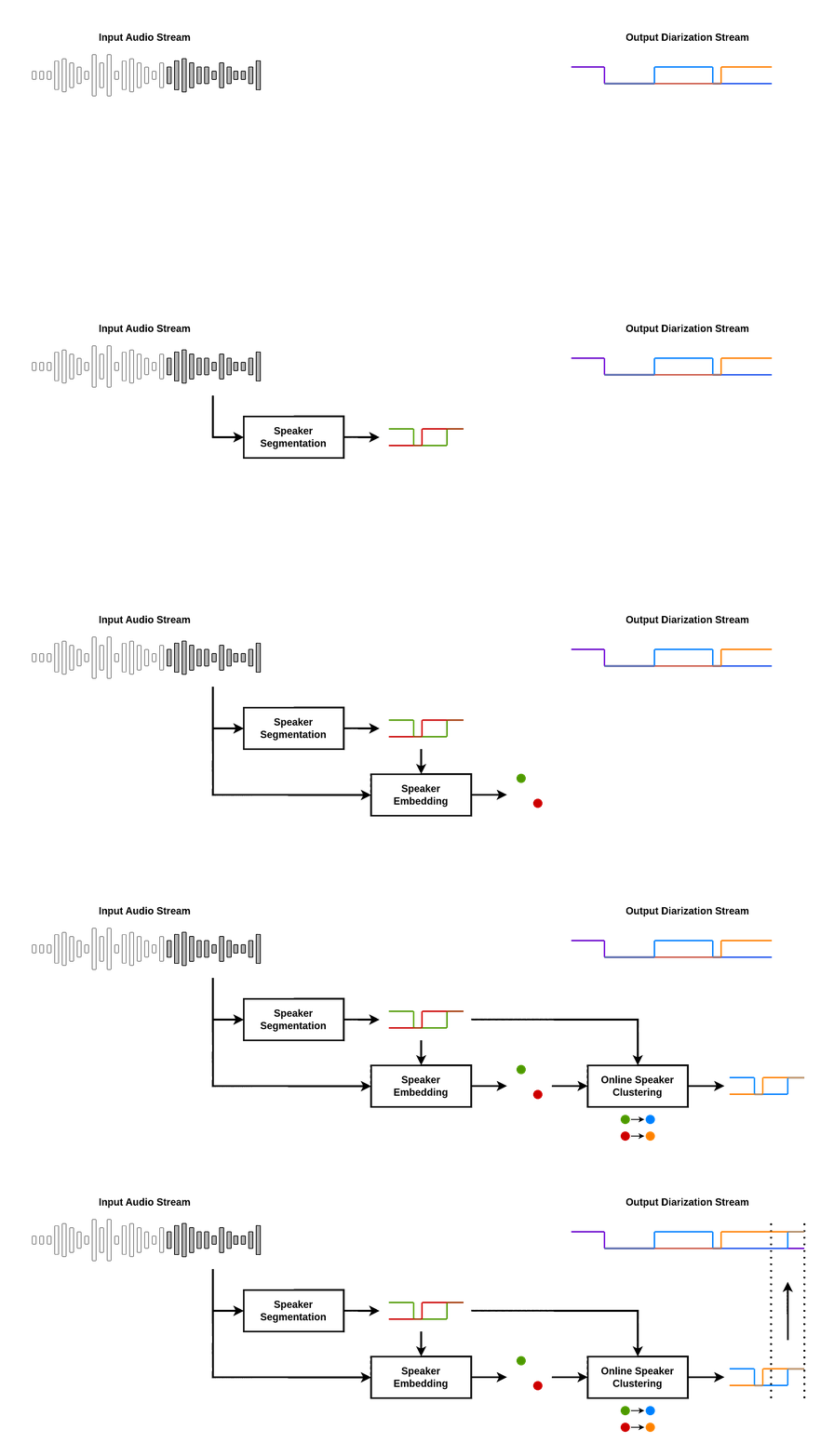
Diart is a python framework to build AI-powered real-time audio applications. Its key feature is the ability to recognize different speakers in real time with state-of-the-art performance, a task commonly known as "speaker diarization".
The pipeline diart.SpeakerDiarization combines a speaker segmentation and a speaker embedding model
to power an incremental clustering algorithm that gets more accurate as the conversation progresses:
With diart you can also create your own custom AI pipeline, benchmark it, tune its hyper-parameters, and even serve it on the web using websockets.
We provide pre-trained pipelines for:
- Speaker Diarization
- Voice Activity Detection
- Transcription (coming soon)
- Speaker-Aware Transcription (coming soon)
💾 Installation
1) Make sure your system has the following dependencies:
ffmpeg < 4.4
portaudio == 19.6.X
libsndfile >= 1.2.2
Alternatively, we provide an environment.yml file for a pre-configured conda environment:
shell
conda env create -f diart/environment.yml
conda activate diart
2) Install the package:
shell
pip install diart
Get access to 🎹 pyannote models
By default, diart is based on pyannote.audio models from the huggingface hub. In order to use them, please follow these steps:
1) Accept user conditions for the pyannote/segmentation model
2) Accept user conditions for the newest pyannote/segmentation-3.0 model
3) Accept user conditions for the pyannote/embedding model
4) Install huggingface-cli and log in with your user access token (or provide it manually in diart CLI or API).
🎙️ Stream audio
From the command line
A recorded conversation:
shell
diart.stream /path/to/audio.wav
A live conversation:
```shell
Use "microphone:ID" to select a non-default device
See python -m sounddevice for available devices
diart.stream microphone ```
By default, diart runs a speaker diarization pipeline, equivalent to setting --pipeline SpeakerDiarization,
but you can also set it to --pipeline VoiceActivityDetection. See diart.stream -h for more options.
From python
Use StreamingInference to run a pipeline on an audio source and write the results to disk:
```python from diart import SpeakerDiarization from diart.sources import MicrophoneAudioSource from diart.inference import StreamingInference from diart.sinks import RTTMWriter
pipeline = SpeakerDiarization() mic = MicrophoneAudioSource() inference = StreamingInference(pipeline, mic, doplot=True) inference.attachobservers(RTTMWriter(mic.uri, "/output/file.rttm")) prediction = inference() ```
For inference and evaluation on a dataset we recommend to use Benchmark (see notes on reproducibility).
🧠 Models
You can use other models with the --segmentation and --embedding arguments.
Or in python:
```python import diart.models as m
segmentation = m.SegmentationModel.frompretrained("modelname") embedding = m.EmbeddingModel.frompretrained("modelname") ```
Pre-trained models
Below is a list of all the models currently supported by diart:
| Model Name | Model Type | CPU Time* | GPU Time* |
|---------------------------------------------------------------------------------------------------------------------------|--------------|-----------|-----------|
| 🤗 pyannote/segmentation (default) | segmentation | 12ms | 8ms |
| 🤗 pyannote/segmentation-3.0 | segmentation | 11ms | 8ms |
| 🤗 pyannote/embedding (default) | embedding | 26ms | 12ms |
| 🤗 hbredin/wespeaker-voxceleb-resnet34-LM (ONNX) | embedding | 48ms | 15ms |
| 🤗 pyannote/wespeaker-voxceleb-resnet34-LM (PyTorch) | embedding | 150ms | 29ms |
| 🤗 speechbrain/spkrec-xvect-voxceleb | embedding | 41ms | 15ms |
| 🤗 speechbrain/spkrec-ecapa-voxceleb | embedding | 41ms | 14ms |
| 🤗 speechbrain/spkrec-ecapa-voxceleb-mel-spec | embedding | 42ms | 14ms |
| 🤗 speechbrain/spkrec-resnet-voxceleb | embedding | 41ms | 16ms |
| 🤗 nvidia/speakerverification_en_titanet_large | embedding | 91ms | 16ms |
The latency of segmentation models is measured in a VAD pipeline (5s chunks).
The latency of embedding models is measured in a diarization pipeline using pyannote/segmentation (also 5s chunks).
* CPU: AMD Ryzen 9 - GPU: RTX 4060 Max-Q
Custom models
Third-party models can be integrated by providing a loader function:
```python from diart import SpeakerDiarization, SpeakerDiarizationConfig from diart.models import EmbeddingModel, SegmentationModel
def segmentationloader(): # It should take a waveform and return a segmentation tensor return loadpretrainedmodel("mymodel.ckpt")
def embeddingloader(): # It should take (waveform, weights) and return per-speaker embeddings return loadpretrainedmodel("myother_model.ckpt")
segmentation = SegmentationModel(segmentationloader) embedding = EmbeddingModel(embeddingloader) config = SpeakerDiarizationConfig( segmentation=segmentation, embedding=embedding, ) pipeline = SpeakerDiarization(config) ```
If you have an ONNX model, you can use from_onnx():
```python from diart.models import EmbeddingModel
embedding = EmbeddingModel.fromonnx( modelpath="mymodel.ckpt", inputnames=["x", "w"], # defaults to ["waveform", "weights"] output_name="output", # defaults to "embedding" ) ```
📈 Tune hyper-parameters
Diart implements an optimizer based on optuna that allows you to tune pipeline hyper-parameters to your needs.
From the command line
shell
diart.tune /wav/dir --reference /rttm/dir --output /output/dir
See diart.tune -h for more options.
From python
```python from diart.optim import Optimizer
optimizer = Optimizer("/wav/dir", "/rttm/dir", "/output/dir") optimizer(num_iter=100) ```
This will write results to an sqlite database in /output/dir.
Distributed tuning
For bigger datasets, it is sometimes more convenient to run multiple optimization processes in parallel. To do this, create a study on a recommended DBMS (e.g. MySQL or PostgreSQL) making sure that the study and database names match:
shell
mysql -u root -e "CREATE DATABASE IF NOT EXISTS example"
optuna create-study --study-name "example" --storage "mysql://root@localhost/example"
You can now run multiple identical optimizers pointing to this database:
shell
diart.tune /wav/dir --reference /rttm/dir --storage mysql://root@localhost/example
or in python:
```python from diart.optim import Optimizer from optuna.samplers import TPESampler import optuna
db = "mysql://root@localhost/example" study = optuna.loadstudy("example", db, TPESampler()) optimizer = Optimizer("/wav/dir", "/rttm/dir", study) optimizer(numiter=100) ```
🧠🔗 Build pipelines
For a more advanced usage, diart also provides building blocks that can be combined to create your own pipeline.
Streaming is powered by RxPY, but the blocks module is completely independent and can be used separately.
Example
Obtain overlap-aware speaker embeddings from a microphone stream:
```python import rx.operators as ops import diart.operators as dops from diart.sources import MicrophoneAudioSource, FileAudioSource from diart.blocks import SpeakerSegmentation, OverlapAwareSpeakerEmbedding
segmentation = SpeakerSegmentation.frompretrained("pyannote/segmentation") embedding = OverlapAwareSpeakerEmbedding.frompretrained("pyannote/embedding")
source = MicrophoneAudioSource()
To take input from file:
source = FileAudioSource("", sample_rate=16000)
Make sure the models have been trained with this sample rate
print(source.sample_rate)
stream = mic.stream.pipe( # Reformat stream to 5s duration and 500ms shift dops.rearrangeaudiostream(samplerate=source.samplerate), ops.map(lambda wav: (wav, segmentation(wav))), ops.starmap(embedding) ).subscribe(on_next=lambda emb: print(emb.shape))
source.read() ```
Output:
```
Shape is (batchsize, numspeakers, embedding_dim)
torch.Size([1, 3, 512]) torch.Size([1, 3, 512]) torch.Size([1, 3, 512]) ... ```
🌐 WebSockets
Diart is also compatible with the WebSocket protocol to serve pipelines on the web.
From the command line
shell
diart.serve --host 0.0.0.0 --port 7007
diart.client microphone --host <server-address> --port 7007
Note: make sure that the client uses the same step and sample_rate than the server with --step and -sr.
See -h for more options.
From python
For customized solutions, a server can also be created in python using the WebSocketAudioSource:
```python from diart import SpeakerDiarization from diart.sources import WebSocketAudioSource from diart.inference import StreamingInference
pipeline = SpeakerDiarization() source = WebSocketAudioSource(pipeline.config.samplerate, "localhost", 7007) inference = StreamingInference(pipeline, source) inference.attachhooks(lambda annwav: source.send(annwav[0].to_rttm())) prediction = inference() ```
🔬 Powered by research
Diart is the official implementation of the paper Overlap-aware low-latency online speaker diarization based on end-to-end local segmentation by Juan Manuel Coria, Hervé Bredin, Sahar Ghannay and Sophie Rosset.
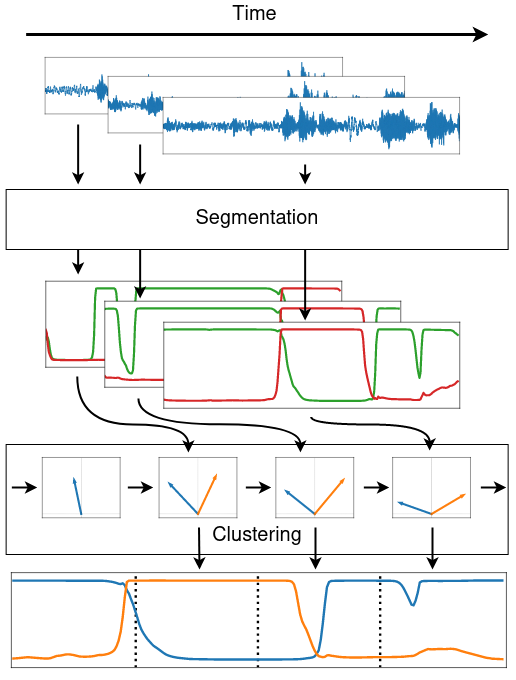
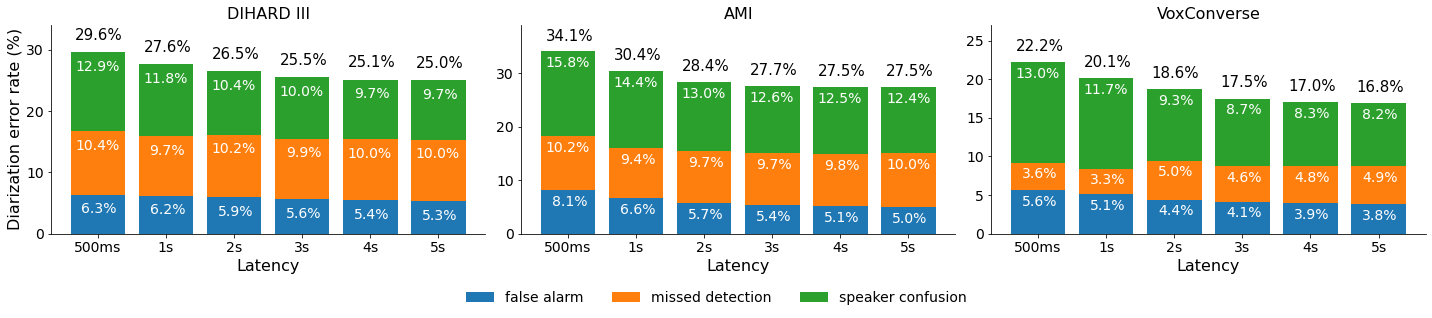
We propose to address online speaker diarization as a combination of incremental clustering and local diarization applied to a rolling buffer updated every 500ms. Every single step of the proposed pipeline is designed to take full advantage of the strong ability of a recently proposed end-to-end overlap-aware segmentation to detect and separate overlapping speakers. In particular, we propose a modified version of the statistics pooling layer (initially introduced in the x-vector architecture) to give less weight to frames where the segmentation model predicts simultaneous speakers. Furthermore, we derive cannot-link constraints from the initial segmentation step to prevent two local speakers from being wrongfully merged during the incremental clustering step. Finally, we show how the latency of the proposed approach can be adjusted between 500ms and 5s to match the requirements of a particular use case, and we provide a systematic analysis of the influence of latency on the overall performance (on AMI, DIHARD and VoxConverse).
Citation
If you found diart useful, please make sure to cite our paper:
bibtex
@inproceedings{diart,
  author={Coria, Juan M. and Bredin, Hervé and Ghannay, Sahar and Rosset, Sophie},
  booktitle={2021 IEEE Automatic Speech Recognition and Understanding Workshop (ASRU)},
  title={Overlap-Aware Low-Latency Online Speaker Diarization Based on End-to-End Local Segmentation},
  year={2021},
  pages={1139-1146},
  doi={10.1109/ASRU51503.2021.9688044},
}
Reproducibility

Important: We highly recommend installing pyannote.audio<3.1 to reproduce these results.
For more information, see this issue.
Diart aims to be lightweight and capable of real-time streaming in practical scenarios. Its performance is very close to what is reported in the paper (and sometimes even a bit better).
To obtain the best results, make sure to use the following hyper-parameters:
| Dataset | latency | tau | rho | delta | |-------------|---------|--------|--------|-------| | DIHARD III | any | 0.555 | 0.422 | 1.517 | | AMI | any | 0.507 | 0.006 | 1.057 | | VoxConverse | any | 0.576 | 0.915 | 0.648 | | DIHARD II | 1s | 0.619 | 0.326 | 0.997 | | DIHARD II | 5s | 0.555 | 0.422 | 1.517 |
diart.benchmark and diart.inference.Benchmark can run, evaluate and measure the real-time latency of the pipeline. For instance, for a DIHARD III configuration:
shell
diart.benchmark /wav/dir --reference /rttm/dir --tau-active=0.555 --rho-update=0.422 --delta-new=1.517 --segmentation pyannote/segmentation@Interspeech2021
or using the inference API:
```python from diart.inference import Benchmark, Parallelize from diart import SpeakerDiarization, SpeakerDiarizationConfig from diart.models import SegmentationModel
benchmark = Benchmark("/wav/dir", "/rttm/dir")
modelname = "pyannote/segmentation@Interspeech2021" model = SegmentationModel.frompretrained(modelname) config = SpeakerDiarizationConfig( # Set the segmentation model used in the paper segmentation=model, step=0.5, latency=0.5, tauactive=0.555, rhoupdate=0.422, deltanew=1.517 ) benchmark(SpeakerDiarization, config)
Run the same benchmark in parallel
pbenchmark = Parallelize(benchmark, numworkers=4) if name == "main": # Needed for multiprocessing p_benchmark(SpeakerDiarization, config) ```
This pre-calculates model outputs in batches, so it runs a lot faster.
See diart.benchmark -h for more options.
For convenience and to facilitate future comparisons, we also provide the expected outputs of the paper implementation in RTTM format for every entry of Table 1 and Figure 5. This includes the VBx offline topline as well as our proposed online approach with latencies 500ms, 1s, 2s, 3s, 4s, and 5s.
📑 License
``` MIT License
Copyright (c) 2021 Université Paris-Saclay Copyright (c) 2021 CNRS
Permission is hereby granted, free of charge, to any person obtaining a copy of this software and associated documentation files (the "Software"), to deal in the Software without restriction, including without limitation the rights to use, copy, modify, merge, publish, distribute, sublicense, and/or sell copies of the Software, and to permit persons to whom the Software is furnished to do so, subject to the following conditions:
The above copyright notice and this permission notice shall be included in all copies or substantial portions of the Software.
THE SOFTWARE IS PROVIDED "AS IS", WITHOUT WARRANTY OF ANY KIND, EXPRESS OR IMPLIED, INCLUDING BUT NOT LIMITED TO THE WARRANTIES OF MERCHANTABILITY, FITNESS FOR A PARTICULAR PURPOSE AND NONINFRINGEMENT. IN NO EVENT SHALL THE AUTHORS OR COPYRIGHT HOLDERS BE LIABLE FOR ANY CLAIM, DAMAGES OR OTHER LIABILITY, WHETHER IN AN ACTION OF CONTRACT, TORT OR OTHERWISE, ARISING FROM, OUT OF OR IN CONNECTION WITH THE SOFTWARE OR THE USE OR OTHER DEALINGS IN THE SOFTWARE. ```
Logo generated by DesignEvo free logo designer
Owner
- Name: Juan Coria
- Login: juanmc2005
- Kind: user
- Location: Paris, France
- Company: Université Paris-Saclay
- Website: juanmc2005.github.io
- Repositories: 3
- Profile: https://github.com/juanmc2005
Pre-trained for computer science 🇦🇷 🇫🇷, fine-tuned for machine learning 🇫🇷
GitHub Events
Total
- Create event: 1
- Release event: 1
- Issues event: 30
- Watch event: 344
- Issue comment event: 92
- Push event: 4
- Pull request review event: 32
- Pull request review comment event: 30
- Pull request event: 10
- Fork event: 19
Last Year
- Create event: 1
- Release event: 1
- Issues event: 30
- Watch event: 346
- Issue comment event: 92
- Push event: 4
- Pull request review event: 32
- Pull request review comment event: 30
- Pull request event: 10
- Fork event: 19
Committers
Last synced: 11 months ago
Top Committers
| Name | Commits | |
|---|---|---|
| Juan Manuel Coria | j****5@h****m | 283 |
| Hervé BREDIN | h****n | 22 |
| Bertrand Higy | b****y@p****m | 6 |
| yagnaa | 5****4 | 2 |
| ckliao-nccu | 7****u | 2 |
| Khaled Zaouk | k****k@h****m | 2 |
| Bertrand Higy | b****y@p****m | 2 |
| igordertigor | g****b@i****t | 1 |
| hmehdi515 | h****i@e****m | 1 |
| Simon | 8****r | 1 |
| Jonny Saunders | J****7@g****m | 1 |
| Jakob Drachmann Havtorn | j****n@g****m | 1 |
| Amit Kesari | k****3@g****m | 1 |
Committer Domains (Top 20 + Academic)
Issues and Pull Requests
Last synced: 11 months ago
All Time
- Total issues: 95
- Total pull requests: 51
- Average time to close issues: 4 months
- Average time to close pull requests: 10 days
- Total issue authors: 38
- Total pull request authors: 12
- Average comments per issue: 3.01
- Average comments per pull request: 0.98
- Merged pull requests: 37
- Bot issues: 0
- Bot pull requests: 0
Past Year
- Issues: 26
- Pull requests: 10
- Average time to close issues: 3 months
- Average time to close pull requests: 2 days
- Issue authors: 13
- Pull request authors: 4
- Average comments per issue: 1.96
- Average comments per pull request: 2.1
- Merged pull requests: 4
- Bot issues: 0
- Bot pull requests: 0
Top Authors
Issue Authors
- juanmc2005 (32)
- Shoawen0213 (10)
- ywangwxd (7)
- nikifori (3)
- rose-jinyang (3)
- m15kh (3)
- abhinavkulkarni (2)
- DmitriyG228 (2)
- Aduomas (2)
- QuentinFuxa (2)
- deyituo (2)
- Yagna24 (2)
- hmehdi515 (2)
- AMITKESARI2000 (2)
- realchandan (1)
Pull Request Authors
- juanmc2005 (34)
- JakobHavtorn (6)
- AMITKESARI2000 (3)
- janaab11 (2)
- hbredin (2)
- pengwei715 (2)
- m15kh (2)
- zaouk (2)
- ckliao-nccu (1)
- DmitriyG228 (1)
- igordertigor (1)
- Yagna24 (1)
- hmehdi515 (1)
- songtaoshi (1)
Top Labels
Issue Labels
Pull Request Labels
Packages
- Total packages: 1
-
Total downloads:
- pypi 5,907 last-month
- Total dependent packages: 0
- Total dependent repositories: 1
- Total versions: 13
- Total maintainers: 1
pypi.org: diart
A python framework to build AI for real-time speech
- Homepage: https://github.com/juanmc2005/diart
- Documentation: https://diart.readthedocs.io/
- License: MIT
-
Latest release: 0.9.2
published over 1 year ago
Rankings
Maintainers (1)
Dependencies
- einops >=0.3.0
- matplotlib >=3.3.3
- numpy >=1.20.2
- pandas >=1.4.2
- pyannote-audio develop
- rx >=3.2.0
- scipy >=1.6.0
- sounddevice >=0.4.2
- tqdm >=4.64.0