Science Score: 36.0%
This score indicates how likely this project is to be science-related based on various indicators:
-
○CITATION.cff file
-
✓codemeta.json file
Found codemeta.json file -
✓.zenodo.json file
Found .zenodo.json file -
○DOI references
-
○Academic publication links
-
✓Committers with academic emails
4 of 101 committers (4.0%) from academic institutions -
○Institutional organization owner
-
○JOSS paper metadata
-
○Scientific vocabulary similarity
Low similarity (15.5%) to scientific vocabulary
Keywords from Contributors
Repository
GRBL CNC command sender, autoleveler and g-code editor
Basic Info
- Host: GitHub
- Owner: vlachoudis
- License: gpl-2.0
- Language: Python
- Default Branch: master
- Size: 43.2 MB
Statistics
- Stars: 1,664
- Watchers: 185
- Forks: 557
- Open Issues: 498
- Releases: 13
Metadata Files
README.md
bCNC
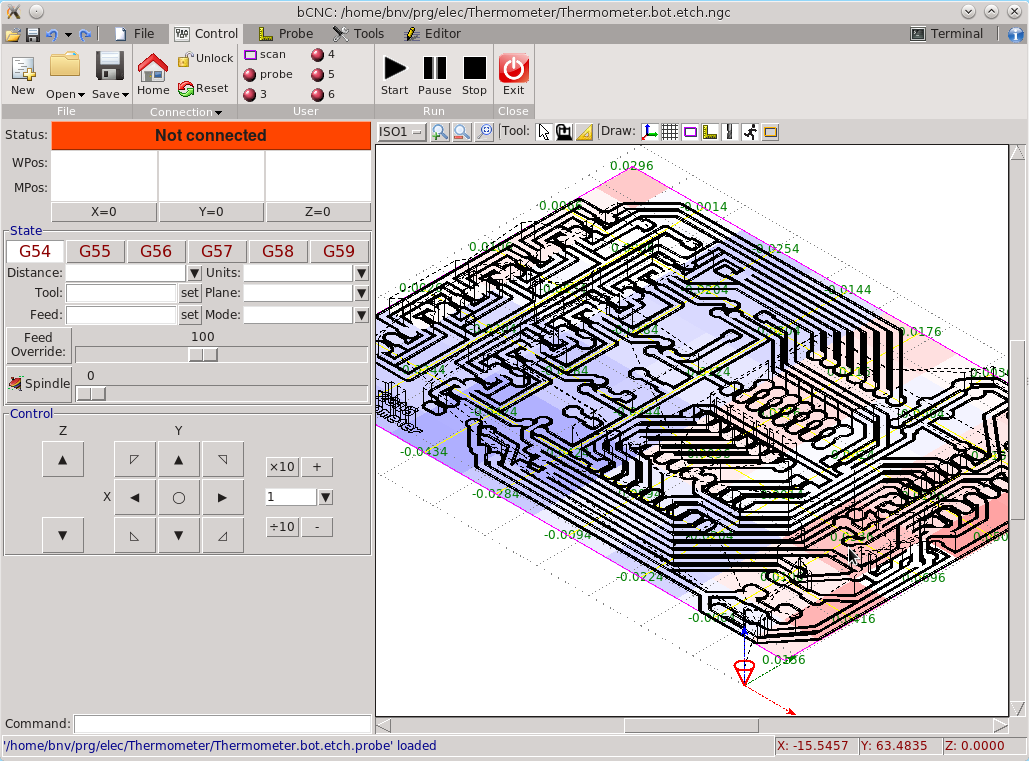
GrblHAL (formerly GRBL) CNC command sender, autoleveler, g-code editor, digitizer, CAM and swiss army knife for all your CNC needs.
An advanced fully featured g-code sender for grblHAL (formerly GRBL). bCNC is a cross platform program (Windows, Linux, Mac) written in python. The sender is robust and fast able to work nicely with old or slow hardware like Raspberry Pi (As it was validated by the GRBL maintainer on heavy testing).
IMPORTANT! If you have any troubles using bCNC, please read WIKI and DISCUSS it first. Only create new issues when you are certain there is a problem with actual bCNC code.

All pull requests that do change GUI should have attached screenshots of GUI before and after the changes. Please note that all pull requests should pass the Travis-CI build in order to get merged.https://github.com/Harvie/cnc-simulator Most pull requests should also pass CodeFactor checks if there is not good reason for failure. Before making pull request, please test your code on ~~both python2 and~~ python3.
Installation (using pip = recommended!)
This is a short overview of the installation process, for more details see the wiki page.
This is how you install (or upgrade) bCNC along with all required packages. You can use any of these commands (you need only one):
pip install --upgrade bCNC
pip install --upgrade git+https://github.com/vlachoudis/bCNC
pip install . #in git directory
python -m pip install --upgrade bCNC
This is how you launch bCNC:
python -m bCNC
Only problem with this approach is that it might not install Tkinter in some cases. So please keep that in mind and make sure it's installed in case of problems.
If you run the python -m bCNC command in root directory of this git repository it will launch the git version.
Every developer should always use this to launch bCNC to ensure that his/her code will work after packaging.
Note that on Windows XP you have to use pyserial==3.0.1 or older as newer version do not work on XP.
PyPI project: https://pypi.org/project/bCNC/
Installation (manual)
You will need the following packages to run bCNC - tkinter the graphical toolkit for python Depending your python/OS it can either be already installed, or under the names tkinter, python3-tkinter, python-tk - pyserial or under the name python-serial, python-pyserial - numpy - Optionally: - python-imaging-tk: the PIL libraries for autolevel height map - python-opencv: for webcam streaming on web pendant - scipy: for 100 times faster 3D mesh slicing
Expand the directory or download it from github and run the bCNC command
Installation (Linux package maintainers)
- Copy
bCNCsubdirectory of this repo to/usr/lib/python3.x/site-packages/ - Launch using
python -m bCNCor install bCNC.sh to /usr/bin - Alternatively you can fetch the bCNC Python package using pip when building Linux package
- refer to your distro, eg.: https://wiki.archlinux.org/index.php/Pythonpackageguidelines
- Py2deb to build Debian package from Python package: https://pypi.org/project/py2deb/
Installation (Compile to Windows .exe)
Note that you might probably find some precompiled .exe files on github "releases" page: https://github.com/vlachoudis/bCNC/releases But they might not be up to date.
This is basic example of how to compile bCNC to .exe file.
(given that you have working bCNC in the first place, eg. using pip install bCNC).
Go to the directory where is your bCNC installed and do the following:
pip install pyinstaller
pyinstaller --onefile --distpath . --hidden-import tkinter --paths lib;plugins;controllers --icon bCNC.ico --name bCNC __main__.py
This will take a minute or two. But in the end it should create bCNC.exe.
Also note that there is make-exe.bat file which will do just that for you.
This will also create rather large "build" subdirectory.
That is solely for caching purposes and you should delete it before redistributing!
If you are going to report bugs in .exe version of bCNC, please check first if that bug occurs even when running directly in python (without .exe build).
IMPORTANT! Motion controller configuration
- We strongly recommend you to use 32b microcontroller with FluidNC https://github.com/bdring/FluidNC http://wiki.fluidnc.com firmware for the new machine builds.
- In case you are using grblHAL https://github.com/grblHAL (Original GRBL firmware is still supported, but it is currently reaching the end-of-life due to limitations of 8b microcontrollers)
- GRBL should be configured to use MPos rather than Wpos. This means that
$10=should be set to odd number. As of GRBL 1.1 we recommend setting$10=3. If you have troubles communicating with your machine, you can try to set failsafe value$10=1. - CADs, bCNC and GRBL all work in millimeters by default. Make sure that
$13=0is set in GRBL, if you experience strange behavior. (unless you've configured your CAD and bCNC to use inches) - Before filing bug please make sure you use latest stable official release of GRBL. Older and unofficial releases might work, but we frequently see cases where they don't. So please upgrade firmware in your Arduinos to reasonably recent version if you can.
- Also read about all possible GRBL settings and make sure your setup is correct: https://github.com/gnea/grbl/wiki/Grbl-v1.1-Configuration
- GrblHAL also has "Compatibility level" settings which have to be correctly configured during firmware compilation: https://github.com/grblHAL/core/wiki/Compatibility-level
Configuration
You can modify most of the parameters from the "CAM -> Config/Controller" page. You can also enable (up to) 6-axis mode in Config section, but bCNC restart is required for changes to take place. Only the changes/differences from the default configuration file will be saved in your home directory ${HOME}/.bCNC or ~/.bCNC
The default configuration is stored on bCNC.ini in the installation directory.
PLEASE DO NOT CHANGE THIS FILE, IT'S GOING TO BE OVERWRITTEN ON EACH UPGRADE OF BCNC
Features:
- simple and intuitive interface for small screens
- 3-axis and 6-axis GUI modes
- import/export g-code, dxf and svg files
- 3D mesh slicing stl and ply files
- fast g-code sender (works nicely on RPi and old hardware)
- workspace configuration (G54..G59 commands)
- user configurable buttons
- g-code function evaluation with run time expansion
- feed override during the running for fine tuning
- Easy probing:
- simple probing
- center finder with a probing ring
- auto leveling, Z-probing and auto leveling by altering the g-code during sending (or permanently autoleveling the g-code file).
- height color map display
- create g-code by jogging and recording points (can even use camera for this)
- manual tool change expansion and automatic tool length probing
- canned cycles expansion
- Various Tools:
- user configurable database of materials, endmills, stock
- properties database of materials, stock, end mills etc..
- basic CAM features (profiling, pocketing, drilling, flat/helical/ramp cutting, thread milling, cutout tabs, drag knife)
- User g-code plugins:
- bowl generator
- finger joint box generator
- simple spur gear generator
- spirograph generator
- surface flatten
- play melody from MIDI file using stepper motor frequency
- ...
- G-Code editor and display
- graphical display of the g-code, and workspace
- graphically moving and editing g-code
- reordering code and rapid motion optimization
- moving, rotating, mirroring the g-code
- Web pendant to be used via smart phones
Debugging
You can log serial communication by changing the port to something like:
spy:///dev/ttyUSB0?file=serial_log.txt&raw
spy://COM1?file=serial_log.txt&raw
If a file isn't specified, the log is written to stderr. The 'raw' option outputs the data directly, instead of creating a hex dump. Further documentation is available at: https://pyserial.readthedocs.io/en/latest/url_handlers.html#spy
Disclaimer
The software is made available "AS IS". It seems quite stable, but it is in an early stage of development. Hence there should be plenty of bugs not yet spotted. Please use/try it with care, I don't want to be liable if it causes any damage :)
See also
- G-code simulators that you can use to independently cross-check g-code generated by bCNC or verify any g-code files in case you have troubles running them.
- https://harvie.github.io/cnc-simulator (github)
- https://camotics.org
- https://freecad.org
Owner
- Name: Vasilis Vlachoudis
- Login: vlachoudis
- Kind: user
- Repositories: 13
- Profile: https://github.com/vlachoudis
GitHub Events
Total
- Release event: 1
- Issues event: 20
- Watch event: 92
- Issue comment event: 112
- Push event: 10
- Gollum event: 1
- Pull request review event: 1
- Pull request event: 19
- Fork event: 27
Last Year
- Release event: 1
- Issues event: 20
- Watch event: 92
- Issue comment event: 112
- Push event: 10
- Gollum event: 1
- Pull request review event: 1
- Pull request event: 19
- Fork event: 27
Committers
Last synced: about 1 year ago
Top Committers
| Name | Commits | |
|---|---|---|
| Tomas Mudrunka | t****s@m****z | 579 |
| Vasilis Vlachoudis | v****s@c****h | 509 |
| SteveMoto | g****m@s****m | 120 |
| Effer | f****o@g****m | 118 |
| vlachoudis | v****s@g****m | 106 |
| =Pierre Klein | k****5@g****m | 83 |
| bosd | c****a@a****e | 55 |
| Mario | m****0@y****r | 29 |
| ThierryM | t****z@f****r | 20 |
| tsmarks | 6****s | 18 |
| tatarize | t****e@g****m | 16 |
| Adam Coddington | me@a****t | 12 |
| apshu | a****r@g****m | 11 |
| Carlos Garcia Saura | c****a@g****m | 11 |
| Felix | f****p@S****x | 9 |
| Bradley McLean | b****n@g****m | 9 |
| Pierre Klein | 5****e | 9 |
| Gonzalo Cobos | g****s@g****m | 8 |
| Romain Porte | m****e@m****g | 8 |
| bgbsww | 1****w | 8 |
| sfinexer | p****i@y****u | 7 |
| onekk | c****i@g****m | 7 |
| GitHubCaps | G****s@g****m | 6 |
| Yiannis Mandravellos | m****v@g****m | 6 |
| Jeff Doyle (nfz) | s****e@e****a | 6 |
| E2D | e****r@g****m | 6 |
| Georgwei | 3****i | 5 |
| Damian Wrobel | d****l@e****l | 5 |
| David Guerizec | d****d@g****t | 5 |
| Pierre Clerissi | p****i@g****m | 5 |
| and 71 more... | ||
Committer Domains (Top 20 + Academic)
Issues and Pull Requests
Last synced: 10 months ago
All Time
- Total issues: 123
- Total pull requests: 92
- Average time to close issues: 8 months
- Average time to close pull requests: 4 months
- Total issue authors: 86
- Total pull request authors: 45
- Average comments per issue: 5.67
- Average comments per pull request: 3.93
- Merged pull requests: 55
- Bot issues: 0
- Bot pull requests: 1
Past Year
- Issues: 19
- Pull requests: 23
- Average time to close issues: 1 day
- Average time to close pull requests: about 1 month
- Issue authors: 15
- Pull request authors: 12
- Average comments per issue: 1.58
- Average comments per pull request: 1.43
- Merged pull requests: 16
- Bot issues: 0
- Bot pull requests: 0
Top Authors
Issue Authors
- MARIOBASZ (15)
- rschell (5)
- imechura (4)
- Git-Bruno (3)
- ltspicer (3)
- ldpgh (3)
- bosd (2)
- Guenni75 (2)
- silver2row (2)
- jeskata (2)
- JipeB (2)
- massiveradiation (2)
- Harvie (2)
- rennen11 (2)
- muhammadelmogy (2)
Pull Request Authors
- dwrobel (10)
- MARIOBASZ (8)
- rschell (6)
- tomjnixon (6)
- gcobos (6)
- LittlePierre (5)
- jlirochon (4)
- ldpgh (4)
- pci06 (4)
- bosd (3)
- Git-Bruno (3)
- bgbsww (3)
- HomineLudens (2)
- Engineer2Designer (2)
- dependabot[bot] (2)
Top Labels
Issue Labels
Pull Request Labels
Packages
- Total packages: 1
-
Total downloads:
- pypi 997 last-month
- Total dependent packages: 0
- Total dependent repositories: 1
- Total versions: 80
- Total maintainers: 1
pypi.org: bcnc
Swiss army knife for all your CNC/g-code needs
- Homepage: https://github.com/vlachoudis/bCNC
- Documentation: https://bcnc.readthedocs.io/
- License: GPLv2
-
Latest release: 0.9.16
published over 1 year ago
Rankings
Maintainers (1)
Dependencies
- Pillow >=4.0
- numpy >=1.12
- opencv-python ==4.5.5.62
- pyserial >=3.5
- Note *
- Pillow >=4.0
- Raspberry *
- Windows *
- aarch64 *
- arm *
- it *
- numpy >=1.12
- opencv-python ==4.5.5.62
- pyobjc *
- pyobjc-core *
- pyobjc-framework-Quartz *
- pyserial <=3.0.1
- pyserial *
- svgelements >=1,<2