Recent Releases of afem
afem - The Border Update
There are new features, I forgot how many. Sorry, Changelog coming soon…
- Python
Published by ZibraMax over 3 years ago

afem - The Border Update
There are new features, I forgot how many. Sorry, Changelog coming soon…
- Python
Published by ZibraMax over 3 years ago
afem - The Quality of Life Update pt 2
JSON file now saves information about solver process (eigenvalues, iteration error, etc.) Regions 2D are treated as border elements
- Python
Published by ZibraMax almost 4 years ago
afem - The Memory Update
Save memoy with sparse matrix!
Docs now behave like first intended






A Python FEM implementation.
N dimensional FEM implementation for M variables per node problems.
Installation
Use the package manager pip to install AFEM.
bash
pip install AFEM
From source:
bash
git clone https://github.com/ZibraMax/FEM
cd FEM
python -m venv .venv
python -m pip install build
python -m build
python -m pip install -e .[docs] # Basic instalation with docs
Contributing
Pull requests are welcome. For major changes, please open an issue first to discuss what you would like to change.
Please make sure to update tests as appropriate.
Full Docs
Tutorial
Using pre implemented equations
Avaliable equations:
- 1D 1 Variable ordinary diferential equation
- 1D 1 Variable 1D Heat with convective border
- 1D 2 Variable Euler Bernoulli Beams
- 1D 3 Variable Non-linear Euler Bernoulli Beams
- 2D 1 Variable Torsion
- 2D 1 Variable Poisson equation
- 2D 1 Variable second order PDE
- 2D 1 Variable 2D Heat with convective borders
- 2D 2 Variable Plane Strees
- 2D 2 Variable Plane Strees Orthotropic
- 2D 2 Variable Plane Strain
- 3D 3 variables per node isotropic elasticity
Numerical Validation:
- [x] 1D 1 Variable ordinary diferential equation
- [ ] 1D 1 Variable 1D Heat with convective border
- [ ] 1D 2 Variable Euler Bernoulli Beams
- [ ] 1D 3 Variable Non-linear Euler Bernoulli Beams
- [x] 2D 1 Variable Torsion
- [ ] 2D 1 Variable 2D Heat with convective borders
- [x] 2D 2 Variable Plane Strees
- [x] 2D 2 Variable Plane Strain
Steps:
- Create geometry
- Create Border Conditions (Point and regions supported)
- Solve!
- For example: Example 2, Example 5, Example 11-14
Example without geometry file (Test 2):
```python import matplotlib.pyplot as plt #Import libraries from FEM.Torsion2D import Torsion2D #import AFEM Torsion class from FEM.Geometry import Delaunay #Import Meshing tools
Define some variables with geometric properties
a = 0.3 b = 0.3 tw = 0.05 tf = 0.05
Define material constants
E = 200000 v = 0.27 G = E / (2 * (1 + v)) phi = 1 #Rotation angle
Define domain coordinates
vertices = [ [0, 0], [a, 0], [a, tf], [a / 2 + tw / 2, tf], [a / 2 + tw / 2, tf + b], [a, tf + b], [a, 2 * tf + b], [0, 2 * tf + b], [0, tf + b], [a / 2 - tw / 2, tf + b], [a / 2 - tw / 2, tf], [0, tf], ]
Define triangulation parameters with _strdelaunay method.
params = Delaunay._strdelaunay(constrained=True, delaunay=True, a='0.00003', o=2)
Create geometry using triangulation parameters. Geometry can be imported from .msh files.
geometry = Delaunay(vertices, params)
Save geometry to .json file
geometry.exportJSON('I_test.json')
Create torsional 2D analysis.
O = Torsion2D(geometry, G, phi)
Solve the equation in domain.
Post process and show results
O.solve() plt.show()
```
Example with geometry file (Example 2):
```python import matplotlib.pyplot as plt #Import libraries from FEM.Torsion2D import Torsion2D #import AFEM from FEM.Geometry import Geometry #Import Geometry tools
Define material constants.
E = 200000 v = 0.27 G = E / (2 * (1 + v)) phi = 1 #Rotation angle
Load geometry with file.
geometry = Geometry.importJSON('I_test.json')
Create torsional 2D analysis.
O = Torsion2D(geometry, G, phi)
Solve the equation in domain.
Post process and show results
O.solve() plt.show()
```
Creating equation classes
Note: Don't forget the docstring!
Steps
Create a Python flie and import the libraries:
python
from .Core import *
from tqdm import tqdm
import numpy as np
import matplotlib.pyplot as plt
- Core: Solver
- Numpy: Numpy data
- Matplotlib: Matplotlib graphs
- Tqdm: Progressbars
- Create a Python class with Core inheritance
python
class PlaneStress(Core):
    def __init__(self,geometry,*args,**kargs):
    #Do stuff
    Core.__init__(self,geometry)
It is important to manage the number of variables per node in the input geometry. Define the matrix calculation methods and post porcessing methods.
python
def elementMatrices(self):
def postProcess(self):
The
elementMatricesmethod uses gauss integration points, so you must use the following structure:```python
for e in tqdm(self.elements,unit='Element'): x,p = e.T(e.Z.T) #Gauss points in global coordinates and Shape functions evaluated in gauss points jac,dpz = e.J(e.Z.T) #Jacobian evaluated in gauss points and shape functions derivatives in natural coordinates detjac = np.linalg.det(jac) _j = np.linalg.inv(jac) #Jacobian inverse dpx = _j @ dpz #Shape function derivatives in global coordinates for k in range(len(e.Z)): #Iterate over gauss points on domain #Calculate matrices with any finite element model #Assign matrices to element ```
A good example is the PlaneStress class in the Elasticity2D.py file.
Roadmap
- 2D elastic plate theory
- Transient analysis (Core modification)
- Non-Lineal for 2D equation (All cases)
- Testing and numerical validation (WIP)
Examples
References
J. N. Reddy. Introduction to the Finite Element Method, Third Edition (McGraw-Hill Education: New York, Chicago, San Francisco, Athens, London, Madrid, Mexico City, Milan, New Delhi, Singapore, Sydney, Toronto, 2006). https://www.accessengineeringlibrary.com/content/book/9780072466850
Jonathan Richard Shewchuk, (1996) Triangle: Engineering a 2D Quality Mesh Generator and Delaunay Triangulator
Ramirez, F. (2020). ICYA 4414 Modelación con Elementos Finitos [Class handout]. Universidad de Los Andes.
License
- Python
Published by ZibraMax about 4 years ago
afem - The Memory Update
Save memoy with sparse matrix!
Docs now behave like first intended
A Python FEM implementation.
N dimensional FEM implementation for M variables per node problems.
Installation
Use the package manager pip to install AFEM.
bash
pip install AFEM
Contributing
Pull requests are welcome. For major changes, please open an issue first to discuss what you would like to change.
Please make sure to update tests as appropriate.
Full Docs
Tutorial
Using pre implemented equations
Avaliable equations:
- 1D 1 Variable ordinary diferential equation
- 1D 1 Variable 1D Heat with convective border
- 1D 2 Variable Euler Bernoulli Beams
- 1D 3 Variable Non-linear Euler Bernoulli Beams
- 2D 1 Variable Torsion
- 2D 1 Variable Poisson equation
- 2D 1 Variable second order PDE
- 2D 1 Variable 2D Heat with convective borders
- 2D 2 Variable Plane Strees
- 2D 2 Variable Plane Strees Orthotropic
- 2D 2 Variable Plane Strain
- 3D 3 variables per node isotropic elasticity
Numerical Validation:
- [x] 1D 1 Variable ordinary diferential equation
- [ ] 1D 1 Variable 1D Heat with convective border
- [ ] 1D 2 Variable Euler Bernoulli Beams
- [ ] 1D 3 Variable Non-linear Euler Bernoulli Beams
- [x] 2D 1 Variable Torsion
- [ ] 2D 1 Variable 2D Heat with convective borders
- [x] 2D 2 Variable Plane Strees
- [x] 2D 2 Variable Plane Strain
Steps:
- Create geometry
- Create Border Conditions (Point and regions supported)
- Solve!
- For example: Example 2, Example 5, Example 11-14
Example without geometry file (Test 2):
```python import matplotlib.pyplot as plt #Import libraries from FEM.Torsion2D import Torsion2D #import AFEM Torsion class from FEM.Geometry import Delaunay #Import Meshing tools
Define some variables with geometric properties
a = 0.3 b = 0.3 tw = 0.05 tf = 0.05
Define material constants
E = 200000 v = 0.27 G = E / (2 * (1 + v)) phi = 1 #Rotation angle
Define domain coordinates
vertices = [ [0, 0], [a, 0], [a, tf], [a / 2 + tw / 2, tf], [a / 2 + tw / 2, tf + b], [a, tf + b], [a, 2 * tf + b], [0, 2 * tf + b], [0, tf + b], [a / 2 - tw / 2, tf + b], [a / 2 - tw / 2, tf], [0, tf], ]
Define triangulation parameters with _strdelaunay method.
params = Delaunay._strdelaunay(constrained=True, delaunay=True, a='0.00003', o=2)
Create geometry using triangulation parameters. Geometry can be imported from .msh files.
geometry = Delaunay(vertices, params)
Save geometry to .json file
geometry.exportJSON('I_test.json')
Create torsional 2D analysis.
O = Torsion2D(geometry, G, phi)
Solve the equation in domain.
Post process and show results
O.solve() plt.show()
```
Example with geometry file (Example 2):
```python import matplotlib.pyplot as plt #Import libraries from FEM.Torsion2D import Torsion2D #import AFEM from FEM.Geometry import Geometry #Import Geometry tools
Define material constants.
E = 200000 v = 0.27 G = E / (2 * (1 + v)) phi = 1 #Rotation angle
Load geometry with file.
geometry = Geometry.importJSON('I_test.json')
Create torsional 2D analysis.
O = Torsion2D(geometry, G, phi)
Solve the equation in domain.
Post process and show results
O.solve() plt.show()
```
Creating equation classes
Note: Don't forget the docstring!
Steps
Create a Python flie and import the libraries:
python
from .Core import *
from tqdm import tqdm
import numpy as np
import matplotlib.pyplot as plt
- Core: Solver
- Numpy: Numpy data
- Matplotlib: Matplotlib graphs
- Tqdm: Progressbars
- Create a Python class with Core inheritance
python
class PlaneStress(Core):
    def __init__(self,geometry,*args,**kargs):
    #Do stuff
    Core.__init__(self,geometry)
It is important to manage the number of variables per node in the input geometry. Define the matrix calculation methods and post porcessing methods.
python
def elementMatrices(self):
def postProcess(self):
The
elementMatricesmethod uses gauss integration points, so you must use the following structure:```python
for e in tqdm(self.elements,unit='Element'): x,p = e.T(e.Z.T) #Gauss points in global coordinates and Shape functions evaluated in gauss points jac,dpz = e.J(e.Z.T) #Jacobian evaluated in gauss points and shape functions derivatives in natural coordinates detjac = np.linalg.det(jac) _j = np.linalg.inv(jac) #Jacobian inverse dpx = _j @ dpz #Shape function derivatives in global coordinates for k in range(len(e.Z)): #Iterate over gauss points on domain #Calculate matrices with any finite element model #Assign matrices to element ```
A good example is the PlaneStress class in the Elasticity2D.py file.
Roadmap
- 2D elastic plate theory
- Transient analysis (Core modification)
- Non-Lineal for 2D equation (All cases)
- Testing and numerical validation (WIP)
Examples
References
J. N. Reddy. Introduction to the Finite Element Method, Third Edition (McGraw-Hill Education: New York, Chicago, San Francisco, Athens, London, Madrid, Mexico City, Milan, New Delhi, Singapore, Sydney, Toronto, 2006). https://www.accessengineeringlibrary.com/content/book/9780072466850
Jonathan Richard Shewchuk, (1996) Triangle: Engineering a 2D Quality Mesh Generator and Delaunay Triangulator
Ramirez, F. (2020). ICYA 4414 Modelación con Elementos Finitos [Class handout]. Universidad de Los Andes.
License
- Python
Published by ZibraMax about 4 years ago
afem - The Region and Docs Update
A Python FEM implementation.
N dimensional FEM implementation for M variables per node problems.
Installation
Use the package manager pip to install AFEM.
bash
pip install AFEM
Contributing
Pull requests are welcome. For major changes, please open an issue first to discuss what you would like to change.
Please make sure to update tests as appropriate.
Full Docs
Tutorial
Using pre implemented equations
Avaliable equations:
- 1D 1 Variable ordinary diferential equation
- 1D 1 Variable 1D Heat with convective border
- 1D 2 Variable Euler Bernoulli Beams
- 1D 3 Variable Non-linear Euler Bernoulli Beams
- 2D 1 Variable Torsion
- 2D 1 Variable Poisson equation
- 2D 1 Variable second order PDE
- 2D 1 Variable 2D Heat with convective borders
- 2D 2 Variable Plane Strees
- 2D 2 Variable Plane Strees Orthotropic
- 2D 2 Variable Plane Strain
- 3D 3 variables per node isotropic elasticity
Numerical Validation:
- [x] 1D 1 Variable ordinary diferential equation
- [ ] 1D 1 Variable 1D Heat with convective border
- [ ] 1D 2 Variable Euler Bernoulli Beams
- [ ] 1D 3 Variable Non-linear Euler Bernoulli Beams
- [x] 2D 1 Variable Torsion
- [ ] 2D 1 Variable 2D Heat with convective borders
- [x] 2D 2 Variable Plane Strees
- [x] 2D 2 Variable Plane Strain
Steps:
- Create geometry
- Create Border Conditions (Point and regions supported)
- Solve!
- For example: Example 2, Example 5, Example 11-14
Example without geometry file (Test 2):
```python import matplotlib.pyplot as plt #Import libraries from FEM.Torsion2D import Torsion2D #import AFEM Torsion class from FEM.Geometry import Delaunay #Import Meshing tools
Define some variables with geometric properties
a = 0.3 b = 0.3 tw = 0.05 tf = 0.05
Define material constants
E = 200000 v = 0.27 G = E / (2 * (1 + v)) phi = 1 #Rotation angle
Define domain coordinates
vertices = [ [0, 0], [a, 0], [a, tf], [a / 2 + tw / 2, tf], [a / 2 + tw / 2, tf + b], [a, tf + b], [a, 2 * tf + b], [0, 2 * tf + b], [0, tf + b], [a / 2 - tw / 2, tf + b], [a / 2 - tw / 2, tf], [0, tf], ]
Define triangulation parameters with _strdelaunay method.
params = Delaunay._strdelaunay(constrained=True, delaunay=True, a='0.00003', o=2)
Create geometry using triangulation parameters. Geometry can be imported from .msh files.
geometry = Delaunay(vertices, params)
Save geometry to .json file
geometry.exportJSON('I_test.json')
Create torsional 2D analysis.
O = Torsion2D(geometry, G, phi)
Solve the equation in domain.
Post process and show results
O.solve() plt.show()
```
Example with geometry file (Example 2):
```python import matplotlib.pyplot as plt #Import libraries from FEM.Torsion2D import Torsion2D #import AFEM from FEM.Geometry import Geometry #Import Geometry tools
Define material constants.
E = 200000 v = 0.27 G = E / (2 * (1 + v)) phi = 1 #Rotation angle
Load geometry with file.
geometry = Geometry.importJSON('I_test.json')
Create torsional 2D analysis.
O = Torsion2D(geometry, G, phi)
Solve the equation in domain.
Post process and show results
O.solve() plt.show()
```
Creating equation classes
Note: Don't forget the docstring!
Steps
Create a Python flie and import the libraries:
python
from .Core import *
from tqdm import tqdm
import numpy as np
import matplotlib.pyplot as plt
- Core: Solver
- Numpy: Numpy data
- Matplotlib: Matplotlib graphs
- Tqdm: Progressbars
- Create a Python class with Core inheritance
python
class PlaneStress(Core):
    def __init__(self,geometry,*args,**kargs):
    #Do stuff
    Core.__init__(self,geometry)
It is important to manage the number of variables per node in the input geometry. Define the matrix calculation methods and post porcessing methods.
python
def elementMatrices(self):
def postProcess(self):
The
elementMatricesmethod uses gauss integration points, so you must use the following structure:```python
for e in tqdm(self.elements,unit='Element'): x,p = e.T(e.Z.T) #Gauss points in global coordinates and Shape functions evaluated in gauss points jac,dpz = e.J(e.Z.T) #Jacobian evaluated in gauss points and shape functions derivatives in natural coordinates detjac = np.linalg.det(jac) _j = np.linalg.inv(jac) #Jacobian inverse dpx = _j @ dpz #Shape function derivatives in global coordinates for k in range(len(e.Z)): #Iterate over gauss points on domain #Calculate matrices with any finite element model #Assign matrices to element ```
A good example is the PlaneStress class in the Elasticity2D.py file.
Roadmap
- 2D elastic plate theory
- Transient analysis (Core modification)
- Non-Lineal for 2D equation (All cases)
- Testing and numerical validation (WIP)
Example index:
Example 1: Preliminar geometry test
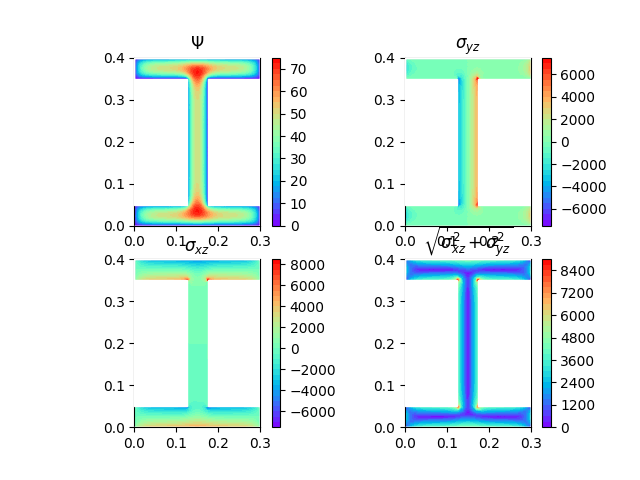
Example 2: 2D Torsion 1 variable per node. H section-Triangular Quadratic.
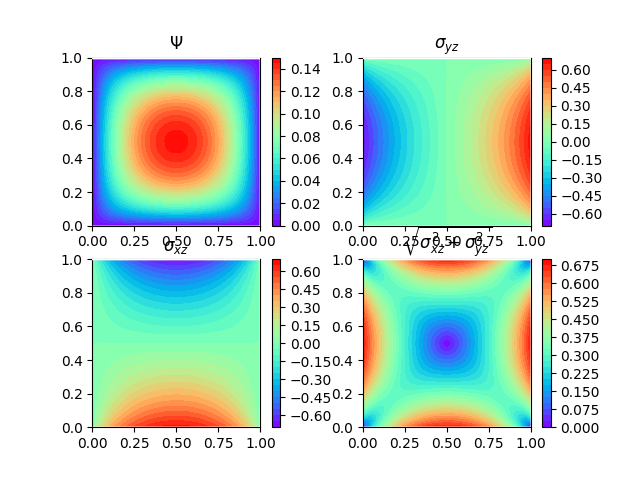
Example 3: 2D Torsion 1 variable per node. Square section-Triangular Quadratic.
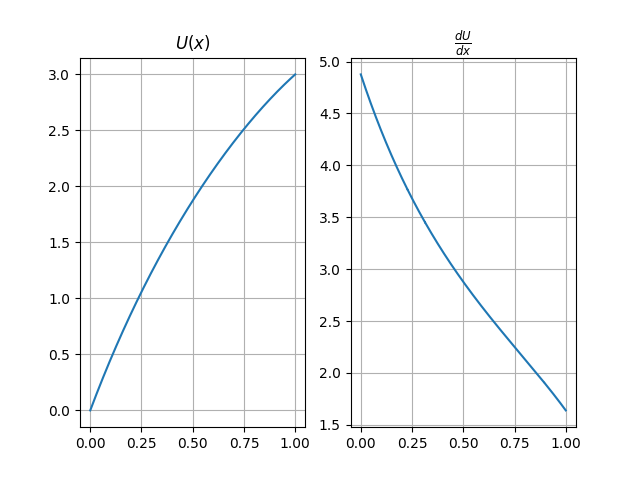
Example 4: 2D Torsion 1 variable per node. Mesh from internet-Square Lineal.
Example 5: 2D Torsion 1 variable per node. Creating and saving mesh-Triangular Quadratic.

Example 6: 1D random differential equation 1 variable per node. Linear Quadratic.

Example 7: GiD Mesh import test — Serendipity elements

Example 8: Plane Stress 2 variable per node. Plate in tension — Serendipity.

Example 9: Plane Stress 2 variable per node. Simple Supported Beam — Serendipity.

Example 10: Plane Stress 2 variable per node. Cantilever Beam — Triangular Quadratic.

Example 11: Plane Stress 2 variable per node. Fixed-Fixed Beam — Serendipity.

Example 12: Plane Strain 2 variable per node. Embankment from GiD — Serendipity.

Example 13: Plane Strain 2 variable per node. Embankment — Triangular Quadratic.


Example 14: Plane Stress 2 variable per node. Cantilever Beam — Serendipity.

Example 15: Profile creation tool. Same as Example 14

Example 16: Non-Local Plane Stress. [WIP]
Example 17: 1D Heat transfer.

Example 18: 2D border elements creation.

Example 19: Apply loads on regions.
loadOnRegionmethod on Test 11
Example 20: Reddy's Example 11.7.1 Ed 3
Example 21: Example 20 with serendipity elements.
Example 22: Example 20 with refined mesh.

Example 23: Reddy's Problem 11.1 Ed 3 Plain Strain

Example 24: Example 23 with refined mesh

Example 25: Holes concept. With Example 24


Example 26: Fillets concept.


Example 27: Combination of Holes Fillets, Plane Stress

Example 28: Fillets and Holes mesh files of Example 27

Example 29: Fillets and Holes in Example 13


Example 30: Border conditions and loads in holes


Example 31: 2D Heat with convective borders


Example 32: Border conditions and loads in holes


Example 33: Example 30 with Heat


Example 34: Custom plots, Beam-Girder steel plate connection


Example 35: Torsion with fillets


Example 36: Convective Heat Transfer from Samson-Mano's software

Example 37: Convective Heat Transfer from Samson-Mano's software


Example 38: Elements with different properties: Torsion with holes


Example 37: Elements with different properties: Torsion with holes Symetrical


Example 38 & 39: Polar moment of inertia for hollow sections
Example 40 & 41: Euler Bernoulli beams, linear and non-linear
Example 42: Non-linear equation solver test
Example 43: Orthotripic plane stress
Example 44: MeshingNet data creation code
References
J. N. Reddy. Introduction to the Finite Element Method, Third Edition (McGraw-Hill Education: New York, Chicago, San Francisco, Athens, London, Madrid, Mexico City, Milan, New Delhi, Singapore, Sydney, Toronto, 2006). https://www.accessengineeringlibrary.com/content/book/9780072466850
Jonathan Richard Shewchuk, (1996) Triangle: Engineering a 2D Quality Mesh Generator and Delaunay Triangulator
Ramirez, F. (2020). ICYA 4414 Modelación con Elementos Finitos [Class handout]. Universidad de Los Andes.
License
- Python
Published by ZibraMax over 4 years ago
afem - The Region Update
A Python FEM implementation.
N dimensional FEM implementation for M variables per node problems.
Installation
Use the package manager pip to install AFEM.
bash
pip install AFEM
Contributing
Pull requests are welcome. For major changes, please open an issue first to discuss what you would like to change.
Please make sure to update tests as appropriate.
Full Docs
Tutorial
Using pre implemented equations
Avaliable equations:
- 1D 1 Variable ordinary diferential equation
- 1D 1 Variable 1D Heat with convective border
- 1D 2 Variable Euler Bernoulli Beams
- 1D 3 Variable Non-linear Euler Bernoulli Beams
- 2D 1 Variable Torsion
- 2D 1 Variable Poisson equation
- 2D 1 Variable second order PDE
- 2D 1 Variable 2D Heat with convective borders
- 2D 2 Variable Plane Strees
- 2D 2 Variable Plane Strees Orthotropic
- 2D 2 Variable Plane Strain
- 3D 3 variables per node isotropic elasticity
Numerical Validation:
- [x] 1D 1 Variable ordinary diferential equation
- [ ] 1D 1 Variable 1D Heat with convective border
- [ ] 1D 2 Variable Euler Bernoulli Beams
- [ ] 1D 3 Variable Non-linear Euler Bernoulli Beams
- [x] 2D 1 Variable Torsion
- [ ] 2D 1 Variable 2D Heat with convective borders
- [x] 2D 2 Variable Plane Strees
- [x] 2D 2 Variable Plane Strain
Steps:
- Create geometry
- Create Border Conditions (Point and regions supported)
- Solve!
- For example: Example 2, Example 5, Example 11-14
Example without geometry file (Test 2):
```python import matplotlib.pyplot as plt #Import libraries from FEM.Torsion2D import Torsion2D #import AFEM Torsion class from FEM.Geometry import Delaunay #Import Meshing tools
Define some variables with geometric properties
a = 0.3 b = 0.3 tw = 0.05 tf = 0.05
Define material constants
E = 200000 v = 0.27 G = E / (2 * (1 + v)) phi = 1 #Rotation angle
Define domain coordinates
vertices = [ [0, 0], [a, 0], [a, tf], [a / 2 + tw / 2, tf], [a / 2 + tw / 2, tf + b], [a, tf + b], [a, 2 * tf + b], [0, 2 * tf + b], [0, tf + b], [a / 2 - tw / 2, tf + b], [a / 2 - tw / 2, tf], [0, tf], ]
Define triangulation parameters with _strdelaunay method.
params = Delaunay._strdelaunay(constrained=True, delaunay=True, a='0.00003', o=2)
Create geometry using triangulation parameters. Geometry can be imported from .msh files.
geometry = Delaunay(vertices, params)
Save geometry to .json file
geometry.exportJSON('I_test.json')
Create torsional 2D analysis.
O = Torsion2D(geometry, G, phi)
Solve the equation in domain.
Post process and show results
O.solve() plt.show()
```
Example with geometry file (Example 2):
```python import matplotlib.pyplot as plt #Import libraries from FEM.Torsion2D import Torsion2D #import AFEM from FEM.Geometry import Geometry #Import Geometry tools
Define material constants.
E = 200000 v = 0.27 G = E / (2 * (1 + v)) phi = 1 #Rotation angle
Load geometry with file.
geometry = Geometry.importJSON('I_test.json')
Create torsional 2D analysis.
O = Torsion2D(geometry, G, phi)
Solve the equation in domain.
Post process and show results
O.solve() plt.show()
```
Creating equation classes
Note: Don't forget the docstring!
Steps
Create a Python flie and import the libraries:
python
from .Core import *
from tqdm import tqdm
import numpy as np
import matplotlib.pyplot as plt
- Core: Solver
- Numpy: Numpy data
- Matplotlib: Matplotlib graphs
- Tqdm: Progressbars
- Create a Python class with Core inheritance
python
class PlaneStress(Core):
    def __init__(self,geometry,*args,**kargs):
    #Do stuff
    Core.__init__(self,geometry)
It is important to manage the number of variables per node in the input geometry. Define the matrix calculation methods and post porcessing methods.
python
def elementMatrices(self):
def postProcess(self):
The
elementMatricesmethod uses gauss integration points, so you must use the following structure:```python
for e in tqdm(self.elements,unit='Element'): x,p = e.T(e.Z.T) #Gauss points in global coordinates and Shape functions evaluated in gauss points jac,dpz = e.J(e.Z.T) #Jacobian evaluated in gauss points and shape functions derivatives in natural coordinates detjac = np.linalg.det(jac) _j = np.linalg.inv(jac) #Jacobian inverse dpx = _j @ dpz #Shape function derivatives in global coordinates for k in range(len(e.Z)): #Iterate over gauss points on domain #Calculate matrices with any finite element model #Assign matrices to element ```
A good example is the PlaneStress class in the Elasticity2D.py file.
Roadmap
- 2D elastic plate theory
- Transient analysis (Core modification)
- Non-Lineal for 2D equation (All cases)
- Testing and numerical validation (WIP)
Example index:
Example 1: Preliminar geometry test
Example 2: 2D Torsion 1 variable per node. H section-Triangular Quadratic.
Example 3: 2D Torsion 1 variable per node. Square section-Triangular Quadratic.
Example 4: 2D Torsion 1 variable per node. Mesh from internet-Square Lineal.
Example 5: 2D Torsion 1 variable per node. Creating and saving mesh-Triangular Quadratic.
Example 6: 1D random differential equation 1 variable per node. Linear Quadratic.
Example 7: GiD Mesh import test — Serendipity elements
Example 8: Plane Stress 2 variable per node. Plate in tension — Serendipity.
Example 9: Plane Stress 2 variable per node. Simple Supported Beam — Serendipity.
Example 10: Plane Stress 2 variable per node. Cantilever Beam — Triangular Quadratic.
Example 11: Plane Stress 2 variable per node. Fixed-Fixed Beam — Serendipity.
Example 12: Plane Strain 2 variable per node. Embankment from GiD — Serendipity.
Example 13: Plane Strain 2 variable per node. Embankment — Triangular Quadratic.
Example 14: Plane Stress 2 variable per node. Cantilever Beam — Serendipity.
Example 15: Profile creation tool. Same as Example 14
Example 16: Non-Local Plane Stress. [WIP]
Example 17: 1D Heat transfer.
Example 18: 2D border elements creation.
Example 19: Apply loads on regions.
loadOnRegionmethod on Test 11Example 20: Reddy's Example 11.7.1 Ed 3
Example 21: Example 20 with serendipity elements.
Example 22: Example 20 with refined mesh.
Example 23: Reddy's Problem 11.1 Ed 3 Plain Strain
Example 24: Example 23 with refined mesh
Example 25: Holes concept. With Example 24
Example 26: Fillets concept.
Example 27: Combination of Holes Fillets, Plane Stress
Example 28: Fillets and Holes mesh files of Example 27
Example 29: Fillets and Holes in Example 13
Example 30: Border conditions and loads in holes
Example 31: 2D Heat with convective borders
Example 32: Border conditions and loads in holes
Example 33: Example 30 with Heat
Example 34: Custom plots, Beam-Girder steel plate connection
Example 35: Torsion with fillets
Example 36: Convective Heat Transfer from Samson-Mano's software
Example 37: Convective Heat Transfer from Samson-Mano's software
Example 38: Elements with different properties: Torsion with holes
Example 37: Elements with different properties: Torsion with holes Symetrical
Example 38 & 39: Polar moment of inertia for hollow sections
Example 40 & 41: Euler Bernoulli beams, linear and non-linear
Example 42: Non-linear equation solver test
Example 43: Orthotripic plane stress
Example 44: MeshingNet data creation code
References
J. N. Reddy. Introduction to the Finite Element Method, Third Edition (McGraw-Hill Education: New York, Chicago, San Francisco, Athens, London, Madrid, Mexico City, Milan, New Delhi, Singapore, Sydney, Toronto, 2006). https://www.accessengineeringlibrary.com/content/book/9780072466850
Jonathan Richard Shewchuk, (1996) Triangle: Engineering a 2D Quality Mesh Generator and Delaunay Triangulator
Ramirez, F. (2020). ICYA 4414 Modelación con Elementos Finitos [Class handout]. Universidad de Los Andes.
License
- Python
Published by ZibraMax over 4 years ago
afem - The elastic update
A Python FEM implementation.
N dimensional FEM implementation for M variables per node problems.
Installation
Use the package manager pip to install AFEM.
bash
pip install AFEM
Contributing
Pull requests are welcome. For major changes, please open an issue first to discuss what you would like to change.
Please make sure to update tests as appropriate.
Full Docs
Tutorial
Using pre implemented equations
Avaliable equations:
- 1D 1 Variable ordinary diferential equation
- 1D 1 Variable 1D Heat with convective border
- 1D 2 Variable Euler Bernoulli Beams
- 1D 3 Variable Non-linear Euler Bernoulli Beams
- 2D 1 Variable Torsion
- 2D 1 Variable Poisson equation
- 2D 1 Variable second order PDE
- 2D 1 Variable 2D Heat with convective borders
- 2D 2 Variable Plane Strees
- 2D 2 Variable Plane Strees Orthotropic
- 2D 2 Variable Plane Strain
- 3D 3 variables per node isotropic elasticity
Numerical Validation:
- [x] 1D 1 Variable ordinary diferential equation
- [ ] 1D 1 Variable 1D Heat with convective border
- [ ] 1D 2 Variable Euler Bernoulli Beams
- [ ] 1D 3 Variable Non-linear Euler Bernoulli Beams
- [x] 2D 1 Variable Torsion
- [ ] 2D 1 Variable 2D Heat with convective borders
- [x] 2D 2 Variable Plane Strees
- [x] 2D 2 Variable Plane Strain
Steps:
- Create geometry (From coordinates or GiD)
- Create Border Conditions (Point and segment supported)
- Solve!
- For example: Example 2, Example 5, Example 11-14
Example without geometry file (Test 2):
```python import matplotlib.pyplot as plt #Import libraries from FEM.Torsion2D import Torsion2D #import AFEM Torsion class from FEM.Mesh.Delaunay import Delaunay #Import Meshing tools
Define some variables with geometric properties
a = 0.3 b = 0.3 tw = 0.05 tf = 0.05
Define material constants
E = 200000 v = 0.27 G = E / (2 * (1 + v)) phi = 1 #Rotation angle
Define domain coordinates
vertices = [ [0, 0], [a, 0], [a, tf], [a / 2 + tw / 2, tf], [a / 2 + tw / 2, tf + b], [a, tf + b], [a, 2 * tf + b], [0, 2 * tf + b], [0, tf + b], [a / 2 - tw / 2, tf + b], [a / 2 - tw / 2, tf], [0, tf], ]
Define triangulation parameters with _strdelaunay method.
params = Delaunay._strdelaunay(constrained=True, delaunay=True, a='0.00003', o=2)
Create geometry using triangulation parameters. Geometry can be imported from .msh files.
geometry = Delaunay(vertices, params)
Save geometry to .msh file
geometry.saveMesh('I_test')
Create torsional 2D analysis.
O = Torsion2D(geometry, G, phi)
Solve the equation in domain.
Post process and show results
O.solve() plt.show()
```
Example with geometry file (Example 2):
```python import matplotlib.pyplot as plt #Import libraries from FEM.Torsion2D import Torsion2D #import AFEM from FEM.Mesh.Geometry import Geometry #Import Geometry tools
Define material constants.
E = 200000 v = 0.27 G = E / (2 * (1 + v)) phi = 1 #Rotation angle
Load geometry with file.
geometry = Geometry.loadmsh('I_test.msh')
Create torsional 2D analysis.
O = Torsion2D(geometry, G, phi)
Solve the equation in domain.
Post process and show results
O.solve() plt.show()
```
Creating equation classes
Note: Don't forget the docstring!
Steps
Create a Python flie and import the libraries:
python
from .Core import *
from tqdm import tqdm
import numpy as np
import matplotlib.pyplot as plt
- Core: Solver
- Numpy: Numpy data
- Matplotlib: Matplotlib graphs
- Tqdm: Progressbars
- Create a Python class with Core inheritance
python
class PlaneStress(Core):
    def __init__(self,geometry,*args,**kargs):
    #Do stuff
    Core.__init__(self,geometry)
It is important to manage the number of variables per node in the input geometry. Define the matrix calculation methods and post porcessing methods.
python
def elementMatrices(self):
def postProcess(self):
The
elementMatricesmethod uses gauss integration points, so you must use the following structure:```python
for e in tqdm(self.elements,unit='Element'): x,p = e.T(e.Z.T) #Gauss points in global coordinates and Shape functions evaluated in gauss points jac,dpz = e.J(e.Z.T) #Jacobian evaluated in gauss points and shape functions derivatives in natural coordinates detjac = np.linalg.det(jac) _j = np.linalg.inv(jac) #Jacobian inverse dpx = _j @ dpz #Shape function derivatives in global coordinates for k in range(len(e.Z)): #Iterate over gauss points on domain #Calculate matrices with any finite element model #Assign matrices to element ```
A good example is the PlaneStress class in the Elasticity2D.py file.
Roadmap
- 2D elastic plate theory
- Geometry class modification for hierarchy with 1D, 2D and 3D geometry child classes
- Transient analysis (Core modification)
- Non-Lineal for 2D equation (All cases)
- Testing and numerical validation (WIP)
Example index:
Example 1: Preliminar geometry test
Example 2: 2D Torsion 1 variable per node. H section-Triangular Quadratic.
Example 3: 2D Torsion 1 variable per node. Square section-Triangular Quadratic.
Example 4: 2D Torsion 1 variable per node. Mesh from internet-Square Lineal.
Example 5: 2D Torsion 1 variable per node. Creating and saving mesh-Triangular Quadratic.
Example 6: 1D random differential equation 1 variable per node. Linear Quadratic.
Example 7: GiD Mesh import test — Serendipity elements
Example 8: Plane Stress 2 variable per node. Plate in tension — Serendipity.
Example 9: Plane Stress 2 variable per node. Simple Supported Beam — Serendipity.
Example 10: Plane Stress 2 variable per node. Cantilever Beam — Triangular Quadratic.
Example 11: Plane Stress 2 variable per node. Fixed-Fixed Beam — Serendipity.
Example 12: Plane Strain 2 variable per node. Embankment from GiD — Serendipity.
Example 13: Plane Strain 2 variable per node. Embankment — Triangular Quadratic.
Example 14: Plane Stress 2 variable per node. Cantilever Beam — Serendipity.
Example 15: Profile creation tool. Same as Example 14
Example 16: Non-Local Plane Stress. [WIP]
Example 17: 1D Heat transfer.
Example 18: 2D border elements creation.
Example 19: Apply loads on segments.
loadOnSegmentmethod on Test 11Example 20: Reddy's Example 11.7.1 Ed 3
Example 21: Example 20 with serendipity elements.
Example 22: Example 20 with refined mesh.
Example 23: Reddy's Problem 11.1 Ed 3 Plain Strain
Example 24: Example 23 with refined mesh
Example 25: Holes concept. With Example 24
Example 26: Fillets concept.
Example 27: Combination of Holes Fillets, Plane Stress
Example 28: Fillets and Holes mesh files of Example 27
Example 29: Fillets and Holes in Example 13
Example 30: Border conditions and loads in holes
Example 31: 2D Heat with convective borders
Example 32: Border conditions and loads in holes
Example 33: Example 30 with Heat
Example 34: Custom plots, Beam-Girder steel plate connection
Example 35: Torsion with fillets
Example 36: Convective Heat Transfer from Samson-Mano's software
Example 37: Convective Heat Transfer from Samson-Mano's software
Example 38: Elements with different properties: Torsion with holes
Example 37: Elements with different properties: Torsion with holes Symetrical
Example 38 & 39: Polar moment of inertia for hollow sections
Example 40 & 41: Euler Bernoulli beams, linear and non-linear
Example 42: Non-linear equation solver test
Example 43: Orthotripic plane stress
Example 44: MeshingNet data creation code
References
J. N. Reddy. Introduction to the Finite Element Method, Third Edition (McGraw-Hill Education: New York, Chicago, San Francisco, Athens, London, Madrid, Mexico City, Milan, New Delhi, Singapore, Sydney, Toronto, 2006). https://www.accessengineeringlibrary.com/content/book/9780072466850
Jonathan Richard Shewchuk, (1996) Triangle: Engineering a 2D Quality Mesh Generator and Delaunay Triangulator
Ramirez, F. (2020). ICYA 4414 Modelación con Elementos Finitos [Class handout]. Universidad de Los Andes.
License
Full Changelog: https://github.com/ZibraMax/FEM/compare/v1.0.27...v1.0.28
- Python
Published by ZibraMax over 4 years ago
afem - The Quality of Life Update
A Python FEM implementation.
N dimensional FEM implementation for M variables per node problems.
Installation
Use the package manager pip to install AFEM.
bash
pip install AFEM
Contributing
Pull requests are welcome. For major changes, please open an issue first to discuss what you would like to change.
Please make sure to update tests as appropriate.
Full Docs
Tutorial
Using pre implemented equations
Avaliable equations:
- 1D 1 Variable ordinary diferential equation
- 1D 1 Variable 1D Heat with convective border
- 1D 2 Variable Euler Bernoulli Beams
- 1D 3 Variable Non-linear Euler Bernoulli Beams
- 1D 2 Variable Timoshenko Beams [WIP]
- 2D 1 Variable Torsion
- 2D 1 Variable Poisson equation
- 2D 1 Variable second order PDE
- 2D 1 Variable 2D Heat with convective borders
- 2D 2 Variable Plane Strees
- 2D 2 Variable Plane Strees Orthotropic
- 2D 2 Variable Plane Strain
Numerical Validation:
- [x] 1D 1 Variable ordinary diferential equation
- [ ] 1D 1 Variable 1D Heat with convective border
- [ ] 1D 2 Variable Euler Bernoulli Beams
- [ ] 1D 3 Variable Non-linear Euler Bernoulli Beams
- [ ] 1D 2 Variable Timoshenko Beams [WIP]
- [x] 2D 1 Variable Torsion
- [ ] 2D 1 Variable 2D Heat with convective borders
- [x] 2D 2 Variable Plane Strees
- [x] 2D 2 Variable Plane Strain
Steps:
- Create geometry (From coordinates or GiD)
- Create Border Conditions (Point and segment supported)
- Solve!
- For example: Example 2, Example 5, Example 11-14
Example without geometry file (Test 2):
```python import matplotlib.pyplot as plt #Import libraries from FEM.Torsion2D import Torsion2D #import AFEM Torsion class from FEM.Mesh.Delaunay import Delaunay #Import Meshing tools
Define some variables with geometric properties
a = 0.3 b = 0.3 tw = 0.05 tf = 0.05
Define material constants
E = 200000 v = 0.27 G = E / (2 * (1 + v)) phi = 1 #Rotation angle
Define domain coordinates
vertices = [ [0, 0], [a, 0], [a, tf], [a / 2 + tw / 2, tf], [a / 2 + tw / 2, tf + b], [a, tf + b], [a, 2 * tf + b], [0, 2 * tf + b], [0, tf + b], [a / 2 - tw / 2, tf + b], [a / 2 - tw / 2, tf], [0, tf], ]
Define triangulation parameters with _strdelaunay method.
params = Delaunay._strdelaunay(constrained=True, delaunay=True, a='0.00003', o=2)
Create geometry using triangulation parameters. Geometry can be imported from .msh files.
geometry = Delaunay(vertices, params)
Save geometry to .msh file
geometry.saveMesh('I_test')
Create torsional 2D analysis.
O = Torsion2D(geometry, G, phi)
Solve the equation in domain.
Post process and show results
O.solve() plt.show()
```
Example with geometry file (Example 2):
```python import matplotlib.pyplot as plt #Import libraries from FEM.Torsion2D import Torsion2D #import AFEM from FEM.Mesh.Geometry import Geometry #Import Geometry tools
Define material constants.
E = 200000 v = 0.27 G = E / (2 * (1 + v)) phi = 1 #Rotation angle
Load geometry with file.
geometry = Geometry.loadmsh('I_test.msh')
Create torsional 2D analysis.
O = Torsion2D(geometry, G, phi)
Solve the equation in domain.
Post process and show results
O.solve() plt.show()
```
Creating equation classes
Note: Don't forget the docstring!
Steps
Create a Python flie and import the libraries:
python
from .Core import *
from tqdm import tqdm
import numpy as np
import matplotlib.pyplot as plt
- Core: Solver
- Core: Numpy data
- Core: Matplotlib graphs
- Tqdm: Progressbars
- Create a Python class with Core inheritance
python
class PlaneStress(Core):
    def __init__(self,geometry,*args,**kargs):
    #Do stuff
    Core.__init__(self,geometry)
It is important to manage the number of variables per node in the input geometry. Define the matrix calculation methods and post porcessing methods.
python
def elementMatrices(self):
def postProcess(self):
The
elementMatricesmethod uses gauss integration points, so you must use the following structure:```python
for e in tqdm(self.elements,unit='Element'): x,p = e.T(e.Z.T) #Gauss points in global coordinates and Shape functions evaluated in gauss points jac,dpz = e.J(e.Z.T) #Jacobian evaluated in gauss points and shape functions derivatives in natural coordinates detjac = np.linalg.det(jac) _j = np.linalg.inv(jac) #Jacobian inverse dpx = _j @ dpz #Shape function derivatives in global coordinates for k in range(len(e.Z)): #Iterate over gauss points on domain #Calculate matrices with any finite element model #Assign matrices to element ```
A good example is the PlaneStress class
Roadmap
- Beam bending by Euler Bernoulli and Timoshenko equations
- 2D elastic plate theory
- Geometry class modification for hierarchy with 1D, 2D and 3D geometry child classes
- Transient analysis (Core modification)
- Elasticity in 3D (3D meshing and post process)
- Non-Lineal analysis for 1D equation (All cases)
- Non-Lineal for 2D equation (All cases)
- Testing and numerical validation (WIP) <!-- 10. Non-Local 2D? -->
Example index:
Example 1: Preliminar geometry test
Example 2: 2D Torsion 1 variable per node. H section-Triangular Quadratic.
Example 3: 2D Torsion 1 variable per node. Square section-Triangular Quadratic.
Example 4: 2D Torsion 1 variable per node. Mesh from internet-Square Lineal.
Example 5: 2D Torsion 1 variable per node. Creating and saving mesh-Triangular Quadratic.
Example 6: 1D random differential equation 1 variable per node. Linear Quadratic.
Example 7: GiD Mesh import test — Serendipity elements
Example 8: Plane Stress 2 variable per node. Plate in tension — Serendipity.
Example 9: Plane Stress 2 variable per node. Simple Supported Beam — Serendipity.
Example 10: Plane Stress 2 variable per node. Cantilever Beam — Triangular Quadratic.
Example 11: Plane Stress 2 variable per node. Fixed-Fixed Beam — Serendipity.
Example 12: Plane Strain 2 variable per node. Embankment from GiD — Serendipity.
Example 13: Plane Strain 2 variable per node. Embankment — Triangular Quadratic.
Example 14: Plane Stress 2 variable per node. Cantilever Beam — Serendipity.
Example 15: Profile creation tool. Same as Example 14
Example 16: Non-Local Plane Stress. [WIP]
Example 17: 1D Heat transfer.
Example 18: 2D border elements creation.
Example 19: Apply loads on segments.
loadOnSegmentmethod on Test 11Example 20: Reddy's Example 11.7.1 Ed 3
Example 21: Example 20 with serendipity elements.
Example 22: Example 20 with refined mesh.
Example 23: Reddy's Problem 11.1 Ed 3 Plain Strain
Example 24: Example 23 with refined mesh
Example 25: Holes concept. With Example 24
Example 26: Fillets concept.
Example 27: Combination of Holes Fillets, Plane Stress
Example 28: Fillets and Holes mesh files of Example 27
Example 29: Fillets and Holes in Example 13
Example 30: Border conditions and loads in holes
Example 31: 2D Heat with convective borders
Example 32: Border conditions and loads in holes
Example 33: Example 30 with Heat
Example 34: Custom plots, Beam-Girder steel plate connection
Example 35: Torsion with fillets
Example 36: Convective Heat Transfer from Samson-Mano's software
Example 37: Convective Heat Transfer from Samson-Mano's software
Example 38: Elements with different properties: Torsion with holes
Example 37: Elements with different properties: Torsion with holes Symetrical
Example 38 & 39: Polar moment of inertia for hollow sections
Example 40 & 41: Euler Bernoulli beams, linear and non-linear
Example 42: Non-linear equation solver test
Example 43: Orthotripic plane stress
Example 44: MeshingNet data creation code
References
J. N. Reddy. Introduction to the Finite Element Method, Third Edition (McGraw-Hill Education: New York, Chicago, San Francisco, Athens, London, Madrid, Mexico City, Milan, New Delhi, Singapore, Sydney, Toronto, 2006). https://www.accessengineeringlibrary.com/content/book/9780072466850
Jonathan Richard Shewchuk, (1996) Triangle: Engineering a 2D Quality Mesh Generator and Delaunay Triangulator
Ramirez, F. (2020). ICYA 4414 Modelación con Elementos Finitos [Class handout]. Universidad de Los Andes.
License
- Python
Published by ZibraMax over 4 years ago
afem - The Torsion Update
A Python FEM implementation.
N dimensional FEM implementation for M variables per node problems.
Installation
Use the package manager pip to install AFEM.
bash
pip install AFEM
Contributing
Pull requests are welcome. For major changes, please open an issue first to discuss what you would like to change.
Please make sure to update tests as appropriate.
Full Docs
Tutorial
Using pre implemented equations
Avaliable equations:
- 1D 1 Variable ordinary diferential equation
- 1D 1 Variable 1D Heat with convective border
- 1D 2 Variable Euler Bernoulli Beams [TODO]
- 1D 2 Variable Timoshenko Beams [TODO]
- 2D 1 Variable Torsion
- 2D 1 Variable 2D Heat with convective borders
- 2D 2 Variable Plane Strees
- 2D 2 Variable Plane Strain
Numerical Validation:
- [x] 1D 1 Variable ordinary diferential equation
- [ ] 1D 1 Variable 1D Heat with convective border
- [ ] 1D 2 Variable Euler Bernoulli Beams [TODO]
- [ ] 1D 2 Variable Timoshenko Beams [TODO]
- [x] 2D 1 Variable Torsion
- [ ] 2D 1 Variable 2D Heat with convective borders
- [x] 2D 2 Variable Plane Strees
- [x] 2D 2 Variable Plane Strain
Steps:
- Create geometry (From coordinates or GiD)
- Create Border Conditions (Point and segment supported)
- Solve!
- For example: Example 2, Example 5, Example 11-14
Example without geometry file (Test 2):
```python import matplotlib.pyplot as plt #Import libraries from FEM.Torsion2D import Torsion2D #import AFEM Torsion class from FEM.Mesh.Delaunay import Delaunay #Import Meshing tools
Define some variables with geometric properties
a = 0.3 b = 0.3 tw = 0.05 tf = 0.05
Define material constants
E = 200000 v = 0.27 G = E / (2 * (1 + v)) phi = 1 #Rotation angle
Define domain coordinates
vertices = [ [0, 0], [a, 0], [a, tf], [a / 2 + tw / 2, tf], [a / 2 + tw / 2, tf + b], [a, tf + b], [a, 2 * tf + b], [0, 2 * tf + b], [0, tf + b], [a / 2 - tw / 2, tf + b], [a / 2 - tw / 2, tf], [0, tf], ]
Define triangulation parameters with _strdelaunay method.
params = Delaunay._strdelaunay(constrained=True, delaunay=True, a='0.00003', o=2)
Create geometry using triangulation parameters. Geometry can be imported from .msh files.
geometry = Delaunay(vertices, params)
Save geometry to .msh file
geometry.saveMesh('I_test')
Create torsional 2D analysis.
O = Torsion2D(geometry, G, phi)
Solve the equation in domain.
Post process and show results
O.solve() plt.show()
```
Example with geometry file (Example 2):
```python import matplotlib.pyplot as plt #Import libraries from FEM.Torsion2D import Torsion2D #import AFEM from FEM.Mesh.Geometry import Geometry #Import Geometry tools
Define material constants.
E = 200000 v = 0.27 G = E / (2 * (1 + v)) phi = 1 #Rotation angle
Load geometry with file.
geometry = Geometry.loadmsh('I_test.msh')
Create torsional 2D analysis.
O = Torsion2D(geometry, G, phi)
Solve the equation in domain.
Post process and show results
O.solve() plt.show()
```
Creating equation classes
Note: Don't forget the docstring!
Steps
Create a Python flie and import the libraries:
python
from .Core import *
from tqdm import tqdm
import numpy as np
import matplotlib.pyplot as plt
- Core: Solver
- Core: Numpy data
- Core: Matplotlib graphs
- Tqdm: Progressbars
- Create a Python class with Core inheritance
python
class PlaneStress(Core):
    def __init__(self,geometry,*args,**kargs):
    #Do stuff
    Core.__init__(self,geometry)
It is important to manage the number of variables per node in the input geometry. Define the matrix calculation methods and post porcessing methods.
python
def elementMatrices(self):
def postProcess(self):
The
elementMatricesmethod uses gauss integration points, so you must use the following structure:```python
for e in tqdm(self.elements,unit='Element'): x,p = e.T(e.Z.T) #Gauss points in global coordinates and Shape functions evaluated in gauss points jac,dpz = e.J(e.Z.T) #Jacobian evaluated in gauss points and shape functions derivatives in natural coordinates detjac = np.linalg.det(jac) _j = np.linalg.inv(jac) #Jacobian inverse dpx = _j @ dpz #Shape function derivatives in global coordinates for k in range(len(e.Z)): #Iterate over gauss points on domain #Calculate matrices with any finite element model #Assign matrices to element ```
A good example is the PlaneStress class
Roadmap
- Beam bending by Euler Bernoulli and Timoshenko equations
- 2D elastic plate theory
- Geometry class modification for hierarchy with 1D, 2D and 3D geometry child classes
- Transient analysis (Core modification)
- Elasticity in 3D (3D meshing and post process)
- Non-Lineal analysis for 1D equation (All cases)
- Non-Lineal for 2D equation (All cases)
- Testing and numerical validation (WIP) <!-- 10. Non-Local 2D? -->
Example index:
Example 1: Preliminar geometry test
Example 2: 2D Torsion 1 variable per node. H section-Triangular Quadratic.
Example 3: 2D Torsion 1 variable per node. Square section-Triangular Quadratic.
Example 4: 2D Torsion 1 variable per node. Mesh from internet-Square Lineal.
Example 5: 2D Torsion 1 variable per node. Creating and saving mesh-Triangular Quadratic.
Example 6: 1D random differential equation 1 variable per node. Linear Quadratic.
Example 7: GiD Mesh import test — Serendipity elements
Example 8: Plane Stress 2 variable per node. Plate in tension — Serendipity.
Example 9: Plane Stress 2 variable per node. Simple Supported Beam — Serendipity.
Example 10: Plane Stress 2 variable per node. Cantilever Beam — Triangular Quadratic.
Example 11: Plane Stress 2 variable per node. Fixed-Fixed Beam — Serendipity.
Example 12: Plane Strain 2 variable per node. Embankment from GiD — Serendipity.
Example 13: Plane Strain 2 variable per node. Embankment — Triangular Quadratic.
Example 14: Plane Stress 2 variable per node. Cantilever Beam — Serendipity.
Example 15: Profile creation tool. Same as Example 14
Example 16: Non-Local Plane Stress. [WIP]
Example 17: 1D Heat transfer.
Example 18: 2D border elements creation.
Example 19: Apply loads on segments.
loadOnSegmentmethod on Test 11Example 20: Reddy's Example 11.7.1 Ed 3
Example 21: Example 20 with serendipity elements.
Example 22: Example 20 with refined mesh.
Example 23: Reddy's Problem 11.1 Ed 3 Plain Strain
Example 24: Example 23 with refined mesh
Example 25: Holes concept. With Example 24
Example 26: Fillets concept.
Example 27: Combination of Holes Fillets, Plane Stress
Example 28: Fillets and Holes mesh files of Example 27
Example 29: Fillets and Holes in Example 13
Example 30: Border conditions and loads in holes
Example 31: 2D Heat with convective borders
Example 32: Border conditions and loads in holes
Example 33: Example 30 with Heat
Example 34: Custom plots, Beam-Girder steel plate connection
Example 35: Torsion with fillets
Example 36: Convective Heat Transfer from Samson-Mano's software
Example 37: Convective Heat Transfer from Samson-Mano's software
Example 38: Elements with different properties: Torsion with holes
Example 37: Elements with different properties: Torsion with holes Symetrical
References
J. N. Reddy. Introduction to the Finite Element Method, Third Edition (McGraw-Hill Education: New York, Chicago, San Francisco, Athens, London, Madrid, Mexico City, Milan, New Delhi, Singapore, Sydney, Toronto, 2006). https://www.accessengineeringlibrary.com/content/book/9780072466850
Jonathan Richard Shewchuk, (1996) Triangle: Engineering a 2D Quality Mesh Generator and Delaunay Triangulator
Ramirez, F. (2020). ICYA 4414 Modelación con Elementos Finitos [Class handout]. Universidad de Los Andes.
License
- Python
Published by ZibraMax almost 5 years ago
afem - The convective update
A Python FEM implementation.
N dimensional FEM implementation for M variables per node problems.
Installation
Use the package manager pip to install AFEM.
bash
pip install AFEM
Contributing
Pull requests are welcome. For major changes, please open an issue first to discuss what you would like to change.
Please make sure to update tests as appropriate.
Full Docs
Tutorial
Using pre implemented equations
Avaliable equations: - 1D 1 Variable ordinary diferential equation - 1D 1 Variable 1D Heat with convective border - 1D 2 Variable Euler Bernoulli Beams [TODO] - 1D 2 Variable Timoshenko Beams [TODO] - 2D 1 Variable Torsion - 2D 1 Variable 2D Heat with convective borders - 2D 2 Variable Plane Strees - 2D 2 Variable Plane Strain
Steps:
- Create geometry (From coordinates or GiD)
- Create Border Conditions (Point and segment supported)
- Solve!
- For example: Test 2, Test 5, Test 11-14
Example without geometry file (Test 2):
```python import matplotlib.pyplot as plt #Import libraries from FEM.Torsion2D import Torsion2D #import AFEM Torsion class from FEM.Mesh.Delaunay import Delaunay #Import Meshing tools
Define some variables with geometric properties
a = 0.3 b = 0.3 tw = 0.05 tf = 0.05
Define material constants
E = 200000 v = 0.27 G = E / (2 * (1 + v)) phi = 1 #Rotation angle
Define domain coordinates
vertices = [ [0, 0], [a, 0], [a, tf], [a / 2 + tw / 2, tf], [a / 2 + tw / 2, tf + b], [a, tf + b], [a, 2 * tf + b], [0, 2 * tf + b], [0, tf + b], [a / 2 - tw / 2, tf + b], [a / 2 - tw / 2, tf], [0, tf], ]
Define triangulation parameters with _strdelaunay method.
params = Delaunay._strdelaunay(constrained=True, delaunay=True, a='0.00003', o=2)
Create geometry using triangulation parameters. Geometry can be imported from .msh files.
geometry = Delaunay(vertices, params)
Save geometry to .msh file
geometry.saveMesh('I_test')
Create torsional 2D analysis.
O = Torsion2D(geometry, G, phi)
Solve the equation in domain.
Post process and show results
O.solve() plt.show()
```
Example with geometry file (Test 2):
```python import matplotlib.pyplot as plt #Import libraries from FEM.Torsion2D import Torsion2D #import AFEM from FEM.Mesh.Geometry import Geometry #Import Geometry tools
Define material constants.
E = 200000 v = 0.27 G = E / (2 * (1 + v)) phi = 1 #Rotation angle
Load geometry with file.
geometry = Geometry.loadmsh('I_test.msh')
Create torsional 2D analysis.
O = Torsion2D(geometry, G, phi)
Solve the equation in domain.
Post process and show results
O.solve() plt.show()
```
Creating equation classes
Note: Don't forget the docstring!
Steps
Create a Python flie and import the libraries:
python
from .Core import *
from tqdm import tqdm
import numpy as np
import matplotlib.pyplot as plt
- Core: Solver
- Core: Numpy data
- Core: Matplotlib graphs
- Tqdm: Progressbars
- Create a Python class with Core inheritance
python
class PlaneStress(Core):
    def __init__(self,geometry,*args,**kargs):
    #Do stuff
    Core.__init__(self,geometry)
It is important to manage the number of variables per node in the input geometry. Define the matrix calculation methods and post porcessing methods.
python
def elementMatrices(self):
def postProcess(self):
The
elementMatricesmethod uses gauss integration points, so you must use the following structure:```python
for e in tqdm(self.elements,unit='Element'): x,p = e.T(e.Z.T) #Gauss points in global coordinates and Shape functions evaluated in gauss points jac,dpz = e.J(e.Z.T) #Jacobian evaluated in gauss points and shape functions derivatives in natural coordinates detjac = np.linalg.det(jac) _j = np.linalg.inv(jac) #Jacobian inverse dpx = _j @ dpz #Shape function derivatives in global coordinates for k in range(len(e.Z)): #Iterate over gauss points on domain #Calculate matrices with any finite element model #Assign matrices to element ```
A good example is the PlaneStress class
Roadmap
- Beam bending by Euler Bernoulli and Timoshenko equations
- 2D elastic plate theory
- Geometry class modification for hierarchy with 1D, 2D and 3D geometry child classes
- Transient analysis (Core modification)
- Elasticity in 3D (3D meshing and post process)
- Non-Lineal analysis for 1D equation (All cases)
- Non-Lineal for 2D equation (All cases)
- UNIT TESTING
- NUMERICAL VALIDATION
- Non-Local 2D?
Test index:
Test 1: Preliminar geometry test
Test 2: 2D Torsion 1 variable per node. H section-Triangular Quadratic.

Test 3: 2D Torsion 1 variable per node. Square section-Triangular Quadratic.

Test 4: 2D Torsion 1 variable per node. Mesh from internet-Square Lineal.

Test 5: 2D Torsion 1 variable per node. Creating and saving mesh-Triangular Quadratic.

Test 6: 1D random differential equation 1 variable per node. Linear Quadratic.

Test 7: GiD Mesh import test — Serendipity elements

Test 8: Plane Stress 2 variable per node. Plate in tension — Serendipity.

Test 9: Plane Stress 2 variable per node. Simple Supported Beam — Serendipity.

Test 10: Plane Stress 2 variable per node. Cantilever Beam — Triangular Quadratic.

Test 11: Plane Stress 2 variable per node. Fixed-Fixed Beam — Serendipity.

Test 12: Plane Strain 2 variable per node. Embankment from GiD — Serendipity.

Test 13: Plane Strain 2 variable per node. Embankment — Triangular Quadratic.


Test 14: Plane Stress 2 variable per node. Cantilever Beam — Serendipity.

Test 15: Profile creation tool. Same as Test 14

Test 16: Non-Local Plane Stress. [WIP]
Test 17: 1D Heat transfer.

Test 18: 2D border elements creation.

Test 19: Apply loads on segments.
loadOnSegmentmethod on Test 11
Test 20: Reddy's Example 11.7.1 Ed 3
Test 21: Test 20 with serendipity elements.
Test 22: Test 20 with refined mesh.

Test 23: Reddy's Problem 11.1 Ed 3 Plain Strain

Test 24: Test 23 with refined mesh

Test 25: Holes concept. With Test 24


Test 26: Fillets concept.


Test 27: Combination of Holes Fillets, Plane Stress

Test 28: Fillets and Holes mesh files of Test 27

Test 29: Fillets and Holes in Test 13


Test 30: Border conditions and loads in holes


Test 31: 2D Heat with convective borders


Test 32: Border conditions and loads in holes


Test 33: Test 30 with Heat


Test 34: Custom plots, Beam-Girder steel plate connection


Test 35: Torsion with fillets


Test 36: Convective Heat Transfer from Samson-Mano's software

Test 36: Convective Heat Transfer from Samson-Mano's software


References
J. N. Reddy. Introduction to the Finite Element Method, Third Edition (McGraw-Hill Education: New York, Chicago, San Francisco, Athens, London, Madrid, Mexico City, Milan, New Delhi, Singapore, Sydney, Toronto, 2006). https://www.accessengineeringlibrary.com/content/book/9780072466850
Jonathan Richard Shewchuk, (1996) Triangle: Engineering a 2D Quality Mesh Generator and Delaunay Triangulator
License
- Python
Published by ZibraMax about 5 years ago
afem - The Heat and Masks Update
A Python FEM implementation.
N dimensional FEM implementation for M variables per node problems.
Installation
Use the package manager pip to install AFEM.
bash
pip install AFEM
Contributing
Pull requests are welcome. For major changes, please open an issue first to discuss what you would like to change.
Please make sure to update tests as appropriate.
Full Docs
Tutorial
Using pre implemented equations
Avaliable equations: - 1D 1 Variable ordinary diferential equation - 1D 1 Variable 1D Heat with convective border - 1D 2 Variable Euler Bernoulli Beams [TODO] - 1D 2 Variable Timoshenko Beams [TODO] - 2D 1 Variable Torsion - 2D 1 Variable 2D Heat with convective borders - 2D 2 Variable Plane Strees - 2D 2 Variable Plane Strain
Steps:
- Create geometry (From coordinates or GiD)
- Create Border Conditions (Point and segment supported)
- Solve!
- For example: Test 2, Test 5, Test 11-14
Example without geometry file (Test 2):
```python import matplotlib.pyplot as plt #Import libraries from FEM.Torsion2D import Torsion2D #import AFEM Torsion class from FEM.Mesh.Delaunay import Delaunay #Import Meshing tools
Define some variables with geometric properties
a = 0.3 b = 0.3 tw = 0.05 tf = 0.05
Define material constants
E = 200000 v = 0.27 G = E / (2 * (1 + v)) phi = 1 #Rotation angle
Define domain coordinates
vertices = [ [0, 0], [a, 0], [a, tf], [a / 2 + tw / 2, tf], [a / 2 + tw / 2, tf + b], [a, tf + b], [a, 2 * tf + b], [0, 2 * tf + b], [0, tf + b], [a / 2 - tw / 2, tf + b], [a / 2 - tw / 2, tf], [0, tf], ]
Define triangulation parameters with _strdelaunay method.
params = Delaunay._strdelaunay(constrained=True, delaunay=True, a='0.00003', o=2)
Create geometry using triangulation parameters. Geometry can be imported from .msh files.
geometry = Delaunay(vertices, params)
Save geometry to .msh file
geometry.saveMesh('I_test')
Create torsional 2D analysis.
O = Torsion2D(geometry, G, phi)
Solve the equation in domain.
Post process and show results
O.solve() plt.show()
```
Example with geometry file (Test 2):
```python import matplotlib.pyplot as plt #Import libraries from FEM.Torsion2D import Torsion2D #import AFEM from FEM.Mesh.Geometry import Geometry #Import Geometry tools
Define material constants.
E = 200000 v = 0.27 G = E / (2 * (1 + v)) phi = 1 #Rotation angle
Load geometry with file.
geometry = Geometry.loadmsh('I_test.msh')
Create torsional 2D analysis.
O = Torsion2D(geometry, G, phi)
Solve the equation in domain.
Post process and show results
O.solve() plt.show()
```
Creating equation classes
Note: Don't forget the docstring!
Steps
Create a Python flie and import the libraries:
python
from .Core import *
from tqdm import tqdm
import numpy as np
import matplotlib.pyplot as plt
- Core: Solver
- Core: Numpy data
- Core: Matplotlib graphs
- Tqdm: Progressbars
- Create a Python class with Core inheritance
python
class PlaneStress(Core):
    def __init__(self,geometry,*args,**kargs):
    #Do stuff
    Core.__init__(self,geometry)
It is important to manage the number of variables per node in the input geometry. Define the matrix calculation methods and post porcessing methods.
python
def elementMatrices(self):
def postProcess(self):
The
elementMatricesmethod uses gauss integration points, so you must use the following structure:```python
for e in tqdm(self.elements,unit='Element'): x,p = e.T(e.Z.T) #Gauss points in global coordinates and Shape functions evaluated in gauss points jac,dpz = e.J(e.Z.T) #Jacobian evaluated in gauss points and shape functions derivatives in natural coordinates detjac = np.linalg.det(jac) _j = np.linalg.inv(jac) #Jacobian inverse dpx = _j @ dpz #Shape function derivatives in global coordinates for k in range(len(e.Z)): #Iterate over gauss points on domain #Calculate matrices with any finite element model #Assign matrices to element ```
A good example is the PlaneStress class
Roadmap
- Beam bending by Euler Bernoulli and Timoshenko equations
- 2D elastic plate theory
- Geometry class modification for hierarchy with 1D, 2D and 3D geometry child classes
- Transient analysis (Core modification)
- Elasticity in 3D (3D meshing and post process)
- Non-Lineal analysis for 1D equation (All cases)
- Non-Lineal for 2D equation (All cases)
- UNIT TESTING
- NUMERICAL VALIDATION
- Non-Local 2D?
Test index:
Test 1: Preliminar geometry test
Test 2: 2D Torsion 1 variable per node. H section-Triangular Quadratic.
Test 3: 2D Torsion 1 variable per node. Square section-Triangular Quadratic.
Test 4: 2D Torsion 1 variable per node. Mesh from internet-Square Lineal.
Test 5: 2D Torsion 1 variable per node. Creating and saving mesh-Triangular Quadratic.
Test 6: 1D random differential equation 1 variable per node. Linear Quadratic.
Test 7: GiD Mesh import test — Serendipity elements
Test 8: Plane Stress 2 variable per node. Plate in tension — Serendipity.
Test 9: Plane Stress 2 variable per node. Simple Supported Beam — Serendipity.
Test 10: Plane Stress 2 variable per node. Cantilever Beam — Triangular Quadratic.
Test 11: Plane Stress 2 variable per node. Fixed-Fixed Beam — Serendipity.
Test 12: Plane Strain 2 variable per node. Embankment from GiD — Serendipity.
Test 13: Plane Strain 2 variable per node. Embankment — Triangular Quadratic.
Test 14: Plane Stress 2 variable per node. Cantilever Beam — Serendipity.
Test 15: Profile creation tool. Same as Test 14
Test 16: Non-Local Plane Stress. [WIP]
Test 17: 1D Heat transfer.
Test 18: 2D border elements creation.
Test 19: Apply loads on segments.
loadOnSegmentmethod on Test 11Test 20: Reddy's Example 11.7.1 Ed 3
Test 21: Test 20 with serendipity elements.
Test 22: Test 20 with refined mesh.
Test 23: Reddy's Problem 11.1 Ed 3 Plain Strain
Test 24: Test 23 with refined mesh
Test 25: Holes concept. With Test 24
Test 26: Fillets concept.
Test 27: Combination of Holes Fillets, Plane Stress
Test 28: Fillets and Holes mesh files of Test 27
Test 29: Fillets and Holes in Test 13
Test 30: Border conditions and loads in holes
Test 31: 2D Heat with convective borders
Test 32: Border conditions and loads in holes
Test 33: Test 30 with Heat
Test 34: Custom plots, Beam-Girder steel plate connection
Test 35: Torsion with fillets
References
J. N. Reddy. Introduction to the Finite Element Method, Third Edition (McGraw-Hill Education: New York, Chicago, San Francisco, Athens, London, Madrid, Mexico City, Milan, New Delhi, Singapore, Sydney, Toronto, 2006). https://www.accessengineeringlibrary.com/content/book/9780072466850
Jonathan Richard Shewchuk, (1996) Triangle: Engineering a 2D Quality Mesh Generator and Delaunay Triangulator
License
- Python
Published by ZibraMax about 5 years ago
afem - The Heat Update
A Python FEM implementation.
N dimensional FEM implementation for M variables per node problems.
Installation
Use the package manager pip to install AFEM.
bash
pip install AFEM
Contributing
Pull requests are welcome. For major changes, please open an issue first to discuss what you would like to change.
Please make sure to update tests as appropriate.
Full Docs
Tutorial
Using pre implemented equations
Avaliable equations: - 1D 1 Variable ordinary diferential equation - 1D 1 Variable 1D Heat with convective border - 1D 2 Variable Euler Bernoulli Beams [TODO] - 1D 2 Variable Timoshenko Beams [TODO] - 2D 1 Variable Torsion - 2D 1 Variable 2D Heat with convective borders - 2D 2 Variable Plane Strees - 2D 2 Variable Plane Strain
Steps:
- Create geometry (From coordinates or GiD)
- Create Border Conditions (Point and segment supported)
- Solve!
- For example: Test 2, Test 5, Test 11-14
Example without geometry file (Test 2):
```python import matplotlib.pyplot as plt #Import libraries from FEM.Torsion2D import Torsion2D #import AFEM Torsion class from FEM.Mesh.Delaunay import Delaunay #Import Meshing tools
Define some variables with geometric properties
a = 0.3 b = 0.3 tw = 0.05 tf = 0.05
Define material constants
E = 200000 v = 0.27 G = E / (2 * (1 + v)) phi = 1 #Rotation angle
Define domain coordinates
vertices = [ [0, 0], [a, 0], [a, tf], [a / 2 + tw / 2, tf], [a / 2 + tw / 2, tf + b], [a, tf + b], [a, 2 * tf + b], [0, 2 * tf + b], [0, tf + b], [a / 2 - tw / 2, tf + b], [a / 2 - tw / 2, tf], [0, tf], ]
Define triangulation parameters with _strdelaunay method.
params = Delaunay._strdelaunay(constrained=True, delaunay=True, a='0.00003', o=2)
Create geometry using triangulation parameters. Geometry can be imported from .msh files.
geometry = Delaunay(vertices, params)
Save geometry to .msh file
geometry.saveMesh('I_test')
Create torsional 2D analysis.
O = Torsion2D(geometry, G, phi)
Solve the equation in domain.
Post process and show results
O.solve() plt.show()
```
Example with geometry file (Test 2):
```python import matplotlib.pyplot as plt #Import libraries from FEM.Torsion2D import Torsion2D #import AFEM from FEM.Mesh.Geometry import Geometry #Import Geometry tools
Define material constants.
E = 200000 v = 0.27 G = E / (2 * (1 + v)) phi = 1 #Rotation angle
Load geometry with file.
geometry = Geometry.loadmsh('I_test.msh')
Create torsional 2D analysis.
O = Torsion2D(geometry, G, phi)
Solve the equation in domain.
Post process and show results
O.solve() plt.show()
```
Creating equation classes
Note: Don't forget the docstring!
Steps
Create a Python flie and import the libraries:
python
from .Core import *
from tqdm import tqdm
import numpy as np
import matplotlib.pyplot as plt
- Core: Solver
- Core: Numpy data
- Core: Matplotlib graphs
- Tqdm: Progressbars
- Create a Python class with Core inheritance
python
class PlaneStress(Core):
    def __init__(self,geometry,*args,**kargs):
    #Do stuff
    Core.__init__(self,geometry)
It is important to manage the number of variables per node in the input geometry. Define the matrix calculation methods and post porcessing methods.
python
def elementMatrices(self):
def postProcess(self):
The
elementMatricesmethod uses gauss integration points, so you must use the following structure:```python
for e in tqdm(self.elements,unit='Element'): x,p = e.T(e.Z.T) #Gauss points in global coordinates and Shape functions evaluated in gauss points jac,dpz = e.J(e.Z.T) #Jacobian evaluated in gauss points and shape functions derivatives in natural coordinates detjac = np.linalg.det(jac) _j = np.linalg.inv(jac) #Jacobian inverse dpx = _j @ dpz #Shape function derivatives in global coordinates for k in range(len(e.Z)): #Iterate over gauss points on domain #Calculate matrices with any finite element model #Assign matrices to element ```
A good example is the PlaneStress class
Roadmap
- Beam bending by Euler Bernoulli and Timoshenko equations
- 2D elastic plate theory
- Geometry class modification for hierarchy with 1D, 2D and 3D geometry child classes
- Transient analysis (Core modification)
- Elasticity in 3D (3D meshing and post process)
- Non-Lineal analysis for 1D equation (All cases)
- Non-Lineal for 2D equation (All cases)
- UNIT TESTING
- NUMERICAL VALIDATION
- Non-Local 2D?
Test index:
Test 1: Preliminar geometry test
Test 2: 2D Torsion 1 variable per node. H section-Triangular Quadratic.
Test 3: 2D Torsion 1 variable per node. Square section-Triangular Quadratic.
Test 4: 2D Torsion 1 variable per node. Mesh from internet-Square Lineal.
Test 5: 2D Torsion 1 variable per node. Creating and saving mesh-Triangular Quadratic.
Test 6: 1D random differential equation 1 variable per node. Linear Quadratic.
Test 7: GiD Mesh import test — Serendipity elements
Test 8: Plane Stress 2 variable per node. Plate in tension — Serendipity.
Test 9: Plane Stress 2 variable per node. Simple Supported Beam — Serendipity.
Test 10: Plane Stress 2 variable per node. Cantilever Beam — Triangular Quadratic.
Test 11: Plane Stress 2 variable per node. Fixed-Fixed Beam — Serendipity.
Test 12: Plane Strain 2 variable per node. Embankment from GiD — Serendipity.
Test 13: Plane Strain 2 variable per node. Embankment — Triangular Quadratic.
Test 14: Plane Stress 2 variable per node. Cantilever Beam — Serendipity.
Test 15: Profile creation tool. Same as Test 14
Test 16: Non-Local Plane Stress. [WIP]
Test 17: 1D Heat transfer.
Test 18: 2D border elements creation.
Test 19: Apply loads on segments.
loadOnSegmentmethod on Test 11Test 20: Reddy's Example 11.7.1 Ed 3
Test 21: Test 20 with serendipity elements.
Test 22: Test 20 with refined mesh.
Test 23: Reddy's Problem 11.1 Ed 3 Plain Strain
Test 24: Test 23 with refined mesh
Test 25: Holes concept. With Test 24
Test 26: Fillets concept.
Test 27: Combination of Holes Fillets, Plane Stress
Test 28: Fillets and Holes mesh files of Test 27
Test 29: Fillets and Holes in Test 13
Test 30: Border conditions and loads in holes
Test 31: 2D Heat with convective borders
Test 32: Border conditions and loads in holes
Test 33: Test 30 with Heat
References
J. N. Reddy. Introduction to the Finite Element Method, Third Edition (McGraw-Hill Education: New York, Chicago, San Francisco, Athens, London, Madrid, Mexico City, Milan, New Delhi, Singapore, Sydney, Toronto, 2006). https://www.accessengineeringlibrary.com/content/book/9780072466850
Jonathan Richard Shewchuk, (1996) Triangle: Engineering a 2D Quality Mesh Generator and Delaunay Triangulator
License
- Python
Published by ZibraMax about 5 years ago
afem - The Heat Update
A Python FEM implementation.
N dimensional FEM implementation for M variables per node problems.
Installation
Use the package manager pip to install AFEM.
bash
pip install AFEM
Contributing
Pull requests are welcome. For major changes, please open an issue first to discuss what you would like to change.
Please make sure to update tests as appropriate.
Full Docs
Tutorial
Using pre implemented equations
Avaliable equations: - 1D 1 Variable ordinary diferential equation - 1D 1 Variable 1D Heat with convective border - 1D 2 Variable Euler Bernoulli Beams [TODO] - 1D 2 Variable Timoshenko Beams [TODO] - 2D 1 Variable Torsion - 2D 1 Variable 2D Heat with convective borders - 2D 2 Variable Plane Strees - 2D 2 Variable Plane Strain
Steps:
- Create geometry (From coordinates or GiD)
- Create Border Conditions (Point and segment supported)
- Solve!
- For example: Test 2, Test 5, Test 11-14
Example without geometry file (Test 2):
```python import matplotlib.pyplot as plt #Import libraries from FEM.Torsion2D import Torsion2D #import AFEM Torsion class from FEM.Mesh.Delaunay import Delaunay #Import Meshing tools
Define some variables with geometric properties
a = 0.3 b = 0.3 tw = 0.05 tf = 0.05
Define material constants
E = 200000 v = 0.27 G = E / (2 * (1 + v)) phi = 1 #Rotation angle
Define domain coordinates
vertices = [ [0, 0], [a, 0], [a, tf], [a / 2 + tw / 2, tf], [a / 2 + tw / 2, tf + b], [a, tf + b], [a, 2 * tf + b], [0, 2 * tf + b], [0, tf + b], [a / 2 - tw / 2, tf + b], [a / 2 - tw / 2, tf], [0, tf], ]
Define triangulation parameters with _strdelaunay method.
params = Delaunay._strdelaunay(constrained=True, delaunay=True, a='0.00003', o=2)
Create geometry using triangulation parameters. Geometry can be imported from .msh files.
geometry = Delaunay(vertices, params)
Save geometry to .msh file
geometry.saveMesh('I_test')
Create torsional 2D analysis.
O = Torsion2D(geometry, G, phi)
Solve the equation in domain.
Post process and show results
O.solve() plt.show()
```
Example with geometry file (Test 2):
```python import matplotlib.pyplot as plt #Import libraries from FEM.Torsion2D import Torsion2D #import AFEM from FEM.Mesh.Geometry import Geometry #Import Geometry tools
Define material constants.
E = 200000 v = 0.27 G = E / (2 * (1 + v)) phi = 1 #Rotation angle
Load geometry with file.
geometry = Geometry.loadmsh('I_test.msh')
Create torsional 2D analysis.
O = Torsion2D(geometry, G, phi)
Solve the equation in domain.
Post process and show results
O.solve() plt.show()
```
Creating equation classes
Note: Don't forget the docstring!
Steps
Create a Python flie and import the libraries:
python
from .Core import *
from tqdm import tqdm
import numpy as np
import matplotlib.pyplot as plt
- Core: Solver
- Core: Numpy data
- Core: Matplotlib graphs
- Tqdm: Progressbars
- Create a Python class with Core inheritance
python
class PlaneStress(Core):
    def __init__(self,geometry,*args,**kargs):
    #Do stuff
    Core.__init__(self,geometry)
It is important to manage the number of variables per node in the input geometry. Define the matrix calculation methods and post porcessing methods.
python
def elementMatrices(self):
def postProcess(self):
The
elementMatricesmethod uses gauss integration points, so you must use the following structure:```python
for e in tqdm(self.elements,unit='Element'): x,p = e.T(e.Z.T) #Gauss points in global coordinates and Shape functions evaluated in gauss points jac,dpz = e.J(e.Z.T) #Jacobian evaluated in gauss points and shape functions derivatives in natural coordinates detjac = np.linalg.det(jac) _j = np.linalg.inv(jac) #Jacobian inverse dpx = _j @ dpz #Shape function derivatives in global coordinates for k in range(len(e.Z)): #Iterate over gauss points on domain #Calculate matrices with any finite element model #Assign matrices to element ```
A good example is the PlaneStress class
Roadmap
- Beam bending by Euler Bernoulli and Timoshenko equations
- 2D elastic plate theory
- Geometry class modification for hierarchy with 1D, 2D and 3D geometry child classes
- Transient analysis (Core modification)
- Elasticity in 3D (3D meshing and post process)
- Non-Lineal analysis for 1D equation (All cases)
- Non-Lineal for 2D equation (All cases)
- UNIT TESTING
- NUMERICAL VALIDATION
- Non-Local 2D?
Test index:
Test 1: Preliminar geometry test
Test 2: 2D Torsion 1 variable per node. H section-Triangular Quadratic.
Test 3: 2D Torsion 1 variable per node. Square section-Triangular Quadratic.
Test 4: 2D Torsion 1 variable per node. Mesh from internet-Square Lineal.
Test 5: 2D Torsion 1 variable per node. Creating and saving mesh-Triangular Quadratic.
Test 6: 1D random differential equation 1 variable per node. Linear Quadratic.
Test 7: GiD Mesh import test — Serendipity elements
Test 8: Plane Stress 2 variable per node. Plate in tension — Serendipity.
Test 9: Plane Stress 2 variable per node. Simple Supported Beam — Serendipity.
Test 10: Plane Stress 2 variable per node. Cantilever Beam — Triangular Quadratic.
Test 11: Plane Stress 2 variable per node. Fixed-Fixed Beam — Serendipity.
Test 12: Plane Strain 2 variable per node. Embankment from GiD — Serendipity.
Test 13: Plane Strain 2 variable per node. Embankment — Triangular Quadratic.
Test 14: Plane Stress 2 variable per node. Cantilever Beam — Serendipity.
Test 15: Profile creation tool. Same as Test 14
Test 16: Non-Local Plane Stress. [WIP]
Test 17: 1D Heat transfer.
Test 18: 2D border elements creation.
Test 19: Apply loads on segments.
loadOnSegmentmethod on Test 11Test 20: Reddy's Example 11.7.1 Ed 3
Test 21: Test 20 with serendipity elements.
Test 22: Test 20 with refined mesh.
Test 23: Reddy's Problem 11.1 Ed 3 Plain Strain
Test 24: Test 23 with refined mesh
Test 25: Holes concept. With Test 24
Test 26: Fillets concept.
Test 27: Combination of Holes Fillets, Plane Stress
Test 28: Fillets and Holes mesh files of Test 27
Test 29: Fillets and Holes in Test 13
Test 30: Border conditions and loads in holes
Test 31: 2D Heat with convective borders
Test 32: Border conditions and loads in holes
Test 33: Test 30 with Heat
References
J. N. Reddy. Introduction to the Finite Element Method, Third Edition (McGraw-Hill Education: New York, Chicago, San Francisco, Athens, London, Madrid, Mexico City, Milan, New Delhi, Singapore, Sydney, Toronto, 2006). https://www.accessengineeringlibrary.com/content/book/9780072466850
Jonathan Richard Shewchuk, (1996) Triangle: Engineering a 2D Quality Mesh Generator and Delaunay Triangulator
License
- Python
Published by ZibraMax about 5 years ago
afem - The Heat Update
A Python FEM implementation.
N dimensional FEM implementation for M variables per node problems.
Installation
Use the package manager pip to install AFEM.
bash
pip install AFEM
Contributing
Pull requests are welcome. For major changes, please open an issue first to discuss what you would like to change.
Please make sure to update tests as appropriate.
Full Docs
Tutorial
Using pre implemented equations
Avaliable equations: - 1D 1 Variable ordinary diferential equation - 1D 1 Variable 1D Heat with convective border - 1D 2 Variable Euler Bernoulli Beams [TODO] - 1D 2 Variable Timoshenko Beams [TODO] - 2D 1 Variable Torsion - 22D 1 Variable 2D Heat with convective borders - 2D 2 Variable Plane Strees - 2D 2 Variable Plane Strain
Steps:
- Create geometry (From coordinates or GiD)
- Create Border Conditions (Point and segment supported)
- Solve!
- For example: Test 2, Test 5, Test 11-14
Example without geometry file (Test 2):
```python import matplotlib.pyplot as plt #Import libraries from FEM.Torsion2D import Torsion2D #import AFEM Torsion class from FEM.Mesh.Delaunay import Delaunay #Import Meshing tools
Define some variables with geometric properties
a = 0.3 b = 0.3 tw = 0.05 tf = 0.05
Define material constants
E = 200000 v = 0.27 G = E / (2 * (1 + v)) phi = 1 #Rotation angle
Define domain coordinates
vertices = [ [0, 0], [a, 0], [a, tf], [a / 2 + tw / 2, tf], [a / 2 + tw / 2, tf + b], [a, tf + b], [a, 2 * tf + b], [0, 2 * tf + b], [0, tf + b], [a / 2 - tw / 2, tf + b], [a / 2 - tw / 2, tf], [0, tf], ]
Define triangulation parameters with _strdelaunay method.
params = Delaunay._strdelaunay(constrained=True, delaunay=True, a='0.00003', o=2)
Create geometry using triangulation parameters. Geometry can be imported from .msh files.
geometry = Delaunay(vertices, params)
Save geometry to .msh file
geometry.saveMesh('I_test')
Create torsional 2D analysis.
O = Torsion2D(geometry, G, phi)
Solve the equation in domain.
Post process and show results
O.solve() plt.show()
```
Example with geometry file (Test 2):
```python import matplotlib.pyplot as plt #Import libraries from FEM.Torsion2D import Torsion2D #import AFEM from FEM.Mesh.Geometry import Geometry #Import Geometry tools
Define material constants.
E = 200000 v = 0.27 G = E / (2 * (1 + v)) phi = 1 #Rotation angle
Load geometry with file.
geometry = Geometry.loadmsh('I_test.msh')
Create torsional 2D analysis.
O = Torsion2D(geometry, G, phi)
Solve the equation in domain.
Post process and show results
O.solve() plt.show()
```
Creating equation classes
Note: Don't forget the docstring!
Steps
Create a Python flie and import the libraries:
python
from .Core import *
from tqdm import tqdm
import numpy as np
import matplotlib.pyplot as plt
- Core: Solver
- Core: Numpy data
- Core: Matplotlib graphs
- Tqdm: Progressbars
- Create a Python class with Core inheritance
python
class PlaneStress(Core):
    def __init__(self,geometry,*args,**kargs):
    #Do stuff
    Core.__init__(self,geometry)
It is important to manage the number of variables per node in the input geometry. Define the matrix calculation methods and post porcessing methods.
python
def elementMatrices(self):
def postProcess(self):
The
elementMatricesmethod uses gauss integration points, so you must use the following structure:```python
for e in tqdm(self.elements,unit='Element'): x,p = e.T(e.Z.T) #Gauss points in global coordinates and Shape functions evaluated in gauss points jac,dpz = e.J(e.Z.T) #Jacobian evaluated in gauss points and shape functions derivatives in natural coordinates detjac = np.linalg.det(jac) _j = np.linalg.inv(jac) #Jacobian inverse dpx = _j @ dpz #Shape function derivatives in global coordinates for k in range(len(e.Z)): #Iterate over gauss points on domain #Calculate matrices with any finite element model #Assign matrices to element ```
A good example is the PlaneStress class
Roadmap
- Beam bending by Euler Bernoulli and Timoshenko equations
- 2D elastic plate theory
- Geometry class modification for hierarchy with 1D, 2D and 3D geometry child classes
- Transient analysis (Core modification)
- Elasticity in 3D (3D meshing and post process)
- Non-Lineal analysis for 1D equation (All cases)
- Non-Lineal for 2D equation (All cases)
- UNIT TESTING
- NUMERICAL VALIDATION
- Non-Local 2D?
Test index:
Test 1: Preliminar geometry test
Test 2: 2D Torsion 1 variable per node. H section-Triangular Quadratic.
Test 3: 2D Torsion 1 variable per node. Square section-Triangular Quadratic.
Test 4: 2D Torsion 1 variable per node. Mesh from internet-Square Lineal.
Test 5: 2D Torsion 1 variable per node. Creating and saving mesh-Triangular Quadratic.
Test 6: 1D random differential equation 1 variable per node. Linear Quadratic.
Test 7: GiD Mesh import test — Serendipity elements
Test 8: Plane Stress 2 variable per node. Plate in tension — Serendipity.
Test 9: Plane Stress 2 variable per node. Simple Supported Beam — Serendipity.
Test 10: Plane Stress 2 variable per node. Cantilever Beam — Triangular Quadratic.
Test 11: Plane Stress 2 variable per node. Fixed-Fixed Beam — Serendipity.
Test 12: Plane Strain 2 variable per node. Embankment from GiD — Serendipity.
Test 13: Plane Strain 2 variable per node. Embankment — Triangular Quadratic.
Test 14: Plane Stress 2 variable per node. Cantilever Beam — Serendipity.
Test 15: Profile creation tool. Same as Test 14
Test 16: Non-Local Plane Stress. [WIP]
Test 17: 1D Heat transfer.
Test 18: 2D border elements creation.
Test 19: Apply loads on segments.
loadOnSegmentmethod on Test 11Test 20: Reddy's Example 11.7.1 Ed 3
Test 21: Test 20 with serendipity elements.
Test 22: Test 20 with refined mesh.
Test 23: Reddy's Problem 11.1 Ed 3 Plain Strain
Test 24: Test 23 with refined mesh
Test 25: Holes concept. With Test 24
Test 26: Fillets concept.
Test 27: Combination of Holes Fillets, Plane Stress
Test 28: Fillets and Holes mesh files of Test 27
Test 29: Fillets and Holes in Test 13
Test 30: Border conditions and loads in holes
Test 31: 2D Heat with convective borders
Test 32: Border conditions and loads in holes
Test 33: Test 30 with Heat
References
J. N. Reddy. Introduction to the Finite Element Method, Third Edition (McGraw-Hill Education: New York, Chicago, San Francisco, Athens, London, Madrid, Mexico City, Milan, New Delhi, Singapore, Sydney, Toronto, 2006). https://www.accessengineeringlibrary.com/content/book/9780072466850
Jonathan Richard Shewchuk, (1996) Triangle: Engineering a 2D Quality Mesh Generator and Delaunay Triangulator
License
- Python
Published by ZibraMax about 5 years ago
afem - The Holes and Fillets Update
A Python FEM implementation.
N dimensional FEM implementation for M variables per node problems.
Installation
Use the package manager pip to install AFEM.
bash
pip install AFEM
Contributing
Pull requests are welcome. For major changes, please open an issue first to discuss what you would like to change.
Please make sure to update tests as appropriate.
Full Docs
Tutorial
Using pre implemented equations
Avaliable equations: - 1D 1 Variable ordinary diferential equation - 1D 1 Variable 1D Heat with convective border - 1D 2 Variable Euler Bernoulli Beams [TODO] - 1D 2 Variable Timoshenko Beams [TODO] - 2D 1 Variable Torsion - 2D 2 Variable Plane Strees - 2D 2 Variable Plane Strain
Steps:
- Create geometry (From coordinates or GiD)
- Create Border Conditions (Point and segment supported)
- Solve!
- For example: Test 2, Test 5, Test 11-14
Example without geometry file (Test 2):
```python import matplotlib.pyplot as plt #Import libraries from FEM.Torsion2D import Torsion2D #import AFEM Torsion class from FEM.Mesh.Delaunay import Delaunay #Import Meshing tools
Define some variables with geometric properties
a = 0.3 b = 0.3 tw = 0.05 tf = 0.05
Define material constants
E = 200000 v = 0.27 G = E / (2 * (1 + v)) phi = 1 #Rotation angle
Define domain coordinates
vertices = [ [0, 0], [a, 0], [a, tf], [a / 2 + tw / 2, tf], [a / 2 + tw / 2, tf + b], [a, tf + b], [a, 2 * tf + b], [0, 2 * tf + b], [0, tf + b], [a / 2 - tw / 2, tf + b], [a / 2 - tw / 2, tf], [0, tf], ]
Define triangulation parameters with _strdelaunay method.
params = Delaunay._strdelaunay(constrained=True, delaunay=True, a='0.00003', o=2)
Create geometry using triangulation parameters. Geometry can be imported from .msh files.
geometry = Delaunay(vertices, params)
Save geometry to .msh file
geometry.saveMesh('I_test')
Create torsional 2D analysis.
O = Torsion2D(geometry, G, phi)
Solve the equation in domain.
Post process and show results
O.solve() plt.show()
```
Example with geometry file (Test 2):
```python import matplotlib.pyplot as plt #Import libraries from FEM.Torsion2D import Torsion2D #import AFEM from FEM.Mesh.Geometry import Geometry #Import Geometry tools
Define material constants.
E = 200000 v = 0.27 G = E / (2 * (1 + v)) phi = 1 #Rotation angle
Load geometry with file.
geometry = Geometry.loadmsh('I_test.msh')
Create torsional 2D analysis.
O = Torsion2D(geometry, G, phi)
Solve the equation in domain.
Post process and show results
O.solve() plt.show()
```
Creating equation classes
Note: Don't forget the docstring!
Steps
Create a Python flie and import the libraries:
python
from .Core import *
from tqdm import tqdm
import numpy as np
import matplotlib.pyplot as plt
- Core: Solver
- Core: Numpy data
- Core: Matplotlib graphs
- Tqdm: Progressbars
- Create a Python class with Core inheritance
python
class PlaneStress(Core):
    def __init__(self,geometry,*args,**kargs):
    #Do stuff
    Core.__init__(self,geometry)
It is important to manage the number of variables per node in the input geometry. Define the matrix calculation methods and post porcessing methods.
python
def elementMatrices(self):
def postProcess(self):
The
elementMatricesmethod uses gauss integration points, so you must use the following structure:```python
for e in tqdm(self.elements,unit='Element'): x,p = e.T(e.Z.T) #Gauss points in global coordinates and Shape functions evaluated in gauss points jac,dpz = e.J(e.Z.T) #Jacobian evaluated in gauss points and shape functions derivatives in natural coordinates detjac = np.linalg.det(jac) _j = np.linalg.inv(jac) #Jacobian inverse dpx = _j @ dpz #Shape function derivatives in global coordinates for k in range(len(e.Z)): #Iterate over gauss points on domain #Calculate matrices with any finite element model #Assign matrices to element ```
A good example is the PlaneStress class
Roadmap
- Beam bending by Euler Bernoulli and Timoshenko equations
- 2D elastic plate theory
- 2D heat transfer
- Geometry class modification for hierarchy with 1D, 2D and 3D geometry child classes
- Transient analysis (Core modification)
- Elasticity in 3D (3D meshing and post process)
- Non-Lineal analysis for 1D equation (All cases)
- Non-Lineal for 2D equation (All cases)
- UNIT TESTING
- NUMERICAL VALIDATION
- Non-Local 2D?
Test index:
Test 1: Preliminar geometry test
Test 2: 2D Torsion 1 variable per node. H section-Triangular Quadratic.
Test 3: 2D Torsion 1 variable per node. Square section-Triangular Quadratic.
Test 4: 2D Torsion 1 variable per node. Mesh from internet-Square Lineal.
Test 5: 2D Torsion 1 variable per node. Creating and saving mesh-Triangular Quadratic.
Test 6: 1D random differential equation 1 variable per node. Linear Quadratic.
Test 7: GiD Mesh import test — Serendipity elements
Test 8: Plane Stress 2 variable per node. Plate in tension — Serendipity.
Test 9: Plane Stress 2 variable per node. Simple Supported Beam — Serendipity.
Test 10: Plane Stress 2 variable per node. Cantilever Beam — Triangular Quadratic.
Test 11: Plane Stress 2 variable per node. Fixed-Fixed Beam — Serendipity.
Test 12: Plane Strain 2 variable per node. Embankment from GiD — Serendipity.
Test 13: Plane Strain 2 variable per node. Embankment — Triangular Quadratic.
Test 14: Plane Stress 2 variable per node. Cantilever Beam — Serendipity.
Test 15: Profile creation tool. Same as Test 14
Test 16: Non-Local Plane Stress. [WIP]
Test 17: 1D Heat transfer.
Test 18: 2D border elements creation.
Test 19: Apply loads on segments.
loadOnSegmentmethod on Test 11Test 20: Reddy's Example 11.7.1 Ed 3
Test 21: Test 20 with serendipity elements.
Test 22: Test 20 with refined mesh.
Test 23: Reddy's Problem 11.1 Ed 3 Plain Strain
Test 24: Test 23 with refined mesh
Test 25: Holes concept. With Test 24
Test 26: Fillets concept.
Test 27: Combination of Holes Fillets, Plane Stress
Test 28: Fillets and Holes mesh files of Test 27
Test 29: Fillets and Holes in Test 13
Test 29: Border conditions in holes
References
J. N. Reddy. Introduction to the Finite Element Method, Third Edition (McGraw-Hill Education: New York, Chicago, San Francisco, Athens, London, Madrid, Mexico City, Milan, New Delhi, Singapore, Sydney, Toronto, 2006). https://www.accessengineeringlibrary.com/content/book/9780072466850
Jonathan Richard Shewchuk, (1996) Triangle: Engineering a 2D Quality Mesh Generator and Delaunay Triangulator
License
- Python
Published by ZibraMax about 5 years ago
afem - The Holes and Fillets Update
AFEM
A FEM implementation.
N dimensional FEM implementation for M variables per node problems.
Full Docs
Tutorial
Using pre implemented equations
Avaliable equations: - 1D 1 Variable ordinary diferential equation - 1D 1 Variable 1D Heat with convective border - 1D 2 Variable Euler Bernoulli Beams [TODO] - 1D 2 Variable Timoshenko Beams [TODO] - 2D 1 Variable Torsion - 2D 2 Variable Plane Strees - 2D 2 Variable Plane Strain
Steps:
- Create geometry (From coordinates or GiD)
- Create Border Conditions (Point and segment supported)
- Solve!
- For example: Test 2, Test 5, Test 11-14
Example without geometry file (Test 2):
```python import matplotlib.pyplot as plt #Import libraries from FEM.Torsion2D import Torsion2D #import AFEM Torsion class from FEM.Mesh.Delaunay import Delaunay #Import Meshing tools
Define some variables with geometric properties
a = 0.3 b = 0.3 tw = 0.05 tf = 0.05
Define material constants
E = 200000 v = 0.27 G = E / (2 * (1 + v)) phi = 1 #Rotation angle
Define domain coordinates
vertices = [ [0, 0], [a, 0], [a, tf], [a / 2 + tw / 2, tf], [a / 2 + tw / 2, tf + b], [a, tf + b], [a, 2 * tf + b], [0, 2 * tf + b], [0, tf + b], [a / 2 - tw / 2, tf + b], [a / 2 - tw / 2, tf], [0, tf], ]
Define triangulation parameters with _strdelaunay method.
params = Delaunay._strdelaunay(constrained=True, delaunay=True, a='0.00003', o=2)
Create geometry using triangulation parameters. Geometry can be imported from .msh files.
geometry = Delaunay(vertices, params)
Save geometry to .msh file
geometry.saveMesh('I_test')
Create torsional 2D analysis.
O = Torsion2D(geometry, G, phi)
Solve the equation in domain.
Post process and show results
O.solve() plt.show()
```
Example with geometry file (Test 2):
```python import matplotlib.pyplot as plt #Import libraries from FEM.Torsion2D import Torsion2D #import AFEM from FEM.Mesh.Geometry import Geometry #Import Geometry tools
Define material constants.
E = 200000 v = 0.27 G = E / (2 * (1 + v)) phi = 1 #Rotation angle
Load geometry with file.
geometry = Geometry.loadmsh('I_test.msh')
Create torsional 2D analysis.
O = Torsion2D(geometry, G, phi)
Solve the equation in domain.
Post process and show results
O.solve() plt.show()
```
Creating equation classes
Note: Don't forget the docstring!
Steps
- Create a Python flie and import the libraries:
python
from .Core import *
from tqdm import tqdm
import numpy as np
import matplotlib.pyplot as plt
- Core: Solver
- Core: Numpy data
- Core: Matplotlib graphs
- Tqdm: Progressbars
- Create a Python class with Core inheritance
python
class PlaneStress(Core):
    def __init__(self,geometry,*args,**kargs):
    #Do stuff
    Core.__init__(self,geometry)
It is important to manage the number of variables per node in the input geometry. - Define the matrix calculation methods and post porcessing methods
python def elementMatrices(self): def postProcess(self): - The
elementMatricesmethod uses gauss integration points, so you must use the following structure:python for e in tqdm(self.elements,unit='Element'): _x,_p = e.T(e.Z.T) #Gauss points in global coordinates and Shape functions evaluated in gauss points jac,dpz = e.J(e.Z.T) #Jacobian evaluated in gauss points and shape functions derivatives in natural coordinates detjac = np.linalg.det(jac) _j = np.linalg.inv(jac) #Jacobian inverse dpx = _j @ dpz #Shape function derivatives in global coordinates for k in range(len(e.Z)): #Iterate over gauss points on domain #Calculate matrices with any finite element model #Assign matrices to elementA good example is thePlaneStressclass
Roadmap
- Beam bending by Euler Bernoulli and Timoshenko equations
- 2D elastic plate theory
- 2D heat transfer
- Geometry class modification for hierarchy with 1D, 2D and 3D geometry child classes
- Transient analysis (Core modification)
- Elasticity in 3D (3D meshing and post process)
- Non Lineal analysis for 1D equation (All cases)
- Non Lineal for 2D equation (All cases)
- UNIT TESTING
- NUMERICAL VALIDATION
- Non Local 2D?
Test index:
Test 1: Preliminar geometry test
Test 2: 2D Torsion 1 variable per node. H section - Triangular Quadratic
- Test 3: 2D Torsion 1 variable per node. Square section - Triangular Quadratic
- Test 4: 2D Torsion 1 variable per node. Mesh from internet - Square Lineal
- Test 5: 2D Torsion 1 variable per node. Creating and saving mesh - Triangular Quadratic
- Test 6: 1D random differential equation 1 variable per node. Linear Quadratic
- Test 7: GiD Mesh import test - Serendipity elements
- Test 8: Plane Stress 2 variable per node. Plate in tension - Serendipity
- Test 9: Plane Stress 2 variable per node. Simple Supported Beam - Serendipity
- Test 10: Plane Stress 2 variable per node. Cantilever Beam - Triangular Quadratic
- Test 11: Plane Stress 2 variable per node. Fixed-Fixed Beam - Serendipity
- Test 12: Plane Strain 2 variable per node. Embankment from GiD - Serendipity
- Test 13: Plane Strain 2 variable per node. Embankment - Triangular Quadratic
- Test 14: Plane Stress 2 variable per node. Cantilever Beam - Serendipity
- Test 15: Profile creation tool. Same as Test 14
- Test 16: Non Local Plane Stress. [WIP]
- Test 17: 1D Heat transfer.
- Test 18: 2D border elements creation.
- Test 19: Apply loads on segments. loadOnSegment method on Test 11
- Test 20: Reddy's Example 11.7.1 Ed 3
- Test 21: Test 20 with serendipity elements.
- Test 22: Test 20 with refined mesh.
- Test 23: Reddy's Problem 11.1 Ed 3 Plain Strain
- Test 24: Test 23 with refined mesh
- Test 25: Holes concept. With Test 24
- Test 26: Fillets concept.
- Test 27: Combination of Holes an Fillets, Plane Stress
- Test 28: Fillets and Holes mesh files of Test 27
- Test 29: Fillets and Holes in Test 13
Test29.png)
References
J. N. Reddy. Introduction to the Finite Element Method, Third Edition (McGraw-Hill Education: New York, Chicago, San Francisco, Athens, London, Madrid, Mexico City, Milan, New Delhi, Singapore, Sydney, Toronto, 2006). https://www.accessengineeringlibrary.com/content/book/9780072466850
Jonathan Richard Shewchuk, (1996) Triangle: Engineering a 2D Quality Mesh Generator and Delaunay Triangulator
- Python
Published by ZibraMax about 5 years ago
afem - The Holes and Fillets Update
AFEM
A FEM implementation.
N dimensional FEM implementation for M variables per node problems.
Docs
Tutorial
Using pre implemented equations
Avaliable equations: - 1D 1 Variable ordinary diferential equation - 1D 2 Variable Euler Bernoulli Beams [TODO] - 1D 2 Variable Timoshenko Beams [TODO] - 2D 1 Variable Torsion - 2D 2 Variable Plane Strees - 2D 2 Variable Plane Strain
Steps:
- Create geometry (From coordinates or GiD)
- Create Border Conditions (Point and segment supported)
- Solve!
- For example: Test 2, Test 5, Test 11-14
Example without geometry file (Test 2):
```python import matplotlib.pyplot as plt #Import libraries from FEM.Torsion2D import Torsion2D #import AFEM Torsion class from FEM.Mesh.Delaunay import Delaunay #Import Meshing tools
Define some variables with geometric properties
a = 0.3 b = 0.3 tw = 0.05 tf = 0.05
Define material constants
E = 200000 v = 0.27 G = E / (2 * (1 + v)) phi = 1 #Rotation angle
Define domain coordinates
vertices = [ [0, 0], [a, 0], [a, tf], [a / 2 + tw / 2, tf], [a / 2 + tw / 2, tf + b], [a, tf + b], [a, 2 * tf + b], [0, 2 * tf + b], [0, tf + b], [a / 2 - tw / 2, tf + b], [a / 2 - tw / 2, tf], [0, tf], ]
Define triangulation parameters with _strdelaunay method.
params = Delaunay._strdelaunay(constrained=True, delaunay=True, a='0.00003', o=2)
Create geometry using triangulation parameters. Geometry can be imported from .msh files.
geometry = Delaunay(vertices, params)
Save geometry to .msh file
geometry.saveMesh('I_test')
Create torsional 2D analysis.
O = Torsion2D(geometry, G, phi)
Solve the equation in domain.
Post process and show results
O.solve() plt.show()
```
Example with geometry file (Test 2):
```python import matplotlib.pyplot as plt #Import libraries from FEM.Torsion2D import Torsion2D #import AFEM from FEM.Mesh.Geometry import Geometry #Import Geometry tools
Define material constants.
E = 200000 v = 0.27 G = E / (2 * (1 + v)) phi = 1 #Rotation angle
Load geometry with file.
geometry = Geometry.loadmsh('I_test.msh')
Create torsional 2D analysis.
O = Torsion2D(geometry, G, phi)
Solve the equation in domain.
Post process and show results
O.solve() plt.show()
```
Creating equation classes
Note: Don't forget the docstring!
Steps
- Create a Python flie and import the libraries:
python
from .Core import *
from tqdm import tqdm
import numpy as np
import matplotlib.pyplot as plt
- Core: Solver
- Core: Numpy data
- Core: Matplotlib graphs
- Tqdm: Progressbars
- Create a Python class with Core inheritance
python
class PlaneStress(Core):
    def __init__(self,geometry,*args,**kargs):
    #Do stuff
    Core.__init__(self,geometry)
It is important to manage the number of variables per node in the input geometry. - Define the matrix calculation methods and post porcessing methods
python def elementMatrices(self): def postProcess(self): - The
elementMatricesmethod uses gauss integration points, so you must use the following structure:python for e in tqdm(self.elements,unit='Element'): _x,_p = e.T(e.Z.T) #Gauss points in global coordinates and Shape functions evaluated in gauss points jac,dpz = e.J(e.Z.T) #Jacobian evaluated in gauss points and shape functions derivatives in natural coordinates detjac = np.linalg.det(jac) _j = np.linalg.inv(jac) #Jacobian inverse dpx = _j @ dpz #Shape function derivatives in global coordinates for k in range(len(e.Z)): #Iterate over gauss points on domain #Calculate matrices with any finite element model #Assign matrices to elementA good example is thePlaneStressclass
Roadmap
- Beam bending by Euler Bernoulli and Timoshenko equations
- 2D elastic plate theory
- 2D heat transfer
- Geometry class modification for hierarchy with 1D, 2D and 3D geometry child classes
- Transient analysis (Core modification)
- Elasticity in 3D (3D meshing and post process)
- Non Lineal analysis for 1D equation (All cases)
- Non Lineal for 2D equation (All cases)
- UNIT TESTING
- NUMERICAL VALIDATION
- Non Local 2D?
- Python
Published by ZibraMax about 5 years ago
afem - The Holes and Fillets Update
AFEM
A FEM implementation.
N dimensional FEM implementation for M variables per node problems.
Docs
Tutorial
Using pre implemented equations
Avaliable equations: - 1D 1 Variable ordinary diferential equation - 1D 2 Variable Euler Bernoulli Beams [TODO] - 1D 2 Variable Timoshenko Beams [TODO] - 2D 1 Variable Torsion - 2D 2 Variable Plane Strees - 2D 2 Variable Plane Strain
Steps:
- Create geometry (From coordinates or GiD)
- Create Border Conditions (Point and segment supported)
- Solve!
- For example: Test 2, Test 5, Test 11-14
Example without geometry file (Test 2):
```python import matplotlib.pyplot as plt #Import libraries from FEM.Torsion2D import Torsion2D #import AFEM Torsion class from FEM.Mesh.Delaunay import Delaunay #Import Meshing tools
Define some variables with geometric properties
a = 0.3 b = 0.3 tw = 0.05 tf = 0.05
Define material constants
E = 200000 v = 0.27 G = E / (2 * (1 + v)) phi = 1 #Rotation angle
Define domain coordinates
vertices = [ [0, 0], [a, 0], [a, tf], [a / 2 + tw / 2, tf], [a / 2 + tw / 2, tf + b], [a, tf + b], [a, 2 * tf + b], [0, 2 * tf + b], [0, tf + b], [a / 2 - tw / 2, tf + b], [a / 2 - tw / 2, tf], [0, tf], ]
Define triangulation parameters with _strdelaunay method.
params = Delaunay._strdelaunay(constrained=True, delaunay=True, a='0.00003', o=2)
Create geometry using triangulation parameters. Geometry can be imported from .msh files.
geometry = Delaunay(vertices, params)
Save geometry to .msh file
geometry.saveMesh('I_test')
Create torsional 2D analysis.
O = Torsion2D(geometry, G, phi)
Solve the equation in domain.
Post process and show results
O.solve() plt.show()
```
Example with geometry file (Test 2):
```python import matplotlib.pyplot as plt #Import libraries from FEM.Torsion2D import Torsion2D #import AFEM from FEM.Mesh.Geometry import Geometry #Import Geometry tools
Define material constants.
E = 200000 v = 0.27 G = E / (2 * (1 + v)) phi = 1 #Rotation angle
Load geometry with file.
geometry = Geometry.loadmsh('I_test.msh')
Create torsional 2D analysis.
O = Torsion2D(geometry, G, phi)
Solve the equation in domain.
Post process and show results
O.solve() plt.show()
```
Creating equation classes
Note: Don't forget the docstring!
Steps
- Create a Python flie and import the libraries:
python
from .Core import *
from tqdm import tqdm
import numpy as np
import matplotlib.pyplot as plt
- Core: Solver
- Core: Numpy data
- Core: Matplotlib graphs
- Tqdm: Progressbars
- Create a Python class with Core inheritance
python
class PlaneStress(Core):
    def __init__(self,geometry,*args,**kargs):
    #Do stuff
    Core.__init__(self,geometry)
It is important to manage the number of variables per node in the input geometry. - Define the matrix calculation methods and post porcessing methods
python def elementMatrices(self): def postProcess(self): - The
elementMatricesmethod uses gauss integration points, so you must use the following structure:python for e in tqdm(self.elements,unit='Element'): _x,_p = e.T(e.Z.T) #Gauss points in global coordinates and Shape functions evaluated in gauss points jac,dpz = e.J(e.Z.T) #Jacobian evaluated in gauss points and shape functions derivatives in natural coordinates detjac = np.linalg.det(jac) _j = np.linalg.inv(jac) #Jacobian inverse dpx = _j @ dpz #Shape function derivatives in global coordinates for k in range(len(e.Z)): #Iterate over gauss points on domain #Calculate matrices with any finite element model #Assign matrices to elementA good example is thePlaneStressclass
Roadmap
- Beam bending by Euler Bernoulli and Timoshenko equations
- 2D elastic plate theory
- 2D heat transfer
- Geometry class modification for hierarchy with 1D, 2D and 3D geometry child classes
- Transient analysis (Core modification)
- Elasticity in 3D (3D meshing and post process)
- Non Lineal analysis for 1D equation (All cases)
- Non Lineal for 2D equation (All cases)
- UNIT TESTING
- NUMERICAL VALIDATION
- Non Local 2D?
- Python
Published by ZibraMax about 5 years ago
afem - The Holes and Fillets Update
AFEM
A FEM implementation.
N dimensional FEM implementation for M variables per node problems.
Docs
Tutorial
Using pre implemented equations
Avaliable equations: - 1D 1 Variable ordinary diferential equation - 1D 2 Variable Euler Bernoulli Beams [TODO] - 1D 2 Variable Timoshenko Beams [TODO] - 2D 1 Variable Torsion - 2D 2 Variable Plane Strees - 2D 2 Variable Plane Strain
Steps:
- Create geometry (From coordinates or GiD)
- Create Border Conditions (Point and segment supported)
- Solve!
- For example: Test 2, Test 5, Test 11-14
Example without geometry file (Test 2):
```python import matplotlib.pyplot as plt #Import libraries from FEM.Torsion2D import Torsion2D #import AFEM Torsion class from FEM.Mesh.Delaunay import Delaunay #Import Meshing tools
Define some variables with geometric properties
a = 0.3 b = 0.3 tw = 0.05 tf = 0.05
Define material constants
E = 200000 v = 0.27 G = E / (2 * (1 + v)) phi = 1 #Rotation angle
Define domain coordinates
vertices = [ [0, 0], [a, 0], [a, tf], [a / 2 + tw / 2, tf], [a / 2 + tw / 2, tf + b], [a, tf + b], [a, 2 * tf + b], [0, 2 * tf + b], [0, tf + b], [a / 2 - tw / 2, tf + b], [a / 2 - tw / 2, tf], [0, tf], ]
Define triangulation parameters with _strdelaunay method.
params = Delaunay._strdelaunay(constrained=True, delaunay=True, a='0.00003', o=2)
Create geometry using triangulation parameters. Geometry can be imported from .msh files.
geometry = Delaunay(vertices, params)
Save geometry to .msh file
geometry.saveMesh('I_test')
Create torsional 2D analysis.
O = Torsion2D(geometry, G, phi)
Solve the equation in domain.
Post process and show results
O.solve() plt.show()
```
Example with geometry file (Test 2):
```python import matplotlib.pyplot as plt #Import libraries from FEM.Torsion2D import Torsion2D #import AFEM from FEM.Mesh.Geometry import Geometry #Import Geometry tools
Define material constants.
E = 200000 v = 0.27 G = E / (2 * (1 + v)) phi = 1 #Rotation angle
Load geometry with file.
geometry = Geometry.loadmsh('I_test.msh')
Create torsional 2D analysis.
O = Torsion2D(geometry, G, phi)
Solve the equation in domain.
Post process and show results
O.solve() plt.show()
```
Creating equation classes
Note: Don't forget the docstring!
Steps
- Create a Python flie and import the libraries:
python
from .Core import *
from tqdm import tqdm
import numpy as np
import matplotlib.pyplot as plt
- Core: Solver
- Core: Numpy data
- Core: Matplotlib graphs
- Tqdm: Progressbars
- Create a Python class with Core inheritance
python
class PlaneStress(Core):
    def __init__(self,geometry,*args,**kargs):
    #Do stuff
    Core.__init__(self,geometry)
It is important to manage the number of variables per node in the input geometry. - Define the matrix calculation methods and post porcessing methods
python def elementMatrices(self): def postProcess(self): - The
elementMatricesmethod uses gauss integration points, so you must use the following structure:python for e in tqdm(self.elements,unit='Element'): _x,_p = e.T(e.Z.T) #Gauss points in global coordinates and Shape functions evaluated in gauss points jac,dpz = e.J(e.Z.T) #Jacobian evaluated in gauss points and shape functions derivatives in natural coordinates detjac = np.linalg.det(jac) _j = np.linalg.inv(jac) #Jacobian inverse dpx = _j @ dpz #Shape function derivatives in global coordinates for k in range(len(e.Z)): #Iterate over gauss points on domain #Calculate matrices with any finite element model #Assign matrices to elementA good example is thePlaneStressclass
Roadmap
- Beam bending by Euler Bernoulli and Timoshenko equations
- 2D elastic plate theory
- 2D heat transfer
- Geometry class modification for hierarchy with 1D, 2D and 3D geometry child classes
- Transient analysis (Core modification)
- Elasticity in 3D (3D meshing and post process)
- Non Lineal analysis for 1D equation (All cases)
- Non Lineal for 2D equation (All cases)
- UNIT TESTING
- NUMERICAL VALIDATION
- Non Local 2D?
Test index:
- Test 1: Preliminar geometry test
- Test 2: 2D Torsion 1 variable per node. H section - Triangular Quadratic
- Test 3: 2D Torsion 1 variable per node. Square section - Triangular Quadratic
- Test 4: 2D Torsion 1 variable per node. Mesh from internet - Square Lineal
- Test 5: 2D Torsion 1 variable per node. Creating and saving mesh - Triangular Quadratic
- Test 6: 1D random differential equation 1 variable per node. Linear Quadratic
- Test 7: GiD Mesh import test - Serendipity elements
- Test 8: Plane Stress 2 variable per node. Plate in tension - Serendipity
- Test 9: Plane Stress 2 variable per node. Simple Supported Beam - Serendipity
- Test 10: Plane Stress 2 variable per node. Cantilever Beam - Triangular Quadratic
- Test 11: Plane Stress 2 variable per node. Fixed-Fixed Beam - Serendipity
- Test 12: Plane Strain 2 variable per node. Embankment from GiD - Serendipity
- Test 13: Plane Strain 2 variable per node. Embankment - Triangular Quadratic
- Test 14: Plane Stress 2 variable per node. Cantilever Beam - Serendipity
- Test 15: Profile creation tool. Same as Test 14
- Test 16: Non Local Plane Stress. [WIP]
- Test 17: 1D Heat transfer
- Test 18: 2D border elements creation.
- Test 19: Apply loads on segments.
loadOnSegmentmethod on Test 11 - Test 20: Reddy's Example 11.7.1 Ed 3
- Test 21: Test 20 with serendipity elements.
- Test 22: Test 20 with refined mesh.
- Test 23: Reddy's Problem 11.1 Ed 3 Plain Strain
- Test 24: Test 23 with refined mesh
- Test 25: Holes concept. With Test 24
- Test 26: Fillets concept.
- Test 27: Combination of Holes an Fillets, Plane Stress
- Test 28: Fillets and Holes mesh files of Test 27
- Test 29: Fillets and Holes in Test 13
References
J. N. Reddy. Introduction to the Finite Element Method, Third Edition (McGraw-Hill Education: New York, Chicago, San Francisco, Athens, London, Madrid, Mexico City, Milan, New Delhi, Singapore, Sydney, Toronto, 2006). https://www.accessengineeringlibrary.com/content/book/9780072466850
Jonathan Richard Shewchuk, (1996) Triangle: Engineering a 2D Quality Mesh Generator and Delaunay Triangulator
- Python
Published by ZibraMax about 5 years ago
afem - 1D, 2D FEM implementation [New Heat1D]
AFEM
A FEM implementation.
N dimensional FEM implementation for M variables per node problems.
Docs
Tutorial
Using pre implemented equations
Avaliable equations: - 1D 1 Variable ordinary diferential equation - 1D 2 Variable Euler Bernoulli Beams [TODO] - 1D 2 Variable Timoshenko Beams [TODO] - 2D 1 Variable Torsion - 2D 2 Variable Plane Strees - 2D 2 Variable Plane Strain
Steps:
- Create geometry (From coordinates or GiD)
- Create Border Conditions (Point and segment supported)
- Solve!
- For example: Test 2, Test 5, Test 11-14
Example without geometry file (Test 2):
```python import matplotlib.pyplot as plt #Import libraries from FEM.Torsion2D import Torsion2D #import AFEM Torsion class from FEM.Mesh.Delaunay import Delaunay #Import Meshing tools
Define some variables with geometric properties
a = 0.3 b = 0.3 tw = 0.05 tf = 0.05
Define material constants
E = 200000 v = 0.27 G = E / (2 * (1 + v)) phi = 1 #Rotation angle
Define domain coordinates
vertices = [ [0, 0], [a, 0], [a, tf], [a / 2 + tw / 2, tf], [a / 2 + tw / 2, tf + b], [a, tf + b], [a, 2 * tf + b], [0, 2 * tf + b], [0, tf + b], [a / 2 - tw / 2, tf + b], [a / 2 - tw / 2, tf], [0, tf], ]
Define triangulation parameters with _strdelaunay method.
params = Delaunay._strdelaunay(constrained=True, delaunay=True, a='0.00003', o=2)
Create geometry using triangulation parameters. Geometry can be imported from .msh files.
geometry = Delaunay(vertices, params)
Save geometry to .msh file
geometry.saveMesh('I_test')
Create torsional 2D analysis.
O = Torsion2D(geometry, G, phi)
Solve the equation in domain.
Post process and show results
O.solve() plt.show()
```
Example with geometry file (Test 2):
```python import matplotlib.pyplot as plt #Import libraries from FEM.Torsion2D import Torsion2D #import AFEM from FEM.Mesh.Geometry import Geometry #Import Geometry tools
Define material constants.
E = 200000 v = 0.27 G = E / (2 * (1 + v)) phi = 1 #Rotation angle
Load geometry with file.
geometry = Geometry.loadmsh('I_test.msh')
Create torsional 2D analysis.
O = Torsion2D(geometry, G, phi)
Solve the equation in domain.
Post process and show results
O.solve() plt.show()
```
Creating equation classes
Note: Don't forget the docstring!
Steps
- Create a Python flie and import the libraries:
python
from .Core import *
from tqdm import tqdm
import numpy as np
import matplotlib.pyplot as plt
- Core: Solver
- Core: Numpy data
- Core: Matplotlib graphs
- Tqdm: Progressbars
- Create a Python class with Core inheritance
python
class PlaneStress(Core):
    def __init__(self,geometry,*args,**kargs):
    #Do stuff
    Core.__init__(self,geometry)
It is important to manage the number of variables per node in the input geometry. - Define the matrix calculation methods and post porcessing methods
python def elementMatrices(self): def postProcess(self): - The
elementMatricesmethod uses gauss integration points, so you must use the following structure:python for e in tqdm(self.elements,unit='Element'): _x,_p = e.T(e.Z.T) #Gauss points in global coordinates and Shape functions evaluated in gauss points jac,dpz = e.J(e.Z.T) #Jacobian evaluated in gauss points and shape functions derivatives in natural coordinates detjac = np.linalg.det(jac) _j = np.linalg.inv(jac) #Jacobian inverse dpx = _j @ dpz #Shape function derivatives in global coordinates for k in range(len(e.Z)): #Iterate over gauss points on domain #Calculate matrices with any finite element model #Assign matrices to elementA good example is thePlaneStressclass
Roadmap
- Beam bending by Euler Bernoulli and Timoshenko equations
- 2D elastic plate theory
- 2D heat transfer
- Geometry class modification for hierarchy with 1D, 2D and 3D geometry child classes
- Transient analysis (Core modification)
- Elasticity in 3D (3D meshing and post process)
- Non Lineal analysis for 1D equation (All cases)
- Non Lineal for 2D equation (All cases)
- UNIT TESTING
- NUMERICAL VALIDATION
- Non Local 2D?
Test index:
- Test 1: Preliminar geometry test
- Test 2: 2D Torsion 1 variable per node. H section - Triangular Quadratic
- Test 3: 2D Torsion 1 variable per node. Square section - Triangular Quadratic
- Test 4: 2D Torsion 1 variable per node. Mesh from internet - Square Lineal
- Test 5: 2D Torsion 1 variable per node. Creating and saving mesh - Triangular Quadratic
- Test 6: 1D random differential equation 1 variable per node. Linear Quadratic
- Test 7: GiD Mesh import test - Serendipity elements
- Test 8: Plane Stress 2 variable per node. Plate in tension - Serendipity
- Test 9: Plane Stress 2 variable per node. Simple Supported Beam - Serendipity
- Test 10: Plane Stress 2 variable per node. Cantilever Beam - Triangular Quadratic
- Test 11: Plane Stress 2 variable per node. Fixed-Fixed Beam - Serendipity
- Test 12: Plane Strain 2 variable per node. Embankment from GiD - Serendipity
- Test 13: Plane Strain 2 variable per node. Embankment - Triangular Quadratic
- Test 14: Plane Stress 2 variable per node. Cantilever Beam - Serendipity
- Test 15: Profile creation tool. Same as Test 14
- Test 16: Non Local Plane Stress. [WIP]
- Test 17: 1D Heat transfer
References
J. N. Reddy. Introduction to the Finite Element Method, Third Edition (McGraw-Hill Education: New York, Chicago, San Francisco, Athens, London, Madrid, Mexico City, Milan, New Delhi, Singapore, Sydney, Toronto, 2006). https://www.accessengineeringlibrary.com/content/book/9780072466850
Jonathan Richard Shewchuk, (1996) Triangle: Engineering a 2D Quality Mesh Generator and Delaunay Triangulator
- Python
Published by ZibraMax about 5 years ago
afem - 1D, 2D FEM implementation
AFEM
A FEM implementation.
N dimensional FEM implementation for M variables per node problems.
Tutorial
Using pre implemented equations
Avaliable equations: - 1D 1 Variable ordinary diferential equation - 1D 2 Variable Euler Bernoulli Beams [TODO] - 1D 2 Variable Timoshenko Beams [TODO] - 2D 1 Variable Torsion - 2D 2 Variable Plane Strees - 2D 2 Variable Plane Strain
Steps:
- Create geometry (From coordinates or GiD)
- Create Border Conditions (Point and segment supported)
- Solve!
- For example: Test 2, Test 5, Test 11-14
Example without geometry file (Test 2):
```python import matplotlib.pyplot as plt #Import libraries from FEM.Torsion2D import Torsion2D #import AFEM Torsion class from FEM.Mesh.Delaunay import Delaunay #Import Meshing tools
Define some variables with geometric properties
a = 0.3 b = 0.3 tw = 0.05 tf = 0.05
Define material constants
E = 200000 v = 0.27 G = E / (2 * (1 + v)) phi = 1 #Rotation angle
Define domain coordinates
vertices = [ [0, 0], [a, 0], [a, tf], [a / 2 + tw / 2, tf], [a / 2 + tw / 2, tf + b], [a, tf + b], [a, 2 * tf + b], [0, 2 * tf + b], [0, tf + b], [a / 2 - tw / 2, tf + b], [a / 2 - tw / 2, tf], [0, tf], ]
Define triangulation parameters with _strdelaunay method.
params = Delaunay._strdelaunay(constrained=True, delaunay=True, a='0.00003', o=2)
Create geometry using triangulation parameters. Geometry can be imported from .msh files.
geometry = Delaunay(vertices, params)
Save geometry to .msh file
geometry.saveMesh('I_test')
Create torsional 2D analysis.
O = Torsion2D(geometry, G, phi)
Solve the equation in domain.
Post process and show results
O.solve() plt.show()
```
Example with geometry file (Test 2):
```python import matplotlib.pyplot as plt #Import libraries from FEM.Torsion2D import Torsion2D #import AFEM from FEM.Mesh.Geometry import Geometry #Import Geometry tools
Define material constants.
E = 200000 v = 0.27 G = E / (2 * (1 + v)) phi = 1 #Rotation angle
Load geometry with file.
geometry = Geometry.loadmsh('I_test.msh')
Create torsional 2D analysis.
O = Torsion2D(geometry, G, phi)
Solve the equation in domain.
Post process and show results
O.solve() plt.show()
```
Creating equation classes
Note: Don't forget the docstring!
Steps
- Create a Python flie and import the libraries:
python
from .Core import *
from tqdm import tqdm
import numpy as np
import matplotlib.pyplot as plt
- Core: Solver
- Core: Numpy data
- Core: Matplotlib graphs
- Tqdm: Progressbars
- Create a Python class with Core inheritance
python
class PlaneStress(Core):
    def __init__(self,geometry,*args,**kargs):
    #Do stuff
    Core.__init__(self,geometry)
It is important to manage the number of variables per node in the input geometry. - Define the matrix calculation methods and post porcessing methods
python def elementMatrices(self): def postProcess(self): - The
elementMatricesmethod uses gauss integration points, so you must use the following structure:python for e in tqdm(self.elements,unit='Element'): _x,_p = e.T(e.Z.T) #Gauss points in global coordinates and Shape functions evaluated in gauss points jac,dpz = e.J(e.Z.T) #Jacobian evaluated in gauss points and shape functions derivatives in natural coordinates detjac = np.linalg.det(jac) _j = np.linalg.inv(jac) #Jacobian inverse dpx = _j @ dpz #Shape function derivatives in global coordinates for k in range(len(e.Z)): #Iterate over gauss points on domain #Calculate matrices with any finite element model #Assign matrices to elementA good example is thePlaneStressclass
Roadmap
- Beam bending by Euler Bernoulli and Timoshenko equations
- 2D elastic plate theory
- 1D and 2D heat transfer
- Geometry class modification for hierarchy with 1D, 2D and 3D geometry child classes
- Transient analysis (Core modification)
- Elasticity in 3D (3D meshing and post process)
- Non Lineal analysis for 1D equation (All cases)
- Non Lineal for 2D equation (All cases)
- UNIT TESTING
- NUMERICAL VALIDATION
- Non Local 2D?
Test index:
- Test 1: Preliminar geometry test
- Test 2: 2D Torsion 1 variable per node. H section - Triangular Quadratic
- Test 3: 2D Torsion 1 variable per node. Square section - Triangular Quadratic
- Test 4: 2D Torsion 1 variable per node. Mesh from internet - Square Lineal
- Test 5: 2D Torsion 1 variable per node. Creating and saving mesh - Triangular Quadratic
- Test 6: 1D random differential equation 1 variable per node. Linear Quadratic
- Test 7: GiD Mesh import test - Serendipity elements
- Test 8: Plane Stress 2 variable per node. Plate in tension - Serendipity
- Test 9: Plane Stress 2 variable per node. Simple Supported Beam - Serendipity
- Test 10: Plane Stress 2 variable per node. Cantilever Beam - Triangular Quadratic
- Test 11: Plane Stress 2 variable per node. Fixed-Fixed Beam - Serendipity
- Test 12: Plane Strain 2 variable per node. Embankment from GiD - Serendipity
- Test 13: Plane Strain 2 variable per node. Embankment - Triangular Quadratic
- Test 14: Plane Stress 2 variable per node. Cantilever Beam - Serendipity
- Test 15: Profile creation tool. Same as Test 14
- Test 16: Non Local Plane Stress. [WIP]
References
J. N. Reddy. Introduction to the Finite Element Method, Third Edition (McGraw-Hill Education: New York, Chicago, San Francisco, Athens, London, Madrid, Mexico City, Milan, New Delhi, Singapore, Sydney, Toronto, 2006). https://www.accessengineeringlibrary.com/content/book/9780072466850
Jonathan Richard Shewchuk, (1996) Triangle: Engineering a 2D Quality Mesh Generator and Delaunay Triangulator
- Python
Published by ZibraMax about 5 years ago
afem - 1D, 2D FEM implementation
AFEM
A FEM implementation.
N dimensional FEM implementation for M variables per node problems.
Tutorial
Using pre implemented equations
Avaliable equations: - 1D 1 Variable ordinary diferential equation - 1D 2 Variable Euler Bernoulli Beams [TODO] - 1D 2 Variable Timoshenko Beams [TODO] - 2D 1 Variable Torsion - 2D 2 Variable Plane Strees - 2D 2 Variable Plane Strain
Steps:
- Create geometry (From coordinates or GiD)
- Create Border Conditions (Point and segment supported)
- Solve!
- For example: Test 2, Test 5, Test 11-14
Example without geometry file (Test 2):
```python import matplotlib.pyplot as plt #Import libraries import FEM #import AFEM from FEM import Mesh #Import Meshing tools
Define some variables with geometric properties
a = 0.3 b = 0.3 tw = 0.05 tf = 0.05
Define material constants
E = 200000 v = 0.27 G = E / (2 * (1 + v)) phi = 1 #Rotation angle
Define domain coordinates
vertices = [ [0, 0], [a, 0], [a, tf], [a / 2 + tw / 2, tf], [a / 2 + tw / 2, tf + b], [a, tf + b], [a, 2 * tf + b], [0, 2 * tf + b], [0, tf + b], [a / 2 - tw / 2, tf + b], [a / 2 - tw / 2, tf], [0, tf], ]
Define triangulation parameters with _strdelaunay method.
params = Mesh.Delaunay._strdelaunay(constrained=True, delaunay=True, a='0.00003', o=2)
Create geometry using triangulation parameters. Geometry can be imported from .msh files.
geometry = Mesh.Delaunay(vertices, params)
Save geometry to .msh file
geometry.saveMesh('I_test')
Create torsional 2D analysis.
O = FEM.Torsion2D(geometry, G, phi)
Solve the equation in domain.
Post process and show results
O.solve() plt.show()
```
Example with geometry file (Test 2):
```python import matplotlib.pyplot as plt #Import libraries import FEM #import AFEM from FEM import Mesh #Import Meshing tools
Define material constants.
E = 200000 v = 0.27 G = E / (2 * (1 + v)) phi = 1 #Rotation angle
Load geometry with file.
geometry = Mesh.Geometry.loadmsh('I_test.msh')
Create torsional 2D analysis.
O = FEM.Torsion2D(geometry, G, phi)
Solve the equation in domain.
Post process and show results
O.solve() plt.show()
```
Creating equation classes
Note: Don't forget the docstring!
Steps
- Create a Python flie and import the libraries:
python
from .Core import *
from tqdm import tqdm
import numpy as np
import matplotlib.pyplot as plt
- Core: Solver
- Core: Numpy data
- Core: Matplotlib graphs
- Tqdm: Progressbars
- Create a Python class with Core inheritance
python
class PlaneStress(Core):
    def __init__(self,geometry,*args,**kargs):
    #Do stuff
    Core.__init__(self,geometry)
It is important to manage the number of variables per node in the input geometry. - Define the matrix calculation methods and post porcessing methods
python def elementMatrices(self): def postProcess(self): - The
elementMatricesmethod uses gauss integration points, so you must use the following structure:python for e in tqdm(self.elements,unit='Element'): _x,_p = e.T(e.Z.T) #Gauss points in global coordinates and Shape functions evaluated in gauss points jac,dpz = e.J(e.Z.T) #Jacobian evaluated in gauss points and shape functions derivatives in natural coordinates detjac = np.linalg.det(jac) _j = np.linalg.inv(jac) #Jacobian inverse dpx = _j @ dpz #Shape function derivatives in global coordinates for k in range(len(e.Z)): #Iterate over gauss points on domain #Calculate matrices with any finite element model #Assign matrices to elementA good example is thePlaneStressclass
Roadmap
- Beam bending by Euler Bernoulli and Timoshenko equations
- 2D elastic plate theory
- 1D and 2D heat transfer
- Geometry class modification for hierarchy with 1D, 2D and 3D geometry child classes
- Transient analysis (Core modification)
- Elasticity in 3D (3D meshing and post process)
- Non Lineal analysis for 1D equation (All cases)
- Non Lineal for 2D equation (All cases)
- UNIT TESTING
- NUMERICAL VALIDATION
- Non Local 2D?
Test index:
- Test 1: Preliminar geometry test
- Test 2: 2D Torsion 1 variable per node. H section - Triangular Quadratic
- Test 3: 2D Torsion 1 variable per node. Square section - Triangular Quadratic
- Test 4: 2D Torsion 1 variable per node. Mesh from internet - Square Lineal
- Test 5: 2D Torsion 1 variable per node. Creating and saving mesh - Triangular Quadratic
- Test 6: 1D random differential equation 1 variable per node. Linear Quadratic
- Test 7: GiD Mesh import test - Serendipity elements
- Test 8: Plane Stress 2 variable per node. Plate in tension - Serendipity
- Test 9: Plane Stress 2 variable per node. Simple Supported Beam - Serendipity
- Test 10: Plane Stress 2 variable per node. Cantilever Beam - Triangular Quadratic
- Test 11: Plane Stress 2 variable per node. Fixed-Fixed Beam - Serendipity
- Test 12: Plane Strain 2 variable per node. Embankment from GiD - Serendipity
- Test 13: Plane Strain 2 variable per node. Embankment - Triangular Quadratic
- Test 14: Plane Stress 2 variable per node. Cantilever Beam - Serendipity
- Test 15: Profile creation tool. Same as Test 14
- Test 16: Non Local Plane Stress. [WIP]
References
J. N. Reddy. Introduction to the Finite Element Method, Third Edition (McGraw-Hill Education: New York, Chicago, San Francisco, Athens, London, Madrid, Mexico City, Milan, New Delhi, Singapore, Sydney, Toronto, 2006). https://www.accessengineeringlibrary.com/content/book/9780072466850
Jonathan Richard Shewchuk, (1996) Triangle: Engineering a 2D Quality Mesh Generator and Delaunay Triangulator
- Python
Published by ZibraMax about 5 years ago
afem - 1D, 2D FEM implementation
AFEM
A FEM implementation.
N dimensional FEM implementation for M variables per node problems.
Tutorial
Using pre implemented equations
Avaliable equations: - 1D 1 Variable ordinary diferential equation - 1D 2 Variable Euler Bernoulli Beams [TODO] - 1D 2 Variable Timoshenko Beams [TODO] - 2D 1 Variable Torsion - 2D 2 Variable Plane Strees - 2D 2 Variable Plane Strain
Steps:
- Create geometry (From coordinates or GiD)
- Create Border Conditions (Point and segment supported)
- Solve!
- For example: Test 2, Test 5, Test 11-14
Example without geometry file (Test 2):
```python import matplotlib.pyplot as plt #Import libraries import FEM #import AFEM from FEM import Mesh #Import Meshing tools
Define some variables with geometric properties
a = 0.3 b = 0.3 tw = 0.05 tf = 0.05
Define material constants
E = 200000 v = 0.27 G = E / (2 * (1 + v)) phi = 1 #Rotation angle
Define domain coordinates
vertices = [ [0, 0], [a, 0], [a, tf], [a / 2 + tw / 2, tf], [a / 2 + tw / 2, tf + b], [a, tf + b], [a, 2 * tf + b], [0, 2 * tf + b], [0, tf + b], [a / 2 - tw / 2, tf + b], [a / 2 - tw / 2, tf], [0, tf], ]
Define triangulation parameters with _strdelaunay method.
params = Mesh.Delaunay._strdelaunay(constrained=True, delaunay=True, a='0.00003', o=2)
Create geometry using triangulation parameters. Geometry can be imported from .msh files.
geometry = Mesh.Delaunay(vertices, params)
Save geometry to .msh file
geometry.saveMesh('I_test')
Create torsional 2D analysis.
O = FEM.Torsion2D(geometry, G, phi)
Solve the equation in domain.
Post process and show results
O.solve() plt.show()
```
Example with geometry file (Test 2):
```python import matplotlib.pyplot as plt #Import libraries import FEM #import AFEM from FEM import Mesh #Import Meshing tools
Define material constants.
E = 200000 v = 0.27 G = E / (2 * (1 + v)) phi = 1 #Rotation angle
Load geometry with file.
geometry = Mesh.Geometry.loadmsh('I_test.msh')
Create torsional 2D analysis.
O = FEM.Torsion2D(geometry, G, phi)
Solve the equation in domain.
Post process and show results
O.solve() plt.show()
```
Creating equation classes
Note: Don't forget the docstring!
Steps
- Create a Python flie and import the libraries:
python
from .Core import *
from tqdm import tqdm
import numpy as np
import matplotlib.pyplot as plt
- Core: Solver
- Core: Numpy data
- Core: Matplotlib graphs
- Tqdm: Progressbars
- Create a Python class with Core inheritance
python
class PlaneStress(Core):
    def __init__(self,geometry,*args,**kargs):
    #Do stuff
    Core.__init__(self,geometry)
It is important to manage the number of variables per node in the input geometry. - Define the matrix calculation methods and post porcessing methods
python def elementMatrices(self): def postProcess(self): - The
elementMatricesmethod uses gauss integration points, so you must use the following structure:python for e in tqdm(self.elements,unit='Element'): _x,_p = e.T(e.Z.T) #Gauss points in global coordinates and Shape functions evaluated in gauss points jac,dpz = e.J(e.Z.T) #Jacobian evaluated in gauss points and shape functions derivatives in natural coordinates detjac = np.linalg.det(jac) _j = np.linalg.inv(jac) #Jacobian inverse dpx = _j @ dpz #Shape function derivatives in global coordinates for k in range(len(e.Z)): #Iterate over gauss points on domain #Calculate matrices with any finite element model #Assign matrices to elementA good example is thePlaneStressclass
Roadmap
- Beam bending by Euler Bernoulli and Timoshenko equations
- 2D elastic plate theory
- 1D and 2D heat transfer
- Geometry class modification for hierarchy with 1D, 2D and 3D geometry child classes
- Transient analysis (Core modification)
- Elasticity in 3D (3D meshing and post process)
- Non Lineal analysis for 1D equation (All cases)
- Non Lineal for 2D equation (All cases)
- UNIT TESTING
- NUMERICAL VALIDATION
- Non Local 2D?
Test index:
- Test 1: Preliminar geometry test
- Test 2: 2D Torsion 1 variable per node. H section - Triangular Quadratic
- Test 3: 2D Torsion 1 variable per node. Square section - Triangular Quadratic
- Test 4: 2D Torsion 1 variable per node. Mesh from internet - Square Lineal
- Test 5: 2D Torsion 1 variable per node. Creating and saving mesh - Triangular Quadratic
- Test 6: 1D random differential equation 1 variable per node. Linear Quadratic
- Test 7: GiD Mesh import test - Serendipity elements
- Test 8: Plane Stress 2 variable per node. Plate in tension - Serendipity
- Test 9: Plane Stress 2 variable per node. Simple Supported Beam - Serendipity
- Test 10: Plane Stress 2 variable per node. Cantilever Beam - Triangular Quadratic
- Test 11: Plane Stress 2 variable per node. Fixed-Fixed Beam - Serendipity
- Test 12: Plane Strain 2 variable per node. Embankment from GiD - Serendipity
- Test 13: Plane Strain 2 variable per node. Embankment - Triangular Quadratic
- Test 14: Plane Stress 2 variable per node. Cantilever Beam - Serendipity
- Test 15: Profile creation tool. Same as Test 14
- Test 16: Non Local Plane Stress. [WIP]
References
J. N. Reddy. Introduction to the Finite Element Method, Third Edition (McGraw-Hill Education: New York, Chicago, San Francisco, Athens, London, Madrid, Mexico City, Milan, New Delhi, Singapore, Sydney, Toronto, 2006). https://www.accessengineeringlibrary.com/content/book/9780072466850
Jonathan Richard Shewchuk, (1996) Triangle: Engineering a 2D Quality Mesh Generator and Delaunay Triangulator
- Python
Published by ZibraMax about 5 years ago
afem - 1D, 2D FEM implementation
AFEM
A FEM implementation.
N dimensional FEM implementation for M variables per node problems.
Tutorial
Using pre implemented equations
Avaliable equations: - 1D 1 Variable ordinary diferential equation - 1D 2 Variable Euler Bernoulli Beams [TODO] - 1D 2 Variable Timoshenko Beams [TODO] - 2D 1 Variable Torsion - 2D 2 Variable Plane Strees - 2D 2 Variable Plane Strain
Steps:
- Create geometry (From coordinates or GiD)
- Create Border Conditions (Point and segment supported)
- Solve!
- For example: Test 2, Test 5, Test 11-14
Example without geometry file (Test 2):
```python import matplotlib.pyplot as plt #Import libraries import FEM #import AFEM from FEM import Mesh #Import Meshing tools
Define some variables with geometric properties
a = 0.3 b = 0.3 tw = 0.05 tf = 0.05
Define material constants
E = 200000 v = 0.27 G = E / (2 * (1 + v)) phi = 1 #Rotation angle
Define domain coordinates
vertices = [ [0, 0], [a, 0], [a, tf], [a / 2 + tw / 2, tf], [a / 2 + tw / 2, tf + b], [a, tf + b], [a, 2 * tf + b], [0, 2 * tf + b], [0, tf + b], [a / 2 - tw / 2, tf + b], [a / 2 - tw / 2, tf], [0, tf], ]
Define triangulation parameters with _strdelaunay method.
params = Mesh.Delaunay._strdelaunay(constrained=True, delaunay=True, a='0.00003', o=2)
Create geometry using triangulation parameters. Geometry can be imported from .msh files.
geometry = Mesh.Delaunay(vertices, params)
Save geometry to .msh file
geometry.saveMesh('I_test')
Create torsional 2D analysis.
O = FEM.Torsion2D(geometry, G, phi)
Solve the equation in domain.
Post process and show results
O.solve() plt.show()
```
Example with geometry file (Test 2):
```python import matplotlib.pyplot as plt #Import libraries import FEM #import AFEM from FEM import Mesh #Import Meshing tools
Define material constants.
E = 200000 v = 0.27 G = E / (2 * (1 + v)) phi = 1 #Rotation angle
Load geometry with file.
geometry = Mesh.Geometry.loadmsh('I_test.msh')
Create torsional 2D analysis.
O = FEM.Torsion2D(geometry, G, phi)
Solve the equation in domain.
Post process and show results
O.solve() plt.show()
```
Creating equation classes
Note: Don't forget the docstring!
Steps
- Create a Python flie and import the libraries:
python
from .Core import *
from tqdm import tqdm
import numpy as np
import matplotlib.pyplot as plt
- Core: Solver
- Core: Numpy data
- Core: Matplotlib graphs
- Tqdm: Progressbars
- Create a Python class with Core inheritance
python
class PlaneStress(Core):
    def __init__(self,geometry,*args,**kargs):
    #Do stuff
    Core.__init__(self,geometry)
It is important to manage the number of variables per node in the input geometry. - Define the matrix calculation methods and post porcessing methods
python def elementMatrices(self): def postProcess(self): - The
elementMatricesmethod uses gauss integration points, so you must use the following structure:python for e in tqdm(self.elements,unit='Element'): _x,_p = e.T(e.Z.T) #Gauss points in global coordinates and Shape functions evaluated in gauss points jac,dpz = e.J(e.Z.T) #Jacobian evaluated in gauss points and shape functions derivatives in natural coordinates detjac = np.linalg.det(jac) _j = np.linalg.inv(jac) #Jacobian inverse dpx = _j @ dpz #Shape function derivatives in global coordinates for k in range(len(e.Z)): #Iterate over gauss points on domain #Calculate matrices with any finite element model #Assign matrices to elementA good example is thePlaneStressclass
Roadmap
- Beam bending by Euler Bernoulli and Timoshenko equations
- 2D elastic plate theory
- 1D and 2D heat transfer
- Geometry class modification for hierarchy with 1D, 2D and 3D geometry child classes
- Transient analysis (Core modification)
- Elasticity in 3D (3D meshing and post process)
- Non Lineal analysis for 1D equation (All cases)
- Non Lineal for 2D equation (All cases)
- UNIT TESTING
- NUMERICAL VALIDATION
- Non Local 2D?
Test index:
- Test 1: Preliminar geometry test
- Test 2: 2D Torsion 1 variable per node. H section - Triangular Quadratic
- Test 3: 2D Torsion 1 variable per node. Square section - Triangular Quadratic
- Test 4: 2D Torsion 1 variable per node. Mesh from internet - Square Lineal
- Test 5: 2D Torsion 1 variable per node. Creating and saving mesh - Triangular Quadratic
- Test 6: 1D random differential equation 1 variable per node. Linear Quadratic
- Test 7: GiD Mesh import test - Serendipity elements
- Test 8: Plane Stress 2 variable per node. Plate in tension - Serendipity
- Test 9: Plane Stress 2 variable per node. Simple Supported Beam - Serendipity
- Test 10: Plane Stress 2 variable per node. Cantilever Beam - Triangular Quadratic
- Test 11: Plane Stress 2 variable per node. Fixed-Fixed Beam - Serendipity
- Test 12: Plane Strain 2 variable per node. Embankment from GiD - Serendipity
- Test 13: Plane Strain 2 variable per node. Embankment - Triangular Quadratic
- Test 14: Plane Stress 2 variable per node. Cantilever Beam - Serendipity
- Test 15: Profile creation tool. Same as Test 14
- Test 16: Non Local Plane Stress. [WIP]
References
J. N. Reddy. Introduction to the Finite Element Method, Third Edition (McGraw-Hill Education: New York, Chicago, San Francisco, Athens, London, Madrid, Mexico City, Milan, New Delhi, Singapore, Sydney, Toronto, 2006). https://www.accessengineeringlibrary.com/content/book/9780072466850
Jonathan Richard Shewchuk, (1996) Triangle: Engineering a 2D Quality Mesh Generator and Delaunay Triangulator
- Python
Published by ZibraMax about 5 years ago
afem - 1D, 2D FEM implementation
AFEM
A FEM implementation.
N dimensional FEM implementation for M variables per node problems.
Tutorial
Using pre implemented equations
Avaliable equations: - 1D 1 Variable ordinary diferential equation - 1D 2 Variable Euler Bernoulli Beams [TODO] - 1D 2 Variable Timoshenko Beams [TODO] - 2D 1 Variable Torsion - 2D 2 Variable Plane Strees - 2D 2 Variable Plane Strain
Steps:
- Create geometry (From coordinates or GiD)
- Create Border Conditions (Point and segment supported)
- Solve!
- For example: Test 2, Test 5, Test 11-14
Example without geometry file (Test 2):
```python import matplotlib.pyplot as plt #Import libraries import FEM #import AFEM from FEM import Mesh #Import Meshing tools
Define some variables with geometric properties
a = 0.3 b = 0.3 tw = 0.05 tf = 0.05
Define material constants
E = 200000 v = 0.27 G = E / (2 * (1 + v)) phi = 1 #Rotation angle
Define domain coordinates
vertices = [ [0, 0], [a, 0], [a, tf], [a / 2 + tw / 2, tf], [a / 2 + tw / 2, tf + b], [a, tf + b], [a, 2 * tf + b], [0, 2 * tf + b], [0, tf + b], [a / 2 - tw / 2, tf + b], [a / 2 - tw / 2, tf], [0, tf], ]
Define triangulation parameters with _strdelaunay method.
params = Mesh.Delaunay._strdelaunay(constrained=True, delaunay=True, a='0.00003', o=2)
Create geometry using triangulation parameters. Geometry can be imported from .msh files.
geometry = Mesh.Delaunay(vertices, params)
Save geometry to .msh file
geometry.saveMesh('I_test')
Create torsional 2D analysis.
O = FEM.Torsion2D(geometry, G, phi)
Solve the equation in domain.
Post process and show results
O.solve() plt.show()
```
Example with geometry file (Test 2):
```python import matplotlib.pyplot as plt #Import libraries import FEM #import AFEM from FEM import Mesh #Import Meshing tools
Define material constants.
E = 200000 v = 0.27 G = E / (2 * (1 + v)) phi = 1 #Rotation angle
Load geometry with file.
geometry = Mesh.Geometry.loadmsh('I_test.msh')
Create torsional 2D analysis.
O = FEM.Torsion2D(geometry, G, phi)
Solve the equation in domain.
Post process and show results
O.solve() plt.show()
```
Creating equation classes
Note: Don't forget the docstring!
Steps
- Create a Python flie and import the libraries:
python
from .Core import *
from tqdm import tqdm
import numpy as np
import matplotlib.pyplot as plt
- Core: Solver
- Core: Numpy data
- Core: Matplotlib graphs
- Tqdm: Progressbars
- Create a Python class with Core inheritance
python
class PlaneStress(Core):
    def __init__(self,geometry,*args,**kargs):
    #Do stuff
    Core.__init__(self,geometry)
It is important to manage the number of variables per node in the input geometry. - Define the matrix calculation methods and post porcessing methods
python def elementMatrices(self): def postProcess(self): - The
elementMatricesmethod uses gauss integration points, so you must use the following structure:python for e in tqdm(self.elements,unit='Element'): _x,_p = e.T(e.Z.T) #Gauss points in global coordinates and Shape functions evaluated in gauss points jac,dpz = e.J(e.Z.T) #Jacobian evaluated in gauss points and shape functions derivatives in natural coordinates detjac = np.linalg.det(jac) _j = np.linalg.inv(jac) #Jacobian inverse dpx = _j @ dpz #Shape function derivatives in global coordinates for k in range(len(e.Z)): #Iterate over gauss points on domain #Calculate matrices with any finite element model #Assign matrices to elementA good example is thePlaneStressclass
Roadmap
- Beam bending by Euler Bernoulli and Timoshenko equations
- 2D elastic plate theory
- 1D and 2D heat transfer
- Geometry class modification for hierarchy with 1D, 2D and 3D geometry child classes
- Transient analysis (Core modification)
- Elasticity in 3D (3D meshing and post process)
- Non Lineal analysis for 1D equation (All cases)
- Non Lineal for 2D equation (All cases)
- UNIT TESTING
- NUMERICAL VALIDATION
- Non Local 2D?
Test index:
- Test 1: Preliminar geometry test
- Test 2: 2D Torsion 1 variable per node. H section - Triangular Quadratic
- Test 3: 2D Torsion 1 variable per node. Square section - Triangular Quadratic
- Test 4: 2D Torsion 1 variable per node. Mesh from internet - Square Lineal
- Test 5: 2D Torsion 1 variable per node. Creating and saving mesh - Triangular Quadratic
- Test 6: 1D random differential equation 1 variable per node. Linear Quadratic
- Test 7: GiD Mesh import test - Serendipity elements
- Test 8: Plane Stress 2 variable per node. Plate in tension - Serendipity
- Test 9: Plane Stress 2 variable per node. Simple Supported Beam - Serendipity
- Test 10: Plane Stress 2 variable per node. Cantilever Beam - Triangular Quadratic
- Test 11: Plane Stress 2 variable per node. Fixed-Fixed Beam - Serendipity
- Test 12: Plane Strain 2 variable per node. Embankment from GiD - Serendipity
- Test 13: Plane Strain 2 variable per node. Embankment - Triangular Quadratic
- Test 14: Plane Stress 2 variable per node. Cantilever Beam - Serendipity
- Test 15: Profile creation tool. Same as Test 14
- Test 16: Non Local Plane Stress. [WIP]
References
J. N. Reddy. Introduction to the Finite Element Method, Third Edition (McGraw-Hill Education: New York, Chicago, San Francisco, Athens, London, Madrid, Mexico City, Milan, New Delhi, Singapore, Sydney, Toronto, 2006). https://www.accessengineeringlibrary.com/content/book/9780072466850
Jonathan Richard Shewchuk, (1996) Triangle: Engineering a 2D Quality Mesh Generator and Delaunay Triangulator
- Python
Published by ZibraMax about 5 years ago
afem - 1D and 2D FULL FEM implementation with docs
AFEM
A FEM implementation.
N dimensional FEM implementation for M variables per node problems.
Tutorial
Using pre implemented equations
Avaliable equations: - 1D 1 Variable ordinary diferential equation - 1D 2 Variable Euler Bernoulli Beams [TODO] - 1D 2 Variable Timoshenko Beams [TODO] - 2D 1 Variable Torsion - 2D 2 Variable Plane Strees - 2D 2 Variable Plane Strain
Steps:
- Create geometry (From coordinates or GiD)
- Create Border Conditions (Point and segment supported)
- Solve!
- For example: Test 2, Test 5, Test 11-14
Example without geometry file (Test 2):
```python import matplotlib.pyplot as plt #Import libraries import FEM #import AFEM from FEM import Mesh #Import Meshing tools
Define some variables with geometric properties
a = 0.3 b = 0.3 tw = 0.05 tf = 0.05
Define material constants
E = 200000 v = 0.27 G = E / (2 * (1 + v)) phi = 1 #Rotation angle
Define domain coordinates
vertices = [ [0, 0], [a, 0], [a, tf], [a / 2 + tw / 2, tf], [a / 2 + tw / 2, tf + b], [a, tf + b], [a, 2 * tf + b], [0, 2 * tf + b], [0, tf + b], [a / 2 - tw / 2, tf + b], [a / 2 - tw / 2, tf], [0, tf], ]
Define triangulation parameters with _strdelaunay method.
params = Mesh.Delaunay._strdelaunay(constrained=True, delaunay=True, a='0.00003', o=2)
Create geometry using triangulation parameters. Geometry can be imported from .msh files.
geometry = Mesh.Delaunay1V(vertices, params)
Save geometry to .msh file
geometry.saveMesh('I_test')
Create torsional 2D analysis.
O = FEM.Torsion2D(geometry, G, phi)
Solve the equation in domain.
Post process and show results
O.solve() plt.show()
```
Example with geometry file (Test 2):
```python import matplotlib.pyplot as plt #Import libraries import FEM #import AFEM from FEM import Mesh #Import Meshing tools
Define material constants.
E = 200000 v = 0.27 G = E / (2 * (1 + v)) phi = 1 #Rotation angle
Load geometry with file.
geometry = Mesh.Geometry.loadmsh('I_test.msh')
Create torsional 2D analysis.
O = FEM.Torsion2D(geometry, G, phi)
Solve the equation in domain.
Post process and show results
O.solve() plt.show()
```
Creating equation classes
Note: Don't forget the docstring!
Steps
- Create a Python flie and import the libraries:
python
from .Core import *
from tqdm import tqdm
import numpy as np
import matplotlib.pyplot as plt
- Core: Solver
- Core: Numpy data
- Core: Matplotlib graphs
- Tqdm: Progressbars
- Create a Python class with Core inheritance
python
class PlaneStress(Core):
    def __init__(self,geometry,*args,**kargs):
    #Do stuff
    Core.__init__(self,geometry)
It is important to manage the number of variables per node in the input geometry. - Define the matrix calculation methods and post porcessing methods
python def elementMatrices(self): def postProcess(self): - The
elementMatricesmethod uses gauss integration points, so you must use the following structure:python for e in tqdm(self.elements,unit='Element'): _x,_p = e.T(e.Z.T) #Gauss points in global coordinates and Shape functions evaluated in gauss points jac,dpz = e.J(e.Z.T) #Jacobian evaluated in gauss points and shape functions derivatives in natural coordinates detjac = np.linalg.det(jac) _j = np.linalg.inv(jac) #Jacobian inverse dpx = _j @ dpz #Shape function derivatives in global coordinates for k in range(len(e.Z)): #Iterate over gauss points on domain #Calculate matrices with any finite element model #Assign matrices to elementA good example is thePlaneStressclass
Roadmap
- Beam bending by Euler Bernoulli and Timoshenko equations
- 2D elastic plate theory
- 1D and 2D heat transfer
- Geometry class modification for hierarchy with 1D, 2D and 3D geometry child classes
- Transient analysis (Core modification)
- Elasticity in 3D (3D meshing and post process)
- Non Lineal analysis for 1D equation (All cases)
- Non Lineal for 2D equation (All cases)
- UNIT TESTING
- NUMERICAL VALIDATION
- Non Local 2D?
Test index:
- Test 1: Preliminar geometry test
- Test 2: 2D Torsion 1 variable per node. H section - Triangular Quadratic
- Test 3: 2D Torsion 1 variable per node. Square section - Triangular Quadratic
- Test 4: 2D Torsion 1 variable per node. Mesh from internet - Square Lineal
- Test 5: 2D Torsion 1 variable per node. Creating and saving mesh - Triangular Quadratic
- Test 6: 1D random differential equation 1 variable per node. Linear Quadratic
- Test 7: GiD Mesh import test - Serendipity elements
- Test 8: Plane Stress 2 variable per node. Plate in tension - Serendipity
- Test 9: Plane Stress 2 variable per node. Simple Supported Beam - Serendipity
- Test 10: Plane Stress 2 variable per node. Cantilever Beam - Triangular Quadratic
- Test 11: Plane Stress 2 variable per node. Fixed-Fixed Beam - Serendipity
- Test 12: Plane Strain 2 variable per node. Embankment from GiD - Serendipity
- Test 13: Plane Strain 2 variable per node. Embankment - Triangular Quadratic
- Test 14: Plane Stress 2 variable per node. Cantilever Beam - Serendipity
- Test 15: Profile creation tool. Same as Test 14
- Test 16: Non Local Plane Stress. [WIP]
References
J. N. Reddy. Introduction to the Finite Element Method, Third Edition (McGraw-Hill Education: New York, Chicago, San Francisco, Athens, London, Madrid, Mexico City, Milan, New Delhi, Singapore, Sydney, Toronto, 2006). https://www.accessengineeringlibrary.com/content/book/9780072466850
Jonathan Richard Shewchuk, (1996) Triangle: Engineering a 2D Quality Mesh Generator and Delaunay Triangulator
- Python
Published by ZibraMax about 5 years ago
afem - 1D and 2D FULL FEM implementation with docs
AFEM
A FEM implementation.
N dimensional FEM implementation for M variables per node problems.
Tutorial
Using pre implemented equations
Avaliable equations: - 1D 1 Variable ordinary diferential equation - 1D 2 Variable Euler Bernoulli Beams [TODO] - 1D 2 Variable Timoshenko Beams [TODO] - 2D 1 Variable Torsion - 2D 2 Variable Plane Strees - 2D 2 Variable Plane Strain
Steps:
- Create geometry (From coordinates or GiD)
- Create Border Conditions (Point and segment supported)
- Solve!
- For example: Test 2, Test 5, Test 11-14
Example without geometry file (Test 2):
```python import matplotlib.pyplot as plt #Import libraries import FEM #import AFEM from FEM import Mesh #Import Meshing tools
Define some variables with geometric properties
a = 0.3 b = 0.3 tw = 0.05 tf = 0.05
Define material constants
E = 200000 v = 0.27 G = E / (2 * (1 + v)) phi = 1 #Rotation angle
Define domain coordinates
vertices = [ [0, 0], [a, 0], [a, tf], [a / 2 + tw / 2, tf], [a / 2 + tw / 2, tf + b], [a, tf + b], [a, 2 * tf + b], [0, 2 * tf + b], [0, tf + b], [a / 2 - tw / 2, tf + b], [a / 2 - tw / 2, tf], [0, tf], ]
Define triangulation parameters with _strdelaunay method.
params = Mesh.Delaunay._strdelaunay(constrained=True, delaunay=True, a='0.00003', o=2)
Create geometry using triangulation parameters. Geometry can be imported from .msh files.
geometry = Mesh.Delaunay1V(vertices, params)
Save geometry to .msh file
geometry.saveMesh('I_test')
Create torsional 2D analysis.
O = FEM.Torsion2D(geometry, G, phi)
Solve the equation in domain.
Post process and show results
O.solve() plt.show()
```
Example with geometry file (Test 2):
```python import matplotlib.pyplot as plt #Import libraries import FEM #import AFEM from FEM import Mesh #Import Meshing tools
Define material constants.
E = 200000 v = 0.27 G = E / (2 * (1 + v)) phi = 1 #Rotation angle
Load geometry with file.
geometry = Mesh.Geometry.loadmsh('I_test.msh')
Create torsional 2D analysis.
O = FEM.Torsion2D(geometry, G, phi)
Solve the equation in domain.
Post process and show results
O.solve() plt.show()
```
Creating equation classes
Note: Don't forget the docstring!
Steps
- Create a Python flie and import the libraries:
python
from .Core import *
from tqdm import tqdm
import numpy as np
import matplotlib.pyplot as plt
- Core: Solver
- Core: Numpy data
- Core: Matplotlib graphs
- Tqdm: Progressbars
- Create a Python class with Core inheritance
python
class PlaneStress(Core):
    def __init__(self,geometry,*args,**kargs):
    #Do stuff
    Core.__init__(self,geometry)
It is important to manage the number of variables per node in the input geometry. - Define the matrix calculation methods and post porcessing methods
python def elementMatrices(self): def postProcess(self): - The
elementMatricesmethod uses gauss integration points, so you must use the following structure:python for e in tqdm(self.elements,unit='Element'): _x,_p = e.T(e.Z.T) #Gauss points in global coordinates and Shape functions evaluated in gauss points jac,dpz = e.J(e.Z.T) #Jacobian evaluated in gauss points and shape functions derivatives in natural coordinates detjac = np.linalg.det(jac) _j = np.linalg.inv(jac) #Jacobian inverse dpx = _j @ dpz #Shape function derivatives in global coordinates for k in range(len(e.Z)): #Iterate over gauss points on domain #Calculate matrices with any finite element model #Assign matrices to elementA good example is thePlaneStressclass
Roadmap
- Beam bending by Euler Bernoulli and Timoshenko equations
- 2D elastic plate theory
- 1D and 2D heat transfer
- Geometry class modification for hierarchy with 1D, 2D and 3D geometry child classes
- Transient analysis (Core modification)
- Elasticity in 3D (3D meshing and post process)
- Non Lineal analysis for 1D equation (All cases)
- Non Lineal for 2D equation (All cases)
- UNIT TESTING
- NUMERICAL VALIDATION
- Non Local 2D?
Test index:
- Test 1: Preliminar geometry test
- Test 2: 2D Torsion 1 variable per node. H section - Triangular Quadratic
- Test 3: 2D Torsion 1 variable per node. Square section - Triangular Quadratic
- Test 4: 2D Torsion 1 variable per node. Mesh from internet - Square Lineal
- Test 5: 2D Torsion 1 variable per node. Creating and saving mesh - Triangular Quadratic
- Test 6: 1D random differential equation 1 variable per node. Linear Quadratic
- Test 7: GiD Mesh import test - Serendipity elements
- Test 8: Plane Stress 2 variable per node. Plate in tension - Serendipity
- Test 9: Plane Stress 2 variable per node. Simple Supported Beam - Serendipity
- Test 10: Plane Stress 2 variable per node. Cantilever Beam - Triangular Quadratic
- Test 11: Plane Stress 2 variable per node. Fixed-Fixed Beam - Serendipity
- Test 12: Plane Strain 2 variable per node. Embankment from GiD - Serendipity
- Test 13: Plane Strain 2 variable per node. Embankment - Triangular Quadratic
- Test 14: Plane Stress 2 variable per node. Cantilever Beam - Serendipity
- Test 15: Profile creation tool. Same as Test 14
- Test 16: Non Local Plane Stress. [WIP]
References
J. N. Reddy. Introduction to the Finite Element Method, Third Edition (McGraw-Hill Education: New York, Chicago, San Francisco, Athens, London, Madrid, Mexico City, Milan, New Delhi, Singapore, Sydney, Toronto, 2006). https://www.accessengineeringlibrary.com/content/book/9780072466850
Jonathan Richard Shewchuk, (1996) Triangle: Engineering a 2D Quality Mesh Generator and Delaunay Triangulator
- Python
Published by ZibraMax about 5 years ago
afem - 1D and 2D FULL FEM implementation with docs
FEM
N dimensional FEM implementation for M variables per node problems.
Tutorial
Using pre implemented equations
Avaliable equations: - 1D 1 Variable ordinary diferential equation - 1D 2 Variable Euler Bernoulli Beams [TODO] - 1D 2 Variable Timoshenko Beams [TODO] - 2D 1 Variable Torsion - 2D 2 Variable Plane Strees - 2D 2 Variable Plane Strain
Steps:
- Create geometry (From coordinates or GiD)
- Create Border Conditions (Point and segment supported)
- Solve!
- For example: Test 2, Test 5, Test 11-14
Example without geometry file (Test 2):
```python import matplotlib.pyplot as plt #Import libraries import FEM #import AFEM from FEM import Mesh #Import Meshing tools
Define some variables with geometric properties
a = 0.3 b = 0.3 tw = 0.05 tf = 0.05
Define material constants
E = 200000 v = 0.27 G = E / (2 * (1 + v)) phi = 1 #Rotation angle
Define domain coordinates
vertices = [ [0, 0], [a, 0], [a, tf], [a / 2 + tw / 2, tf], [a / 2 + tw / 2, tf + b], [a, tf + b], [a, 2 * tf + b], [0, 2 * tf + b], [0, tf + b], [a / 2 - tw / 2, tf + b], [a / 2 - tw / 2, tf], [0, tf], ]
Define triangulation parameters with _strdelaunay method.
params = Mesh.Delaunay._strdelaunay(constrained=True, delaunay=True, a='0.00003', o=2)
Create geometry using triangulation parameters. Geometry can be imported from .msh files.
geometry = Mesh.Delaunay1V(vertices, params)
Save geometry to .msh file
geometry.saveMesh('I_test')
Create torsional 2D analysis.
O = FEM.Torsion2D(geometry, G, phi)
Solve the equation in domain.
Post process and show results
O.solve() plt.show()
```
Example with geometry file (Test 2):
```python import matplotlib.pyplot as plt #Import libraries import FEM #import AFEM from FEM import Mesh #Import Meshing tools
Define material constants.
E = 200000 v = 0.27 G = E / (2 * (1 + v)) phi = 1 #Rotation angle
Load geometry with file.
geometry = Mesh.Geometry.loadmsh('I_test.msh')
Create torsional 2D analysis.
O = FEM.Torsion2D(geometry, G, phi)
Solve the equation in domain.
Post process and show results
O.solve() plt.show()
```
Creating equation classes
Note: Don't forget the docstring!
Steps
- Create a Python flie and import the libraries:
python
from .Core import *
from tqdm import tqdm
import numpy as np
import matplotlib.pyplot as plt
- Core: Solver
- Core: Numpy data
- Core: Matplotlib graphs
- Tqdm: Progressbars
- Create a Python class with Core inheritance
python
class PlaneStress(Core):
    def __init__(self,geometry,*args,**kargs):
    #Do stuff
    Core.__init__(self,geometry)
It is important to manage the number of variables per node in the input geometry. - Define the matrix calculation methods and post porcessing methods
python def elementMatrices(self): def postProcess(self): - The
elementMatricesmethod uses gauss integration points, so you must use the following structure:python for e in tqdm(self.elements,unit='Element'): _x,_p = e.T(e.Z.T) #Gauss points in global coordinates and Shape functions evaluated in gauss points jac,dpz = e.J(e.Z.T) #Jacobian evaluated in gauss points and shape functions derivatives in natural coordinates detjac = np.linalg.det(jac) _j = np.linalg.inv(jac) #Jacobian inverse dpx = _j @ dpz #Shape function derivatives in global coordinates for k in range(len(e.Z)): #Iterate over gauss points on domain #Calculate matrices with any finite element model #Assign matrices to elementA good example is thePlaneStressclass
Roadmap
- Beam bending by Euler Bernoulli and Timoshenko equations
- 2D elastic plate theory
- 1D and 2D heat transfer
- Geometry class modification for hierarchy with 1D, 2D and 3D geometry child classes
- Transient analysis (Core modification)
- Elasticity in 3D (3D meshing and post process)
- Non Lineal analysis for 1D equation (All cases)
- Non Lineal for 2D equation (All cases)
- UNIT TESTING
- NUMERICAL VALIDATION
- Non Local 2D?
Test index:
- Test 1: Preliminar geometry test
- Test 2: 2D Torsion 1 variable per node. H section - Triangular Quadratic
- Test 3: 2D Torsion 1 variable per node. Square section - Triangular Quadratic
- Test 4: 2D Torsion 1 variable per node. Mesh from internet - Square Lineal
- Test 5: 2D Torsion 1 variable per node. Creating and saving mesh - Triangular Quadratic
- Test 6: 1D random differential equation 1 variable per node. Linear Quadratic
- Test 7: GiD Mesh import test - Serendipity elements
- Test 8: Plane Stress 2 variable per node. Plate in tension - Serendipity
- Test 9: Plane Stress 2 variable per node. Simple Supported Beam - Serendipity
- Test 10: Plane Stress 2 variable per node. Cantilever Beam - Triangular Quadratic
- Test 11: Plane Stress 2 variable per node. Fixed-Fixed Beam - Serendipity
- Test 12: Plane Strain 2 variable per node. Embankment from GiD - Serendipity
- Test 13: Plane Strain 2 variable per node. Embankment - Triangular Quadratic
- Test 14: Plane Stress 2 variable per node. Cantilever Beam - Serendipity
- Test 15: Profile creation tool. Same as Test 14
- Test 16: Non Local Plane Stress. [WIP]
References
J. N. Reddy. Introduction to the Finite Element Method, Third Edition (McGraw-Hill Education: New York, Chicago, San Francisco, Athens, London, Madrid, Mexico City, Milan, New Delhi, Singapore, Sydney, Toronto, 2006). https://www.accessengineeringlibrary.com/content/book/9780072466850
Jonathan Richard Shewchuk, (1996) Triangle: Engineering a 2D Quality Mesh Generator and Delaunay Triangulator
- Python
Published by ZibraMax about 5 years ago
afem - 1D and 2D FULL FEM implementation with docs
FEM
N dimensional FEM implementation for M variables per node problems.
Tutorial
Using pre implemented equations
Avaliable equations: - 1D 1 Variable ordinary diferential equation - 1D 2 Variable Euler Bernoulli Beams [TODO] - 1D 2 Variable Timoshenko Beams [TODO] - 2D 1 Variable Torsion - 2D 2 Variable Plane Strees - 2D 2 Variable Plane Strain
Steps:
- Create geometry (From coordinates or GiD)
- Create Border Conditions (Point and segment supported)
- Solve!
- For example: Test 2, Test 5, Test 11-14
Example without geometry file (Test 2):
```python import matplotlib.pyplot as plt #Import libraries import FEM #import AFEM from FEM import Mesh #Import Meshing tools
Define some variables with geometric properties
a = 0.3 b = 0.3 tw = 0.05 tf = 0.05
Define material constants
E = 200000 v = 0.27 G = E / (2 * (1 + v)) phi = 1 #Rotation angle
Define domain coordinates
vertices = [ [0, 0], [a, 0], [a, tf], [a / 2 + tw / 2, tf], [a / 2 + tw / 2, tf + b], [a, tf + b], [a, 2 * tf + b], [0, 2 * tf + b], [0, tf + b], [a / 2 - tw / 2, tf + b], [a / 2 - tw / 2, tf], [0, tf], ]
Define triangulation parameters with _strdelaunay method.
params = Mesh.Delaunay._strdelaunay(constrained=True, delaunay=True, a='0.00003', o=2)
Create geometry using triangulation parameters. Geometry can be imported from .msh files.
geometry = Mesh.Delaunay1V(vertices, params)
Save geometry to .msh file
geometry.saveMesh('I_test')
Create torsional 2D analysis.
O = FEM.Torsion2D(geometry, G, phi)
Solve the equation in domain.
Post process and show results
O.solve() plt.show()
```
Example with geometry file (Test 2):
```python import matplotlib.pyplot as plt #Import libraries import FEM #import AFEM from FEM import Mesh #Import Meshing tools
Define material constants.
E = 200000 v = 0.27 G = E / (2 * (1 + v)) phi = 1 #Rotation angle
Load geometry with file.
geometry = Mesh.Geometry.loadmsh('I_test.msh')
Create torsional 2D analysis.
O = FEM.Torsion2D(geometry, G, phi)
Solve the equation in domain.
Post process and show results
O.solve() plt.show()
```
Creating equation classes
Note: Don't forget the docstring!
Steps
- Create a Python flie and import the libraries:
python
from .Core import *
from tqdm import tqdm
import numpy as np
import matplotlib.pyplot as plt
- Core: Solver
- Core: Numpy data
- Core: Matplotlib graphs
- Tqdm: Progressbars
- Create a Python class with Core inheritance
python
class PlaneStress(Core):
    def __init__(self,geometry,*args,**kargs):
    #Do stuff
    Core.__init__(self,geometry)
It is important to manage the number of variables per node in the input geometry. - Define the matrix calculation methods and post porcessing methods
python def elementMatrices(self): def postProcess(self): - The
elementMatricesmethod uses gauss integration points, so you must use the following structure:python for e in tqdm(self.elements,unit='Element'): _x,_p = e.T(e.Z.T) #Gauss points in global coordinates and Shape functions evaluated in gauss points jac,dpz = e.J(e.Z.T) #Jacobian evaluated in gauss points and shape functions derivatives in natural coordinates detjac = np.linalg.det(jac) _j = np.linalg.inv(jac) #Jacobian inverse dpx = _j @ dpz #Shape function derivatives in global coordinates for k in range(len(e.Z)): #Iterate over gauss points on domain #Calculate matrices with any finite element model #Assign matrices to elementA good example is thePlaneStressclass
Roadmap
- Beam bending by Euler Bernoulli and Timoshenko equations
- 2D elastic plate theory
- 1D and 2D heat transfer
- Geometry class modification for hierarchy with 1D, 2D and 3D geometry child classes
- Transient analysis (Core modification)
- Elasticity in 3D (3D meshing and post process)
- Non Lineal analysis for 1D equation (All cases)
- Non Lineal for 2D equation (All cases)
- UNIT TESTING
- NUMERICAL VALIDATION
- Non Local 2D?
Test index:
- Test 1: Preliminar geometry test
- Test 2: 2D Torsion 1 variable per node. H section - Triangular Quadratic
- Test 3: 2D Torsion 1 variable per node. Square section - Triangular Quadratic
- Test 4: 2D Torsion 1 variable per node. Mesh from internet - Square Lineal
- Test 5: 2D Torsion 1 variable per node. Creating and saving mesh - Triangular Quadratic
- Test 6: 1D random differential equation 1 variable per node. Linear Quadratic
- Test 7: GiD Mesh import test - Serendipity elements
- Test 8: Plane Stress 2 variable per node. Plate in tension - Serendipity
- Test 9: Plane Stress 2 variable per node. Simple Supported Beam - Serendipity
- Test 10: Plane Stress 2 variable per node. Cantilever Beam - Triangular Quadratic
- Test 11: Plane Stress 2 variable per node. Fixed-Fixed Beam - Serendipity
- Test 12: Plane Strain 2 variable per node. Embankment from GiD - Serendipity
- Test 13: Plane Strain 2 variable per node. Embankment - Triangular Quadratic
- Test 14: Plane Stress 2 variable per node. Cantilever Beam - Serendipity
- Test 15: Profile creation tool. Same as Test 14
- Test 16: Non Local Plane Stress. [WIP]
References
J. N. Reddy. Introduction to the Finite Element Method, Third Edition (McGraw-Hill Education: New York, Chicago, San Francisco, Athens, London, Madrid, Mexico City, Milan, New Delhi, Singapore, Sydney, Toronto, 2006). https://www.accessengineeringlibrary.com/content/book/9780072466850
Jonathan Richard Shewchuk, (1996) Triangle: Engineering a 2D Quality Mesh Generator and Delaunay Triangulator
- Python
Published by ZibraMax about 5 years ago
afem - 1D and 2D FULL FEM implementation with docs
FEM
N dimensional FEM implementation for M variables per node problems.
Tutorial
Using pre implemented equations
Avaliable equations: - 1D 1 Variable ordinary diferential equation - 1D 2 Variable Euler Bernoulli Beams [TODO] - 1D 2 Variable Timoshenko Beams [TODO] - 2D 1 Variable Torsion - 2D 2 Variable Plane Strees - 2D 2 Variable Plane Strain
Steps:
- Create geometry (From coordinates or GiD)
- Create Border Conditions (Point and segment supported)
- Solve!
- For example: Test 2, Test 5, Test 11-14
Example without geometry file (Test 2):
```python import matplotlib.pyplot as plt #Import libraries import FEM #import AFEM from FEM import Mesh #Import Meshing tools
Define some variables with geometric properties
a = 0.3 b = 0.3 tw = 0.05 tf = 0.05
Define material constants
E = 200000 v = 0.27 G = E / (2 * (1 + v)) phi = 1 #Rotation angle
Define domain coordinates
vertices = [ [0, 0], [a, 0], [a, tf], [a / 2 + tw / 2, tf], [a / 2 + tw / 2, tf + b], [a, tf + b], [a, 2 * tf + b], [0, 2 * tf + b], [0, tf + b], [a / 2 - tw / 2, tf + b], [a / 2 - tw / 2, tf], [0, tf], ]
Define triangulation parameters with _strdelaunay method.
params = Mesh.Delaunay._strdelaunay(constrained=True, delaunay=True, a='0.00003', o=2)
Create geometry using triangulation parameters. Geometry can be imported from .msh files.
geometry = Mesh.Delaunay1V(vertices, params)
Save geometry to .msh file
geometry.saveMesh('I_test')
Create torsional 2D analysis.
O = FEM.Torsion2D(geometry, G, phi)
Solve the equation in domain.
Post process and show results
O.solve() plt.show()
```
Example with geometry file (Test 2):
```python import matplotlib.pyplot as plt #Import libraries import FEM #import AFEM from FEM import Mesh #Import Meshing tools
Define material constants.
E = 200000 v = 0.27 G = E / (2 * (1 + v)) phi = 1 #Rotation angle
Load geometry with file.
geometry = Mesh.Geometry.loadmsh('I_test.msh')
Create torsional 2D analysis.
O = FEM.Torsion2D(geometry, G, phi)
Solve the equation in domain.
Post process and show results
O.solve() plt.show()
```
Creating equation classes
Note: Don't forget the docstring!
Steps
- Create a Python flie and import the libraries:
python
from .Core import *
from tqdm import tqdm
import numpy as np
import matplotlib.pyplot as plt
- Core: Solver
- Core: Numpy data
- Core: Matplotlib graphs
- Tqdm: Progressbars
- Create a Python class with Core inheritance
python
class PlaneStress(Core):
    def __init__(self,geometry,*args,**kargs):
    #Do stuff
    Core.__init__(self,geometry)
It is important to manage the number of variables per node in the input geometry. - Define the matrix calculation methods and post porcessing methods
python def elementMatrices(self): def postProcess(self): - The
elementMatricesmethod uses gauss integration points, so you must use the following structure:python for e in tqdm(self.elements,unit='Element'): _x,_p = e.T(e.Z.T) #Gauss points in global coordinates and Shape functions evaluated in gauss points jac,dpz = e.J(e.Z.T) #Jacobian evaluated in gauss points and shape functions derivatives in natural coordinates detjac = np.linalg.det(jac) _j = np.linalg.inv(jac) #Jacobian inverse dpx = _j @ dpz #Shape function derivatives in global coordinates for k in range(len(e.Z)): #Iterate over gauss points on domain #Calculate matrices with any finite element model #Assign matrices to elementA good example is thePlaneStressclass
Roadmap
- Beam bending by Euler Bernoulli and Timoshenko equations
- 2D elastic plate theory
- 1D and 2D heat transfer
- Geometry class modification for hierarchy with 1D, 2D and 3D geometry child classes
- Transient analysis (Core modification)
- Elasticity in 3D (3D meshing and post process)
- Non Lineal analysis for 1D equation (All cases)
- Non Lineal for 2D equation (All cases)
- UNIT TESTING
- NUMERICAL VALIDATION
- Non Local 2D?
Test index:
- Test 1: Preliminar geometry test
- Test 2: 2D Torsion 1 variable per node. H section - Triangular Quadratic
- Test 3: 2D Torsion 1 variable per node. Square section - Triangular Quadratic
- Test 4: 2D Torsion 1 variable per node. Mesh from internet - Square Lineal
- Test 5: 2D Torsion 1 variable per node. Creating and saving mesh - Triangular Quadratic
- Test 6: 1D random differential equation 1 variable per node. Linear Quadratic
- Test 7: GiD Mesh import test - Serendipity elements
- Test 8: Plane Stress 2 variable per node. Plate in tension - Serendipity
- Test 9: Plane Stress 2 variable per node. Simple Supported Beam - Serendipity
- Test 10: Plane Stress 2 variable per node. Cantilever Beam - Triangular Quadratic
- Test 11: Plane Stress 2 variable per node. Fixed-Fixed Beam - Serendipity
- Test 12: Plane Strain 2 variable per node. Embankment from GiD - Serendipity
- Test 13: Plane Strain 2 variable per node. Embankment - Triangular Quadratic
- Test 14: Plane Stress 2 variable per node. Cantilever Beam - Serendipity
- Test 15: Profile creation tool. Same as Test 14
- Test 16: Non Local Plane Stress. [WIP]
References
J. N. Reddy. Introduction to the Finite Element Method, Third Edition (McGraw-Hill Education: New York, Chicago, San Francisco, Athens, London, Madrid, Mexico City, Milan, New Delhi, Singapore, Sydney, Toronto, 2006). https://www.accessengineeringlibrary.com/content/book/9780072466850
Jonathan Richard Shewchuk, (1996) Triangle: Engineering a 2D Quality Mesh Generator and Delaunay Triangulator
- Python
Published by ZibraMax about 5 years ago
afem - 1D and 2D FULL FEM implementation with docs
FEM
N dimensional FEM implementation for M variables per node problems.
Tutorial
Using pre implemented equations
Avaliable equations: - 1D 1 Variable ordinary diferential equation - 1D 2 Variable Euler Bernoulli Beams [TODO] - 1D 2 Variable Timoshenko Beams [TODO] - 2D 1 Variable Torsion - 2D 2 Variable Plane Strees - 2D 2 Variable Plane Strain
Steps:
- Create geometry (From coordinates or GiD)
- Create Border Conditions (Point and segment supported)
- Solve!
- For example: Test 2, Test 5, Test 11-14
Example without geometry file (Test 2):
```python import matplotlib.pyplot as plt #Import libraries import FEM #import AFEM from FEM import Mesh #Import Meshing tools
Define some variables with geometric properties
a = 0.3 b = 0.3 tw = 0.05 tf = 0.05
Define material constants
E = 200000 v = 0.27 G = E / (2 * (1 + v)) phi = 1 #Rotation angle
Define domain coordinates
vertices = [ [0, 0], [a, 0], [a, tf], [a / 2 + tw / 2, tf], [a / 2 + tw / 2, tf + b], [a, tf + b], [a, 2 * tf + b], [0, 2 * tf + b], [0, tf + b], [a / 2 - tw / 2, tf + b], [a / 2 - tw / 2, tf], [0, tf], ]
Define triangulation parameters with _strdelaunay method.
params = Mesh.Delaunay._strdelaunay(constrained=True, delaunay=True, a='0.00003', o=2)
Create geometry using triangulation parameters. Geometry can be imported from .msh files.
geometry = Mesh.Delaunay1V(vertices, params)
Save geometry to .msh file
geometry.saveMesh('I_test')
Create torsional 2D analysis.
O = FEM.Torsion2D(geometry, G, phi)
Solve the equation in domain.
Post process and show results
O.solve() plt.show()
```
Example with geometry file (Test 2):
```python import matplotlib.pyplot as plt #Import libraries import FEM #import AFEM from FEM import Mesh #Import Meshing tools
Define material constants.
E = 200000 v = 0.27 G = E / (2 * (1 + v)) phi = 1 #Rotation angle
Load geometry with file.
geometry = Mesh.Geometry.loadmsh('I_test.msh')
Create torsional 2D analysis.
O = FEM.Torsion2D(geometry, G, phi)
Solve the equation in domain.
Post process and show results
O.solve() plt.show()
```
- Python
Published by ZibraMax about 5 years ago
afem - 1D and 2D FULL FEM implementation
FEM
N dimensional FEM implementation for M variables per node problems.
Tutorial
Using pre implemented equations
Avaliable equations: - 1D 1 Variable ordinary diferential equation - 1D 2 Variable Euler Bernoulli Beams [TODO] - 1D 2 Variable Timoshenko Beams [TODO] - 2D 1 Variable Torsion - 2D 2 Variable Plane Strees - 2D 2 Variable Plane Strain
Steps:
- Create geometry (From coordinates or GiD)
- Create Border Conditions (Point and segment supported)
- Solve!
- For example: Test 2, Test 5, Test 11-14
Example without geometry file (Test 2):
```python import matplotlib.pyplot as plt #Import libraries import FEM #import AFEM from FEM import Mesh #Import Meshing tools
Define some variables with geometric properties
a = 0.3 b = 0.3 tw = 0.05 tf = 0.05
Define material constants
E = 200000 v = 0.27 G = E / (2 * (1 + v)) phi = 1 #Rotation angle
Define domain coordinates
vertices = [ [0, 0], [a, 0], [a, tf], [a / 2 + tw / 2, tf], [a / 2 + tw / 2, tf + b], [a, tf + b], [a, 2 * tf + b], [0, 2 * tf + b], [0, tf + b], [a / 2 - tw / 2, tf + b], [a / 2 - tw / 2, tf], [0, tf], ]
Define triangulation parameters with _strdelaunay method.
params = Mesh.Delaunay._strdelaunay(constrained=True, delaunay=True, a='0.00003', o=2)
Create geometry using triangulation parameters. Geometry can be imported from .msh files.
geometry = Mesh.Delaunay1V(vertices, params)
Save geometry to .msh file
geometry.saveMesh('I_test')
Create torsional 2D analysis.
O = FEM.Torsion2D(geometry, G, phi)
Solve the equation in domain.
Post process and show results
O.solve() plt.show()
```
Example with geometry file (Test 2):
```python import matplotlib.pyplot as plt #Import libraries import FEM #import AFEM from FEM import Mesh #Import Meshing tools
Define material constants.
E = 200000 v = 0.27 G = E / (2 * (1 + v)) phi = 1 #Rotation angle
Load geometry with file.
geometry = Mesh.Geometry.loadmsh('I_test.msh')
Create torsional 2D analysis.
O = FEM.Torsion2D(geometry, G, phi)
Solve the equation in domain.
Post process and show results
O.solve() plt.show()
```
Roadmap
- Beam bending by Euler Bernoulli and Timoshenko equations
- 2D elastic plate theory
- 1D and 2D heat transfer
- Geometry class modification for hierarchy with 1D, 2D and 3D geometry child classes
- Transient analysis (Core modification)
- Elasticity in 3D (3D meshing and post process)
- Non Lineal analysis for 1D equation (All cases)
- Non Lineal for 2D equation (All cases)
- UNIT TESTING
- NUMERICAL VALIDATION
- Non Local 2D?
Test index:
- Test 1: Preliminar geometry test
- Test 2: 2D Torsion 1 variable per node. H section - Triangular Quadratic
- Test 3: 2D Torsion 1 variable per node. Square section - Triangular Quadratic
- Test 4: 2D Torsion 1 variable per node. Mesh from internet - Square Lineal
- Test 5: 2D Torsion 1 variable per node. Creating and saving mesh - Triangular Quadratic
- Test 6: 1D random differential equation 1 variable per node. Linear Quadratic
- Test 7: GiD Mesh import test - Serendipity elements
- Test 8: Plane Stress 2 variable per node. Plate in tension - Serendipity
- Test 9: Plane Stress 2 variable per node. Simple Supported Beam - Serendipity
- Test 10: Plane Stress 2 variable per node. Cantilever Beam - Triangular Quadratic
- Test 11: Plane Stress 2 variable per node. Fixed-Fixed Beam - Serendipity
- Test 12: Plane Strain 2 variable per node. Embankment from GiD - Serendipity
- Test 13: Plane Strain 2 variable per node. Embankment - Triangular Quadratic
- Test 14: Plane Stress 2 variable per node. Cantilever Beam - Serendipity
- Test 15: Profile creation tool. Same as Test 14
- Test 16: Non Local Plane Stress. [WIP]
References
J. N. Reddy. Introduction to the Finite Element Method, Third Edition (McGraw-Hill Education: New York, Chicago, San Francisco, Athens, London, Madrid, Mexico City, Milan, New Delhi, Singapore, Sydney, Toronto, 2006). https://www.accessengineeringlibrary.com/content/book/9780072466850
Jonathan Richard Shewchuk, (1996) Triangle: Engineering a 2D Quality Mesh Generator and Delaunay Triangulator
- Python
Published by ZibraMax about 5 years ago
afem - 1D and 2D FULL FEM implementation
FEM
N dimensional FEM implementation for M variables per node problems.
Tutorial
Using pre implemented equations
Avaliable equations: - 1D 1 Variable ordinary diferential equation - 1D 2 Variable Euler Bernoulli Beams [TODO] - 1D 2 Variable Timoshenko Beams [TODO] - 2D 1 Variable Torsion - 2D 2 Variable Plane Strees - 2D 2 Variable Plane Strain
Steps:
- Create geometry (From coordinates or GiD)
- Create Border Conditions (Point and segment supported)
- Solve!
- For example: Test 2, Test 5, Test 11-14
Example without geometry file (Test 2):
```python import matplotlib.pyplot as plt #Import libraries import FEM #import AFEM from FEM import Mesh #Import Meshing tools
Define some variables with geometric properties
a = 0.3 b = 0.3 tw = 0.05 tf = 0.05
Define material constants
E = 200000 v = 0.27 G = E / (2 * (1 + v)) phi = 1 #Rotation angle
Define domain coordinates
vertices = [ [0, 0], [a, 0], [a, tf], [a / 2 + tw / 2, tf], [a / 2 + tw / 2, tf + b], [a, tf + b], [a, 2 * tf + b], [0, 2 * tf + b], [0, tf + b], [a / 2 - tw / 2, tf + b], [a / 2 - tw / 2, tf], [0, tf], ]
Define triangulation parameters with _strdelaunay method.
params = Mesh.Delaunay._strdelaunay(constrained=True, delaunay=True, a='0.00003', o=2)
Create geometry using triangulation parameters. Geometry can be imported from .msh files.
geometry = Mesh.Delaunay1V(vertices, params)
Save geometry to .msh file
geometry.saveMesh('I_test')
Create torsional 2D analysis.
O = FEM.Torsion2D(geometry, G, phi)
Solve the equation in domain.
Post process and show results
O.solve() plt.show()
```
Example with geometry file (Test 2):
```python import matplotlib.pyplot as plt #Import libraries import FEM #import AFEM from FEM import Mesh #Import Meshing tools
Define material constants.
E = 200000 v = 0.27 G = E / (2 * (1 + v)) phi = 1 #Rotation angle
Load geometry with file.
geometry = Mesh.Geometry.loadmsh('I_test.msh')
Create torsional 2D analysis.
O = FEM.Torsion2D(geometry, G, phi)
Solve the equation in domain.
Post process and show results
O.solve() plt.show()
```
Roadmap
- Beam bending by Euler Bernoulli and Timoshenko equations
- 2D elastic plate theory
- 1D and 2D heat transfer
- Geometry class modification for hierarchy with 1D, 2D and 3D geometry child classes
- Transient analysis (Core modification)
- Elasticity in 3D (3D meshing and post process)
- Non Lineal analysis for 1D equation (All cases)
- Non Lineal for 2D equation (All cases)
- UNIT TESTING
- NUMERICAL VALIDATION
- Non Local 2D?
Test index:
- Test 1: Preliminar geometry test
- Test 2: 2D Torsion 1 variable per node. H section - Triangular Quadratic
- Test 3: 2D Torsion 1 variable per node. Square section - Triangular Quadratic
- Test 4: 2D Torsion 1 variable per node. Mesh from internet - Square Lineal
- Test 5: 2D Torsion 1 variable per node. Creating and saving mesh - Triangular Quadratic
- Test 6: 1D random differential equation 1 variable per node. Linear Quadratic
- Test 7: GiD Mesh import test - Serendipity elements
- Test 8: Plane Stress 2 variable per node. Plate in tension - Serendipity
- Test 9: Plane Stress 2 variable per node. Simple Supported Beam - Serendipity
- Test 10: Plane Stress 2 variable per node. Cantilever Beam - Triangular Quadratic
- Test 11: Plane Stress 2 variable per node. Fixed-Fixed Beam - Serendipity
- Test 12: Plane Strain 2 variable per node. Embankment from GiD - Serendipity
- Test 13: Plane Strain 2 variable per node. Embankment - Triangular Quadratic
- Test 14: Plane Stress 2 variable per node. Cantilever Beam - Serendipity
- Test 15: Profile creation tool. Same as Test 14
- Test 16: Non Local Plane Stress. [WIP]
References
J. N. Reddy. Introduction to the Finite Element Method, Third Edition (McGraw-Hill Education: New York, Chicago, San Francisco, Athens, London, Madrid, Mexico City, Milan, New Delhi, Singapore, Sydney, Toronto, 2006). https://www.accessengineeringlibrary.com/content/book/9780072466850
Jonathan Richard Shewchuk, (1996) Triangle: Engineering a 2D Quality Mesh Generator and Delaunay Triangulator
- Python
Published by ZibraMax about 5 years ago