scadnano
Python scripting library for generating designs readable by scadnano.
https://github.com/uc-davis-molecular-computing/scadnano-python-package
Science Score: 57.0%
This score indicates how likely this project is to be science-related based on various indicators:
-
○CITATION.cff file
-
✓codemeta.json file
Found codemeta.json file -
✓.zenodo.json file
Found .zenodo.json file -
✓DOI references
Found 2 DOI reference(s) in README -
○Academic publication links
-
✓Committers with academic emails
2 of 14 committers (14.3%) from academic institutions -
✓Institutional organization owner
Organization uc-davis-molecular-computing has institutional domain (web.cs.ucdavis.edu) -
○JOSS paper metadata
-
○Scientific vocabulary similarity
Low similarity (15.0%) to scientific vocabulary
Keywords
Keywords from Contributors
Repository
Python scripting library for generating designs readable by scadnano.
Basic Info
- Host: GitHub
- Owner: UC-Davis-molecular-computing
- License: mit
- Language: Python
- Default Branch: main
- Homepage: https://scadnano.org
- Size: 10.2 MB
Statistics
- Stars: 16
- Watchers: 4
- Forks: 8
- Open Issues: 43
- Releases: 62
Topics
Metadata Files
README.md
scadnano Python package

scadnano ("scriptable-cadnano") is a program for designing synthetic DNA structures such as DNA origami. The scadnano Python package (source code repository here) is a library for programmatically creating and editing these nanostructures. The scadnano project is developed and maintained by the UC Davis Molecular Computing group. Note that cadnano is a separate project, developed and maintained by the Douglas lab at UCSF.
If you find scadnano useful in a scientific project, please cite its associated paper:
scadnano: A browser-based, scriptable tool for designing DNA nanostructures.
David Doty, Benjamin L Lee, and Tristan Stérin.
DNA 2020: Proceedings of the 26th International Conference on DNA Computing and Molecular Programming
[ paper | BibTeX ]
Note: If you are reading this on the PyPI website, some of the links below won't work. Many are relative links intended to be read on the GitHub README page.
Table of contents
- Overview
- Reporting issues
- Installation
- Example
- Abbreviated syntax with chained methods
- StrandBuilder object for iteratively building up strands with many domains
- Tutorial
- API documentation
- Other examples
- Contributing
Overview
This package is used to write Python scripts outputting .sc files readable by scadnano, a web application useful for displaying and manually editing these structures. The purpose of this module is to help automate some of the task of creating DNA designs, as well as making large-scale changes to them that are easier to describe programmatically than to do by hand in the scadnano web interface.
We will try to announce breaking changes (and possibly new features) under the GitHub releases page. The version numbers in this Python library repo and the web interface repo won't always advance at the same time, and sometimes a feature is supported in one before the other.
Following semantic versioning, version numbers are major.minor.patch, i.e., version 0.9.2 has minor version number 9. Prior to version 1.0.0, when a breaking change is made, this will increment the minor version (for example, going from 0.9.4 to 0.10.0). After version 1.0.0, breaking changes will increment the major version.
Reporting issues
Please report issues in the web interface at the scadnano web interface GitHub repository, and report issues in the Python scripting library at the scadnano Python package GitHub repository.
Installation
Short version: type this at the command line:
console
pip install scadnano
Read below for troubleshooting suggestions if that didn't work.
Getting Python
The scadnano Python package requires Python version 3.9 or later.
To check your current version of Python, open a command line and type
python --version
If it is version 2.7 or below, type
python3 --version
If that fails, or reports Python version 3.8 or below, you will have to install a later version of Python. Follow this link to install Python. You may also use an alternative Python distribution, such as Anaconda.
Installing the scadnano Python package
Once Python is installed, there are two ways you can install the scadnano Python package:
pip (recommended)
Use pip to install the package by executing the following at the command line:
console
pip install scadnano
If it worked, you should be able to open a Python interpreter and import the scadnano module:
```console Python 3.7.9 (default, Aug 31 2020, 17:10:11) [MSC v.1916 64 bit (AMD64)] :: Anaconda, Inc. on win32 Type "help", "copyright", "credits" or "license" for more information.
import scadnano as sc print(sc.Domain(helix=1, forward=True, start=0, end=8)) Domain(, helix=1, forward=True, start=0, end=8)
```
Troubleshooting
If the above does not work for you, here are some things to try.
If your Python installation does not already have pip installed, you may have to install it. Executing this Python script should work; see also https://docs.python.org/3/installing/index.html or https://www.liquidweb.com/kb/install-pip-windows/.
Once pip is installed, or if you believe it is already installed, check your version of
pipby typingpip --versionIt should say something likepip 19.3.1 from ...lib\site-packages\pip (python 3.8)If the version of Python at the end is Python 3.9 or higher, you are good. If it is version 2.7 or lower, typepip3 --versionIf that works and shows Python 3.9 or higher, you are good, but you should typepip3in the subsequent instructions instead ofpip.download
As a simple alternative (in case you run into trouble using pip), you can simply download the scadnano.py file. However, you need to first install two packages that are required by scadnano: Install openpyxl and tabulate by typing the following at the command line:
pip install openpyxl tabulate.Download and place the following files in your PYTHONPATH (e.g., in the same directory as the scripts you are running). Note: If you are reading this on the PyPI website or anywhere other than GitHub, the links below won't work. They are relative links intended to be read on the GitHub README page.
- *required*: [scadnano.py](scadnano/scadnano.py)
- *optional*: [modifications.py](scadnano/modifications.py); This contains some common DNA modifications such as biotin and Cy3.
- *optional*: [origami_rectangle.py](scadnano/origami_rectangle.py); This can help create origami rectangles, but it is not necessary to use scadnano.
To download them, right-click on "Raw" near the top and select (in Chrome or Firefox) "Save link as...":

The scadnano package uses the Python package [xlwt](https://pypi.org/project/xlwt/) to write Excel files, so xlwt must be installed in order to call the method [`Design.write_idt_plate_excel_file()`](https://scadnano-python-package.readthedocs.io/#scadnano.Design.write_idt_plate_excel_file) to export an Excel file with DNA sequences. To install xlwt, type `pip install xlwt` at the command line. (If you instead use pip to install the scadnano package, xlwt will be automatically installed.)
Example
Consider the following design:
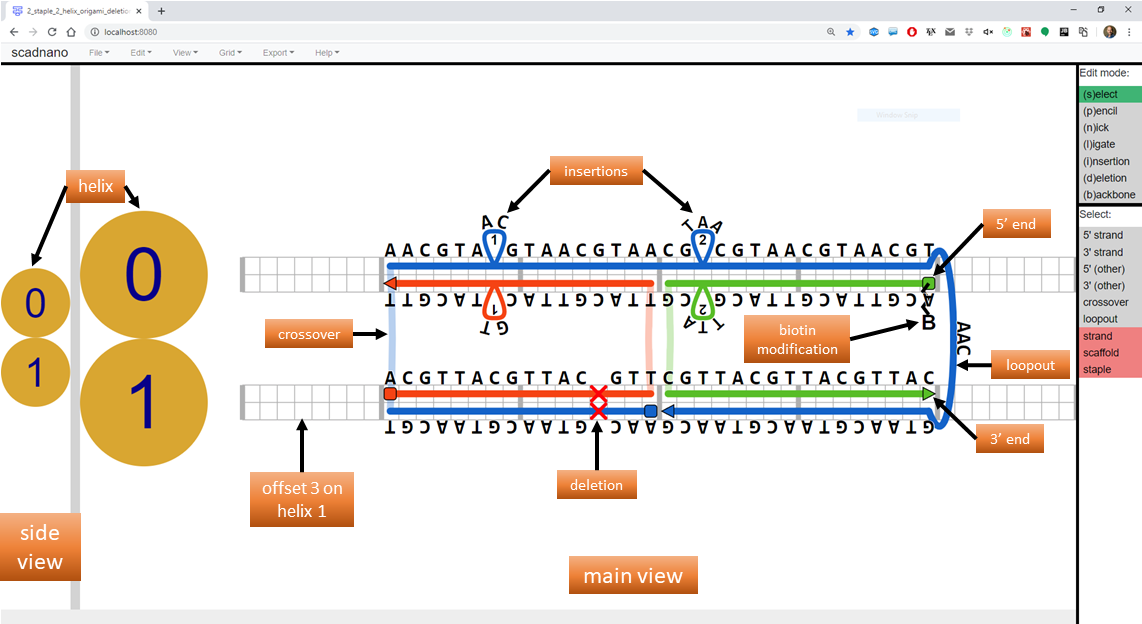
The following Python script produces this design.
```python import scadnano as sc import modifications as mod
def createdesign() -> sc.Design: # helices helices = [sc.Helix(maxoffset=48), sc.Helix(max_offset=48)]
# left staple
stap_left_domain1 = sc.Domain(helix=1, forward=True, start=8, end=24)
stap_left_domain0 = sc.Domain(helix=0, forward=False, start=8, end=24)
stap_left = sc.Strand(domains=[stap_left_domain1, stap_left_domain0])

# right staple
stap_right_domain0 = sc.Domain(helix=0, forward=False, start=24, end=40)
stap_right_domain1 = sc.Domain(helix=1, forward=True, start=24, end=40)
stap_right = sc.Strand(domains=[stap_right_domain0, stap_right_domain1])
stap_right.set_modification_5p(mod.biotin_5p)

# scaffold
scaf_domain1_left = sc.Domain(helix=1, forward=False, start=8, end=24)
scaf_domain0 = sc.Domain(helix=0, forward=True, start=8, end=40)
loopout = sc.Loopout(length=3)
scaf_domain1_right = sc.Domain(helix=1, forward=False, start=24, end=40)
scaf = sc.Strand(domains=[scaf_domain1_left, scaf_domain0, loopout, scaf_domain1_right], is_scaffold=True)

# whole design
design = sc.Design(helices=helices, strands=[scaf, stap_left, stap_right], grid=sc.square)

# deletions and insertions added to design are added to both strands on a helix
design.add_deletion(helix=1, offset=20)
design.add_insertion(helix=0, offset=14, length=1)
design.add_insertion(helix=0, offset=26, length=2)

# also assigns complement to strands other than scaf bound to it
design.assign_dna(scaf, 'AACGT' * 18)

return design
if name == 'main': design = createdesign() design.writescadnanofile(directory='outputdesigns') ```
Running the code above produces a .sc file that, if loaded into scadnano, should appear as in the screenshot above. The web interface README explains many of the terms used in the code (domain, helix, loopout, insertion, etc.).
Abbreviated syntax with chained methods
Instead of explicitly creating variables and objects representing each domain in each strand, there is a shorter syntax using chained method calls. Instead of the above, create only the helices first, then create the Design. Then strands can be added using a shorter syntax, to describe how to draw the strand starting at the 5' end and moving to the 3' end. The following is a modified version of the above create_design function using these chained methods:
```python def createdesign() -> sc.Design: # helices helices = [sc.Helix(maxoffset=48), sc.Helix(max_offset=48)]
# whole design
design = sc.Design(helices=helices, grid=sc.square)

# for absolute offsets, call method "to"
# left staple
design.draw_strand(1, 8).to(24).cross(0).to(8)

# for relative offsets, call method "move"
# right staple
design.draw_strand(0, 40).move(-16).cross(1).move(16).with_modification_5p(mod.biotin_5p)

# scaffold
design.draw_strand(1, 24).move(-16).cross(0).move(32).loopout(1, 3).move(-16).as_scaffold()

# deletions and insertions added to design are added to both strands on a helix
design.add_deletion(helix=1, offset=20)
design.add_insertion(helix=0, offset=14, length=1)
design.add_insertion(helix=0, offset=26, length=2)

# also assigns complement to strands other than scaf bound to it
design.assign_dna(design.scaffold, 'AACGT' * 18)

return design
```
Documentation is available in the API docs.
StrandBuilder object for iteratively building up strands with many domains
The method Design.draw_strand, as well as all those that follow it in a chained method call (e.g., move, cross, etc.) all return an instance of the class StrandBuilder.
Above, that StrandBuilder instance is anonymous, i.e., never assigned to a variable.
Some long strands may be easier to specify with loops, for example an M13 scaffold strand for an origami.
If so, then to use the above methods, assign the StrandBuilder object to a variable, and call the relevant methods on that object to build up the strand in each iteration of the loop.
For example, the following modification of the above create_design function creates a linear scaffold strand that zig-zags back and forth across 32 helices:
python
def create_design() -> sc.Design:
    num_helices = 32
    helices = [sc.Helix(max_offset=200) for _ in range(num_helices)]
    design = sc.Design(helices=helices, grid=sc.square)
    strand_builder = design.draw_strand(0, 0)
    for helix in range(num_helices):
        # move forward if on an even helix, otherwise move in reverse
        move_distance = 200 if helix % 2 == 0 else -200
        strand_builder.move(move_distance)
        if helix < 31: # crossover to next helix, unless it's the last helix
            strand_builder.cross(helix + 1)
    strand_builder.as_scaffold()
    return design
API Documentation
Online documentation of the package API (which classes, methods, functions, and constants are provided by the package) is located here: https://scadnano-python-package.readthedocs.io
Tutorial
A tutorial shows how to create a "standard" 24-helix DNA origami rectangle using the scadnano Python package.
Other examples
Note: If you are reading this on the PyPI website, the links below won't work. They are relative links intended to be read on the GitHub README page.
Several example scripts are located in the examples/ subfolder. Their output is contained in the examples/output_designs/ subfolder.
Contributing
If you wish to contribute to scadnano, please see the CONTRIBUTING document to contribute to the scadnano Python package. There is also a CONTRIBUTING document for the web interface.
Owner
- Name: UC-Davis Molecular Computing Group
- Login: UC-Davis-molecular-computing
- Kind: organization
- Email: doty@ucdavis.edu
- Location: Davis, CA, USA
- Website: https://web.cs.ucdavis.edu/~doty/
- Repositories: 6
- Profile: https://github.com/UC-Davis-molecular-computing
GitHub Events
Total
- Create event: 4
- Release event: 4
- Issues event: 4
- Watch event: 3
- Delete event: 2
- Issue comment event: 12
- Push event: 38
- Pull request review event: 4
- Pull request event: 8
- Fork event: 1
Last Year
- Create event: 4
- Release event: 4
- Issues event: 4
- Watch event: 3
- Delete event: 2
- Issue comment event: 12
- Push event: 38
- Pull request review event: 4
- Pull request event: 8
- Fork event: 1
Committers
Last synced: almost 3 years ago
Top Committers
| Name | Commits | |
|---|---|---|
| David Doty | d****y@u****u | 569 |
| Benjamin Lee | b****e@u****u | 138 |
| David Doty | p****s@g****m | 74 |
| tcosmo | t****n@e****r | 43 |
| Cosmo | t****n@g****m | 22 |
| Constantine Evans | c****t@c****u | 9 |
| Tristan Stérin | t****n@m****e | 8 |
| Daniel Hader | d****l@d****l | 3 |
| Anelise Cho | 2****o | 3 |
| Daniel Hader | D****6@g****m | 3 |
| Constantine Evans | c****s@c****g | 2 |
| Cesar Alonso Guzman Avina | c****1@g****m | 2 |
| Constantine Evans | c****t@c****g | 1 |
| Daniel Hader | d****6@g****m | 1 |
Committer Domains (Top 20 + Academic)
Issues and Pull Requests
Last synced: 11 months ago
All Time
- Total issues: 75
- Total pull requests: 87
- Average time to close issues: 4 months
- Average time to close pull requests: 4 days
- Total issue authors: 6
- Total pull request authors: 8
- Average comments per issue: 0.96
- Average comments per pull request: 0.71
- Merged pull requests: 80
- Bot issues: 0
- Bot pull requests: 0
Past Year
- Issues: 4
- Pull requests: 6
- Average time to close issues: 7 months
- Average time to close pull requests: about 1 hour
- Issue authors: 1
- Pull request authors: 3
- Average comments per issue: 2.25
- Average comments per pull request: 0.33
- Merged pull requests: 3
- Bot issues: 0
- Bot pull requests: 0
Top Authors
Issue Authors
- dave-doty (65)
- cgevans (5)
- UnHumbleBen (2)
- cesarg707 (1)
- ajvetturini (1)
- DanielHader (1)
- Phillip-Drake (1)
Pull Request Authors
- dave-doty (46)
- UnHumbleBen (17)
- DanielHader (7)
- cgevans (7)
- RayBipse (6)
- tcosmo (6)
- anelisecho (1)
- cesarg707 (1)
Top Labels
Issue Labels
Pull Request Labels
Packages
- Total packages: 2
-
Total downloads:
- pypi 282 last-month
-
Total dependent packages: 1
(may contain duplicates) -
Total dependent repositories: 4
(may contain duplicates) - Total versions: 71
- Total maintainers: 2
pypi.org: scadnano
Python scripting library for generating designs readable by scadnano.
- Homepage: https://github.com/UC-Davis-molecular-computing/scadnano-python-package
- Documentation: https://scadnano.readthedocs.io/
- License: MIT
-
Latest release: 0.20.1
published about 1 year ago
Rankings
Maintainers (2)
pypi.org: scadnano-test
Python scripting library for generating designs readable by scadnano.
- Homepage: https://github.com/UC-Davis-molecular-computing/scadnano-python-package
- Documentation: https://scadnano-test.readthedocs.io/
- License: MIT
-
Latest release: 0.17.1
published over 4 years ago
Rankings
Maintainers (1)
Dependencies
- dataclasses >=0.6
- tabulate *
- xlwt *
- actions/checkout v2 composite
- actions/setup-python v2 composite
- actions/checkout v2.3.4 composite
- actions/setup-python v2 composite
- actions/checkout v2 composite
- actions/setup-python v2 composite
- marvinpinto/action-automatic-releases latest composite
- actions/checkout v2 composite
- actions/setup-python v1 composite
- s-weigand/setup-conda v1 composite