contrib
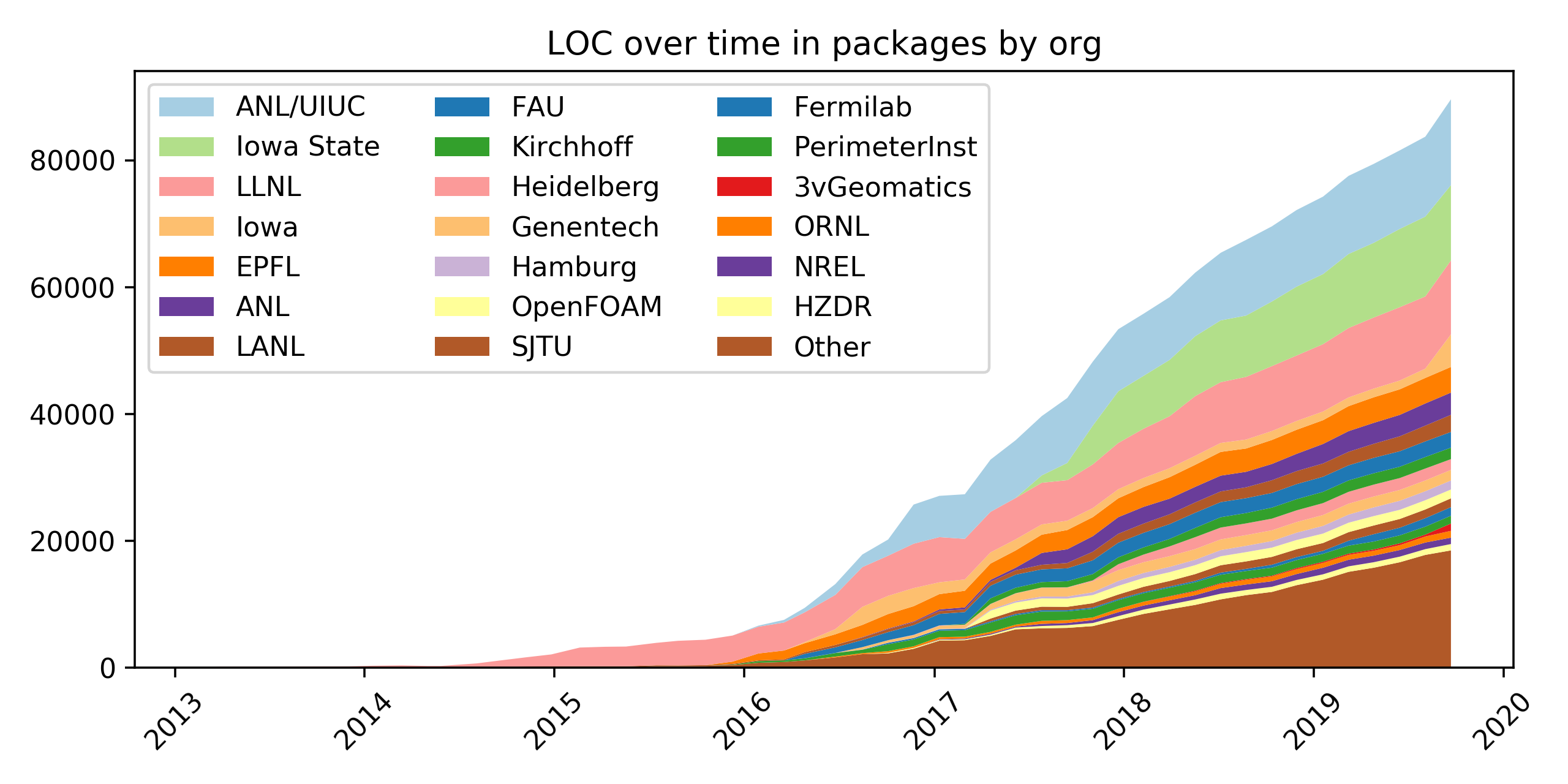
A python package for making stacked area plots of contributions over time.
Science Score: 10.0%
This score indicates how likely this project is to be science-related based on various indicators:
-
○CITATION.cff file
-
○codemeta.json file
-
○.zenodo.json file
-
○DOI references
-
○Academic publication links
-
✓Committers with academic emails
1 of 3 committers (33.3%) from academic institutions -
○Institutional organization owner
-
○JOSS paper metadata
-
○Scientific vocabulary similarity
Low similarity (18.0%) to scientific vocabulary
Keywords
Repository
A python package for making stacked area plots of contributions over time.
Basic Info
- Host: GitHub
- Owner: spack
- License: other
- Language: Python
- Default Branch: main
- Size: 301 KB
Statistics
- Stars: 6
- Watchers: 5
- Forks: 3
- Open Issues: 2
- Releases: 0
Topics
Metadata Files
README.md
Contrib




A python package for making stacked area plots of contributions to a git repository over time. Plots can show contributions by authors, or by organizations.
- Installation using pip
- Usage on your local machine
- Docker container usage, locally or via GitHub Actions
- Related Projects of interest
- License information.
Installation
contrib is on PyPI, so you can just pip install it:
console
$ pip install contrib
Alternately, you can clone this project, add its directory to your
PYTHONPATH, and add the bin directory to your PATH.
Usage
To use contrib, you'll need to create a configuration file telling it
where to find your code. Below is an example for Spack; you can find a
complete example in the
spack-contributions repo.
Here's an example contrib.yaml:
```yaml contrib: # Path to your git repository. to run git blame on. # Consider making this a git submodule. repo: ./spack
# JSON file mapping authors to organizations (optional) orgmap: ./author-to-org.json
# Separate parts of the repository to process (optional). For each # commit, contrib will look for files that match the patterns in each # part. For a simple repo, you may only need one regular expression # per part. In Spack, the packages have moved around in the repo over # time, so we provide multiple patterns. Contrib will use the first # pattern matched by any file in each commit. parts: packages: - ^var/spack/repos/builtin/packages/..py$ - ^var/spack/packages/..py$ - ^lib/spack/spack/packages/.*.py$ ```
The repo needs to be in your local filesystem, preferably in the same
directory as contrib.yaml. orgmap is optional (see below for how to
generate it). parts is also optional; if you do not specify it, there
will be one part called all that matches everything:
yaml
    parts:
      all:
        - ^.*$
You can name your parts anything; see the example above for how to model a repository where different logical parts have moved around in subdirectories.
Mapping authors to organizations
The orgmap (author-to-org.json in the example above) is optional. If
you choose to provide it, it should be simple json dictionary mapping
authors to organizations:
json
{
  "Author 1": "UIUC",
  "Author 2": "LBL",
  ...
  "Author N": "LLNL"
}
You can run contrib --update-org-map to generate an orgmap to start
with. contrib will look at your repository's history and generate the
file automatically:
```console $ contrib --update-org-map ==> Added 503 new authors to 'author-to-org.json' ==> New orgmap file created in 'author-to-org.json'. ==> Add it to './contrib.yaml' like this:
contrib:
    orgmap: author-to-org.json
```
If you then add this file to your contrib.yaml, you can update it later
as your repository evolves:
console
$ contrib --update-org-map
==> Added 10 new authors to 'author-to-org.json'
Newly added authors will be labeled as unknown <email from git> in the
json file:
json
  "Author 1": "unknown <foo@bar.com>",
  "Author 2": "unknown <444532+someusername@users.noreply.github.com>",
  "Author 3": "unknown <user@example.com>",
You can replace these with valid organizations, or just leave them and
they'll show up as "unknown" in the contrib plots.
Running
Once you've got all of that set up, you can run contrib in the
directory where contrib.yaml lives:
```console $ ls author-to-org.json contrib.yaml $ contrib ==> Indexing 49 commits.
STARTED 0/49 53ab298e88f80454f7f7c20ef200a3dbd0870473 packages: processed 45/3487 blames (9.04/s) ... ```
By default, contrib will sample 50 commits from your repository and
plot them. If you want it to plot fewer samples, you can run contrib
--samples SAMPLES where SAMPLES is a number of your choosing.
contrib tries to use the available processors on the machine it is
run, and by default it will run parallel git blame jobs. You can
control the parallelism with the --jobs JOBS argument.
contrib has to run git blame for each sampled commit and for each
file matched by the parts section of your contrib.yaml file (or for
all files if parts is not provided), so it can take a long time to run
if your repo's history is long. contrib's output shows how many git
blame calls remain and how fast blames are currently completing.
Cached data
contrib caches results of git blame in a directory called
line-data. For large repositories, this can get to be quite large, so
make sure you have a decent amount of space available (gigabytes for
large repositories).
Docker
If you don't want to worry about installing dependencies, you can build a local Docker container as follows:
bash
$ docker build -t spack/contrib .
The entrypoint to the container is intended to be run as a GitHub action, however you can provide the same input arguments via environment variables to achieve the same functionality.
Entrypoint
By default, the entrypoint is the entrypoint.sh provided in the repository, so it expects environment variables defined with your inputs and GitHub token:
bash
docker run -it --env GITHUB_TOKEN=$GITHUB_TOKEN \
               --env INPUT_REPO=https://github.com/spack/spack \
               --env INPUT_SAMPLES=2 \
               --env INPUT_FILE=contrib.yaml \
               --env INPUT_FORMAT=pdf \
               --env INPUT_AUTHORS=true \
               --env INPUT_WORKDIR=examples spack/contrib
However you could easily change the entrypoint to interact with contrib directly:
bash
docker run -it --entrypoint /opt/conda/bin/contrib spack/contrib
GitHub Actions
It might be the case that you instead want to run a GitHub action so that the graphic is generated on pull requests, or even as a scheduled task. You can see the .github/workflows/generate-contrib-graphic.yml that is set up to run with this repository and basically:
- Defines the input files (authors and yaml) to be in the working directory examples
- Clones the spack repository
- Runs contrib with all settings set to generate a pdf
- Saves a graphic as output, and caches the line-data folder
The GitHub action is defined to exist for this repository, meaning that it's metadata is defined in action.yml and built from the included Dockerfile that we've been using. When you want to generate the action for your repository, you can reference it here. See the examples section below for the full example. A full table of variables that you can use is provided here:
Inputs
| variable name | variable type | variable description |
|---------------|----------------------------------------------|------------------------------------------------------------------|
| repo | optional | A url to clone, if the repository isn't already in workdir |
| samples | optional | Number of commits to sample (default is 2) |
| workdir | optional | Change to this working directory before clone or execution |
| file | optional | Path to contrib.yaml (default) with configuration and settings |
| format | optional | Format of output file (one of png, svg, jpg, gif, pdf) |
| authors | optional | If set, update from authors file referenced in config file |
| topn | optional | Number of contributions before collapsing into 'other' |
| verbose | optional | Print verbose output for generation |
Outputs
| variable name | variable type | variable description |
|---------------|-----------------------------------------------------|--------------------------------------------------------------------|
| plot | optional to use | the path to the generated output ${{ steps.<step>.outputs.plot }}|
See the example above, or the one provided with the repository in .github/workflows for another example. The action above will generate the plot, and it's up to you to decide what to do with it. You might:
- save as an artifact for manual download
- open a pull request to another repository
- push directly to a branch
Example
The following example will reference just one commit from spack, and generate files called
loc-in-packages-by-*.pdf that we upload as an artifact. We will also print verbose output,
and using the files in the examples folder, generate a graphic. This run takes
about 6 minutes for the graphic generation, and a few more for building the container and
uploading the artifact. Here is an example step that uses the master branch.
```yaml contrib: name: Generate Contribution Graphic runs-on: ubuntu-latest steps: - name: Checkout Repository uses: actions/checkout@v2 - name: Run GitHub Action uses: spack/contrib@master env: token: ${{ secrets.GITHUB_TOKEN }} with:
      # A url to clone, if contrib.yaml "repo" doesn't exist in the repository
      repo: https://github.com/spack/spack

      # number of commit samples, set to 0 for all commits
      samples: 2

      # Working directory to do the clone, and expect contrib and authors files
      workdir: examples

      # The contrib.yaml flie with configuration
      file: contrib.yaml

      # Authors should be set in the file (contrib.yaml)
      authors: true

      # number of contributions to show before collapse into "other"
      topn: 10

      # format of file to save (pdf, svg, png, jpg, gif)
      format: pdf

      # Print verbose output (remove for regular)
      verbose: true
```
Note that (it's recommended to use a tagged or released version instead of a branch).
Interactive Generation
You can test, debug, or otherwise interact with contrib in the container by shelling inside:
```bash $ docker run -it --entrypoint bash spack/contrib
$ which contrib /opt/conda/bin/contrib root@941ae1020363:/code# contrib --help usage: contrib [-h] [-i] [-v] [-f FILE] [-n TOPN] [-s SAMPLES] [-j JOBS] [-u] [--format {pdf,svg,png,jpg,gif}]
optional arguments: -h, --help show this help message and exit -i, --index build the commit index and display progress, but do not plot -v, --verbose print out each commit as it is processed -f FILE, --file FILE path to valid contrib.yaml (default './contrib.yaml') -n TOPN, --topn TOPN number of contributors to show before collapsing into 'other' -s SAMPLES, --samples SAMPLES number of commits to sample for the chart (0 for all commits) -j JOBS, --jobs JOBS number of concurrent blame jobs (default #cpus) -u, --update-org-map update or create an author-to-organization mapping --format {pdf,svg,png,jpg,gif} format for images (default pdf) ```
Let's (starting at the /code working directory) define some environment variables. You can generate a personal access token for the GitHub token.
bash
export GITHUB_TOKEN=mysecrettoken
export INPUT_WORKDIR=examples
export INPUT_REPO=https://github.com/spack/spack
export INPUT_SAMPLES=2
export INPUT_FILE=contrib.yaml
export INPUT_FORMAT=png
export INPUT_TOPN=50
export INPUT_AUTHORS=true
We can then run the entrypoint to show the verbose output:
bash
./entrypoint.sh
Again, this is what would be run if we ran the container from our host and provided these environment variables.
Related projects
If you like contrib, you may be interested in the projects below.
contrib does some very specific things we wanted for Spack; these
systems can provide much more sophisticated metrics:
- Augur (https://github.com/chaoss/augur)
- Labours (https://pypi.org/project/labours/), purportedly much faster
than
git-of-theseus git-of-theseus(https://github.com/erikbern/git-of-theseus)
License
Contrib is part of the Spack project. Spack is distributed under the terms of both the MIT license and the Apache License (Version 2.0). Users may choose either license, at their option.
All new contributions must be made under both the MIT and Apache-2.0 licenses.
See LICENSE-MIT, LICENSE-APACHE, COPYRIGHT, and NOTICE for details.
SPDX-License-Identifier: (Apache-2.0 OR MIT)
LLNL-CODE-647188
Owner
- Name: Spack
- Login: spack
- Kind: organization
- Location: Worldwide
- Website: https://spack.io
- Twitter: spackpm
- Repositories: 48
- Profile: https://github.com/spack
A flexible package manager that supports multiple versions, configurations, platforms, and compilers.
GitHub Events
Total
- Issues event: 1
- Watch event: 1
- Issue comment event: 1
- Pull request event: 1
- Fork event: 2
Last Year
- Issues event: 1
- Watch event: 1
- Issue comment event: 1
- Pull request event: 1
- Fork event: 2
Committers
Last synced: over 2 years ago
Top Committers
| Name | Commits | |
|---|---|---|
| Todd Gamblin | t****n@l****v | 35 |
| Vanessasaurus | v****t@g****m | 1 |
| Adam J. Stewart | a****6@g****m | 1 |
Committer Domains (Top 20 + Academic)
Issues and Pull Requests
Last synced: over 1 year ago
All Time
- Total issues: 1
- Total pull requests: 3
- Average time to close issues: N/A
- Average time to close pull requests: 12 days
- Total issue authors: 1
- Total pull request authors: 3
- Average comments per issue: 0.0
- Average comments per pull request: 1.33
- Merged pull requests: 2
- Bot issues: 0
- Bot pull requests: 0
Past Year
- Issues: 1
- Pull requests: 1
- Average time to close issues: N/A
- Average time to close pull requests: N/A
- Issue authors: 1
- Pull request authors: 1
- Average comments per issue: 0.0
- Average comments per pull request: 1.0
- Merged pull requests: 0
- Bot issues: 0
- Bot pull requests: 0
Top Authors
Issue Authors
- adamjstewart (1)
Pull Request Authors
- Rayyanbaig1243 (2)
- vsoch (1)
- adamjstewart (1)
Top Labels
Issue Labels
Pull Request Labels
Packages
- Total packages: 2
-
Total downloads:
- pypi 5,036 last-month
-
Total dependent packages: 0
(may contain duplicates) -
Total dependent repositories: 23
(may contain duplicates) - Total versions: 5
- Total maintainers: 1
pypi.org: contrib
A python package for making stacked area plots of contributions over time.
- Homepage: https://github.com/spack/contrib
- Documentation: https://contrib.readthedocs.io/
- License: Apache-2.0 OR MIT
-
Latest release: 0.3.0
published almost 7 years ago
Rankings
Maintainers (1)
spack.io: py-contrib
A python package for making stacked area plots of contributions over time.
- Homepage: https://github.com/spack/contrib
- License: []
-
Latest release: 0.3.0
published over 1 year ago
Rankings
Dependencies
- codecov *
- jsonschema *
- matplotlib *
- pytest *
- python-dateutil *
- pyyaml *
- setuptools *
- jsonschema *
- matplotlib *
- python-dateutil *
- pyyaml *
- setuptools *