Science Score: 36.0%
This score indicates how likely this project is to be science-related based on various indicators:
-
○CITATION.cff file
-
✓codemeta.json file
Found codemeta.json file -
✓.zenodo.json file
Found .zenodo.json file -
○DOI references
-
✓Academic publication links
Links to: arxiv.org -
○Committers with academic emails
-
○Institutional organization owner
-
○JOSS paper metadata
-
○Scientific vocabulary similarity
Low similarity (15.2%) to scientific vocabulary
Keywords
Keywords from Contributors
Repository
🦆 Contextually-keyed word vectors
Basic Info
- Host: GitHub
- Owner: explosion
- License: mit
- Language: Python
- Default Branch: master
- Homepage: https://explosion.ai/blog/sense2vec-reloaded
- Size: 1.16 MB
Statistics
- Stars: 1,652
- Watchers: 49
- Forks: 241
- Open Issues: 24
- Releases: 18
Topics
Metadata Files
README.md

sense2vec: Contextually-keyed word vectors
sense2vec (Trask et. al, 2015) is a nice twist on word2vec that lets you learn more interesting and detailed word vectors. This library is a simple Python implementation for loading, querying and training sense2vec models. For more details, check out our blog post. To explore the semantic similarities across all Reddit comments of 2015 and 2019, see the interactive demo.
🦆 Version 2.0 (for spaCy v3) out now! Read the release notes here.




✨ Features

- Query vectors for multi-word phrases based on part-of-speech tags and entity labels.
- spaCy pipeline component and extension attributes.
- Fully serializable so you can easily ship your sense2vec vectors with your spaCy model packages.
- Optional caching of nearest neighbors for super fast "most similar" queries.
- Train your own vectors using a pretrained spaCy model, raw text and GloVe or Word2Vec via fastText (details).
- Prodigy annotation recipes for evaluating models, creating lists of similar multi-word phrases and converting them to match patterns, e.g. for rule-based NER or to bootstrap NER annotation (details & examples).
🚀 Quickstart
Standalone usage
```python from sense2vec import Sense2Vec
s2v = Sense2Vec().fromdisk("/path/to/s2vreddit2015md") query = "naturallanguageprocessing|NOUN" assert query in s2v vector = s2v[query] freq = s2v.getfreq(query) mostsimilar = s2v.most_similar(query, n=3)
[('machine_learning|NOUN', 0.8986967),
('computer_vision|NOUN', 0.8636297),
('deep_learning|NOUN', 0.8573361)]
```
Usage as a spaCy pipeline component
⚠️ Note that this example describes usage with spaCy v3. For usage with spaCy v2, download
sense2vec==1.0.3and check out thev1.xbranch of this repo.
```python import spacy
nlp = spacy.load("encorewebsm") s2v = nlp.addpipe("sense2vec") s2v.fromdisk("/path/to/s2vreddit2015md")
doc = nlp("A sentence about natural language processing.") assert doc[3:6].text == "natural language processing" freq = doc[3:6]..s2vfreq vector = doc[3:6]..s2vvec mostsimilar = doc[3:6]..s2vmostsimilar(3)
[(('machine learning', 'NOUN'), 0.8986967),
(('computer vision', 'NOUN'), 0.8636297),
(('deep learning', 'NOUN'), 0.8573361)]
```
Interactive demos
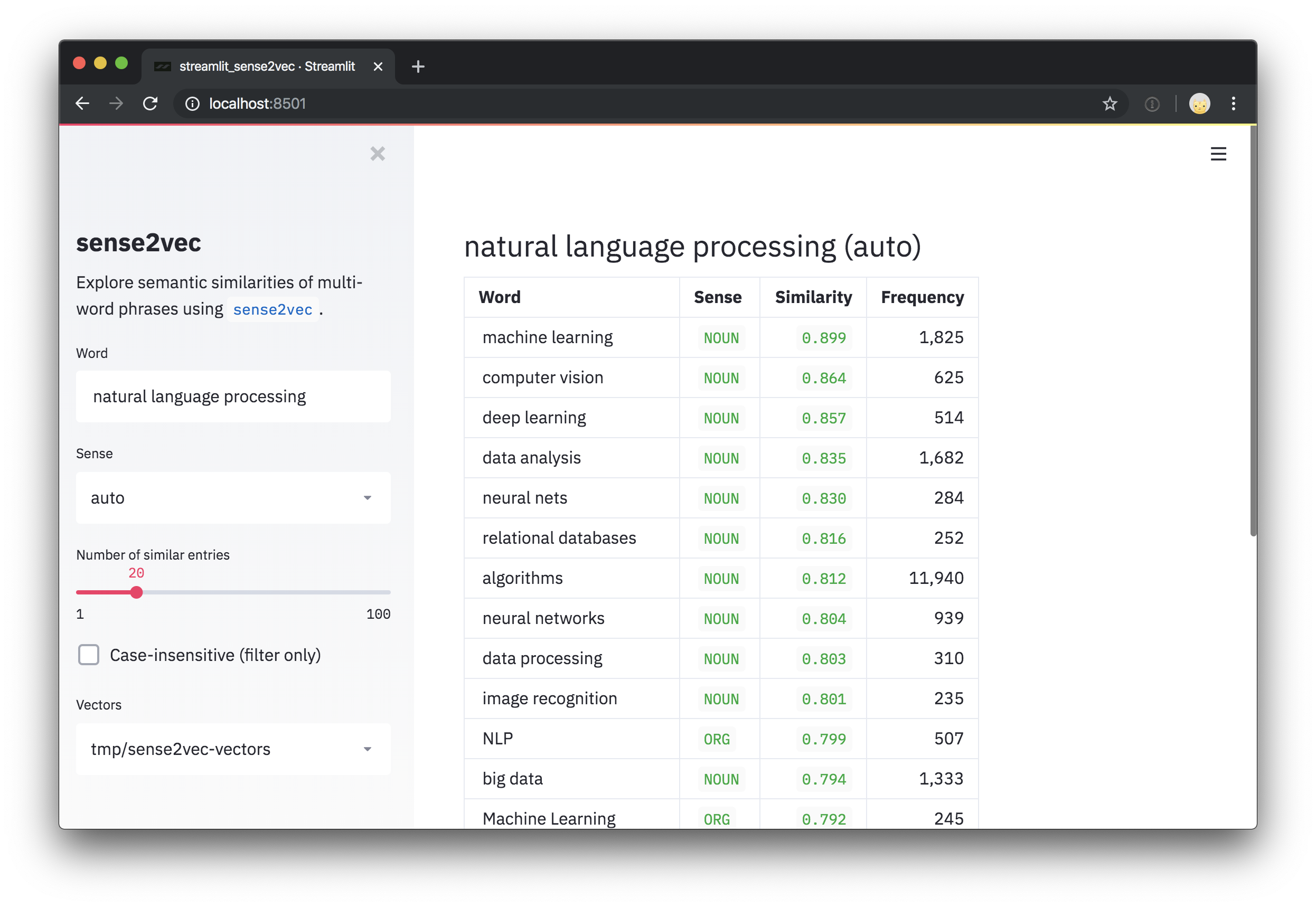
To try out our pretrained vectors trained on Reddit comments, check out the interactive sense2vec demo.
This repo also includes a Streamlit demo script for
exploring vectors and the most similar phrases. After installing streamlit,
you can run the script with streamlit run and one or more paths to
pretrained vectors as positional arguments on the command line. For
example:
bash
pip install streamlit
streamlit run https://raw.githubusercontent.com/explosion/sense2vec/master/scripts/streamlit_sense2vec.py /path/to/vectors
Pretrained vectors
To use the vectors, download the archive(s) and pass the extracted directory to
Sense2Vec.from_disk or Sense2VecComponent.from_disk. The vector files are
attached to the GitHub release. Large files have been split into multi-part
downloads.
| Vectors | Size | Description | 📥 Download (zipped) |
| -------------------- | -----: | ---------------------------- | ------------------------------------------------------------------------------------------------------------------------------------------------------------------------------------------------------------------------------------------------------------------------------------------------------------------------- |
| s2v_reddit_2019_lg | 4 GB | Reddit comments 2019 (01-07) | part 1, part 2, part 3 |
| s2v_reddit_2015_md | 573 MB | Reddit comments 2015 | part 1 |
To merge the multi-part archives, you can run the following:
bash
cat s2v_reddit_2019_lg.tar.gz.* > s2v_reddit_2019_lg.tar.gz
⏳ Installation & Setup
sense2vec releases are available on pip:
bash
pip install sense2vec
To use pretrained vectors, download
one of the vector packages, unpack the .tar.gz archive
and point from_disk to the extracted data directory:
python
from sense2vec import Sense2Vec
s2v = Sense2Vec().from_disk("/path/to/s2v_reddit_2015_md")
👩💻 Usage
Usage with spaCy v3
The easiest way to use the library and vectors is to plug it into your spaCy
pipeline. The sense2vec package exposes a Sense2VecComponent, which can be
initialised with the shared vocab and added to your spaCy pipeline as a
custom pipeline component.
By default, components are added to the end of the pipeline, which is the
recommended position for this component, since it needs access to the dependency
parse and, if available, named entities.
```python import spacy from sense2vec import Sense2VecComponent
nlp = spacy.load("encorewebsm") s2v = nlp.addpipe("sense2vec") s2v.fromdisk("/path/to/s2vreddit2015md") ```
The component will add several
extension attributes and methods
to spaCy's Token and Span objects that let you retrieve vectors and
frequencies, as well as most similar terms.
python
doc = nlp("A sentence about natural language processing.")
assert doc[3:6].text == "natural language processing"
freq = doc[3:6]._.s2v_freq
vector = doc[3:6]._.s2v_vec
most_similar = doc[3:6]._.s2v_most_similar(3)
For entities, the entity labels are used as the "sense" (instead of the token's part-of-speech tag):
python
doc = nlp("A sentence about Facebook and Google.")
for ent in doc.ents:
    assert ent._.in_s2v
    most_similar = ent._.s2v_most_similar(3)
Available attributes
The following extension attributes are exposed on the Doc object via the ._
property:
| Name | Attribute Type | Type | Description |
| ------------- | -------------- | ---- | ----------------------------------------------------------------------------------- |
| s2v_phrases | property | list | All sense2vec-compatible phrases in the given Doc (noun phrases, named entities). |
The following attributes are available via the ._ property of Token and
Span objects – for example token._.in_s2v:
| Name | Attribute Type | Return Type | Description |
| ------------------ | -------------- | ------------------ | ---------------------------------------------------------------------------------- |
| in_s2v | property | bool | Whether a key exists in the vector map. |
| s2v_key | property | unicode | The sense2vec key of the given object, e.g. "duck NOUN". |
| s2v_vec | property | ndarray[float32] | The vector of the given key. |
| s2v_freq | property | int | The frequency of the given key. |
| s2v_other_senses | property | list | Available other senses, e.g. "duck\|VERB" for "duck\|NOUN". |
| s2v_most_similar | method | list | Get the n most similar terms. Returns a list of ((word, sense), score) tuples. |
| s2v_similarity | method | float | Get the similarity to another Token or Span. |
⚠️ A note on span attributes: Under the hood, entities in
doc.entsareSpanobjects. This is why the pipeline component also adds attributes and methods to spans and not just tokens. However, it's not recommended to use the sense2vec attributes on arbitrary slices of the document, since the model likely won't have a key for the respective text.Spanobjects also don't have a part-of-speech tag, so if no entity label is present, the "sense" defaults to the root's part-of-speech tag.
Adding sense2vec to a trained pipeline
If you're training and packaging a spaCy pipeline and want to include a
sense2vec component in it, you can load in the data via the
[initialize] block of the
training config:
```ini [initialize.components]
[initialize.components.sense2vec] datapath = "/path/to/s2vreddit2015md" ```
Standalone usage
You can also use the underlying Sense2Vec class directly and load in the
vectors using the from_disk method. See below for the available API methods.
python
from sense2vec import Sense2Vec
s2v = Sense2Vec().from_disk("/path/to/reddit_vectors-1.1.0")
most_similar = s2v.most_similar("natural_language_processing|NOUN", n=10)
⚠️ Important note: To look up entries in the vectors table, the keys need to follow the scheme of
phrase_text|SENSE(note the_instead of spaces and the|before the tag or label) – for example,machine_learning|NOUN. Also note that the underlying vector table is case-sensitive.
🎛 API
class Sense2Vec
The standalone Sense2Vec object that holds the vectors, strings and
frequencies.
method Sense2Vec.__init__
Initialize the Sense2Vec object.
| Argument | Type | Description |
| -------------- | --------------------------- | ---------------------------------------------------------------------------------------------------------------------- |
| shape | tuple | The vector shape. Defaults to (1000, 128). |
| strings | spacy.strings.StringStore | Optional string store. Will be created if it doesn't exist. |
| senses | list | Optional list of all available senses. Used in methods that generate the best sense or other senses. |
| vectors_name | unicode | Optional name to assign to the Vectors table, to prevent clashes. Defaults to "sense2vec". |
| overrides | dict | Optional custom functions to use, mapped to names registered via the registry, e.g. {"make_key": "custom_make_key"}. |
| RETURNS | Sense2Vec | The newly constructed object. |
python
s2v = Sense2Vec(shape=(300, 128), senses=["VERB", "NOUN"])
method Sense2Vec.__len__
The number of rows in the vectors table.
| Argument | Type | Description | | ----------- | ---- | ---------------------------------------- | | RETURNS | int | The number of rows in the vectors table. |
python
s2v = Sense2Vec(shape=(300, 128))
assert len(s2v) == 300
method Sense2Vec.__contains__
Check if a key is in the vectors table.
| Argument | Type | Description |
| ----------- | ------------- | -------------------------------- |
| key | unicode / int | The key to look up. |
| RETURNS | bool | Whether the key is in the table. |
python
s2v = Sense2Vec(shape=(10, 4))
s2v.add("avocado|NOUN", numpy.asarray([4, 2, 2, 2], dtype=numpy.float32))
assert "avocado|NOUN" in s2v
assert "avocado|VERB" not in s2v
method Sense2Vec.__getitem__
Retrieve a vector for a given key. Returns None if the key is not in the table.
| Argument | Type | Description |
| ----------- | --------------- | --------------------- |
| key | unicode / int | The key to look up. |
| RETURNS | numpy.ndarray | The vector or None. |
python
vec = s2v["avocado|NOUN"]
method Sense2Vec.__setitem__
Set a vector for a given key. Will raise an error if the key doesn't exist. To
add a new entry, use Sense2Vec.add.
| Argument | Type | Description |
| -------- | --------------- | ------------------ |
| key | unicode / int | The key. |
| vector | numpy.ndarray | The vector to set. |
python
vec = s2v["avocado|NOUN"]
s2v["avacado|NOUN"] = vec
method Sense2Vec.add
Add a new vector to the table.
| Argument | Type | Description |
| -------- | --------------- | ------------------------------------------------------------ |
| key | unicode / int | The key to add. |
| vector | numpy.ndarray | The vector to add. |
| freq | int | Optional frequency count. Used to find best matching senses. |
python
vec = s2v["avocado|NOUN"]
s2v.add("🥑|NOUN", vec, 1234)
method Sense2Vec.get_freq
Get the frequency count for a given key.
| Argument | Type | Description |
| ----------- | ------------- | ------------------------------------------------- |
| key | unicode / int | The key to look up. |
| default | - | Default value to return if no frequency is found. |
| RETURNS | int | The frequency count. |
python
vec = s2v["avocado|NOUN"]
s2v.add("🥑|NOUN", vec, 1234)
assert s2v.get_freq("🥑|NOUN") == 1234
method Sense2Vec.set_freq
Set a frequency count for a given key.
| Argument | Type | Description |
| -------- | ------------- | ----------------------------- |
| key | unicode / int | The key to set the count for. |
| freq | int | The frequency count. |
python
s2v.set_freq("avocado|NOUN", 104294)
method Sense2Vec.__iter__, Sense2Vec.items
Iterate over the entries in the vectors table.
| Argument | Type | Description | | ---------- | ----- | ----------------------------------------- | | YIELDS | tuple | String key and vector pairs in the table. |
```python for key, vec in s2v: print(key, vec)
for key, vec in s2v.items(): print(key, vec) ```
method Sense2Vec.keys
Iterate over the keys in the table.
| Argument | Type | Description | | ---------- | ------- | ----------------------------- | | YIELDS | unicode | The string keys in the table. |
python
all_keys = list(s2v.keys())
method Sense2Vec.values
Iterate over the vectors in the table.
| Argument | Type | Description |
| ---------- | --------------- | ------------------------- |
| YIELDS | numpy.ndarray | The vectors in the table. |
python
all_vecs = list(s2v.values())
property Sense2Vec.senses
The available senses in the table, e.g. "NOUN" or "VERB" (added at
initialization).
| Argument | Type | Description | | ----------- | ---- | --------------------- | | RETURNS | list | The available senses. |
python
s2v = Sense2Vec(senses=["VERB", "NOUN"])
assert "VERB" in s2v.senses
property Sense2vec.frequencies
The frequencies of the keys in the table, in descending order.
| Argument | Type | Description |
| ----------- | ---- | -------------------------------------------------- |
| RETURNS | list | The (key, freq) tuples by frequency, descending. |
python
most_frequent = s2v.frequencies[:10]
key, score = s2v.frequencies[0]
method Sense2vec.similarity
Make a semantic similarity estimate of two keys or two sets of keys. The default estimate is cosine similarity using an average of vectors.
| Argument | Type | Description |
| ----------- | ------------------------ | ----------------------------------- |
| keys_a | unicode / int / iterable | The string or integer key(s). |
| keys_b | unicode / int / iterable | The other string or integer key(s). |
| RETURNS | float | The similarity score. |
python
keys_a = ["machine_learning|NOUN", "natural_language_processing|NOUN"]
keys_b = ["computer_vision|NOUN", "object_detection|NOUN"]
print(s2v.similarity(keys_a, keys_b))
assert s2v.similarity("machine_learning|NOUN", "machine_learning|NOUN") == 1.0
method Sense2Vec.most_similar
Get the most similar entries in the table. If more than one key is provided, the average of the vectors is used. To make this method faster, see the script for precomputing a cache of the nearest neighbors.
| Argument | Type | Description |
| ------------ | ------------------------- | ------------------------------------------------------- |
| keys | unicode / int / iterable | The string or integer key(s) to compare to. |
| n | int | The number of similar keys to return. Defaults to 10. |
| batch_size | int | The batch size to use. Defaults to 16. |
| RETURNS | list | The (key, score) tuples of the most similar vectors. |
```python mostsimilar = s2v.mostsimilar("naturallanguageprocessing|NOUN", n=3)
[('machine_learning|NOUN', 0.8986967),
('computer_vision|NOUN', 0.8636297),
('deep_learning|NOUN', 0.8573361)]
```
method Sense2Vec.get_other_senses
Find other entries for the same word with a different sense, e.g. "duck|VERB"
for "duck|NOUN".
| Argument | Type | Description |
| ------------- | ------------- | ----------------------------------------------------------------- |
| key | unicode / int | The key to check. |
| ignore_case | bool | Check for uppercase, lowercase and titlecase. Defaults to True. |
| RETURNS | list | The string keys of other entries with different senses. |
```python othersenses = s2v.getother_senses("duck|NOUN")
['duck|VERB', 'Duck|ORG', 'Duck|VERB', 'Duck|PERSON', 'Duck|ADJ']
```
method Sense2Vec.get_best_sense
Find the best-matching sense for a given word based on the available senses and
frequency counts. Returns None if no match is found.
| Argument | Type | Description |
| ------------- | ------- | ------------------------------------------------------------------------------------------------------- |
| word | unicode | The word to check. |
| senses | list | Optional list of senses to limit the search to. If not set / empty, all senses in the vectors are used. |
| ignore_case | bool | Check for uppercase, lowercase and titlecase. Defaults to True. |
| RETURNS | unicode | The best-matching key or None. |
python
assert s2v.get_best_sense("duck") == "duck|NOUN"
assert s2v.get_best_sense("duck", ["VERB", "ADJ"]) == "duck|VERB"
method Sense2Vec.to_bytes
Serialize a Sense2Vec object to a bytestring.
| Argument | Type | Description |
| ----------- | ----- | ----------------------------------------- |
| exclude | list | Names of serialization fields to exclude. |
| RETURNS | bytes | The serialized Sense2Vec object. |
python
s2v_bytes = s2v.to_bytes()
method Sense2Vec.from_bytes
Load a Sense2Vec object from a bytestring.
| Argument | Type | Description |
| ------------ | ----------- | ----------------------------------------- |
| bytes_data | bytes | The data to load. |
| exclude | list | Names of serialization fields to exclude. |
| RETURNS | Sense2Vec | The loaded object. |
python
s2v_bytes = s2v.to_bytes()
new_s2v = Sense2Vec().from_bytes(s2v_bytes)
method Sense2Vec.to_disk
Serialize a Sense2Vec object to a directory.
| Argument | Type | Description |
| --------- | ---------------- | ----------------------------------------- |
| path | unicode / Path | The path. |
| exclude | list | Names of serialization fields to exclude. |
python
s2v.to_disk("/path/to/sense2vec")
method Sense2Vec.from_disk
Load a Sense2Vec object from a directory.
| Argument | Type | Description |
| ----------- | ---------------- | ----------------------------------------- |
| path | unicode / Path | The path to load from |
| exclude | list | Names of serialization fields to exclude. |
| RETURNS | Sense2Vec | The loaded object. |
python
s2v.to_disk("/path/to/sense2vec")
new_s2v = Sense2Vec().from_disk("/path/to/sense2vec")
class Sense2VecComponent
The pipeline component to add sense2vec to spaCy pipelines.
method Sense2VecComponent.__init__
Initialize the pipeline component.
| Argument | Type | Description |
| --------------- | --------------------------------------------------------------------------------------------------------------------- | ----------------------------------------------------------------------------------------------------------- |
| vocab | Vocab | The shared Vocab. Mostly used for the shared StringStore. |
| shape | tuple | The vector shape. |
| merge_phrases | bool | Whether to merge sense2vec phrases into one token. Defaults to False. |
| lemmatize | bool | Always look up lemmas if available in the vectors, otherwise default to original word. Defaults to False. |
| overrides | Optional custom functions to use, mapped to names registred via the registry, e.g. {"make_key": "custom_make_key"}. |
| RETURNS | Sense2VecComponent | The newly constructed object. |
python
s2v = Sense2VecComponent(nlp.vocab)
classmethod Sense2VecComponent.from_nlp
Initialize the component from an nlp object. Mostly used as the component
factory for the entry point (see setup.cfg) and to auto-register via the
@spacy.component decorator.
| Argument | Type | Description |
| ----------- | -------------------- | ----------------------------- |
| nlp | Language | The nlp object. |
| **cfg | - | Optional config parameters. |
| RETURNS | Sense2VecComponent | The newly constructed object. |
python
s2v = Sense2VecComponent.from_nlp(nlp)
method Sense2VecComponent.__call__
Process a Doc object with the component. Typically only called as part of the
spaCy pipeline and not directly.
| Argument | Type | Description |
| ----------- | ----- | ------------------------ |
| doc | Doc | The document to process. |
| RETURNS | Doc | the processed document. |
method Sense2Vec.init_component
Register the component-specific extension attributes here and only if the component is added to the pipeline and used – otherwise, tokens will still get the attributes even if the component is only created and not added.
method Sense2VecComponent.to_bytes
Serialize the component to a bytestring. Also called when the component is added
to the pipeline and you run nlp.to_bytes.
| Argument | Type | Description | | ----------- | ----- | ------------------------- | | RETURNS | bytes | The serialized component. |
method Sense2VecComponent.from_bytes
Load a component from a bytestring. Also called when you run nlp.from_bytes.
| Argument | Type | Description |
| ------------ | -------------------- | ------------------ |
| bytes_data | bytes | The data to load. |
| RETURNS | Sense2VecComponent | The loaded object. |
method Sense2VecComponent.to_disk
Serialize the component to a directory. Also called when the component is added
to the pipeline and you run nlp.to_disk.
| Argument | Type | Description |
| -------- | ---------------- | ----------- |
| path | unicode / Path | The path. |
method Sense2VecComponent.from_disk
Load a Sense2Vec object from a directory. Also called when you run
nlp.from_disk.
| Argument | Type | Description |
| ----------- | -------------------- | --------------------- |
| path | unicode / Path | The path to load from |
| RETURNS | Sense2VecComponent | The loaded object. |
class registry
Function registry (powered by
catalogue) to easily customize the
functions used to generate keys and phrases. Allows you to decorate and name
custom functions, swap them out and serialize the custom names when you save out
the model. The following registry options are available:
| Name | Description |
| ------------------------- | -------------------------------------------------------------------------------------------------------------------------------------------------------------------------------------------------------------------------------------------------- |
| registry.make_key | Given a word and sense, return a string of the key, e.g. "word\|sense". |
| registry.split_key | Given a string key, return a (word, sense) tuple. |
| registry.make_spacy_key | Given a spaCy object (Token or Span) and a boolean prefer_ents keyword argument (whether to prefer the entity label for single tokens), return a (word, sense) tuple. Used in extension attributes to generate a key for tokens and spans. |
| registry.get_phrases | Given a spaCy Doc, return a list of Span objects used for sense2vec phrases (typically noun phrases and named entities). |
| registry.merge_phrases | Given a spaCy Doc, get all sense2vec phrases and merge them into single tokens. |
Each registry has a register method that can be used as a function decorator
and takes one argument, the name of the custom function.
```python from sense2vec import registry
@registry.makekey.register("custom") def custommake_key(word, sense): return f"{word}###{sense}"
@registry.splitkey.register("custom") def customsplit_key(key): word, sense = key.split("###") return word, sense ```
When initializing the Sense2Vec object, you can now pass in a dictionary of
overrides with the names of your custom registered functions.
python
overrides = {"make_key": "custom", "split_key": "custom"}
s2v = Sense2Vec(overrides=overrides)
This makes it easy to experiment with different strategies and serializing the strategies as plain strings (instead of having to pass around and/or pickle the functions themselves).
🚂 Training your own sense2vec vectors
The /scripts directory contains command line utilities for
preprocessing text and training your own vectors.
Requirements
To train your own sense2vec vectors, you'll need the following:
- A very large source of raw text (ideally more than you'd use for word2vec, since the senses make the vocabulary more sparse). We recommend at least 1 billion words.
- A pretrained spaCy model that assigns
part-of-speech tags, dependencies and named entities, and populates the
doc.noun_chunks. If the language you need doesn't provide a built in syntax iterator for noun phrases, you'll need to write your own. (Thedoc.noun_chunksanddoc.entsare what sense2vec uses to determine what's a phrase.) - GloVe or
fastText installed and built.
You should be able to clone the repo and run
makein the respective directory.
Step-by-step process
The training process is split up into several steps to allow you to resume at
any given point. Processing scripts are designed to operate on single files,
making it easy to parallellize the work. The scripts in this repo require either
Glove or
fastText which you need to clone
and make.
For Fasttext, the scripts will require the path to the created binary file. If
you're working on Windows, you can build with cmake, or alternatively use the
.exe file from this unofficial repo with FastText binary builds for
Windows: https://github.com/xiamx/fastText/releases.
| | Script | Description |
| ------ | -------------------------------------------------------------------------------------------------------------------------------------------- | ------------------------------------------------------------------------------------------------------------------------------------------------------------------------------------------- |
| 1. | 01_parse.py | Use spaCy to parse the raw text and output binary collections of Doc objects (see DocBin). |
| 2. | 02_preprocess.py | Load a collection of parsed Doc objects produced in the previous step and output text files in the sense2vec format (one sentence per line and merged phrases with senses). |
| 3. | 03_glove_build_counts.py | Use GloVe to build the vocabulary and counts. Skip this step if you're using Word2Vec via FastText. |
| 4. | 04_glove_train_vectors.py04_fasttext_train_vectors.py | Use GloVe or FastText to train vectors. |
| 5. | 05_export.py | Load the vectors and frequencies and output a sense2vec component that can be loaded via Sense2Vec.from_disk. |
| 6. | 06_precompute_cache.py | Optional: Precompute nearest-neighbor queries for every entry in the vocab to make Sense2Vec.most_similar faster. |
For more detailed documentation of the scripts, check out the source or run them
with --help. For example, python scripts/01_parse.py --help.
🍳 Prodigy recipes
This package also seamlessly integrates with the Prodigy
annotation tool and exposes recipes for using sense2vec vectors to quickly
generate lists of multi-word phrases and bootstrap NER annotations. To use a
recipe, sense2vec needs to be installed in the same environment as Prodigy.
For an example of a real-world use case, check out this
NER project
with downloadable datasets.
The following recipes are available – see below for more detailed docs.
| Recipe | Description |
| ------------------------------------------------------------------- | -------------------------------------------------------------------- |
| sense2vec.teach | Bootstrap a terminology list using sense2vec. |
| sense2vec.to-patterns | Convert phrases dataset to token-based match patterns. |
| sense2vec.eval | Evaluate a sense2vec model by asking about phrase triples. |
| sense2vec.eval-most-similar | Evaluate a sense2vec model by correcting the most similar entries. |
| sense2vec.eval-ab | Perform an A/B evaluation of two pretrained sense2vec vector models. |
recipe sense2vec.teach
Bootstrap a terminology list using sense2vec. Prodigy will suggest similar terms based on the most similar phrases from sense2vec, and the suggestions will be adjusted as you annotate and accept similar phrases. For each seed term, the best matching sense according to the sense2vec vectors will be used.
bash
prodigy sense2vec.teach [dataset] [vectors_path] [--seeds] [--threshold]
[--n-similar] [--batch-size] [--resume]
| Argument | Type | Description |
| -------------------- | ---------- | ----------------------------------------- |
| dataset | positional | Dataset to save annotations to. |
| vectors_path | positional | Path to pretrained sense2vec vectors. |
| --seeds, -s | option | One or more comma-separated seed phrases. |
| --threshold, -t | option | Similarity threshold. Defaults to 0.85. |
| --n-similar, -n | option | Number of similar items to get at once. |
| --batch-size, -b | option | Batch size for submitting annotations. |
| --resume, -R | flag | Resume from an existing phrases dataset. |
Example
bash
prodigy sense2vec.teach tech_phrases /path/to/s2v_reddit_2015_md
--seeds "natural language processing, machine learning, artificial intelligence"
recipe sense2vec.to-patterns
Convert a dataset of phrases collected with sense2vec.teach to token-based
match patterns that can be used with
spaCy's EntityRuler
or recipes like ner.match. If no output file is specified, the patterns are
written to stdout. The examples are tokenized so that multi-token terms are
represented correctly, e.g.:
{"label": "SHOE_BRAND", "pattern": [{ "LOWER": "new" }, { "LOWER": "balance" }]}.
bash
prodigy sense2vec.to-patterns [dataset] [spacy_model] [label] [--output-file]
[--case-sensitive] [--dry]
| Argument | Type | Description |
| ------------------------- | ---------- | -------------------------------------------- |
| dataset | positional | Phrase dataset to convert. |
| spacy_model | positional | spaCy model for tokenization. |
| label | positional | Label to apply to all patterns. |
| --output-file, -o | option | Optional output file. Defaults to stdout. |
| --case-sensitive, -CS | flag | Make patterns case-sensitive. |
| --dry, -D | flag | Perform a dry run and don't output anything. |
Example
bash
prodigy sense2vec.to-patterns tech_phrases en_core_web_sm TECHNOLOGY
--output-file /path/to/patterns.jsonl
recipe sense2vec.eval
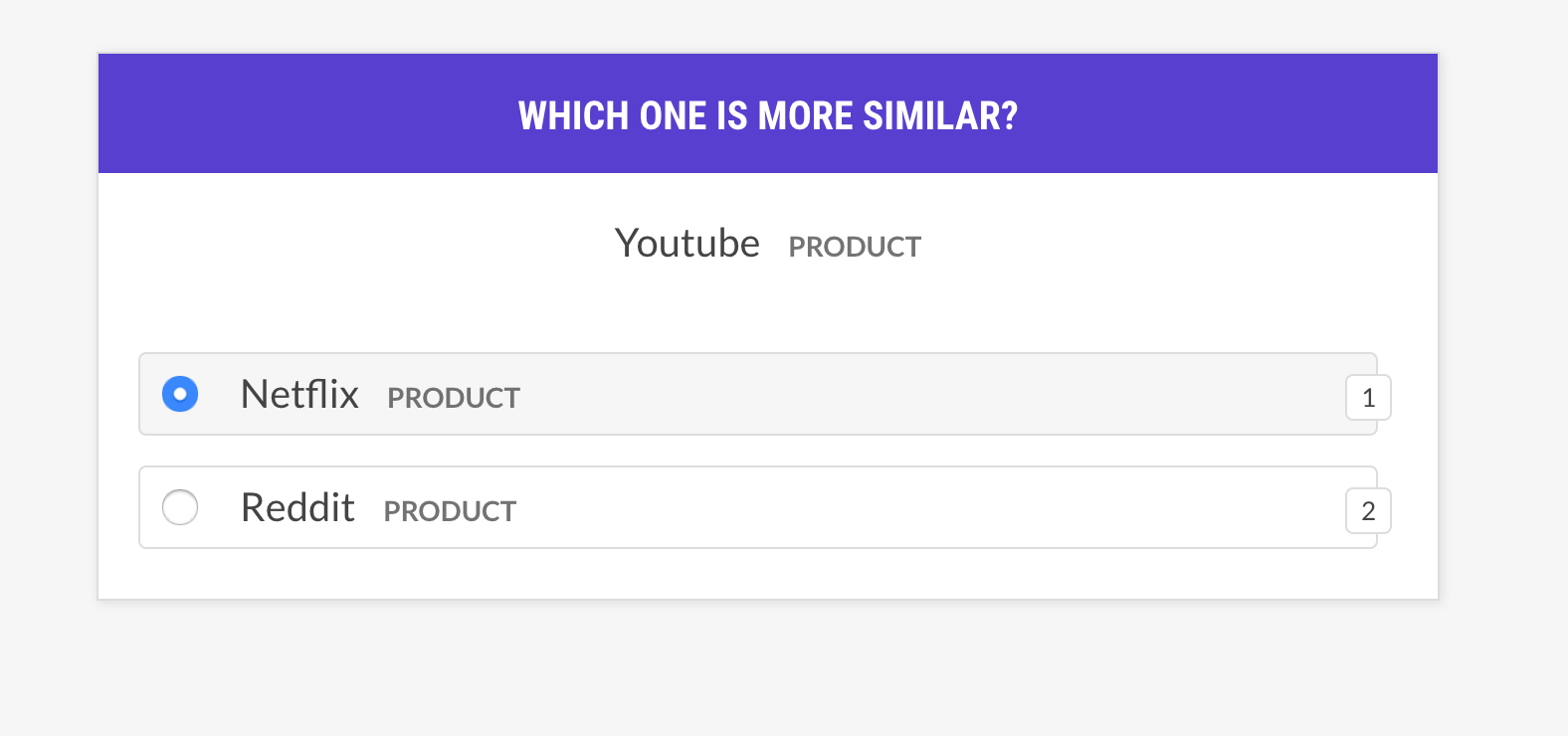
Evaluate a sense2vec model by asking about phrase triples: is word A more similar to word B, or to word C? If the human mostly agrees with the model, the vectors model is good. The recipe will only ask about vectors with the same sense and supports different example selection strategies.
bash
prodigy sense2vec.eval [dataset] [vectors_path] [--strategy] [--senses]
[--exclude-senses] [--n-freq] [--threshold] [--batch-size] [--eval-whole]
[--eval-only] [--show-scores]
| Argument | Type | Description |
| ------------------------- | ---------- | ------------------------------------------------------------------------------------------------------------- |
| dataset | positional | Dataset to save annotations to. |
| vectors_path | positional | Path to pretrained sense2vec vectors. |
| --strategy, -st | option | Example selection strategy. most similar (default) or random. |
| --senses, -s | option | Comma-separated list of senses to limit the selection to. If not set, all senses in the vectors will be used. |
| --exclude-senses, -es | option | Comma-separated list of senses to exclude. See prodigy_recipes.EVAL_EXCLUDE_SENSES fro the defaults. |
| --n-freq, -f | option | Number of most frequent entries to limit to. |
| --threshold, -t | option | Minimum similarity threshold to consider examples. |
| --batch-size, -b | option | Batch size to use. |
| --eval-whole, -E | flag | Evaluate the whole dataset instead of the current session. |
| --eval-only, -O | flag | Don't annotate, only evaluate the current dataset. |
| --show-scores, -S | flag | Show all scores for debugging. |
Strategies
| Name | Description |
| -------------------- | --------------------------------------------------------------------------------------------------------------------------------------------------------------------- |
| most_similar | Pick a random word from a random sense and get its most similar entries of the same sense. Ask about the similarity to the last and middle entry from that selection. |
| most_least_similar | Pick a random word from a random sense and get the least similar entry from its most similar entries, and then the last most similar entry of that. |
| random | Pick a random sample of 3 words from the same random sense. |
Example
bash
prodigy sense2vec.eval vectors_eval /path/to/s2v_reddit_2015_md
--senses NOUN,ORG,PRODUCT --threshold 0.5
recipe sense2vec.eval-most-similar
Evaluate a vectors model by looking at the most similar entries it returns for a random phrase and unselecting the mistakes.
bash
prodigy sense2vec.eval [dataset] [vectors_path] [--senses] [--exclude-senses]
[--n-freq] [--n-similar] [--batch-size] [--eval-whole] [--eval-only]
[--show-scores]
| Argument | Type | Description |
| ------------------------- | ---------- | ------------------------------------------------------------------------------------------------------------- |
| dataset | positional | Dataset to save annotations to. |
| vectors_path | positional | Path to pretrained sense2vec vectors. |
| --senses, -s | option | Comma-separated list of senses to limit the selection to. If not set, all senses in the vectors will be used. |
| --exclude-senses, -es | option | Comma-separated list of senses to exclude. See prodigy_recipes.EVAL_EXCLUDE_SENSES fro the defaults. |
| --n-freq, -f | option | Number of most frequent entries to limit to. |
| --n-similar, -n | option | Number of similar items to check. Defaults to 10. |
| --batch-size, -b | option | Batch size to use. |
| --eval-whole, -E | flag | Evaluate the whole dataset instead of the current session. |
| --eval-only, -O | flag | Don't annotate, only evaluate the current dataset. |
| --show-scores, -S | flag | Show all scores for debugging. |
bash
prodigy sense2vec.eval-most-similar vectors_eval_sim /path/to/s2v_reddit_2015_md
--senses NOUN,ORG,PRODUCT
recipe sense2vec.eval-ab
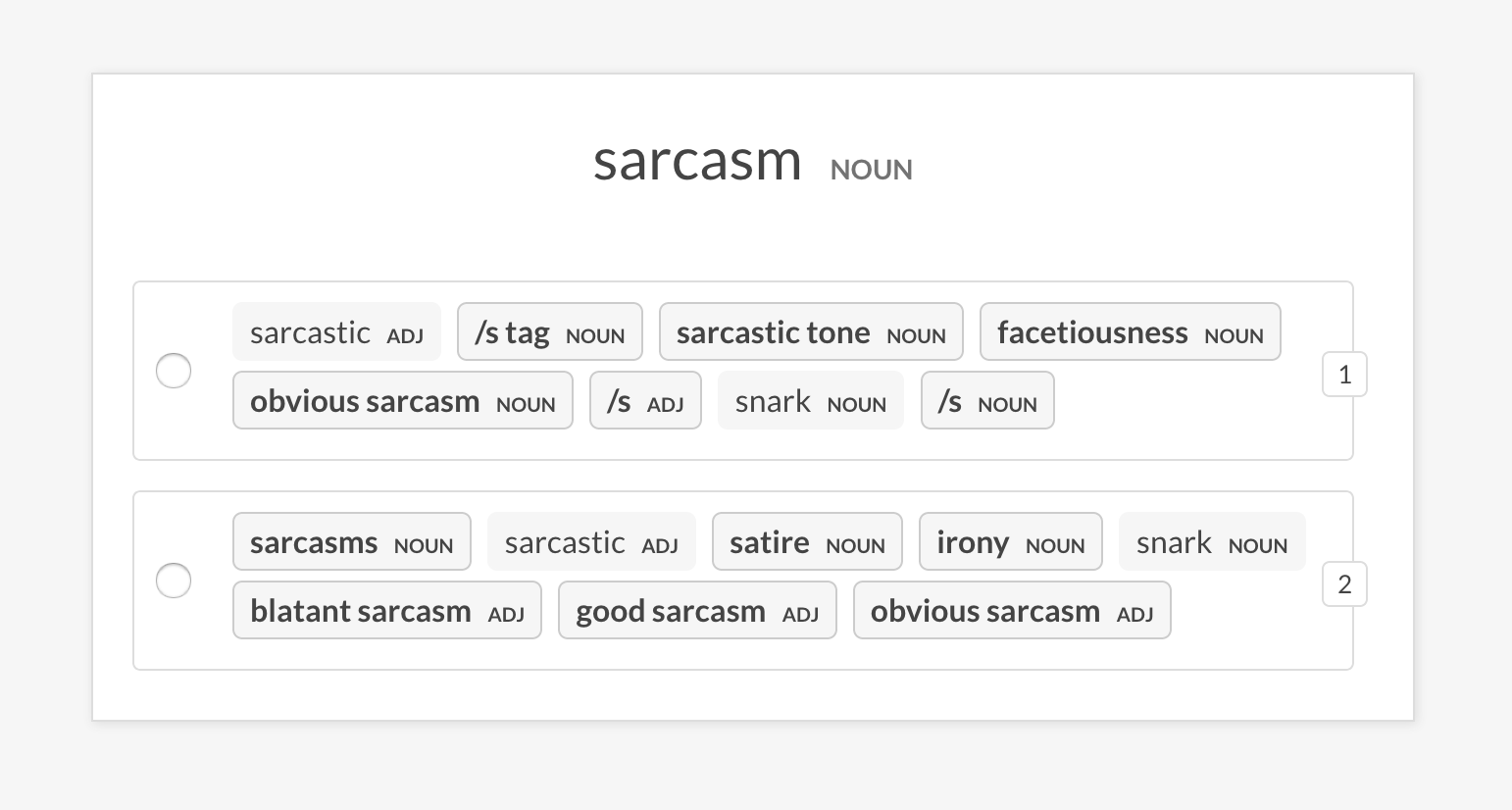
Perform an A/B evaluation of two pretrained sense2vec vector models by comparing the most similar entries they return for a random phrase. The UI shows two randomized options with the most similar entries of each model and highlights the phrases that differ. At the end of the annotation session the overall stats and preferred model are shown.
bash
prodigy sense2vec.eval [dataset] [vectors_path_a] [vectors_path_b] [--senses]
[--exclude-senses] [--n-freq] [--n-similar] [--batch-size] [--eval-whole]
[--eval-only] [--show-mapping]
| Argument | Type | Description |
| ------------------------- | ---------- | ------------------------------------------------------------------------------------------------------------- |
| dataset | positional | Dataset to save annotations to. |
| vectors_path_a | positional | Path to pretrained sense2vec vectors. |
| vectors_path_b | positional | Path to pretrained sense2vec vectors. |
| --senses, -s | option | Comma-separated list of senses to limit the selection to. If not set, all senses in the vectors will be used. |
| --exclude-senses, -es | option | Comma-separated list of senses to exclude. See prodigy_recipes.EVAL_EXCLUDE_SENSES fro the defaults. |
| --n-freq, -f | option | Number of most frequent entries to limit to. |
| --n-similar, -n | option | Number of similar items to check. Defaults to 10. |
| --batch-size, -b | option | Batch size to use. |
| --eval-whole, -E | flag | Evaluate the whole dataset instead of the current session. |
| --eval-only, -O | flag | Don't annotate, only evaluate the current dataset. |
| --show-mapping, -S | flag | Show which models are option 1 and option 2 in the UI (for debugging). |
bash
prodigy sense2vec.eval-ab vectors_eval_sim /path/to/s2v_reddit_2015_md /path/to/s2v_reddit_2019_md --senses NOUN,ORG,PRODUCT
Pretrained vectors
The pretrained Reddit vectors support the following "senses", either part-of-speech tags or entity labels. For more details, see spaCy's annotation scheme overview.
| Tag | Description | Examples |
| ------- | ------------------------- | ------------------------------------ |
| ADJ | adjective | big, old, green |
| ADP | adposition | in, to, during |
| ADV | adverb | very, tomorrow, down, where |
| AUX | auxiliary | is, has (done), will (do) |
| CONJ | conjunction | and, or, but |
| DET | determiner | a, an, the |
| INTJ | interjection | psst, ouch, bravo, hello |
| NOUN | noun | girl, cat, tree, air, beauty |
| NUM | numeral | 1, 2017, one, seventy-seven, MMXIV |
| PART | particle | 's, not |
| PRON | pronoun | I, you, he, she, myself, somebody |
| PROPN | proper noun | Mary, John, London, NATO, HBO |
| PUNCT | punctuation | , ? ( ) |
| SCONJ | subordinating conjunction | if, while, that |
| SYM | symbol | \$, %, =, :), 😝 |
| VERB | verb | run, runs, running, eat, ate, eating |
| Entity Label | Description |
| ------------- | ---------------------------------------------------- |
| PERSON | People, including fictional. |
| NORP | Nationalities or religious or political groups. |
| FACILITY | Buildings, airports, highways, bridges, etc. |
| ORG | Companies, agencies, institutions, etc. |
| GPE | Countries, cities, states. |
| LOC | Non-GPE locations, mountain ranges, bodies of water. |
| PRODUCT | Objects, vehicles, foods, etc. (Not services.) |
| EVENT | Named hurricanes, battles, wars, sports events, etc. |
| WORK_OF_ART | Titles of books, songs, etc. |
| LANGUAGE | Any named language. |
Owner
- Name: Explosion
- Login: explosion
- Kind: organization
- Email: contact@explosion.ai
- Location: Berlin, Germany
- Website: https://explosion.ai
- Twitter: explosion_ai
- Repositories: 61
- Profile: https://github.com/explosion
A software company specializing in developer tools for Artificial Intelligence and Natural Language Processing
GitHub Events
Total
- Issues event: 2
- Watch event: 35
- Member event: 1
- Issue comment event: 4
- Push event: 1
- Pull request event: 4
- Fork event: 4
Last Year
- Issues event: 2
- Watch event: 35
- Member event: 1
- Issue comment event: 4
- Push event: 1
- Pull request event: 4
- Fork event: 4
Committers
Last synced: about 1 year ago
Top Committers
| Name | Commits | |
|---|---|---|
| Ines Montani | i****s@i****o | 237 |
| Matthew Honnibal | h****h@g****m | 66 |
| Henning Peters | p****e@d****e | 49 |
| Matthew Honnibal | h****l@g****m | 24 |
| svlandeg | s****m@g****m | 7 |
| Kabir Khan | k****h@m****m | 5 |
| Yaser Martinez Palenzuela | y****r@n****m | 4 |
| Adriane Boyd | a****d@g****m | 4 |
| Madeesh Kannan | s****e | 2 |
| Niek Bartholomeus | n****s@g****m | 2 |
| init-random | c****h@y****m | 2 |
| Andy | a****0@g****m | 1 |
| Anxo06 | a****a@h****m | 1 |
| David Chanin | c****v@g****m | 1 |
| Elias | 3****s | 1 |
| Mukesh Kr Mehta | m****8@g****m | 1 |
| Sheffield, David | d****d@i****m | 1 |
| Matthew Honnibal | m****t@j****m | 1 |
| cerules | c****s | 1 |
| vincent d warmerdam | v****m@g****m | 1 |
Committer Domains (Top 20 + Academic)
Issues and Pull Requests
Last synced: 11 months ago
All Time
- Total issues: 66
- Total pull requests: 42
- Average time to close issues: 6 months
- Average time to close pull requests: about 1 month
- Total issue authors: 54
- Total pull request authors: 17
- Average comments per issue: 2.45
- Average comments per pull request: 0.71
- Merged pull requests: 33
- Bot issues: 0
- Bot pull requests: 0
Past Year
- Issues: 1
- Pull requests: 4
- Average time to close issues: 3 days
- Average time to close pull requests: 3 months
- Issue authors: 1
- Pull request authors: 2
- Average comments per issue: 0.0
- Average comments per pull request: 1.75
- Merged pull requests: 2
- Bot issues: 0
- Bot pull requests: 0
Top Authors
Issue Authors
- santoshbs (4)
- joshweir (3)
- eboraks (2)
- npattarone (2)
- danielmoore19 (2)
- ahalterman (2)
- myeghaneh (2)
- Z-e-e (2)
- petulla (2)
- ivy-jiang (1)
- forgetso (1)
- angelo337 (1)
- kuatroka (1)
- henokDES (1)
- nateraw (1)
Pull Request Authors
- ines (12)
- adrianeboyd (4)
- svlandeg (4)
- honnibal (3)
- HandcartCactus (2)
- jsal13 (2)
- austinjp (2)
- shadeMe (2)
- ericfeunekes (2)
- ahalterman (2)
- chanind (1)
- cerules (1)
- Smyja (1)
- mukesh-mehta (1)
- dshefman1 (1)
Top Labels
Issue Labels
Pull Request Labels
Packages
- Total packages: 2
-
Total downloads:
- pypi 3,181 last-month
- Total docker downloads: 89
-
Total dependent packages: 3
(may contain duplicates) -
Total dependent repositories: 33
(may contain duplicates) - Total versions: 27
- Total maintainers: 2
pypi.org: sense2vec
Contextually-keyed word vectors
- Homepage: https://github.com/explosion/sense2vec
- Documentation: https://sense2vec.readthedocs.io/
- License: MIT
-
Latest release: 2.0.2
published over 3 years ago
Rankings
Maintainers (2)
conda-forge.org: sense2vec
- Homepage: https://github.com/explosion/sense2vec
- License: MIT
-
Latest release: 2.0.0
published about 5 years ago
Rankings
Dependencies
- catalogue >=2.0.1,<2.1.0
- importlib_metadata >=0.20
- numpy >=1.15.0
- pytest >=5.2.0,<6.0.0
- spacy >=3.0.0,<4.0.0
- srsly >=2.4.0,<3.0.0
- wasabi >=0.8.1,<1.1.0
- fasttext >=0.9.1
- tqdm >=4.36.1,<5.0.0
- typer >=0.3.0