keras-segmentation
Implementation of Segnet, FCN, UNet , PSPNet and other models in Keras.
Science Score: 23.0%
This score indicates how likely this project is to be science-related based on various indicators:
-
○CITATION.cff file
-
✓codemeta.json file
Found codemeta.json file -
○.zenodo.json file
-
○DOI references
-
✓Academic publication links
Links to: arxiv.org -
○Committers with academic emails
-
○Institutional organization owner
-
○JOSS paper metadata
-
○Scientific vocabulary similarity
Low similarity (9.1%) to scientific vocabulary
Repository
Implementation of Segnet, FCN, UNet , PSPNet and other models in Keras.
Basic Info
- Host: GitHub
- Owner: divamgupta
- License: mit
- Language: Python
- Default Branch: master
- Homepage: https://divamgupta.com/image-segmentation/2019/06/06/deep-learning-semantic-segmentation-keras.html
- Size: 4.5 MB
Statistics
- Stars: 2,982
- Watchers: 59
- Forks: 1,166
- Open Issues: 164
- Releases: 1
Metadata Files
README.md
Image Segmentation Keras : Implementation of Segnet, FCN, UNet, PSPNet and other models in Keras.




Implementation of various Deep Image Segmentation models in keras.
News : Some functionality of this repository has been integrated with https://liner.ai . Check it out!!
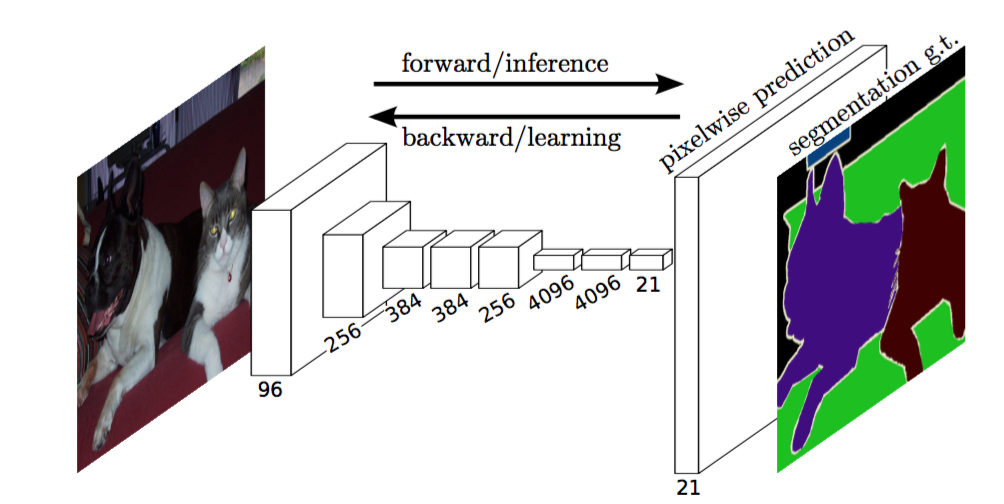
Link to the full blog post with tutorial : https://divamgupta.com/image-segmentation/2019/06/06/deep-learning-semantic-segmentation-keras.html
Working Google Colab Examples:
- Python Interface: https://colab.research.google.com/drive/1q_eCYEzKxixpCKH1YDsLnsvgxl92ORcv?usp=sharing
- CLI Interface: https://colab.research.google.com/drive/1Kpy4QGFZ2ZHm69mPfkmLSUes8kj6Bjyi?usp=sharing
Training using GUI interface
You can also train segmentation models on your computer with https://liner.ai
Train | Inference / Export
:-------------------------:|:-------------------------:
 |
| 
 |
| 
Models
Following models are supported:
| modelname | Base Model | Segmentation Model | |------------------|-------------------|--------------------| | fcn8 | Vanilla CNN | FCN8 | | fcn32 | Vanilla CNN | FCN8 | | fcn8vgg | VGG 16 | FCN8 | | fcn32vgg | VGG 16 | FCN32 | | fcn8resnet50 | Resnet-50 | FCN32 | | fcn32resnet50 | Resnet-50 | FCN32 | | fcn8mobilenet | MobileNet | FCN32 | | fcn32mobilenet | MobileNet | FCN32 | | pspnet | Vanilla CNN | PSPNet | | pspnet50 | Vanilla CNN | PSPNet | | pspnet101 | Vanilla CNN | PSPNet | | vggpspnet | VGG 16 | PSPNet | | resnet50pspnet | Resnet-50 | PSPNet | | unetmini | Vanilla Mini CNN | U-Net | | unet | Vanilla CNN | U-Net | | vggunet | VGG 16 | U-Net | | resnet50unet | Resnet-50 | U-Net | | mobilenetunet | MobileNet | U-Net | | segnet | Vanilla CNN | Segnet | | vggsegnet | VGG 16 | Segnet | | resnet50segnet | Resnet-50 | Segnet | | mobilenetsegnet | MobileNet | Segnet |
Example results for the pre-trained models provided :
Input Image | Output Segmentation Image
:-------------------------:|:-------------------------:
 |
| 
 |
| 
How to cite
If you are using this library, please cite using:
``` @article{gupta2023image, title={Image segmentation keras: Implementation of segnet, fcn, unet, pspnet and other models in keras}, author={Gupta, Divam}, journal={arXiv preprint arXiv:2307.13215}, year={2023} }
```
Getting Started
Prerequisites
- Keras ( recommended version : 2.4.3 )
- OpenCV for Python
- Tensorflow ( recommended version : 2.4.1 )
shell
apt-get install -y libsm6 libxext6 libxrender-dev
pip install opencv-python
Installing
Install the module
Recommended way:
shell
pip install --upgrade git+https://github.com/divamgupta/image-segmentation-keras
or
shell
pip install keras-segmentation
or
shell
git clone https://github.com/divamgupta/image-segmentation-keras
cd image-segmentation-keras
python setup.py install
Pre-trained models:
```python from kerassegmentation.pretrained import pspnet50ADE20K , pspnet101cityscapes, pspnet101voc12
model = pspnet50ADE_20K() # load the pretrained model trained on ADE20k dataset
model = pspnet101cityscapes() # load the pretrained model trained on Cityscapes dataset
model = pspnet101voc12() # load the pretrained model trained on Pascal VOC 2012 dataset
load any of the 3 pretrained models
out = model.predictsegmentation( inp="inputimage.jpg", out_fname="out.png" )
```
Preparing the data for training
You need to make two folders
- Images Folder - For all the training images
- Annotations Folder - For the corresponding ground truth segmentation images
The filenames of the annotation images should be same as the filenames of the RGB images.
The size of the annotation image for the corresponding RGB image should be same.
For each pixel in the RGB image, the class label of that pixel in the annotation image would be the value of the blue pixel.
Example code to generate annotation images :
```python import cv2 import numpy as np
annimg = np.zeros((30,30,3)).astype('uint8') annimg[ 3 , 4 ] = 1 # this would set the label of pixel 3,4 as 1
cv2.imwrite( "ann1.png" ,annimg ) ```
Only use bmp or png format for the annotation images.
Download the sample prepared dataset
Download and extract the following:
https://drive.google.com/file/d/0B0d9ZiqAgFkiOHR1NTJhWVJMNEU/view?usp=sharing
You will get a folder named dataset1/
Using the python module
You can import keras_segmentation in your python script and use the API
```python from kerassegmentation.models.unet import vggunet
model = vggunet(nclasses=51 , inputheight=416, inputwidth=608 )
model.train( trainimages = "dataset1/imagespreppedtrain/", trainannotations = "dataset1/annotationspreppedtrain/", checkpointspath = "/tmp/vggunet_1" , epochs=5 )
out = model.predictsegmentation( inp="dataset1/imagespreppedtest/0016E507965.png", out_fname="/tmp/out.png" )
import matplotlib.pyplot as plt plt.imshow(out)
evaluating the model
print(model.evaluatesegmentation( inpimagesdir="dataset1/imagespreppedtest/" , annotationsdir="dataset1/annotationspreppedtest/" ) )
```
Usage via command line
You can also use the tool just using command line
Visualizing the prepared data
You can also visualize your prepared annotations for verification of the prepared data.
shell
python -m keras_segmentation verify_dataset \
 --images_path="dataset1/images_prepped_train/" \
 --segs_path="dataset1/annotations_prepped_train/"  \
 --n_classes=50
shell
python -m keras_segmentation visualize_dataset \
 --images_path="dataset1/images_prepped_train/" \
 --segs_path="dataset1/annotations_prepped_train/"  \
 --n_classes=50
Training the Model
To train the model run the following command:
shell
python -m keras_segmentation train \
 --checkpoints_path="path_to_checkpoints" \
 --train_images="dataset1/images_prepped_train/" \
 --train_annotations="dataset1/annotations_prepped_train/" \
 --val_images="dataset1/images_prepped_test/" \
 --val_annotations="dataset1/annotations_prepped_test/" \
 --n_classes=50 \
 --input_height=320 \
 --input_width=640 \
 --model_name="vgg_unet"
Choose model_name from the table above
Getting the predictions
To get the predictions of a trained model
```shell python -m kerassegmentation predict \ --checkpointspath="pathtocheckpoints" \ --inputpath="dataset1/imagespreppedtest/" \ --outputpath="pathtopredictions"
```
Video inference
To get predictions of a video
shell
python -m keras_segmentation predict_video \
 --checkpoints_path="path_to_checkpoints" \
 --input="path_to_video" \
 --output_file="path_for_save_inferenced_video" \
 --display
If you want to make predictions on your webcam, don't use --input, or pass your device number: --input 0
--display opens a window with the predicted video. Remove this argument when using a headless system.
Model Evaluation
To get the IoU scores
shell
python -m keras_segmentation evaluate_model \
 --checkpoints_path="path_to_checkpoints" \
 --images_path="dataset1/images_prepped_test/" \
 --segs_path="dataset1/annotations_prepped_test/"
Fine-tuning from existing segmentation model
The following example shows how to fine-tune a model with 10 classes .
```python from kerassegmentation.models.modelutils import transferweights from kerassegmentation.pretrained import pspnet50ADE20K from kerassegmentation.models.pspnet import pspnet_50
pretrainedmodel = pspnet50ADE20K()
newmodel = pspnet50( n_classes=51 )
transferweights( pretrainedmodel , new_model ) # transfer weights from pre-trained model to your model
newmodel.train( trainimages = "dataset1/imagespreppedtrain/", trainannotations = "dataset1/annotationspreppedtrain/", checkpointspath = "/tmp/vggunet1" , epochs=5 )
```
Knowledge distillation for compressing the model
The following example shows transfer the knowledge from a larger ( and more accurate ) model to a smaller model. In most cases the smaller model trained via knowledge distilation is more accurate compared to the same model trained using vanilla supervised learning.
```python from kerassegmentation.predict import modelfromcheckpointpath from kerassegmentation.models.unet import unetmini from kerassegmentation.modelcompression import perform_distilation
modellarge = modelfromcheckpointpath( "/checkpoints/path/of/trained/model" ) modelsmall = unetmini( nclasses=51, inputheight=300, input_width=400 )
performdistilation ( datapath="/path/to/largeimageset/" , checkpointspath="path/to/save/checkpoints" , teachermodel=modellarge , studentmodel=modelsmall , distilationloss='kl' , featsdistilationloss='pa' )
```
Adding custom augmentation function to training
The following example shows how to define a custom augmentation function for training.
```python
from kerassegmentation.models.unet import vggunet from imgaug import augmenters as iaa
def custom_augmentation(): return iaa.Sequential( [ # apply the following augmenters to most images iaa.Fliplr(0.5), # horizontally flip 50% of all images iaa.Flipud(0.5), # horizontally flip 50% of all images ])
model = vggunet(nclasses=51 , inputheight=416, inputwidth=608)
model.train( trainimages = "dataset1/imagespreppedtrain/", trainannotations = "dataset1/annotationspreppedtrain/", checkpointspath = "/tmp/vggunet1" , epochs=5, doaugment=True, # enable augmentation customaugmentation=customaugmentation # sets the augmention function to use ) ```
Custom number of input channels
The following example shows how to set the number of input channels.
```python
from kerassegmentation.models.unet import vggunet
model = vggunet(nclasses=51 , inputheight=416, inputwidth=608, channels=1 # Sets the number of input channels )
model.train( trainimages = "dataset1/imagespreppedtrain/", trainannotations = "dataset1/annotationspreppedtrain/", checkpointspath = "/tmp/vggunet1" , epochs=5, readimagetype=0 # Sets how opencv will read the images # cv2.IMREADCOLOR = 1 (rgb), # cv2.IMREADGRAYSCALE = 0, # cv2.IMREADUNCHANGED = -1 (4 channels like RGBA) ) ```
Custom preprocessing
The following example shows how to set a custom image preprocessing function.
```python
from kerassegmentation.models.unet import vggunet
def image_preprocessing(image): return image + 1
model = vggunet(nclasses=51 , inputheight=416, inputwidth=608)
model.train( trainimages = "dataset1/imagespreppedtrain/", trainannotations = "dataset1/annotationspreppedtrain/", checkpointspath = "/tmp/vggunet1" , epochs=5, preprocessing=imagepreprocessing # Sets the preprocessing function ) ```
Custom callbacks
The following example shows how to set custom callbacks for the model training.
```python
from kerassegmentation.models.unet import vggunet from keras.callbacks import ModelCheckpoint, EarlyStopping
model = vggunet(nclasses=51 , inputheight=416, inputwidth=608 )
When using custom callbacks, the default checkpoint saver is removed
callbacks = [ ModelCheckpoint( filepath="checkpoints/" + model.name + ".{epoch:05d}", saveweightsonly=True, verbose=True ), EarlyStopping() ]
model.train( trainimages = "dataset1/imagespreppedtrain/", trainannotations = "dataset1/annotationspreppedtrain/", checkpointspath = "/tmp/vggunet_1" , epochs=5, callbacks=callbacks ) ```
Multi input image input
The following example shows how to add additional image inputs for models.
```python
from kerassegmentation.models.unet import vggunet
model = vggunet(nclasses=51 , inputheight=416, inputwidth=608)
model.train( trainimages = "dataset1/imagespreppedtrain/", trainannotations = "dataset1/annotationspreppedtrain/", checkpointspath = "/tmp/vggunet1" , epochs=5, otherinputs_paths=[ "/path/to/other/directory" ],
Ability to add preprocessing
preprocessing=[lambda x: x+1, lambda x: x+2, lambda x: x+3], # Different prepocessing for each input
OR
preprocessing=lambda x: x+1, # Same preprocessing for each input
) ```
Projects using keras-segmentation
Here are a few projects which are using our library : * https://github.com/SteliosTsop/QF-image-segmentation-keras paper * https://github.com/willembressers/bouquetquality * https://github.com/jqueguiner/image-segmentation * https://github.com/pan0rama/CS230-Microcrystal-Facet-Segmentation * https://github.com/theerawatramchuen/KerasSegmentation * https://github.com/neheller/labels18 * https://github.com/Divyam10/Face-Matting-using-Unet * https://github.com/shsh-a/segmentation-over-web * https://github.com/chenwe73/deepactivelearningsegmentation * https://github.com/vigneshrajap/vision-based-navigation-agri-fields * https://github.com/ronalddas/Pneumonia-Detection * https://github.com/Aiwiscal/ECGUNet * https://github.com/TianzhongSong/Unet-for-Person-Segmentation * https://github.com/Guyanqi/GMDNN * https://github.com/kozemzak/prostate-lesion-segmentation * https://github.com/lixiaoyu12138/fcn-date * https://github.com/sagarbhokre/LyftChallenge * https://github.com/TianzhongSong/Person-Segmentation-Keras * https://github.com/divyanshpuri02/COCO2018-Stuff-Segmentation-Challenge * https://github.com/XiangbingJi/Stanford-cs230-final-project * https://github.com/lsh1994/keras-segmentation * https://github.com/SpirinEgor/mobilesemanticsegmentation * https://github.com/LeadingIndiaAI/COCO-DATASET-STUFF-SEGMENTATION-CHALLENGE * https://github.com/lidongyue12138/Image-Segmentation-by-Keras * https://github.com/laoj2/segnetcrfasrnn * https://github.com/rancheng/AirSimProjects * https://github.com/RadiumScriptTang/cartoonsegmentation * https://github.com/dquail/NerveSegmentation * https://github.com/Bhomik/SemanticHumanMatting * https://github.com/Symefa/FP-Biomedik-Breast-Cancer * https://github.com/Alpha-Monocerotis/PDFFigureTableExtraction * https://github.com/rusito-23/mobileunet_segmentation * https://github.com/Philliec459/ThinSection-image-segmentation-keras * https://github.com/imsadia/cv-assignment-three.git * https://github.com/kejitan/ESVGscale
If you use our code in a publicly available project, please add the link here ( by posting an issue or creating a PR )
Owner
- Name: Divam Gupta
- Login: divamgupta
- Kind: user
- Location: Pittsburgh, United States
- Website: https://divamgupta.com/
- Twitter: divamgupta
- Repositories: 8
- Profile: https://github.com/divamgupta
Creator of one-click ML tool - Liner.ai • AI for VR @ Meta • Previously: research @ Microsoft , robotics @ CMU
GitHub Events
Total
- Watch event: 98
- Fork event: 13
Last Year
- Watch event: 98
- Fork event: 13
Committers
Last synced: about 1 year ago
Top Committers
| Name | Commits | |
|---|---|---|
| Divam Gupta | d****a | 120 |
| Marius-Juston | M****n@h****r | 49 |
| Rounaq Jhunjhunu wala | r****6@g****m | 13 |
| JaledMC | j****a@s****m | 10 |
| Divam Gupta | d****a@m****l | 9 |
| pandya keval | k****5@g****m | 3 |
| Nils Bäckström | n****m@u****m | 2 |
| Filipp Bakanov | f****p@b****u | 2 |
| Rusito | i****3@g****m | 2 |
| Thomas Aarholt | t****t@g****m | 2 |
| Bhawna Bharat Mehbubani | b****i@g****m | 1 |
| Mate Hegedus | m****9@g****m | 1 |
| Matthew McAteer | m****0@g****m | 1 |
| Mengyang Liu | 4****s | 1 |
| Peter Reutemann | f****e@g****m | 1 |
| juniorjasin | a****n@s****m | 1 |
| Robert Fink | r****k@p****m | 1 |
| Oscar Fernandez Batalla | o****a@g****s | 1 |
| Piet Brömmel | p****l@g****m | 1 |
| Sushant Agarwal | 4****9 | 1 |
Committer Domains (Top 20 + Academic)
Issues and Pull Requests
Last synced: 11 months ago
All Time
- Total issues: 89
- Total pull requests: 25
- Average time to close issues: 6 months
- Average time to close pull requests: 4 months
- Total issue authors: 72
- Total pull request authors: 19
- Average comments per issue: 2.47
- Average comments per pull request: 0.4
- Merged pull requests: 6
- Bot issues: 0
- Bot pull requests: 0
Past Year
- Issues: 0
- Pull requests: 1
- Average time to close issues: N/A
- Average time to close pull requests: N/A
- Issue authors: 0
- Pull request authors: 1
- Average comments per issue: 0
- Average comments per pull request: 0.0
- Merged pull requests: 0
- Bot issues: 0
- Bot pull requests: 0
Top Authors
Issue Authors
- mavaylon1 (5)
- varungupta31 (3)
- WEIYI2021 (3)
- DmitryMalishev (2)
- eyildiz-ugoe (2)
- silvernox-dev (2)
- jjohn485 (2)
- webcluster4u (2)
- jaigsingla (2)
- Samberlance (2)
- sotomotocross (2)
- sachinkmohan (2)
- mcsenne (1)
- andrey-bat (1)
- victor-roris (1)
Pull Request Authors
- keval2232 (4)
- sushantag9 (3)
- jerinkantony (3)
- duducosmos (2)
- Farahinha00 (2)
- rola93 (1)
- Neethu-pixel (1)
- ArthurMoreDonuts (1)
- geinarm (1)
- v2thegreat (1)
- hamidriasat (1)
- BhawnaMehbubani (1)
- juantoca (1)
- mmahdim (1)
- fracpete (1)
Top Labels
Issue Labels
Pull Request Labels
Packages
- Total packages: 1
-
Total downloads:
- pypi 235 last-month
- Total docker downloads: 69
- Total dependent packages: 0
- Total dependent repositories: 21
- Total versions: 3
- Total maintainers: 1
pypi.org: keras-segmentation
Image Segmentation toolkit for keras
- Homepage: https://github.com/divamgupta/image-segmentation-keras
- Documentation: https://keras-segmentation.readthedocs.io/
- License: GPLv3
-
Latest release: 0.3.0
published over 6 years ago
Rankings
Maintainers (1)
Dependencies
- h5py *
- imageio >=2.5.0
- imgaug >=0.4.0
- keras >=2.3.0
- numpy *
- opencv-python *
- tensorflow >=2.2
- tqdm *
- Keras *
- h5py <=2.10.0
- imageio ==2.5.0
- imgaug >=0.4.0
- opencv-python *
- tqdm *
- tanmaniac/opencv3-cudagl latest build