lux
Automatically visualize your pandas dataframe via a single print! 📊 💡
Science Score: 33.0%
This score indicates how likely this project is to be science-related based on various indicators:
-
○CITATION.cff file
-
✓codemeta.json file
Found codemeta.json file -
○.zenodo.json file
-
○DOI references
-
✓Academic publication links
Links to: arxiv.org -
✓Committers with academic emails
4 of 21 committers (19.0%) from academic institutions -
○Institutional organization owner
-
○JOSS paper metadata
-
○Scientific vocabulary similarity
Low similarity (8.5%) to scientific vocabulary
Keywords
Repository
Automatically visualize your pandas dataframe via a single print! 📊 💡
Basic Info
Statistics
- Stars: 5,301
- Watchers: 88
- Forks: 376
- Open Issues: 86
- Releases: 12
Topics
Metadata Files
README.md

A Python API for Intelligent Visual Discovery







Lux is a Python library that facilitate fast and easy data exploration by automating the visualization and data analysis process. By simply printing out a dataframe in a Jupyter notebook, Lux recommends a set of visualizations highlighting interesting trends and patterns in the dataset. Visualizations are displayed via an interactive widget that enables users to quickly browse through large collections of visualizations and make sense of their data.
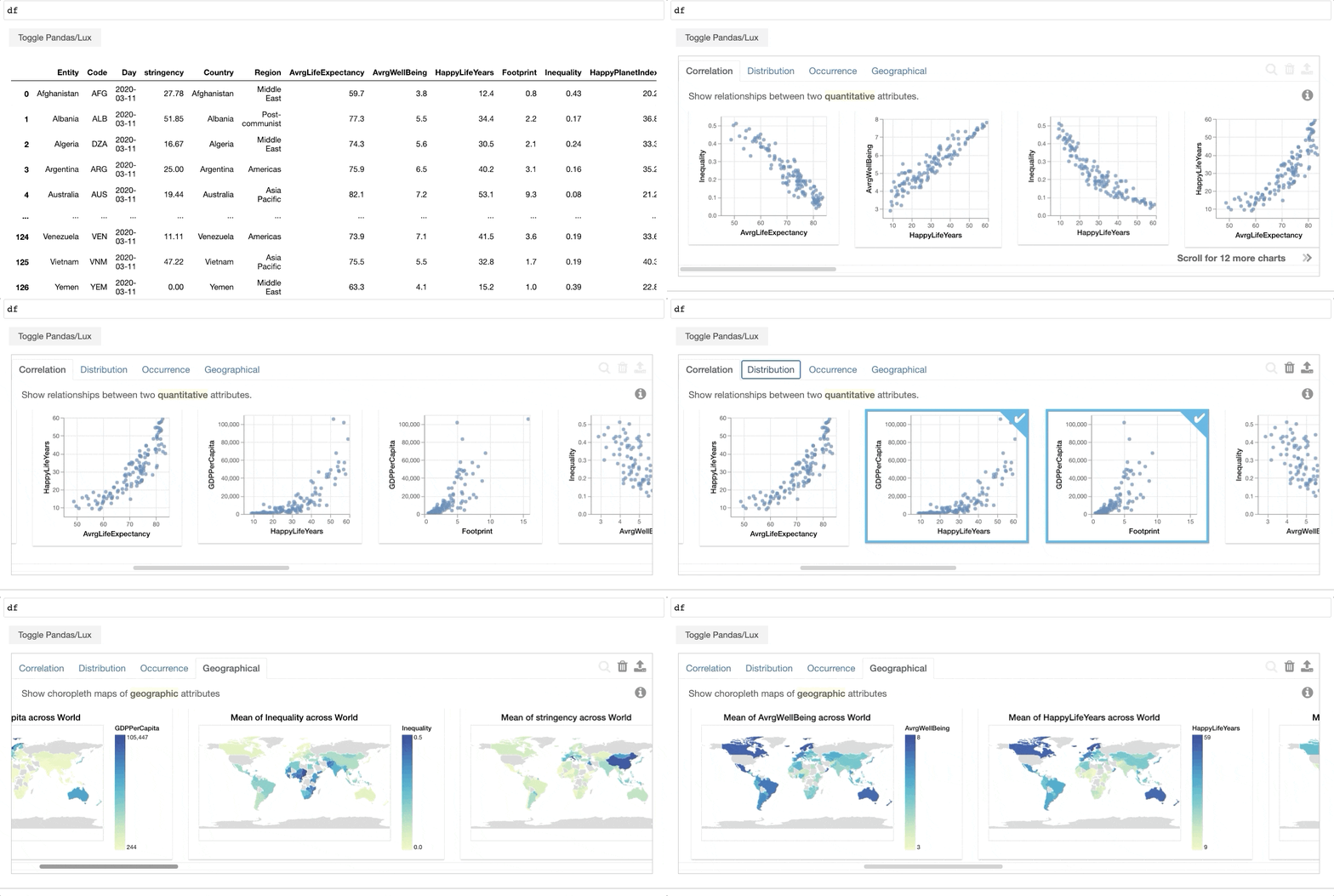
Here is a 1-min video introducing Lux, and slides from a more extended talk.
Check out our notebook gallery with examples of how Lux can be used with different datasets and analyses.
Or try out Lux on your own in a live Jupyter Notebook!
Getting Started
To start using Lux, simply add an extra import statement along with your Pandas import.
python
import lux
import pandas as pd
Lux can be used without modifying any existing Pandas code. Here, we use Pandas's read_csv command to load in a dataset of colleges and their properties.
python
df = pd.read_csv("https://raw.githubusercontent.com/lux-org/lux-datasets/master/data/college.csv")
df
When the dataframe is printed out, Lux automatically recommends a set of visualizations highlighting interesting trends and patterns in the dataset.
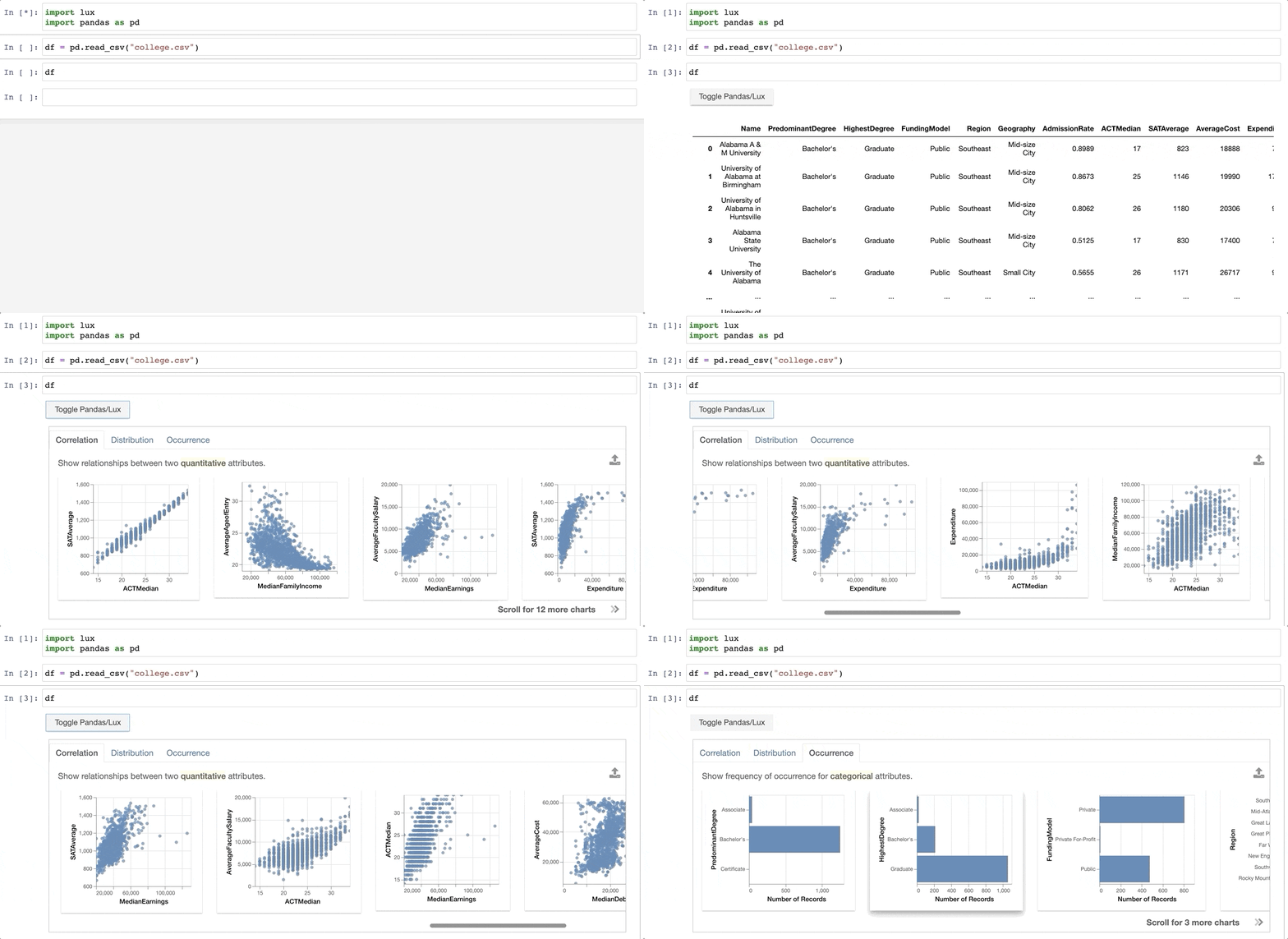
Voila! Here's a set of visualizations that you can now use to explore your dataset further!
Next-step recommendations based on user intent:
In addition to dataframe visualizations at every step in the exploration, you can specify to Lux the attributes and values you're interested in. Based on this intent, Lux guides users towards potential next-steps in their exploration.
For example, we might be interested in the attributes AverageCost and SATAverage.
python
df.intent = ["AverageCost","SATAverage"]
df
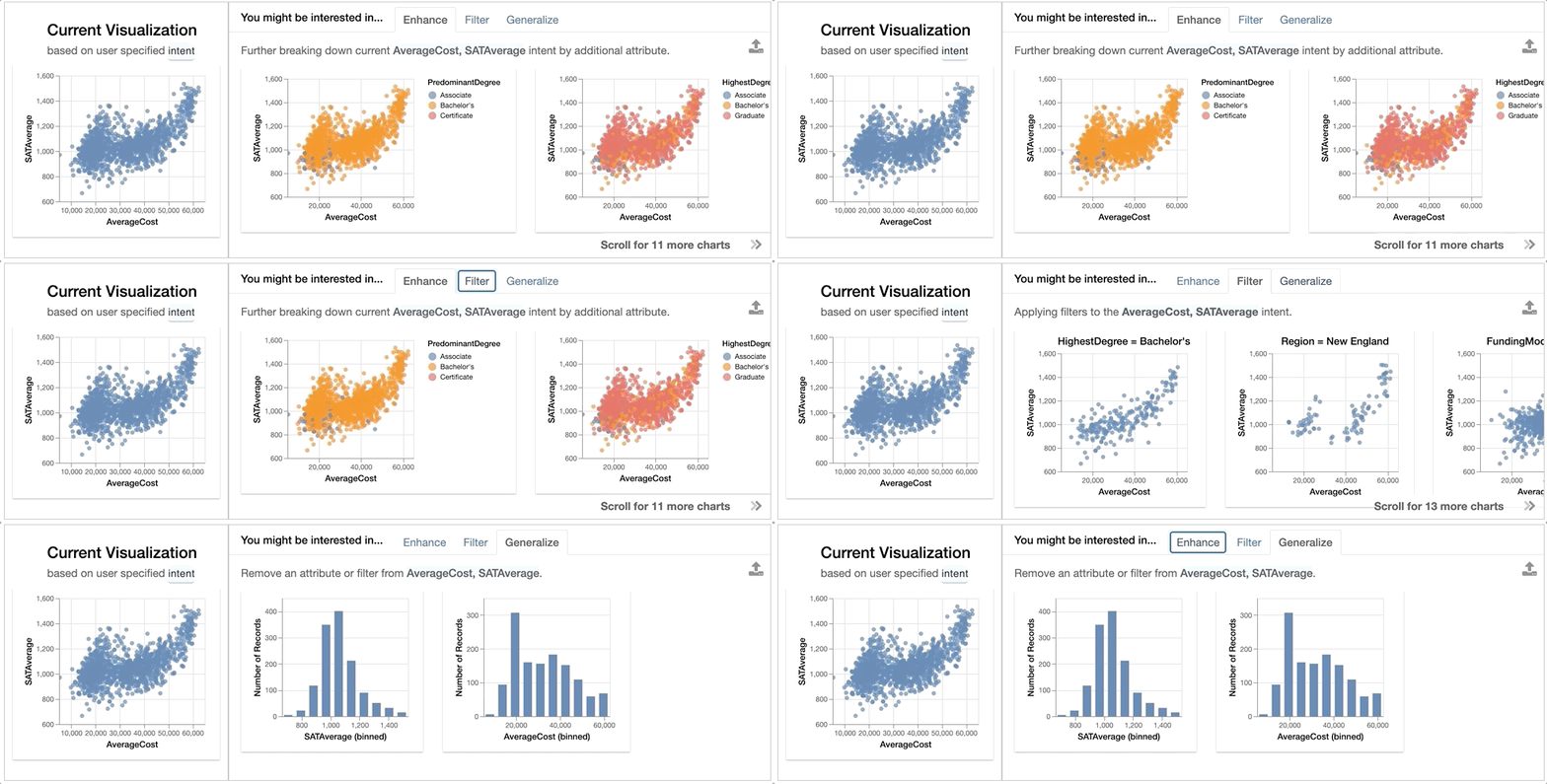
The left-hand side of the widget shows the current visualization, i.e., the current visualization generated based on what the user is interested in. On the right, Lux generates three sets of recommendations, organized as separate tabs on the widget:
Enhanceadds an additional attribute to the current selection, essentially highlighting how additional variables affect the relationship ofAverageCostandSATAverage. We see that if we breakdown the relationship byFundingModel, there is a clear separation between public colleges (shown in red) and private colleges (in blue), with public colleges being cheaper to attend and with SAT average of lower than 1400.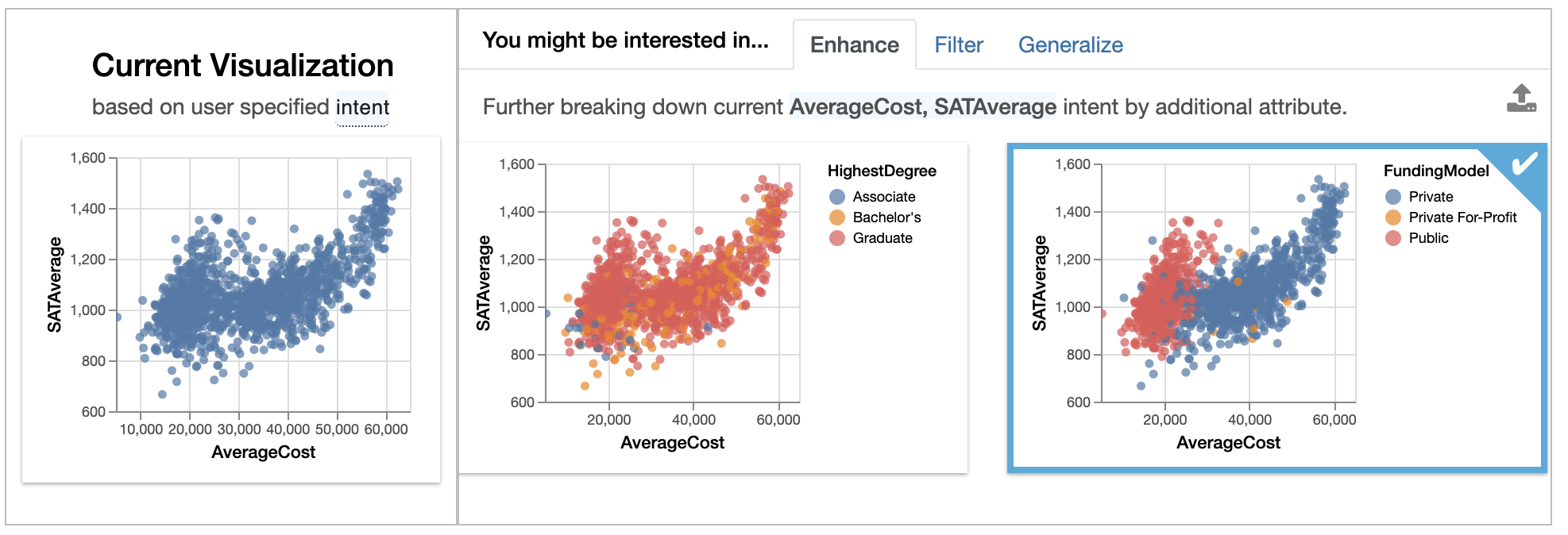
Filteradds a filter to the current selection, while keeping attributes (on the X and Y axes) fixed. These visualizations show how the relationship ofAverageCostandSATAveragechanges for different subsets of data. For instance, we see that colleges that offer Bachelor's degree as its highest degree show a roughly linear trend between the two variables.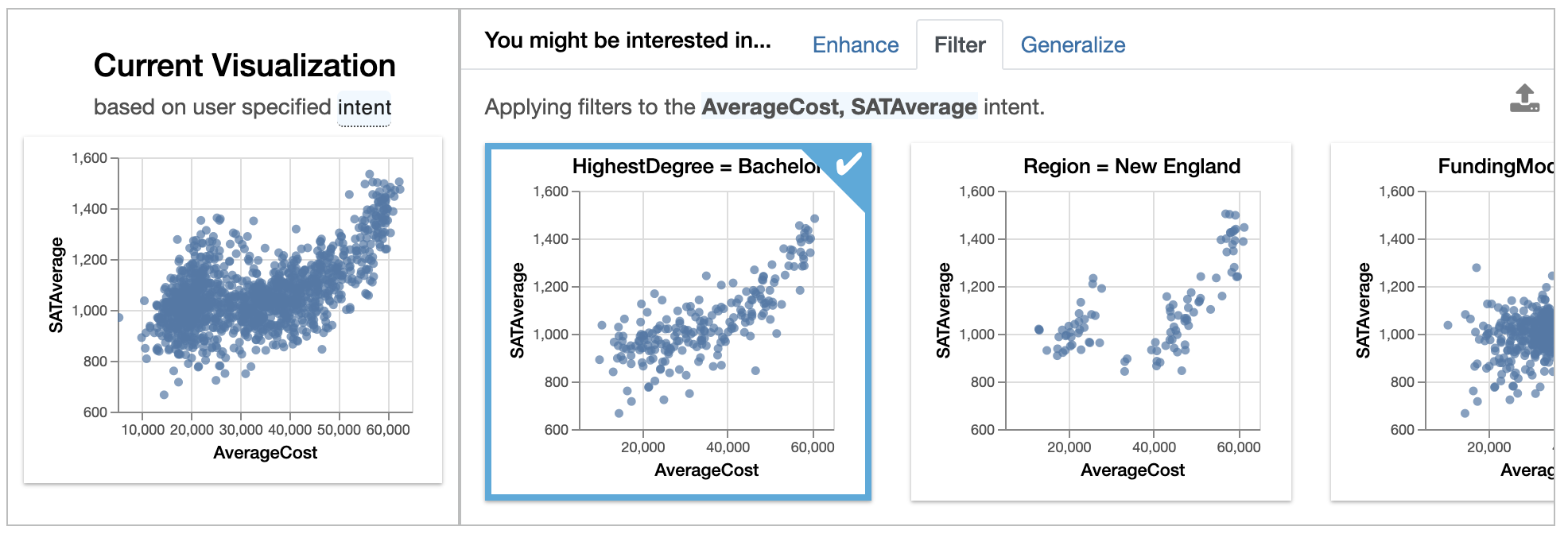
Generalizeremoves an attribute to display a more general trend, showing the distributions ofAverageCostandSATAverageon its own. From theAverageCosthistogram, we see that many colleges with average cost of around $20000 per year, corresponding to the bulge we see in the scatterplot view.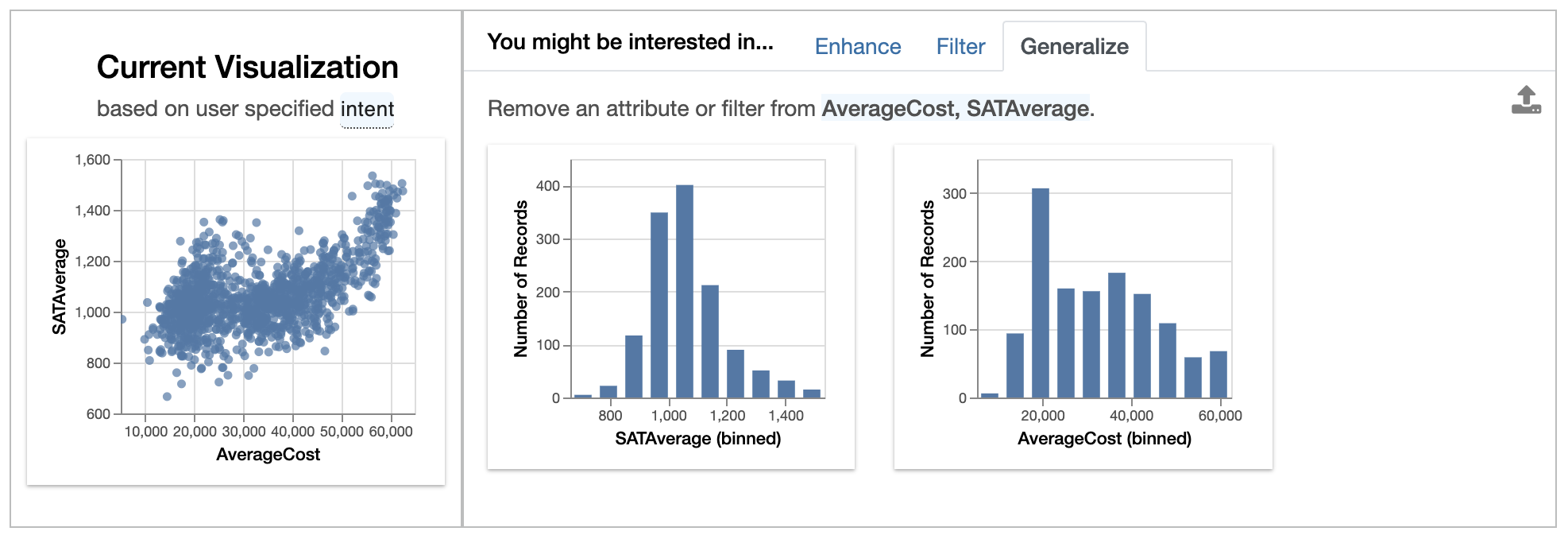
See this page for more information on additional ways for specifying the intent.
Easy programmatic access and export of visualizations:
Now that we have found some interesting visualizations through Lux, we might be interested in digging into these visualizations a bit more or sharing it with others. We can save the visualizations generated in Lux as a static, shareable HTML or programmatically access these visualizations further in Jupyter. Selected Vis objects can be translated into Altair, Matplotlib, or Vega-Lite code, so that they can be further edited.
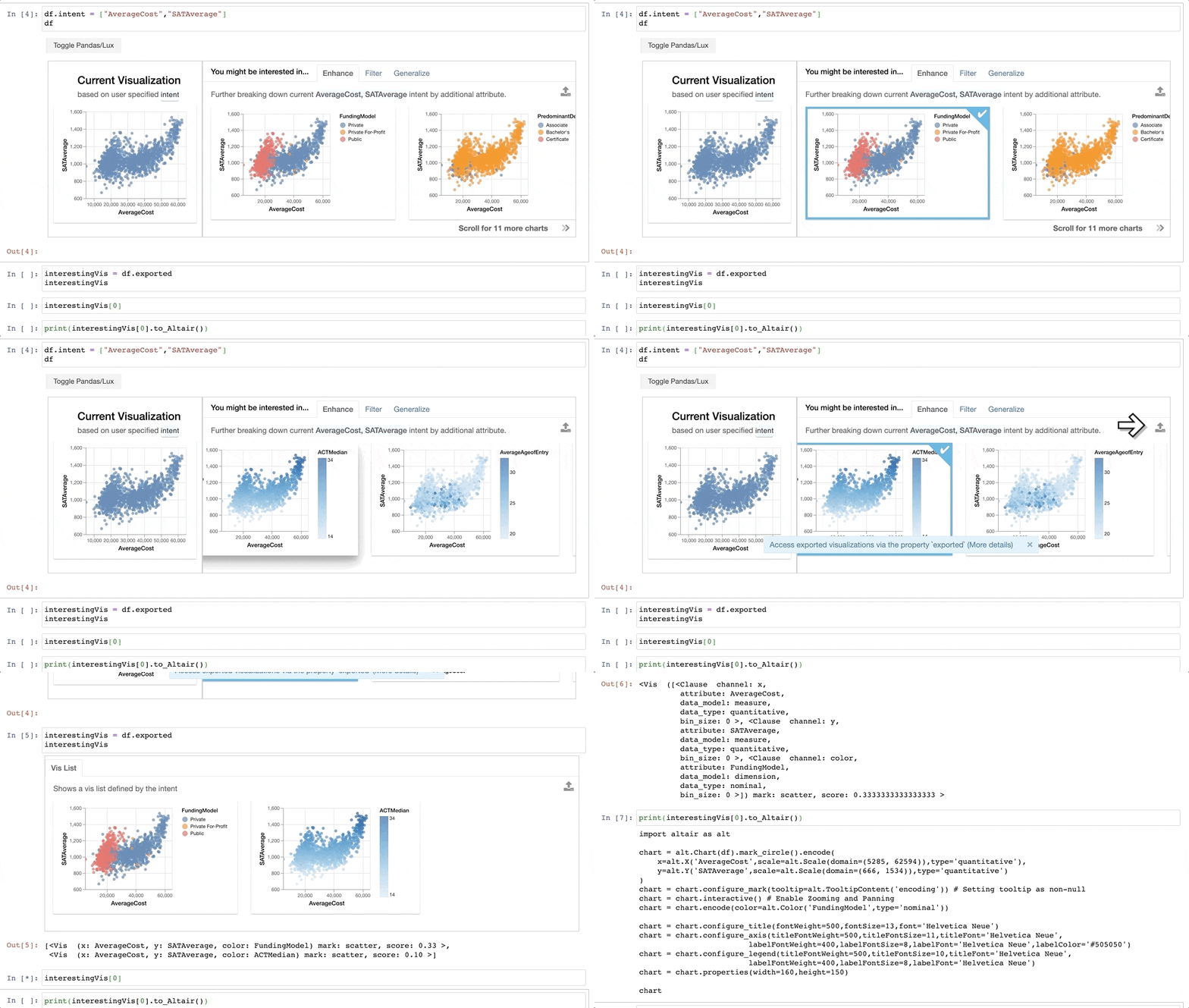
Learn more about how to save and export visualizations here.
Quick, on-demand visualizations with the help of automatic encoding:
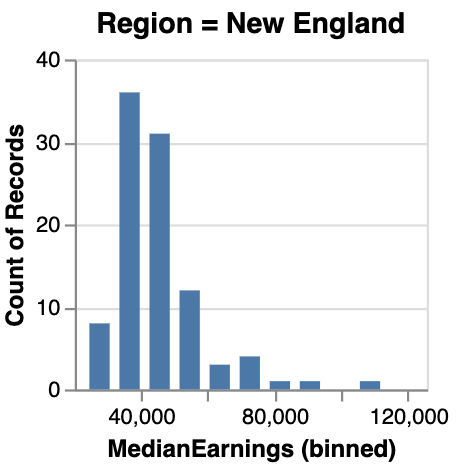
We've seen how Viss are automatically generated as part of the recommendations. Users can also create their own Vis via the same syntax as specifying the intent. Lux is built on the philosophy that users should always be able to visualize anything they want, without having to think about how the visualization should look like. Lux automatically determines the mark and channel mappings based on a set of best practices. The visualizations are rendered via Altair into Vega-Lite specifications.
python
from lux.vis.Vis import Vis
Vis(["Region=New England","MedianEarnings"],df)
Powerful language for working with collections of visualizations:
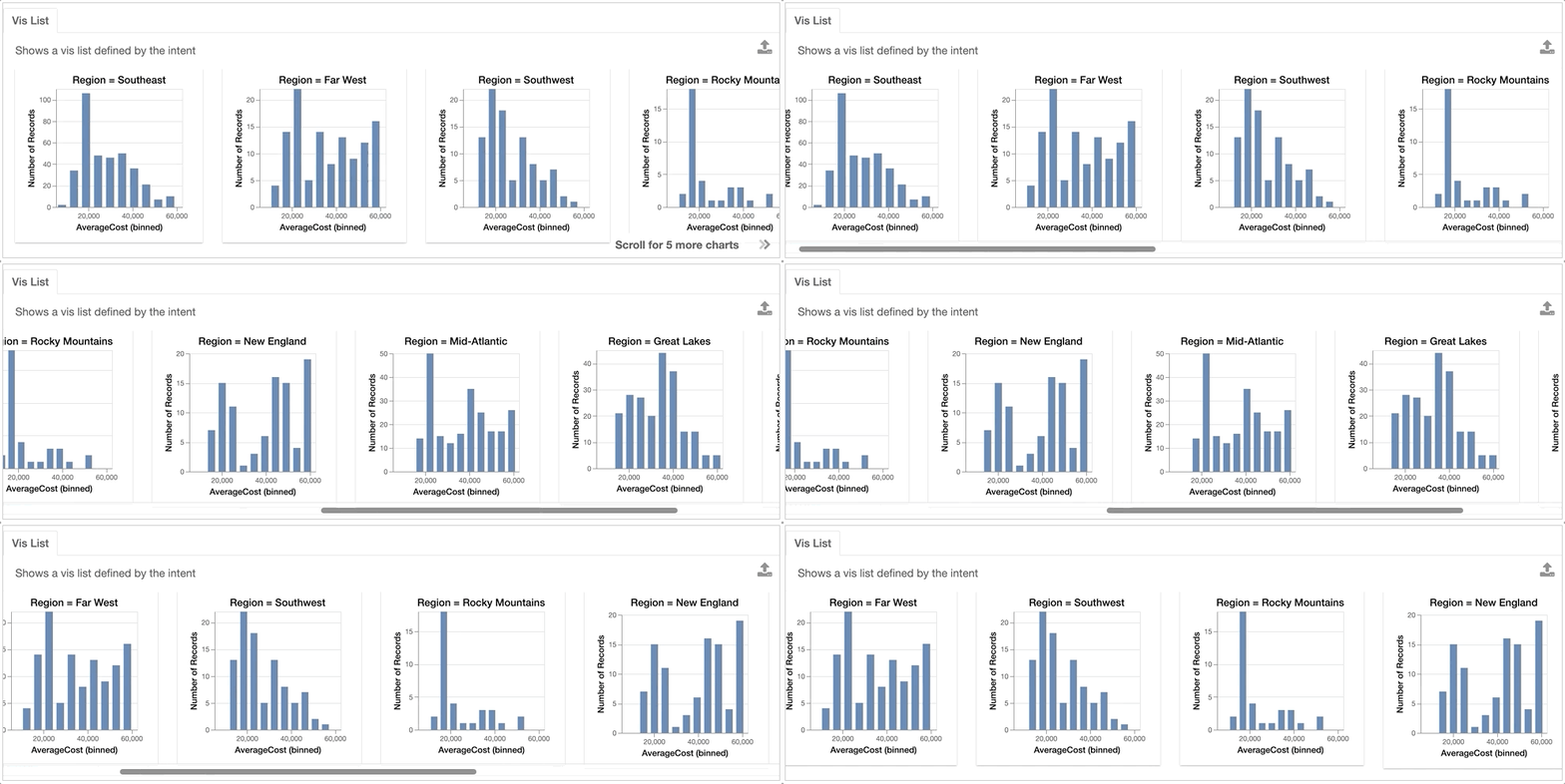
Lux provides a powerful abstraction for working with collections of visualizations based on a partially specified queries. Users can provide a list or a wildcard to iterate over combinations of filter or attribute values and quickly browse through large numbers of visualizations. The partial specification is inspired by existing work on visualization query languages, including ZQL and CompassQL.
For example, we are interested in how the AverageCost distribution differs across different Regions.
python
from lux.vis.VisList import VisList
VisList(["Region=?","AverageCost"],df)
To find out more about other features in Lux, see the complete documentation on ReadTheDocs.
Installation & Setup
Note: Lux's official package name is
lux-api(notlux). After installing the package, remember to run the setup instructions for your notebook IDE, e.g., jupyter notebook and jupyter lab.
To get started, please follow both the installation and setup instructions in your command line.
lux-api can be installed through PyPI or conda-forge.
bash
pip install lux-api
If you use conda, you can install lux-api via:
bash
conda install -c conda-forge lux-api
Both the PyPI and conda installation include includes the Lux Jupyter widget frontend, lux-widget.
Setup in Jupyter Notebook, VSCode, JupyterHub
To use Lux with any Jupyter notebook-based frontends (e.g., Jupyter notebook, JupyterHub, or VSCode), activate the notebook extension:
bash
jupyter nbextension install --py luxwidget
jupyter nbextension enable --py luxwidget
If the installation happens correctly, you should see two - Validating: OK after executing the two lines above.
Note that you may have to restart the Jupyter Notebook server to ensure that the widget is displaying correctly.
Setup in Jupyter Lab
Lux is compatible with both Jupyter Lab version 2 and 3. To use Lux in Jupyter Lab, activate the lab extension:
bash
jupyter labextension install @jupyter-widgets/jupyterlab-manager
jupyter labextension install luxwidget
Note that JupyterLab and VSCode is supported only for lux-widget version >=0.1.2, if you have an earlier version, please upgrade to the latest version of lux-widget. Lux has only been tested with the Chrome browser.
If you encounter issues with the installation, please refer to this page to troubleshoot the installation. Follow these instructions to set up Lux for development purposes.
Support and Resources
Lux is undergoing active development. If you are using Lux, we would love to hear from you!
Drop us a note here to share your experiences — any feedback, suggestions, and contributions are welcome!
Links to additional resources:
- Follow us on Twitter or sign up to our mailing list to stay tuned for upcoming releases and updates.
- Visit ReadTheDoc for more detailed documentation.
- Try out these hands-on exercises or tutorials on Binder. Or clone and run lux-binder locally.
- Join our community Slack to discuss and ask questions.
- Check out our paper for more details on how Lux works under the hoods.
- Report any bugs, issues, or requests through Github Issues.
Owner
- Name: Lux
- Login: lux-org
- Kind: organization
- Repositories: 11
- Profile: https://github.com/lux-org
A Python API for Intelligent Visual Discovery
GitHub Events
Total
- Issues event: 1
- Watch event: 155
- Issue comment event: 1
- Fork event: 14
Last Year
- Issues event: 1
- Watch event: 155
- Issue comment event: 1
- Fork event: 14
Committers
Last synced: about 1 year ago
Top Committers
| Name | Commits | |
|---|---|---|
| Doris Lee | d****e@g****m | 416 |
| jaywoo123 | j****5@i****u | 46 |
| 19thyneb | t****k@g****m | 40 |
| Kunal Agarwal | 3****2 | 38 |
| Caitlyn Chen | c****n@g****m | 29 |
| jrdzha | j****o@b****u | 18 |
| jinimukh | 4****h | 17 |
| thyneb19 | t****k@b****u | 13 |
| Micah Yong | m****g@g****m | 11 |
| Cristian Garcia | c****8@g****m | 7 |
| Labanya Mukhopadhyay | l****y | 7 |
| cjachekang | 4****g | 7 |
| Aditya Parameswaran | a****p@g****m | 1 |
| Anupam Baranwal | 6****b | 1 |
| Jerry Song | 3****4 | 1 |
| Mantej Panesar | m****r@b****u | 1 |
| Marc Skov Madsen | m****n@g****m | 1 |
| Moh-Yakoub | m****b@g****m | 1 |
| Piyush Gupta | p****4@g****m | 1 |
| Priyans Nishithkumar Desai | 4****i | 1 |
| RenChu Wang | r****3@g****m | 1 |
Committer Domains (Top 20 + Academic)
Issues and Pull Requests
Last synced: 11 months ago
All Time
- Total issues: 77
- Total pull requests: 40
- Average time to close issues: 2 months
- Average time to close pull requests: about 2 months
- Total issue authors: 63
- Total pull request authors: 14
- Average comments per issue: 1.81
- Average comments per pull request: 1.63
- Merged pull requests: 22
- Bot issues: 0
- Bot pull requests: 1
Past Year
- Issues: 3
- Pull requests: 0
- Average time to close issues: N/A
- Average time to close pull requests: N/A
- Issue authors: 3
- Pull request authors: 0
- Average comments per issue: 0.0
- Average comments per pull request: 0
- Merged pull requests: 0
- Bot issues: 0
- Bot pull requests: 0
Top Authors
Issue Authors
- dorisjlee (8)
- cgarciae (4)
- Pisciotta (2)
- flight505 (2)
- westernguy2 (2)
- ladylazy9x (1)
- labanyamukhopadhyay (1)
- joseberlines (1)
- Berowne (1)
- tillnagel (1)
- MaryDonovanMartello (1)
- MarcSkovMadsen (1)
- NinetyNineBunny (1)
- AlohaPropolis (1)
- METTA2 (1)
Pull Request Authors
- cgarciae (12)
- labanyamukhopadhyay (8)
- westernguy2 (4)
- cclauss (3)
- rentruewang (3)
- dorisjlee (3)
- saltSam (1)
- thyneb19 (1)
- micahtyong (1)
- hydrosquall (1)
- adityagp (1)
- jinimukh (1)
- dependabot[bot] (1)
- AdityaR-Bits (1)
Top Labels
Issue Labels
Pull Request Labels
Packages
- Total packages: 5
-
Total downloads:
- pypi 4,110 last-month
-
Total dependent packages: 4
(may contain duplicates) -
Total dependent repositories: 28
(may contain duplicates) - Total versions: 36
- Total maintainers: 3
pypi.org: lux
A Python API for Intelligent Data Discovery
- Homepage: https://github.com/lux-org/lux
- Documentation: https://lux.readthedocs.io/
- License: Apache-2.0 License
-
Latest release: 0.5.1
published over 4 years ago
Rankings
Maintainers (2)
pypi.org: lux-api
A Python API for Intelligent Data Discovery
- Homepage: https://github.com/lux-org/lux
- Documentation: https://lux-api.readthedocs.io/
- License: Apache-2.0 License
-
Latest release: 0.5.1
published over 4 years ago
Rankings
proxy.golang.org: github.com/lux-org/lux
- Documentation: https://pkg.go.dev/github.com/lux-org/lux#section-documentation
- License: apache-2.0
-
Latest release: v0.5.1
published over 4 years ago
Rankings
conda-forge.org: lux-api
- Homepage: https://github.com/lux-org/lux
- License: Apache-2.0
-
Latest release: 0.5.1
published over 4 years ago
Rankings
conda-forge.org: lux
- Homepage: https://github.com/lux-org/lux
- License: Apache-2.0
-
Latest release: 0.5.1
published almost 4 years ago