Science Score: 26.0%
This score indicates how likely this project is to be science-related based on various indicators:
-
○CITATION.cff file
-
✓codemeta.json file
Found codemeta.json file -
✓.zenodo.json file
Found .zenodo.json file -
○DOI references
-
○Academic publication links
-
○Committers with academic emails
-
○Institutional organization owner
-
○JOSS paper metadata
-
○Scientific vocabulary similarity
Low similarity (10.4%) to scientific vocabulary
Repository
Perceptual Control Theory with Python
Basic Info
- Host: GitHub
- Owner: perceptualrobots
- License: apache-2.0
- Language: Jupyter Notebook
- Default Branch: master
- Homepage: https://perceptualrobots.github.io/pct/
- Size: 23.6 MB
Statistics
- Stars: 5
- Watchers: 3
- Forks: 1
- Open Issues: 3
- Releases: 0
Metadata Files
README.md
Perceptual Control Theory
With this library you can create and run simple or complex hierarchies of perceptual control systems as well as make use of the power of the Python platform and its rich set of packages.
In the context of this library a single control system comprising a perceptual, reference, comparator and output function is called a Node. The functions therein can be configured by the user.
A hierarchy is defined by a collection of nodes.
Install
pip install pct
Import
Examples of importing the library functionality.
import pct as p
from pct.hierarchy import Hierarchy
from pct import *
How to use
Import modules from the PCT library.
python
from pct.nodes import PCTNode
For the purposes of this example define a world model. This would not be required if the real world is used, or a simulation such as OpenAI Gym.
``` python def velocity_model(velocity, force , mass): velocity = velocity + force / mass return velocity
World value
mass = 50 ```
Create a PCTNode, a control system unit comprising a reference, perception, comparator and output function. The default value for the reference is 1. With the history flag set, the data for each iteration is recorded for later plotting.
python
pctnode = PCTNode(history=True)
Call the node repeatedly to control the perception of velocity. With the verbose flag set, the control values are printed. In this case the printed values are the iteration number, the (velocity) reference, the perception, the error and the (force) output.
python
for i in range(40):
    print(i, end=" ")
    force = pctnode(verbose=True)
    velocity = velocity_model(pctnode.get_perception_value(), force, mass)
    pctnode.set_perception_value(velocity)
0 0.000 0.000 0.000 0.000
1 0.000 0.000 0.000 0.000
2 0.000 0.000 0.000 0.000
3 0.000 0.000 0.000 0.000
4 0.000 0.000 0.000 0.000
5 0.000 0.000 0.000 0.000
6 0.000 0.000 0.000 0.000
7 0.000 0.000 0.000 0.000
8 0.000 0.000 0.000 0.000
9 0.000 0.000 0.000 0.000
10 0.000 0.000 0.000 0.000
11 0.000 0.000 0.000 0.000
12 0.000 0.000 0.000 0.000
13 0.000 0.000 0.000 0.000
14 0.000 0.000 0.000 0.000
15 0.000 0.000 0.000 0.000
16 0.000 0.000 0.000 0.000
17 0.000 0.000 0.000 0.000
18 0.000 0.000 0.000 0.000
19 0.000 0.000 0.000 0.000
20 0.000 0.000 0.000 0.000
21 0.000 0.000 0.000 0.000
22 0.000 0.000 0.000 0.000
23 0.000 0.000 0.000 0.000
24 0.000 0.000 0.000 0.000
25 0.000 0.000 0.000 0.000
26 0.000 0.000 0.000 0.000
27 0.000 0.000 0.000 0.000
28 0.000 0.000 0.000 0.000
29 0.000 0.000 0.000 0.000
30 0.000 0.000 0.000 0.000
31 0.000 0.000 0.000 0.000
32 0.000 0.000 0.000 0.000
33 0.000 0.000 0.000 0.000
34 0.000 0.000 0.000 0.000
35 0.000 0.000 0.000 0.000
36 0.000 0.000 0.000 0.000
37 0.000 0.000 0.000 0.000
38 0.000 0.000 0.000 0.000
39 0.000 0.000 0.000 0.000
Using the plotly library plot the data. The graph shows the perception being controlled to match the reference value.
python
import plotly.graph_objects as go
fig = go.Figure(layout_title_text="Velocity Goal")
fig.add_trace(go.Scatter(y=pctnode.history.data['refcoll']['constant'], name="ref"))
fig.add_trace(go.Scatter(y=pctnode.history.data['percoll']['variable'], name="perc"))
This following code is only for the purposes of displaying image of the graph generated by the above code.
python
from IPython.display import Image
python
Image(url='http://www.perceptualrobots.com/wp-content/uploads/2020/08/pct_node_plot.png')
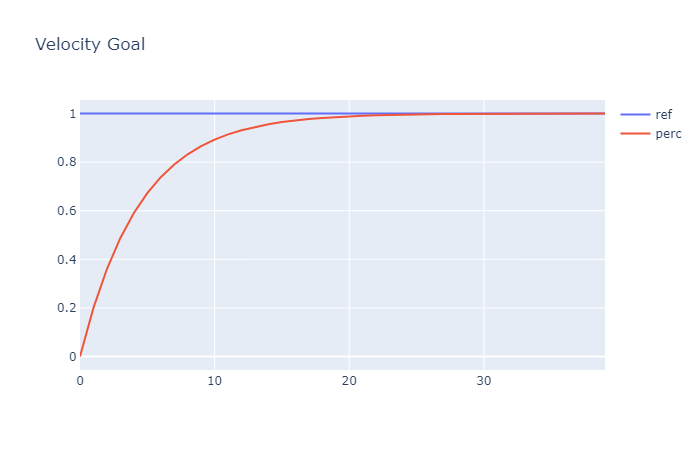
This shows a very basic example of the use of the PCT library. For more advanced functionality see the API documentation at https://perceptualrobots.github.io/pct/.
Owner
- Login: perceptualrobots
- Kind: user
- Repositories: 3
- Profile: https://github.com/perceptualrobots
GitHub Events
Total
- Issues event: 13
- Delete event: 4
- Issue comment event: 2
- Member event: 1
- Push event: 199
- Pull request review event: 5
- Pull request event: 10
- Create event: 6
Last Year
- Issues event: 13
- Delete event: 4
- Issue comment event: 2
- Member event: 1
- Push event: 199
- Pull request review event: 5
- Pull request event: 10
- Create event: 6
Committers
Last synced: over 2 years ago
Top Committers
| Name | Commits | |
|---|---|---|
| Rupert Young | r****t@p****m | 1,013 |
| Rupert Young | r****g@g****m | 166 |
| rupert | r****t@m****k | 113 |
| perceptualrobots | 6****s | 1 |
Committer Domains (Top 20 + Academic)
Issues and Pull Requests
Last synced: 11 months ago
All Time
- Total issues: 4
- Total pull requests: 2
- Average time to close issues: 15 days
- Average time to close pull requests: about 3 hours
- Total issue authors: 1
- Total pull request authors: 1
- Average comments per issue: 0.5
- Average comments per pull request: 0.0
- Merged pull requests: 2
- Bot issues: 0
- Bot pull requests: 0
Past Year
- Issues: 4
- Pull requests: 2
- Average time to close issues: 15 days
- Average time to close pull requests: about 3 hours
- Issue authors: 1
- Pull request authors: 1
- Average comments per issue: 0.5
- Average comments per pull request: 0.0
- Merged pull requests: 2
- Bot issues: 0
- Bot pull requests: 0
Top Authors
Issue Authors
- perceptualrobots (7)
Pull Request Authors
- perceptualrobots (6)
Top Labels
Issue Labels
Pull Request Labels
Packages
- Total packages: 1
-
Total downloads:
- pypi 421 last-month
- Total dependent packages: 0
- Total dependent repositories: 2
- Total versions: 42
- Total maintainers: 1
pypi.org: pct
Perceptual Control Theory with Python
- Homepage: https://github.com/perceptualrobots/pct/tree/master/
- Documentation: https://pct.readthedocs.io/
- License: Apache Software License 2.0
-
Latest release: 0.0.42
published 12 months ago
Rankings
Maintainers (1)
Dependencies
- fastai/workflows/quarto-ghp master composite
- fastai/workflows/nbdev-ci master composite