SlideRunner
SlideRunner is a tool for massive cell annotations in whole slide images
Science Score: 59.0%
This score indicates how likely this project is to be science-related based on various indicators:
-
○CITATION.cff file
-
✓codemeta.json file
Found codemeta.json file -
✓.zenodo.json file
Found .zenodo.json file -
✓DOI references
Found 6 DOI reference(s) in README -
✓Academic publication links
Links to: arxiv.org, ieee.org, zenodo.org -
✓Committers with academic emails
1 of 11 committers (9.1%) from academic institutions -
○Institutional organization owner
-
○JOSS paper metadata
-
○Scientific vocabulary similarity
Low similarity (9.6%) to scientific vocabulary
Keywords from Contributors
Repository
SlideRunner is a tool for massive cell annotations in whole slide images
Basic Info
- Host: GitHub
- Owner: DeepMicroscopy
- License: gpl-3.0
- Language: Python
- Default Branch: master
- Size: 99.7 MB
Statistics
- Stars: 79
- Watchers: 8
- Forks: 10
- Open Issues: 6
- Releases: 0
Metadata Files
README.md

SlideRunner

SlideRunner is a tool for massive cell annotations in whole slide images.
It has been created in close cooperation between the Pattern Recognition Lab, Friedrich-Alexander-Universität Erlangen-Nürnberg and the Institute of Veterenary Pathology, Freie Universität Berlin. Development is continued now at Technische Hochschule Ingolstadt.
If you use the software for research purposes, please cite our paper:
M. Aubreville, C. Bertram, R. Klopfleisch and A. Maier (2018) SlideRunner - A Tool for Massive Cell Annotations in Whole Slide Images. In: Bildverarbeitung für die Medizin 2018. Springer Vieweg, Berlin, Heidelberg, 2018. pp. 309-314. link arXiv:1802.02347
Please find the authors webpage at: https://imi.thi.de
Version 2.0.0
With so many new features, it is time to declare Version 2. While we initially wanted to declare the version on this years BVM, it has all been delayed a bit. But for a good reason: Following requests by our pathologists, SlideRunner now has support for a much broader range of image formats.
List of new features: - New formats: - DICOM supprt (including DICOM WSI, through pydicom, new in 1.99beta4) - CellVizio MKT (Confocal Laser Endomicroscopy, new in 1.99beta4) - TIFF stacks (previously was only for 2D images, new in 1.99beta6) - NII files (thanks to nibabel package, new in 2.0.0) - Synchronization support with EXACT - Much enhanced polygon annotation support, including modifying and simplification - Support for z Stacks as well as time series - Support for non-clickable annotations (to aid some annotation tasks) (new in 2.0.0) - New plugins, e.g.: - WSI co-registration using the method of Jun Jiang https://doi.org/10.1371/journal.pone.0220074 - Secondary Database visualization - and uncountable small fixes and improvements
Download and Installation
For Windows 10 and Mac OS X, we provide a binary file, that you can download here:
| Operating System | Version | Download link| |---|---|---| | Windows 10 (google drive) | V. 2.2.0 | link | | Mac OS X (10.15) (google drive) | V. 2.0.0 | link |
Updates
Starting V. 1.31.0, SlideRunner has support for the DICOM WSI image format (thanks, pydicom team, for your support!). Use wsi2dcm to convert images into dicom format.
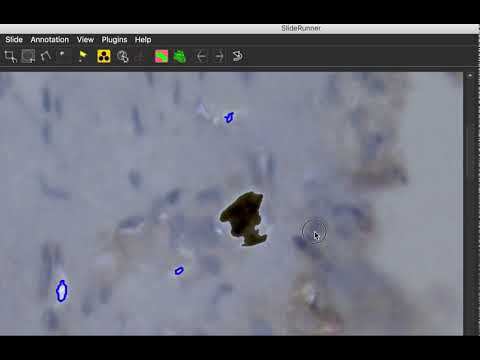
Starting V. 1.25.0, SlideRunner features a magic wand tool.
Installation - Source
SlideRunner is written in Python 3, so you will need a Python 3 distribution like e.g. Anaconda (https://www.anaconda.com/download/) to run it. Further, you need to install OpenSlide (http://openslide.org/download/).
Install using PIP
After OpenSlide is installed, we provide a convenient installation by using pip. On Linux or Mac, simply run:
sudo pip install -U SlideRunner
On windows, pip should install without sudo (untested):
pip install -U SlideRunner
Installation from repository
You need to clone this repository:
git clone https://github.com/maubreville/SlideRunner
In order to use the automated installation process, you need to have setuptools installed.
pip install -U setuptools
The installation procedure is then as easy as:
cd SlideRunner
python setup.py install
To run, the following libraries and their dependencies will be installed:
Library | version | link
------------------|-------------------|-------------------
PyQt6 | >= 6.9.1 | https://pyqt.sourceforge.net/
numpy | >= 1.24.4 | https://www.numpy.org
cv2 (OpenCV3) | >= 4.7.0.72 | https://opencv.org
sqlite3 | >= 2.6.0 | https://www.sqlite.org
openslide | >= 1.4.2 | https://www.openslide.org
Screenshots

Usage
SlideRunner features a number of annotation modes.

View/Select
This mode is meant for browsing/screening the image, without the intention to add annotations.
Object center annotation
In this mode, annotations of object centers (e.g. cells) can be made with one click only. Select the class to annotate by clicking the button next to it in the class list or press the key corresponding to the number in the list of annotations (e.g. key 1 for the first class entry). Objects annotated in this mode are displayed with a circle having a diameter of 50 pixels in full resolution, and scaled appropriately when not viewed in full resolution.
Outline annotation (rectangular) This mode provides a rectangular annotation tool, that can be used to annotate rectangular patches on the image.
Outline annotation (circle) (new in ver 1.8.0) This mode provides a circle annotation tool, that can be used to annotate circular patches on the image.
Outline annotation (polygon) This mode creates a polygon, i.e. a connected line of points corresponding to a single annotation object. This can be handy for cellular structures or tissue types.
Annotation of important position Important positions are annotations shown with a cross in a circle. The size of this annotation does not change depending on the zooming level. An important position does not have a class attached to it.
Key Shortcuts
General
| Key | Function | |-----------|------------| | Ctrl + D | Open default database | | Ctrl + C | Open custom database | | Ctrl + V | Database overview | | Ctrl + O | Open image | | Ctrl + Q | Quit |
View
| Key | Function | |-----------|------------| | + | Zoom in | | - | Zoom out | | Ctrl + Alt + C | Create snapshot of current view | | X | Full plugin opacity | | V | Half plugin opacity | | Y | No plugin opacity | | N | Next frame in screening mode |
Annotation
| Key | Function | |-----------|------------| | S | Object center annotation | | R | Bounding box annotation | | P | Polygon annotation | | W | Magic wand annotation | | F | Important position annotation | | C | Spot annotation | | Del | Delete currently selected annotation | | Esc | Cancel polygon annotation | | Ctrl + R | Remove last polygon point |
News
New version 1.22.0 has a much improved plugin interface. Amongst the many improvements are annotation support from the plugin, as well as the ability to copy annotations from the plugin to the database, even annotation groups.
Databases
The MITOS2012 [http://ludo17.free.fr/mitos_2012/], MITOS-ATYPIA-2014 [https://mitos-atypia-14.grand-challenge.org/] and TUPAC16 [http://tupac.tue-image.nl] data sets are provided as SlideRunner database in the repository. Please download the original images (*.bmp, *.tif) in order to use them.
Tools
Mingrui Jiang has written a tool to extract patches around ROIS. Find it here: https://github.com/mingrui/SlideRunner-ROI-Patch-Maker
Demo workflows
To get started how to use SlideRunners databases, have a look into this notebook.
Plugins
There are currently three plug-ins available:
- OTSU threshold: A simple OTSU threshold plugin. Positive pixels are shown in green color.
- PPC: Positive Pixel Count, as in: Olson, Allen H. "Image analysis using the Aperio ScanScope." Technical manual. Aperio Technologies Inc (2006).
- Macenko normalization: Image-based normalization using the method of Macenko et al. link
Database structure
The major entity of our database model is the annotation. Each annotation can have multiple coordinates, with their respective x and y coordinates, and the order they were drawn (for polygons). Further, each annotation has a multitude of labels that were given by one person each and are belonging to one class, respectively.

Troubleshooting
Programm won't start, error message: Missing or nonfunctional package openslide: Couldn't locate OpenSlide dylib. Is OpenSlide installed?
Unfortunately, the OpenSlide binary libraries can't be fetched using pip. You need to install OpenSlide libraries (and dependencies). See http://openslide.org/download/ for more.
Owner
- Name: DeepMicroscopy - Generating Deep Insights from Deep Learning in Microscopy
- Login: DeepMicroscopy
- Kind: organization
- Location: Erlangen, Germany
- Website: https://deepmicroscopy.org
- Repositories: 1
- Profile: https://github.com/DeepMicroscopy
This is our central home for all our digital pathology projects, focusing on deep learning.
GitHub Events
Total
- Issues event: 1
- Watch event: 4
- Push event: 5
- Fork event: 1
Last Year
- Issues event: 1
- Watch event: 4
- Push event: 5
- Fork event: 1
Committers
Last synced: over 2 years ago
Top Committers
| Name | Commits | |
|---|---|---|
| Marc Aubreville | m****e@f****e | 674 |
| Marc Aubreville | m****e@t****e | 41 |
| Marc Aubreville | m****e@s****m | 26 |
| c.marzahl@de.eu.local | c****l@e****e | 9 |
| wilm | f****m@f****e | 7 |
| Christian Marzahl | c****l@g****m | 5 |
| Marc Aubreville | m****e@g****m | 4 |
| dependabot[bot] | 4****] | 3 |
| Marc Aubreville | m****e@M****l | 1 |
| Robert Klopfleisch | R****h@f****e | 1 |
| Douwe van der Wal | d****l@d****m | 1 |
Committer Domains (Top 20 + Academic)
Dependencies
- EXCAT_Sync ==0.0.34
- Pillow ==9.2.0
- PyQt5 ==5.15.7
- Shapely ==1.8.2
- SlideRunner_dataAccess ==1.0.9
- h5py ==3.7.0
- matplotlib ==3.5.3
- numpy ==1.22.0
- opencv_python ==4.5.3.56
- openslide_wrapper ==1.1.2
- qt_wsi_registration ==0.0.11
- requests ==2.28.1
- requests_toolbelt ==0.9.1
- rollbar ==0.14.7
- scikit_image ==0.16.2
- scikit_learn ==1.1.2
- scipy ==1.9.0
- setuptools ==61.2.0
- SlideRunner_dataAccess >=1.0.7
- matplotlib >=2.0.0
- numpy >=1.13
- opencv-python >=3.1.0
- openslide-python >=1.1.1
- pydicom >=1.4.1
- rollbar >=0.14
- shapely >=1.6.4
- actions/checkout v1 composite
- actions/setup-python v1 composite