vidstab
A Python package to stabilize videos using OpenCV
Science Score: 23.0%
This score indicates how likely this project is to be science-related based on various indicators:
-
○CITATION.cff file
-
✓codemeta.json file
Found codemeta.json file -
○.zenodo.json file
-
○DOI references
-
○Academic publication links
-
✓Committers with academic emails
1 of 4 committers (25.0%) from academic institutions -
○Institutional organization owner
-
○JOSS paper metadata
-
○Scientific vocabulary similarity
Low similarity (13.7%) to scientific vocabulary
Keywords
Repository
A Python package to stabilize videos using OpenCV
Basic Info
- Host: GitHub
- Owner: AdamSpannbauer
- License: mit
- Language: Python
- Default Branch: master
- Homepage: https://adamspannbauer.github.io/python_video_stab/html/index.html
- Size: 425 MB
Statistics
- Stars: 731
- Watchers: 20
- Forks: 123
- Open Issues: 22
- Releases: 18
Topics
Metadata Files
README.md
Python Video Stabilization 




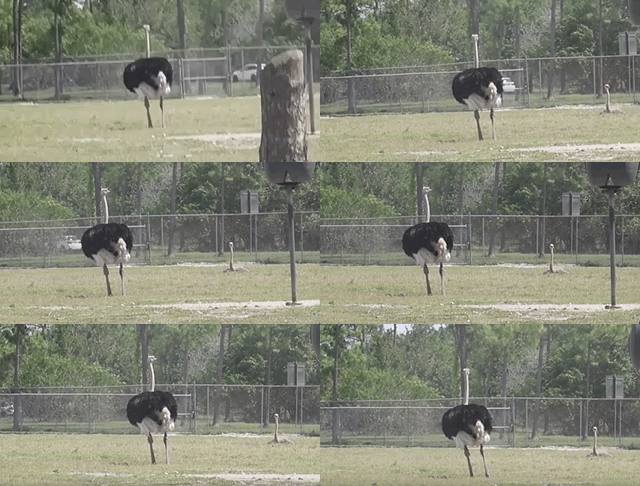
Python video stabilization using OpenCV. Full searchable documentation here.
This module contains a single class (VidStab) used for video stabilization. This class is based on the work presented by Nghia Ho in SIMPLE VIDEO STABILIZATION USING OPENCV. The foundation code was found in a comment on Nghia Ho's post by the commenter with username koala.
Input | Output
:-------------------------------:|:-------------------------:
 |
| 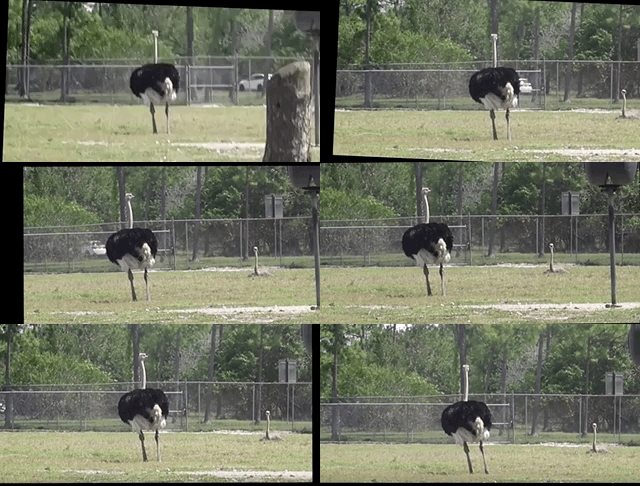
Video used with permission from HappyLiving
Contents:
Installation
diff
+ Please report issues if you install/try to install and run into problems!
Install vidstab without installing OpenCV
If you've already built OpenCV with python bindings on your machine it is recommended to install vidstab without installing the pypi versions of OpenCV. The opencv-python python module can cause issues if you've already built OpenCV from source in your environment.
The below commands will install vidstab without OpenCV included.
From PyPi
bash
pip install vidstab
From GitHub
bash
pip install git+https://github.com/AdamSpannbauer/python_video_stab.git
Install vidstab & OpenCV
If you don't have OpenCV installed already there are a couple options.
- You can build OpenCV using one of the great online tutorials from PyImageSearch, LearnOpenCV, or OpenCV themselves. When building from source you have more options (e.g. platform optimization), but more responsibility. Once installed you can use the pip install command shown above.
- You can install a pre-built distribution of OpenCV from pypi as a dependency for
vidstab(see command below)
The below commands will install vidstab with opencv-contrib-python as dependencies.
From PyPi
bash
pip install vidstab[cv2]
From Github
bash
 pip install -e git+https://github.com/AdamSpannbauer/python_video_stab.git#egg=vidstab[cv2]
Basic usage
The VidStab class can be used as a command line script or in your own custom python code.
Using from command line
```bash
Using defaults
python3 -m vidstab --input inputvideo.mov --output stablevideo.avi ```
```bash
Using a specific keypoint detector
python3 -m vidstab -i inputvideo.mov -o stablevideo.avi -k GFTT ```
Using VidStab class
```python from vidstab import VidStab
Using defaults
stabilizer = VidStab() stabilizer.stabilize(inputpath='inputvideo.mov', outputpath='stablevideo.avi')
Using a specific keypoint detector
stabilizer = VidStab(kpmethod='ORB') stabilizer.stabilize(inputpath='inputvideo.mp4', outputpath='stable_video.avi')
Using a specific keypoint detector and customizing keypoint parameters
stabilizer = VidStab(kpmethod='FAST', threshold=42, nonmaxSuppression=False) stabilizer.stabilize(inputpath='inputvideo.mov', outputpath='stable_video.avi') ```
Advanced usage
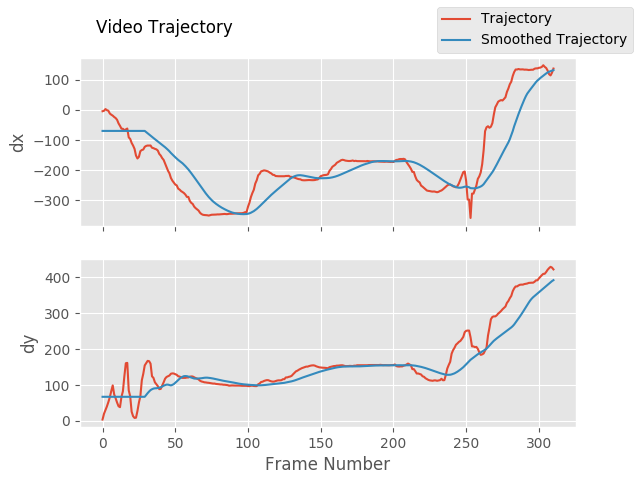
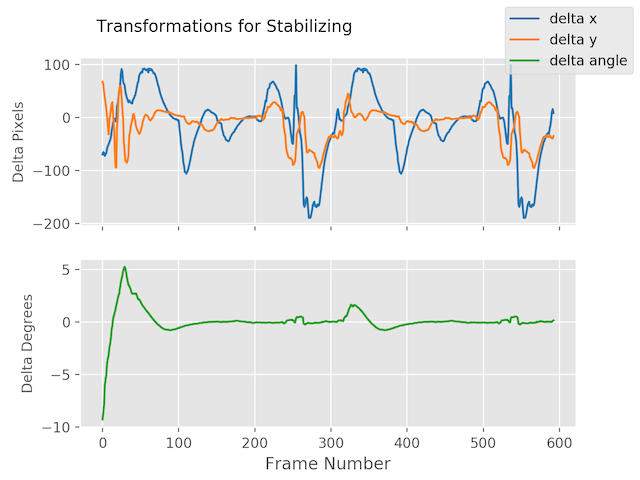
Plotting frame to frame transformations
```python from vidstab import VidStab import matplotlib.pyplot as plt
stabilizer = VidStab() stabilizer.stabilize(inputpath='inputvideo.mov', outputpath='stablevideo.avi')
stabilizer.plot_trajectory() plt.show()
stabilizer.plot_transforms() plt.show() ```
Trajectories | Transforms
:-------------------------------:|:-------------------------:
 |
| 
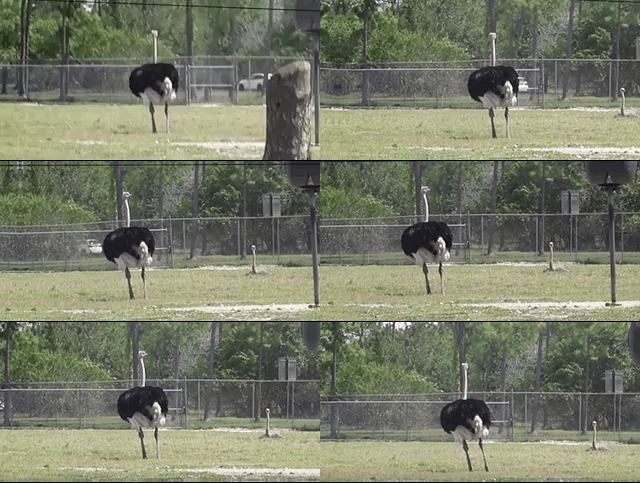
Using borders
```python from vidstab import VidStab
stabilizer = VidStab()
black borders
stabilizer.stabilize(inputpath='inputvideo.mov', outputpath='stablevideo.avi', bordertype='black') stabilizer.stabilize(inputpath='inputvideo.mov', outputpath='widestablevideo.avi', bordertype='black', bordersize=100)
filled in borders
stabilizer.stabilize(inputpath='inputvideo.mov', outputpath='refstablevideo.avi', bordertype='reflect') stabilizer.stabilize(inputpath='inputvideo.mov', outputpath='repstablevideo.avi', bordertype='replicate') ```
|
|
|
|
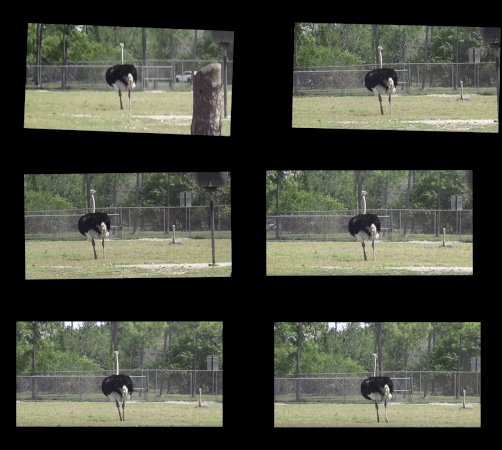
border_type='reflect' | border_type='replicate'
:--------------------------------------:|:-------------------------:
 |
| 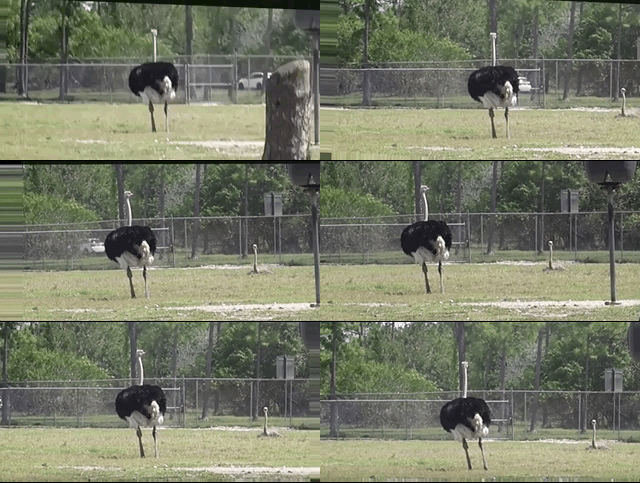
Video used with permission from HappyLiving
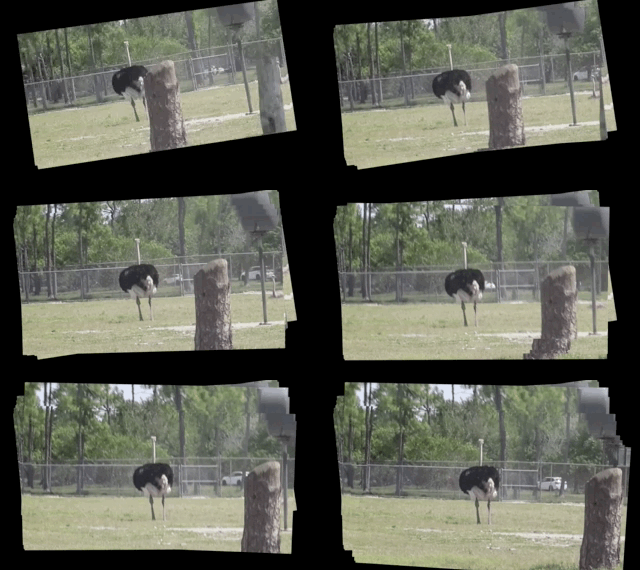
Using Frame Layering
```python from vidstab import VidStab, layeroverlay, layerblend
init vid stabilizer
stabilizer = VidStab()
use vidstab.layer_overlay for generating a trail effect
stabilizer.stabilize(inputpath=INPUTVIDEOPATH, outputpath='trailstablevideo.avi', bordertype='black', bordersize=100, layerfunc=layeroverlay)
create custom overlay function
here we use vidstab.layer_blend with custom alpha
layer_blend will generate a fading trail effect with some motion blur
def layercustom(foreground, background): return layerblend(foreground, background, foreground_alpha=.8)
use custom overlay function
stabilizer.stabilize(inputpath=INPUTVIDEOPATH, outputpath='blendstablevideo.avi', bordertype='black', bordersize=100, layerfunc=layercustom) ```
layer_func=vidstab.layer_overlay | layer_func=vidstab.layer_blend
:--------------------------------------:|:-------------------------:
 |
| 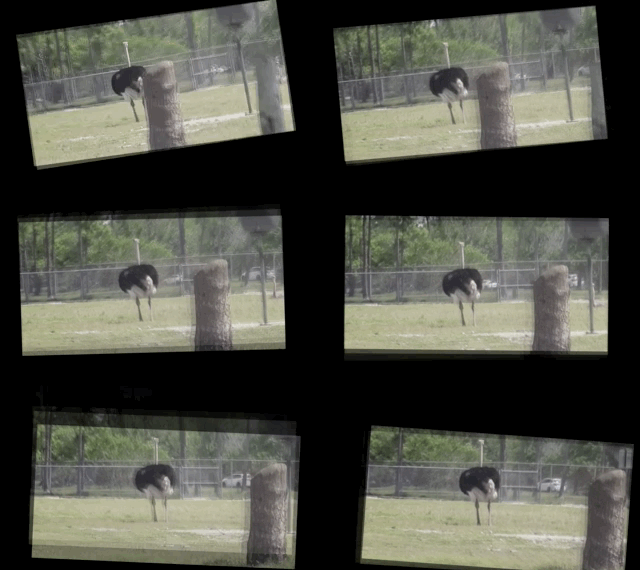
Video used with permission from HappyLiving
Automatic border sizing
```python from vidstab import VidStab, layer_overlay
stabilizer = VidStab()
stabilizer.stabilize(inputpath=INPUTVIDEOPATH, outputpath='autoborderstablevideo.avi', bordersize='auto', # frame layering to show performance of auto sizing layerfunc=layeroverlay) ```

Stabilizing a frame at a time
The method VidStab.stabilize_frame() can accept numpy arrays to allow stabilization processing a frame at a time.
This can allow pre/post processing for each frame to be stabilized; see examples below.
Simplest form
```python from vidstab.VidStab import VidStab
stabilizer = VidStab() vidcap = cv2.VideoCapture('input_video.mov')
while True: grabbed_frame, frame = vidcap.read()
 if frame is not None:
    # Perform any pre-processing of frame before stabilization here
    pass

 # Pass frame to stabilizer even if frame is None
 # stabilized_frame will be an all black frame until iteration 30
 stabilized_frame = stabilizer.stabilize_frame(input_frame=frame,
                                               smoothing_window=30)
 if stabilized_frame is None:
     # There are no more frames available to stabilize
     break

 # Perform any post-processing of stabilized frame here
 pass
```
Example with object tracking
```python import os import cv2 from vidstab import VidStab, layeroverlay, downloadostrich_video
Download test video to stabilize
if not os.path.isfile("ostrich.mp4"): downloadostrichvideo("ostrich.mp4")
Initialize object tracker, stabilizer, and video reader
objecttracker = cv2.TrackerCSRTcreate() stabilizer = VidStab() vidcap = cv2.VideoCapture("ostrich.mp4")
Initialize bounding box for drawing rectangle around tracked object
objectboundingbox = None
while True: grabbed_frame, frame = vidcap.read()
# Pass frame to stabilizer even if frame is None
stabilized_frame = stabilizer.stabilize_frame(input_frame=frame, border_size=50)

# If stabilized_frame is None then there are no frames left to process
if stabilized_frame is None:
    break

# Draw rectangle around tracked object if tracking has started
if object_bounding_box is not None:
    success, object_bounding_box = object_tracker.update(stabilized_frame)

    if success:
        (x, y, w, h) = [int(v) for v in object_bounding_box]
        cv2.rectangle(stabilized_frame, (x, y), (x + w, y + h),
                      (0, 255, 0), 2)

# Display stabilized output
cv2.imshow('Frame', stabilized_frame)

key = cv2.waitKey(5)

# Select ROI for tracking and begin object tracking
# Non-zero frame indicates stabilization process is warmed up
if stabilized_frame.sum() > 0 and object_bounding_box is None:
    object_bounding_box = cv2.selectROI("Frame",
                                        stabilized_frame,
                                        fromCenter=False,
                                        showCrosshair=True)
    object_tracker.init(stabilized_frame, object_bounding_box)
elif key == 27:
    break
vidcap.release() cv2.destroyAllWindows() ```

Working with live video
The VidStab class can also process live video streams. The underlying video reader is cv2.VideoCapture(documentation).
The relevant snippet from the documentation for stabilizing live video is:
Its argument can be either the device index or the name of a video file. Device index is just the number to specify which camera. Normally one camera will be connected (as in my case). So I simply pass 0 (or -1). You can select the second camera by passing 1 and so on.
The input_path argument of the VidStab.stabilize method can accept integers that will be passed directly to cv2.VideoCapture as a device index. You can also pass a device index to the --input argument for command line usage.
One notable difference between live feeds and video files is that webcam footage does not have a definite end point.
The options for ending a live video stabilization are to set the max length using the max_frames argument or to manually stop the process by pressing the Esc key or the Q key.
If max_frames is not provided then no progress bar can be displayed for live video stabilization processes.
Example
```python from vidstab import VidStab
stabilizer = VidStab() stabilizer.stabilize(inputpath=0, outputpath='stablewebcam.avi', maxframes=1000, playback=True) ```

Transform file writing & reading
Generating and saving transforms to file
```python import numpy as np from vidstab import VidStab, downloadostrichvideo
Download video if needed
downloadostrichvideo(INPUTVIDEOPATH)
Generate transforms and save to TRANSFORMATIONS_PATH as csv (no headers)
stabilizer = VidStab() stabilizer.gentransforms(INPUTVIDEOPATH) np.savetxt(TRANSFORMATIONSPATH, stabilizer.transforms, delimiter=',') ```
File at TRANSFORMATIONS_PATH is of the form shown below. The 3 columns represent delta x, delta y, and delta angle respectively.
-9.249733913760086068e+01,2.953221378387767970e+01,-2.875918912994855636e-02
-8.801434576214279559e+01,2.741942225927152776e+01,-2.715232319470826938e-02
Reading and using transforms from file
Below example reads a file of transforms and applies to an arbitrary video. The transform file is of the form shown in above section.
```python import numpy as np from vidstab import VidStab
Read in csv transform data, of form (delta x, delta y, delta angle):
transforms = np.loadtxt(TRANSFORMATIONS_PATH, delimiter=',')
Create stabilizer and supply numpy array of transforms
stabilizer = VidStab() stabilizer.transforms = transforms
Apply stabilizing transforms to INPUTVIDEOPATH and save to OUTPUTVIDEOPATH
stabilizer.applytransforms(INPUTVIDEOPATH, OUTPUTVIDEO_PATH) ```
Owner
- Name: Adam Spannbauer
- Login: AdamSpannbauer
- Kind: user
- Location: Tennessee
- Company: University of Tennessee
- Website: adamspannbauer.github.io
- Twitter: ASpannbauer
- Repositories: 237
- Profile: https://github.com/AdamSpannbauer
Data Scientist/Instructor・Mostly write Python & R for pay・Mostly write p5js for fun・Check me out @thespanningset on Instagram
GitHub Events
Total
- Issues event: 2
- Watch event: 48
- Fork event: 6
Last Year
- Issues event: 2
- Watch event: 48
- Fork event: 6
Committers
Last synced: about 1 year ago
Top Committers
| Name | Commits | |
|---|---|---|
| Adam Spannbauer | S****m@g****m | 294 |
| Adam Spannbauer | u****9@e****m | 2 |
| SuslikV | v****0@i****a | 1 |
| Robert Schütz | r****z@s****e | 1 |
Committer Domains (Top 20 + Academic)
Issues and Pull Requests
Last synced: about 1 year ago
All Time
- Total issues: 71
- Total pull requests: 35
- Average time to close issues: about 1 month
- Average time to close pull requests: about 9 hours
- Total issue authors: 40
- Total pull request authors: 3
- Average comments per issue: 2.92
- Average comments per pull request: 1.94
- Merged pull requests: 28
- Bot issues: 0
- Bot pull requests: 0
Past Year
- Issues: 2
- Pull requests: 0
- Average time to close issues: N/A
- Average time to close pull requests: N/A
- Issue authors: 2
- Pull request authors: 0
- Average comments per issue: 0.0
- Average comments per pull request: 0
- Merged pull requests: 0
- Bot issues: 0
- Bot pull requests: 0
Top Authors
Issue Authors
- AdamSpannbauer (26)
- ScissorHill (3)
- AlbertoMQ (2)
- korabelnikov (2)
- LS11111 (2)
- Rothax (2)
- Choikyungho9 (1)
- Howie9600 (1)
- evgdobr (1)
- NikolasHofmann (1)
- MiladGhorbaniG (1)
- nikzasel (1)
- mrsahabu (1)
- gyillikci (1)
- pranavlal (1)
Pull Request Authors
- AdamSpannbauer (33)
- marcus858 (1)
- SuslikV (1)
Top Labels
Issue Labels
Pull Request Labels
Packages
- Total packages: 3
-
Total downloads:
- pypi 1,540 last-month
-
Total dependent packages: 0
(may contain duplicates) -
Total dependent repositories: 10
(may contain duplicates) - Total versions: 24
- Total maintainers: 1
pypi.org: vidstab
Video Stabilization using OpenCV
- Homepage: https://github.com/AdamSpannbauer/python_video_stab
- Documentation: https://vidstab.readthedocs.io/
- License: MIT
-
Latest release: 1.7.4
published almost 5 years ago
Rankings
Maintainers (1)
proxy.golang.org: github.com/adamspannbauer/python_video_stab
- Documentation: https://pkg.go.dev/github.com/adamspannbauer/python_video_stab#section-documentation
- License: mit
-
Latest release: v1.0.0
published almost 8 years ago
Rankings
proxy.golang.org: github.com/AdamSpannbauer/python_video_stab
- Documentation: https://pkg.go.dev/github.com/AdamSpannbauer/python_video_stab#section-documentation
- License: mit
-
Latest release: v1.0.0
published almost 8 years ago
Rankings
Dependencies
- imutils >=0.5.2
- matplotlib *
- numpy >=1.13.1
- progress >=1.3
- pytest *
- imutils >=0.5.2
- matplotlib *
- numpy *
- progress *