pysheds
:earth_americas: Simple and fast watershed delineation in python.
Science Score: 49.0%
This score indicates how likely this project is to be science-related based on various indicators:
-
○CITATION.cff file
-
✓codemeta.json file
Found codemeta.json file -
✓.zenodo.json file
Found .zenodo.json file -
✓DOI references
Found 1 DOI reference(s) in README -
○Academic publication links
-
✓Committers with academic emails
3 of 11 committers (27.3%) from academic institutions -
○Institutional organization owner
-
○JOSS paper metadata
-
○Scientific vocabulary similarity
Low similarity (10.5%) to scientific vocabulary
Keywords
Keywords from Contributors
Repository
:earth_americas: Simple and fast watershed delineation in python.
Basic Info
Statistics
- Stars: 814
- Watchers: 29
- Forks: 215
- Open Issues: 91
- Releases: 9
Topics
Metadata Files
README.md
pysheds 


🌎 Simple and fast watershed delineation in python.
Documentation
Read the docs here 📖.
Media
Hatari Labs - Elevation model conditioning and stream network delineation with python and pysheds :uk:
Hatari Labs - Watershed and stream network delineation with python and pysheds :uk:
Gidahatari - Delimitación de límite de cuenca y red hidrica con python y pysheds :es:
Earth Science Information Partners - Pysheds: a fast, open-source digital elevation model processing library :uk:
Example usage
Example data used in this tutorial are linked below:
- Elevation: elevation.tiff
- Terrain: impervious_area.zip
- Soil Polygons: soils.zip
Additional DEM datasets are available via the USGS HydroSHEDS project.
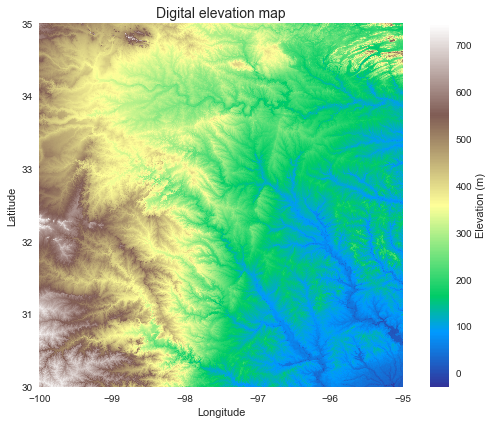
Read DEM data
```python
Read elevation raster
----------------------------
from pysheds.grid import Grid
grid = Grid.fromraster('elevation.tiff') dem = grid.readraster('elevation.tiff') ```
Plotting code...
```python import numpy as np import matplotlib.pyplot as plt from matplotlib import colors import seaborn as sns fig, ax = plt.subplots(figsize=(8,6)) fig.patch.set_alpha(0) plt.imshow(dem, extent=grid.extent, cmap='terrain', zorder=1) plt.colorbar(label='Elevation (m)') plt.grid(zorder=0) plt.title('Digital elevation map', size=14) plt.xlabel('Longitude') plt.ylabel('Latitude') plt.tight_layout() ```
Condition the elevation data
```python
Condition DEM
----------------------
Fill pits in DEM
pitfilleddem = grid.fill_pits(dem)
Fill depressions in DEM
floodeddem = grid.filldepressions(pitfilleddem)
Resolve flats in DEM
inflateddem = grid.resolveflats(flooded_dem) ```
Elevation to flow direction
```python
Determine D8 flow directions from DEM
----------------------
Specify directional mapping
dirmap = (64, 128, 1, 2, 4, 8, 16, 32)
Compute flow directions
-------------------------------------
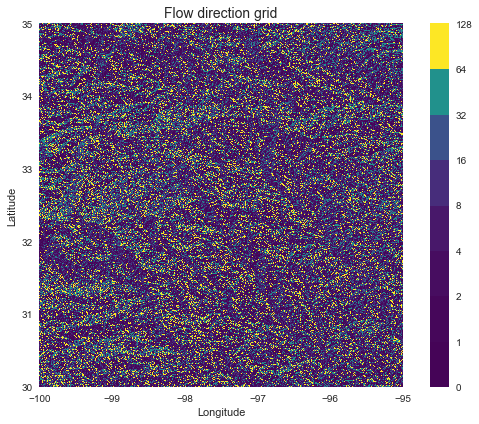
fdir = grid.flowdir(inflated_dem, dirmap=dirmap) ```
Plotting code...
```python fig = plt.figure(figsize=(8,6)) fig.patch.set_alpha(0) plt.imshow(fdir, extent=grid.extent, cmap='viridis', zorder=2) boundaries = ([0] + sorted(list(dirmap))) plt.colorbar(boundaries= boundaries, values=sorted(dirmap)) plt.xlabel('Longitude') plt.ylabel('Latitude') plt.title('Flow direction grid', size=14) plt.grid(zorder=-1) plt.tight_layout() ```
Compute accumulation from flow direction
```python
Calculate flow accumulation
--------------------------
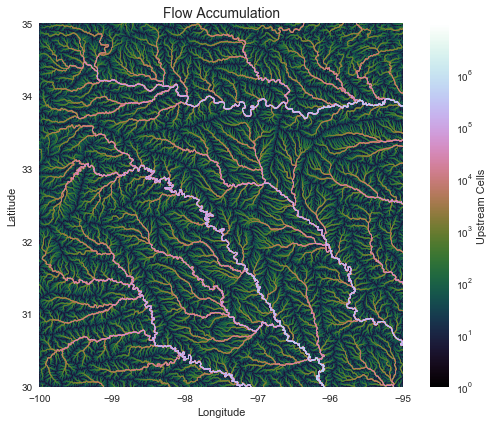
acc = grid.accumulation(fdir, dirmap=dirmap) ```
Plotting code...
```python fig, ax = plt.subplots(figsize=(8,6)) fig.patch.set_alpha(0) plt.grid('on', zorder=0) im = ax.imshow(acc, extent=grid.extent, zorder=2, cmap='cubehelix', norm=colors.LogNorm(1, acc.max()), interpolation='bilinear') plt.colorbar(im, ax=ax, label='Upstream Cells') plt.title('Flow Accumulation', size=14) plt.xlabel('Longitude') plt.ylabel('Latitude') plt.tight_layout() ```
Delineate catchment from flow direction
```python
Delineate a catchment
---------------------
Specify pour point
x, y = -97.294, 32.737
Snap pour point to high accumulation cell
xsnap, ysnap = grid.snaptomask(acc > 1000, (x, y))
Delineate the catchment
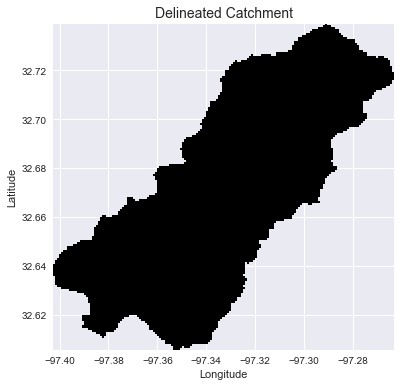
catch = grid.catchment(x=xsnap, y=ysnap, fdir=fdir, dirmap=dirmap, xytype='coordinate')
Crop and plot the catchment
---------------------------
Clip the bounding box to the catchment
grid.clipto(catch) clippedcatch = grid.view(catch) ```
Plotting code...
```python # Plot the catchment fig, ax = plt.subplots(figsize=(8,6)) fig.patch.set_alpha(0) plt.grid('on', zorder=0) im = ax.imshow(np.where(clipped_catch, clipped_catch, np.nan), extent=grid.extent, zorder=1, cmap='Greys_r') plt.xlabel('Longitude') plt.ylabel('Latitude') plt.title('Delineated Catchment', size=14) ```
Extract the river network
```python
Extract river network
---------------------
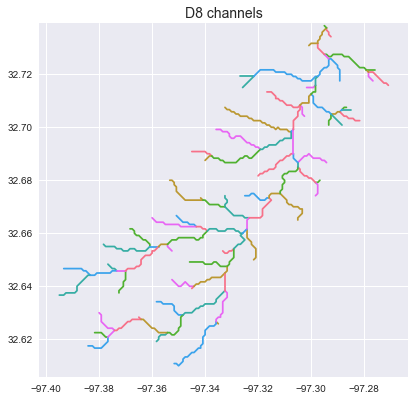
branches = grid.extractrivernetwork(fdir, acc > 50, dirmap=dirmap) ```
Plotting code...
```python sns.set_palette('husl') fig, ax = plt.subplots(figsize=(8.5,6.5)) plt.xlim(grid.bbox[0], grid.bbox[2]) plt.ylim(grid.bbox[1], grid.bbox[3]) ax.set_aspect('equal') for branch in branches['features']: line = np.asarray(branch['geometry']['coordinates']) plt.plot(line[:, 0], line[:, 1]) _ = plt.title('D8 channels', size=14) ```
Compute flow distance from flow direction
```python
Calculate distance to outlet from each cell
-------------------------------------------
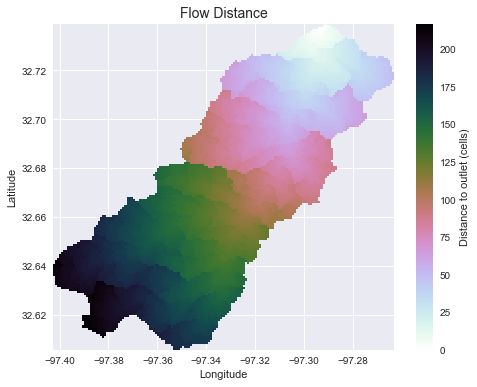
dist = grid.distancetooutlet(x=xsnap, y=ysnap, fdir=fdir, dirmap=dirmap, xytype='coordinate') ```
Plotting code...
```python fig, ax = plt.subplots(figsize=(8,6)) fig.patch.set_alpha(0) plt.grid('on', zorder=0) im = ax.imshow(dist, extent=grid.extent, zorder=2, cmap='cubehelix_r') plt.colorbar(im, ax=ax, label='Distance to outlet (cells)') plt.xlabel('Longitude') plt.ylabel('Latitude') plt.title('Flow Distance', size=14) ```
Add land cover data
```python
Combine with land cover data
---------------------
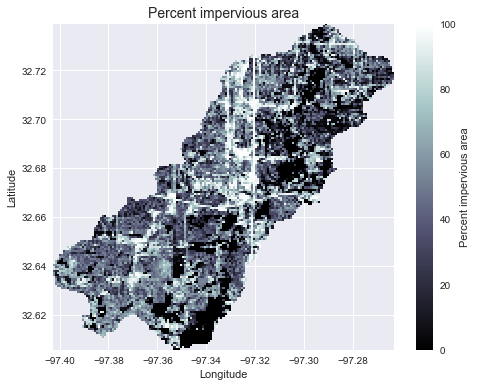
terrain = grid.readraster('imperviousarea.tiff', window=grid.bbox, window_crs=grid.crs, nodata=0)
Reproject data to grid's coordinate reference system
projectedterrain = terrain.tocrs(grid.crs)
View data in catchment's spatial extent
catchmentterrain = grid.view(projectedterrain, nodata=np.nan) ```
Plotting code...
```python fig, ax = plt.subplots(figsize=(8,6)) fig.patch.set_alpha(0) plt.grid('on', zorder=0) im = ax.imshow(catchment_terrain, extent=grid.extent, zorder=2, cmap='bone') plt.colorbar(im, ax=ax, label='Percent impervious area') plt.xlabel('Longitude') plt.ylabel('Latitude') plt.title('Percent impervious area', size=14) ```
Add vector data
```python
Convert catchment raster to vector and combine with soils shapefile
---------------------
Read soils shapefile
import pandas as pd import geopandas as gpd from shapely import geometry, ops soils = gpd.readfile('soils.shp') soilid = 'MUKEY'
Convert catchment raster to vector geometry and find intersection
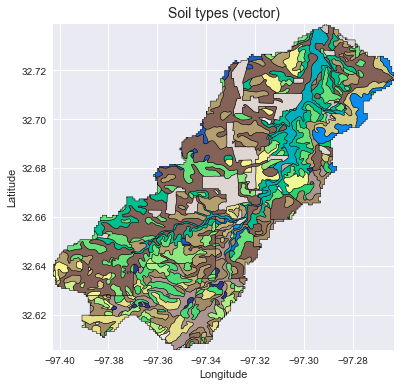
shapes = grid.polygonize() catchmentpolygon = ops.unaryunion([geometry.shape(shape) for shape, value in shapes]) soils = soils[soils.intersects(catchmentpolygon)] catchmentsoils = gpd.GeoDataFrame(soils[soilid], geometry=soils.intersection(catchmentpolygon))
Convert soil types to simple integer values
soiltypes = np.unique(catchmentsoils[soilid]) soiltypes = pd.Series(np.arange(soiltypes.size), index=soiltypes) catchmentsoils[soilid] = catchmentsoils[soilid].map(soil_types) ```
Plotting code...
```python fig, ax = plt.subplots(figsize=(8, 6)) catchment_soils.plot(ax=ax, column=soil_id, categorical=True, cmap='terrain', linewidth=0.5, edgecolor='k', alpha=1, aspect='equal') ax.set_xlim(grid.bbox[0], grid.bbox[2]) ax.set_ylim(grid.bbox[1], grid.bbox[3]) plt.xlabel('Longitude') plt.ylabel('Latitude') ax.set_title('Soil types (vector)', size=14) ```
Convert from vector to raster
python
soil_polygons = zip(catchment_soils.geometry.values, catchment_soils[soil_id].values)
soil_raster = grid.rasterize(soil_polygons, fill=np.nan)
Plotting code...
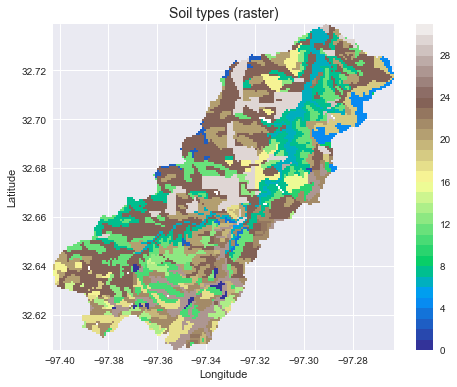
```python fig, ax = plt.subplots(figsize=(8, 6)) plt.imshow(soil_raster, cmap='terrain', extent=grid.extent, zorder=1) boundaries = np.unique(soil_raster[~np.isnan(soil_raster)]).astype(int) plt.colorbar(boundaries=boundaries, values=boundaries) ax.set_xlim(grid.bbox[0], grid.bbox[2]) ax.set_ylim(grid.bbox[1], grid.bbox[3]) plt.xlabel('Longitude') plt.ylabel('Latitude') ax.set_title('Soil types (raster)', size=14) ```
Features
- Hydrologic Functions:
flowdir: Generate a flow direction grid from a given digital elevation dataset.catchment: Delineate the watershed for a given pour point (x, y).accumulation: Compute the number of cells upstream of each cell; if weights are given, compute the sum of weighted cells upstream of each cell.distance_to_outlet: Compute the (weighted) distance from each cell to a given pour point, moving downstream.distance_to_ridge: Compute the (weighted) distance from each cell to its originating drainage divide, moving upstream.compute_hand: Compute the height above nearest drainage (HAND).stream_order: Compute the (strahler) stream order.extract_river_network: Extract river segments from a catchment and return a geojson object.extract_profiles: Extract river segments and return a list of channel indices along with a dictionary describing connectivity.cell_dh: Compute the drop in elevation from each cell to its downstream neighbor.cell_distances: Compute the distance from each cell to its downstream neighbor.cell_slopes: Compute the slope between each cell and its downstream neighbor.fill_pits: Fill single-celled pits in a digital elevation dataset.fill_depressions: Fill multi-celled depressions in a digital elevation dataset.resolve_flats: Remove flats from a digital elevation dataset.detect_pits: Detect single-celled pits in a digital elevation dataset.detect_depressions: Detect multi-celled depressions in a digital elevation dataset.detect_flats: Detect flats in a digital elevation dataset.
- Viewing Functions:
view: Returns a "view" of a dataset defined by the grid's viewfinder.clip_to: Clip the viewfinder to the smallest area containing all non- null gridcells for a provided dataset.nearest_cell: Returns the index (column, row) of the cell closest to a given geographical coordinate (x, y).snap_to_mask: Snaps a set of points to the nearest nonzero cell in a boolean mask; useful for finding pour points from an accumulation raster.
- I/O Functions:
read_ascii: Reads ascii gridded data.read_raster: Reads raster gridded data.from_ascii: Instantiates a grid from an ascii file.from_raster: Instantiates a grid from a raster file or Raster object.to_ascii: Write grids to delimited ascii files.to_raster: Write grids to raster files (e.g. geotiff).
pysheds supports both D8 and D-infinity routing schemes.
Installation
pysheds currently only supports Python 3.
Using pip
You can install pysheds using pip:
bash
$ pip install pysheds
Using anaconda
First, add conda forge to your channels, if you have not already done so:
bash
$ conda config --add channels conda-forge
Then, install pysheds:
bash
$ conda install pysheds
Installing from source
For the bleeding-edge version, you can install pysheds from this github repository.
bash
$ git clone https://github.com/mdbartos/pysheds.git
$ cd pysheds
$ python setup.py install
or
bash
$ git clone https://github.com/mdbartos/pysheds.git
$ cd pysheds
$ pip install .
Performance
Performance benchmarks on a 2015 MacBook Pro (M: million, K: thousand):
| Function | Routing | Number of cells | Run time |
| ----------------------- | ------- | ------------------------ | -------- |
| flowdir | D8 | 36M | 1.14 [s] |
| flowdir | DINF | 36M | 7.01 [s] |
| flowdir | MFD | 36M | 4.21 [s] |
| accumulation | D8 | 36M | 3.44 [s] |
| accumulation | DINF | 36M | 14.9 [s] |
| accumulation | MFD | 36M | 32.5 [s] |
| catchment | D8 | 9.76M | 2.19 [s] |
| catchment | DINF | 9.76M | 3.5 [s] |
| catchment | MFD | 9.76M | 17.1 [s] |
| distance_to_outlet | D8 | 9.76M | 2.98 [s] |
| distance_to_outlet | DINF | 9.76M | 5.49 [s] |
| distance_to_outlet | MFD | 9.76M | 13.1 [s] |
| distance_to_ridge | D8 | 36M | 4.53 [s] |
| distance_to_ridge | DINF | 36M | 14.5 [s] |
| distance_to_ridge | MFD | 36M | 31.3 [s] |
| hand | D8 | 36M total, 730K channel | 12.3 [s] |
| hand | DINF | 36M total, 770K channel | 15.8 [s] |
| hand | MFD | 36M total, 770K channel | 29.8 [s] |
| stream_order | D8 | 36M total, 1M channel | 3.99 [s] |
| extract_river_network | D8 | 36M total, 345K channel | 4.07 [s] |
| extract_profiles | D8 | 36M total, 345K channel | 2.89 [s] |
| detect_pits | N/A | 36M | 1.80 [s] |
| detect_flats | N/A | 36M | 1.84 [s] |
| fill_pits | N/A | 36M | 2.52 [s] |
| fill_depressions | N/A | 36M | 27.1 [s] |
| resolve_flats | N/A | 36M | 9.56 [s] |
| cell_dh | D8 | 36M | 2.34 [s] |
| cell_dh | DINF | 36M | 4.92 [s] |
| cell_dh | MFD | 36M | 30.1 [s] |
| cell_distances | D8 | 36M | 1.11 [s] |
| cell_distances | DINF | 36M | 2.16 [s] |
| cell_distances | MFD | 36M | 26.8 [s] |
| cell_slopes | D8 | 36M | 4.01 [s] |
| cell_slopes | DINF | 36M | 10.2 [s] |
| cell_slopes | MFD | 36M | 58.7 [s] |
Speed tests were run on a conditioned DEM from the HYDROSHEDS DEM repository
(linked above as elevation.tiff).
Citing
If you have used this codebase in a publication and wish to cite it, consider citing the zenodo repository:
bibtex
@misc{bartos_2020,
    title  = {pysheds: simple and fast watershed delineation in python},
    author = {Bartos, Matt},
    url    = {https://github.com/mdbartos/pysheds},
    year   = {2020},
    doi    = {10.5281/zenodo.3822494}
}
Owner
- Name: Matt Bartos
- Login: mdbartos
- Kind: user
- Location: Austin, TX
- Company: @future-water, @ESIPFed
- Website: future-water.github.io
- Repositories: 33
- Profile: https://github.com/mdbartos
Assistant Professor of Civil Engineering at UT Austin
GitHub Events
Total
- Issues event: 11
- Watch event: 93
- Issue comment event: 33
- Push event: 3
- Pull request event: 8
- Fork event: 20
- Create event: 1
Last Year
- Issues event: 11
- Watch event: 93
- Issue comment event: 33
- Push event: 3
- Pull request event: 8
- Fork event: 20
- Create event: 1
Committers
Last synced: 12 months ago
Top Committers
| Name | Commits | |
|---|---|---|
| Matt Bartos | m****s@u****u | 354 |
| Zeitsperre | 1****e | 16 |
| Ryan Grout | r****n@r****g | 13 |
| itati01 | i****1 | 13 |
| rickD | d****r@g****m | 8 |
| Philipp Kraft | p****t@u****e | 4 |
| Philipp Kraft | o****z@g****e | 3 |
| Matthew Plough | m****h@k****m | 2 |
| Jonathan King | j****3@g****m | 1 |
| Ryan Grout | r****t@n****v | 1 |
| David Huard | d****d@g****m | 1 |
Committer Domains (Top 20 + Academic)
Issues and Pull Requests
Last synced: 11 months ago
All Time
- Total issues: 207
- Total pull requests: 71
- Average time to close issues: 10 months
- Average time to close pull requests: 21 days
- Total issue authors: 124
- Total pull request authors: 20
- Average comments per issue: 2.36
- Average comments per pull request: 1.65
- Merged pull requests: 55
- Bot issues: 0
- Bot pull requests: 0
Past Year
- Issues: 13
- Pull requests: 8
- Average time to close issues: 5 days
- Average time to close pull requests: 3 months
- Issue authors: 13
- Pull request authors: 5
- Average comments per issue: 0.46
- Average comments per pull request: 0.38
- Merged pull requests: 1
- Bot issues: 0
- Bot pull requests: 0
Top Authors
Issue Authors
- mdbartos (39)
- itati01 (12)
- ShervanGharari (4)
- philippkraft (3)
- rishav-karanjit (3)
- fluviotect (3)
- JamesSample (3)
- groutr (3)
- tommylees112 (3)
- saikirankuntla (3)
- hikmet34 (3)
- PierreRCM (2)
- bosmanoglu (2)
- staceyzhang-cbcl (2)
- bhanu-magotra (2)
Pull Request Authors
- mdbartos (38)
- groutr (6)
- JonKing93 (5)
- itati01 (3)
- Zeitsperre (3)
- philippkraft (2)
- debboutr (2)
- JaweedNazary (2)
- alessandro-mariotti-zupit (2)
- ashleymedin (2)
- mplough-kobold (2)
- Ledoux (2)
- cheginit (2)
- feromes (1)
- avkoehl (1)
Top Labels
Issue Labels
Pull Request Labels
Packages
- Total packages: 1
- Total downloads: unknown
- Total dependent packages: 2
- Total dependent repositories: 2
- Total versions: 7
conda-forge.org: pysheds
Simple and fast watershed delineation in python.
- Homepage: https://github.com/mdbartos/pysheds
- License: GPL-3.0-or-later
-
Latest release: 0.3.3
published almost 4 years ago
Rankings
Dependencies
- affine *
- geojson *
- numba *
- numpy *
- pandas *
- pyproj *
- rasterio >=1
- scikit-image *
- scipy *
- actions/checkout v2 composite
- actions/setup-python v2 composite
- actions/checkout v2 composite
- actions/setup-python v2 composite
- pypa/gh-action-pypi-publish 27b31702a0e7fc50959f5ad993c78deac1bdfc29 composite