pvtrace
Optical ray tracing for luminescent materials and spectral converter photovoltaic devices
Science Score: 33.0%
This score indicates how likely this project is to be science-related based on various indicators:
-
○CITATION.cff file
-
○codemeta.json file
-
○.zenodo.json file
-
✓DOI references
Found 3 DOI reference(s) in README -
✓Academic publication links
Links to: zenodo.org -
✓Committers with academic emails
4 of 8 committers (50.0%) from academic institutions -
○Institutional organization owner
-
○JOSS paper metadata
-
○Scientific vocabulary similarity
Low similarity (13.8%) to scientific vocabulary
Keywords
Keywords from Contributors
Repository
Optical ray tracing for luminescent materials and spectral converter photovoltaic devices
Basic Info
Statistics
- Stars: 104
- Watchers: 10
- Forks: 95
- Open Issues: 9
- Releases: 0
Topics
Metadata Files
README.md


Optical ray tracing for luminescent materials and spectral converter photovoltaic devices
Ray-tracing luminescent solar concentrators
pvtrace is a statistical photon path tracer written in Python. Rays are followed through a 3D scene and their interactions with objects are recorded to build up statistical information about energy flow.
This is useful in photovoltaics and non-imaging optics where the goal is to design systems which efficiently transport light to target locations.
One of its key features is the ability to simulate re-absorption in luminescent materials. For example, like in devices like Luminescent Solar Concentrators (LSCs).
A basic LSC can be simulated and visualised in five lines of code,
python
from pvtrace import *
lsc = LSC((5.0, 5.0, 1.0))  # size in cm
lsc.show()                  # open visualiser
lsc.simulate(100)           # emit 100 rays
lsc.report()                # print report
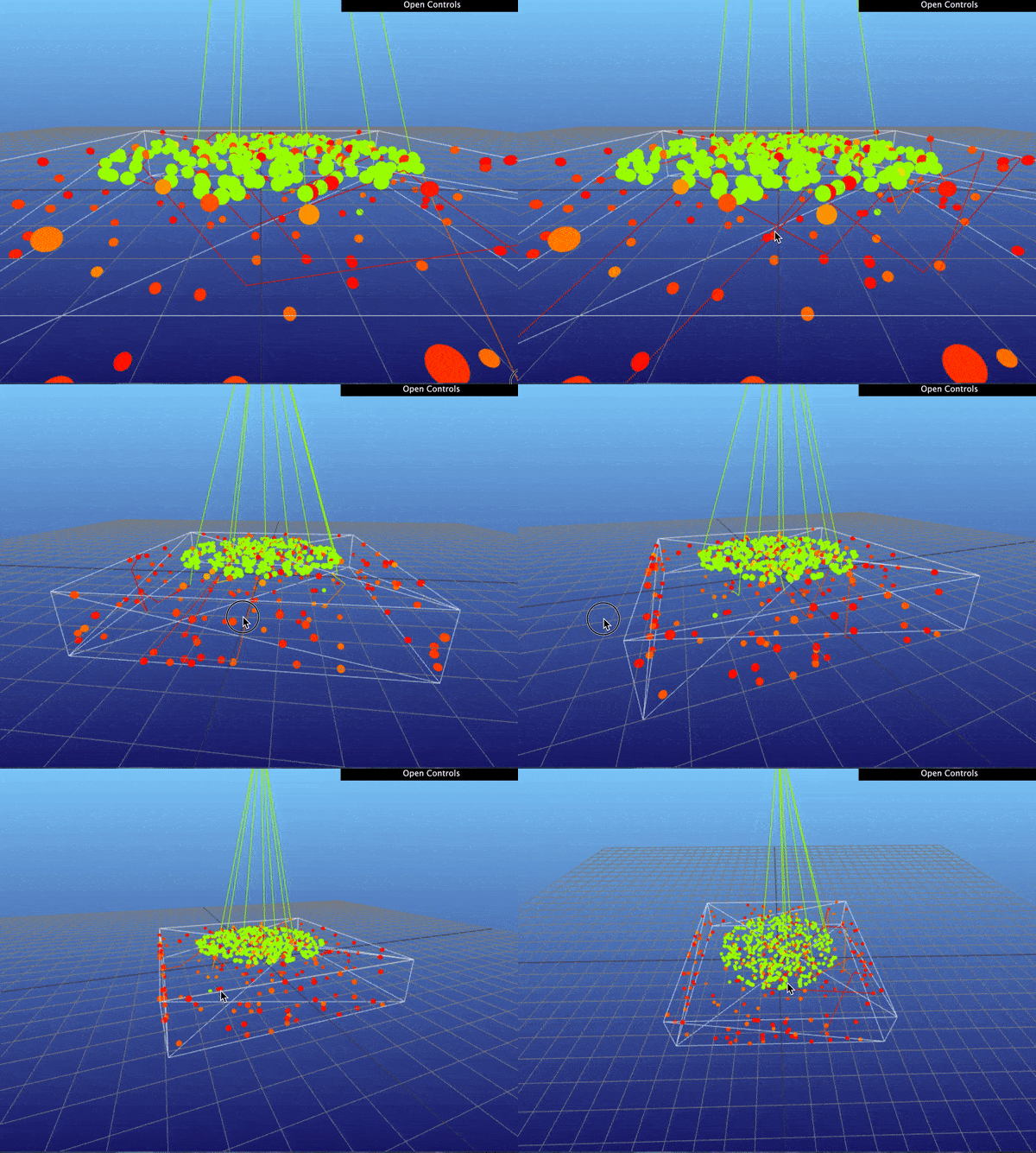
This script will render the ray-tracing in real time,
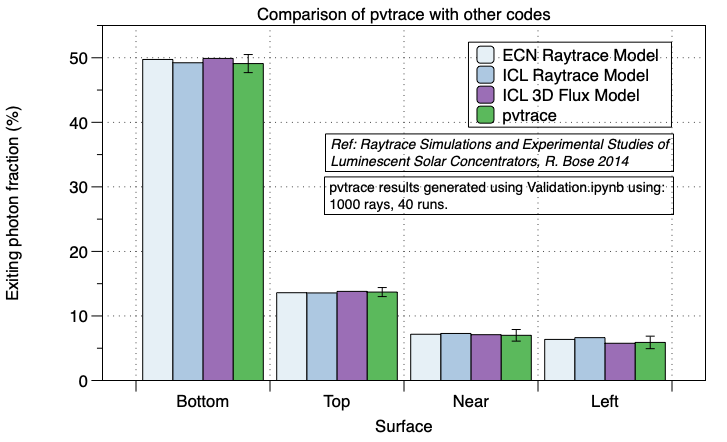
pvtrace has been validate against three other luminescent concentrator codes. For full details see Validation.ipynb notebook
Install
MacOS using pyenv
On MacOS pvtrace can be installed easily using pyenv, the pip command and homebrew. First install homebrew, then install spatialindex for the RTree dependency,
brew install spatialindex
Next, create a clean virtual environment for pvtrace
pyenv install 3.7.8
pyenv virtualenv 3.7.8 pvtrace-env
pyenv activate pvtrace-env
pip install pvtrace
Linux and Windows using Conda
On Linux and Windows you must use conda to create the python environment. Optionally you can also use this method on MacOS too if you prefer conda over pyenv.
conda create --name pvtrace-env python=3.7.8
conda activate pvtrace-env
conda install Rtree
pip install pvtrace
Run the example script and notebooks
Download the hello_world.py example script either manually or using curl,
# Download example script
curl https://raw.githubusercontent.com/danieljfarrell/pvtrace/master/examples/hello_world.py > hello_world.py
Now active your python environment!
If you installed using pyenv do the following,
pyenv local pvtrace-env
If you are using conda to this,
conda activate pvtrace-env
Now start the meshcat server with the command,
meshcat-server
This will print information like,
zmq_url=tcp://127.0.0.1:6000
web_url=http://127.0.0.1:7000/static/
Open a new terminal window and again activate your pvtrace-env.
Open hello_world.py and make sure the line below has zmq_url of your meshcat-server,
# Change zmq_url here to be the address of your meshcat-server!
renderer = MeshcatRenderer(
    zmq_url="tcp://127.0.0.1:6000", wireframe=True, open_browser=True
)
You can now run pvtrace scripts! Run this following command,
python hello_world.py
Also take a look at the online Jupyter notebook tutorial series which provide an overview of pvtrace and examples,
- Quick Start.ipynb, an interactive ray-tracing tutorial (download an run locally)
- Materials.ipynb, include physical properties with materials
- Lights.ipynb, place photon sources in the scene and customise their properties
- Nodes.ipynb translate and rotate scene objects with nodes
- Geometry.ipynb define the shapes of objects in your scene
- Coatings.ipynb introduce custom reflections with coatings
Download and run these notebooks locally for a more interactive experience, but first install jupyter,
pip install jupyter
or with conda,
conda install jupyter
Then launch the jupyter notebook,
jupyter notebook
Features
Ray optics simulations
pvtrace supports 3D ray optics simulations shapes,
- box
- sphere
- cylinder
- mesh
The optical properties of each shape can be customised,
- refractive index
- absorption coefficient
- scattering coefficient
- emission lineshape
- quantum yield
- surface reflection
- surface scattering
High and low-level API
pvtrace has a high-level API for handling common problems with LSCs and a low-level API where objects can be positioned in a 3D scene and optical properties customised.
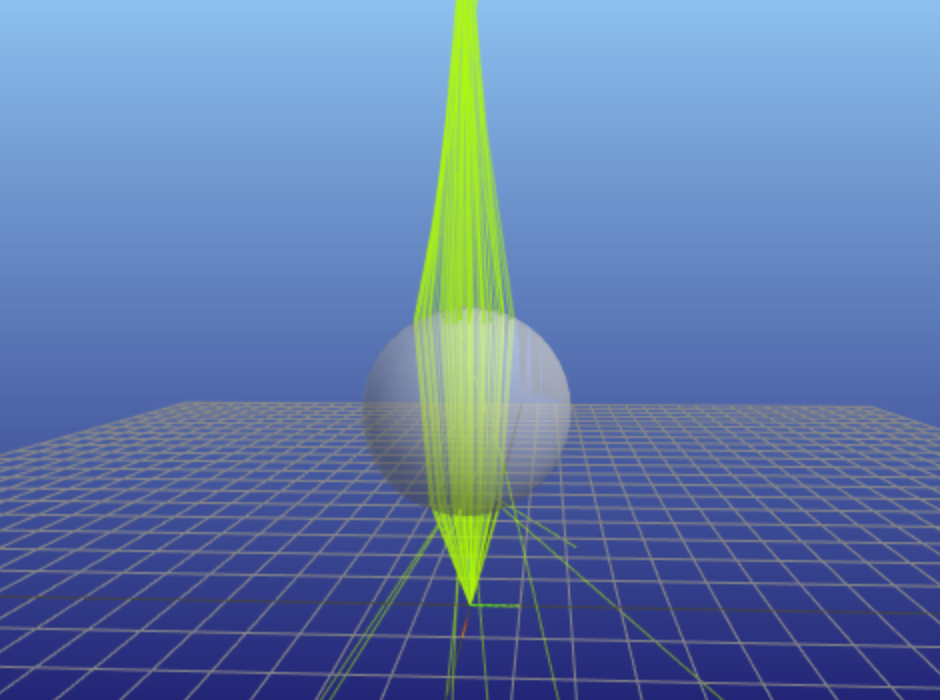
For example, a script using the low-level API to ray trace this glass sphere is below,
```python import time import sys import functools import numpy as np from pvtrace import *
World node contains all objects
world = Node( name="world (air)", geometry=Sphere( radius=10.0, material=Material(refractive_index=1.0), ) )
The glass sphere
sphere = Node( name="sphere (glass)", geometry=Sphere( radius=1.0, material=Material(refractive_index=1.5), ), parent=world ) sphere.location = (0, 0, 2)
The source of rays
light = Node( name="Light (555nm)", light=Light(direction=functools.partial(cone, np.pi/8)), parent=world )
Render and ray-trace
renderer = MeshcatRenderer(wireframe=True, openbrowser=True) scene = Scene(world) renderer.render(scene) for ray in scene.emit(100): steps = photontracer.follow(scene, ray) path, events = zip(*steps) renderer.addraypath(path) time.sleep(0.1)
Wait for Ctrl-C to terminate the script; keep the window open
print("Ctrl-C to close") while True: try: time.sleep(.3) except KeyboardInterrupt: sys.exit() ```
Scene Graph
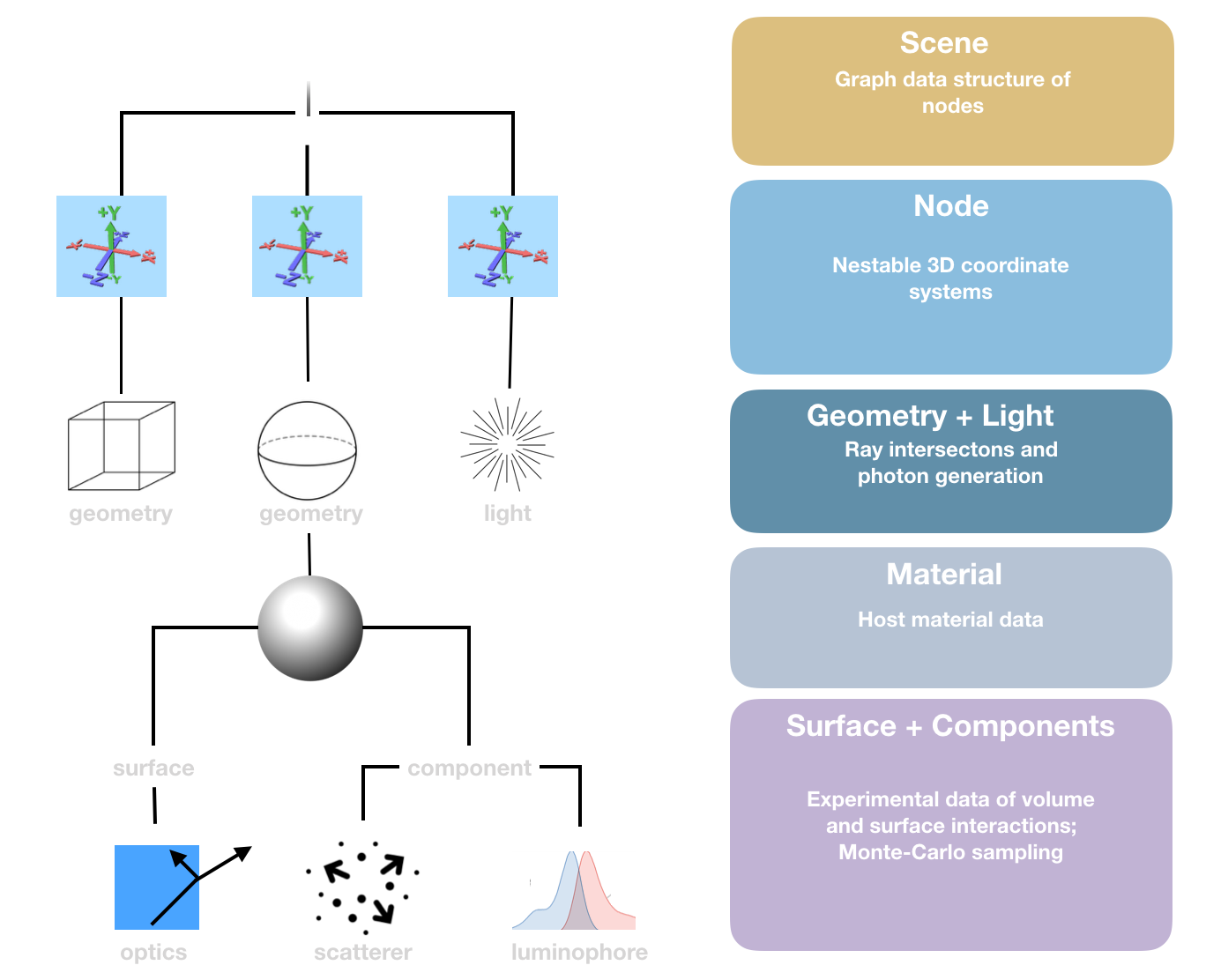
pvtrace is designed in layers each with as limited scope as possible.
- Scene
- Graph data structure of node and the thing that is ray-traced.
- Node
- Provides a coordinate system, can be nested inside one another, perform arbitrary rotation and translation transformations.
- Geometry
- Attached to nodes to define different shapes (Sphere, Box, Cylinder, Mesh) and handles all ray intersections.
- Material
- Attached to geometry objects to assign physical properties to shapes such as refractive index.
- Surface
- Handles details of interaction between material surfaces and a customisation point for simulation of wavelength selective coatings.
- Components
- Specifies optical properties of the geometries volume, absorption coefficient, scattering coefficient, quantum yield, emission spectrum.
- Ray-tracing engine
- The algorithm which spawns rays, computes intersections, samples probabilities and traverses the rays through the scene.
Ray-tracing engine
Currently pvtrace supports only one ray-tracing engine: a photon path tracer. This is physically accurate, down to treating individual absorption and emission events, but is slow because the problem cannot be vectorised as each ray is followed individually.
Documentation
Interactive Jupyter notebooks are in examples directory, download and take a look, although they can be viewed online.
Contributing
Please use the github issue tracker for bug fixes, suggestions, or support questions.
If you are considering contributing to pvtrace, first fork the project. This will make it easier to include your contributions using pull requests.
Creating a development environment
- First create a new development environment using MacOS instructions or Linux and Windows instructions, but do not install pvtrace using pip! You will need to clone your own copy of the source code in the following steps.
- Use the GitHub fork button to make your own fork of the project. This will make it easy to include your changes in pvtrace using a pull request.
- Follow the steps below to clone and install the development dependencies
```bash
Pull from your fork
git clone https://github.com/
Get development dependencies
pip install -r pvtrace/requirements_dev.txt
Add local pvtrace directory to known packages
pip install -e pvtrace
Run units tests
pytest pvtrace/tests
Run an example
python pvtrace/examples/hello_world.py ```
You should now be able to edit the source code and simply run scripts directly without the need to reinstall anything.
Unit tests
Please add or modify an existing unit tests in the pvtrace/tests directory if you are adding new code. This will make it much easier to include your changes in the project.
Pull requests
Pull requests will be considered. Please make contact before doing a lot of work, to make sure that the changes will definitely be included in the main project.
Questions
You can get in contact with me directly at dan@excitonlabs.com or raise an issue on the issue tracker.
Dependencies
Basic environment requires the following packages which will be installed with pip automatically
- python >= 3.7.2
- numpy
- pandas
- trimesh[easy]
- meshcat >= 0.0.16
- anytree
Owner
- Name: Daniel
- Login: danieljfarrell
- Kind: user
- Location: Cambridge, UK
- Company: Exciton Labs Ltd.
- Website: http://daniel.farrell.name
- Repositories: 71
- Profile: https://github.com/danieljfarrell
GitHub Events
Total
- Watch event: 5
- Fork event: 2
Last Year
- Watch event: 5
- Fork event: 2
Committers
Last synced: 12 months ago
Top Committers
| Name | Commits | |
|---|---|---|
| danieljfarrell | d****l@g****m | 154 |
| Daniel Farrell | d****l@t****m | 3 |
| LukasHD | u****r@s****e | 2 |
| achatten | a****n@i****k | 2 |
| Daniel J Farrell | d****l@i****k | 1 |
| Dario Cambié | d****e@t****l | 1 |
| dcambie | d****e@m****e | 1 |
| dependabot[bot] | 4****] | 1 |
Committer Domains (Top 20 + Academic)
Issues and Pull Requests
Last synced: 11 months ago
All Time
- Total issues: 32
- Total pull requests: 25
- Average time to close issues: 4 months
- Average time to close pull requests: 7 months
- Total issue authors: 11
- Total pull request authors: 6
- Average comments per issue: 3.84
- Average comments per pull request: 2.52
- Merged pull requests: 11
- Bot issues: 0
- Bot pull requests: 5
Past Year
- Issues: 0
- Pull requests: 0
- Average time to close issues: N/A
- Average time to close pull requests: N/A
- Issue authors: 0
- Pull request authors: 0
- Average comments per issue: 0
- Average comments per pull request: 0
- Merged pull requests: 0
- Bot issues: 0
- Bot pull requests: 0
Top Authors
Issue Authors
- danieljfarrell (19)
- jaydeshpande (3)
- Qudzu (2)
- chrisspen (1)
- keithbriggs (1)
- tommyflynn13 (1)
- nro-bot (1)
- peter-spencer (1)
- settwi (1)
- Simon030 (1)
- carlotapereira (1)
Pull Request Authors
- dcambie (13)
- dependabot[bot] (5)
- danieljfarrell (3)
- achatten (2)
- lukasHD (1)
- jv307 (1)
Top Labels
Issue Labels
Pull Request Labels
Packages
- Total packages: 2
-
Total downloads:
- pypi 178 last-month
-
Total dependent packages: 0
(may contain duplicates) -
Total dependent repositories: 1
(may contain duplicates) - Total versions: 19
- Total maintainers: 1
proxy.golang.org: github.com/danieljfarrell/pvtrace
- Documentation: https://pkg.go.dev/github.com/danieljfarrell/pvtrace#section-documentation
- License: other
-
Latest release: v2.1.2+incompatible
published over 6 years ago
Rankings
pypi.org: pvtrace
Optical ray tracing for luminescent materials and spectral converter photovoltaic devices.
- Homepage: https://github.com/danieljfarrell/pvtrace
- Documentation: https://pvtrace.readthedocs.io/
- License: BSD License
-
Latest release: 2.1.6
published over 5 years ago
Rankings
Maintainers (1)
Dependencies
- anytree *
- meshcat >=0.0.16
- numpy *
- pandas *
- trimesh *
- anytree *
- jupyter *
- matplotlib *
- meshcat >=0.0.16
- numpy *
- pandas *
- pytest *
- trimesh *
- numpy *