Science Score: 59.0%
This score indicates how likely this project is to be science-related based on various indicators:
-
○CITATION.cff file
-
✓codemeta.json file
Found codemeta.json file -
✓.zenodo.json file
Found .zenodo.json file -
✓DOI references
Found 1 DOI reference(s) in README -
✓Academic publication links
Links to: wiley.com -
✓Committers with academic emails
18 of 32 committers (56.3%) from academic institutions -
○Institutional organization owner
-
○JOSS paper metadata
-
○Scientific vocabulary similarity
Low similarity (12.4%) to scientific vocabulary
Keywords from Contributors
Repository
Tree based hydrologic and hydraulic routing
Basic Info
- Host: GitHub
- Owner: NOAA-OWP
- License: apache-2.0
- Language: Python
- Default Branch: master
- Size: 64.9 MB
Statistics
- Stars: 53
- Watchers: 8
- Forks: 62
- Open Issues: 149
- Releases: 7
Metadata Files
readme.md
T-Route - Tree-Based Channel Routing
Fast, flexible, modular channel routing for the National water model and beyond:
T-Route, a dynamic channel routing model, offers a comprehensive solution for river network routing problems. It is designed to handle 1-D channel routing challenges in vector-based river network data, such as the USGS's NHDPlus High Resolution dataset, and OGC WaterML 2.0 Surface Hydrology Features (HY_Features) data model used in NextGen framework.
Provided a series lateral inflows for each node in a channel network, T-Route computes the resulting streamflows. T-Route requires that all routing computations srictly obey an upstream-to-downstream ordering. Such ordering facilitates the heterogenous application of routing models in a single river network. For example, hydrologic models - such as Muskingum Cunge - may be more appropriate for low-order headwater streams where backwater conditions have minimal impact on flooding. In contrast, T-Route empowers users to apply computationally intensive hydraulic models, such as the diffusive wave approximation of St. Venant equations, for high-order streams and rivers, where backwater flooding is a significant concern. This flexibility enables users to allocate computational resources precisely where they are needed most, optimizing efficiency.
Expanding its capabilities, T-Route now supports the OGC WaterML 2.0 Surface Hydrology Features (HYFeatures) data model, facilitating the management of complex acyclic network connectivity. HYFeatures data model provides users with a choice of routing solutions, including Muskingum-Cunge, Diffusive Wave, or Dynamic Wave.
Key Features of T-Route: - Adaptable to multiple network formulations. - Supports a range of routing solutions. - Redesigned core operations accessible via standard BMI functions. - Modular design for independent reservoir and data assimilation modules. - Capable of disaggregating routing across large spatial domains. - Facilitates heterogenous application of routing models in a single network.
Routing Model Comparisons
| Feature | Muskingum-Cunge (MC) | Diffusive Wave | |---------|----------------------|----------------| | Domain | Individual stream segment | Independent sub-network | | Computing Method | Parallel on CONUS using junction order and short-time step | Serial on a sub-network using junction order | | Routing Direction | Upstream to downstream | Both directions | | Numerical Scheme | One-dimensional explicit scheme | Implicit Crank-Nicolson scheme |
T-Route's flexible design is ideal for NOAA's National Water Model (NWM) 3.0, but its utility extends to various research and practical applications. While the code is currently bespoke for NWM, efforts are ongoing to generalize the core utilities, making T-Route compatible with any standardized network and forcing data.
General Sheme:
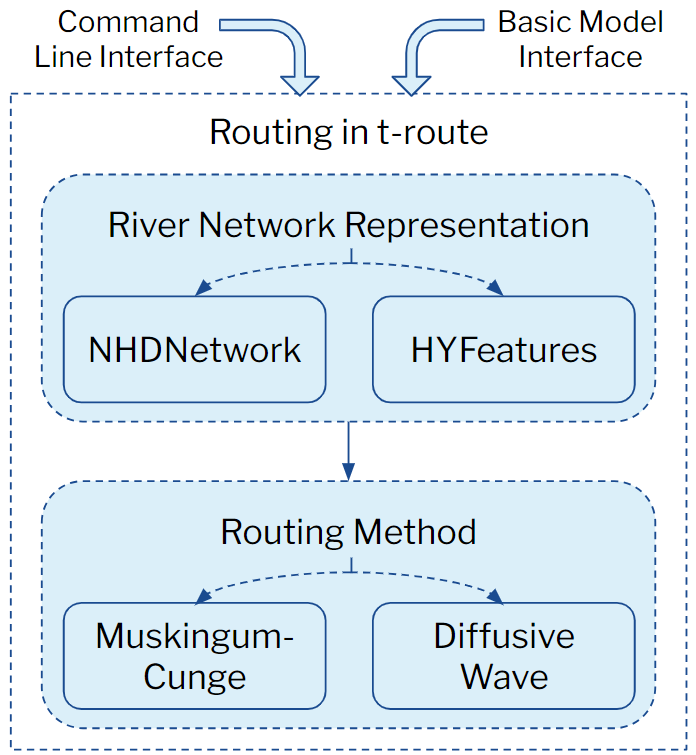
The figure below illustrates the workflow for executing T-Route via two interfaces: the Command Line Interface (CLI) and the Basic Model Interface (BMI). When using the CLI, the user can select from two river network representations: NHDNetwork or HYFeatures. In contrast, the BMI exclusively supports HYFeatures. For the routing method, users have the option to apply either the Muskingum-Cunge method or the Diffusive Wave method.
Project Overview:
- Technology Stack: Combines Python with Fortran for core routing model engines. The river network pre-processor, river network traversal framework, and time series data model are all written in python. The routing model engines (e.g. Muskingum-Cunge and diffusive wave) are primarily written in fortran, though we can imagine future additions to the engine suite being writted in any number of laguages that can be packaged as python extensions.
- Current Status: Focused on integration with NWM 3.0.
- Demonstrations: The
/testdirectory includes a T-Route demonstration on the Lower Colorado River, TX, showcasing capabilities like streamflow data assimilation and diffusive wave routing.
Mission Alignment
T-Route development is rigorously aligned with and guided by the NOAA Office of Water Prediction mission: Collaboratively research, develop and deliver timely and consistent, state-of-the-science national hydrologic analyses, forecast information, data, guidance and equitable decision-support services to inform essential emergency management and water resources decisions across all time scales.
Structure of Folders:
src/kernel/: Fortran modules.src/troute-config/: Configuration parser for T-Route specific file.src/troute-network/: Manages network, data assimilation, and routing types.src/troute-nwm/: Coordinates T-Route’s modules.src/troute-routing/: Handles flow segment and reservoir routing modules.
Summary:
T-Route represents streamflow channel routing and reservoir routing, assimilating data on vector-based channel networks. It fits into a broader framework where it interacts with land surface models, Forcing Engines, and coastal models, each playing a pivotal role in hydrologic forecasting and analysis.
Configuration and Dependencies
This program uses the following system packages:
python3
gcc-gfortran
... and the following non-default python modules:
numpy
pandas
xarray
netcdf4
joblib
toolz
Cython
pyyaml
geopandas
pyarrow
deprecated
Installation
please see usage and testing below. Standby for docker container instructions in the near future.
Configuration
Currently, there are no specific configuration details. Stand by for updates.
Usage and Testing
To get a sense of the operation of the routing scheme, follow this sequence of commands:
```shell
install required python modules
pip3 install numpy pandas xarray netcdf4 joblib toolz pyyaml Cython>3,!=3.0.4 geopandas pyarrow deprecated wheel
clone t-toute
git clone --progress --single-branch --branch master http://github.com/NOAA-OWP/T-Route.git
compile and install
./compiler.sh
execute a demonstration test with NHD network
cd test/LowerColoradoTX python3 -m nwmrouting -f -V4 testAnAV4_NHD.yaml
OR
execute a demonstration test with HYFeature network
cd test/LowerColoradoTXv4 python3 -m nwmrouting -f -V4 testAnAV4HYFeature.yaml ```
T-Route Setup Instructions and Troubleshooting Guide for Windows Users
Note: The following instructions are for setting up T-Route on a Linux environment (standalone, no MPI). If you are using Windows, please install WSL (Windows Subsystem for Linux) before proceeding.
T-Route Setup and Testing Guide for Windows Users WITHOUT conda [based on pip and venv - only widely available dependencies].
WARNING: INSTALLATION WITHIN EXISTING MINICONDA/CONDA VIRTUAL ENVIRONMENT NOT RECOMMENDED, PIP AND CONDA DO NOT MIX WELL, AND YOU MAY BREAK YOUR CONDA ENVIRONMENT!
Install Recommended distro:
- Download and install WSL2 for your Windows OS
- We recommend long-term stable (LTS) Ubuntu distribution 22.04 or 20.04 (24.04 not recommended yet)
- Open Windows Power Shell and issue
shell wsl --install Ubuntu-22.04 - Enter (root) username and password (2x) of your choice
Set up venv-based virtual environment:
- From root (the username you created under 1):
- Update Linux distro:
shell sudo apt update - Install pip (package manager):
shell sudo apt install python3-pip - Install venv:
shell sudo apt install python3.10-venv - Create a virtual environment for T-Route (named here 'troute-env1'):
shell python3 -m venv troute_env1 - Activate your shiny new virtual environment:
shell source troute_env1/bin/activate - Now, the command prompts in the Shell window should start with (troute-env1)
- Update Linux distro:
- From root (the username you created under 1):
Clone T-Route:
- Go to a folder of your choice (here, your home folder) and create a T-Route directory
shell mkdir troute1 cd troute1 - Clone a T-Route repository (the current main branch is used as an example):
shell git clone --progress --single-branch --branch master http://github.com/NOAA-OWP/T-Route.git cd troute1 - Install python packages per requirements file
shell
pip install -r requirements.txt
- Go to a folder of your choice (here, your home folder) and create a T-Route directory
Download & build netcdf fortran libraries from UCAR:
- Go to a folder of your choice (here, your home folder) and download the source code:
shell cd ~ wget https://downloads.unidata.ucar.edu/netcdf-fortran/4.6.1/netcdf-fortran-4.6.1.tar.gz - Unzip it:
shell tar xvf netcdf-fortran-4.6.1.tar.gz - Enter the directory:
shell cd netcdf-fortran-4.6.1/ - Install some prerequisites (Fortran compiler, build essentials, standard C-netcdf library):
shell sudo apt install gfortran sudo apt install build-essential sudo apt-get install libnetcdf-dev - Configure the fortran-netcdf libraries:
shell ./configure - There should be no error message, and the output log should end up with something like:
- Check the installation (running two sets of examples):
shell make check - Again, there should be no error message (expect some warnings, though), and output should end with "passing" of two sets:
- Finally, install the libraries:
shell sudo make install - Output should be something like:
- Go to a folder of your choice (here, your home folder) and download the source code:
Build and test T-Route:
- Go to your T-Route folder:
shell cd ~/troute1 - Compile T-Route (may take a few minutes, depending on the machine):
shell ./compiler.sh - Set path to runtime netcdf-Fortran library [recommend including this in the .bashrc file or your equivalent]:
shell export LD_LIBRARY_PATH=/usr/local/lib/ - Run one of the demo examples provided:
shell cd test/LowerColorado_TX python3 -m nwm_routing -f -V4 test_AnA_V4_NHD.yaml - The latter is a hybrid (MC + diffusive) routing example that should run within a few minutes at most
- Go to your T-Route folder:
T-Route Setup Instructions and Troubleshooting Guide for Windows Users - Legacy Conda Version [may have to be built with compiler.sh no-e option]
Install Required Components:
- Open the WSL terminal.
- Install Miniconda, Python, Pip, and Git.
- Clone the Miniconda template repository:
git clone https://github.com/jameshalgren/miniconda-template.git. - Follow the repository instructions to create a new environment.
Activate the Environment:
- Activate the new environment created in the previous step.
Install T-Route:
- Follow the instructions in the T-Route repository (https://github.com/NOAA-OWP/T-Route/tree/master) for installation.
- Ensure gcc, gfortran, and all required Python libraries are installed.
NetCDF Issues:
- Resolve errors with NetCDF libraries (e.g., "netcdf.mod" not found) by running:
apt-get install *netcdf*. - Locate the installed netcdf.mod (e.g.,
find /usr/ -name *mod). - Define the NETCDF path in the compiler.sh file in T-Route (before the ‘if [-z “NETCDF …” ]’ statement):
export NETCDF="PATH_TO_NETCDF.MOD".
- Resolve errors with NetCDF libraries (e.g., "netcdf.mod" not found) by running:
Python Version:
- Define
alias python=python3in the .bashrc file ifpythonis not defined. - Change all instances of "python" to "python3" in the compiler file.
- Define
Handle Permission Errors:
- Try compiling T-Route again after editing the compiler.
- Use
sudo chmod 777 <path>for "permission denied" errors (replace<path>with the relevant directory).
By following these instructions, you should successfully install and set up T-Route on your Linux system. For any issues or questions, feel free to seek assistance.
Known issues
We are constantly looking to improve. Please see the Git Issues for additional information.
Getting help
T-Route team and the technical maintainers of the repository for more questions are: dongha.kim@noaa.gov sean.horvath@noaa.gov amin.torabi@noaa.gov jurgen.zach@noaa.gov
Getting involved
Among other things, we are working on preparing more robust I/O capability for testing and on improving the speed of the parallel tree traversal. We welcome your thoughts, recommendations, comments, and of course, PRs.
Please feel free to fork the repository and let us know if you will be issuing a pull request. More instructions will eventually be documented in CONTRIBUTING.
Open source licensing info
Credits and references
A great deal of credit is owed to Drs. Ehab Meslehe and Fred Ogden, and as well to the entire NCAR WRF-Hydro development team. Continued leadership and support from Dr. Trey Flowers.
Owner
- Name: NOAA-OWP
- Login: NOAA-OWP
- Kind: organization
- Repositories: 28
- Profile: https://github.com/NOAA-OWP
GitHub Events
Total
- Issues event: 2
- Watch event: 8
- Member event: 2
- Issue comment event: 18
- Push event: 1
- Pull request review comment event: 1
- Pull request review event: 2
- Pull request event: 15
- Gollum event: 6
- Fork event: 10
Last Year
- Issues event: 2
- Watch event: 8
- Member event: 2
- Issue comment event: 18
- Push event: 1
- Pull request review comment event: 1
- Pull request review event: 2
- Pull request event: 15
- Gollum event: 6
- Fork event: 10
Committers
Last synced: 10 months ago
Top Committers
| Name | Commits | |
|---|---|---|
| James Halgren | j****n@n****v | 287 |
| Sean Horvath | s****h@n****v | 285 |
| awlostowski-noaa | a****i@n****v | 114 |
| Nels Frazier | n****r@n****v | 75 |
| Dong Ha Kim | d****m@n****v | 42 |
| Amin Torabi | 1****A | 41 |
| jhrehanoaa | 5****a | 38 |
| Austin Raney | a****y@n****v | 27 |
| Neptune-Meister | 1****A | 25 |
| john mattern | j****n@n****v | 21 |
| Ryan Grout | r****n@r****g | 15 |
| karnesh | j****h@g****m | 12 |
| David Mattern | d****n@c****u | 12 |
| David Mattern | 4****a | 10 |
| Josh | j****u@g****m | 10 |
| Matt Williamson | 8****s | 7 |
| program-- | j****n@j****e | 5 |
| Jacob Hreha | j****a@c****u | 5 |
| Dong Ha Kim | d****m@n****v | 4 |
| kumdonoaa | d****x@D****Q | 3 |
| David Mattern | d****n@c****u | 3 |
| David Mattern | d****n@c****u | 3 |
| David Mattern | d****n@c****u | 3 |
| Brian Avant | b****t@n****v | 2 |
| Adam Wlostowski | a****i@n****v | 2 |
| jdhondia | 5****a | 1 |
| John David Mattern | j****n@l****n | 1 |
| james Halgren | j****n@n****v | 1 |
| donaldwj | d****n@n****v | 1 |
| Phil Miller - NOAA | u****h@g****m | 1 |
| and 2 more... | ||
Committer Domains (Top 20 + Academic)
Issues and Pull Requests
Last synced: 10 months ago
All Time
- Total issues: 311
- Total pull requests: 540
- Average time to close issues: 8 months
- Average time to close pull requests: 27 days
- Total issue authors: 25
- Total pull request authors: 25
- Average comments per issue: 1.39
- Average comments per pull request: 1.25
- Merged pull requests: 349
- Bot issues: 0
- Bot pull requests: 0
Past Year
- Issues: 2
- Pull requests: 20
- Average time to close issues: N/A
- Average time to close pull requests: 18 days
- Issue authors: 2
- Pull request authors: 8
- Average comments per issue: 0.5
- Average comments per pull request: 0.85
- Merged pull requests: 3
- Bot issues: 0
- Bot pull requests: 0
Top Authors
Issue Authors
- jameshalgren (129)
- jhrehanoaa (70)
- awlostowski-noaa (42)
- hellkite500 (12)
- aaraney (11)
- jdmattern (8)
- shorvath-noaa (6)
- BradfordBates-NOAA (4)
- groutr (4)
- benlee0423 (3)
- mattw-nws (3)
- TrupeshKumarPatel (2)
- robertbartel (2)
- kumdonoaa (2)
- taddyb (1)
Pull Request Authors
- awlostowski-noaa (84)
- shorvath-noaa (84)
- jhrehanoaa (81)
- AminTorabi-NOAA (80)
- jameshalgren (78)
- kumdonoaa (58)
- JurgenZach-NOAA (58)
- aaraney (25)
- jdmattern (16)
- groutr (15)
- hellkite500 (15)
- JoshCu (12)
- taddyb (12)
- BrianAvant (6)
- Brian-Cosgrove (3)
Top Labels
Issue Labels
Pull Request Labels
Packages
- Total packages: 2
- Total downloads: unknown
-
Total dependent packages: 0
(may contain duplicates) -
Total dependent repositories: 0
(may contain duplicates) - Total versions: 16
proxy.golang.org: github.com/NOAA-OWP/t-route
- Documentation: https://pkg.go.dev/github.com/NOAA-OWP/t-route#section-documentation
- License: apache-2.0
-
Latest release: v2.4.0+incompatible
published over 1 year ago
Rankings
proxy.golang.org: github.com/noaa-owp/t-route
- Documentation: https://pkg.go.dev/github.com/noaa-owp/t-route#section-documentation
- License: apache-2.0
-
Latest release: v2.4.0+incompatible
published over 1 year ago
Rankings
Dependencies
- Cython *
- joblib *
- netcdf4 *
- numpy *
- pandas >=1.1.5
- pyyaml *
- toolz *
- xarray *
- pydantic ~=1.10
- typing_extensions *