Science Score: 67.0%
This score indicates how likely this project is to be science-related based on various indicators:
-
○CITATION.cff file
-
✓codemeta.json file
Found codemeta.json file -
✓.zenodo.json file
Found .zenodo.json file -
✓DOI references
Found 3 DOI reference(s) in README -
✓Academic publication links
Links to: zenodo.org -
✓Committers with academic emails
10 of 25 committers (40.0%) from academic institutions -
✓Institutional organization owner
Organization tum-ens has institutional domain (www.ens.ei.tum.de) -
○JOSS paper metadata
-
○Scientific vocabulary similarity
Low similarity (17.3%) to scientific vocabulary
Keywords
Repository
A linear optimisation model for distributed energy systems
Basic Info
- Host: GitHub
- Owner: tum-ens
- License: gpl-3.0
- Language: Python
- Default Branch: master
- Size: 86 MB
Statistics
- Stars: 194
- Watchers: 25
- Forks: 136
- Open Issues: 31
- Releases: 9
Topics
Metadata Files
README.md
urbs
urbs is a linear programming optimisation model for capacity expansion planning and unit commitment for distributed energy systems. Its name, latin for city, stems from its origin as a model for optimisation for urban energy systems. Since then, it has been adapted to multiple scales from neighbourhoods to continents.

Table of Contents
- Features
- Screenshots
- Installation
- Get started
- Next steps and tips
- Further reading
- Example uses
- Contributing
- License
Features
- urbs is a linear programming model for multi-commodity energy systems with a focus on optimal storage sizing and use.
- It finds the minimum cost energy system to satisfy given demand time series for possibly multiple commodities (e.g. electricity).
- By default, operates on hourly-spaced time steps (configurable).
- Thanks to Pandas, complex data analysis is easy.
- The model itself is quite small thanks to relying on package Pyomo.
- The small codebase includes reporting and plotting functionality.
Screenshots


Installation
Installing Python
1) Download and install Python 3.12. Note: Make sure to check the box "Add Python to PATH" during installation.
2) Using your terminal you can check which Python versions are installed on your system with py -0 and check your standard version with python --version. The output should be Python 3.12.x or similar.
(Note: If your standard python version is Python 2.X, you might need to call python3 instead of python.)
Installing an IDE (optional)
If you want to use an IDE for Python, you can install PyCharm or Visual Studio Code. Both are free to use.
Installing Git
1) Download and install Git. Make sure to check the box "Run Git from the Windows Command Prompt" during installation.
You can also use the GitHub Desktop application if you prefer a graphical user interface.
2) Check that Git is installed by running the command git --version in your terminal.
Cloning the urbs repository
1) Open your terminal and navigate to your preferred directory.
2) Clone the repository by running the following commands in your terminal.:
- For GitLab: git clone git@gitlab.lrz.de:tum-ens/urbs.git
- For GitHub: git clone git@github.com:tum-ens/urbs.git
3) Navigate to the cloned repository by running cd urbs in your terminal.
Installing your environment
1) In windows you can install the environment by running the batch script prepare-virtual-environment in the root directory of the repository.
You can do so from a terminal or by double-clicking the file in the file explorer. This will create a virtual environment and install all necessary packages.
2) If you want to install the environment manually, enter the commands below in your terminal:
- Windows:
py -3.12 -m venv urbs-env
urbs-env\Scripts\activate
python -m pip install -r urbs-env.txt
- Linux/MacOS:
python3.12 -m venv urbs-env
source urbs-env/bin/activate
python -m pip install -r urbs-env.txt
Solver
There are several solvers that can be used to solve the optimization problems. Our recommendations are the following two python libraries that have been installed in the environment. - Highs (open-source) - Gurobi (commercial): To run this powerful solver you first need to create an account, apply for an academic license in the license center and download it (descriptions).
However, also other solvers such as glpk (open-source) or CPLEX (commercial) are compatible with the Pyomo interface in urbs.
(optional) Installing Jupyter Notebook
If you want to use the Jupyter Notebook, install it by running python -m pip install jupyter in your terminal.
Get started
Before running a script, ensure your environment is activated:
- Either set up your interpreter in your IDE with your created environment.
- Or, if running from your terminal, use the following command to activate it:
- Windows: urbs-env\Scripts\activate
- Linux/MacOS: source urbs-env/bin/activate
In the downloaded directory, open a execute the runme script by using the following on the command prompt or Terminal.
(Note: Depending on what your standard python version is, you might need to call python3.12 instead of python.):
python runme.py
Some minutes later, the subfolder result should contain plots and summary spreadsheets for multiple optimised energy supply scenarios, whose definitions are contained in the run script (watch out for def scenario lines). Not working at the moment: To get a graphical and tabular summary over all scenarios, execute
python comp.py
and look at the new files result/mimo-example-.../comparison.xlsx and result/mimo-example-.../comparison.png for a quick comparison. This script parses the summary spreadsheets for all scenarios.
Next steps and tips
- Head over to the tutorial at http://urbs.readthedocs.io, which goes through runme.py step by step or try out the Jupyter Notebook tutorial inside the teaching folder.
- Read the source code of
runme.pyandcomp.py. - Try adding/modifying scenarios in
scenarios.pyand see their effect on results. - If you need a nice python editor, think about using PyCharm. It has many features including easy Git integration, package management, etc.
- Fire up IPython (
ipython3) and run the scripts from there using the run command:run runmeandrun comp. Then usewhosand inspect the workspace afterwards (whos). See what you can do (analyses, plotting) with the DataFrames. Take theurbs.get_constants,urbs.get_timeseriesandurbs.plotfunctions as inspriation and the Pandas docs as reference.
Further reading
- If you do not know anything about the command line, read Command Line Crash Course. Python programs are scripts that are executed from the command line, similar to MATLAB scripts that are executed from the MATLAB command prompt.
- If you do not know Python, try one of the following ressources:
- The official Python Tutorial walks you through the language's basic features.
- Learn Python the Hard Way. It is meant for programming beginners.
- The book Python for Data Analysis best summarises the capabilities of the packages installed here. It starts with IPython, then adds NumPy, slowly fades to pandas and then shows first basic, then advanced data conversion and analysis recipes. Visualisation with matplotlib is given its own chapter, both with and without pandas.
- For a huge buffet of appetizers showing the capabilities of Python for scientific computing, I recommend browsing this gallery of interesting IPython Notebooks.
Example uses
- Branch 1node in the forked repository ojdo/urbs shows a small example of a real-world usage of the model. It includes a
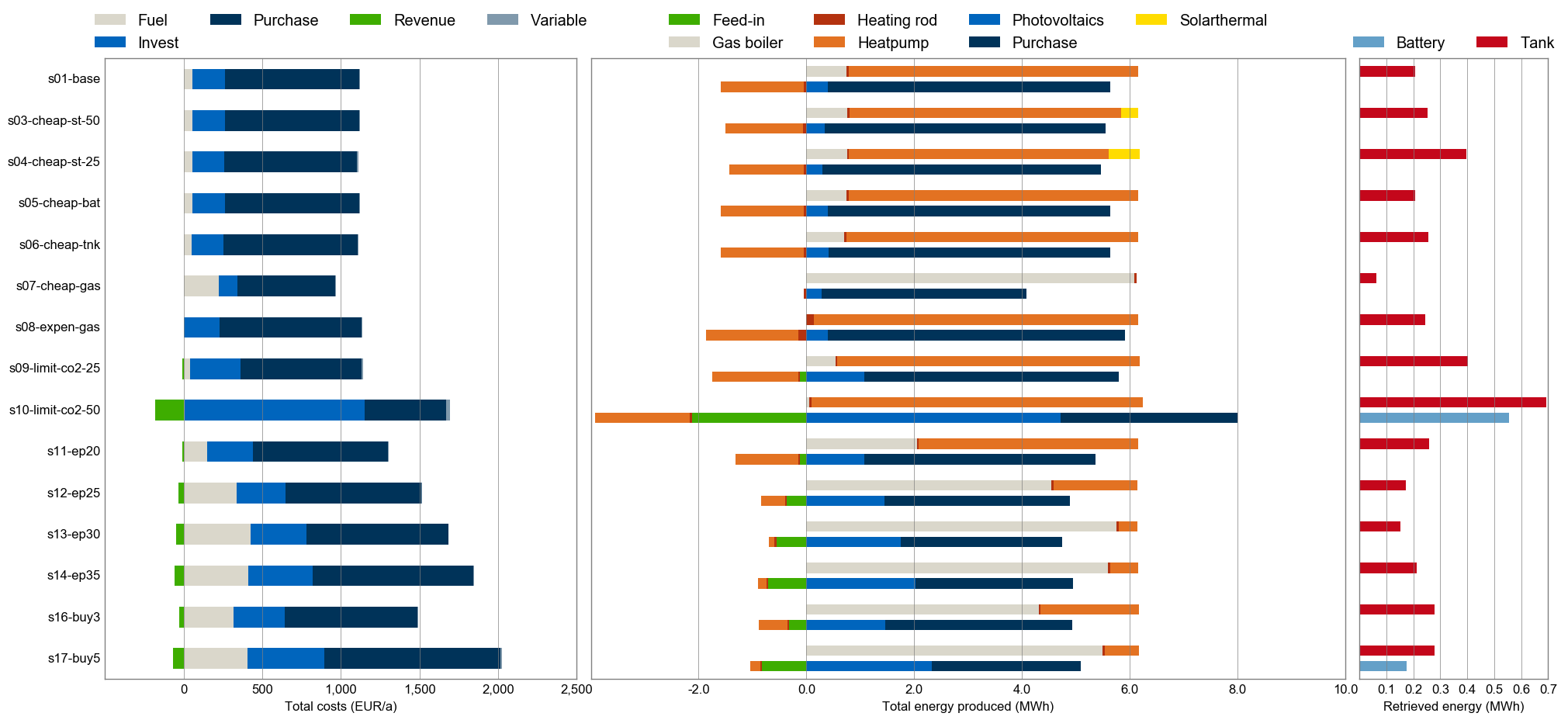
scenario_generatorfunction in its run script, which is useful for extensive parameter sweeps. - Branch 1house in the forked repository ojdo/urbs shows another (newer) example of a small-scale application of the model. It demonstrates the use for two demand commodities (electricity and heat) for a single consumer (a single site named 'house'). It also shows how to create a very customized comparison script:
- Branch haag15 in the forked repository ojdo/urbs shows a larger example of a real-world use. Its input file contains a town divided into 12 regions, 12 process types, and 2 demand commodities (electricity and heat) . Patience and RAM (64 GB or more) is needed to run these scenarios with 8760 timesteps. The branch also contains three IPython notebooks that are used for result analysis and coupling to model rivus.
Copyright
Copyright (C) 2014-2019 TUM ENS
This program is free software: you can redistribute it and/or modify it under the terms of the GNU General Public License as published by the Free Software Foundation, either version 3 of the License, or (at your option) any later version.
This program is distributed in the hope that it will be useful, but WITHOUT ANY WARRANTY; without even the implied warranty of MERCHANTABILITY or FITNESS FOR A PARTICULAR PURPOSE. See the GNU General Public License for more details.
You should have received a copy of the GNU General Public License along with this program. If not, see http://www.gnu.org/licenses/
Owner
- Name: Chair of Renewable and Sustainable Energy Systems
- Login: tum-ens
- Kind: organization
- Location: Technical University of Munich
- Website: http://www.ens.ei.tum.de
- Repositories: 18
- Profile: https://github.com/tum-ens
GitHub Events
Total
- Issues event: 2
- Watch event: 8
- Delete event: 13
- Issue comment event: 2
- Push event: 23
- Pull request review event: 1
- Pull request event: 8
- Fork event: 4
- Create event: 14
Last Year
- Issues event: 2
- Watch event: 8
- Delete event: 13
- Issue comment event: 2
- Push event: 23
- Pull request review event: 1
- Pull request event: 8
- Fork event: 4
- Create event: 14
Committers
Last synced: 11 months ago
Top Committers
| Name | Commits | |
|---|---|---|
| Johannes Dorfner | j****r@t****e | 218 |
| Konrad Schönleber | k****r@t****e | 83 |
| Magdalena Dorfner | m****r@t****e | 57 |
| Mert Alpaslan | m****n@g****m | 44 |
| sonercandas | s****s@g****m | 41 |
| yunusozsahin | y****n@g****m | 40 |
| froehlie | 3****e | 32 |
| lodersky | l****y@t****e | 30 |
| smuellr | s****n@k****e | 19 |
| dogauzrek | d****k@w****m | 14 |
| Kais Siala | s****a@p****e | 13 |
| WYAUDI | w****3@h****m | 12 |
| Leonhard-B | l****z@f****e | 11 |
| adeeljsid | a****4@g****m | 9 |
| Thomas Zipperle | t****e@t****e | 7 |
| lodersky | l****y@t****e | 5 |
| Thushara Addanki | 5****6 | 4 |
| Simon Herzog | s****g@t****e | 4 |
| Julia Gawlick | j****k@t****e | 4 |
| Balz | g****l@m****e | 4 |
| Icedkk | o****a@g****m | 2 |
| Beneharo | b****r@t****e | 2 |
| LennartMorlock | 6****k | 1 |
| Leon | s****2@f****e | 1 |
| Mert Alpaslan | 3****e | 1 |
Committer Domains (Top 20 + Academic)
Issues and Pull Requests
Last synced: 11 months ago
All Time
- Total issues: 134
- Total pull requests: 190
- Average time to close issues: 6 months
- Average time to close pull requests: about 2 months
- Total issue authors: 37
- Total pull request authors: 30
- Average comments per issue: 1.05
- Average comments per pull request: 0.63
- Merged pull requests: 150
- Bot issues: 0
- Bot pull requests: 0
Past Year
- Issues: 1
- Pull requests: 3
- Average time to close issues: 17 days
- Average time to close pull requests: 1 day
- Issue authors: 1
- Pull request authors: 2
- Average comments per issue: 2.0
- Average comments per pull request: 0.0
- Merged pull requests: 3
- Bot issues: 0
- Bot pull requests: 0
Top Authors
Issue Authors
- ojdo (43)
- maledo (14)
- KSchoenleber (12)
- kbareiss (6)
- kais-siala (5)
- Leonhard-B (5)
- sonercandas (4)
- IngaMueller (3)
- sohumsen (3)
- oakca (3)
- smuellr (3)
- lodersky (3)
- GlennCeusters (2)
- dacoex (2)
- TDiaconu (2)
Pull Request Authors
- KSchoenleber (37)
- maledo (24)
- ojdo (24)
- sonercandas (22)
- lodersky (14)
- smuellr (11)
- tzipperle (7)
- yunusozsahin (6)
- maxhock (5)
- kais-siala (5)
- amrelshahawy (5)
- WYAUDI (5)
- Leonhard-B (4)
- mert-alpaslan (3)
- bereba (3)
Top Labels
Issue Labels
Pull Request Labels
Packages
- Total packages: 1
- Total downloads: unknown
- Total dependent packages: 0
- Total dependent repositories: 0
- Total versions: 3
proxy.golang.org: github.com/tum-ens/urbs
- Documentation: https://pkg.go.dev/github.com/tum-ens/urbs#section-documentation
- License: gpl-3.0
-
Latest release: v0.7.3
published over 8 years ago