pyorc
Surface velocity, object tracking, and river flow measurements in an open-source API
Science Score: 26.0%
This score indicates how likely this project is to be science-related based on various indicators:
-
○CITATION.cff file
-
✓codemeta.json file
Found codemeta.json file -
✓.zenodo.json file
Found .zenodo.json file -
○DOI references
-
○Academic publication links
-
○Committers with academic emails
-
○Institutional organization owner
-
○JOSS paper metadata
-
○Scientific vocabulary similarity
Low similarity (16.1%) to scientific vocabulary
Keywords
Repository
Surface velocity, object tracking, and river flow measurements in an open-source API
Basic Info
Statistics
- Stars: 164
- Watchers: 9
- Forks: 35
- Open Issues: 19
- Releases: 34
Topics
Metadata Files
README.md

pyOpenRiverCam







pyorc, short for "pyOpenRiverCam" is a fully Open Source library for performing image-based river flow analysis. It is the underlying library for computations on the fully open software stack OpenRiverCam. pyorc can only be successful if the underlying methods are made available openly for all. Currently pyorc implements Large-scale Particle Image Velocimetry (LSPIV) based flow analysis using the OpenPIV library and reprojections and image pre-processing with OpenCV. We wish to extend this to Large-scale Particle Tracking Velocimetry (LSPTV) and Space-Time Image Velocimetry (STIV) for conditions that are less favourable for LSPIV using open libraries or extensions to this code.
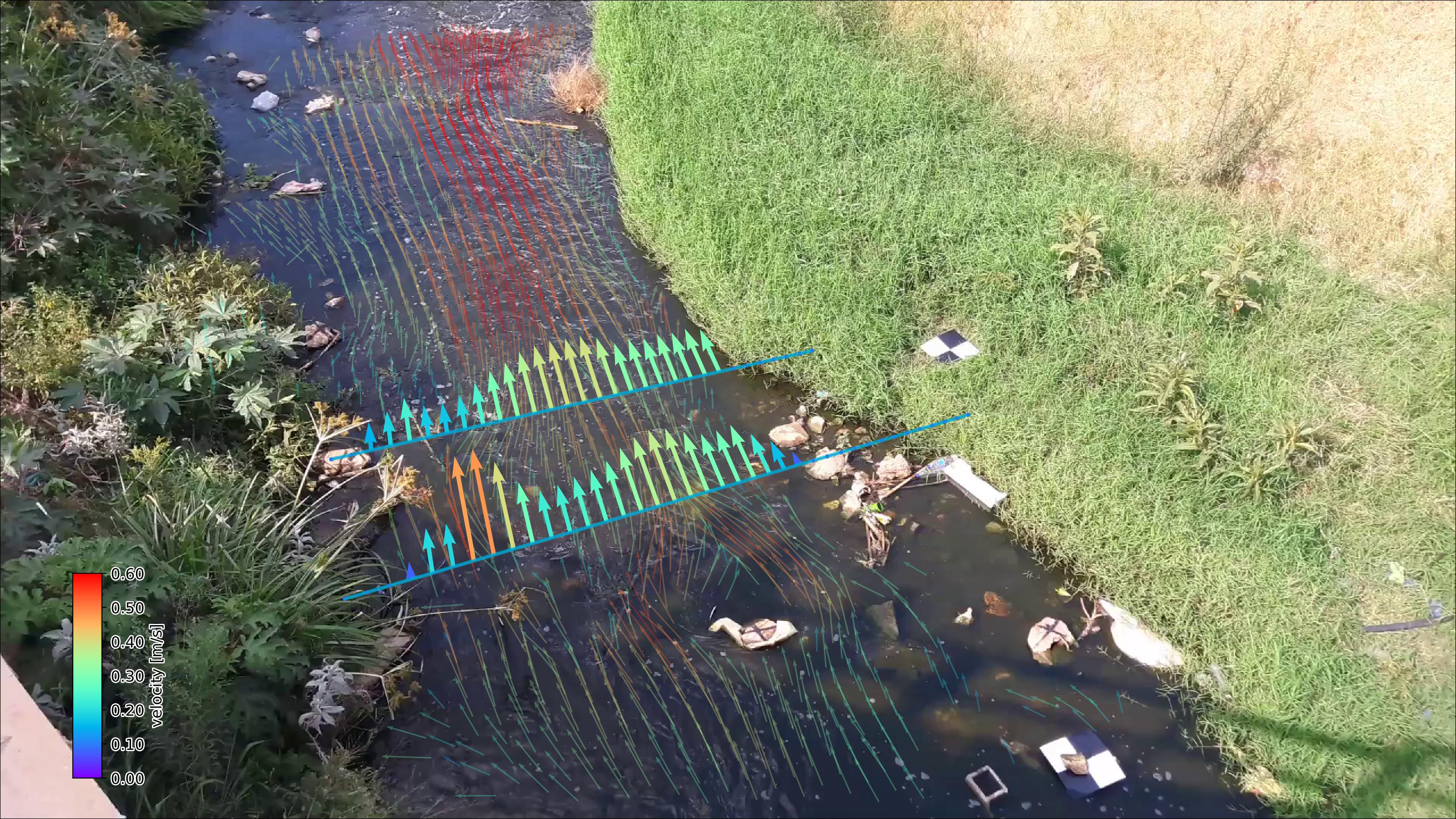 Image: Example of pyorc velocimetry over Ngwerere river at the Zambezi Road crossing - Lusaka, Zambia.
Current capabilities are: * Reading of frames and reprojection to surface * Velocimetry estimation at user-defined resolution * Discharge estimation over provided cross-section * Plotting of velocimetry results and cross-section flows in camera, geographical and orthoprojected perspectives.
We use the well-known xarray data models and computation pipelines (with dask) throughout the entire library to guarantee an easy interoperability with other tools and methods, and allow for lazy computing.
We are seeking funding for the following frequently requested functionalities: * Exports to simple text formats and GIS-compatible layers * Exports to augmented reality videos * Implementation of additional processing algorithms (STIV and LSPTV) * Improved nighttime / poor weather conditions processing through learning approaches
If you wish to fund this or other work on features, please contact us at info@rainbowsensing.com.
note: For instructions how to get Anaconda (with lots of pre-installed libraries) or Miniconda (light weight) installed, please go to https://docs.conda.io/projects/conda/en/latest/
manual: Please go to https://localdevices.github.io/pyorc for the latest documentation
compatibility: At this moment pyorc works with any video compatible with OpenCV as long as it has proper metadata.
Installation
You need a python environment. We recommend using the Miniforge project. Download the latest miniforge installer from https://github.com/conda-forge/miniforge and follow the installation instructions before continuing installing pyorc.
virtual environment
To get started with pyorc, we recommend to set up a python virtual environment. This ensures that installed libraries pyorc will not conflict with other libraries or library versions which you may need for other projects.
Setting up a virtual environment can be done with:
shell
python -m venv pyorc_env
this creates a new folder pyorc_env on your disk which contains your virtual environment.
After activating the environment, any package you install will be installed in this environment only.
Activating in Unix/Linux is done as follows:
shell
source pyorc_env/bin/activate
In Windows, the activation script is in a different folder. Type the following to activate the environment.
shell
pyorc_env\Scripts\activate
Installation for direct use
If you simply want to add pyorc to an existing python installation or virtual environment, then follow these instructions.
First activate the environment you want pyorc to be installed in (if you don't care about virtual environments, then simply skip this step). See the above sub-section for information. You can simply install pyorc with all its dependencies as follows:
shell
pip install pyopenrivercam[extra]
The [extra] section ensures that also geographical plotting is supported, which we recommend especially for the
set up of a camera configuration with RTK-GPS measured control points.
Upgrading from pypi with pip
Did you read about a new version and you want to upgrade? Simply activate your virtual environment, type
shell
pip install --upgrade pyopenrivercam[extra]
and then enjoy the latest features.
installation with mamba package manager
If you use mamba as a package manager, then the steps are the same, except for the installation step, which is:
shell
mamba install pyopenrivercam
Installation from latest code base
To install pyorc from scratch in a new virtual environment from the code base, go through these steps. Logical cases when you wish to install from the code base are when you wish to have the very latest non-released version.
First, clone the code with git and move into the cloned folder.
git clone https://github.com/localdevices/pyorc.git
cd pyorc
Set up a virtual environment with all dependencies as follows:
conda env create -f envs/pyorc-dev.yml
conda activate pyorc-dev
then install pyorc from the code base as follows:
pip install .
note: pyorc is now installed in a virtual environment called
pyorc-dev. This means that if you wish to run python with pyorc. You need to always first activate this environment before running python (or jupyter). This is done with the following command:conda activate pyorc-devInstallation from latest code base as developer
Clone the repository with ssh and move into the cloned folder.
git clone git@github.com:localdevices/pyorc.git
cd pyorc
Setup a virtual developers environment and install the package as follows:
conda env create -f envs/pyorc-dev.yml
conda activate pyorc-dev
pip install -e .
Make sure you install pre-commit hooks so that code is properly linted before pushing.
pip install pre-commit
pre-commit install
Using pyorc
To use pyorc, you can use the API for processing. A command-line interface is forthcoming pending funding. A manual is also still in the making.
Acknowledgement
The first development of pyorc has been supported by the World Meteorological Organisation - HydroHub.
License
pyorc is licensed under AGPL Version 3 (see LICENSE file).
pyorc uses the following important libraries and software with said licenses.
| Package | Version | License | |------------|---------|------------------------------------| | ffpiv | 0.1.2 | AGPLv3 | | numpy | 1.26.4 | BSD License | | opencv2 | 4.10.0 | MIT License | | openpiv | 0.25.3 | GPLv3 | | matplotlib | 3.9.2 | Python Software Foundation License | | geopandas | 1.0.1 | BSD License | | pandas | 2.2.2 | BSD License |
Project organisation
.
├── CHANGELOG.md        <- Version-based changelog documentation
├── README.md           <- This file
├── LICENSE             <- License file containing AGPLv3.0 license terms
├── TRADEMARK.md        <- Trademark guidelines
├── pyproject.toml      <- setup pipeline compatible with pip
├── environment.yml     <- YML-file for setting up a conda environment with dependencies
├── docs                <- Sphinx documentation source code
    ├── ...             <- Sphinx source code files
├── examples            <- Jupyter notebooks with examples how to use the API
    ├── ...             <- individual notebooks and folder with example data files
├── pyorc               <- pyorc library
    ├── ...             <- pyorc functions and API files
├── tests               <- pytest suite
    ├── ...             <- pytest functions on API level
Owner
- Name: localdevices
- Login: localdevices
- Kind: organization
- Repositories: 9
- Profile: https://github.com/localdevices
GitHub Events
Total
- Create event: 25
- Release event: 12
- Issues event: 78
- Watch event: 20
- Delete event: 17
- Issue comment event: 35
- Push event: 122
- Pull request event: 34
- Fork event: 2
Last Year
- Create event: 25
- Release event: 12
- Issues event: 78
- Watch event: 20
- Delete event: 17
- Issue comment event: 35
- Push event: 122
- Pull request event: 34
- Fork event: 2
Committers
Last synced: 10 months ago
Top Committers
| Name | Commits | |
|---|---|---|
| hcwinsemius | h****s@g****m | 494 |
| Rick Hagenaars | r****s@m****m | 1 |
| Stephen Mather | 1****r@u****m | 1 |
Committer Domains (Top 20 + Academic)
Issues and Pull Requests
Last synced: 11 months ago
All Time
- Total issues: 152
- Total pull requests: 95
- Average time to close issues: 3 months
- Average time to close pull requests: 1 day
- Total issue authors: 16
- Total pull request authors: 2
- Average comments per issue: 0.64
- Average comments per pull request: 0.56
- Merged pull requests: 91
- Bot issues: 0
- Bot pull requests: 0
Past Year
- Issues: 47
- Pull requests: 47
- Average time to close issues: 6 days
- Average time to close pull requests: about 13 hours
- Issue authors: 4
- Pull request authors: 1
- Average comments per issue: 0.45
- Average comments per pull request: 0.74
- Merged pull requests: 43
- Bot issues: 0
- Bot pull requests: 0
Top Authors
Issue Authors
- hcwinsemius (127)
- NajafiRoja (5)
- Ilhamrafi (3)
- abhisek-acharya (3)
- moroth89 (2)
- RodrigoMR89 (2)
- lflowers39 (1)
- farhanvicena (1)
- Shen001 (1)
- Andreas-Bombaert (1)
- A290-65 (1)
- riddle911 (1)
- MemoGonzalez23 (1)
- amirdastgheib (1)
- Mohawker47 (1)
Pull Request Authors
- hcwinsemius (94)
- smathermather (1)
Top Labels
Issue Labels
Pull Request Labels
Packages
- Total packages: 3
-
Total downloads:
- pypi 456 last-month
-
Total dependent packages: 1
(may contain duplicates) -
Total dependent repositories: 1
(may contain duplicates) - Total versions: 73
- Total maintainers: 1
proxy.golang.org: github.com/localdevices/pyorc
- Documentation: https://pkg.go.dev/github.com/localdevices/pyorc#section-documentation
- License: agpl-3.0
-
Latest release: v0.8.9
published 11 months ago
Rankings
pypi.org: pyopenrivercam
pyorc: free and open-source image-based surface velocity and discharge.
- Documentation: https://pyopenrivercam.readthedocs.io/
- License: GNU Affero General Public License v3
-
Latest release: 0.8.9
published 11 months ago
Rankings
Maintainers (1)
conda-forge.org: pyopenrivercam
pyOpenRiverCam is an open-source API for estimating surface velocity and river flow from IP, drone or smartphone camera videos. It performs preprocessing, surface velocity estimation, spurious velocity filtering, cross section sampling, infilling of missings, and integration to discharge. A user only needs to perform light field work and collect videos. It is pure python code and therefore easy to take up in your own software project or perform research with or develop new features.
- Homepage: https://github.com/localdevices/pyorc
- License: AGPL-3.0-only
-
Latest release: 0.3.0
published over 3 years ago
Rankings
Dependencies
- actions/checkout v3 composite
- conda-incubator/setup-miniconda v2 composite
- peaceiris/actions-gh-pages v3.8.0 composite
- actions/checkout v3 composite
- actions/setup-python v3 composite
- pypa/gh-action-pypi-publish 27b31702a0e7fc50959f5ad993c78deac1bdfc29 composite
- actions/checkout v3 composite
- actions/setup-python v3 composite
- pypa/gh-action-pypi-publish 27b31702a0e7fc50959f5ad993c78deac1bdfc29 composite
- actions/checkout v2 composite
- codecov/codecov-action v1 composite
- conda-incubator/setup-miniconda v2 composite
- continuumio/miniconda3 latest build
- ipykernel *
- matplotlib *
- nbsphinx *
- pandoc *
- pydata_sphinx_theme *
- sphinx ==5.3
- sphinx-design *
- sphinx-gallery *
- sphinx_autosummary_accessors *
- sphinx_rtd_theme *
- sphinxcontrib-programoutput *
- click *
- cython *
- dask *
- descartes *
- flox *
- geojson *
- geopandas *
- matplotlib *
- netCDF4 *
- numba *
- numpy *
- opencv-python *
- openpiv *
- packaging *
- pip *
- pyproj *
- pythran *
- pyyaml *
- rasterio *
- scikit-image *
- scipy *
- shapely *
- tqdm *
- typeguard *
- xarray *
- cartopy
- dask
- descartes
- flox
- geojson
- geopandas
- geos
- jupyter
- matplotlib
- netcdf4
- numba
- numpy
- opencv
- pip
- pyproj
- python
- rasterio
- requests
- scikit-image
- scipy
- shapely
- tqdm
- typeguard
- xarray
- yaml