sustainability-scanner
Science Score: 13.0%
This score indicates how likely this project is to be science-related based on various indicators:
-
○CITATION.cff file
-
✓codemeta.json file
Found codemeta.json file -
○.zenodo.json file
-
○DOI references
-
○Academic publication links
-
○Committers with academic emails
-
○Institutional organization owner
-
○JOSS paper metadata
-
○Scientific vocabulary similarity
Low similarity (13.0%) to scientific vocabulary
Repository
Basic Info
- Host: GitHub
- Owner: awslabs
- License: mit-0
- Language: Python
- Default Branch: main
- Size: 22 MB
Statistics
- Stars: 121
- Watchers: 12
- Forks: 12
- Open Issues: 2
- Releases: 0
Metadata Files
README.md
Sustainability Scanner (SusScanner)

Validate AWS CloudFormation templates against AWS Well-Architected Sustainability Pillar best practices.
Sustainability scanner is an open source tool that helps you create a more sustainable infrastructure on AWS. It takes in your Cloudformation template as input, evaluates it against a set of sustainability best practices and generates a report with a sustainability score and suggested improvements to apply to your template.
SusScanner comes with a set of rule implementations aligned to the AWS Well-Architected Pillar for Sustainability. However, this is not an exhaustive list and new rules will come out as the tool evolves. Furthermore, you can extend these rules (located in the susscanner/rules dir) in accordance with your company-specific sustainability policies.
Sustainability Scanner in action
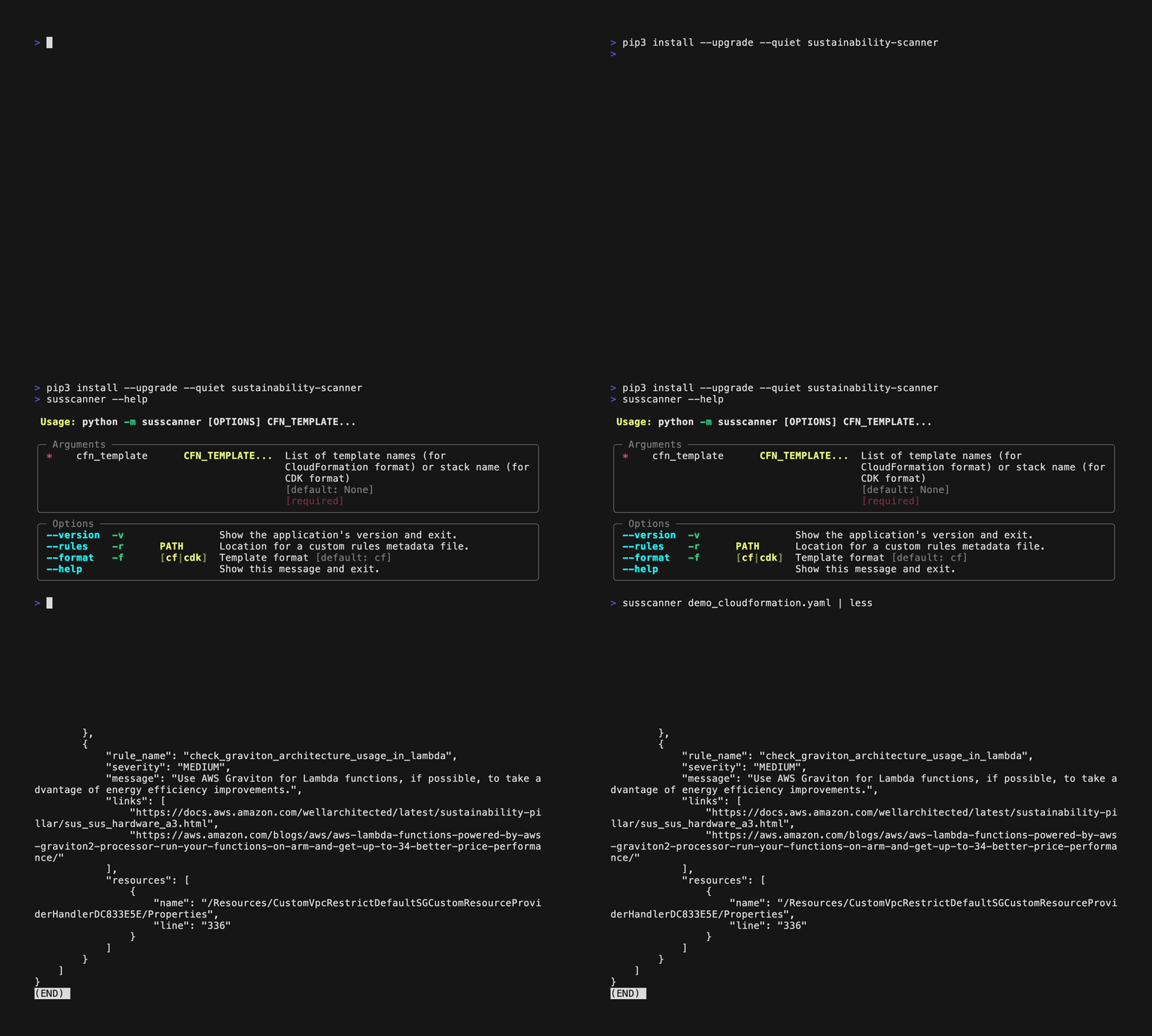
Scroll down to the getting started section to get detailed examples on how to use the tool.
Table of Contents
- Installation
- Prerequisites
- Getting Started
- Install via pip
- Install from source
- Sustainability Score
- Rule Set
- Disabling Rules
- Extending the rule set
- FAQs
- Security
- License
Installation
To install Sustainability Scanner please follow the following instructions.
Prerequisites
- AWS CloudFormation Guard
- an open-source general-purpose policy-as-code evaluation tool which SusScanner builds on top of
- Python 3.6 or later
- check version with
python3 -V
- check version with
- AWS CDK, if you use CDK to define your AWS infrastructure.
Getting Started
There are two options to install the tool:
1. Install via pip
To install the project via pip, you simply have to call
sh
pip3 install sustainability-scanner
Scanning an AWS CloudFormation Template
Run susscanner --help to get a list of options and arguments for the tool.
You should see an output like below:
```sh susscanner --help Usage: susscanner [OPTIONS] CFN_TEMPLATE...
╭─ Arguments ──────────────────────────────────────────────────────────────────────────────────────────────────────────────────────────────────────────────╮
│ * cfntemplate CFNTEMPLATE... List of template names (for CloudFormation format) or stack name (for CDK format) [default: None] [required] │
╰──────────────────────────────────────────────────────────────────────────────────────────────────────────────────────────────────────────────────────────╯
╭─ Options ────────────────────────────────────────────────────────────────────────────────────────────────────────────────────────────────────────────────╮
│ --version -v Show the application's version and exit. │
│ --rules -r PATH Location for a custom rules metadata file. │
│ --format -f [cf|cdk] Template format [default: cf] │
│ --help Show this message and exit. │
╰──────────────────────────────────────────────────────────────────────────────────────────────────────────────────────────────────────────────────────────╯
```
You can scan a template by using the command:
sh
susscanner [path/to/cloudformation/template_or_templates]
Or you can scan a CDK stack by using the command, NB! you have to run this command in your CDK application root directory:
sh
susscanner -f cdk <STACK_NAME>
You should see an output like below;
sh
susscanner test.yaml
{
    "title": "Sustainability Scanner Report",
    "file": "test.yaml",
    "version": "1.3.0",
    "sustainability_score": 8,
    "failed_rules": [
        {
            "rule_name": "rest_api_compression_max",
            "severity": "MEDIUM",
            "message": "Consider configuring the payload compression with MinimumCompressionSize. Compressing the payload will in general reduce the network traffic.",
            "links": [
                "https://docs.aws.amazon.com/apigateway/latest/developerguide/api-gateway-gzip-compression-decompression.html",
                "https://docs.aws.amazon.com/wellarchitected/latest/sustainability-pillar/sus_sus_data_a8.html"
            ],
            "resources": [
                {
                    "name": "/Resources/API-GW-2/Properties/MinimumCompressionSize",
                    "line": "15"
                }
            ]
        }
    ]
}
If you want to use your own rules_metadata file you can specify one using the -r or --rules options.
2. Install from source
Clone this project
sh
git clone https://github.com/awslabs/sustainability-scanner.git
Move into the project directory
sh
cd sustainability-scanner
Create and activate virtual environment (optional)
```sh
from the root directory of the project
python3 -m venv .venv source .venv/bin/activate ```
Install dependencies
sh
python3 -m pip install -r requirements.txt
That's it! You're ready to use Sustainability Scanner.
Scanning an AWS CloudFormation Template
You can scan a template by using the command;
```sh
from the root directory of the project
python3 -m susscanner [path/to/cloudformation/templateortemplates] ```
Sustainability Score
After you've scanned your AWS CloudFormation template, as part of the report, you will get a Sustainability Score. It follows inverted scoring and increases your score for each best practice you can improve; the lower the score the better. Higher severity rules have a greater scope for improvement e.g. Failing a HIGH SEV rule will increase your score more than a LOW SEV rule. If you are following all the best practices or none of the rules apply to your infrastructure this score will be 0. Find the scoring by severity in the table below
| SEVERITY | SCORE | | ----------- | ----------- | | LOW | 1 | | MEDIUM | 2 | | HIGH | 3 |
Rule set
SusScanner comes with a set of best practices/rules that align with best practices for sustainability in the cloud. You can find the list of best practices, the service they apply to and their improvement actions in the rules_metadata.json file.
Disabling rules
As mentioned before, the tool comes with a pre-defined set of rules, all of which are enabled by default. However, you can disable a rule if it is not applicable to your setup.
In the susscanner directory you can find a file called rules_metadata.json. This configuration file can be used to specify which rules to include. The structure of this file is as follows:
01:{
02:    "all_rules":
03:    {
04:        "rule_on_service_level": {
05:            "enabled": true,
06:            "rules": [
07:            {
08:                "rule_name": "name_of_the_rule",
09:                "severity": "MEDIUM",
10:                "message": "message_of_the_rule",
11:                "enabled": true,
12:                "links": [
13:                    "link_1",
14:                    "link_2"
15:                ]
16:            }
17:        }
18:    }
19:}
Rules can be enabled or disabled on both a service level and rule level. If you want to disable the checks for a service, for example Amazon Elastic Compute Cloud (EC2), you can set enabled to false on line 5 of the example above. Since a service can have multiple rules you can opt to disable rules on a per rule base. This can be done by setting enabled to false, in the example shown on line 11.
Extending the rule set
If you wish to extend the pre-existing set of rules you can define your own by adding AWS CloudFormation Guard rules to the susscanner/rules directory. For each rule that you add, don't forget to add test cases to validate it. You can validate a rule by running:
sh
cfn-guard test --rules-file ./susscanner/rules/<RULE_FILE> --test-data ./susscanner/rules/test_cases/<TEST_FILE>
AWS CloudFormation Guard uses a domain-specific language (DSL) to define the rules. More information can be found at the AWS CloudFormation Guard documentation page. When defining a new rule there are 2 requirements to ensure compatibility with the Sustainability Scanner project.
- Rules
FAILwhen the resulting state is not desirable in terms of sustainability andPASSwhen the outcome is sustainable. - Add the rule created in the
susscanner/rulesdirectory to therules_metadata.jsonfile. Define the name of the rule in therule_namevariable.
FAQs
Are all the recommendations mandatory to implement?
No, the recommendations are not mandatory to implement, if you categorize a best practice as not applicable or prefer the status quo given your workload, you can choose to either ignore the failed rule or disable it.
What happens if there are no suggested improvements?
You will get a Sustainability Scanner Report without failed rules. This looks as follows:
{
    "title": "Sustainability Scanner Report",
    "file": "cloudformation.yaml",
    "version": "1.3.0",
    "sustainability_score": 0,
    "failed_rules": []
}
Can I use it as part of a Github workflow?
Yes, a Github Action to run the scanner is available on the marketplace.
Security
See CONTRIBUTING for more information.
License
This project is licensed under the MIT-0 License.
Owner
- Name: Amazon Web Services - Labs
- Login: awslabs
- Kind: organization
- Location: Seattle, WA
- Website: http://amazon.com/aws/
- Repositories: 914
- Profile: https://github.com/awslabs
AWS Labs
GitHub Events
Total
- Watch event: 12
- Fork event: 2
Last Year
- Watch event: 12
- Fork event: 2
Committers
Last synced: 11 months ago
Top Committers
| Name | Commits | |
|---|---|---|
| Maurits de Groot | 6****t | 27 |
| Jyri Seiger | j****e@a****i | 15 |
| Sebastien Serre | s****e@a****m | 2 |
| aleenayunus | 4****s | 1 |
| Thomas Kriechbaumer | t****s@k****e | 1 |
| James Pether Sörling | p****s | 1 |
| Antoine Cichowicz | a****f@f****r | 1 |
| Amazon GitHub Automation | 5****o | 1 |
Committer Domains (Top 20 + Academic)
Issues and Pull Requests
Last synced: 11 months ago
All Time
- Total issues: 6
- Total pull requests: 15
- Average time to close issues: 24 days
- Average time to close pull requests: 9 days
- Total issue authors: 5
- Total pull request authors: 5
- Average comments per issue: 0.67
- Average comments per pull request: 0.4
- Merged pull requests: 13
- Bot issues: 0
- Bot pull requests: 0
Past Year
- Issues: 2
- Pull requests: 1
- Average time to close issues: N/A
- Average time to close pull requests: 3 days
- Issue authors: 2
- Pull request authors: 1
- Average comments per issue: 0.0
- Average comments per pull request: 0.0
- Merged pull requests: 1
- Bot issues: 0
- Bot pull requests: 0
Top Authors
Issue Authors
- awskaran (2)
- alex9smith (1)
- rahulsharesth (1)
- FollowTheProcess (1)
- mchittineni (1)
Pull Request Authors
- jyriseiger (8)
- Maurits-de-Groot (7)
- pethers (1)
- czantoine (1)
- serresebastien (1)
Top Labels
Issue Labels
Pull Request Labels
Packages
- Total packages: 2
-
Total downloads:
- pypi 484 last-month
-
Total dependent packages: 0
(may contain duplicates) -
Total dependent repositories: 0
(may contain duplicates) - Total versions: 8
- Total maintainers: 1
proxy.golang.org: github.com/awslabs/sustainability-scanner
- Documentation: https://pkg.go.dev/github.com/awslabs/sustainability-scanner#section-documentation
- License: mit-0
-
Latest release: v1.0.1
published about 3 years ago
Rankings
pypi.org: sustainability-scanner
Sustainability Scanner
- Homepage: http://github.com/awslabs/sustainability-scanner
- Documentation: https://sustainability-scanner.readthedocs.io/
- License: MIT-0
-
Latest release: 1.3.0
published almost 2 years ago
Rankings
Maintainers (1)
Dependencies
- typer ==0.7.0
- typer ==0.7.0