https://github.com/datarootsio/tf-profile
CLI tool to profile Terraform runs, written in Go
Science Score: 26.0%
This score indicates how likely this project is to be science-related based on various indicators:
-
○CITATION.cff file
-
✓codemeta.json file
Found codemeta.json file -
✓.zenodo.json file
Found .zenodo.json file -
○DOI references
-
○Academic publication links
-
○Committers with academic emails
-
○Institutional organization owner
-
○JOSS paper metadata
-
○Scientific vocabulary similarity
Low similarity (12.0%) to scientific vocabulary
Keywords
Repository
CLI tool to profile Terraform runs, written in Go
Basic Info
Statistics
- Stars: 160
- Watchers: 23
- Forks: 3
- Open Issues: 5
- Releases: 7
Topics
Metadata Files
README.md
tf-profile



CLI tool to profile Terraform runs, written in Go.
Main features: - Modern CLI (cobra-based) with autocomplete - Read logs straight from your Terraform process (using pipe) or a log file - Can generate global stats, resource-level stats or visualizations - Provides many levels of granularity and aggregation and customizable outputs
Featured on: awesome-go | awesome-terraform
[!WARNING] tf-profile is no longer being actively developed. I do not intend to add new features or support newer versions of Terraform.
Installation
Brew install
```bash ❱ brew tap datarootsio/tf-profile ❱ brew install tf-profile ❱ tf-profile --help tf-profile is a CLI tool to profile Terraform runs
Usage: tf-profile [command] ```
Binary download
- Head over to the releases page (https://github.com/QuintenBruynseraede/tf-profile/releases)
- Download the correct binary for your operating system
- Copy it to a path that is on your
$PATH. On a Linux system,/usr/local/binis the most common location.
Using docker
If you want to try tf-profile without installing anything, you can run it using Docker (or similar).
```bash ❱ cat mylogfile.log | docker run -i qbruynseraede/tf-profile:0.5.0 stats
Key Value
Number of resources created 1510
Cumulative duration 36m19s
Longest apply time 7m18s
Longest apply resource time_sleep.foo[*]
...
```
Optionally, define an alias:
bash
❱ alias tf-profile=docker run -i qbruynseraede/tf-profile:0.5.0
❱ cat my_log_file.log | tf-profile
Build from source
This requires at least version 1.23 of the go cli.
```bash ❱ git clone git@github.com:QuintenBruynseraede/tf-profile.git ❱ cd tf-profile && go build . ❱ sudo ln -s $(pwd)/tf-profile /usr/local/bin # Optional: only if you want to run tf-profile from other directories ❱ tf-profile --help tf-profile is a CLI tool to profile Terraform runs
Usage: tf-profile [command] ```
Basic usage
tf-profile handles input from stdin and from files. These two commands are therefore equivalent:
bash
❱ terraform apply -auto-approve | tf-profile table
❱ terraform apply -auto-approve > log.txt && tf-profile table log.txt
Four major commands are supported:
- 🔗 tf-profile stats: provide general statistics about a Terraform run
- 🔗 tf-profile table: provide detailed, resource-level statistics about a Terraform run
- 🔗 tf-profile filter: filter logs to include only certain resources
- 🔗 tf-profile graph: generate a visual overview of a Terraform run.
tf-profile stats
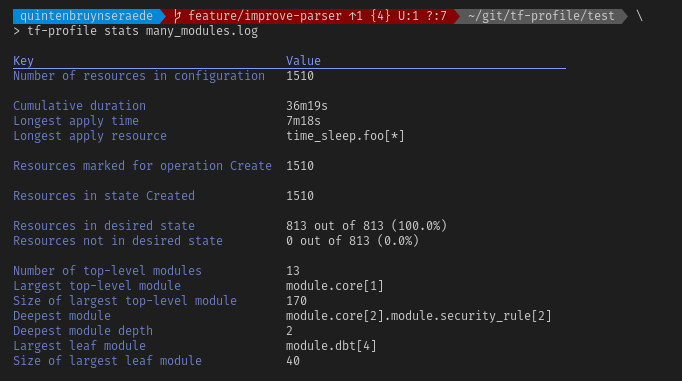
tf-profile stats is the most basic command. Given a Terraform log, it will only provide high-level statistics.
```bash ❱ terraform apply -auto-approve > log.txt ❱ tf-profile stats log.txt
Key Value
Number of resources in configuration 1510
Cumulative duration 36m19s
Longest apply time 7m18s
Longest apply resource time_sleep.foo[*]
Resources marked for operation Create 892 Resources marked for operation None 18 Resources marked for operation Replace 412
Resources in state AllCreated 800
Resources in state Created 695
Resources in state Started 15
Resources in desired state 1492 out of 1510 (98.8%) Resources not in desired state 18 out of 1510 (0.01%)
Number of top-level modules 13
Largest top-level module module.core[2]
Size of largest top-level module 170
Deepest module module.core[2].module.role[47]
Deepest module depth 2
Largest leaf module module.dbt[4]
Size of largest leaf module 40
```
For more information, refer to the reference for the stats command.
tf-profile table
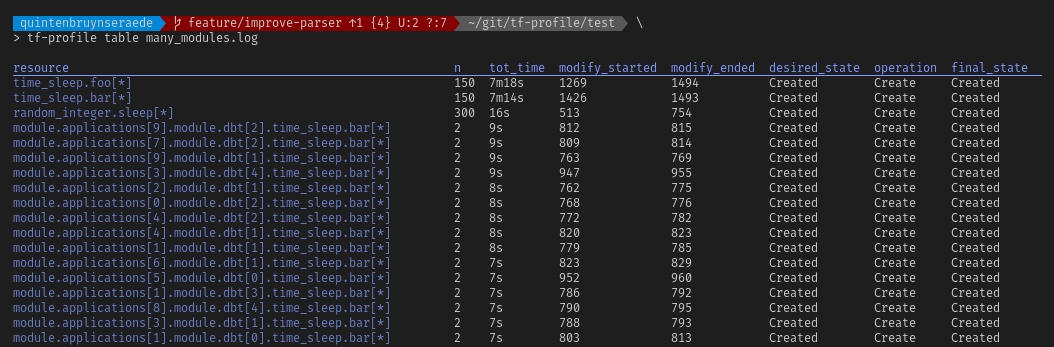
tf-profile table will parse a log and provide per-resource metrics.
```bash ❱ terraform apply -auto-approve > log.txt ❱ tf-profile table log.txt
resource n tottime modifystarted modifyended desiredstate operation finalstate
awsssmparameter.p6 1 0s 6 7 Created Replace Created
awsssmparameter.p1 1 0s 7 5 Created Replace Created
awsssmparameter.p3 1 0s 5 6 Created Replace Created
awsssmparameter.p4 1 0s / 1 NotCreated Destroy NotCreated
awsssmparameter.p5 1 0s 4 4 Created Modify Created
awsssm_parameter.p2 1 0s / / Created None Created
```
For a full description of the options, see the reference page.
tf-profile filter
tf-profile filter filters logs to include only certain resources. Wildcards are supported to filter on multiple resources.
```sh ❱ tf-profile filter "module..null_resource." log.txt
# module.mod1.nullresource.foo will be created + resource "nullresource" "foo" { ... }
# module.mod2.nullresource.bar will be created + resource "nullresource" "bar" { ... }
module.mod1.nullresource.foo: Creating... module.mod2.nullresource.bar: Creating... module.mod1.nullresource.foo: Creation complete after 1s [id=foo] module.mod2.nullresource.bar: Creation complete after 1s [id=bar] ```
For a full description of the options, see the reference page.
tf-profile graph
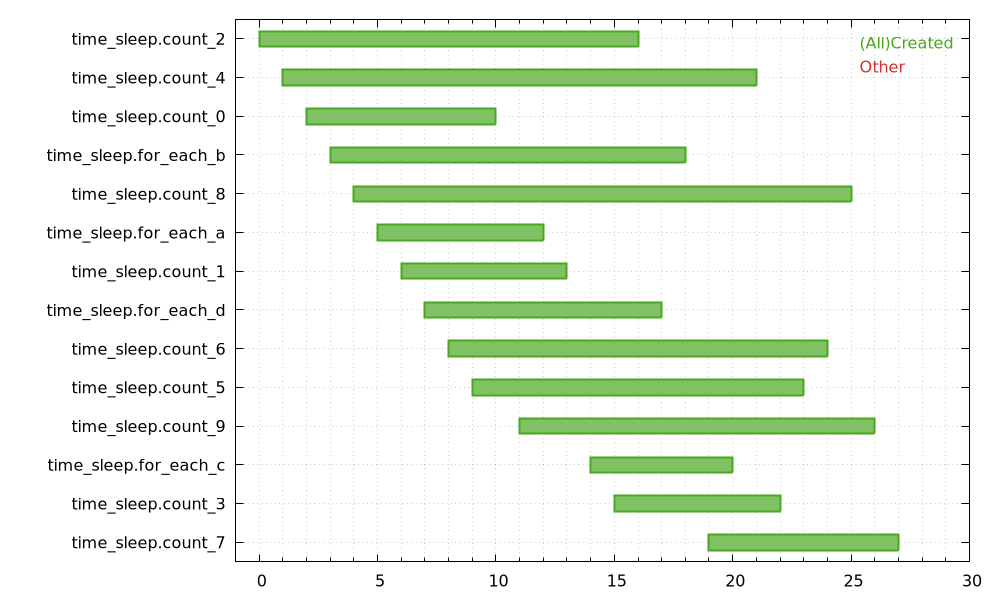
tf-profile graph is used to visualize your terraform logs. It generates a Gantt-like chart that shows in which order resources were created. tf-profile does not actually create the final image, but generates a script file that Gnuplot understands.
bash
❱ tf-profile graph my_log.log --out graph.png --size 2000,1000 | gnuplot
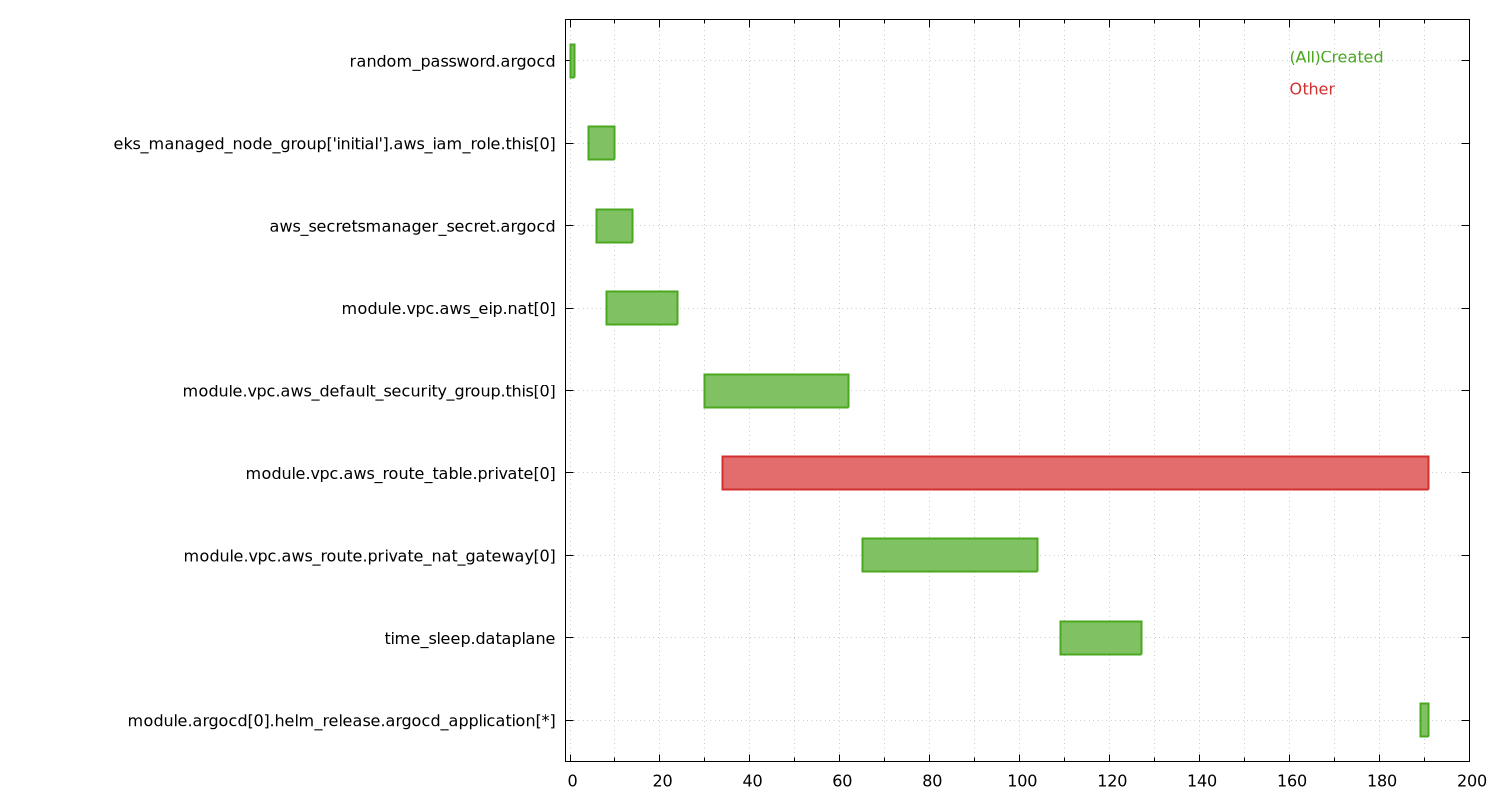
Disclaimer: Terraform's logs do not contain any absolute timestamps. We can only derive the order in which resources started and finished their modifications. Therefore, the output of tf-profile graph gives only a general indication of how long something actually took. In other words: the X axis is meaningless, apart from the fact that it's monotonically increasing.
Screenshots
Owner
- Name: dataroots
- Login: datarootsio
- Kind: organization
- Email: info@dataroots.io
- Location: Brussels (Belgium)
- Website: https://dataroots.io
- Repositories: 79
- Profile: https://github.com/datarootsio
Supporting your data driven strategy.
GitHub Events
Total
- Release event: 2
- Watch event: 11
- Delete event: 10
- Issue comment event: 2
- Push event: 5
- Pull request event: 7
- Fork event: 2
- Create event: 6
Last Year
- Release event: 2
- Watch event: 11
- Delete event: 10
- Issue comment event: 2
- Push event: 5
- Pull request event: 7
- Fork event: 2
- Create event: 6
Committers
Last synced: about 1 year ago
Top Committers
| Name | Commits | |
|---|---|---|
| Quinten Bruynseraede | Q****e | 62 |
| GitHub Action | a****n@g****m | 3 |
| baizon | b****n | 1 |
| Rui Chen | r****i@c****v | 1 |
| Araram96 | a****6@g****m | 1 |
| ardalan | a****n@d****o | 1 |
Committer Domains (Top 20 + Academic)
Issues and Pull Requests
Last synced: 11 months ago
All Time
- Total issues: 11
- Total pull requests: 46
- Average time to close issues: 20 days
- Average time to close pull requests: 3 days
- Total issue authors: 5
- Total pull request authors: 5
- Average comments per issue: 0.82
- Average comments per pull request: 0.09
- Merged pull requests: 41
- Bot issues: 0
- Bot pull requests: 5
Past Year
- Issues: 0
- Pull requests: 9
- Average time to close issues: N/A
- Average time to close pull requests: 3 days
- Issue authors: 0
- Pull request authors: 3
- Average comments per issue: 0
- Average comments per pull request: 0.44
- Merged pull requests: 4
- Bot issues: 0
- Bot pull requests: 5
Top Authors
Issue Authors
- bart6114 (3)
- advissor (1)
- QuintenBruynseraede (1)
- ikogfonna (1)
Pull Request Authors
- QuintenBruynseraede (22)
- dependabot[bot] (4)
- baizon (2)
- Araram96 (1)
- chenrui333 (1)
Top Labels
Issue Labels
Pull Request Labels
Packages
- Total packages: 1
-
Total downloads:
- homebrew 7 last-month
- Total dependent packages: 0
- Total dependent repositories: 0
- Total versions: 2
formulae.brew.sh: tf-profile
CLI tool to profile Terraform runs
- Homepage: https://github.com/datarootsio/tf-profile
- License: MIT
-
Latest release: 0.5.0
published over 1 year ago
Rankings
Dependencies
- actions/checkout v2 composite
- actions/setup-go v2 composite
- actions/upload-artifact v2 composite
- actions/checkout v2 composite
- docker/login-action v1 composite
- actions/checkout v2 composite
- actions/setup-go v2 composite
- actions/cache v2 composite
- actions/checkout v2 composite
- actions/setup-go v2 composite
- ad-m/github-push-action master composite
- tj-actions/coverage-badge-go v2 composite
- tj-actions/verify-changed-files v12 composite
- build latest build
- gcr.io/distroless/base-debian11 latest build
- golang 1.20 build
- github.com/davecgh/go-spew v1.1.1
- github.com/fatih/color v1.15.0
- github.com/inconshreveable/mousetrap v1.1.0
- github.com/mattn/go-colorable v0.1.13
- github.com/mattn/go-isatty v0.0.17
- github.com/pmezard/go-difflib v1.0.0
- github.com/rodaine/table v1.1.0
- github.com/spf13/cobra v1.7.0
- github.com/spf13/pflag v1.0.5
- github.com/stretchr/testify v1.8.2
- golang.org/x/sys v0.6.0
- gopkg.in/yaml.v3 v3.0.1
- github.com/cpuguy83/go-md2man/v2 v2.0.2
- github.com/davecgh/go-spew v1.1.0
- github.com/davecgh/go-spew v1.1.1
- github.com/fatih/color v1.15.0
- github.com/google/go-cmp v0.5.9
- github.com/inconshreveable/mousetrap v1.1.0
- github.com/mattn/go-colorable v0.1.13
- github.com/mattn/go-isatty v0.0.16
- github.com/mattn/go-isatty v0.0.17
- github.com/mattn/go-runewidth v0.0.9
- github.com/pmezard/go-difflib v1.0.0
- github.com/rodaine/table v1.1.0
- github.com/russross/blackfriday/v2 v2.1.0
- github.com/spf13/cobra v1.7.0
- github.com/spf13/pflag v1.0.5
- github.com/stretchr/objx v0.1.0
- github.com/stretchr/objx v0.4.0
- github.com/stretchr/objx v0.5.0
- github.com/stretchr/testify v1.6.1
- github.com/stretchr/testify v1.7.1
- github.com/stretchr/testify v1.8.0
- github.com/stretchr/testify v1.8.2
- golang.org/x/sys v0.0.0-20220811171246-fbc7d0a398ab
- golang.org/x/sys v0.6.0
- gopkg.in/check.v1 v0.0.0-20161208181325-20d25e280405
- gopkg.in/yaml.v3 v3.0.0-20200313102051-9f266ea9e77c
- gopkg.in/yaml.v3 v3.0.1