https://github.com/0xade1a1de/usb-injection
USB device hardware core with modified behaviour capable of injecting transmissions on behalf of other devices
Science Score: 36.0%
This score indicates how likely this project is to be science-related based on various indicators:
-
○CITATION.cff file
-
✓codemeta.json file
Found codemeta.json file -
✓.zenodo.json file
Found .zenodo.json file -
○DOI references
-
✓Academic publication links
Links to: arxiv.org -
○Committers with academic emails
-
○Institutional organization owner
-
○JOSS paper metadata
-
○Scientific vocabulary similarity
Low similarity (8.7%) to scientific vocabulary
Repository
USB device hardware core with modified behaviour capable of injecting transmissions on behalf of other devices
Basic Info
Statistics
- Stars: 35
- Watchers: 4
- Forks: 5
- Open Issues: 0
- Releases: 2
Metadata Files
README.md
USB Injector
~5 minute read
A USB device capable of injecting upstream communications on behalf of other connected USB devices. Under the provided configurations the injector can send keystrokes on behalf of a victim keyboard device while presenting itself as a mouse device. The injector can also block genuine inputs sent by the victim.
Basic principles of use and security relevance
Connect both the injector and a keyboard to a common USB hub. If the common hub is vulnerable to injection, pressing buttons on the injector will send keystroke inputs that the host computer receives and falsely attributes to the keyboard device. The security issue here is that this misattribution occurs at the hardware layer, so any protections implemented against USB-based attacks in software will be bypassed when injecting on behalf of a victim device that is trusted.
Example: to prevent BadUSB-type keyboard masquerading attacks, you configure a device authorisation policy to only trust keystroke inputs from a certain keyboard. With injection, that trusted keyboard's interface can still be used to send keystroke commands.
Paper report
This device is an artefact of research that has been published in a paper titled The Impostor Among US(B): Off-Path Injection Attacks on USB Communications, at USENIX Security '23. Preprint available online here or arXiv.
Disclaimers
We do not guarantee compliance with the USB Specification. In fact, our injectors are purposely non-compliant as the injection mechanism exploits the fact that USB assumes compliance from all devices on a given bus. In its state as provided, this is not an inherently destructive artefact. However it can be developed into one, as such we do not condone the use of this technology for illegal purposes and assume no responsibility for any damages caused.
Equipment needed
Listed below is the equipment required for use with the provided bitsream / constraints files. However, alternative target boards can be used with porting of constraints. The cores are not very demanding of logic resources; buttons, switches, and 3.3V IO (like Pmod) are mainly what is needed.
- Digilent Basys 3 FPGA development board. This is a cheap (149 USD) and commonly used FPGA board. If you are at a university with an Elec Eng department, chances are they will have some of these available. A USB A to Micro B cable is also needed to program the board.
- Spliced USB cable (exposing internal connector wires) with intact type-A male connector (part that plugs into computer USB ports)
- 1.5kΩ resistor
- Wires / connectors / breadboard
- USB Hub(s) for testing
Software / tools
(Needed) - programming the FPGA board
Any version of Xilinx's Vivado software, including free versions, can be used to configure the injector. See https://www.xilinx.com/support/download.html for latest versions.
(Alternatively, Digilent's Adept software: https://digilent.com/reference/software/adept/start can be used, but this cannot be used to create and modify HDL designs).
(Optional, strongly recommended) - viewing connected USB devices
Viewing the complete hierarchy of USB devices connected to your computer, along with their descriptor sets, will help confirm the platform is working. This is also good for general awareness - you might find some interesting things too e.g. your fixed webcam actually connected as a USB device.
Windows:
While Device Manager can be used to show connected devices, there are other tools which provide better visualisation. We highly recommend USB Device Tree Viewer by Uwe Sieber.
Linux:
The lsusb command can be used to show complete device connection hierarchy and decriptor sets.
(Optional) - viewing USB traffic
Wireshark's USBPcap functionality can be used to inspect USB traffic. This can confirm misattribution of injected data to the victim device if injection is successful.
Setup
~10 min setup (with equipment gathered)
Here are instructions for setting up the Low-Speed (LS) injection platform to perform injections on behalf of a regular LS keyboard victim. We also mention any differences in steps for configuring as a Full-Speed device, such configuration will only inject against FS keyboards which are rarer (usually just gaming keyboards). 1. Connect Basys 3 board to the computer running Vivado and program the target FPGA with the bitstream file: LS Keystroke Injector > USB_Demo.bit (FS alternative in FS Keystroke Injector > ...) 2. Connect wires from a spliced USB cable to the Basys 3 board with the following pin correspondence:
| USB pin | USB wire colour | Basys 3 JB Pmod pin |
| ------ | ------ | ------ |
| D+ |  Green | JB1 |
| D- |
Green | JB1 |
| D- |  White | JB3 |
| Gnd |
White | JB3 |
| Gnd |  Black | JB5 |
| Vs |
Black | JB5 |
| Vs |  Red | Leave unconnected |
Pmod connector header pin numbering.
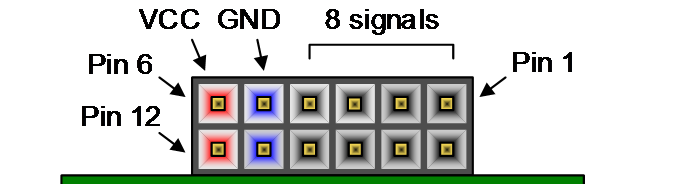

- Pull up the D- line to 3.3V across a 1.5kΩ resistor (as in diagram below). To do this, you can connect one side of the resistor through JB6 (Vcc at 3.3V) on the same Basys 3 Pmod header, and connect the other side to the junction of JB3 and D- from the spliced cable. (For configuring injector as Full-Speed device, D+ line must be pulled up instead)

- Plug spliced USB connector into USB port and confirm connection of mouse device (see above 'Software - For viewing connected USB devices')
How to use
- With setup complete, connect both the injector and victim keyboard through the same single-TT USB hub (this can be checked in hub descriptors within connection hierarchy). Confirm that the keyboard and injector are both operating in the same speed mode (LS or FS), and are logically connected through the same hub (some hubs such as 7-port hubs are implemented by chaining a 4-port hub onto another 4-port hub).
- The injector can selectively block or allow victim communication. Different injection configurations are managed by two switches on the bottom right of the Basys 3 board (see labels in table below). Ensure the reset switch (SW0 - furthest to the right) is off (down). The victim device can only be used as normal in state 1. Configure the switches into state 3 to attempt injection in next step.
| State | inj (SW1) | DOSswitch (SW2) | Behaviour | | ------ | ------ | ------ | ------ | | 0 | 0 | 0 | NAKs being injected | | 1 | 0 | 1 | No injections - victim works | | 2 | 1 | 0 | NAKs being injected | | 3 | 1 | 1 | Data is being injected |
- Open a blank document. Push the buttons on the Basys 3 board (5 buttons arranged in + shape on the bottom right side of the board). If injection is successful, the buttons along the vertical line (top to bottom) should inject keystrokes that type 'c', 'm', and 'd'. If injection is unsuccessful, try with other hubs. See next part for information on vulnerable hubs.
- If injection works and you are on a Windows machine, press the buttons in the following order to open a Command Window: L (Left), L + R, release both, U, release, C, release, D, release, R. These are configured as: Windows Key, Windows Key & r, c, m, d, Enter Key.
- [Optional] capture injected traffic with Wireshark to further confirm injected keystrokes are attributed to the USB address assigned to the victim keyboard. This misattributed data what any/all software based protections have to rely on.
- [Optional] install a device authorisation policy on your host machine and allow communication with the victim while blocking injection platform. Injected transmissions on behalf of the victim can circumvent any such protection.
Vulnerable hubs
Injection was found to work against most USB 2.0 hubs and a small minority of 3.0 hubs. Injection of LS/FS traffic as performed by the injectors provided here will only work against single-TT (non-multi-TT) hubs, you can check which category the hubs you test fall into. This is specified in hub descriptor fields. Injection does not work when connecting directly to a computer's root hub, which are typically connected to its fixed USB ports. Please consult the research paper for more information, there we have listed all the hubs we tested and which were found vulnerable. We are interested in any additional 3.0 hub models found vulnerable, if you test and find one feel free to contact the paper's primary author (Robbie Dumitru).
Author of original core
These applications are based on an original USB device core 'FPGA-USB-V2' produced by Robert E. Jenkins - Johns Hopkins University ECE Dept., 2009. The project can be found here: https://web.archive.org/web/20230830230604/https://xess.com/projects/fpga-usb-v2-project/
Author of injector modifications
Robbie Dumitru - The University of Adelaide School of Computer Science, 2022.
Copyright and license
Original source - Copyright 2009 by Robert E. Jenkins
Modified source - Copyright 2022 by Robbie Dumitru
These applications can be freely modified, used, and distributed as long as the attributions to both the original author and author of modifications (and their employers) are not removed.
Acknowledgements
This project was supported by:
- the Air Force Office of Scientific Research (AFOSR) under award number FA9550-20-1-0425
- an ARC Discovery Early Career Researcher Award number DE200101577
- an ARC Discovery Project number DP210102670
- the Blavatnik ICRC at Tel-Aviv University
- the Defence Science and Technology Group (DSTG), Australia under Agreement ID10620
- the National Science Foundation under grant CNS-1954712
- and gifts from AMD, Intel, and Qualcomm
Owner
- Name: 0xADE1A1DE
- Login: 0xADE1A1DE
- Kind: organization
- Repositories: 5
- Profile: https://github.com/0xADE1A1DE
GitHub Events
Total
- Watch event: 9
- Fork event: 1
Last Year
- Watch event: 9
- Fork event: 1
Committers
Last synced: about 1 year ago
Top Committers
| Name | Commits | |
|---|---|---|
| RobbieDumitru | R****o@g****m | 24 |
| javali7 | j****7 | 2 |
Issues and Pull Requests
Last synced: about 1 year ago
All Time
- Total issues: 0
- Total pull requests: 0
- Average time to close issues: N/A
- Average time to close pull requests: N/A
- Total issue authors: 0
- Total pull request authors: 0
- Average comments per issue: 0
- Average comments per pull request: 0
- Merged pull requests: 0
- Bot issues: 0
- Bot pull requests: 0
Past Year
- Issues: 0
- Pull requests: 0
- Average time to close issues: N/A
- Average time to close pull requests: N/A
- Issue authors: 0
- Pull request authors: 0
- Average comments per issue: 0
- Average comments per pull request: 0
- Merged pull requests: 0
- Bot issues: 0
- Bot pull requests: 0