https://github.com/SETL-Framework/setl
A simple Spark-powered ETL framework that just works 🍺
Science Score: 13.0%
This score indicates how likely this project is to be science-related based on various indicators:
-
○CITATION.cff file
-
✓codemeta.json file
Found codemeta.json file -
○.zenodo.json file
-
○DOI references
-
○Academic publication links
-
○Committers with academic emails
-
○Institutional organization owner
-
○JOSS paper metadata
-
○Scientific vocabulary similarity
Low similarity (16.2%) to scientific vocabulary
Keywords
Keywords from Contributors
Repository
A simple Spark-powered ETL framework that just works 🍺
Basic Info
Statistics
- Stars: 182
- Watchers: 11
- Forks: 33
- Open Issues: 5
- Releases: 6
Topics
Metadata Files
README.md






If you’re a data scientist or data engineer, this might sound familiar while working on an ETL project:
- Switching between multiple projects is a hassle
- Debugging others’ code is a nightmare
- Spending a lot of time solving non-business-related issues
SETL (pronounced "settle") is a Scala ETL framework powered by Apache Spark that helps you structure your Spark ETL projects, modularize your data transformation logic and speed up your development.
Use SETL
In a new project
You can start working by cloning this template project.
In an existing project
xml
<dependency>
  <groupId>io.github.setl-framework</groupId>
  <artifactId>setl_2.12</artifactId>
  <version>1.0.0-RC2</version>
</dependency>
To use the SNAPSHOT version, add Sonatype snapshot repository to your pom.xml
```xml
Quick Start
Basic concept
With SETL, an ETL application could be represented by a Pipeline. A Pipeline contains multiple Stages. In each stage, we could find one or several Factories.
The class Factory[T] is an abstraction of a data transformation that will produce an object of type T. It has 4 methods (read, process, write and get) that should be implemented by the developer.
The class SparkRepository[T] is a data access layer abstraction. It could be used to read/write a Dataset[T] from/to a datastore. It should be defined in a configuration file. You can have as many SparkRepositories as you want.
The entry point of a SETL project is the object io.github.setl.Setl, which will handle the pipeline and spark repository instantiation.
Show me some code
You can find the following tutorial code in the starter template of SETL. Go and clone it :)
Here we show a simple example of creating and saving a Dataset[TestObject]. The case class TestObject is defined as follows:
scala
case class TestObject(partition1: Int, partition2: String, clustering1: String, value: Long)
Context initialization
Suppose that we want to save our output into src/main/resources/test_csv. We can create a configuration file local.conf in src/main/resources with the following content that defines the target datastore to save our dataset:
txt
testObjectRepository {
  storage = "CSV"
  path = "src/main/resources/test_csv"
  inferSchema = "true"
  delimiter = ";"
  header = "true"
  saveMode = "Append"
}
In our App.scala file, we build Setl and register this data store:
```scala
val setl: Setl = Setl.builder()
.withDefaultConfigLoader()
.getOrCreate()
// Register a SparkRepository to context setl.setSparkRepositoryTestObject
```
Implementation of Factory
We will create our Dataset[TestObject] inside a Factory[Dataset[TestObject]]. A Factory[A] will always produce an object of type A, and it contains 4 abstract methods that you need to implement:
- read
- process
- write
- get
```scala class MyFactory() extends Factory[Dataset[TestObject]] with HasSparkSession {
import spark.implicits._
// A repository is needed for writing data. It will be delivered by the pipeline @Delivery private[this] val repo = SparkRepository[TestObject]
private[this] var output = spark.emptyDataset[TestObject]
override def read(): MyFactory.this.type = { // in our demo we don't need to read any data this }
override def process(): MyFactory.this.type = { output = Seq( TestObject(1, "a", "A", 1L), TestObject(2, "b", "B", 2L) ).toDS() this }
override def write(): MyFactory.this.type = { repo.save(output) // use the repository to save the output this }
override def get(): Dataset[TestObject] = output
} ```
Define the pipeline
To execute the factory, we should add it into a pipeline.
When we call setl.newPipeline(), Setl will instantiate a new Pipeline and configure all the registered repositories as inputs of the pipeline. Then we can call addStage to add our factory into the pipeline.
scala
val pipeline = setl
  .newPipeline()
  .addStage[MyFactory]()
Run our pipeline
scala
pipeline.describe().run()
The dataset will be saved into src/main/resources/test_csv
What's more?
As our MyFactory produces a Dataset[TestObject], it can be used by other factories of the same pipeline.
```scala class AnotherFactory extends Factory[String] with HasSparkSession {
import spark.implicits._
@Delivery private[this] val outputOfMyFactory = spark.emptyDataset[TestObject]
override def read(): AnotherFactory.this.type = this
override def process(): AnotherFactory.this.type = this
override def write(): AnotherFactory.this.type = { outputOfMyFactory.show() this }
override def get(): String = "output" } ```
Add this factory into the pipeline:
scala
pipeline.addStage[AnotherFactory]()
Custom Connector
You can implement you own data source connector by implementing the ConnectorInterface
```scala class CustomConnector extends ConnectorInterface with CanDrop { override def setConf(conf: Conf): Unit = null
override def read(): DataFrame = { import spark.implicits._ Seq(1, 2, 3).toDF("id") }
override def write(t: DataFrame, suffix: Option[String]): Unit = logDebug("Write with suffix")
override def write(t: DataFrame): Unit = logDebug("Write")
/** * Drop the entire table. */ override def drop(): Unit = logDebug("drop") } ```
To use it, just set the storage to OTHER and provide the class reference of your connector:
txt
myConnector {
  storage = "OTHER"
  class = "com.example.CustomConnector"  // class reference of your connector
}
Generate pipeline diagram
You can generate a Mermaid diagram by doing:
scala
pipeline.showDiagram()
You will have some log like this:
```
--------- MERMAID DIAGRAM ---------
classDiagram
class MyFactory {
<
class DatasetTestObject {
<
partition1: Int partition2: String clustering1: String value: Long }
DatasetTestObject <|.. MyFactory : Output
class AnotherFactory {
<
class StringFinal {
<
}
StringFinal <|.. AnotherFactory : Output
class SparkRepositoryTestObjectExternal {
<
}
AnotherFactory <|-- DatasetTestObject : Input MyFactory <|-- SparkRepositoryTestObjectExternal : Input
------- END OF MERMAID CODE -------
You can copy the previous code to a markdown viewer that supports Mermaid.
Or you can try the live editor: https://mermaid-js.github.io/mermaid-live-editor/#/edit/eyJjb2RlIjoiY2xhc3NEaWFncmFtXG5jbGFzcyBNeUZhY3Rvcnkge1xuICA8PEZhY3RvcnlbRGF0YXNldFtUZXN0T2JqZWN0XV0-PlxuICArU3BhcmtSZXBvc2l0b3J5W1Rlc3RPYmplY3RdXG59XG5cbmNsYXNzIERhdGFzZXRUZXN0T2JqZWN0IHtcbiAgPDxEYXRhc2V0W1Rlc3RPYmplY3RdPj5cbiAgPnBhcnRpdGlvbjE6IEludFxuICA-cGFydGl0aW9uMjogU3RyaW5nXG4gID5jbHVzdGVyaW5nMTogU3RyaW5nXG4gID52YWx1ZTogTG9uZ1xufVxuXG5EYXRhc2V0VGVzdE9iamVjdCA8fC4uIE15RmFjdG9yeSA6IE91dHB1dFxuY2xhc3MgQW5vdGhlckZhY3Rvcnkge1xuICA8PEZhY3RvcnlbU3RyaW5nXT4-XG4gICtEYXRhc2V0W1Rlc3RPYmplY3RdXG59XG5cbmNsYXNzIFN0cmluZ0ZpbmFsIHtcbiAgPDxTdHJpbmc-PlxuICBcbn1cblxuU3RyaW5nRmluYWwgPHwuLiBBbm90aGVyRmFjdG9yeSA6IE91dHB1dFxuY2xhc3MgU3BhcmtSZXBvc2l0b3J5VGVzdE9iamVjdEV4dGVybmFsIHtcbiAgPDxTcGFya1JlcG9zaXRvcnlbVGVzdE9iamVjdF0-PlxuICBcbn1cblxuQW5vdGhlckZhY3RvcnkgPHwtLSBEYXRhc2V0VGVzdE9iamVjdCA6IElucHV0XG5NeUZhY3RvcnkgPHwtLSBTcGFya1JlcG9zaXRvcnlUZXN0T2JqZWN0RXh0ZXJuYWwgOiBJbnB1dFxuIiwibWVybWFpZCI6eyJ0aGVtZSI6ImRlZmF1bHQifX0=
```
You can either copy the code into a Markdown viewer or just copy the link into your browser (link) 🍻
App Configuration
The configuration system of SETL allows users to execute their Spark application in different execution environments, by using environment-specific configurations.
In src/main/resources directory, you should have at least two configuration files named application.conf
and local.conf
(take a look at this example). These
are what you need if you only want to run your application in one single environment.
You can also create other configurations (for example dev.conf and prod.conf), in which environment-specific
parameters can be defined.
application.conf
This configuration file should contain universal configurations that could be used regardless the execution environment.
env.conf (e.g. local.conf, dev.conf)
These files should contain environment-specific parameters. By default, local.conf will be used.
How to use the configuration
Imagine the case we have two environments, a local development environment and a remote production environment. Our application
needs a repository for saving and loading data. In this use case, let's prepare application.conf, local.conf, prod.conf
and storage.conf
```hocon
application.conf
setl.environment = ${app.environment}
setl.config {
spark.app.name = "my_application"
# and other general spark configurations
}
```
```hocon
local.conf
include "application.conf"
setl.config {
spark.default.parallelism = "200"
spark.sql.shuffle.partitions = "200"
# and other local spark configurations
}
app.root.dir = "/some/local/path"
include "storage.conf" ```
```hocon
prod.conf
setl.config {
spark.default.parallelism = "1000"
spark.sql.shuffle.partitions = "1000"
# and other production spark configurations
}
app.root.dir = "/some/remote/path"
include "storage.conf" ```
```hocon
storage.conf
myRepository { storage = "CSV" path = ${app.root.dir} // this path will depend on the execution environment inferSchema = "true" delimiter = ";" header = "true" saveMode = "Append" } ```
To compile with local configuration, with maven, just run:
shell
mvn compile
To compile with production configuration, pass the jvm property app.environment.
shell
mvn compile -Dapp.environment=prod
Make sure that your resources directory has filtering enabled:
xml
<resources>
    <resource>
        <directory>src/main/resources</directory>
        <filtering>true</filtering>
    </resource>
</resources>
Dependencies
SETL currently supports the following data source. You won't need to provide these libraries in your project (except the JDBC driver): - All file formats supported by Apache Spark (csv, json, parquet etc) - Delta - Excel (crealytics/spark-excel) - Cassandra (datastax/spark-cassandra-connector) - DynamoDB (audienceproject/spark-dynamodb) - JDBC (you have to provide the jdbc driver)
To read/write data from/to AWS S3 (or other storage services), you should include the corresponding hadoop library in your project.
For example
<dependency>
    <groupId>org.apache.hadoop</groupId>
    <artifactId>hadoop-aws</artifactId>
    <version>2.9.2</version>
</dependency>
You should also provide Scala and Spark in your pom file. SETL is tested against the following version of Spark:
| Spark Version | Scala Version | Note | | ------------- | ------------- | -----------------------------| | 3.0 | 2.12 | :heavycheckmark: Ok | | 2.4 | 2.12 | :heavycheckmark: Ok | | 2.4 | 2.11 | :warning: see known issues | | 2.3 | 2.11 | :warning: see known issues |
Known issues
Spark 2.4 with Scala 2.11
When using setl_2.11-1.x.x with Spark 2.4 and Scala 2.11, you may need to include manually these following dependencies to override the default version:
xml
<dependency>
    <groupId>com.audienceproject</groupId>
    <artifactId>spark-dynamodb_2.11</artifactId>
    <version>1.0.4</version>
</dependency>
<dependency>
    <groupId>io.delta</groupId>
    <artifactId>delta-core_2.11</artifactId>
    <version>0.7.0</version>
</dependency>
<dependency>
    <groupId>com.datastax.spark</groupId>
    <artifactId>spark-cassandra-connector_2.11</artifactId>
    <version>2.5.1</version>
</dependency>
Spark 2.3 with Scala 2.11
DynamoDBConnectordoesn't work with Spark version 2.3Compressannotation can only be used on Struct field or Array of Struct field with Spark 2.3
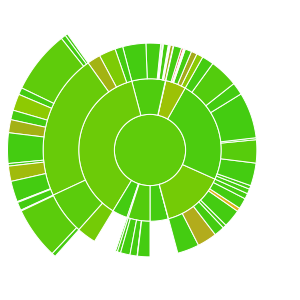
Test Coverage
Documentation
https://setl-framework.github.io/setl/
Contributing to SETL
Owner
- Name: SETL Framework
- Login: SETL-Framework
- Kind: organization
- Repositories: 2
- Profile: https://github.com/SETL-Framework
GitHub Events
Total
- Watch event: 5
- Delete event: 13
- Issue comment event: 20
- Pull request event: 29
- Fork event: 3
- Create event: 15
Last Year
- Watch event: 5
- Delete event: 13
- Issue comment event: 20
- Pull request event: 29
- Fork event: 3
- Create event: 15
Committers
Last synced: over 1 year ago
Top Committers
| Name | Commits | |
|---|---|---|
| Xuzhou Qin | x****n@j****m | 363 |
| XuzhouQin | 1****q | 135 |
| Marouane Felja | m****a@j****m | 36 |
| dependabot[bot] | 4****] | 19 |
| JorisTruong | j****g@p****m | 15 |
| Xuzhou Qin | me@q****v | 7 |
| nourrammal | 5****l | 3 |
| Huong Vuong | h****h@g****m | 2 |
| Lorin Dawson | 2****8 | 1 |
| charhrouchni | c****i@f****g | 1 |
Committer Domains (Top 20 + Academic)
Issues and Pull Requests
Last synced: 10 months ago
All Time
- Total issues: 9
- Total pull requests: 135
- Average time to close issues: 3 months
- Average time to close pull requests: 3 months
- Total issue authors: 7
- Total pull request authors: 5
- Average comments per issue: 2.67
- Average comments per pull request: 2.14
- Merged pull requests: 10
- Bot issues: 0
- Bot pull requests: 126
Past Year
- Issues: 0
- Pull requests: 24
- Average time to close issues: N/A
- Average time to close pull requests: 3 months
- Issue authors: 0
- Pull request authors: 1
- Average comments per issue: 0
- Average comments per pull request: 0.71
- Merged pull requests: 0
- Bot issues: 0
- Bot pull requests: 24
Top Authors
Issue Authors
- conderls (3)
- hanbei (1)
- tontolentino (1)
- qxzzxq (1)
- maroil (1)
- R7L208 (1)
- JhossePaul (1)
Pull Request Authors
- dependabot[bot] (123)
- qxzzxq (4)
- hoaihuongbk (3)
- R7L208 (1)
- JorisTruong (1)
Top Labels
Issue Labels
Pull Request Labels
Packages
- Total packages: 4
- Total downloads: unknown
-
Total dependent packages: 0
(may contain duplicates) -
Total dependent repositories: 0
(may contain duplicates) - Total versions: 4
proxy.golang.org: github.com/SETL-Framework/setl
- Documentation: https://pkg.go.dev/github.com/SETL-Framework/setl#section-documentation
- License: apache-2.0
-
Latest release: v0.4.0
published over 6 years ago
Rankings
proxy.golang.org: github.com/setl-framework/setl
- Documentation: https://pkg.go.dev/github.com/setl-framework/setl#section-documentation
- License: apache-2.0
-
Latest release: v0.4.0
published over 6 years ago
Rankings
repo1.maven.org: io.github.setl-framework:setl_2.11
SETL is an open-source Scala framework powered by Apache Spark that helps developers to structure ETL projects, modularize data transformation logic and speed up the development.
- Homepage: https://github.com/SETL-Framework/setl
- Documentation: https://appdoc.app/artifact/io.github.setl-framework/setl_2.11/
- License: The Apache License, Version 2.0
-
Latest release: 1.0.0-RC2
published over 5 years ago
Rankings
repo1.maven.org: io.github.setl-framework:setl_2.12
SETL is an open-source Scala framework powered by Apache Spark that helps developers to structure ETL projects, modularize data transformation logic and speed up the development.
- Homepage: https://github.com/SETL-Framework/setl
- Documentation: https://appdoc.app/artifact/io.github.setl-framework/setl_2.12/
- License: The Apache License, Version 2.0
-
Latest release: 1.0.0-RC2
published over 5 years ago
Rankings
Dependencies
- actions/checkout v2 composite
- actions/setup-java v1 composite
- actions/checkout v2 composite
- actions/setup-java v1 composite
- codecov/codecov-action v1 composite
- actions/checkout v2 composite
- actions/setup-java v1 composite
- codecov/codecov-action v1 composite
- amazon/dynamodb-local latest
- cassandra latest
- postgres latest
- org.apache.hadoop:hadoop-aws 3.3.2 provided
- org.apache.hadoop:hadoop-common 3.3.2 provided
- org.apache.spark:spark-core_2.12 3.2.0 provided
- org.apache.spark:spark-hive_2.12 3.2.0 provided
- org.apache.spark:spark-mllib_2.12 3.2.0 provided
- org.apache.spark:spark-sql_2.12 3.2.0 provided
- org.scala-lang:scala-library 2.12.10 provided
- org.scala-lang:scala-reflect 2.12.10 provided
- com.audienceproject:spark-dynamodb_2.12 1.1.2
- com.crealytics:spark-excel_2.12 0.13.7
- com.datastax.spark:spark-cassandra-connector_2.12 3.1.0
- com.typesafe:config 1.4.2
- io.delta:delta-core_2.12 1.1.0
- org.apache.hudi:hudi-spark3.2-bundle_2.12 0.11.0
- org.apache.spark:spark-avro_2.12 3.0.2
- org.postgresql:postgresql 42.3.3 test
- org.scalatest:scalatest_2.12 3.2.1 test