https://github.com/philippmeder/visdata
Useful python tools for data visualisation, e.g. 2D-profiles (also known as profile plots), comparison of measurements, or tables.
Science Score: 13.0%
This score indicates how likely this project is to be science-related based on various indicators:
-
○CITATION.cff file
-
✓codemeta.json file
Found codemeta.json file -
○.zenodo.json file
-
○DOI references
-
○Academic publication links
-
○Committers with academic emails
-
○Institutional organization owner
-
○JOSS paper metadata
-
○Scientific vocabulary similarity
Low similarity (16.6%) to scientific vocabulary
Keywords
Repository
Useful python tools for data visualisation, e.g. 2D-profiles (also known as profile plots), comparison of measurements, or tables.
Basic Info
Statistics
- Stars: 0
- Watchers: 1
- Forks: 0
- Open Issues: 0
- Releases: 0
Topics
Metadata Files
README.md






Useful tools for data visualisation, e.g. 2D-profiles, comparison of measurements, or tables.
[!WARNING] This package is still under development. The features work, but the API might change in the future.
Developed and maintained by Philipp Meder.
- Source code: https://github.com/philippmeder/visdata
- Report bugs: https://github.com/philippmeder/visdata/issues
Quick Start
Install this package:
bash
pip install visdata
You can get the newest stable version with:
bash
pip install git+https://github.com/philippmeder/visdata
License
Distributed under the BSD 3-Clause License.
Features
This README covers the following: 1. Profile2d Plot for 2D-histograms 2. Visual Comparison of Measurements 3. Table Output for Terminal, CSV, and LaTeX 4. Additional Features
Check out the examples!
Profile2d Plot for 2D-histograms
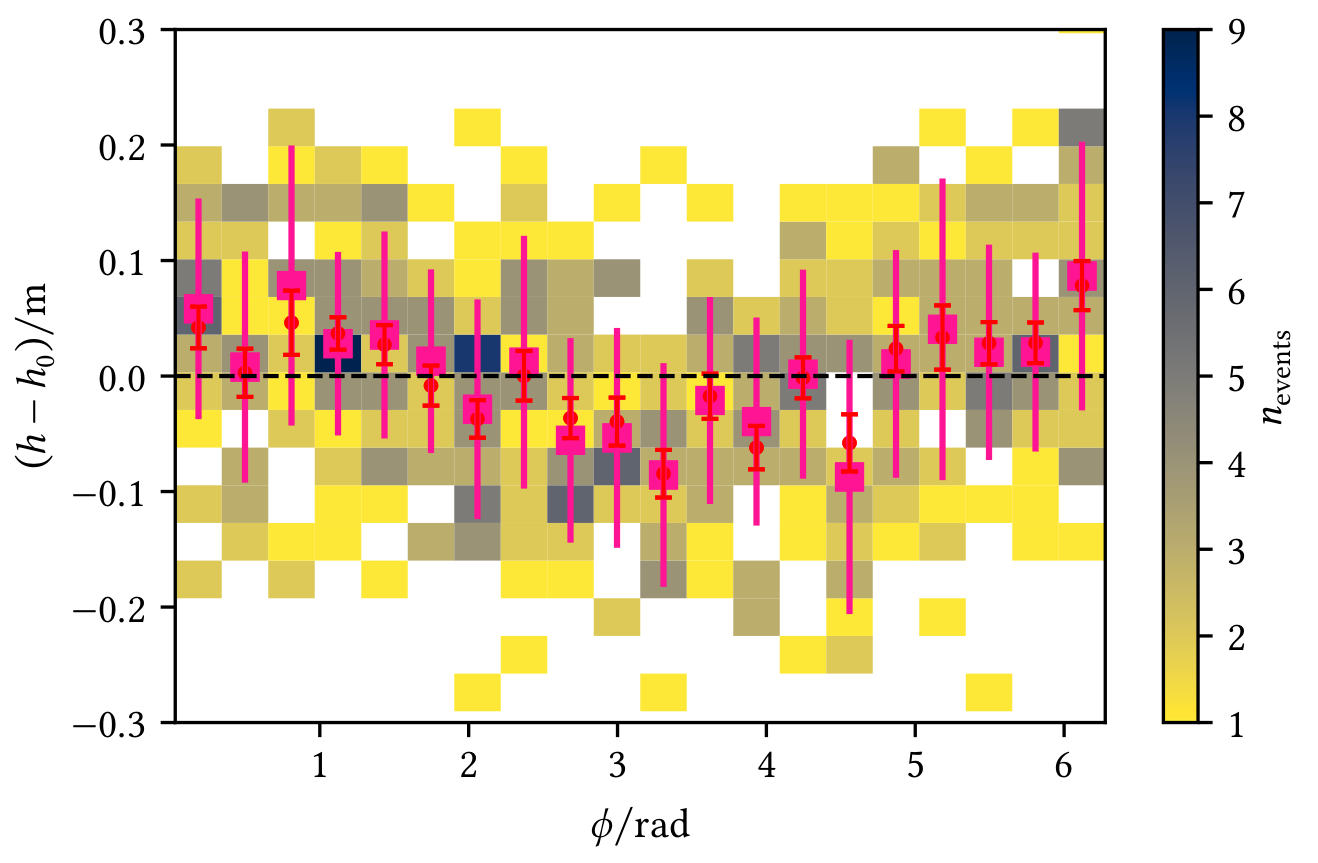
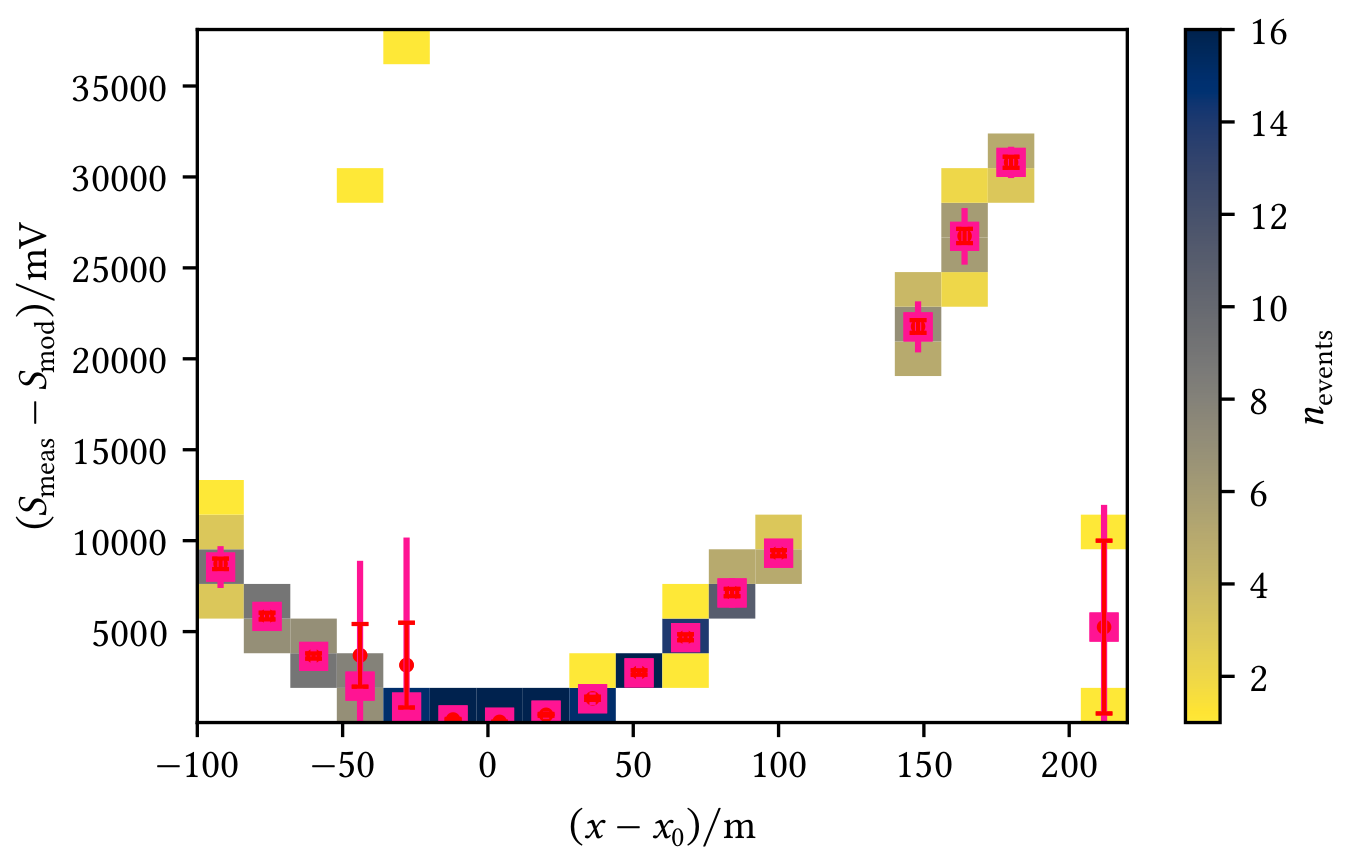
Profiles allow a visual interpretation of the data, e.g. in the following figures where red markers represent the mean with the standard error on the mean and pink markers represent the median of the y-data in each x-bin:
Profile shows an angle-dependent deviation from the zero line | Profile shows deviations from the model
----|----
 |
| 
Create a Profile2d object with your data and directly add the profile to a plot (you may adjust what and how to plot, see Histogramd2d example) or get the profile data and do the plotting yourself.
```python from matplotlib import pyplot as plt from visdata import Profile2d, plot_profile2d
Example data
x, y = ...
Create normal 2D-histogram
fig, ax = plt.subplots() hist, xedges, yedges, image = ax.hist2d(x, y, bins=10)
Create profile and add it to the axis (using default config)
profile = Profile2d(x, y, bins=10) plot_profile2d(ax, profile) ```
You can also use a Histogram2d object which gives you the ability to directly draw a profile.
In addition, it allows to plot 1D-histograms of the x/y data on the margins, which looks like this:
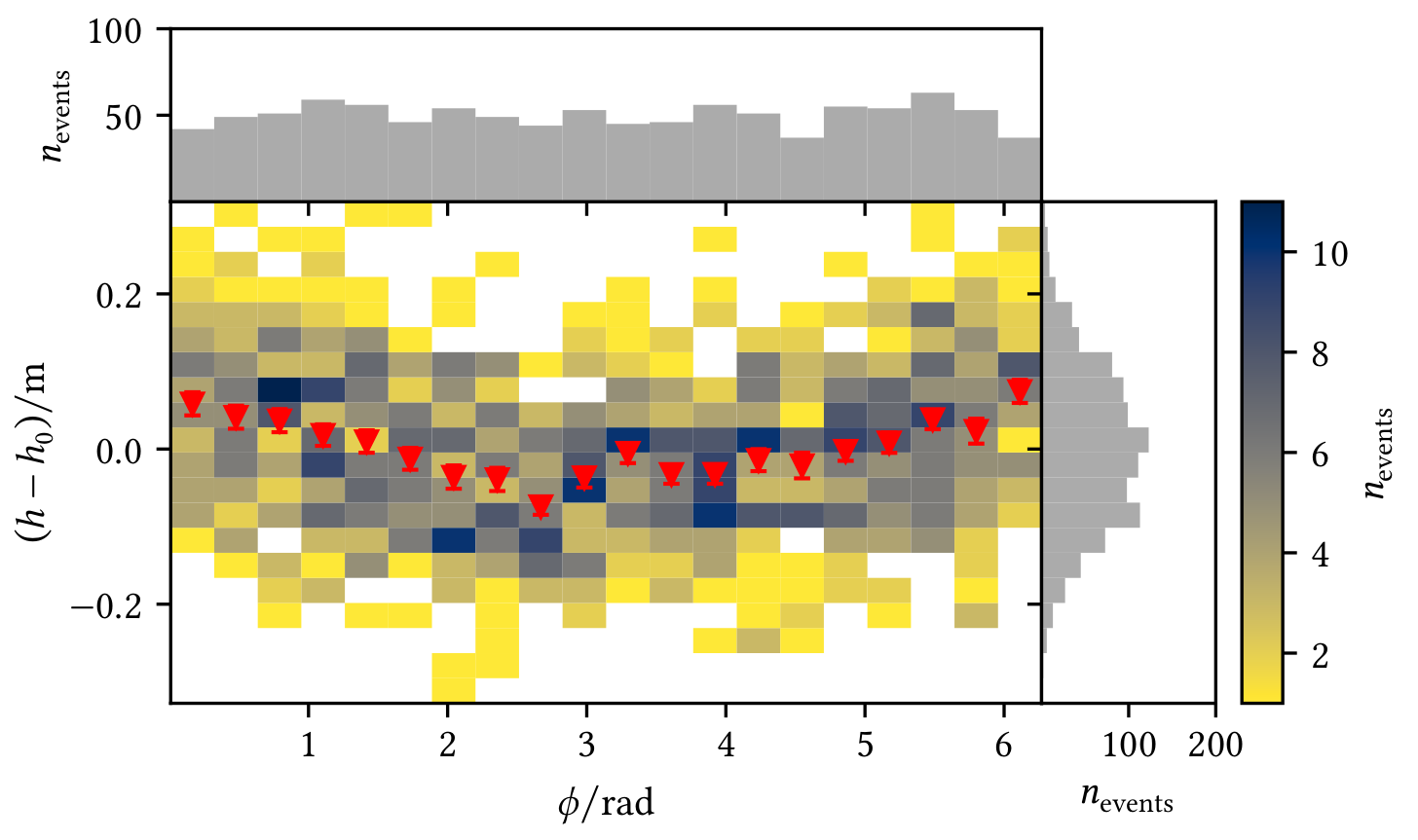
You can configure the marginal plots and the profile, see the following example:
```python from visdata import Histogram2d, Profile2dMeanPlotter, plot_profile2d
hist = Histogram2d(x, y, bins=bins)
Configure the marginal histograms if wanted, e.g. the color
Keywords are passed to 'ax.hist'
hist.configure_marginal(color="C2")
Configure the profile with a set of configs, e.g. only plot the mean but change the marker
hist.profile_plotters = [ # Keywords are passed to 'ax.errorbar' Profile2dMeanPlotter(marker="v") # You could add another config here, e.g. to plot the median ]
Plot hist2d with colorbar + 1D-histograms and profile
hist_result = hist.plot(marginal=True, profile=True) ```
Visual Comparison of Measurements Including Uncertainties
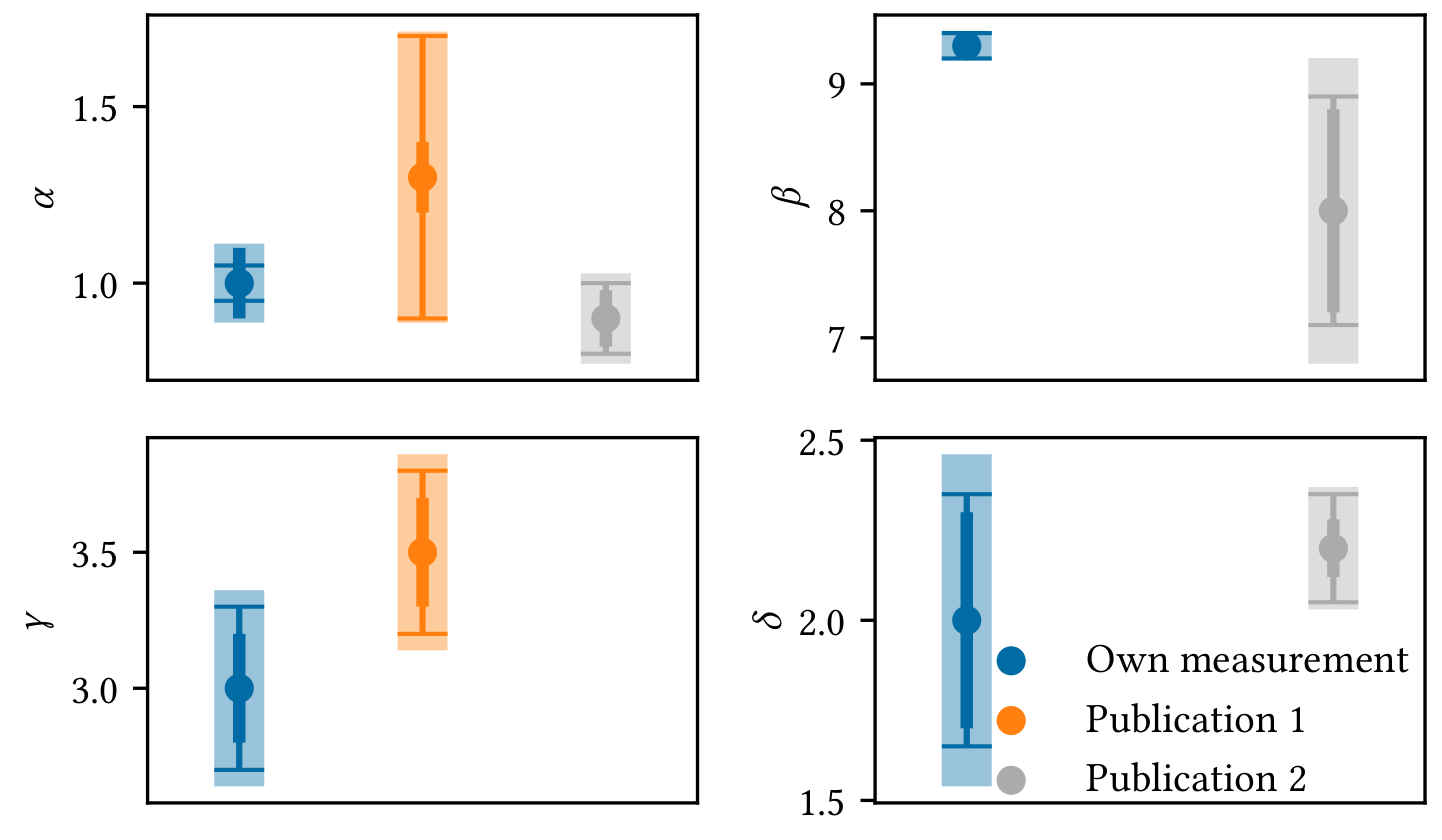
Sometimes it is easier to understand if different measurements are compatible with each other by looking at a visualisation, e.g. you want to compare your own measurements of some parameters with the measurements presented in other publications with respect to the uncertainties. The example shows - statistical uncertainties as medium thick errorbars, - systematic uncertainties as thin errorbars with caps, - quadratic combination of both as thick errobars with transparency (for visual guidance only, this value is meaningless).
You can of course configure what and how to plot. In this example, Publication 1 did not provide any values for $\beta$ and $\delta$ while Publication 2 did not provide a value for $\gamma$.
```python from visdata import ( Measurement, MeasurementResult, CompareMeasurementsPlot )
Example measurements for multiple parameters
measurement1 = Measurement( "Measurement name", { "par 1 name": MeasurementResult( 1, statistical=0.1, systematic=0.05 ), ... } ) measurement2 = ...
Create plot object and do the plotting
compplot = CompareMeasurementsPlot(measurment1, measurement2) fig, axs, handles, labels = compplot.plot()
At this point you can configure fig and axs the usual way or include a legend with handles and labels
... ```
Formatted Table Output for Terminal, CSV, and LaTeX
Create a Table object from a 2D-array and get the wanted output, either as a nice terminal output, a CSV table, or a LaTeX table ready for your document.
You can name the columns and rows independently and add a caption if you want. Furthermore, you can specify a formatter for the data.
```python from visdata import Table
Setup data and example formatter
data, description, columnlabels, rowlabels = ... formatter = "5.2f"
Create table object
table = Table( data, description=description, columnlabels=columnlabels, rowlabels=rowlabels )
Print the terminal representation as well as CSV and LaTeX
print(table) print(table.csv(formatter=formatter)) print(table.latex(formatter=formatter)) ```
The LaTeX output returns a scientific table. The terminal representation mimics this, e.g.
console
            Table: Some important values
────────────────────────────────────────────────────
              a0            a1            a2
────────────────────────────────────────────────────
A0              0.00e+00      1.00e+00      2.00e+00
A1              3.00e+00      4.00e+00      5.00e+00
────────────────────────────────────────────────────
Additional Features
- Decorators for code development, e.g. timer for function execution
- Intervals
- Functions like secans or cos called with angle in degrees
- Regular polygons for plotting and calculation of their most important properties
- Some utilities for matplotlib output
Requirements and Dependencies
Following requirements must be satisfied:
Python 3.10+(developed withPython 3.13, tested withPython 3.10+, lower version are not working due to the use ofmatch ... caseandUnion)numpy 2+matplotlib 3.8+
Owner
- Login: PhilippMeder
- Kind: user
- Repositories: 1
- Profile: https://github.com/PhilippMeder
GitHub Events
Total
- Push event: 3
- Public event: 1
- Create event: 1
Last Year
- Push event: 3
- Public event: 1
- Create event: 1
Issues and Pull Requests
Last synced: 11 months ago
All Time
- Total issues: 0
- Total pull requests: 0
- Average time to close issues: N/A
- Average time to close pull requests: N/A
- Total issue authors: 0
- Total pull request authors: 0
- Average comments per issue: 0
- Average comments per pull request: 0
- Merged pull requests: 0
- Bot issues: 0
- Bot pull requests: 0
Past Year
- Issues: 0
- Pull requests: 0
- Average time to close issues: N/A
- Average time to close pull requests: N/A
- Issue authors: 0
- Pull request authors: 0
- Average comments per issue: 0
- Average comments per pull request: 0
- Merged pull requests: 0
- Bot issues: 0
- Bot pull requests: 0
Top Authors
Issue Authors
Pull Request Authors
Top Labels
Issue Labels
Pull Request Labels
Packages
- Total packages: 1
-
Total downloads:
- pypi 58 last-month
- Total dependent packages: 0
- Total dependent repositories: 0
- Total versions: 1
- Total maintainers: 1
pypi.org: visdata
Package for data visualisation.
- Homepage: https://github.com/philippmeder/visdata
- Documentation: https://visdata.readthedocs.io/
- License: BSD 3-Clause License Copyright (c) 2024-2025, Philipp Meder. All rights reserved. Redistribution and use in source and binary forms, with or without modification, are permitted provided that the following conditions are met: 1. Redistributions of source code must retain the above copyright notice, this list of conditions and the following disclaimer. 2. Redistributions in binary form must reproduce the above copyright notice, this list of conditions and the following disclaimer in the documentation and/or other materials provided with the distribution. 3. Neither the name of the copyright holder nor the names of its contributors may be used to endorse or promote products derived from this software without specific prior written permission. THIS SOFTWARE IS PROVIDED BY THE COPYRIGHT HOLDERS AND CONTRIBUTORS "AS IS" AND ANY EXPRESS OR IMPLIED WARRANTIES, INCLUDING, BUT NOT LIMITED TO, THE IMPLIED WARRANTIES OF MERCHANTABILITY AND FITNESS FOR A PARTICULAR PURPOSE ARE DISCLAIMED. IN NO EVENT SHALL THE COPYRIGHT HOLDER OR CONTRIBUTORS BE LIABLE FOR ANY DIRECT, INDIRECT, INCIDENTAL, SPECIAL, EXEMPLARY, OR CONSEQUENTIAL DAMAGES (INCLUDING, BUT NOT LIMITED TO, PROCUREMENT OF SUBSTITUTE GOODS OR SERVICES; LOSS OF USE, DATA, OR PROFITS; OR BUSINESS INTERRUPTION) HOWEVER CAUSED AND ON ANY THEORY OF LIABILITY, WHETHER IN CONTRACT, STRICT LIABILITY, OR TORT (INCLUDING NEGLIGENCE OR OTHERWISE) ARISING IN ANY WAY OUT OF THE USE OF THIS SOFTWARE, EVEN IF ADVISED OF THE POSSIBILITY OF SUCH DAMAGE.
-
Latest release: 0.2.0.dev1
published 11 months ago