https://github.com/predict-idlab/plotly-resampler
Visualize large time series data with plotly.py
Science Score: 36.0%
This score indicates how likely this project is to be science-related based on various indicators:
-
○CITATION.cff file
-
✓codemeta.json file
Found codemeta.json file -
✓.zenodo.json file
Found .zenodo.json file -
○DOI references
-
✓Academic publication links
Links to: arxiv.org -
○Committers with academic emails
-
○Institutional organization owner
-
○JOSS paper metadata
-
○Scientific vocabulary similarity
Low similarity (13.8%) to scientific vocabulary
Keywords
Keywords from Contributors
Repository
Visualize large time series data with plotly.py
Basic Info
- Host: GitHub
- Owner: predict-idlab
- License: mit
- Language: Python
- Default Branch: main
- Homepage: https://predict-idlab.github.io/plotly-resampler/latest
- Size: 48.4 MB
Statistics
- Stars: 1,144
- Watchers: 17
- Forks: 73
- Open Issues: 62
- Releases: 11
Topics
Metadata Files
README.md










plotly_resampler: visualize large sequential data by adding resampling functionality to Plotly figures
plotly-resampler improves the scalability of Plotly for visualizing large time series datasets. Specifically, our library dynamically aggregates time-series data respective to the current graph view, ensuring efficient and responsive updates during user interactions like panning or zooming via callbacks.
This core aggregation functionality is achieved by utilizing by time-series data point selection algorithms, for which plotly-resampler leverages the highly optimized implementations available in tsdownsample. Our default data aggregation method is MinMaxLTTB (and selects 1000 data points for plotting). For a deeper understanding of this method, you can consult to the algorithm's dedicated MinMaxLTTB repository and the associated research paper.
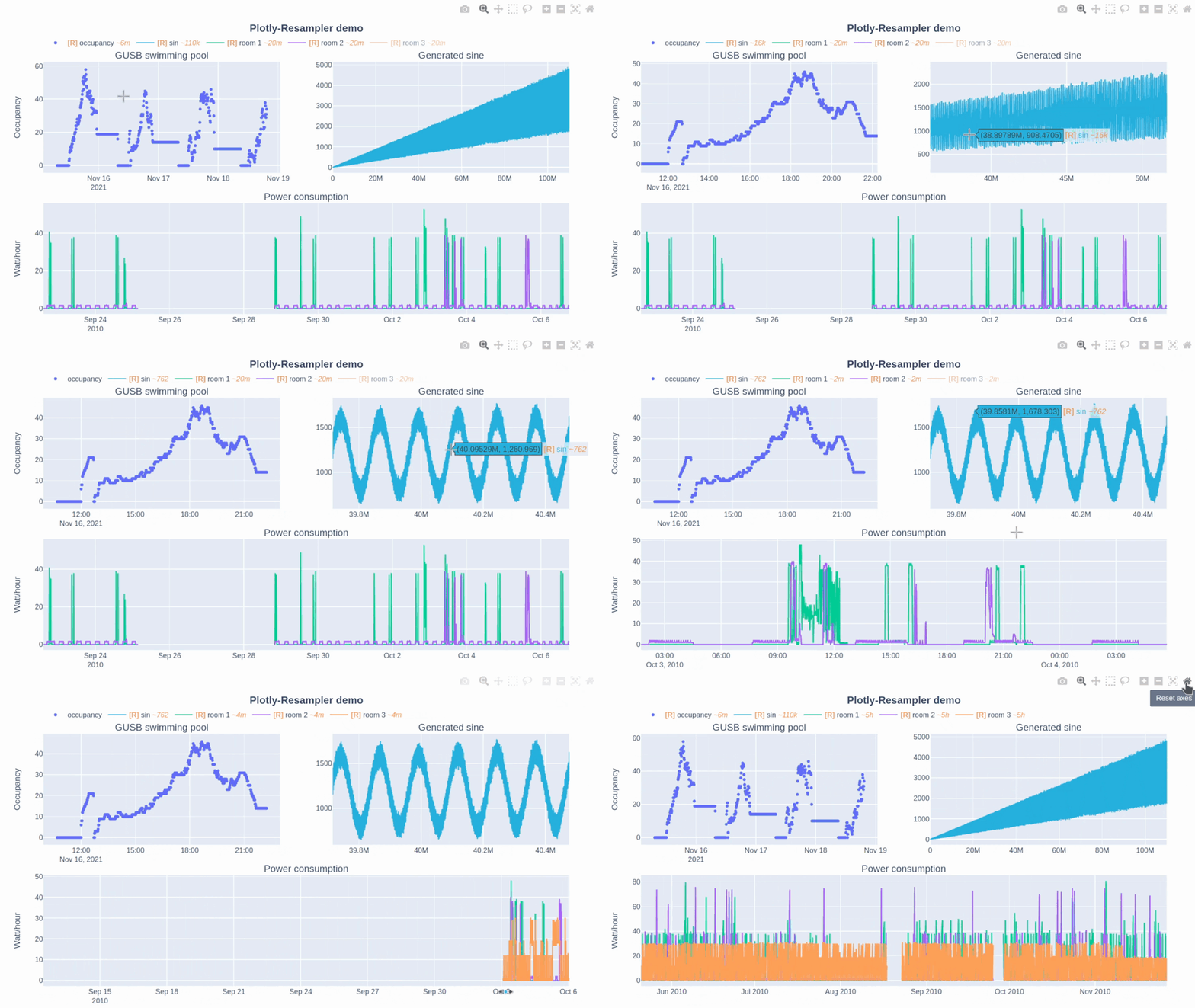
In this Plotly-Resampler demo over 110,000,000 data points are visualized!
🛠️ Installation
| pip | pip install plotly-resampler |
| ---| ----|
<!-- | conda | conda install -c conda-forge plotly_resampler | -->
👀 What is the difference between plotly-resampler figures and plain plotly figures?
plotly-resampler can be thought of as wrapper around plain plotly figures which adds visualization scalability to line-charts by dynamically aggregating the data w.r.t. the front-end view. plotly-resampler thus adds dynamic aggregation functionality to plain plotly figures.
❗ Important to know:
showalways generates a static HTML view of the figure, prohibiting dynamic aggregation.- To have dynamic aggregation:
- Use
show_dashwithFigureResamplerto initiate a Dash app to realize the dynamic aggregation with callbacks.
(or output the object in a cell viaIPython.display), which will also spawn a dash-web app - with
FigureWidgetResampler, you need to useIPython.displayon the object, which uses widget-events to realize dynamic aggregation (via the running IPython kernel).
- Use
Other changes of plotly-resampler figures w.r.t. vanilla plotly:
- double-clicking within a line-chart area does not Reset Axes, as it results in an “Autoscale” event. We decided to implement an Autoscale event as updating your y-range such that it shows all the data that is in your x-range.
- Note: vanilla Plotly figures their Autoscale result in Reset Axes behavior, in our opinion this did not make a lot of sense. It is therefore that we have overriden this behavior in plotly-resampler.
- Note: vanilla Plotly figures their Autoscale result in Reset Axes behavior, in our opinion this did not make a lot of sense. It is therefore that we have overriden this behavior in plotly-resampler.
📋 Features
- Convenient to use:
- just add either
register_plotly_resamplerfunction to your notebook with the best suitedmodeargument.FigureResamplerdecorator around a plotly Figure and call.show_dash()FigureWidgetResamplerdecorator around a plotly Figure and output the instance in a cell
- allows all other plotly figure construction flexibility to be used!
- just add either
- Environment-independent
- can be used in Jupyter, vscode-notebooks, Pycharm-notebooks, Google Colab, DataSpell, and even as application (on a server)
- Interface for various aggregation algorithms:
- ability to develop or select your preferred sequence aggregation method
🚀 Usage
Add dynamic aggregation to your plotly Figure (unfold your fitting use case)
* 🤖 Automatically (minimal code overhead):
Use the
registerplotlyresampler function
1. Import and call the `register_plotly_resampler` method
2. Just use your regular graph construction code

* **code example**:
  ```python
  import plotly.graph_objects as go; import numpy as np
  from plotly_resampler import register_plotly_resampler

  # Call the register function once and all Figures/FigureWidgets will be wrapped
  # according to the register_plotly_resampler its `mode` argument
  register_plotly_resampler(mode='auto')

  x = np.arange(1_000_000)
  noisy_sin = (3 + np.sin(x / 200) + np.random.randn(len(x)) / 10) * x / 1_000


  # auto mode: when working in an IPython environment, this will automatically be a
  # FigureWidgetResampler else, this will be an FigureResampler
  f = go.Figure()
  f.add_trace({"y": noisy_sin + 2, "name": "yp2"})
  f
  ```

> **Note**: This wraps **all** plotly graph object figures with a
> `FigureResampler` | `FigureWidgetResampler`. This can thus also be
> used for the `plotly.express` interface. 🎉
👷 Manually (higher data aggregation configurability, more speedup possibilities):
- Within a jupyter environment without creating a web application
- wrap the plotly Figure with
FigureWidgetResampler - output the
FigureWidgetResamplerinstance in a cell ```python import plotly.graphobjects as go; import numpy as np from plotlyresampler import FigureResampler, FigureWidgetResampler
x = np.arange(1000000) noisysin = (3 + np.sin(x / 200) + np.random.randn(len(x)) / 10) * x / 1000
# OPTION 1 - FigureWidgetResampler: dynamic aggregation via
FigureWidget.layout.on_changefig = FigureWidgetResampler(go.Figure()) fig.addtrace(go.Scattergl(name='noisy sine', showlegend=True), hfx=x, hfy=noisysin)fig
* Using a <b><i>web-application</i></b> with <b><a href="https://github.com/plotly/dash">dash</a></b> callbacks
1. wrap the plotly Figure with `FigureResampler`
2. call `.show_dash()` on the `Figure`
python import plotly.graphobjects as go; import numpy as np from plotlyresampler import FigureResampler, FigureWidgetResamplerx = np.arange(1000000) noisysin = (3 + np.sin(x / 200) + np.random.randn(len(x)) / 10) * x / 1000
# OPTION 2 - FigureResampler: dynamic aggregation via a Dash web-app fig = FigureResampler(go.Figure()) fig.addtrace(go.Scattergl(name='noisy sine', showlegend=True), hfx=x, hfy=noisysin)
fig.show_dash(mode='inline') ```
Tip 💡: For significant faster initial loading of the Figure, we advise to wrap the constructor of the plotly Figure and add the trace data as
hf_xandhf_y
Note: Any plotly Figure can be wrapped with
FigureResamplerandFigureWidgetResampler! 🎉 But only thego.Scatter/go.Scattergltraces are resampled.
💭 Important considerations & tips
- When running the code on a server, you should forward the port of the
FigureResampler.show_dash()method to your local machine.
Note that you can add dynamic aggregation to plotly figures with theFigureWidgetResamplerwrapper without needing to forward a port! - The
FigureWidgetResampleruses the IPython main thread for its data aggregation functionality, so when this main thread is occupied, no resampling logic can be executed. For example; if you perform long computations within your notebook, the kernel will be occupied during these computations, and will only execute the resampling operations that take place during these computations after finishing that computation. - In general, when using downsampling one should be aware of (possible) aliasing effects.
The [R] in the legend indicates when the corresponding trace is being resampled (and thus possibly distorted) or not. Additionally, the
~<range>suffix represent the mean aggregation bin size in terms of the sequence index. - The plotly autoscale event (triggered by the autoscale button or a double-click within the graph), does not reset the axes but autoscales the current graph-view of plotly-resampler figures. This design choice was made as it seemed more intuitive for the developers to support this behavior with double-click than the default axes-reset behavior. The graph axes can ofcourse be resetted by using the
reset_axisbutton. If you want to give feedback and discuss this further with the developers, see issue #49.
📜 Citation and papers
The paper about the plotly-resampler toolkit itself (preprint): https://arxiv.org/abs/2206.08703
bibtex
@inproceedings{van2022plotly,
  title={Plotly-resampler: Effective visual analytics for large time series},
  author={Van Der Donckt, Jonas and Van Der Donckt, Jeroen and Deprost, Emiel and Van Hoecke, Sofie},
  booktitle={2022 IEEE Visualization and Visual Analytics (VIS)},
  pages={21--25},
  year={2022},
  organization={IEEE}
}
Related papers:
- Visual representativeness of time series data point selection algorithms (preprint): https://arxiv.org/abs/2304.00900
code: https://github.com/predict-idlab/ts-datapoint-selection-vis
- MinMaxLTTB - an efficient data point selection algorithm (preprint): https://arxiv.org/abs/2305.00332
code: https://github.com/predict-idlab/MinMaxLTTB
👤 Jonas Van Der Donckt, Jeroen Van Der Donckt, Emiel Deprost
Owner
- Name: PreDiCT.IDLab
- Login: predict-idlab
- Kind: organization
- Location: Ghent - Belgium
- Website: http://predict.idlab.ugent.be/
- Repositories: 55
- Profile: https://github.com/predict-idlab
Repositories of the IDLab PreDiCT research group
GitHub Events
Total
- Issues event: 25
- Watch event: 114
- Delete event: 4
- Issue comment event: 48
- Push event: 44
- Pull request review comment event: 8
- Pull request review event: 16
- Pull request event: 18
- Fork event: 11
- Create event: 3
Last Year
- Issues event: 25
- Watch event: 114
- Delete event: 4
- Issue comment event: 48
- Push event: 44
- Pull request review comment event: 8
- Pull request review event: 16
- Pull request event: 18
- Fork event: 11
- Create event: 3
Committers
Last synced: about 1 year ago
Top Committers
| Name | Commits | |
|---|---|---|
| jonvdrdo | j****t@u****e | 452 |
| jvdd | b****d@g****m | 243 |
| Emiel Deprost | e****t@u****e | 5 |
| Niels Praet | 6****t | 2 |
| Jayce Slesar | 4****r | 2 |
| Alexander Braekevelt | a****t@g****m | 1 |
| Emmanuel Ferdman | e****n@g****m | 1 |
| Mathieu De Meue | m****u@d****e | 1 |
| Maxim Ivanov | i****g@g****m | 1 |
| Michael Moore | 1****e | 1 |
| Sofie Van Hoecke | s****e@u****e | 1 |
| Tomasz Jakubek | T****k@c****m | 1 |
| mstojche | m****a@u****e | 1 |
| Mathieu De Meue | m****e@c****e | 1 |
Committer Domains (Top 20 + Academic)
Issues and Pull Requests
Last synced: 10 months ago
All Time
- Total issues: 129
- Total pull requests: 112
- Average time to close issues: 2 months
- Average time to close pull requests: 28 days
- Total issue authors: 78
- Total pull request authors: 11
- Average comments per issue: 2.89
- Average comments per pull request: 1.74
- Merged pull requests: 89
- Bot issues: 0
- Bot pull requests: 0
Past Year
- Issues: 19
- Pull requests: 19
- Average time to close issues: 3 days
- Average time to close pull requests: 11 days
- Issue authors: 15
- Pull request authors: 4
- Average comments per issue: 0.84
- Average comments per pull request: 0.47
- Merged pull requests: 12
- Bot issues: 0
- Bot pull requests: 0
Top Authors
Issue Authors
- jonasvdd (27)
- jvdd (8)
- kszlim (4)
- Jeremy38100 (3)
- firmai (2)
- mhangaard (2)
- darynwhite (2)
- johann-petrak (2)
- Velip09 (2)
- hongbo-miao (2)
- Broundal (2)
- jayceslesar (2)
- auxym (2)
- Olivier0330 (2)
- Alexander-Serov (2)
Pull Request Authors
- jonasvdd (57)
- jvdd (30)
- NielsPraet (7)
- jayceslesar (4)
- ivanovmg (4)
- yzhaoinuw (2)
- lemikhovalex (2)
- t-jakubek (2)
- emmanuel-ferdman (2)
- ISX2 (1)
- imichaelmoore (1)
Top Labels
Issue Labels
Pull Request Labels
Packages
- Total packages: 4
-
Total downloads:
- pypi 404,650 last-month
- Total docker downloads: 2,335
-
Total dependent packages: 11
(may contain duplicates) -
Total dependent repositories: 195
(may contain duplicates) - Total versions: 89
- Total maintainers: 2
pypi.org: plotly-resampler
Visualizing large time series with plotly
- Homepage: https://github.com/predict-idlab/plotly-resampler
- Documentation: https://predict-idlab.github.io/plotly-resampler/latest
- License: MIT
-
Latest release: 0.11.0
published 11 months ago
Rankings
proxy.golang.org: github.com/predict-idlab/plotly-resampler
- Documentation: https://pkg.go.dev/github.com/predict-idlab/plotly-resampler#section-documentation
- License: mit
-
Latest release: v0.11.0
published 11 months ago
Rankings
conda-forge.org: plotly-resampler
- Homepage: https://github.com/predict-idlab/plotly-resampler
- License: LicenseRef-plotly-resampler
-
Latest release: 0.8.1
published almost 4 years ago
Rankings
anaconda.org: plotly-resampler
Plotly is an awesome interactive visualization library, however it can get pretty slow when a lot of data points are visualized (100 000+ datapoints). Plotly-resampler solves this by downsampling (aggregating) the data respective to the view and then plotting the aggregated points. When you interact with the plot (panning, zooming, ...), callbacks are used to aggregate data and update the figure.
- Homepage: https://github.com/predict-idlab/plotly-resampler
- License: MIT
-
Latest release: 0.8.3.2
published about 3 years ago
Rankings
Dependencies
- actions/cache v2 composite
- actions/checkout v2 composite
- actions/setup-python v2 composite
- snok/install-poetry v1 composite
- actions/cache v2 composite
- actions/checkout v2 composite
- actions/setup-python v2 composite
- actions/upload-artifact v2 composite
- codecov/codecov-action v1 composite
- nanasess/setup-chromedriver master composite
- snok/install-poetry v1 composite
- dash-bootstrap-components >=1.2.0
- dash-extensions >=0.1.4
- ipywidgets >=7.7.0
- kaleido >=0.2.1
- line-profiler >=3.5.1
- memory-profiler >=0.60.0
- pyarrow >=6.0.0
- pyfunctional >=1.4.3
- 162 dependencies
- Sphinx ^4.4.0 develop
- black ^22.6.0 develop
- ipywidgets ^7.7.1 develop
- isort ^5.10.1 develop
- kaleido 0.2.1 develop
- line-profiler ^4.0 develop
- memory-profiler ^0.60.0 develop
- pyarrow ^10.0 develop
- pydata-sphinx-theme ^0.9.0 develop
- pytest ^6.2.5 develop
- pytest-cov ^3.0.0 develop
- pytest-selenium ^2.0.1 develop
- ruff ^0.0.173 develop
- selenium 4.2.0 develop
- selenium-wire ^5.0 develop
- sphinx-autodoc-typehints ^1.17.0 develop
- webdriver-manager ^3.5.2 develop
- Flask-Cors ^3.0.10
- Werkzeug <=2.1.2
- dash ^2.2.0
- jupyter-dash >=0.4.2
- numpy --- - !ruby/hash:ActiveSupport::HashWithIndifferentAccess version: ">=1.14" python: "<3.11" - !ruby/hash:ActiveSupport::HashWithIndifferentAccess version: ">=1.24" python: ">=3.11"
- orjson ^3.8.0
- pandas ^1.3.5
- plotly ^5.5.0
- python ^3.7.1
- trace-updater >=0.0.8
- actions/checkout v3 composite
- github/codeql-action/analyze v2 composite
- github/codeql-action/init v2 composite
- actions/cache v3 composite
- actions/checkout v3 composite
- actions/setup-python v4 composite
- snok/install-poetry v1 composite