https://github.com/thibaudcolas/kontrasto
🎨 Automated color contrast for text over images
Science Score: 13.0%
This score indicates how likely this project is to be science-related based on various indicators:
-
○CITATION.cff file
-
✓codemeta.json file
Found codemeta.json file -
○.zenodo.json file
-
○DOI references
-
○Academic publication links
-
○Committers with academic emails
-
○Institutional organization owner
-
○JOSS paper metadata
-
○Scientific vocabulary similarity
Low similarity (14.6%) to scientific vocabulary
Keywords
Repository
🎨 Automated color contrast for text over images
Basic Info
- Host: GitHub
- Owner: thibaudcolas
- License: mit
- Language: Python
- Default Branch: main
- Homepage: https://kontrasto.netlify.app
- Size: 9.5 MB
Statistics
- Stars: 29
- Watchers: 2
- Forks: 3
- Open Issues: 13
- Releases: 0
Topics
Metadata Files
README.md
Kontrasto 






Why we need this
Kontrasto is a dual Python and JavaScript library which analyses instances of text over images, and transforms the text to make it more readable and have a higher contrast against the background.
Using Kontrasto both server-side and client-side gives the best results: server-side processing means users will have the best possible styles as the page loads, while client-side processing can refine the result based on the final position of the text over the image.
Here is a demo, over different areas of an image, with different methods of dominant color extraction and contrast ratio calculation:
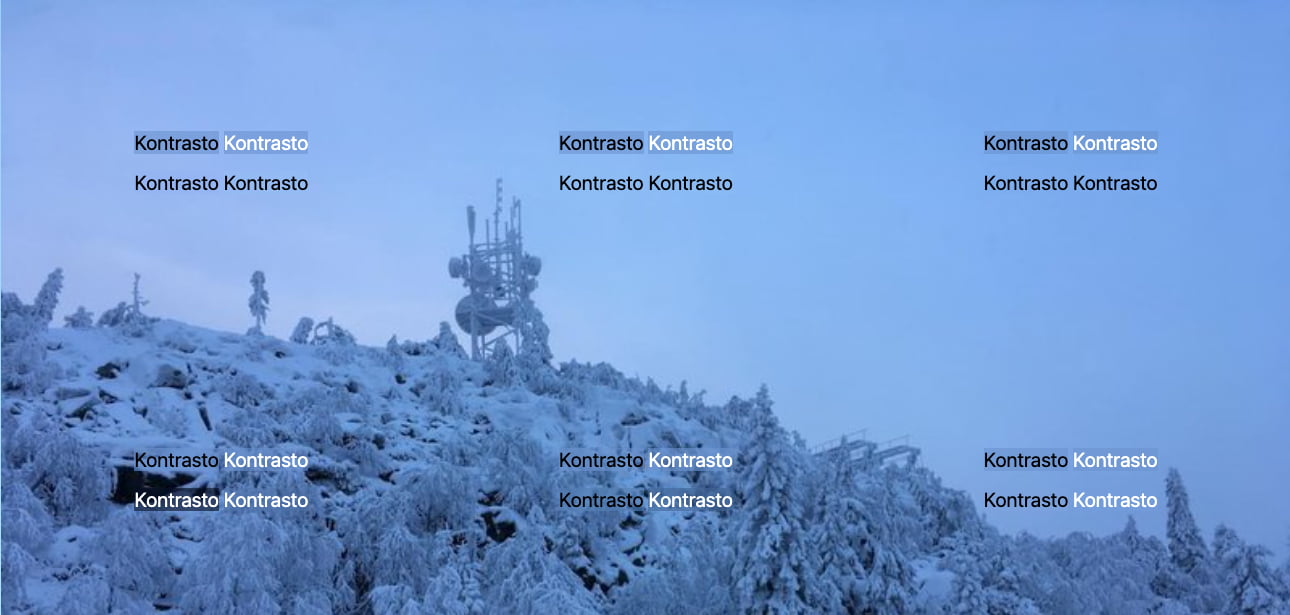
Check out our live demo for other examples.
Usage in Python
kontrasto is available on PyPI.
```bash
Assuming you’re using Python 3.6+,
pip install kontrasto ```
The simplest way to try it out is to use the command-line interface:
bash
kontrasto --text '#00ff00' demo_images/blue-sky-cliffs.jpg
This will extract the image’s dominant color, and compare it against three text colors: white, black, and the provided #00ff00. Here is a sample result:
- Dominant color:
#4971a1(https://whocanuse.com/?b=4971a1&c=&f=16) - WCAG 2 contrast black: 4.16:1 (AA large only, https://whocanuse.com/?b=4971a1&c=000000&f=16)
- WCAG 2 contrast white: 5.05:1 (AA, AAA large, https://whocanuse.com/?b=4971a1&c=ffffff&f=16)
- WCAG 2 contrast text color: 3.68:1 (AA large only, https://whocanuse.com/?b=4971a1&c=00ff00&f=16)
- WCAG 3 contrast black: 29.158302335633827
- https://whocanuse.com/?b=4971a1&c=000000&f=16
- WCAG 3 contrast white: 82.7306051896947
- [(18, 400), (16, 500)]
- https://www.myndex.com/APCA/?BG=4971a1&TXT=ffffff
- https://whocanuse.com/?b=4971a1&c=ffffff&f=18
- https://whocanuse.com/?b=4971a1&c=ffffff&f=16
- WCAG 3 contrast text color: 60.98703767172198
- [(24, 400), (18, 500), (16, 600)]
- https://www.myndex.com/APCA/?BG=4971a1&TXT=00ff00
- https://whocanuse.com/?b=4971a1&c=00ff00&f=24
- https://whocanuse.com/?b=4971a1&c=00ff00&f=18
- https://whocanuse.com/?b=4971a1&c=00ff00&f=16&s=b
From there, we can move onto more serious use cases!
Usage in vanilla Python
Import the low-level methods and enjoy:
```python from kontrasto import wcag2, wcag3 from kontrasto.convert import tohex from kontrasto.contrast import getdominant_color from PIL import Image
def wcag2contrastlightordark( image, lightcolor: str, darkcolor: str ) -> Dict[str, str]: dominant = tohex(getdominantcolor(image)) lightcontrast = wcag2.wcag2contrast(dominant, lightcolor) darkcontrast = wcag2.wcag2contrast(dominant, darkcolor) lighter = lightcontrast > darkcontrast return { "textcolor": lightcolor if lighter else darkcolor, "texttheme": "light" if lighter else "dark", "bgcolor": dominant, "bgtheme": "dark" if lighter else "light", }
def wcag3contrastlightordark( image, lightcolor: str, darkcolor: str ) -> Dict[str, str]: dominant = tohex(getdominantcolor(image)) lightcontrast = wcag3.formatcontrast( wcag3.apcacontrast(dominant, lightcolor) ) darkcontrast = wcag3.formatcontrast( wcag3.apcacontrast(dominant, darkcolor) ) lighter = lightcontrast > darkcontrast return { "textcolor": lightcolor if lighter else darkcolor, "texttheme": "light" if lighter else "dark", "bgcolor": dominant, "bgtheme": "dark" if lighter else "light", } ```
Usage in Wagtail
In Wagtail, using Kontrasto is much simpler:
- The result of dominant color extraction is cached, greatly improving performance.
- The above methods are directly available as template tags.
At least for now, this does mean using Kontrasto requires adding a field to a custom image model:
```python from wagtail.images.models import ( AbstractImage, AbstractRendition, SourceImageIOError, )
from kontrasto.willowoperations import pillowdominant
class CustomImage(AbstractImage): dominantcolor = models.CharField(maxlength=10, blank=True)
admin_form_fields = Image.admin_form_fields

def has_dominant_color(self) -> bool:
    return self.dominant_color

def set_dominant_color(self, color: str) -> bool:
    self.dominant_color = color

def get_dominant_color(self):
    if not self.has_dominant_color():
        with self.get_willow_image() as willow:
            try:
                self.dominant_color = pillow_dominant(willow)
            except Exception as e:
                # File not found
                #
                # Have to catch everything, because the exception
                # depends on the file subclass, and therefore the
                # storage being used.
                raise SourceImageIOError(str(e))

            self.save(update_fields=["dominant_color"])

    return self.dominant_color
class Rendition(AbstractRendition): image = models.ForeignKey( "CustomImage", relatedname="renditions", ondelete=models.CASCADE )
class Meta:
    unique_together = (("image", "filter_spec", "focal_point_key"),)
```
Then, in templates:
```html {% wcag2contrastlightordark page.testimage "#ffffff" "#000000" as result %} {% wcag3contrastlightordark page.testimage "#ffffff" "#000000" as result3 %} <div data-banner style="--kontrasto-text:{{ result3.textcolor }}; --kontrasto-bg:{{ result3.bg_color }}99;"
{% image page.testimage width-800 loading="lazy" data-banner-image="true" %}
{{ demo
text }}
This additionally relies on the following CSS, for the simplest integration with client-side processing:
css
.kontrasto-text-bg {
  color: var(--kontrasto-text);
  background: var(--kontrasto-bg);
}
Usage in JavaScript
kontrasto is available on npm for client-side (browser) JavaScript. This option makes it possible to only extract the dominant color of images where the text appears, which leads to much better results. However, it has the caveat of executing in the users’ browser, which has a clear performance cost.
bash
npm install kontrasto
Using it in JavaScript is slightly different.
Vanilla JavaScript
Here is a basic vanilla JavaScript integration:
```js import { wcag2contrastlightordark, wcag3contrastlightordark, } from "kontrasto";
const banner = document.querySelector("[data-banner]"); const bannerImage = banner.querySelector("[data-banner-image]"); const bannerText = banner.querySelector("[data-banner-text]");
const contrast = wcag3contrastlightordark(
bannerImage,
"#ffffff",
"#000000",
bannerText,
);
banner.style.setProperty("--kontrasto-bg", `${contrast.bgcolor}99);
banner.style.setProperty("--kontrasto-text", contrast.text_color);
``
This assumes an HTML structure like:
```html {% wcag2contrastlightordark page.testimage "#ffffff" "#000000" as result %} {% wcag3contrastlightordark page.testimage "#ffffff" "#000000" as result3 %} <div data-banner style="--kontrasto-text:{{ result3.textcolor }}; --kontrasto-bg:{{ result3.bg_color }}99;"
{% image page.testimage width-800 loading="lazy" data-banner-image="true" %}
{{ demo
text }}
And CSS:
css
.kontrasto-text-bg {
  color: var(--kontrasto-text);
  background: var(--kontrasto-bg);
}
Combined with the server-side integration, this makes it possible to deliver both the best possible performance, and the best possible text contrast enhancement.
Particular considerations
TODO
React
TODO
Contributing
See anything you like in here? Anything missing? We welcome all support, whether on bug reports, feature requests, code, design, reviews, tests, documentation, and more. Please have a look at our contribution guidelines.
If you just want to set up the project on your own computer, the contribution guidelines also contain all of the setup commands.
Credits
Image credit: FxEmojis. Test templates extracted from third-party projects. Website hosted by Netlify.
View the full list of contributors. MIT licensed. Website content available as CC0.