https://github.com/aaltoml/hybvio
HybVIO visual-inertial odometry and SLAM system
Science Score: 10.0%
This score indicates how likely this project is to be science-related based on various indicators:
-
○CITATION.cff file
-
○codemeta.json file
-
○.zenodo.json file
-
○DOI references
-
✓Academic publication links
Links to: arxiv.org -
○Academic email domains
-
○Institutional organization owner
-
○JOSS paper metadata
-
○Scientific vocabulary similarity
Low similarity (15.3%) to scientific vocabulary
Last synced: 10 months ago
·
JSON representation
Repository
HybVIO visual-inertial odometry and SLAM system
Basic Info
- Host: GitHub
- Owner: AaltoML
- License: gpl-3.0
- Default Branch: main
- Homepage: https://arxiv.org/abs/2106.11857
- Size: 301 KB
Statistics
- Stars: 0
- Watchers: 0
- Forks: 0
- Open Issues: 0
- Releases: 0
Fork of SpectacularAI/HybVIO
Created over 3 years ago
· Last pushed about 4 years ago
https://github.com/AaltoML/HybVIO/blob/main/
# HybVIO
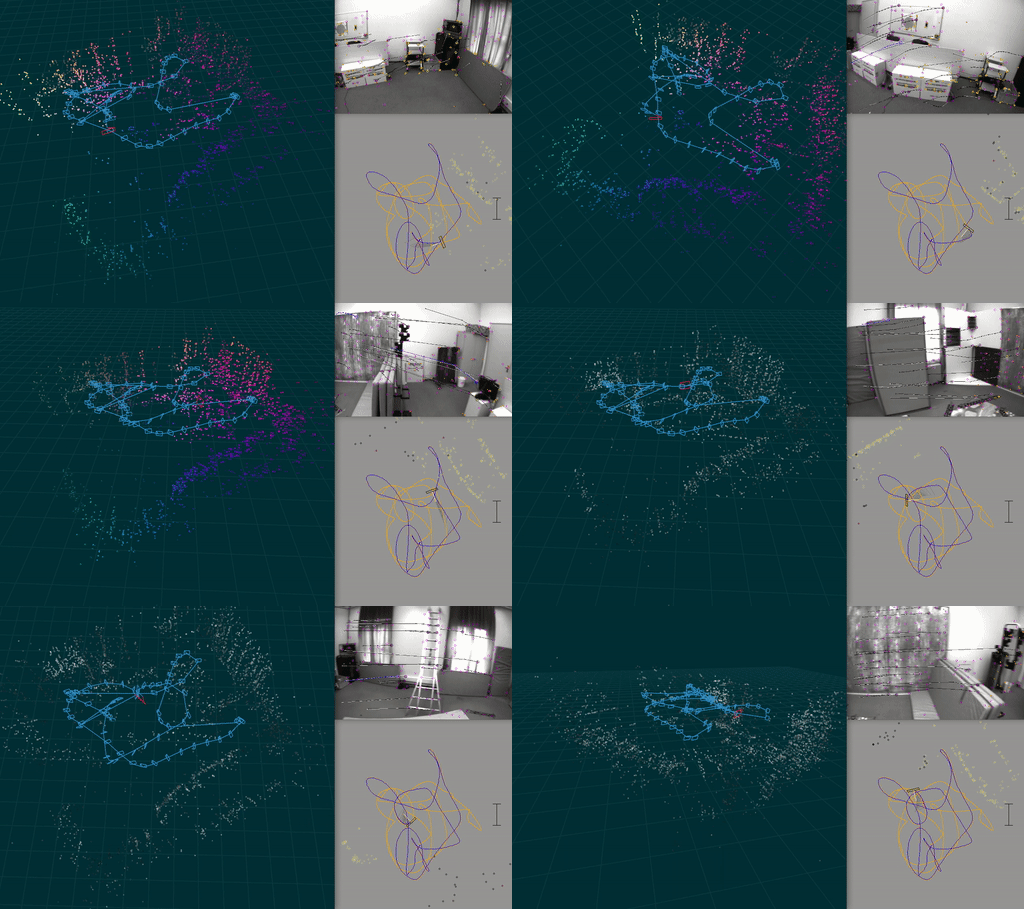
**A visual-inertial odometry system with an optional SLAM module**.
This is a research-oriented codebase, which has been published for the purposes of verifiability and reproducibility of the results in the paper:
* Otto Seiskari, Pekka Rantalankila, Juho Kannala, Jerry Ylilammi, Esa Rahtu, and Arno Solin (2022). **HybVIO: Pushing the limits of real-time visual-inertial odometry**. In *IEEE Winter Conference on Applications of Computer Vision (WACV)*.
[[arXiv pre-print]](https://arxiv.org/abs/2106.11857) | [[video]](https://youtu.be/8V_EGJrPHeA)
It can also serve as a baseline in VIO and VISLAM benchmarks. The code is not intended for production use and does not represent a particularly clean or simple way of implementing the methods described in the above paper. The code contains numerous feature flags and parameters (see `codegen/parameter_definitions.c`) that are not used in the HybVIO but may (or may not) be relevant in other scenarios and use cases.
## Setup
Here are basic instructions for setting up the project, there is some more detailed help included in the later sections (e.g., for Linux).
* Install CMake, glfw and ffmpeg, e.g., by `brew install cmake glfw ffmpeg`.
* Clone this repository with the `--recursive` option (this will take a while)
* Build dependencies by running `cd 3rdparty/mobile-cv-suite; ./scripts/build.sh`
* Make sure you are using `clang` to compile the C++ sources (it's the default on Macs).
If not default, like on many Linux Distros, you can control this with environment variables,
e.g., `CC=clang CXX=clang++ ./scripts/build.sh`
* (optional) In order to be able to use the SLAM module, run `./src/slam/download_orb_vocab.sh`
Then, to build the main and test binaries, perform the standard CMake routine:
``` bash
mkdir target
cd target
cmake -DBUILD_VISUALIZATIONS=ON -DUSE_SLAM=ON ..
# or if not using clang by default:
# CC=clang CXX=clang++ cmake ..
make -j6
```
Now the `target` folder should contain the binaries `main` and `run-tests`. After making changes to code, only run `make`. Tests can be run with the binary `run-tests`.
To compile faster, pass `-j` argument to `make`, or use a program like `ccache`. To run faster, check `CMakeLists.txt` for some options.
### Troubleshooting: disabling GPU visualizations and acceleration
If you see error messages related to OpenGL or GLFW, try building without visualizations
```bash
cd 3rdparty/mobile-cv-suite && BUILD_VISUALIZATIONS=OFF ./scripts/build.sh
cd ../..; mkdir -p target; cd target
cmake -DBUILD_VISUALIZATIONS=OFF -DUSE_SLAM=ON ..
```
or without any GPU support
```bash
cd 3rdparty/mobile-cv-suite && WITH_OPENGL=OFF BUILD_VISUALIZATIONS=OFF ./scripts/build.sh
cd ../..; mkdir -p target; cd target
cmake -DBUILD_VISUALIZATIONS=OFF -DBUILD_WITH_GPU=OFF -DUSE_SLAM=ON ..
```
### Arch Linux
List of packages needed: clang, cmake, ffmpeg, glfw, gtk3
### Debian
On Debian Stretch, had to install (some might be optional): clang, libc++-dev, libgtk2.0-dev, libgstreamer1.0-dev, libvtk6-dev, libavresample-dev.
### Raspberry Pi/Raspbian
On Raspbian (Pi 4, 8 GiB), had to install at least: libglfw3-dev and libglfw3 (for accelerated arrays) and libglew-dev and libxkbcommon-dev (for Pangolin, still had problems). Also started off with the Debian setup above.
## Benchmarking and the `main` binary
To run benchmarks on EuRoC, TUM and SenseTime datasets and reproduce numbers published in https://arxiv.org/abs/2106.11857, please follow the instructions in https://github.com/AaltoML/vio_benchmark/tree/main/hybvio_runner.
If you want to test the software on individual datasets, e.g. to see various real-time visualizations, you can use the `main` binary. For example to run an EuRoC dataset, you can do the following:
1. In [`vio_benchmark`](https://github.com/AaltoML/vio_benchmark) root folder, run `python convert/euroc_to_benchmark.py` to download and convert the EuRoC data
2. Symlink that data here: `mkdir -p data && cd data && ln -s /path/to/vio_benchmark/data/benchmark .`
Then inside the `target/` folder use, e.g.:
./main -i=../data/benchmark/euroc-v1-02-medium -p -useStereo
In general, to run the algorithm on recorded data, use `./main -i=path/to/datafolder`, where `datafolder/` must at the very least contain a `data.{jsonl|csv}`, `data.{mp4|mov|avi}`, and `parameters.txt` (sensor data, camera data, and camera calibration). Read about the formats [here](https://github.com/AaltoML/vio_benchmark/tree/98559272f59af35bb88bd63cc5cfc16e82a99bb3#benchmark-data-format). Such recordings can be created with
* [Android VIO tester](https://github.com/AaltoML/android-viotester)
* [realsense-capture](https://github.com/AaltoVision/realsense-capture)
* [mynt-capture](https://github.com/AaltoVision/mynt-capture)
* [zed-capture](https://github.com/AaltoML/zed-capture)
* [oak-d-capture](https://github.com/SpectacularAI/oak-d-capture)
Some common arguments to `main` are:
* `-p`: show pose visualization.
* `-c`: show video output.
* `-useSlam`: Enable SLAM module.
* `-useStereo`: Enable stereo.
* `-s`: show 3d visualization. Requires `-useSlam`.
* `-gpu`: Enable GPU acceleration
You can get full list of command line options with `./main -help`.
### Key controls for `main`
These keys can be used when any of the graphical windows are focused (see `commandline/command_queue.cpp` for full list).
* `A` to pause and toggle _step mode_, where a key press (e.g., SPACE) processes the next frame.
* `Q` or Escape to quit
* `R` to rotate camera window
* The horizontal number keys 1,2, toggle methods drawn in the pose visualization.
When the command line is focused, Ctrl-C aborts the program.
## Copyright
Licensed under GPLv3. For different (commercial) licensing options, contact us at https://www.spectacularai.com/
Owner
- Name: AaltoML
- Login: AaltoML
- Kind: organization
- Location: Finland
- Website: http://arno.solin.fi
- Repositories: 20
- Profile: https://github.com/AaltoML
Machine learning group at Aalto University lead by Prof. Solin