https://github.com/adithya-s-k/marker-api
Easily deployable 🚀 API to convert PDF to markdown quickly with high accuracy.
Science Score: 23.0%
This score indicates how likely this project is to be science-related based on various indicators:
-
○CITATION.cff file
-
✓codemeta.json file
Found codemeta.json file -
○.zenodo.json file
-
○DOI references
-
✓Academic publication links
Links to: arxiv.org -
○Committers with academic emails
-
○Institutional organization owner
-
○JOSS paper metadata
-
○Scientific vocabulary similarity
Low similarity (9.7%) to scientific vocabulary
Keywords
Keywords from Contributors
Repository
Easily deployable 🚀 API to convert PDF to markdown quickly with high accuracy.
Basic Info
Statistics
- Stars: 854
- Watchers: 6
- Forks: 96
- Open Issues: 24
- Releases: 0
Topics
Metadata Files
README.md
Marker API
[!IMPORTANT]
Marker API provides a simple endpoint for converting PDF documents to Markdown quickly and accurately. With just one click, you can deploy the Marker API endpoint and start converting PDFs seamlessly.
Features 🚀
- PDF to Markdown Conversion 📄 ➡️ 📝: Converts PDF documents to Markdown efficiently.
- Asynchronous Processing ⏳🔄: Supports both sync and async task processing.
- Distributed Architecture 🌐📡: Enables distributed processing using Celery and Redis.
- Monitoring 📊👁️: Integrated with Flower for monitoring the Celery tasks.
- Scalable 📈🛠️: Easily scalable with distributed workers.
- GPU/CPU Support 💻⚡: Supports both CPU and GPU for intensive processing.
- Multi-Language Support 🌍💬: Handles documents in any language.
- Advanced Formatting 🎨📋: Extracts tables, images, and code blocks accurately.
- Equation Handling ✏️➗: Converts most mathematical equations to LaTeX.
- Docker and Kubernetes Support 🐳🛠️: Full Docker support for both CPU and GPU setups, and Kubernetes (coming soon).
Comparison
| Original PDF | Marker-API | PyPDF |
|--------------|------------|-------|
| 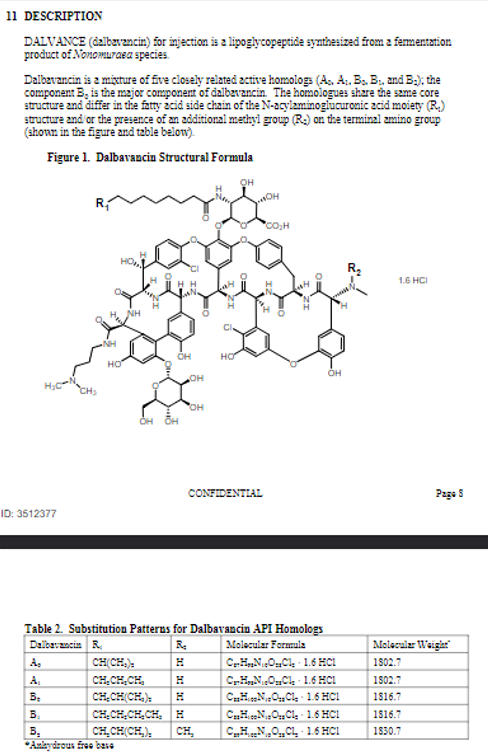 |
| 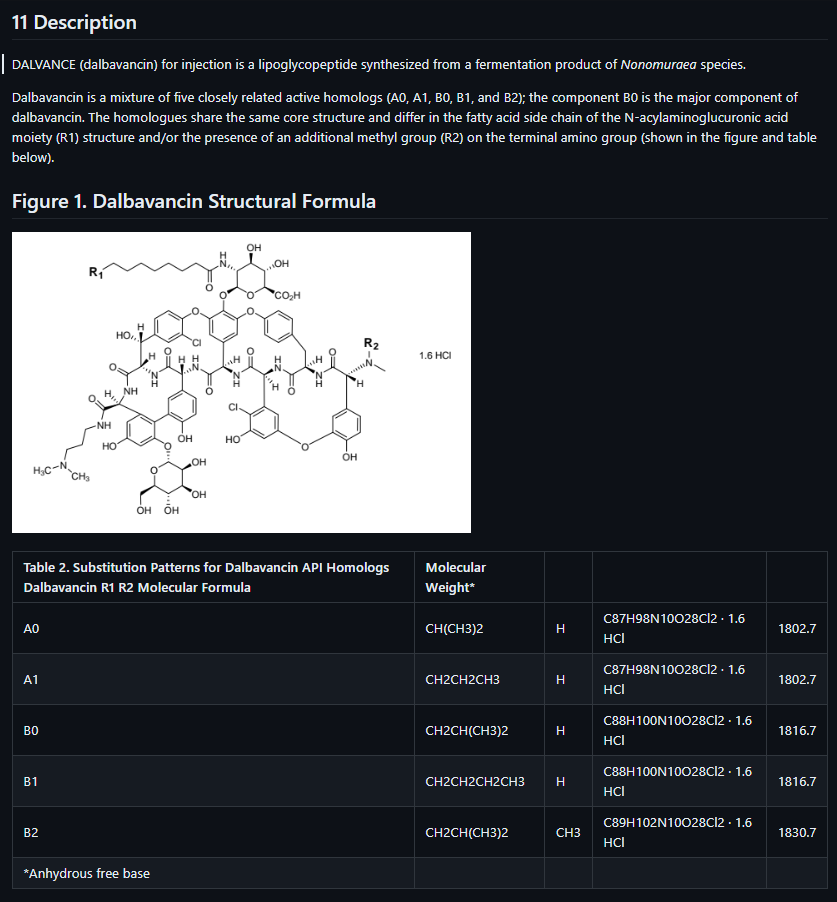 |
| 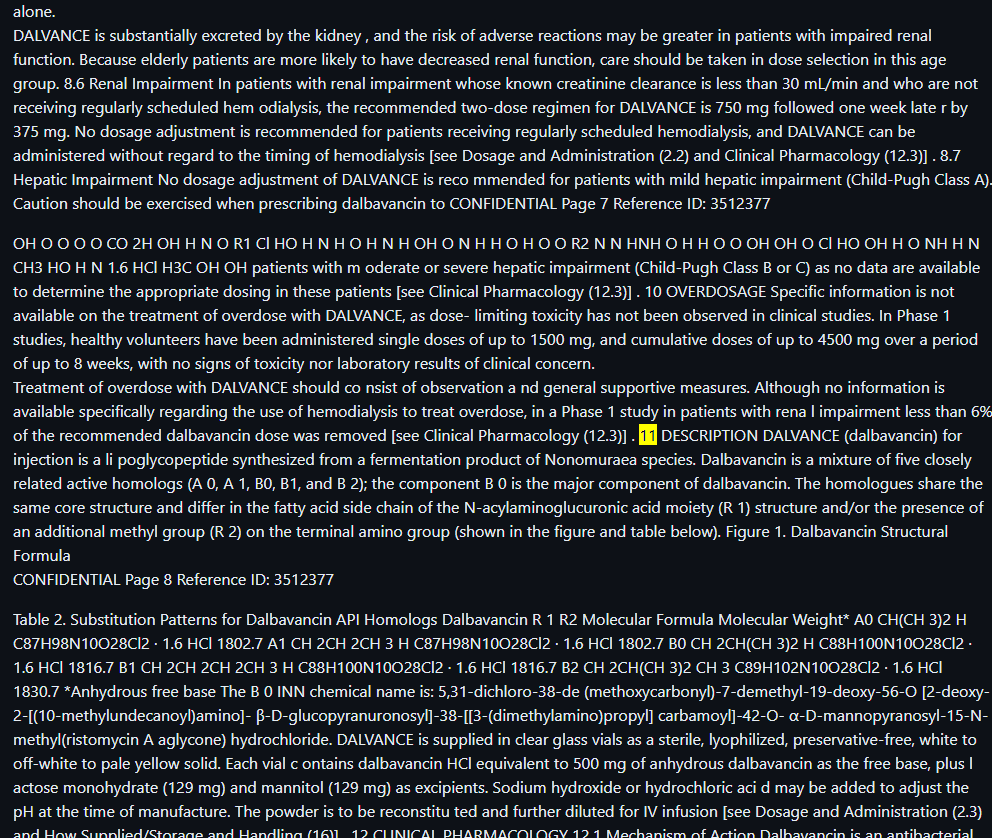 |
|
Here’s an improved version of the features section, along with the comparison table and setup details:
Simple Server vs. Distributed Server
| Criteria | Simple Server | Distributed Server | |----------------------------|---------------------------------------------|------------------------------------------------| | Use Case | Small scale, local deployments | Large scale, production environments | | Scalability | Limited (single server) | Highly scalable with multiple workers | | Performance | Synchronous (one file at a time) | Asynchronous with parallel task processing | | Setup Complexity | Easy (local or Docker setup) | Moderate (multiple services to manage) | | Monitoring | No built-in monitoring | Flower for task monitoring | | Failure Tolerance | Low (single server) | High (distributed worker nodes) | | Docker Support | Yes, CPU and GPU | Yes, CPU and GPU | | Resource Utilization | Limited to local resources | Efficient resource distribution with Celery | | Task Distribution | No task distribution | Uses Celery for task distribution | | Ideal For | Testing, small local deployments | Production environments with high traffic |
Installation and Setup
Simple Server Setup
Local Setup
Clone the repository:
bash
git clone https://github.com/adithya-s-k/marker-api
cd marker-api
Set up the Python environment:
bash
cp .env.example .env
poetry install  # or
pip install -e .
Run the server:
bash
python server.py --host 0.0.0.0 --port 8080
Docker Setup (Simple Server)
For CPU:
bash
docker build -f docker/Dockerfile.cpu.server -t marker-api-cpu .
docker run -p 8080:8080 marker-api-cpu
For GPU:
bash
docker build -f docker/Dockerfile.gpu.server -t marker-api-gpu .
docker run --gpus all -p 8080:8080 marker-api-gpu
Distributed Server Setup
The distributed server setup uses several services like FastAPI, Redis, Celery workers, and Flower, which are designed for large-scale deployments. You can either set it up locally or use Docker Compose for more seamless scaling.
Local Setup ⚙️
Step 1: Clone the repository and set up the environment
bash
git clone https://github.com/adithya-s-k/marker-api
cd marker-api
cp .env.example .env
poetry install  # or
pip install -e .
Step 2: Run Redis using Docker
Since Redis is essential for Celery to function, let's run Redis in a Docker container. This will ensure it's up and running on port 6379.
bash
docker run -d -p 6379:6379 redis
Now, update your .env file with the correct Redis host URL:
bash
REDIS_HOST=redis://localhost:6379/0
Step 3: Open three terminals for each service
You will need three separate terminals for Redis, Celery, and FastAPI:
Terminal 1: Start a Celery worker
bash
celery -A marker_api.celery_worker.celery_app worker --pool=solo --loglevel=info
Terminal 2: Start Flower for Celery task monitoring
bash
celery -A marker_api.celery_worker.celery_app flower --port=5555
Terminal 3: Run FastAPI server
bash
python distributed_server.py --host 0.0.0.0 --port 8080
Adding More Celery Workers
To scale Celery workers manually, you can open more terminals and run the same Celery worker command:
bash
celery -A marker_api.celery_worker.celery_app worker --pool=solo --loglevel=info
Each new terminal will spin up a new worker, allowing the system to handle more tasks concurrently.
Docker Compose Setup (Distributed Server) 🐳
For an even more seamless setup, you can use Docker Compose, which helps run all services within containers. Here’s how to do it.
Step 1: Start the distributed server with Docker Compose
Use Docker Compose to orchestrate all the services.
Without Scaling:
bash
sudo docker-compose -f docker-compose.gpu.yml up --build
This command will start:
- FastAPI on port 8080.
- Redis for managing task queue messages.
- Celery Worker to handle background tasks.
- Flower on port 5556 to monitor the Celery tasks.
Step 2: Scale Celery Workers with Docker Compose
To scale up Celery workers, you can use the --scale option:
bash
sudo docker-compose -f docker-compose.gpu.yml up --build --scale celery_worker=3
- This command will start 3 Celery workers, increasing the task processing capacity of the system.
- When you use scaling, Docker Compose will automatically spin up multiple instances of the
celery_workerservice.
Explanation of Scaling in Docker Compose
When running without scaling, you get one instance of the Celery worker service. However, adding the --scale celery_worker=3 flag creates three instances of the worker, meaning tasks will be processed concurrently by three separate workers, which improves the throughput and helps distribute the load across multiple workers.
Kubernetes Support
(Coming Soon)
Why Distributed?
The distributed server architecture offers several advantages over the simple server:
Scalability: By using Celery workers, the system can easily scale horizontally by adding more worker instances to handle increased load.
Reliability: The distributed system is more resilient to failures. If one worker crashes, others can continue processing tasks.
Non-blocking: Asynchronous processing allows the API to handle many requests concurrently without blocking, improving overall throughput.
Resource Management: The distributed architecture allows for better management of resources, particularly important for GPU utilization in PDF processing.
Monitoring: With tools like Flower, it's easier to monitor the system's performance and identify bottlenecks.
Flexibility: The distributed setup allows for more complex workflows and integration with other services.
By using the distributed server, you can process multiple PDFs in parallel, handle high loads more effectively, and provide a more responsive service to your users.
Marker Readme
Marker converts PDF to markdown quickly and accurately.
- Supports a wide range of documents (optimized for books and scientific papers)
- Supports all languages
- Removes headers/footers/other artifacts
- Formats tables and code blocks
- Extracts and saves images along with the markdown
- Converts most equations to latex
- Works on GPU, CPU, or MPS
## How it works
Marker is a pipeline of deep learning models:
- Extract text, OCR if necessary (heuristics, [surya](https://github.com/VikParuchuri/surya), tesseract)
- Detect page layout and find reading order ([surya](https://github.com/VikParuchuri/surya))
- Clean and format each block (heuristics, [texify](https://github.com/VikParuchuri/texify)
- Combine blocks and postprocess complete text (heuristics, [pdf_postprocessor](https://huggingface.co/vikp/pdf_postprocessor_t5))
It only uses models where necessary, which improves speed and accuracy.
## Examples
| PDF | Type | Marker | Nougat |
|-----------------------------------------------------------------------|-------------|--------------------------------------------------------------------------------------------------------|--------------------------------------------------------------------------------------------------------|
| [Think Python](https://greenteapress.com/thinkpython/thinkpython.pdf) | Textbook | [View](https://github.com/VikParuchuri/marker/blob/master/data/examples/marker/thinkpython.md) | [View](https://github.com/VikParuchuri/marker/blob/master/data/examples/nougat/thinkpython.md) |
| [Think OS](https://greenteapress.com/thinkos/thinkos.pdf) | Textbook | [View](https://github.com/VikParuchuri/marker/blob/master/data/examples/marker/thinkos.md) | [View](https://github.com/VikParuchuri/marker/blob/master/data/examples/nougat/thinkos.md) |
| [Switch Transformers](https://arxiv.org/pdf/2101.03961.pdf) | arXiv paper | [View](https://github.com/VikParuchuri/marker/blob/master/data/examples/marker/switch_transformers.md) | [View](https://github.com/VikParuchuri/marker/blob/master/data/examples/nougat/switch_transformers.md) |
| [Multi-column CNN](https://arxiv.org/pdf/1804.07821.pdf) | arXiv paper | [View](https://github.com/VikParuchuri/marker/blob/master/data/examples/marker/multicolcnn.md) | [View](https://github.com/VikParuchuri/marker/blob/master/data/examples/nougat/multicolcnn.md) |
## Performance

The above results are with marker and nougat setup so they each take ~4GB of VRAM on an A6000.
See [below](#benchmarks) for detailed speed and accuracy benchmarks, and instructions on how to run your own benchmarks.
# Commercial usage
I want marker to be as widely accessible as possible, while still funding my development/training costs. Research and personal usage is always okay, but there are some restrictions on commercial usage.
The weights for the models are licensed `cc-by-nc-sa-4.0`, but I will waive that for any organization under $5M USD in gross revenue in the most recent 12-month period AND under $5M in lifetime VC/angel funding raised. If you want to remove the GPL license requirements (dual-license) and/or use the weights commercially over the revenue limit, check out the options [here](https://www.datalab.to).
# Community
[Discord](https://discord.gg//KuZwXNGnfH) is where we discuss future development.
# Limitations
PDF is a tricky format, so marker will not always work perfectly. Here are some known limitations that are on the roadmap to address:
- Marker will not convert 100% of equations to LaTeX. This is because it has to detect then convert.
- Tables are not always formatted 100% correctly - text can be in the wrong column.
- Whitespace and indentations are not always respected.
- Not all lines/spans will be joined properly.
- This works best on digital PDFs that won't require a lot of OCR. It's optimized for speed, and limited OCR is used to fix errors.
# Installation
You'll need python 3.9+ and PyTorch. You may need to install the CPU version of torch first if you're not using a Mac or a GPU machine. See [here](https://pytorch.org/get-started/locally/) for more details.
Install with:
```shell
pip install marker-pdf
```
## Optional: OCRMyPDF
Only needed if you want to use the optional `ocrmypdf` as the ocr backend. Note that `ocrmypdf` includes Ghostscript, an AGPL dependency, but calls it via CLI, so it does not trigger the license provisions.
See the instructions [here](docs/install_ocrmypdf.md)
# Usage
First, some configuration:
- Inspect the settings in `marker/settings.py`. You can override any settings with environment variables.
- Your torch device will be automatically detected, but you can override this. For example, `TORCH_DEVICE=cuda`.
- If using GPU, set `INFERENCE_RAM` to your GPU VRAM (per GPU). For example, if you have 16 GB of VRAM, set `INFERENCE_RAM=16`.
- Depending on your document types, marker's average memory usage per task can vary slightly. You can configure `VRAM_PER_TASK` to adjust this if you notice tasks failing with GPU out of memory errors.
- By default, marker will use `surya` for OCR. Surya is slower on CPU, but more accurate than tesseract. If you want faster OCR, set `OCR_ENGINE` to `ocrmypdf`. This also requires external dependencies (see above). If you don't want OCR at all, set `OCR_ENGINE` to `None`.
## Convert a single file
```shell
marker_single /path/to/file.pdf /path/to/output/folder --batch_multiplier 2 --max_pages 10 --langs English
```
- `--batch_multiplier` is how much to multiply default batch sizes by if you have extra VRAM. Higher numbers will take more VRAM, but process faster. Set to 2 by default. The default batch sizes will take ~3GB of VRAM.
- `--max_pages` is the maximum number of pages to process. Omit this to convert the entire document.
- `--langs` is a comma separated list of the languages in the document, for OCR
Make sure the `DEFAULT_LANG` setting is set appropriately for your document. The list of supported languages for OCR is [here](https://github.com/VikParuchuri/surya/blob/master/surya/languages.py). If you need more languages, you can use any language supported by [Tesseract](https://tesseract-ocr.github.io/tessdoc/Data-Files#data-files-for-version-400-november-29-2016) if you set `OCR_ENGINE` to `ocrmypdf`. If you don't need OCR, marker can work with any language.
## Convert multiple files
```shell
marker /path/to/input/folder /path/to/output/folder --workers 10 --max 10 --metadata_file /path/to/metadata.json --min_length 10000
```
- `--workers` is the number of pdfs to convert at once. This is set to 1 by default, but you can increase it to increase throughput, at the cost of more CPU/GPU usage. Parallelism will not increase beyond `INFERENCE_RAM / VRAM_PER_TASK` if you're using GPU.
- `--max` is the maximum number of pdfs to convert. Omit this to convert all pdfs in the folder.
- `--min_length` is the minimum number of characters that need to be extracted from a pdf before it will be considered for processing. If you're processing a lot of pdfs, I recommend setting this to avoid OCRing pdfs that are mostly images. (slows everything down)
- `--metadata_file` is an optional path to a json file with metadata about the pdfs. If you provide it, it will be used to set the language for each pdf. If not, `DEFAULT_LANG` will be used. The format is:
```
{
"pdf1.pdf": {"languages": ["English"]},
"pdf2.pdf": {"languages": ["Spanish", "Russian"]},
...
}
```
You can use language names or codes. The exact codes depend on the OCR engine. See [here](https://github.com/VikParuchuri/surya/blob/master/surya/languages.py) for a full list for surya codes, and [here](https://tesseract-ocr.github.io/tessdoc/Data-Files#data-files-for-version-400-november-29-2016) for tesseract.
## Convert multiple files on multiple GPUs
```shell
MIN_LENGTH=10000 METADATA_FILE=../pdf_meta.json NUM_DEVICES=4 NUM_WORKERS=15 marker_chunk_convert ../pdf_in ../md_out
```
- `METADATA_FILE` is an optional path to a json file with metadata about the pdfs. See above for the format.
- `NUM_DEVICES` is the number of GPUs to use. Should be `2` or greater.
- `NUM_WORKERS` is the number of parallel processes to run on each GPU. Per-GPU parallelism will not increase beyond `INFERENCE_RAM / VRAM_PER_TASK`.
- `MIN_LENGTH` is the minimum number of characters that need to be extracted from a pdf before it will be considered for processing. If you're processing a lot of pdfs, I recommend setting this to avoid OCRing pdfs that are mostly images. (slows everything down)
Note that the env variables above are specific to this script, and cannot be set in `local.env`.
# Troubleshooting
There are some settings that you may find useful if things aren't working the way you expect:
- `OCR_ALL_PAGES` - set this to true to force OCR all pages. This can be very useful if the table layouts aren't recognized properly by default, or if there is garbled text.
- `TORCH_DEVICE` - set this to force marker to use a given torch device for inference.
- `OCR_ENGINE` - can set this to `surya` or `ocrmypdf`.
- `DEBUG` - setting this to `True` shows ray logs when converting multiple pdfs
- Verify that you set the languages correctly, or passed in a metadata file.
- If you're getting out of memory errors, decrease worker count (increased the `VRAM_PER_TASK` setting). You can also try splitting up long PDFs into multiple files.
In general, if output is not what you expect, trying to OCR the PDF is a good first step. Not all PDFs have good text/bboxes embedded in them.
# Benchmarks
Benchmarking PDF extraction quality is hard. I've created a test set by finding books and scientific papers that have a pdf version and a latex source. I convert the latex to text, and compare the reference to the output of text extraction methods. It's noisy, but at least directionally correct.
Benchmarks show that marker is 4x faster than nougat, and more accurate outside arXiv (nougat was trained on arXiv data). We show naive text extraction (pulling text out of the pdf with no processing) for comparison.
**Speed**
| Method | Average Score | Time per page | Time per document |
|--------|---------------|---------------|-------------------|
| marker | 0.613721 | 0.631991 | 58.1432 |
| nougat | 0.406603 | 2.59702 | 238.926 |
**Accuracy**
First 3 are non-arXiv books, last 3 are arXiv papers.
| Method | multicolcnn.pdf | switch_trans.pdf | thinkpython.pdf | thinkos.pdf | thinkdsp.pdf | crowd.pdf |
|--------|-----------------|------------------|-----------------|-------------|--------------|-----------|
| marker | 0.536176 | 0.516833 | 0.70515 | 0.710657 | 0.690042 | 0.523467 |
| nougat | 0.44009 | 0.588973 | 0.322706 | 0.401342 | 0.160842 | 0.525663 |
Peak GPU memory usage during the benchmark is `4.2GB` for nougat, and `4.1GB` for marker. Benchmarks were run on an A6000 Ada.
**Throughput**
Marker takes about 4.5GB of VRAM on average per task, so you can convert 10 documents in parallel on an A6000.

## Running your own benchmarks
You can benchmark the performance of marker on your machine. Install marker manually with:
```shell
git clone https://github.com/VikParuchuri/marker.git
poetry install
```
Download the benchmark data [here](https://drive.google.com/file/d/1ZSeWDo2g1y0BRLT7KnbmytV2bjWARWba/view?usp=sharing) and unzip. Then run `benchmark.py` like this:
```shell
python benchmark.py data/pdfs data/references report.json --nougat
```
This will benchmark marker against other text extraction methods. It sets up batch sizes for nougat and marker to use a similar amount of GPU RAM for each.
Omit `--nougat` to exclude nougat from the benchmark. I don't recommend running nougat on CPU, since it is very slow.
# Thanks
This work would not have been possible without amazing open source models and datasets, including (but not limited to):
- Surya
- Texify
- Pypdfium2/pdfium
- DocLayNet from IBM
- ByT5 from Google
Thank you to the authors of these models and datasets for making them available to the community!
To Do
- [x] Create server
- [x] Add support for single PDF upload
- [x] Add support for multi PDF upload
- [x] Docker support and Skypilot support
- [x] Implement handling for multiple PDF uploads simultaneously.
- [x] Introduce a toggle mode to generate Markdown without including images in the output.
- [x] Enhance GPU utilization and optimize performance for efficient processing.
- [x] Implement dynamic adjustment of batch size based on available VRAM.
- [x] Add celery and flower for distributed queue and monitoring
- [x] Locust for load testing
- [x] Distibuted server for scaling workloads
- [ ] Clinet package init
- [ ] add K8s and helm chart
- [ ] Benchmarks from production load testing
Built With
License
Marker-api is licensed under the GPL-3.0 license. See LICENSE for more information.
The project uses Marker under the hood, which has a commercial license that needs to be followed. Here are the details:
Commercial Usage
Marker and Surya OCR Models are designed to be as widely accessible as possible while still funding development and training costs. Research and personal usage are always allowed, but there are some restrictions on commercial usage. The weights for the models are licensed under cc-by-nc-sa-4.0. However, this restriction is waived for any organization with less than $5M USD in gross revenue in the most recent 12-month period AND less than $5M in lifetime VC/angel funding raised. To remove the GPL license requirements (dual-license) and/or use the weights commercially over the revenue limit, check out the options provided. Please refer to Marker for more Information about the License of the Model weights
Acknowledgements
This project is a fork of marker project created by VikParuchuri.
Owner
- Name: Adithya S K
- Login: adithya-s-k
- Kind: user
- Location: Indian
- Company: Cognitivelab
- Website: https://adithyask.com/
- Twitter: adithya_s_k
- Repositories: 60
- Profile: https://github.com/adithya-s-k
Exploring Generative AI • Google DSC Lead'23 • Cloud & Full Stack Engineer • Drones & IoT • FOSS Contributor
GitHub Events
Total
- Issues event: 10
- Watch event: 160
- Issue comment event: 29
- Push event: 1
- Pull request review event: 1
- Pull request event: 7
- Fork event: 36
Last Year
- Issues event: 10
- Watch event: 160
- Issue comment event: 29
- Push event: 1
- Pull request review event: 1
- Pull request event: 7
- Fork event: 36
Committers
Last synced: about 1 year ago
Top Committers
| Name | Commits | |
|---|---|---|
| Vik Paruchuri | v****i@g****m | 81 |
| adithya-s-k | a****i@g****m | 69 |
| github-actions[bot] | 4****] | 1 |
| Samuel Lampa | s****a@r****m | 1 |
Committer Domains (Top 20 + Academic)
Issues and Pull Requests
Last synced: 10 months ago
All Time
- Total issues: 22
- Total pull requests: 9
- Average time to close issues: 9 days
- Average time to close pull requests: 14 days
- Total issue authors: 22
- Total pull request authors: 7
- Average comments per issue: 3.27
- Average comments per pull request: 0.33
- Merged pull requests: 0
- Bot issues: 0
- Bot pull requests: 0
Past Year
- Issues: 9
- Pull requests: 7
- Average time to close issues: 24 minutes
- Average time to close pull requests: 14 days
- Issue authors: 9
- Pull request authors: 5
- Average comments per issue: 2.22
- Average comments per pull request: 0.43
- Merged pull requests: 0
- Bot issues: 0
- Bot pull requests: 0
Top Authors
Issue Authors
- Sakura4036 (2)
- jdoe-lumira (1)
- gramster (1)
- oddstan (1)
- ealyn (1)
- BUJIDAOVS (1)
- zsinba (1)
- wangxing7714436 (1)
- yty0820 (1)
- joon-at-sri (1)
- Erginous123 (1)
- liwenlong520 (1)
- Amokh2018 (1)
- Nahyan90 (1)
- liuzhongkai (1)
Pull Request Authors
- ealyn (3)
- rtechtips (2)
- DavidNavarroSaiz (2)
- kaan-playbook (2)
- cahya-wirawan (2)
- duladissa (1)
- Schroedi (1)