https://github.com/ag2ai/fastagency
The fastest way to bring multi-agent workflows to production.
Science Score: 26.0%
This score indicates how likely this project is to be science-related based on various indicators:
-
○CITATION.cff file
-
✓codemeta.json file
Found codemeta.json file -
✓.zenodo.json file
Found .zenodo.json file -
○DOI references
-
○Academic publication links
-
○Committers with academic emails
-
○Institutional organization owner
-
○JOSS paper metadata
-
○Scientific vocabulary similarity
Low similarity (13.4%) to scientific vocabulary
Keywords
Keywords from Contributors
Repository
The fastest way to bring multi-agent workflows to production.
Basic Info
- Host: GitHub
- Owner: ag2ai
- License: apache-2.0
- Language: Python
- Default Branch: main
- Homepage: https://fastagency.ai/latest
- Size: 38.7 MB
Statistics
- Stars: 508
- Watchers: 5
- Forks: 54
- Open Issues: 76
- Releases: 25
Topics
Metadata Files
README.md

FastAgency
The fastest way to bring multi-agent workflows to production.









What is FastAgency?
For start, FastAgency is not yet another agentic AI framework. There are many such frameworks available today, the most popular open-source one is AG2 (formerly AutoGen). FastAgency provides you with a unified programming interface for deploying agentic workflows written in AG2 agentic framework in both development and productional settings. With only a few lines of code, you can create a web chat application or REST API service interacting with agents of your choice. If you need to scale-up your workloads, FastAgency can help you deploy a fully distributed system using internal message brokers coordinating multiple machines in multiple datacenters with just a few lines of code changed from your local development setup.
FastAgency is an open-source framework designed to accelerate the transition from prototype to production for multi-agent AI workflows. For developers who use the AG2 (formerly AutoGen) framework, FastAgency enables you to seamlessly scale Jupyter notebook prototypes into a fully functional, production-ready applications. With multi-framework support, a unified programming interface, and powerful API integration capabilities, FastAgency streamlines the deployment process, saving time and effort while maintaining flexibility and performance.
Whether you're orchestrating complex AI agents or integrating external APIs into workflows, FastAgency provides the tools necessary to quickly transition from concept to production, reducing development cycles and allowing you to focus on optimizing your multi-agent systems.
Key Features
Unified Programming Interface Across UIs: FastAgency features a common programming interface that enables you to develop your core workflows once and reuse them across various user interfaces without rewriting code. This includes support for both console-based applications via
ConsoleUIand web-based applications viaMesopUI. Whether you need a command-line tool or a fully interactive web app, FastAgency allows you to deploy the same underlying workflows across environments, saving development time and ensuring consistency.Seamless External API Integration: One of FastAgency's standout features is its ability to easily integrate external APIs into your agent workflows. With just a few lines of code, you can import an OpenAPI specification, and in only one more line, you can connect it to your agents. This dramatically simplifies the process of enhancing AI agents with real-time data, external processing, or third-party services. For example, you can easily integrate a weather API to provide dynamic, real-time weather updates to your users, making your application more interactive and useful with minimal effort.
Tester Class for Continuous Integration: FastAgency also provides a Tester Class that enables developers to write and execute tests for their multi-agent workflows. This feature is crucial for maintaining the reliability and robustness of your application, allowing you to automatically verify agent behavior and interactions. The Tester Class is designed to integrate smoothly with continuous integration (CI) pipelines, helping you catch bugs early and ensure that your workflows remain functional as they scale into production.
Command-Line Interface (CLI) for Orchestration: FastAgency includes a powerful command-line interface (CLI) for orchestrating and managing multi-agent applications directly from the terminal. The CLI allows developers to quickly run workflows, pass parameters, and monitor agent interactions without needing a full GUI. This is especially useful for automating deployments and integrating workflows into broader DevOps pipelines, enabling developers to maintain control and flexibility in how they manage AI-driven applications.
Why FastAgency?
FastAgency bridges the gap between rapid prototyping and production-ready deployment, empowering developers to bring their multi-agent systems to life quickly and efficiently. By integrating familiar frameworks like AG2 (formerly AutoGen), providing powerful API integration, and offering robust CI testing tools, FastAgency reduces the complexity and overhead typically associated with deploying AI agents in real-world applications.
Whether you’re building interactive console tools, developing fully-featured web apps, or orchestrating large-scale multi-agent systems, FastAgency is built to help you deploy faster, more reliably, and with greater flexibility.
Supported Runtimes
Currently, the only supported runtime is AG2 (formerly AutoGen).
Supported User Interfaces
FastAgency currently supports workflows defined using AG2 (formerly AutoGen) and provides options for different types of applications:
Console: Use the
ConsoleUIinterface for command-line based interaction. This is ideal for developing and testing workflows in a text-based environment.Mesop: Utilize
MesopUIfor web-based applications. This interface is suitable for creating web applications with a user-friendly interface.
Supported Network Adapters
FastAgency can use chainable network adapters that can be used to easily create scalable, production ready architectures for serving your workflows. Currently, we support the following network adapters:
REST API via FastAPI: Use the
FastAPIAdapterto serve your workflow using FastAPI server. This setup allows you to work your workflows in multiple workers and serve them using the highly extensible and stable ASGI server.NATS.io via FastStream: Utilize the
NatsAdapterto use NATS.io MQ message broker for highly-scalable, production-ready setup. This interface is suitable for setups in VPN-s or, in combination with theFastAPIAdapterto serve public workflows in an authenticated, secure manner.
Quick Start
Project setup
We strongly recommend using Cookiecutter for setting up a FastAgency project. It creates the project folder structure, default workflow, automatically installs all the necessary requirements, and creates a devcontainer that can be used with Visual Studio Code for development.
Install Cookiecutter with the following command:
console
pip install cookiecutter
Run the
cookiecuttercommand:console cookiecutter https://github.com/ag2ai/cookiecutter-fastagency.gitAssuming that you used the default values, you should get the following output:
console
[1/4] project_name (My FastAgency App):
[2/4] project_slug (my_fastagency_app):
[3/4] Select app_type
    1 - fastapi+mesop
    2 - mesop
    3 - nats+fastapi+mesop
    Choose from [1/2/3] (1): 1
[4/4] Select python_version
    1 - 3.12
    2 - 3.11
    3 - 3.10
    Choose from [1/2/3] (1):
[5/5] Select authentication
    1 - none
    2 - google
    Choose from [1/2] (1):
To run LLM-based applications, you need an API key for the LLM used. The most commonly used LLM is OpenAI. To use it, create an OpenAI API Key and set it as an environment variable in the terminal using the following command:
console
export OPENAI_API_KEY=openai_api_key_here
Open the generated project in Visual Studio Code with the following command:
console
code my_fastagency_app
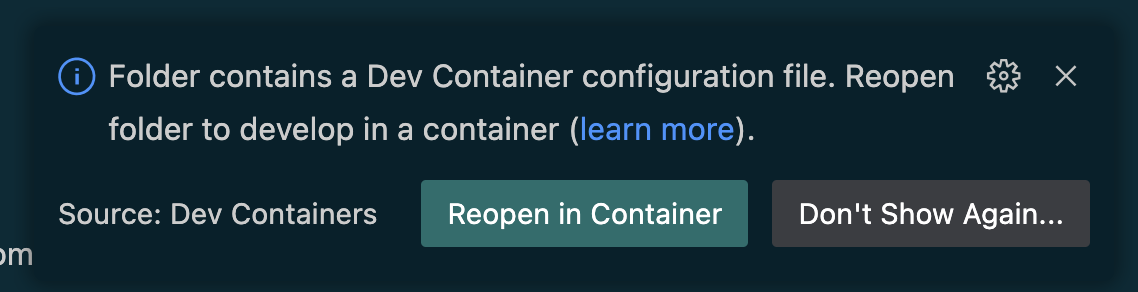
Once the project is opened, you will get the following option to reopen it in a devcontainer:
After reopening the project in devcontainer, you can verify that the setup is correct by running the provided tests with the following command:
console
pytest -s
You should get the following output if everything is correctly setup. ```console =================================== test session starts =================================== platform linux -- Python 3.12.7, pytest-8.3.3, pluggy-1.5.0 rootdir: /workspaces/myfastagencyapp configfile: pyproject.toml plugins: asyncio-0.24.0, anyio-4.6.2.post1 asyncio: mode=Mode.STRICT, defaultloopscope=None collected 1 item
tests/test_workflow.py . [100%]
==================================== 1 passed in 1.02s ====================================
```
Workflow Development
Define the Workflow
You need to define the workflow that your application will use. This is where you specify how the agents interact and what they do. Here's a simple example of a workflow definition as it is generated by the cookie cutter under my_fastagency_app/workflow.py:
```python import os from typing import Any
from autogen import ConversableAgent, LLMConfig from fastagency import UI from fastagency.runtimes.ag2 import Workflow
llmconfig = LLMConfig( model="gpt-4o-mini", apikey=os.getenv("OPENAIAPIKEY"), temperature=0.8, )
wf = Workflow()
@wf.register(name="simplelearning", description="Student and teacher learning chat") # type: ignore[misc] def simpleworkflow(ui: UI, params: dict[str, Any]) -> str: initialmessage = ui.textinput( sender="Workflow", recipient="User", prompt="I can help you learn about mathematics. What subject you would like to explore?", )
with llm_config:
  student_agent = ConversableAgent(
      name="Student_Agent",
      system_message="You are a student willing to learn.",
  )
  teacher_agent = ConversableAgent(
      name="Teacher_Agent",
      system_message="You are a math teacher.",
  )

response = student_agent.run(
    teacher_agent,
    message=initial_message,
    summary_method="reflection_with_llm",
    max_turns=3,
)

return ui.process(response)
```
This code snippet sets up a simple learning chat between a student and a teacher. It defines the agents and how they should interact and specify how the conversation should be summarized.
Run and Debug the Workflow
To ensure that the workflow we have defined is working properly, we can test it locally using MesopUI. The code below can be found under my_fastagency_app/local/main_mesop.py and imports the defined workflow and sets up MesopUI.
You can run the Mesop application locally with the following command on Linux and MacOS:
console
gunicorn my_fastagency_app.local.main_mesop:app
On Windows, please use the following command:
console
waitress-serve --listen=0.0.0.0:8000 my_fastagency_app.local.main_mesop:app
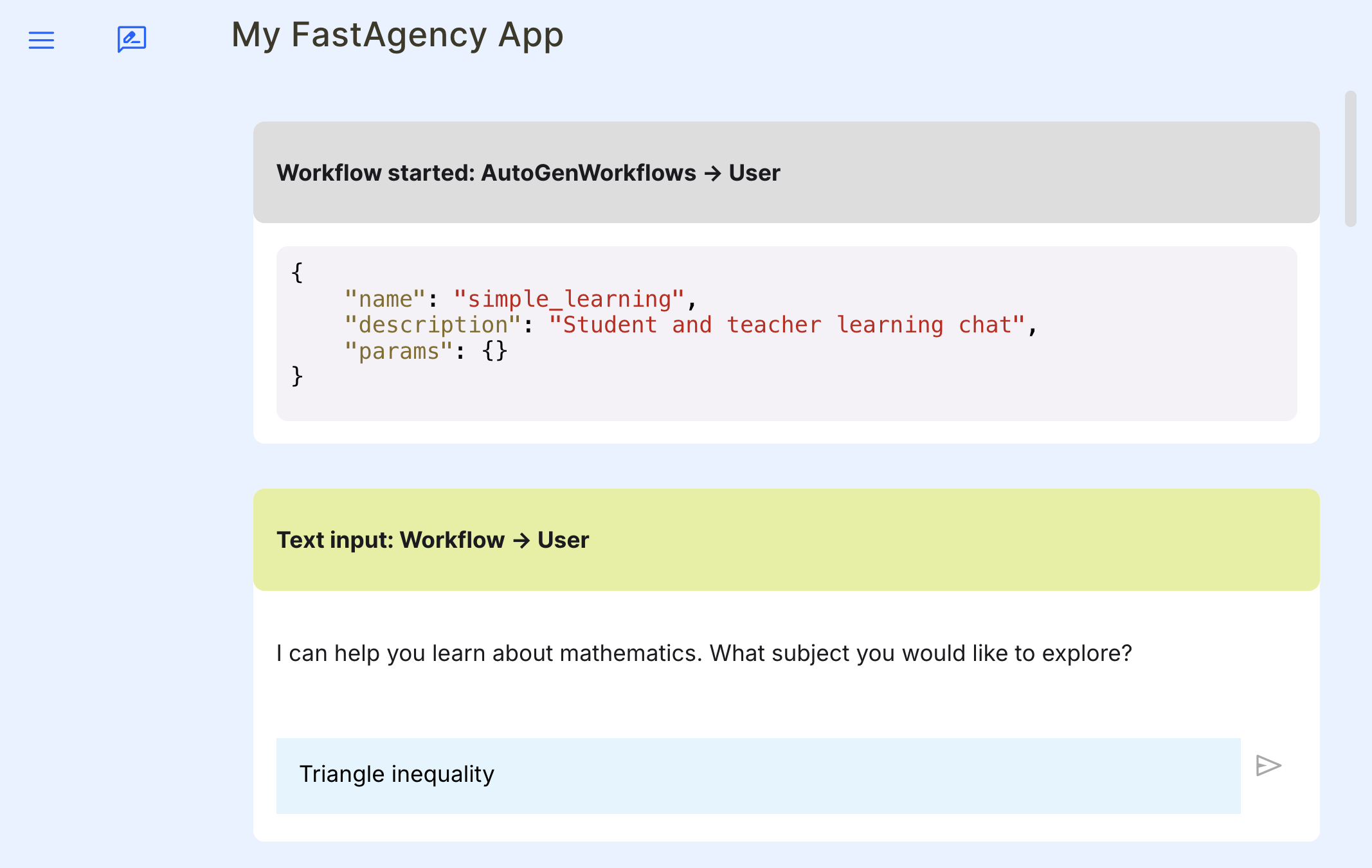
Open the MesopUI URL http://localhost:8000 in your browser. You can now use the graphical user interface to start, run, test and debug the autogen workflow manually.
Deployment
Building the Docker Image
If you created the project using Cookiecutter, then building the Docker image is as simple as running the provided script, as shown below:
console
./scripts/build_docker.sh
Running the Docker Image
Similarly, running the Docker container is as simple as running the provided script, as shown below:
console
./scripts/run_docker.sh
Deploying to Fly.io
If you created the project using Cookiecutter, there are built-in scripts to deploy your workflow to Fly.io. In Fly.io, the application namespace is global, so the application name you chose might already be taken. To check your application's name availability and to reserve it, you can run the following script:
console
./scripts/register_to_fly_io.sh
Once you have reserved your application name, you can test whether you can deploy your application to Fly.io using the following script:
console
./scripts/deploy_to_fly_io.sh
This is only for testing purposes. You should deploy using GitHub Actions{target="_blank"} as explained below.
Cookiecutter generated all the necessary files to deploy your application to Fly.io using GitHub Actions. Simply push your code to your github repository's main branch and GitHub Actions will automatically deploy your application to Fly.io. For this, you need to set the following secrets in your GitHub repository:
FLY_API_TOKENOPENAI_API_KEY
To learn how to create keys and add them as secrets, use the following links:
Future Plans
We are actively working on expanding FastAgency’s capabilities. In addition to supporting AG2 (formerly AutoGen), we plan to integrate support for other frameworks, other network providers and other UI frameworks.
⭐⭐⭐ Stay in touch ⭐⭐⭐
Stay up to date with new features and integrations by following our documentation and community updates on our Discord server. FastAgency is continually evolving to support new frameworks, APIs, and deployment strategies, ensuring you remain at the forefront of AI-driven development.
Last but not least, show us your support by giving a star to our GitHub repository.
Your support helps us to stay in touch with you and encourages us to continue developing and improving the framework. Thank you for your support!
Contributors
Thanks to all of these amazing people who made the project better!
Owner
- Name: ag2ai
- Login: ag2ai
- Kind: organization
- Repositories: 1
- Profile: https://github.com/ag2ai
GitHub Events
Total
- Create event: 81
- Issues event: 30
- Release event: 8
- Watch event: 71
- Delete event: 71
- Member event: 2
- Issue comment event: 33
- Push event: 147
- Pull request review comment event: 2
- Pull request review event: 50
- Pull request event: 86
- Fork event: 15
Last Year
- Create event: 81
- Issues event: 30
- Release event: 8
- Watch event: 71
- Delete event: 71
- Member event: 2
- Issue comment event: 33
- Push event: 147
- Pull request review comment event: 2
- Pull request review event: 50
- Pull request event: 86
- Fork event: 15
Committers
Last synced: about 1 year ago
Top Committers
| Name | Commits | |
|---|---|---|
| Kumaran Rajendhiran | k****n@a****i | 105 |
| Davor Runje | d****r@a****i | 103 |
| Harish Mohan Raj | h****h@a****i | 36 |
| rjambrecic | 3****c | 21 |
| Tvrtko Sternak | 1****t | 21 |
| Davorin Ruševljan | d****n@g****m | 13 |
| airt-release-notes-updater[bot] | 1****] | 12 |
| Pastukhov Nikita | n****a@p****u | 1 |
| Adhing'a Fredrick | 5****3 | 1 |
Committer Domains (Top 20 + Academic)
Issues and Pull Requests
Last synced: 10 months ago
All Time
- Total issues: 22
- Total pull requests: 78
- Average time to close issues: 7 days
- Average time to close pull requests: 3 days
- Total issue authors: 7
- Total pull request authors: 10
- Average comments per issue: 0.05
- Average comments per pull request: 0.54
- Merged pull requests: 43
- Bot issues: 0
- Bot pull requests: 25
Past Year
- Issues: 21
- Pull requests: 78
- Average time to close issues: 7 days
- Average time to close pull requests: 3 days
- Issue authors: 7
- Pull request authors: 10
- Average comments per issue: 0.05
- Average comments per pull request: 0.54
- Merged pull requests: 43
- Bot issues: 0
- Bot pull requests: 25
Top Authors
Issue Authors
- kumaranvpl (8)
- rjambrecic (5)
- davorinrusevljan (3)
- davorrunje (2)
- buddha314 (1)
- sternakt (1)
- pumidol-tt (1)
Pull Request Authors
- kumaranvpl (30)
- dependabot[bot] (23)
- marklysze (6)
- davorinrusevljan (6)
- harishmohanraj (3)
- rjambrecic (2)
- sternakt (2)
- davorrunje (2)
- devin-ai-integration[bot] (2)
- yugasun (1)
Top Labels
Issue Labels
Pull Request Labels
Packages
- Total packages: 1
-
Total downloads:
- pypi 1,419 last-month
- Total dependent packages: 0
- Total dependent repositories: 0
- Total versions: 56
- Total maintainers: 1
pypi.org: fastagency
The fastest way to bring multi-agent workflows to production
- Homepage: https://github.com/ag2ai/fastagency
- Documentation: https://fastagency.ai/latest/
- License: Apache Software License
-
Latest release: 0.9.7
published 12 months ago
Rankings
Maintainers (1)
Dependencies
- actions/cache v4 composite
- actions/checkout v4 composite
- actions/setup-python v5 composite
- pypa/gh-action-pypi-publish release/v1 composite
- mcr.microsoft.com/devcontainers/python 3.11
- nats latest
- postgres latest
- mcr.microsoft.com/devcontainers/python 3.12
- nats latest
- postgres latest
- mcr.microsoft.com/devcontainers/python 3.9
- nats latest
- postgres latest
- asyncer ==0.0.7
- fastapi ==0.111.1
- fastapi-code-generator ==0.5.1
- faststream [nats]>=0.5.10,<0.6
- httpx ==0.27.0
- markdownify ==0.13.1
- prisma >=0.13.1,<0.14
- pyautogen [anthropic,together]==0.2.32
- pydantic >=2.3,<3
- python-weather ==2.0.3
- together >=1.2.1,<2
- typing-extensions >=4.8.0,<5
- ruzickap/action-my-broken-link-checker v2 composite
- actions/checkout v4 composite
- github/codeql-action/analyze v3 composite
- github/codeql-action/autobuild v3 composite
- github/codeql-action/init v3 composite
- actions/checkout v4 composite
- actions/dependency-review-action v4 composite
- actions/cache v4 composite
- actions/checkout v4 composite
- actions/setup-python v5 composite
- actions/cache v4 composite
- actions/checkout v4 composite
- actions/download-artifact v4 composite
- actions/setup-node v4 composite
- actions/setup-python v5 composite
- actions/upload-artifact v4 composite
- codecov/codecov-action v4 composite
- nschloe/action-cached-lfs-checkout v1 composite
- pre-commit/action v3.0.1 composite
- re-actors/alls-green release/v1 composite
- actions/setup-python v5 composite
- dawidd6/action-download-artifact v6 composite
- actions/cache v4 composite
- actions/checkout v4 composite
- actions/setup-node v4 composite
- actions/setup-python v5 composite
- actions/upload-artifact v4 composite
- diementros/nats js docker
- postgres 13 docker
- actions/checkout v4 composite
- actions/setup-python v5 composite
- peter-evans/create-pull-request v6 composite
- tibdex/github-app-token v2 composite
- mcr.microsoft.com/devcontainers/python 3.10
- nats latest
- postgres latest