https://github.com/agahkarakuzu/qlayers
Quantitative layer based analysis for renal magnetic resonance imaging.
Science Score: 23.0%
This score indicates how likely this project is to be science-related based on various indicators:
-
○CITATION.cff file
-
○codemeta.json file
-
○.zenodo.json file
-
✓DOI references
Found 6 DOI reference(s) in README -
✓Academic publication links
Links to: researchgate.net, zenodo.org -
○Academic email domains
-
○Institutional organization owner
-
○JOSS paper metadata
-
○Scientific vocabulary similarity
Low similarity (14.1%) to scientific vocabulary
Last synced: 9 months ago
·
JSON representation
Repository
Quantitative layer based analysis for renal magnetic resonance imaging.
Basic Info
Statistics
- Stars: 0
- Watchers: 0
- Forks: 0
- Open Issues: 0
- Releases: 0
Fork of alexdaniel654/qlayers
Created about 1 year ago
· Last pushed about 1 year ago
https://github.com/agahkarakuzu/qlayers/blob/main/
# QLayers [](https://github.com/alexdaniel654/qlayers/actions/workflows/python_ci.yml) [](https://codecov.io/gh/alexdaniel654/qlayers) [](https://qlayers.readthedocs.io/latest/) [](https://badge.fury.io/py/qlayers) [](https://anaconda.org/conda-forge/qlayers) [](https://pepy.tech/project/qlayers) [](https://anaconda.org/conda-forge/qlayers) [](https://opensource.org/licenses/Apache-2.0) [](https://doi.org/10.5281/zenodo.12707173)
Quantitative layer based analysis for renal magnetic resonance imaging.
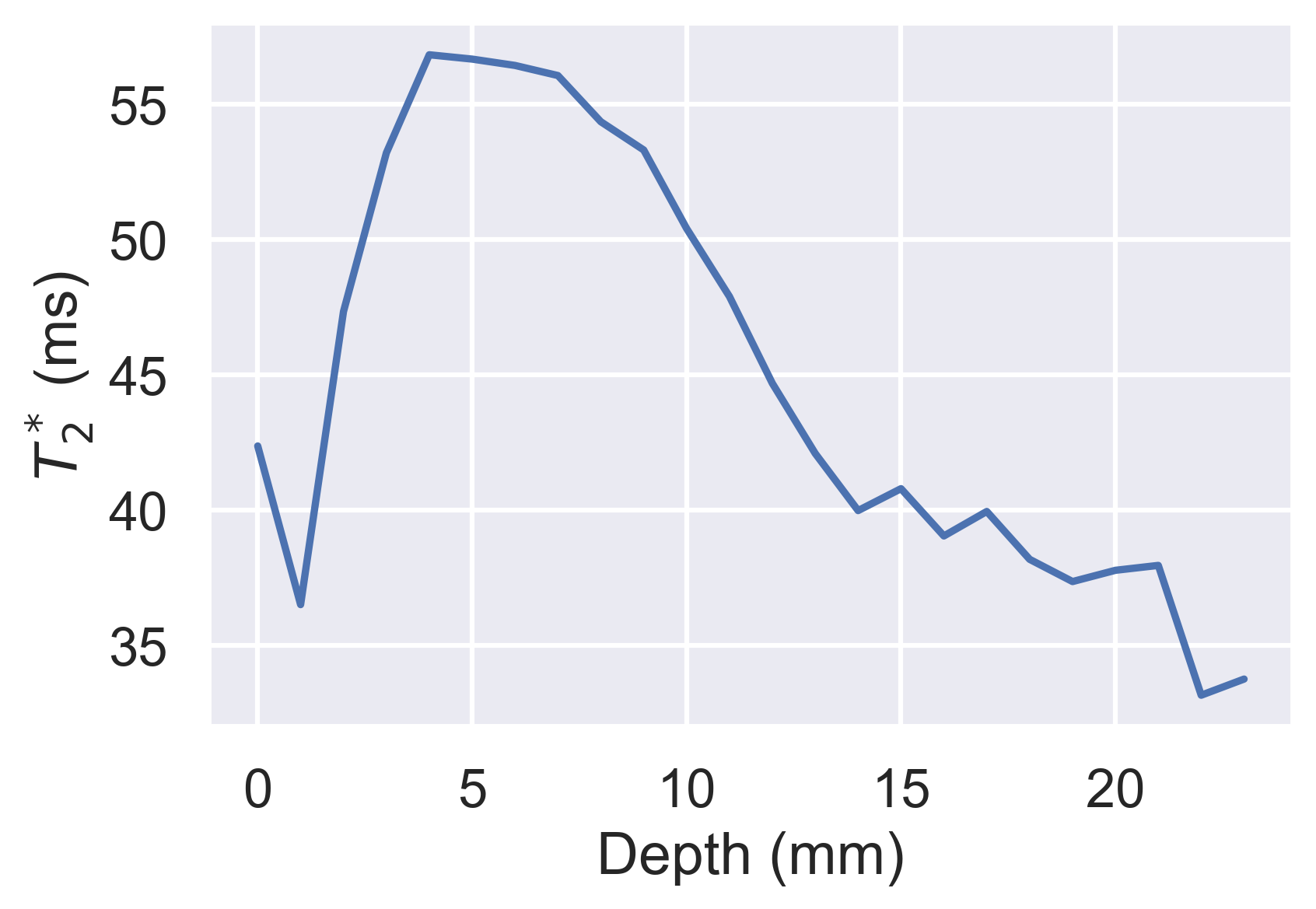
## Installation The easiest way to install `qlayers`is via `pip`: ```bash pip install qlayers ``` or if you're a `conda` user: ```bash conda install qlayers -c conda-forge ``` Alternatively, you can install `qlayers`from source in pips editable mode: ```bash git clone https://github.com/alexdaniel654/qlayers.git cd qlayers pip install -e . ``` ## Quick Start For a more thorough example of how to use `qlayers` see the tutorials section of this reposetry/documentation, however if you want to get started, the snippet of code below should get you going. ```python import nibabel as nib from qlayers import QLayers mask_img = nib.load("kidney_mask.nii.gz") t2star_img = nib.load("t2star_map.nii.gz") qlayers = QLayers(mask_img, pelvis_dist=10) qlayers.add_map(t2star_img, "t2star") df = qlayers.get_df(format="wide") df.groupby("layer").median().loc[:, "t2star"].plot( xlabel="Depth (mm)", ylabel="$T_2^*$ (ms)" ) ```## Theory ### Background The premise behind `qlayers` was first proposed by [Pruijm et al](https://doi.org/10.1007/s10334-019-00808-5) and is based on the idea to segment the kidney into layers based on each voxels distance from the surface of the kidney. The average of a quantitative parameter can be calculated for each layer producing profiles of, for example, T2* with depth. The outer and inner layers are analogous to the cortex and medulla respectively while the gradient of the profile is representative of the cortico-medullary difference. `qlayers` extends this idea by allowing the user to define layers based on a 3D mask and apply the layer to any quantitative parameter. ### Generating Layers Layers are generated via the process outlined in the figure below.
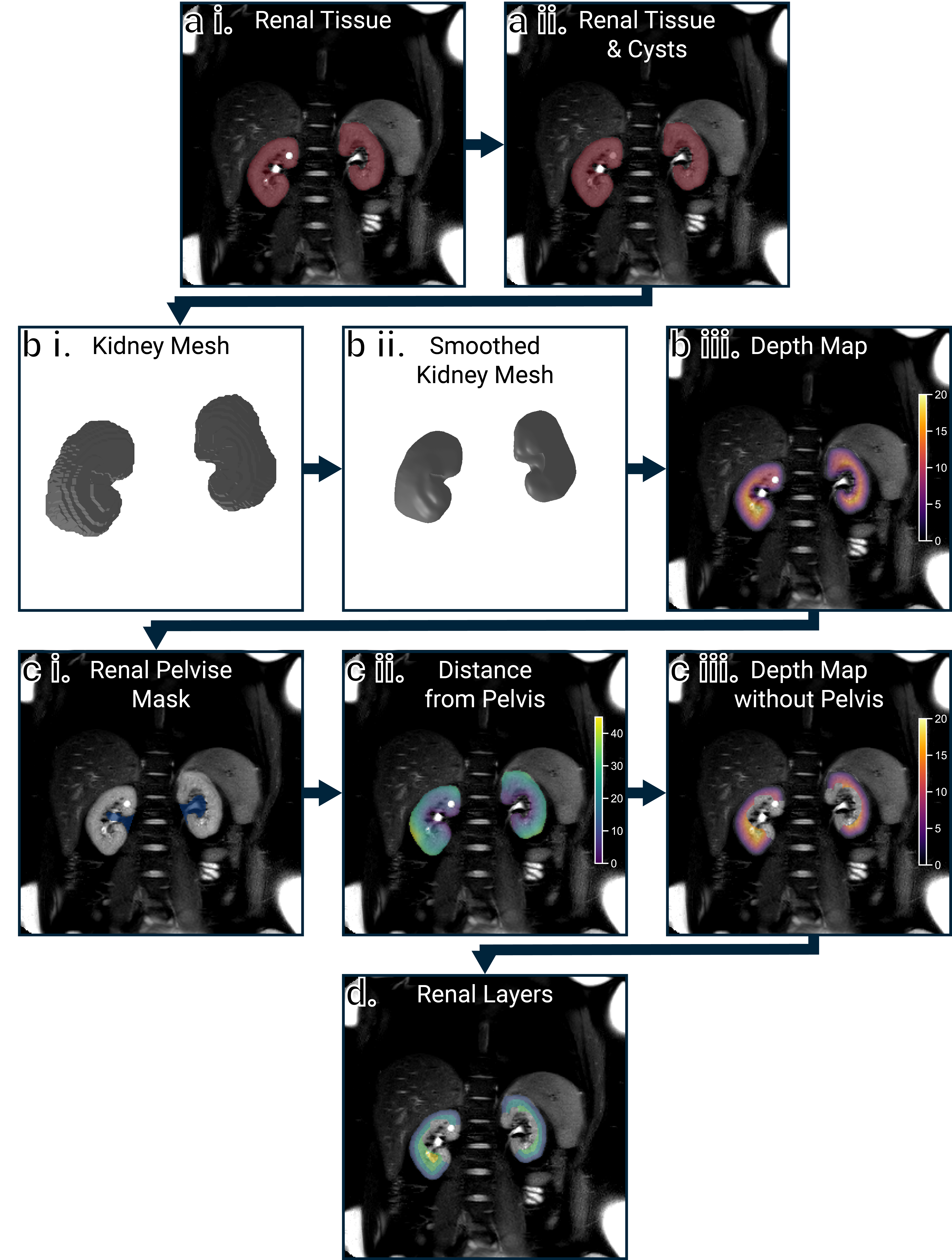
a i. Shows the mask thats input to the `QLayers` class. This mask then has any holes smaller than `fill_ml` filled as these are most likely cysts and therefore not cortical surfaces, a ii. The mask is then converted from a voxel representation to a mesh surface representation, b i, this mesh is then smoothed because anatomical scans of the kidneys often have a low through-plane resolution, b ii. The distance from the centre of each voxel in the kidneys to the closest surface on the mesh is then calculated, b iii. As the tissue adjacent to the renal pelvis is not representative of the medulla, this is automatically excluded from the resulting depth maps. Fist the pelvis is automatically segmented, c i, and the distance from each voxel in the kidneys to the pelvis calculated as above, c ii. Voxels closer than a specified threshold `pelvis_dist` are then excluded from the depth maps, c iii. Finally, a layer image is generated by quantising the depth map to a desired layer thickness, typically 1 mm although shown with 5 mm layers here for illustrative purposes, d. ### Applying Layers to Quantitative Data If the `space` parameter of the `QLayers` object is set to `layers`, when a quantitative map is added to the `QLayers` object, it is resampled to the same resolution and orientation as the layers. If the `space` parameter is set to `map` then the layers are resampled to the resolution and orientation of the quantitative map. In both cases, Pandas DataFrames can be generated with the quantitative value, depth and layer each voxel is in. These DataFrames can then be used for further calculations such as generating profiles or linear regressions to explore the cortico-medullary difference. Some example voxels are shown in the table below. | Depth | Layer | T2* | R2* | |-------|-------|------|------| | 0 | 0 | 57 | 17.6 | | 13.2 | 14 | 35.5 | 28.2 | | 10.2 | 11 | 60.9 | 16.4 | | 3.05 | 4 | 51.6 | 19.4 | | 9.33 | 10 | 42.8 | 23.3 | | 10.4 | 11 | 29.6 | 33.8 | | 8.63 | 9 | 37.5 | 26.7 | | 6.66 | 7 | 49.2 | 20.3 | | 19.8 | 20 | 42.8 | 23.3 | | 12.1 | 13 | 39.4 | 25.4 | ## Citing 3DQLayers If you have used 3DQLayers in your research, please cite the following conference abstract: [Daniel AJ, Francis ST. Volumetric Layer Based Analysis for Quantitative Renal MRI. In: Proc. Intl. Soc. Mag. Reson. Med. 33. Singapore; 2024:2748.](https://www.researchgate.net/publication/380534128_Volumetric_Layer_Based_Analysis_for_Quantitative_Renal_MRI) Alternatively, if you want to cite a specific version of this software, each release has an individual DOI on Zenodo, the DOI for the latest release can be [found here](https://zenodo.org/doi/10.5281/zenodo.12707172). ## Contributing We welcome contributions to QLayers, a full contributing guide can be found [here](.github/CONTRIBUTING.md).

Owner
- Name: Agah
- Login: agahkarakuzu
- Kind: user
- Location: Montreal
- Company: @neuropoly @qMRLab @neurolibre
- Website: https://agahkarakuzu.github.io
- Twitter: agahkarakuzu
- Repositories: 114
- Profile: https://github.com/agahkarakuzu
GitHub Events
Total
- Watch event: 1
- Push event: 6
Last Year
- Watch event: 1
- Push event: 6