https://github.com/ai-forever/automated-sign-language-tutor
Automated Sign Language Tutor: A Dual-Language Real-Time Approach for RSL and ASL
Science Score: 26.0%
This score indicates how likely this project is to be science-related based on various indicators:
-
○CITATION.cff file
-
✓codemeta.json file
Found codemeta.json file -
✓.zenodo.json file
Found .zenodo.json file -
○DOI references
-
○Academic publication links
-
○Academic email domains
-
○Institutional organization owner
-
○JOSS paper metadata
-
○Scientific vocabulary similarity
Low similarity (15.3%) to scientific vocabulary
Keywords
Repository
Automated Sign Language Tutor: A Dual-Language Real-Time Approach for RSL and ASL
Basic Info
Statistics
- Stars: 1
- Watchers: 0
- Forks: 2
- Open Issues: 0
- Releases: 0
Topics
Metadata Files
README.md
Automated Sign Language Tutor Project
This is the official repository for the paper "Automated Sign Language Tutor: A Dual-Language Real-Time Approach for RSL and ASL".
Appearance and video of the stand operation:

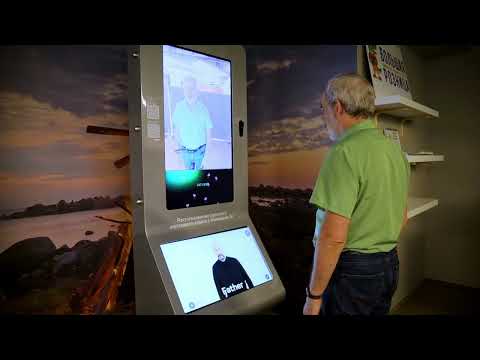
Important Note: This repository contains a backend system for sign language recognition (Streaming Sign Recognition Engine and Controller Process components). The provided frontend (ws.html, ws.css, ws.js) serves as a basic example implementation to demonstrate backend functionality and is not a production-ready application. Developers should create their own frontend implementations tailored to specific use cases while using this backend as a recognition service.
It is also possible to use the backend with custom models.
Key Features
- Two operating modes:
- LIVE: Real-time gesture recognition
- Training: Mode for teaching the model new gestures
- Dual language support: Russian and English interface and recognition models
- WebSocket interaction: Client sends video stream, server returns recognized gestures
- Visual feedback: Notification system for users
- Responsive interface: Modern design, user-friendly
Setup and Installation
Prerequisites
- Python 3.7+
- Node.js (optional for frontend)
- Web camera
Installing Dependencies
bash
pip install -r requirements.txt
Models Downloading
Download the models
- https://rndml-team-cv.obs.ru-moscow-1.hc.sbercloud.ru/rsl/demostandmodels/tsm/ru/mobilenetdemostand_ru.onnx
- https://rndml-team-cv.obs.ru-moscow-1.hc.sbercloud.ru/rsl/demostandmodels/tsm/en/mobilenetdemostand_en.onnx
and place them in the folder models/checkpoints/.
Running the Server
bash
python server_fapi.py
The server will run at localhost:3003.
Docker Deployment
bash
docker build -t sign-tutor .
docker run -it -d -v $PWD:/app -p 3003:3003 sign-tutor
Using the Web Interface
- Open
ws.htmlin your browser - Click "Enable Camera" to access your webcam
- After enabling the camera, the "Start Stream" button will become available
- Select operating mode:
- LIVE: Real-time gesture recognition
- Training:
- Enter gesture name in the text field
- Click "Select Gesture"
- Perform the gesture in front of the camera
- The system will notify you when the gesture is recognized correctly
- Switching interface and model language: Use the RU/EN buttons in the top right corner
- The recognition result is displayed in the server console.
Working with custom models
Place ONNX models for Russian and English in the
models/checkpoints/folderUpdate the configuration files:
models/config_ru.yamlfor the Russian model,models/config_en.yamlfor the English model.
Use the available files as examples.
- Update the sign class files:
models/constants_ru.pywith the `classes' variable for Russian,models/constants_en.pywith the `classes' variable for English.
Use the available files as examples.
System Architecture
Client-Server Interaction
Establishing connection:
- Client opens WebSocket connection to
ws://localhost:3003/ - Server initializes the default language model (Russian)
- Client opens WebSocket connection to
Main workflow: ```mermaid sequenceDiagram participant Client participant Server participant Model
Client->>Server: {"type": "LANGUAGE", "lang": "ru"} Server->>Model: Initialize Russian model Model-->>Server: Model ready Server-->>Client: {"status": 200, "message": "Language changed to ru"}
Client->>Server: {"type": "MODE", "mode": "TRAINING"} Server-->>Client: {"status": 200, "message": "New MODE TRAINING set correctly"}
Client->>Server: {"type": "GLOSS", "gloss": "привет"} Server-->>Client: {"status": 200, "message": "New GLOSS привет set correctly"}
loop Each frame (30 FPS) Client->>Server: {"type": "IMAGE", "image": "data:image/jpeg"} Server->>Model: Process frame Model-->>Server: Recognition result alt Gesture recognized Server-->>Client: {"text": "привет", "type": "WORD"} end end ```
Key Components
Client (Frontend):
- view/ws.html: Main HTML interface file
- view/ws.css: Interface styles
- view/ws.js: Camera and WebSocket logic
Server (Backend):
- server_fapi.py: Main server code (FastAPI)
- models/model.py: Recognition model logic
- Runner: Class for managing video processing flow
- RecognitionMP: Process for gesture recognition in a separate thread
Model: - ONNX models for gesture recognition - Configuration files for Russian and English versions - Gesture class files for each language
Implementation Details
Client-Side
Camera management:
- Webcam access via WebRTC
- Frame capture and base64 encoding
- Frame sending at specified frequency (30 FPS)
Mode management:
- Smooth switching between LIVE and Training modes
- Dynamic UI element display based on current mode
Localization:
- Full support for Russian and English
- Language preference persistence between sessions
Feedback:
- Animated notification system
- Visual confirmation of user actions
- Error handling and display
Server-Side
Video processing:
- Base64 decoding to OpenCV image
- Frame preprocessing for neural network
- Frame buffering for sequence analysis
Model management:
- Dynamic model loading for different languages
- Multithreaded processing to minimize latency
- Proper resource cleanup when switching languages
Gesture recognition:
- Sequence analysis for gesture recognition
- Threshold filtering to reduce false positives
Configuration and Customization
Changing Parameters
- Frame rate: Change the
FPSvalue inws.js - Video resolution: Change
widthandheightattributes of the<video>element inws.html - Recognition threshold: Change the
thresholdvalue in model configuration files
Adding New Languages
- Create a new configuration file
models/config_<language>.yaml - Add a gesture class file
models/constants_<language>.py - Update translation dictionaries in
ws.js:javascript const translations = { // ... <language>: { title: "...", startWebcam: "...", // ... other texts } }
Troubleshooting
Common Issues
Camera not working:
- Check browser permissions
- Ensure no other applications are using the camera
- Try reloading the page
No connection to server:
- Ensure the server is running (
python server_fapi.py) - Check WebSocket address in
ws.js - Ensure no firewall blocking
- Ensure the server is running (
Model not loading:
- Check model paths in configuration files
- Ensure model files exist
- Verify content of gesture class files
Logging
- Client: Open browser developer console (F12)
- Server: Logs are printed in the server console
Authors
— Petr Surovtsev
— Alexander Nagaev
— Alexander Kapitanov
— Ilya Ovodov
License
This project is licensed under the APACHE License. See the LICENSE file for details.
For questions and suggestions, please use the project's Issues section.
Owner
- Name: AI Forever
- Login: ai-forever
- Kind: organization
- Location: Armenia
- Repositories: 60
- Profile: https://github.com/ai-forever
Creating ML for the future. AI projects you already know. We are non-profit organization with members from all over the world.
GitHub Events
Total
- Issues event: 1
- Member event: 1
- Push event: 1
Last Year
- Issues event: 1
- Member event: 1
- Push event: 1
Issues and Pull Requests
Last synced: 11 months ago
Dependencies
- python 3.9 build
- fastapi ==0.109.2
- loguru ==0.7.2
- numpy ==1.26.4
- omegaconf *
- onnx ==1.14.1
- onnxruntime ==1.14.1
- opencv-contrib-python ==4.9.0.80
- uvicorn ==0.27.1
- websockets ==12.0