https://github.com/ai4bharat/shoonya
Shoonya - Platform to Annotate and label data at scale.
Science Score: 13.0%
This score indicates how likely this project is to be science-related based on various indicators:
-
○CITATION.cff file
-
✓codemeta.json file
Found codemeta.json file -
○.zenodo.json file
-
○DOI references
-
○Academic publication links
-
○Academic email domains
-
○Institutional organization owner
-
○JOSS paper metadata
-
○Scientific vocabulary similarity
Low similarity (12.1%) to scientific vocabulary
Keywords
Repository
Shoonya - Platform to Annotate and label data at scale.
Basic Info
- Host: GitHub
- Owner: AI4Bharat
- License: mit
- Default Branch: master
- Homepage: https://ai4bharat.iitm.ac.in/shoonya
- Size: 7.5 MB
Statistics
- Stars: 47
- Watchers: 8
- Forks: 7
- Open Issues: 2
- Releases: 0
Topics
Metadata Files
README.md

An open source platform to annotate and label data at scale

Shoonya is an open source platform to annotate and label data at scale, built with a vision to enhance digital presence of under-represented languages in India.
Shoonya offers support for multiple data types (Ex : parallel datasets, OCR, ASR, TTS etc) and labeling tasks (Ex : parallel datasets, OCR, ASR, TTS etc).
Shoonya, referring to zero, represents the start. It also represents universality in the sense that several cultures have a similar symbol for zero. We believe that the language resources that we collect in Shoonya will start a valuable open-source movement for Indian language technologies that will be available universally for all to adopt and improve upon.
Qualities of a good Data Collection Ecosystem

Challenges faced by Annotators

Why Shoonya?
The National Language Translation Mission (NLTM) has been announced in the budget by the Honorable Finance Minister in the backdrop of growing demand for accessing online services in local Indian languages. This will enable the wealth of governance-and-policy related knowledge on the Internet being made available in major Indian languages. The Ministry of Electronics and Information Technology (MeitY) has launched 'Bhashini' to help ensure that digital content is readily available to all citizens, in their preferred languages.
The goal of Bhashini is to develop an ecosystem of innovative practices for data collection, curation, develop technology for speech to speech translation and deliver solutions powered by open data, apps and services. Bhashini shall act as an orchestrator to bring contributions (like data, models etc.) received from government, industry, academia and society into an open “Hundi” or “Repository”. All contributions to Bhashini shall be validated and standardized using a Unified Language Contribution API (ULCA).

Reference : Bhashini Whitepaper
Also read Bhashini Data Report
Naturally, data collection/curation becomes the core of building state-of-the-art NLP ML models. This is where Shoonya comes into picture. Shoonya provides the platform for the Annotators/Translators to create such large datasets with highest quality.

Goals
- Support all possible data types and labeling tasks
- Build a reliable & scalable platform beneath Shoonya
- Keep the UI simple and intuitive
Features of Shoonya

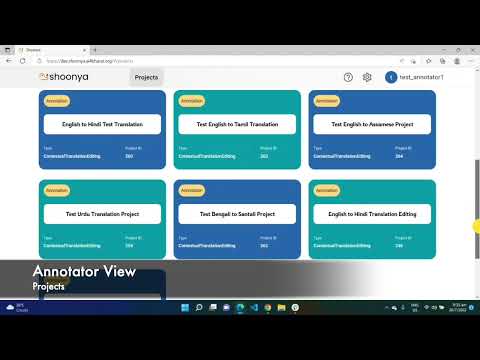
Overview and Demo Video
Cloning this master repo
git clone --recurse-submodules https://github.com/AI4Bharat/Shoonya
Backend Setup
Clone the Shoonya-Backend repository from GitHub to your local machine.
git clone https://github.com/AI4Bharat/Shoonya-Backend.git
Create a virtual environment for the project. Replace with your preferred environment name.
python3 -m venv
Activate the virtual environment. This ensures that the packages you install are isolated from the global Python environment.
source /bin/activate
Install all required Python packages listed in the requirements-dev.txt file.
pip install -r deploy/requirements-dev.txt
Set up the environment variables needed for the project by copying the example environment file.
cp .env.example ./backend/.env
Generate a new secret key for Django (within the virtual environment):
Open a Python shell.
python backend/manage.py shell

# Import the utility function to generate a secret key.
>> from django.core.management.utils import get_random_secret_key

# Generate and print a new secret key.
>> get_random_secret_key()
Copy the generated secret key and paste it into the .env file as the value for SECRET_KEY.
Docker Installation
Build the Docker containers as defined in the docker-compose-local.yml file.
docker-compose -f docker-compose-local.yml build
Run the containers in detached mode (-d flag). This will start up all the services defined in the Docker Compose file.
docker-compose -f docker-compose-local.yml up -d
Run Migrations
The following steps are required only when you run the project for the first time or after making changes to the models.
# Check if there are any pending migrations.
docker-compose exec web python backend/manage.py makemigrations

# Apply all pending migrations to the database.
docker-compose exec web python backend/manage.py migrate
Create a superuser for accessing the Django admin interface (required only once).
docker-compose exec web python backend/manage.py createsuperuser
Run the Django development server within the Docker container.
docker-compose exec web python backend/manage.py runserver
Frontend Setup
Clone the Shoonya-Frontend repository from GitHub to your local machine.
git clone https://github.com/AI4Bharat/Shoonya-Frontend.git
Change directory to the newly cloned Shoonya-Frontend folder.
cd Shoonya-Frontend
Install the necessary dependencies for the project.
The --force flag is used to bypass conflicts with the existing dependencies.
npm i --force
Start the development server. This will run the frontend application on a local server.
npm start
Communication Forum
Any information/help/discussion required, can be taken up using the following link : https://github.com/AI4Bharat/Shoonya/discussions
Code of Conduct
This project adheres to the Contributor Covenant code of conduct. By participating, you are expected to uphold this code. Please report unacceptable behavior to opensource@ai4bharat.org.
Owner
- Name: AI4Bhārat
- Login: AI4Bharat
- Kind: organization
- Email: opensource@ai4bharat.org
- Location: India
- Website: https://ai4bharat.org
- Twitter: AI4Bharat
- Repositories: 37
- Profile: https://github.com/AI4Bharat
Artificial-Intelligence-For-Bhārat : Building open-source AI solutions for India!
GitHub Events
Total
- Issues event: 1
- Watch event: 5
- Gollum event: 2
- Fork event: 3
Last Year
- Issues event: 1
- Watch event: 5
- Gollum event: 2
- Fork event: 3
Issues and Pull Requests
Last synced: 9 months ago
All Time
- Total issues: 3
- Total pull requests: 12
- Average time to close issues: N/A
- Average time to close pull requests: about 8 hours
- Total issue authors: 3
- Total pull request authors: 4
- Average comments per issue: 0.33
- Average comments per pull request: 0.0
- Merged pull requests: 12
- Bot issues: 0
- Bot pull requests: 0
Past Year
- Issues: 1
- Pull requests: 0
- Average time to close issues: N/A
- Average time to close pull requests: N/A
- Issue authors: 1
- Pull request authors: 0
- Average comments per issue: 0.0
- Average comments per pull request: 0
- Merged pull requests: 0
- Bot issues: 0
- Bot pull requests: 0
Top Authors
Issue Authors
- mujhenahiata (1)
- Tejaswgupta (1)
- psvnbhavanishankar (1)
Pull Request Authors
- aravinth (5)
- aparna-aa (4)
- kartikvirendrar (2)
- ishvindersethi22 (1)