https://github.com/ajaymin28/aruco_python
This is Aruco Build in Python, basically it is written in C++. This is the bindings through Opencv
Science Score: 26.0%
This score indicates how likely this project is to be science-related based on various indicators:
-
○CITATION.cff file
-
✓codemeta.json file
Found codemeta.json file -
✓.zenodo.json file
Found .zenodo.json file -
○DOI references
-
○Academic publication links
-
○Academic email domains
-
○Institutional organization owner
-
○JOSS paper metadata
-
○Scientific vocabulary similarity
Low similarity (15.4%) to scientific vocabulary
Keywords
Repository
This is Aruco Build in Python, basically it is written in C++. This is the bindings through Opencv
Basic Info
Statistics
- Stars: 18
- Watchers: 2
- Forks: 10
- Open Issues: 0
- Releases: 0
Topics
Metadata Files
README.md
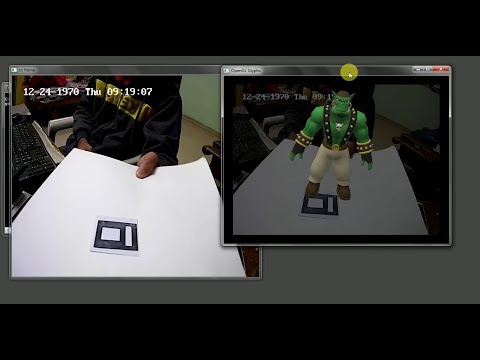
Augmented Reality with Aruco Markers in Python
A Python project that brings augmented reality to life by overlaying 3D objects on Aruco markers using OpenCV and OpenGL.
Demo
Requirements
- Python 3.x
- OpenCV 3.x (
opencv_contribrequired for Aruco support) - imutils
- PyYAML
- pygame
- PyOpenGL
Install Python packages via pip:
bash
pip install imutils pyyaml pygame PyOpenGL
Developed and tested on Anaconda 4 (Python 3.x, Windows 10), but should work on most platforms.
Project Structure
main.py: Main code. Loads the 3D object, initializes your camera, detects Aruco markers, and overlays the 3D object.objloader.py: Utility for loading OBJ files (see PyGame Wiki)..objand.mtlfiles: Your 3D model (exported from Blender or other 3D software). Both are required for proper rendering.
Getting Started
- Camera Calibration
- Calibrate your camera first. Use scripts in the
calibrationdirectory (see details below). This generates a
.yamlfile for your camera matrix.- Prepare Your Files
Place your
camera_matrix.yaml,.obj, and.mtlfiles in the project’s main directory.- Run the Demo
bash
   python main.py
Calibration
You can calibrate using either a chessboard or an Aruco board.
Aruco Board Calibration
Edit
calibration/main.py:- Set your video source (camera index or file).
- Set output YAML filename.
Run and follow the instructions.
When done, copy the generated YAML to the main directory.
Chessboard Calibration
Edit
calibration/aruco.py:- Set your video source and output YAML filename.
Run the script.
Move or rename the generated YAML file to match the main directory config.
Using Your Own 3D Objects
- Download
.objmodels with matching.mtlfiles (e.g., from Free3D). - Replace the
.objand.mtlfiles in your main directory. - Without an
.mtlfile, objects will render black. - You can create/edit models in Blender or other 3D tools.
Troubleshooting & Tips
- OpenGL window lighting may be dimmer than OpenCV—work in a well-lit room.
- All required files (
main.py,objloader.py, model files,camera_matrix.yaml) must be in the same folder. - Report bugs or issues by opening an issue or reaching out.
License & Attribution
- 3D models included are not owned by me. See the license/readme in
models/orzip/sinband/for details.
References
- University of Cordoba: Aruco Documentation
- Augmented Reality using OpenCV, OpenGL, and Blender
- JeVois Aruco Demo
Owner
- Name: Jaimin Bhoi
- Login: ajaymin28
- Kind: user
- Location: Bangalore
- Company: Tata Consulatancy Services
- Repositories: 1
- Profile: https://github.com/ajaymin28
A computer engineer. on my way to make computers do great things.
GitHub Events
Total
- Watch event: 1
- Push event: 1
- Fork event: 1
Last Year
- Watch event: 1
- Push event: 1
- Fork event: 1
Issues and Pull Requests
Last synced: 11 months ago
All Time
- Total issues: 2
- Total pull requests: 0
- Average time to close issues: almost 2 years
- Average time to close pull requests: N/A
- Total issue authors: 2
- Total pull request authors: 0
- Average comments per issue: 2.5
- Average comments per pull request: 0
- Merged pull requests: 0
- Bot issues: 0
- Bot pull requests: 0
Past Year
- Issues: 0
- Pull requests: 0
- Average time to close issues: N/A
- Average time to close pull requests: N/A
- Issue authors: 0
- Pull request authors: 0
- Average comments per issue: 0
- Average comments per pull request: 0
- Merged pull requests: 0
- Bot issues: 0
- Bot pull requests: 0
Top Authors
Issue Authors
- tuhintiwari (1)
- BryceQing (1)