https://github.com/ajinkya-kulkarni/d-fine
D-FINE: Redefine Regression Task of DETRs as Fine-grained Distribution Refinement [ICLR 2025 Spotlight]
Science Score: 10.0%
This score indicates how likely this project is to be science-related based on various indicators:
-
○CITATION.cff file
-
○codemeta.json file
-
○.zenodo.json file
-
○DOI references
-
✓Academic publication links
Links to: arxiv.org -
○Academic email domains
-
○Institutional organization owner
-
○JOSS paper metadata
-
○Scientific vocabulary similarity
Low similarity (6.6%) to scientific vocabulary
Repository
D-FINE: Redefine Regression Task of DETRs as Fine-grained Distribution Refinement [ICLR 2025 Spotlight]
Basic Info
Statistics
- Stars: 0
- Watchers: 0
- Forks: 0
- Open Issues: 0
- Releases: 0
https://github.com/ajinkya-kulkarni/D-FINE/blob/master/
English | [](README_cn.md) | [](README_ja.md) | [English Blog](src/zoo/dfine/blog.md) | [](src/zoo/dfine/blog_cn.md)D-FINE: Redefine Regression Task of DETRs as Fine‑grained Distribution Refinement






This is the official implementation of the paper:
D-FINE: Redefine Regression Task of DETRs as Fine-grained Distribution RefinementYansong Peng, Hebei Li, Peixi Wu, Yueyi Zhang, Xiaoyan Sun, and Feng Wu
University of Science and Technology of China

If you like D-FINE, please give us a ! Your support motivates us to keep improving!
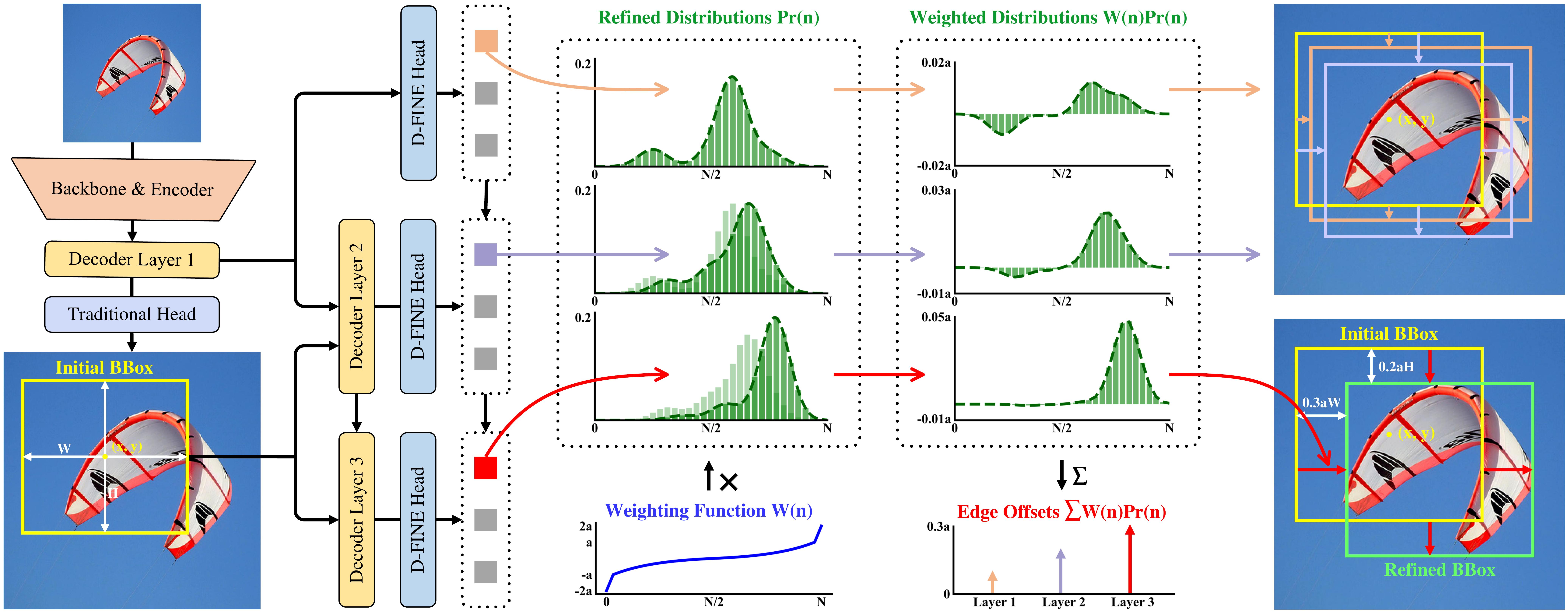
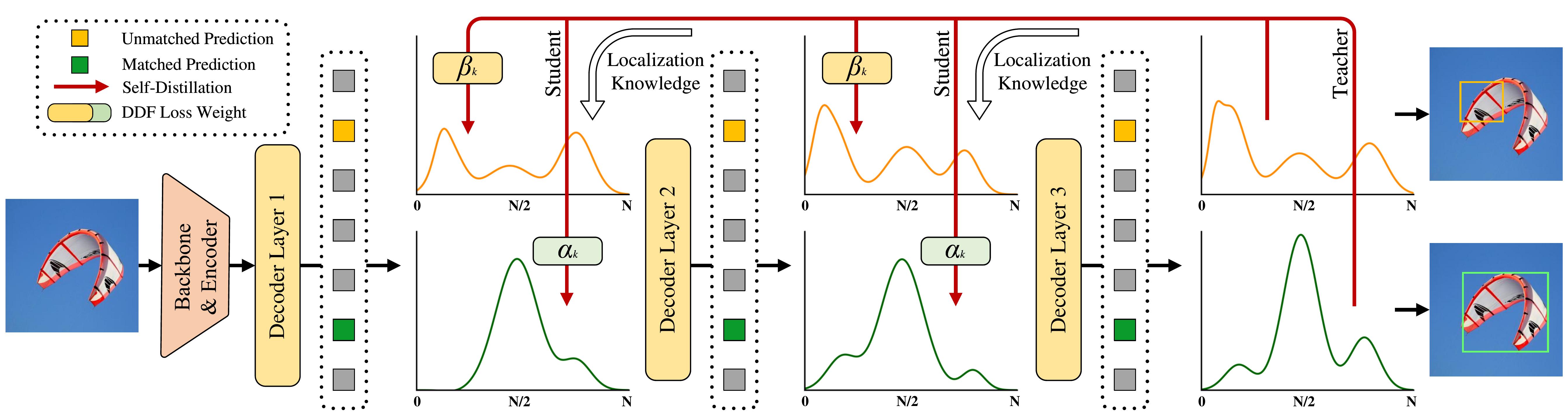
D-FINE is a powerful real-time object detector that redefines the bounding box regression task in DETRs as Fine-grained Distribution Refinement (FDR) and introduces Global Optimal Localization Self-Distillation (GO-LSD), achieving outstanding performance without introducing additional inference and training costs.
 ## Updates - [x] **\[2024.10.18\]** Release D-FINE series. - [x] **\[2024.10.25\]** Add custom dataset finetuning configs ([#7](https://github.com/Peterande/D-FINE/issues/7)). - [x] **\[2024.10.30\]** Update D-FINE-L (E25) pretrained model, with performance improved by 2.0%. - [x] **\[2024.11.07\]** Release **D-FINE-N**, achiving 42.8% APval on COCO @ 472 FPST4! ## Model Zoo ### COCO | Model | Dataset | APval | #Params | Latency | GFLOPs | config | checkpoint | logs | | :---: | :---: | :---: | :---: | :---: | :---: | :---: | :---: | :---: | **D‑FINE‑N** | COCO | **42.8** | 4M | 2.12ms | 7 | [yml](./configs/dfine/dfine_hgnetv2_n_coco.yml) | [42.8](https://github.com/Peterande/storage/releases/download/dfinev1.0/dfine_n_coco.pth) | [url](https://raw.githubusercontent.com/Peterande/storage/refs/heads/master/logs/coco/dfine_n_coco_log.txt) **D‑FINE‑S** | COCO | **48.5** | 10M | 3.49ms | 25 | [yml](./configs/dfine/dfine_hgnetv2_s_coco.yml) | [48.5](https://github.com/Peterande/storage/releases/download/dfinev1.0/dfine_s_coco.pth) | [url](https://raw.githubusercontent.com/Peterande/storage/refs/heads/master/logs/coco/dfine_s_coco_log.txt) **D‑FINE‑M** | COCO | **52.3** | 19M | 5.62ms | 57 | [yml](./configs/dfine/dfine_hgnetv2_m_coco.yml) | [52.3](https://github.com/Peterande/storage/releases/download/dfinev1.0/dfine_m_coco.pth) | [url](https://raw.githubusercontent.com/Peterande/storage/refs/heads/master/logs/coco/dfine_m_coco_log.txt) **D‑FINE‑L** | COCO | **54.0** | 31M | 8.07ms | 91 | [yml](./configs/dfine/dfine_hgnetv2_l_coco.yml) | [54.0](https://github.com/Peterande/storage/releases/download/dfinev1.0/dfine_l_coco.pth) | [url](https://raw.githubusercontent.com/Peterande/storage/refs/heads/master/logs/coco/dfine_l_coco_log.txt) **D‑FINE‑X** | COCO | **55.8** | 62M | 12.89ms | 202 | [yml](./configs/dfine/dfine_hgnetv2_x_coco.yml) | [55.8](https://github.com/Peterande/storage/releases/download/dfinev1.0/dfine_x_coco.pth) | [url](https://raw.githubusercontent.com/Peterande/storage/refs/heads/master/logs/coco/dfine_x_coco_log.txt) ### Objects365+COCO | Model | Dataset | APval | #Params | Latency | GFLOPs | config | checkpoint | logs | | :---: | :---: | :---: | :---: | :---: | :---: | :---: | :---: | :---: | **D‑FINE‑S** | Objects365+COCO | **50.7** | 10M | 3.49ms | 25 | [yml](./configs/dfine/objects365/dfine_hgnetv2_s_obj2coco.yml) | [50.7](https://github.com/Peterande/storage/releases/download/dfinev1.0/dfine_s_obj2coco.pth) | [url](https://raw.githubusercontent.com/Peterande/storage/refs/heads/master/logs/obj2coco/dfine_s_obj2coco_log.txt) **D‑FINE‑M** | Objects365+COCO | **55.1** | 19M | 5.62ms | 57 | [yml](./configs/dfine/objects365/dfine_hgnetv2_m_obj2coco.yml) | [55.1](https://github.com/Peterande/storage/releases/download/dfinev1.0/dfine_m_obj2coco.pth) | [url](https://raw.githubusercontent.com/Peterande/storage/refs/heads/master/logs/obj2coco/dfine_m_obj2coco_log.txt) **D‑FINE‑L** | Objects365+COCO | **57.3** | 31M | 8.07ms | 91 | [yml](./configs/dfine/objects365/dfine_hgnetv2_l_obj2coco.yml) | [57.3](https://github.com/Peterande/storage/releases/download/dfinev1.0/dfine_l_obj2coco_e25.pth) | [url](https://raw.githubusercontent.com/Peterande/storage/refs/heads/master/logs/obj2coco/dfine_l_obj2coco_log_e25.txt) **D‑FINE‑X** | Objects365+COCO | **59.3** | 62M | 12.89ms | 202 | [yml](./configs/dfine/objects365/dfine_hgnetv2_x_obj2coco.yml) | [59.3](https://github.com/Peterande/storage/releases/download/dfinev1.0/dfine_x_obj2coco.pth) | [url](https://raw.githubusercontent.com/Peterande/storage/refs/heads/master/logs/obj2coco/dfine_x_obj2coco_log.txt) **We highly recommend that you use the Objects365 pre-trained model for fine-tuning:** **Important**: Please note that this is generally beneficial for complex scene understanding. If your categories are very simple, it might lead to overfitting and suboptimal performance.
Video
We conduct object detection using D-FINE and YOLO11 on a complex street scene video from [YouTube](https://www.youtube.com/watch?v=CfhEWj9sd9A). Despite challenging conditions such as backlighting, motion blur, and dense crowds, D-FINE-X successfully detects nearly all targets, including subtle small objects like backpacks, bicycles, and traffic lights. Its confidence scores and the localization precision for blurred edges are significantly higher than those of YOLO11. https://github.com/user-attachments/assets/e5933d8e-3c8a-400e-870b-4e452f5321d9**Notes:** - **APval** is evaluated on *MSCOCO val2017* dataset. - **Latency** is evaluated on a single T4 GPU with $batch\\_size = 1$, $fp16$, and $TensorRT==10.4.0$. - **Objects365+COCO** means finetuned model on *COCO* using pretrained weights trained on *Objects365*. ## Quick start ### Setup ```shell conda create -n dfine python=3.11.9 conda activate dfine pip install -r requirements.txt ``` ### Data PreparationPretrained Models on Objects365 (Best generalization)
| Model | Dataset | APval | AP5000 | #Params | Latency | GFLOPs | config | checkpoint | logs | | :---: | :---: | :---: | :---: | :---: | :---: | :---: | :---: | :---: | :---: | **D‑FINE‑S** | Objects365 | **31.0** | **30.5** | 10M | 3.49ms | 25 | [yml](./configs/dfine/objects365/dfine_hgnetv2_s_obj365.yml) | [30.5](https://github.com/Peterande/storage/releases/download/dfinev1.0/dfine_s_obj365.pth) | [url](https://raw.githubusercontent.com/Peterande/storage/refs/heads/master/logs/obj365/dfine_s_obj365_log.txt) **D‑FINE‑M** | Objects365 | **38.6** | **37.4** | 19M | 5.62ms | 57 | [yml](./configs/dfine/objects365/dfine_hgnetv2_m_obj365.yml) | [37.4](https://github.com/Peterande/storage/releases/download/dfinev1.0/dfine_m_obj365.pth) | [url](https://raw.githubusercontent.com/Peterande/storage/refs/heads/master/logs/obj365/dfine_m_obj365_log.txt) **D‑FINE‑L** | Objects365 | - | **40.6** | 31M | 8.07ms | 91 | [yml](./configs/dfine/objects365/dfine_hgnetv2_l_obj365.yml) | [40.6](https://github.com/Peterande/storage/releases/download/dfinev1.0/dfine_l_obj365.pth) | [url](https://raw.githubusercontent.com/Peterande/storage/refs/heads/master/logs/obj365/dfine_l_obj365_log.txt) **D‑FINE‑L (E25)** | Objects365 | **44.7** | **42.6** | 31M | 8.07ms | 91 | [yml](./configs/dfine/objects365/dfine_hgnetv2_l_obj365.yml) | [42.6](https://github.com/Peterande/storage/releases/download/dfinev1.0/dfine_l_obj365_e25.pth) | [url](https://raw.githubusercontent.com/Peterande/storage/refs/heads/master/logs/obj365/dfine_l_obj365_log_e25.txt) **D‑FINE‑X** | Objects365 | **49.5** | **46.5** | 62M | 12.89ms | 202 | [yml](./configs/dfine/objects365/dfine_hgnetv2_x_obj365.yml) | [46.5](https://github.com/Peterande/storage/releases/download/dfinev1.0/dfine_x_obj365.pth) | [url](https://raw.githubusercontent.com/Peterande/storage/refs/heads/master/logs/obj365/dfine_x_obj365_log.txt) - **E25**: Re-trained and extended the pretraining to 25 epochs. - **APval** is evaluated on *Objects365* full validation set. - **AP5000** is evaluated on the first 5000 samples of the *Objects365* validation set.COCO2017 Dataset
1. Download COCO2017 from [OpenDataLab](https://opendatalab.com/OpenDataLab/COCO_2017) or [COCO](https://cocodataset.org/#download). 1. Modify paths in [coco_detection.yml](./configs/dataset/coco_detection.yml) ```yaml train_dataloader: img_folder: /data/COCO2017/train2017/ ann_file: /data/COCO2017/annotations/instances_train2017.json val_dataloader: img_folder: /data/COCO2017/val2017/ ann_file: /data/COCO2017/annotations/instances_val2017.json ```Objects365 Dataset
1. Download Objects365 from [OpenDataLab](https://opendatalab.com/OpenDataLab/Objects365). 2. Set the Base Directory: ```shell export BASE_DIR=/data/Objects365/data ``` 3. Extract and organize the downloaded files, resulting directory structure: ```shell ${BASE_DIR}/train images v1 patch0 000000000.jpg 000000001.jpg ... (more images) v2 patchx 000000000.jpg 000000001.jpg ... (more images) zhiyuan_objv2_train.json ``` ```shell ${BASE_DIR}/val images v1 patch0 000000000.jpg ... (more images) v2 patchx 000000000.jpg ... (more images) zhiyuan_objv2_val.json ``` 4. Create a New Directory to Store Images from the Validation Set: ```shell mkdir -p ${BASE_DIR}/train/images_from_val ``` 5. Copy the v1 and v2 folders from the val directory into the train/images_from_val directory ```shell cp -r ${BASE_DIR}/val/images/v1 ${BASE_DIR}/train/images_from_val/ cp -r ${BASE_DIR}/val/images/v2 ${BASE_DIR}/train/images_from_val/ ``` 6. Run remap_obj365.py to merge a subset of the validation set into the training set. Specifically, this script moves samples with indices between 5000 and 800000 from the validation set to the training set. ```shell python tools/remap_obj365.py --base_dir ${BASE_DIR} ``` 7. Run the resize_obj365.py script to resize any images in the dataset where the maximum edge length exceeds 640 pixels. Use the updated JSON file generated in Step 5 to process the sample data. Ensure that you resize images in both the train and val datasets to maintain consistency. ```shell python tools/resize_obj365.py --base_dir ${BASE_DIR} ``` 8. Modify paths in [obj365_detection.yml](./configs/dataset/obj365_detection.yml) ```yaml train_dataloader: img_folder: /data/Objects365/data/train ann_file: /data/Objects365/data/train/new_zhiyuan_objv2_train_resized.json val_dataloader: img_folder: /data/Objects365/data/val/ ann_file: /data/Objects365/data/val/new_zhiyuan_objv2_val_resized.json ```CrowdHuman
Download COCO format dataset here: [url](https://aistudio.baidu.com/datasetdetail/231455)## UsageCustom Dataset
To train on your custom dataset, you need to organize it in the COCO format. Follow the steps below to prepare your dataset: 1. **Set `remap_mscoco_category` to `False`:** This prevents the automatic remapping of category IDs to match the MSCOCO categories. ```yaml remap_mscoco_category: False ``` 2. **Organize Images:** Structure your dataset directories as follows: ```shell dataset/ images/ train/ image1.jpg image2.jpg ... val/ image1.jpg image2.jpg ... annotations/ instances_train.json instances_val.json ... ``` - **`images/train/`**: Contains all training images. - **`images/val/`**: Contains all validation images. - **`annotations/`**: Contains COCO-formatted annotation files. 3. **Convert Annotations to COCO Format:** If your annotations are not already in COCO format, you'll need to convert them. You can use the following Python script as a reference or utilize existing tools: ```python import json def convert_to_coco(input_annotations, output_annotations): # Implement conversion logic here pass if __name__ == "__main__": convert_to_coco('path/to/your_annotations.json', 'dataset/annotations/instances_train.json') ``` 4. **Update Configuration Files:** Modify your [custom_detection.yml](./configs/dataset/custom_detection.yml). ```yaml task: detection evaluator: type: CocoEvaluator iou_types: ['bbox', ] num_classes: 777 # your dataset classes remap_mscoco_category: False train_dataloader: type: DataLoader dataset: type: CocoDetection img_folder: /data/yourdataset/train ann_file: /data/yourdataset/train/train.json return_masks: False transforms: type: Compose ops: ~ shuffle: True num_workers: 4 drop_last: True collate_fn: type: BatchImageCollateFunction val_dataloader: type: DataLoader dataset: type: CocoDetection img_folder: /data/yourdataset/val ann_file: /data/yourdataset/val/ann.json return_masks: False transforms: type: Compose ops: ~ shuffle: False num_workers: 4 drop_last: False collate_fn: type: BatchImageCollateFunction ```COCO2017
1. Set Model ```shell export model=l # n s m l x ``` 2. Training ```shell CUDA_VISIBLE_DEVICES=0,1,2,3 torchrun --master_port=7777 --nproc_per_node=4 train.py -c configs/dfine/dfine_hgnetv2_${model}_coco.yml --use-amp --seed=0 ``` 3. Testing ```shell CUDA_VISIBLE_DEVICES=0,1,2,3 torchrun --master_port=7777 --nproc_per_node=4 train.py -c configs/dfine/dfine_hgnetv2_${model}_coco.yml --test-only -r model.pth ``` 4. Tuning ```shell CUDA_VISIBLE_DEVICES=0,1,2,3 torchrun --master_port=7777 --nproc_per_node=4 train.py -c configs/dfine/dfine_hgnetv2_${model}_coco.yml --use-amp --seed=0 -t model.pth ```Objects365 to COCO2017
1. Set Model ```shell export model=l # n s m l x ``` 2. Training on Objects365 ```shell CUDA_VISIBLE_DEVICES=0,1,2,3 torchrun --master_port=7777 --nproc_per_node=4 train.py -c configs/dfine/objects365/dfine_hgnetv2_${model}_obj365.yml --use-amp --seed=0 ``` 3. Tuning on COCO2017 ```shell CUDA_VISIBLE_DEVICES=0,1,2,3 torchrun --master_port=7777 --nproc_per_node=4 train.py -c configs/dfine/objects365/dfine_hgnetv2_${model}_obj2coco.yml --use-amp --seed=0 -t model.pth ``` 4. Testing ```shell CUDA_VISIBLE_DEVICES=0,1,2,3 torchrun --master_port=7777 --nproc_per_node=4 train.py -c configs/dfine/dfine_hgnetv2_${model}_coco.yml --test-only -r model.pth ```Custom Dataset
1. Set Model ```shell export model=l # n s m l x ``` 2. Training on Custom Dataset ```shell CUDA_VISIBLE_DEVICES=0,1,2,3 torchrun --master_port=7777 --nproc_per_node=4 train.py -c configs/dfine/custom/dfine_hgnetv2_${model}_custom.yml --use-amp --seed=0 ``` 3. Testing ```shell CUDA_VISIBLE_DEVICES=0,1,2,3 torchrun --master_port=7777 --nproc_per_node=4 train.py -c configs/dfine/custom/dfine_hgnetv2_${model}_custom.yml --test-only -r model.pth ``` 4. Tuning on Custom Dataset ```shell CUDA_VISIBLE_DEVICES=0,1,2,3 torchrun --master_port=7777 --nproc_per_node=4 train.py -c configs/dfine/custom/objects365/dfine_hgnetv2_${model}_obj2custom.yml --use-amp --seed=0 -t model.pth ``` 5. **[Optional]** Modify Class Mappings: When using the Objects365 pre-trained weights to train on your custom dataset, the example assumes that your dataset only contains the classes `'Person'` and `'Car'`. For faster convergence, you can modify `self.obj365_ids` in `src/solver/_solver.py` as follows: ```python self.obj365_ids = [0, 5] # Person, Cars ``` You can replace these with any corresponding classes from your dataset. The list of Objects365 classes with their corresponding IDs: https://github.com/Peterande/D-FINE/blob/352a94ece291e26e1957df81277bef00fe88a8e3/src/solver/_solver.py#L330 New training command: ```shell CUDA_VISIBLE_DEVICES=0,1,2,3 torchrun --master_port=7777 --nproc_per_node=4 train.py -c configs/dfine/custom/dfine_hgnetv2_${model}_custom.yml --use-amp --seed=0 -t model.pth ``` However, if you don't wish to modify the class mappings, the pre-trained Objects365 weights will still work without any changes. Modifying the class mappings is optional and can potentially accelerate convergence for specific tasks.Customizing Batch Size
For example, if you want to double the total batch size when training D-FINE-L on COCO2017, here are the steps you should follow: 1. **Modify your [dataloader.yml](./configs/dfine/include/dataloader.yml)** to increase the `total_batch_size`: ```yaml train_dataloader: total_batch_size: 64 # Previously it was 32, now doubled ``` 2. **Modify your [dfine_hgnetv2_l_coco.yml](./configs/dfine/dfine_hgnetv2_l_coco.yml)**. Heres how the key parameters should be adjusted: ```yaml optimizer: type: AdamW params: - params: '^(?=.*backbone)(?!.*norm|bn).*$' lr: 0.000025 # doubled, linear scaling law - params: '^(?=.*(?:encoder|decoder))(?=.*(?:norm|bn)).*$' weight_decay: 0. lr: 0.0005 # doubled, linear scaling law betas: [0.9, 0.999] weight_decay: 0.0001 # need a grid search ema: # added EMA settings decay: 0.9998 # adjusted by 1 - (1 - decay) * 2 warmups: 500 # halved lr_warmup_scheduler: warmup_duration: 250 # halved ```## ToolsCustomizing Input Size
If you'd like to train **D-FINE-L** on COCO2017 with an input size of 320x320, follow these steps: 1. **Modify your [dataloader.yml](./configs/dfine/include/dataloader.yml)**: ```yaml train_dataloader: dataset: transforms: ops: - {type: Resize, size: [320, 320], } collate_fn: base_size: 320 dataset: transforms: ops: - {type: Resize, size: [320, 320], } ``` 2. **Modify your [dfine_hgnetv2.yml](./configs/dfine/include/dfine_hgnetv2.yml)**: ```yaml eval_spatial_size: [320, 320] ```Deployment
1. Setup ```shell pip install onnx onnxsim export model=l # n s m l x ``` 2. Export onnx ```shell python tools/deployment/export_onnx.py --check -c configs/dfine/dfine_hgnetv2_${model}_coco.yml -r model.pth ``` 3. Export [tensorrt](https://docs.nvidia.com/deeplearning/tensorrt/install-guide/index.html) ```shell trtexec --onnx="model.onnx" --saveEngine="model.engine" --fp16 ```Inference (Visualization)
1. Setup ```shell pip install -r tools/inference/requirements.txt export model=l # n s m l x ``` 2. Inference (onnxruntime / tensorrt / torch) Inference on images and videos is now supported. ```shell python tools/inference/onnx_inf.py --onnx model.onnx --input image.jpg # video.mp4 python tools/inference/trt_inf.py --trt model.engine --input image.jpg python tools/inference/torch_inf.py -c configs/dfine/dfine_hgnetv2_${model}_coco.yml -r model.pth --input image.jpg --device cuda:0 ```Benchmark
1. Setup ```shell pip install -r tools/benchmark/requirements.txt export model=l # n s m l x ``` 2. Model FLOPs, MACs, and Params ```shell python tools/benchmark/get_info.py -c configs/dfine/dfine_hgnetv2_${model}_coco.yml ``` 2. TensorRT Latency ```shell python tools/benchmark/trt_benchmark.py --COCO_dir path/to/COCO2017 --engine_dir model.engine ```Fiftyone Visualization
1. Setup ```shell pip install fiftyone export model=l # n s m l x ``` 4. Voxel51 Fiftyone Visualization ([fiftyone](https://github.com/voxel51/fiftyone)) ```shell python tools/visualization/fiftyone_vis.py -c configs/dfine/dfine_hgnetv2_${model}_coco.yml -r model.pth ```## Figures and VisualizationsOthers
1. Auto Resume Training ```shell bash reference/safe_training.sh ``` 2. Converting Model Weights ```shell python reference/convert_weight.py model.pth ```FDR and GO-LSD
1. Overview of D-FINE with FDR. The probability distributions that act as a more fine- grained intermediate representation are iteratively refined by the decoder layers in a residual manner. Non-uniform weighting functions are applied to allow for finer localization.2. Overview of GO-LSD process. Localization knowledge from the final layers refined distributions is distilled into earlier layers through DDF loss with decoupled weighting strategies.
Distributions
Visualizations of FDR across detection scenarios with initial and refined bounding boxes, along with unweighted and weighted distributions.
 ## Citation If you use `D-FINE` or its methods in your work, please cite the following BibTeX entries:
Hard Cases
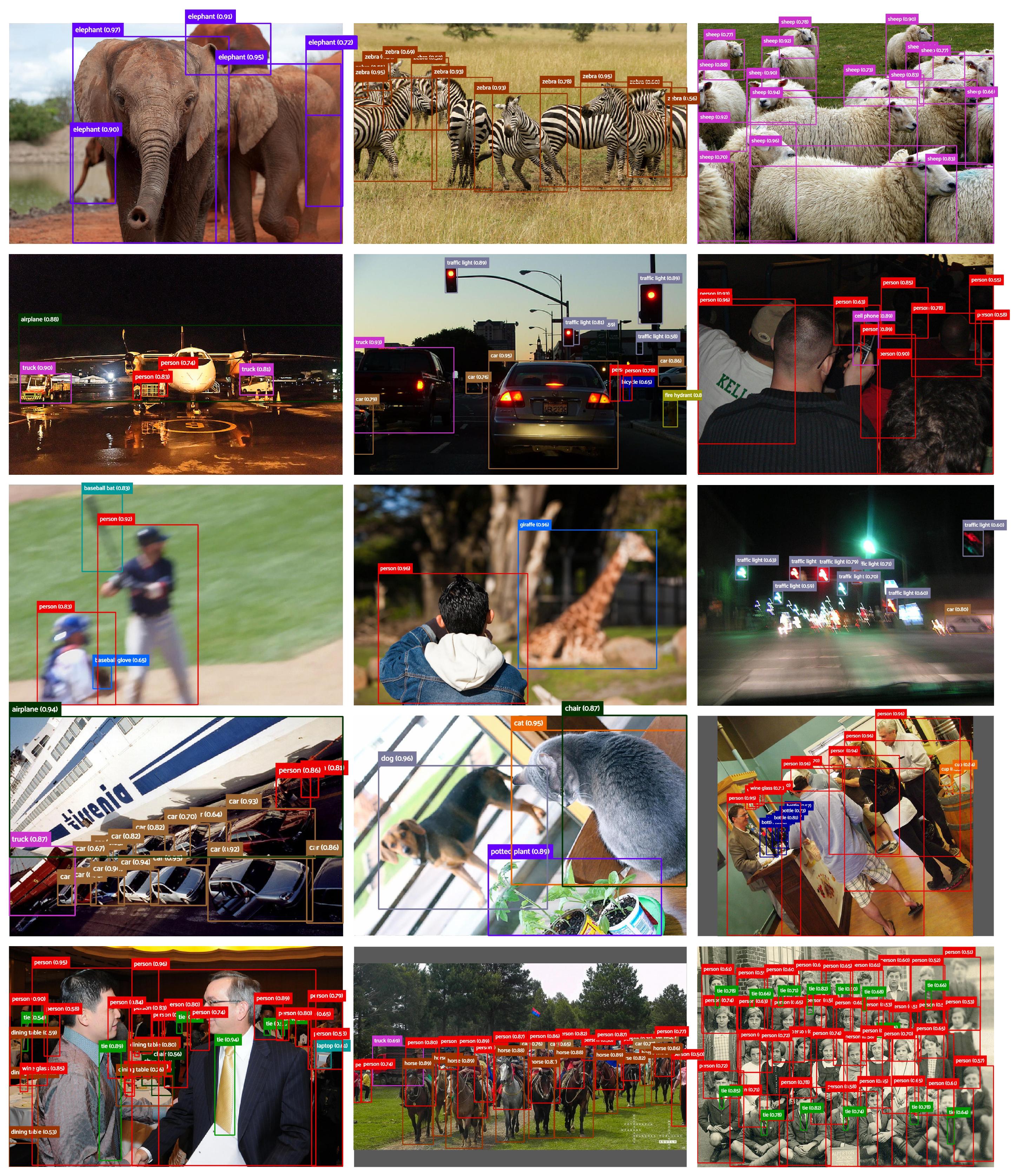
The following visualization demonstrates D-FINE's predictions in various complex detection scenarios. These include cases with occlusion, low-light conditions, motion blur, depth of field effects, and densely populated scenes. Despite these challenges, D-FINE consistently produces accurate localization results.
 ## Acknowledgement Our work is built upon [RT-DETR](https://github.com/lyuwenyu/RT-DETR). Thanks to the inspirations from [RT-DETR](https://github.com/lyuwenyu/RT-DETR), [GFocal](https://github.com/implus/GFocal), [LD](https://github.com/HikariTJU/LD), and [YOLOv9](https://github.com/WongKinYiu/yolov9). Feel free to contribute and reach out if you have any questions!
bibtex
```latex @misc{peng2024dfine, title={D-FINE: Redefine Regression Task in DETRs as Fine-grained Distribution Refinement}, author={Yansong Peng and Hebei Li and Peixi Wu and Yueyi Zhang and Xiaoyan Sun and Feng Wu}, year={2024}, eprint={2410.13842}, archivePrefix={arXiv}, primaryClass={cs.CV} } ```
Owner
- Name: Ajinkya Kulkarni
- Login: ajinkya-kulkarni
- Kind: user
- Location: Göttingen
- Company: Max Planck Institute for Multidisciplinary Sciences
- Website: https://orcid.org/0000-0003-1423-3676
- Twitter: kulkajinkya
- Repositories: 5
- Profile: https://github.com/ajinkya-kulkarni
Image Data Scientist @mpi_nat working in Translational Oncology
GitHub Events
Total
- Push event: 1
Last Year
- Push event: 1