https://github.com/alcampopiano/graphical_query_app
A Python web app for constructing graphical queries
Science Score: 26.0%
This score indicates how likely this project is to be science-related based on various indicators:
-
○CITATION.cff file
-
✓codemeta.json file
Found codemeta.json file -
✓.zenodo.json file
Found .zenodo.json file -
○DOI references
-
○Academic publication links
-
○Committers with academic emails
-
○Institutional organization owner
-
○JOSS paper metadata
-
○Scientific vocabulary similarity
Low similarity (10.7%) to scientific vocabulary
Repository
A Python web app for constructing graphical queries
Basic Info
- Host: GitHub
- Owner: Alcampopiano
- License: bsd-3-clause
- Language: CSS
- Default Branch: master
- Size: 8.34 MB
Statistics
- Stars: 3
- Watchers: 1
- Forks: 1
- Open Issues: 0
- Releases: 0
Metadata Files
README.md
Graphical Query Application
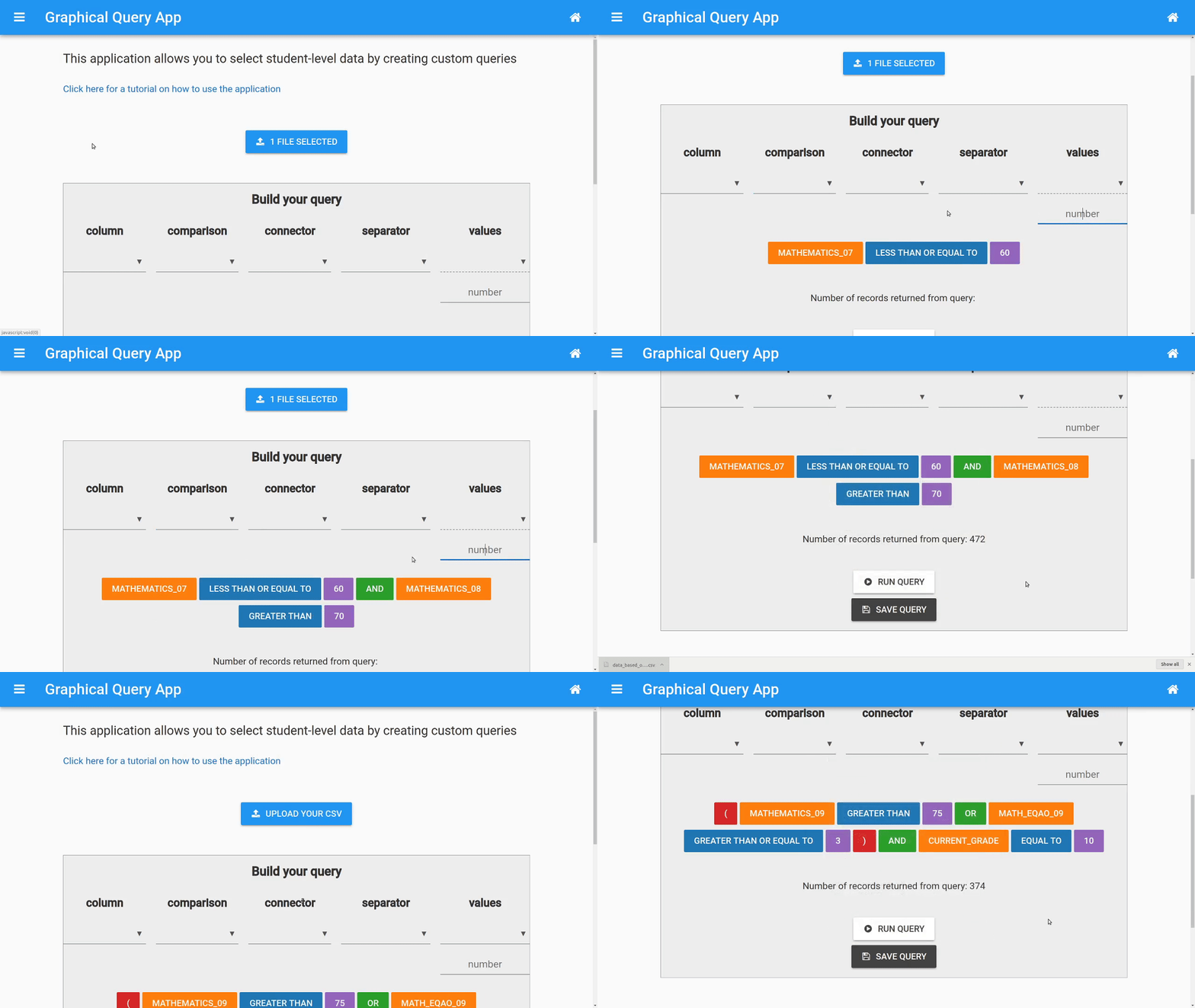
This is an example of using the Anvil App Server to build a web application using nothing but Python.
As shown above, this application allows you to select data based on a graphical-style query.
Installation
$ pip install -r graphical_query_app/requirements.txt
Running the app locally
After cloning this repository, run the following command to launch the app
$ anvil-app-server --app graphical_query_app
The app should now be running on http://localhost:3030.
Using your own data
I have included some same data in the "example_data" directory. Feel free to load that into the app to see how everything works. When you are ready to use your own data, make sure it is squeaky clean! That is, don't have mixed types inside the same column. Numbers need to be able to be treated as numbers. Also, best to keep your column names sane as well (no spaces or special characters, or else the app may explode)
Saving queries
To save your queries, simply click "save query" once you have one that you like. A text area will appear asking you to give it a nice description. That's it! Now you can reuse that query without having to construct it all over again.
Enjoy!
Owner
- Name: Allan Campopiano
- Login: Alcampopiano
- Kind: user
- Repositories: 5
- Profile: https://github.com/Alcampopiano
Combining expertise from computer science, statistics, and psychological research
GitHub Events
Total
Last Year
Committers
Last synced: about 1 year ago
Top Committers
| Name | Commits | |
|---|---|---|
| campopianoa@hcdsb.org | c****a@h****g | 9 |
| alcampopiano | a****o@g****m | 4 |
Committer Domains (Top 20 + Academic)
Issues and Pull Requests
Last synced: about 1 year ago
All Time
- Total issues: 0
- Total pull requests: 0
- Average time to close issues: N/A
- Average time to close pull requests: N/A
- Total issue authors: 0
- Total pull request authors: 0
- Average comments per issue: 0
- Average comments per pull request: 0
- Merged pull requests: 0
- Bot issues: 0
- Bot pull requests: 0
Past Year
- Issues: 0
- Pull requests: 0
- Average time to close issues: N/A
- Average time to close pull requests: N/A
- Issue authors: 0
- Pull request authors: 0
- Average comments per issue: 0
- Average comments per pull request: 0
- Merged pull requests: 0
- Bot issues: 0
- Bot pull requests: 0