https://github.com/cytoscape/cytoscape.js-cxtmenu
Context menu for Cytoscape.js
Science Score: 33.0%
This score indicates how likely this project is to be science-related based on various indicators:
-
○CITATION.cff file
-
✓codemeta.json file
Found codemeta.json file -
○.zenodo.json file
-
○DOI references
-
✓Academic publication links
Links to: zenodo.org -
✓Committers with academic emails
2 of 25 committers (8.0%) from academic institutions -
○Institutional organization owner
-
○JOSS paper metadata
-
○Scientific vocabulary similarity
Low similarity (9.8%) to scientific vocabulary
Keywords
Keywords from Contributors
Repository
Context menu for Cytoscape.js
Basic Info
Statistics
- Stars: 173
- Watchers: 27
- Forks: 83
- Open Issues: 0
- Releases: 12
Topics
Metadata Files
README.md
cytoscape-cxtmenu

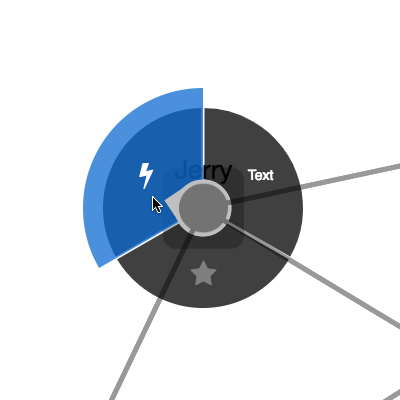
Description
A circular, swipeable context menu extension for Cytoscape.js
- Demo with default options: demo
- Demo with adaptative spotlight radius features: demo
- Demo with outsideMenuCancel: demo
This extension creates a widget that lets the user operate circular context menus on nodes in Cytoscape.js. The user swipes along the circular menu to select a menu item and perform a command on either a node, a edge, or the graph background.
Dependencies
- Cytoscape.js ^3.2.0
Usage instructions
Download the library:
* via npm: npm install cytoscape-cxtmenu,
* via bower: bower install cytoscape-cxtmenu, or
* via direct download in the repository (probably from a tag).
Import the library as appropriate for your project:
ES import:
```js import cytoscape from 'cytoscape'; import cxtmenu from 'cytoscape-cxtmenu';
cytoscape.use( cxtmenu ); ```
CommonJS require:
```js let cytoscape = require('cytoscape'); let cxtmenu = require('cytoscape-cxtmenu');
cytoscape.use( cxtmenu ); // register extension ```
AMD:
js
require(['cytoscape', 'cytoscape-cxtmenu'], function( cytoscape, cxtmenu ){
  cxtmenu( cytoscape ); // register extension
});
Plain HTML/JS has the extension registered for you automatically, because no require() is needed.
CSS
You can style the font of the command text with the cxtmenu-content class, and you can style disabled entries with the cxtmenu-disabled class.
API
You initialise the plugin on the same HTML DOM element container used for Cytoscape.js:
```js
let cy = cytoscape({ container: document.getElementById('cy'), /* ... */ });
// the default values of each option are outlined below:
let defaults = {
menuRadius: function(ele){ return 100; }, // the outer radius (node center to the end of the menu) in pixels. It is added to the rendered size of the node. Can either be a number or function as in the example.
selector: 'node', // elements matching this Cytoscape.js selector will trigger cxtmenus
commands: [ // an array of commands to list in the menu or a function that returns the array
/*
{ // example command
fillColor: 'rgba(200, 200, 200, 0.75)', // optional: custom background color for item
content: 'a command name', // html/text content to be displayed in the menu
contentStyle: {}, // css key:value pairs to set the command's css in js if you want
select: function(ele){ // a function to execute when the command is selected
console.log( ele.id() ) // ele holds the reference to the active element
},
hover: function(ele){ // a function to execute when the command is hovered
console.log( ele.id() ) // ele holds the reference to the active element
},
enabled: true // whether the command is selectable
}
/
], // function( ele ){ return [ /...*/ ] }, // a function that returns commands or a promise of commands
fillColor: 'rgba(0, 0, 0, 0.75)', // the background colour of the menu
activeFillColor: 'rgba(1, 105, 217, 0.75)', // the colour used to indicate the selected command
activePadding: 20, // additional size in pixels for the active command
indicatorSize: 24, // the size in pixels of the pointer to the active command, will default to the node size if the node size is smaller than the indicator size,
separatorWidth: 3, // the empty spacing in pixels between successive commands
spotlightPadding: 4, // extra spacing in pixels between the element and the spotlight
adaptativeNodeSpotlightRadius: false, // specify whether the spotlight radius should adapt to the node size
minSpotlightRadius: 24, // the minimum radius in pixels of the spotlight (ignored for the node if adaptativeNodeSpotlightRadius is enabled but still used for the edge & background)
maxSpotlightRadius: 38, // the maximum radius in pixels of the spotlight (ignored for the node if adaptativeNodeSpotlightRadius is enabled but still used for the edge & background)
openMenuEvents: 'cxttapstart taphold', // space-separated cytoscape events that will open the menu; only cxttapstart and/or taphold work here
itemColor: 'white', // the colour of text in the command's content
itemTextShadowColor: 'transparent', // the text shadow colour of the command's content
zIndex: 9999, // the z-index of the ui div
atMouse: false, // draw menu at mouse position
outsideMenuCancel: false // if set to a number, this will cancel the command if the pointer is released outside of the spotlight, padded by the number given
};
let menu = cy.cxtmenu( defaults ); ```
You get access to the cxtmenu API as the returned value of calling the extension. You can use this to clean up and destroy the menu instance:
```js let menu = cy.cxtmenu( someOptions );
menu.destroy(); ```
Build targets
npm run test: Run Mocha tests in./testnpm run build: Build./src/**intocytoscape-cxtmenu.jsnpm run watch: Automatically build on changes with live reloading (N.b. you must already have an HTTP server running)npm run dev: Automatically build on changes with live reloading with webpack dev servernpm run lint: Run eslint on the source
N.b. all builds use babel, so modern ES features can be used in the src.
Publishing instructions
This project is set up to automatically be published to npm and bower. To publish:
- Build the extension :
npm run build:release - Commit the build :
git commit -am "Build for release" - Bump the version number and tag:
npm version major|minor|patch - Push to origin:
git push && git push --tags - Publish to npm:
npm publish . - If publishing to bower for the first time, you'll need to run
bower register cytoscape-cxtmenu https://github.com/cytoscape/cytoscape.js-cxtmenu.git - Make a new release for Zenodo.
Owner
- Name: Cytoscape Consortium
- Login: cytoscape
- Kind: organization
- Website: http://www.cytoscape.org/
- Repositories: 153
- Profile: https://github.com/cytoscape
GitHub Events
Total
- Issues event: 4
- Watch event: 6
- Delete event: 6
- Issue comment event: 19
- Pull request event: 12
- Fork event: 1
- Create event: 3
Last Year
- Issues event: 4
- Watch event: 6
- Delete event: 6
- Issue comment event: 19
- Pull request event: 12
- Fork event: 1
- Create event: 3
Committers
Last synced: 11 months ago
Top Committers
| Name | Commits | |
|---|---|---|
| Max Franz | m****z@g****m | 128 |
| cheuncp1 | c****g@r****l | 6 |
| Tristan IDOUX | t****x@g****m | 6 |
| Manfred Cheung | m****n@u****a | 4 |
| dependabot[bot] | 4****] | 4 |
| Jan Blok | j****k@r****l | 3 |
| Derek Kent | d****k@d****g | 3 |
| Emile | e****n@v****l | 3 |
| xiani | x****e@g****m | 3 |
| Luke Preston | l****n@b****k | 2 |
| Davey Chu | d****u@r****l | 2 |
| Aidan Reel | a****l@g****m | 2 |
| Jörg Richter | j****i@d****e | 2 |
| DC | 3****z | 2 |
| Alexander Li | a****0@g****m | 1 |
| Brad Mostert | m****b | 1 |
| Florian Dejonckheere | f****n@f****e | 1 |
| Javed Nissar | j****r@g****m | 1 |
| SIM | k****t | 1 |
| Shakhal Levinson | s****n@g****m | 1 |
| Yaroslav Sidlovsky | z****n@g****m | 1 |
| ktei | k****8@g****m | 1 |
| megawebmaster | m****r | 1 |
| zxx | 8****2@q****m | 1 |
| costinBol | c****n@o****m | 1 |
Committer Domains (Top 20 + Academic)
Issues and Pull Requests
Last synced: 10 months ago
All Time
- Total issues: 53
- Total pull requests: 75
- Average time to close issues: 6 months
- Average time to close pull requests: about 1 month
- Total issue authors: 41
- Total pull request authors: 14
- Average comments per issue: 3.38
- Average comments per pull request: 2.04
- Merged pull requests: 14
- Bot issues: 0
- Bot pull requests: 58
Past Year
- Issues: 2
- Pull requests: 14
- Average time to close issues: 24 days
- Average time to close pull requests: 22 days
- Issue authors: 2
- Pull request authors: 1
- Average comments per issue: 2.5
- Average comments per pull request: 1.0
- Merged pull requests: 0
- Bot issues: 0
- Bot pull requests: 14
Top Authors
Issue Authors
- jri (6)
- maxkfranz (4)
- KonradHoeffner (2)
- vict0rsch (2)
- mlcalache (2)
- sukazavr (1)
- mecharmor (1)
- ajoslin103 (1)
- til2000 (1)
- DavidFlamini (1)
- developer0116 (1)
- cicarulez (1)
- lukejpreston (1)
- aabidsofi19 (1)
- tunesmith (1)
Pull Request Authors
- dependabot[bot] (71)
- cicarulez (3)
- tristanidoux (2)
- costinBol (2)
- XiaNi (1)
- mostertb (1)
- kamranjon (1)
- vjarnot (1)
- HEmile (1)
- kgullion (1)
- jri (1)
- zxxzzzzz (1)
- lukejpreston (1)
- jakdosen (1)
Top Labels
Issue Labels
Pull Request Labels
Packages
- Total packages: 3
-
Total downloads:
- npm 22,163 last-month
- Total docker downloads: 286
-
Total dependent packages: 20
(may contain duplicates) -
Total dependent repositories: 108
(may contain duplicates) - Total versions: 85
- Total maintainers: 6
npmjs.org: cytoscape-cxtmenu
A circular, swipeable context menu extension for Cytoscape.js
- Homepage: https://github.com/cytoscape/cytoscape.js-cxtmenu
- License: MIT
-
Latest release: 3.5.0
published over 3 years ago
Rankings
Maintainers (5)
bower.io: cytoscape-cxtmenu
A circular, swipeable context menu extension for Cytoscape.js
- License: MIT
-
Latest release: v3.5.0
published over 3 years ago
Rankings
npmjs.org: @radixlabs/cytoscape-cxtmenu
A circular, swipeable context menu extension for Cytoscape.js
- Homepage: https://github.com/cytoscape/cytoscape.js-cxtmenu
- License: MIT
-
Latest release: 3.4.0
published over 4 years ago
Rankings
Maintainers (1)
Dependencies
- cytoscape ^3.2.0
- 1097 dependencies
- babel-core ^6.24.1 development
- babel-loader ^7.0.0 development
- babel-preset-env ^1.5.1 development
- camelcase ^4.1.0 development
- chai 4.0.2 development
- cpy-cli ^1.0.1 development
- cross-env ^5.0.0 development
- eslint ^3.9.1 development
- gh-pages ^1.0.0 development
- mocha 3.4.2 development
- npm-run-all ^4.1.2 development
- rimraf ^2.6.2 development
- update ^0.7.4 development
- updater-license ^1.0.0 development
- webpack ^2.6.1 development
- webpack-dev-server ^2.4.5 development