philharmonic
Decoding the functional networks of non-model organisms
Science Score: 67.0%
This score indicates how likely this project is to be science-related based on various indicators:
-
✓CITATION.cff file
Found CITATION.cff file -
✓codemeta.json file
Found codemeta.json file -
✓.zenodo.json file
Found .zenodo.json file -
✓DOI references
Found 9 DOI reference(s) in README -
✓Academic publication links
Links to: biorxiv.org, frontiersin.org, zenodo.org -
○Academic email domains
-
○Institutional organization owner
-
○JOSS paper metadata
-
○Scientific vocabulary similarity
Low similarity (15.2%) to scientific vocabulary
Repository
Decoding the functional networks of non-model organisms
Basic Info
- Host: GitHub
- Owner: samsledje
- License: mit
- Language: Jupyter Notebook
- Default Branch: main
- Size: 40.9 MB
Statistics
- Stars: 11
- Watchers: 1
- Forks: 1
- Open Issues: 0
- Releases: 8
Metadata Files
README.md

Decoding the Functional Networks of Non-Model Organisms





 -->
-->
PHILHARMONIC is a computational framework for de novo network inference and functional clustering in non-model organisms. It requires only a sequenced proteome, and produces functionally coherent, human-interpretable clusterings.
[!IMPORTANT] Our preprint is out now!
Table of Contents
- Installation
- Usage
- Workflow Overview
- Interpreting Results
- Detailed Configuration
- Citation
- FAQ/Known Issues
- Contributing
Installation
For the simplest installation, you can install via pip. For more control over use of computational resources or running of individual steps, we recommend cloning this repository and installing with Poetry.
bash
pip install philharmonic
[!NOTE] We also recommend installing Cytoscape to visualize the resulting networks. <!-- You may need to swap out the pytorch-cuda version for your specific system. -->
Usage
Required data
The only data that PHILHARMONIC requires is a set of protein sequences in .fasta format. We provide a set of high-level GO terms on which to filter proteins prior to candidate generation and network prediction. You may optionally provide your own set of GO terms, as the go_filter_path argument in the configuration file.
Setting up the config
The config.yml file is where you will specify the parameters for PHILHARMONIC. We provide a sample config in this repository
with recommended parameters. You will need to specify the paths to your protein sequences. You can find an explanation for all parameters below. If you want to use an LLM to automatically name your clusters, make sure you have set the OPENAI_API_KEY environment variable with your API key, or set llm.model in the config to an open source LLM (see llm package docs). For most use cases, the default parameters should be okay, but make sure to set those in the "User Specified" section as these will differ per system and for each run.
[!IMPORTANT] The
run_nameCANNOT have a space in it. If you want to use multiple words replace spaces with underscores.[!NOTE] We recommend using the default
go_filter_path, but if you choose to set your own, it should be a non-empty file. If you want to include all proteins, you can use the root of the GO tree --GO:008150as the only line in the file.
```yaml
User Specified
runname: [identifier for this run] sequencepath: [path to protein sequences in .fasta format] workdir: [path to working directory] gofilterpath: assets/gofilter.txt use_llm: [true/false: whether to name clusters using a large language model] ... [rest of config file] ```
Running PHILHARMONIC
Once your configuration file is set up, you can invoke PHILHARMONIC with
bash
philharmonic conduct -cf {config file} -c {number of cores}
or, if the repository has been locally cloned and installed, with
bash
snakemake --configfile {config file} -c {number of cores}
Outputs
We provide a zip of the most relevant output files in [run].zip, which contains the following files:
bash
run.zip
|
|-- run_human_readable.txt # Easily readable/scannable list of clusters
|-- run_network.positive.tsv # All edges predicted by D-SCRIPT
|-- run_clusters.json # Main result file, contains all clusters, edges, and functions
|-- run_cluster_graph.tsv # Graph of clusters, where edges are weighted by the number of connections between clusters
|-- run_cluster_graph_functions.tsv # Table of high-level cluster functions from GO Slim
|-- run_GO_map.tsv # Mapping between proteins and GO function labels
Instructions for working with and evaluating these results can be found in Interpreting the Results.
Resource Usage
We recommend running on a machine with at least 32 cores and one GPU, and ~1GB of RAM per 100 sequences. hmmscan runtime is limited by the number of cores provided. dscript is memory intensive, and will run extremely slowly without access to a GPU
Running on Google Colab

We provide support for running PHILHARMONIC in Google Colab with the notebook at nb/00_run_philharmonic.ipynb.
[!WARNING] The
hmmscananddscriptsteps can be quite resource intensive, and may result in a time-out if run on Colab.
Running on HPC
We provide support for running PHILHARMONIC on an HPC environment with the Snakefile_slurm file. We have provided resource estimates, but before submitting a job make sure that resources are properly set for your system.
Make sure you have the snakemake-executor-plugin-slurm plugin installed
pip install snakemake-executor-plugin-slurm
Create a profile file slurm_profile/config.v8+.yaml and specify the following:
```yaml executor: slurm jobs: [number of species] default-resources: slurmpartition: [your main partition] slurmaccount: [your main account]
set-resources: dscript: slurmpartition: [your gpu partition] slurmextra: [your gpu specification] # "'--gres=gpu:h100_pcie:1'" ```
Then, all query .fasta files should be placed in the directory {species}_results/{species}.fasta, or the SPECIES_NAME list at the head of the file should be edited. Then run
bash
XDG_CACHE_HOME="{your cache dir}" OPENAI_API_KEY="{your api key}" snakemake -s Snakefile_slurm --configfile config_slurm.yml --workflow-profile slurm_profile
Workflow Overview
A detailed overview of PHILHARMNONIC can be found in the manuscript. We briefly outline the method below.
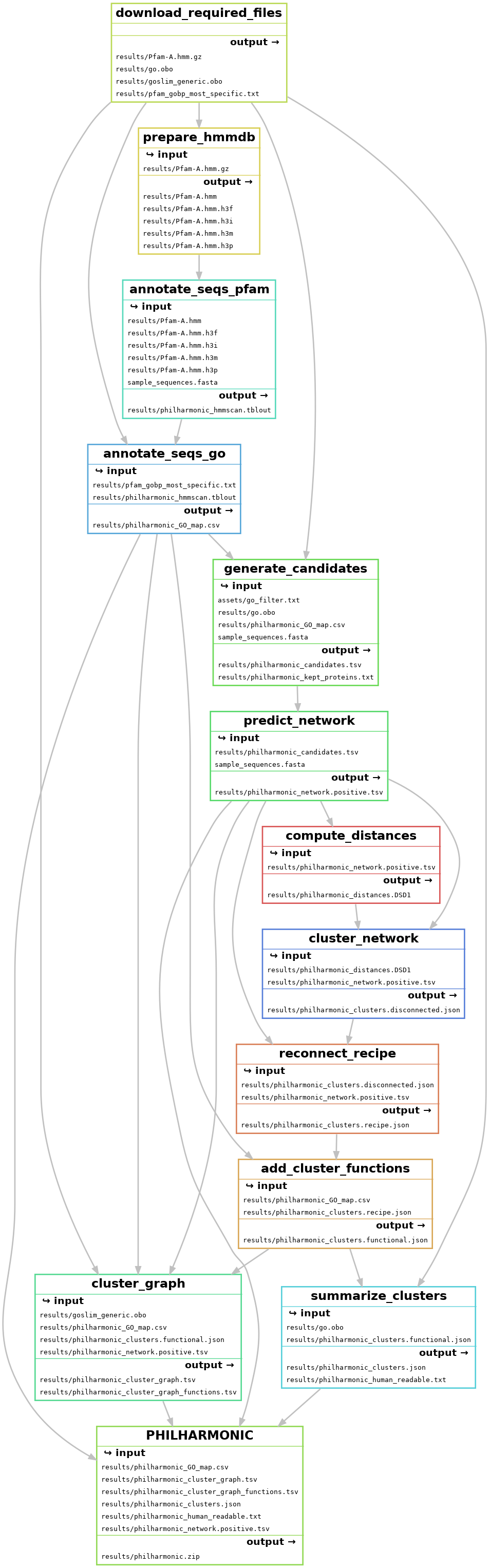
- Download necessary files (
download_required_files) - Run hmmscan on protein sequences to annotate pfam domains (
annotate_seqs_pfam) - Use pfam-go associations to add GO terms to sequences (
annotate_seqs_go) - Generate candidate pairs (
generate_candidates+) - Use D-SCRIPT to predict network (
predict_network) - Compute node distances with FastDSD (
compute_distances) - Cluster the network with spectral clustering (
cluster_network+) - Use ReCIPE to reconnect clusters (
reconnect_recipe) - Annotate clusters with functions (
add_cluster_functions+) - Compute cluster graph (
cluster_graph+) - Name and describe clusters for human readability (
summarize_clusters+)
Each of these steps can be invoked independently by running snakemake -c {number of cores} --configfile {config file} {target}. The {target} is shown in parentheses following each step above. Certain steps (marked with a +) are available to run directly as philharmonic commands with the appropriate input, e.g. philharmonic summarize-clusters---note that in this case, underscores are generally replaced with dashes. Run philharmonic --help for full specifications.
Interpreting the Results
We provide some guidance on interpreting the output of PHILHARMONIC here, as well as analysis notebooks which can be run locally or in Google Colab. The typical starting point for these analyses is the zip file described in Outputs.
1. Result Summary
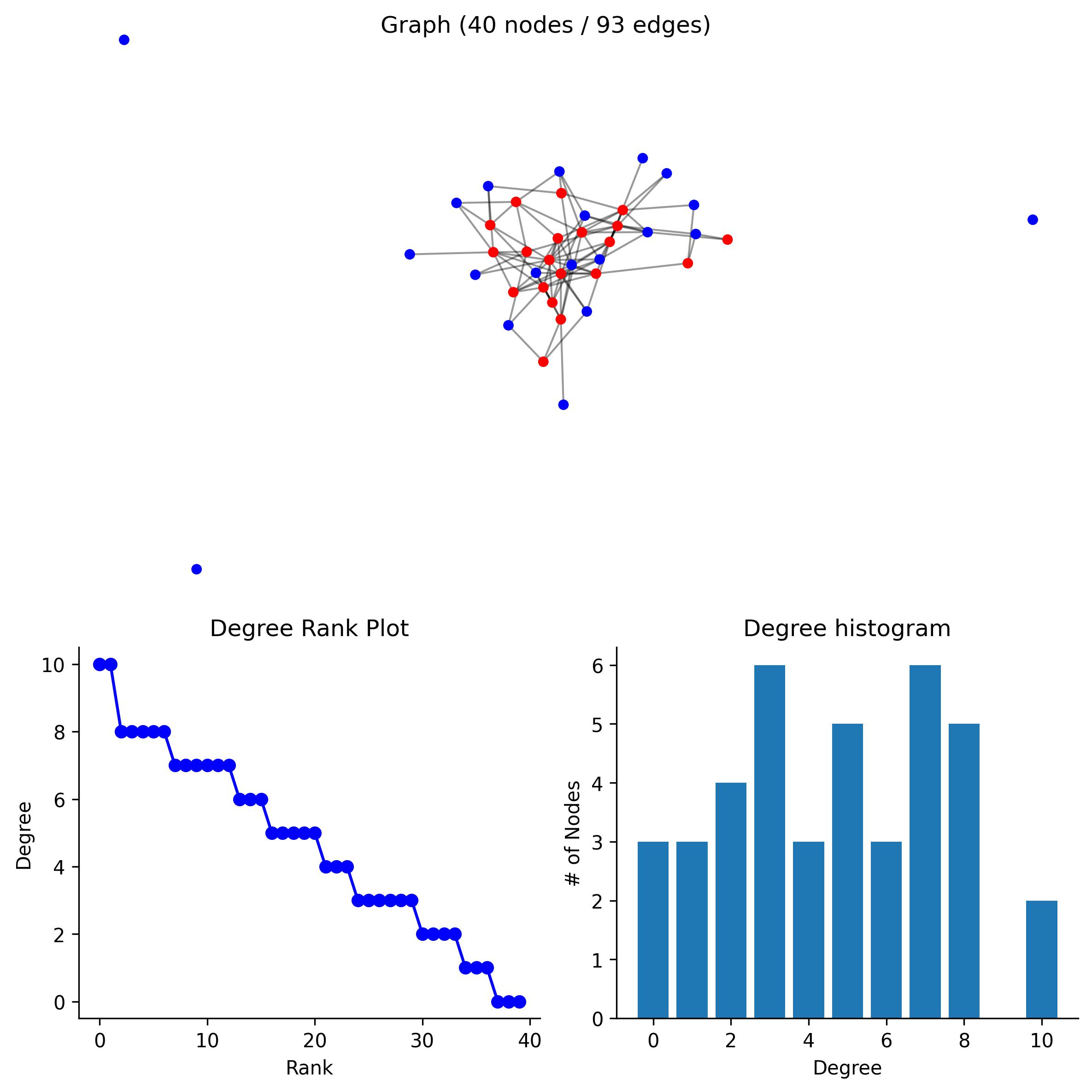
Using the clusters.json file, the network.positive.tsv file, the GO map.tsv file, and a GO Slim database, you can view the overall network, a summary of the clustering, and explore individual clusters.
| | Network | |:-------------|----------------:| | Nodes | 7267 | | Edges | 348278 | | Degree (Med) | 37 | | Degree (Avg) | 95.8519 | | Sparsity | 0.00659501 |
bash
Pain Response and Signaling Pathways Cluster
Cluster of 20 proteins [pdam_00013683-RA, pdam_00006515-RA, pdam_00000216-RA, ...] (hash 208641124039621440)
20 proteins re-added by ReCIPE (degree, 0.75)
Edges: 3
Triangles: 0
Max Degree: 2
Top Terms:
        GO:0019233 - <sensory perception of pain> (20)
        GO:0048148 - <behavioral response to cocaine> (19)
        GO:0006468 - <protein phosphorylation> (19)
        GO:0007507 - <heart development> (19)
        GO:0010759 - <positive regulation of macrophage chemotaxis> (19)
        GO:0001963 - <synaptic transmission, dopaminergic> (19)
        GO:0071380 - <cellular response to prostaglandin E stimulus> (19)
        GO:0071502 - <cellular response to temperature stimulus> (19)
        GO:0008542 - <visual learning> (19)
        GO:0007601 - <visual perception> (19)
2. Functional Permutation Analysis
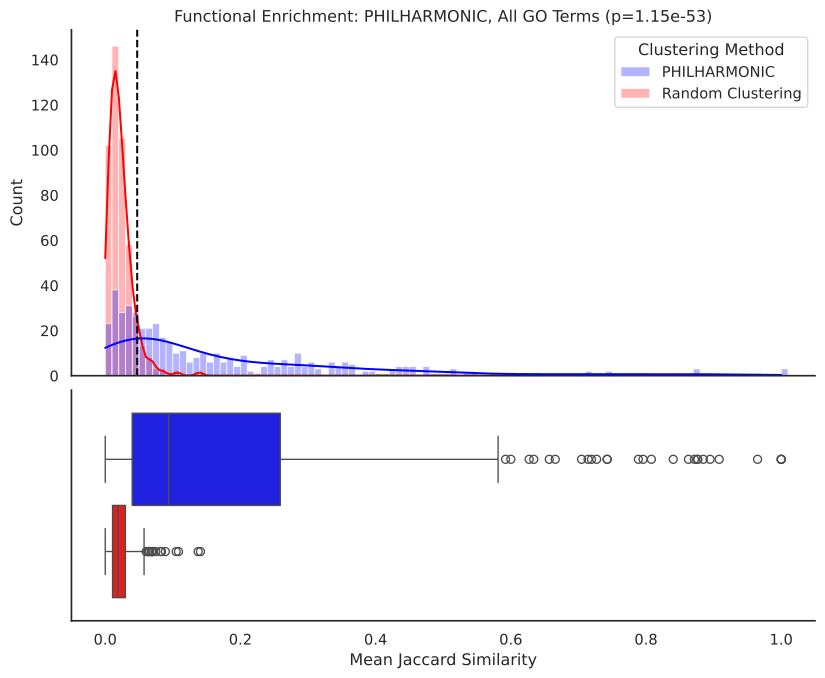
Using the same files, you can run a statistical test of cluster function by permuting cluster labels, and computing the Jaccard similarity between terms in the same cluster.
3. g:Profiler Enrichment Analysis
You can view GO enrichments for each cluster using g:Profiler. In the provided notebook, we perform an additional mapping step to align the namespace used in our analysis with the namespace used by g:Profiler.
| | native | name | p_value | |---:|:-----------|:---------------------------------------------|------------:| | 0 | GO:0007186 | G protein-coupled receptor signaling pathway | 4.99706e-09 | | 1 | GO:0007165 | signal transduction | 2.77627e-06 | | 2 | GO:0023052 | signaling | 3.17572e-06 | | 3 | GO:0007154 | cell communication | 3.50392e-06 | | 4 | GO:0051716 | cellular response to stimulus | 1.58692e-05 | | 5 | GO:0050896 | response to stimulus | 2.62309e-05 | | 6 | GO:0050794 | regulation of cellular process | 0.000432968 | | 7 | GO:0050789 | regulation of biological process | 0.00072382 | | 8 | GO:0065007 | biological regulation | 0.000923115 |
4. Gene Expression Analysis
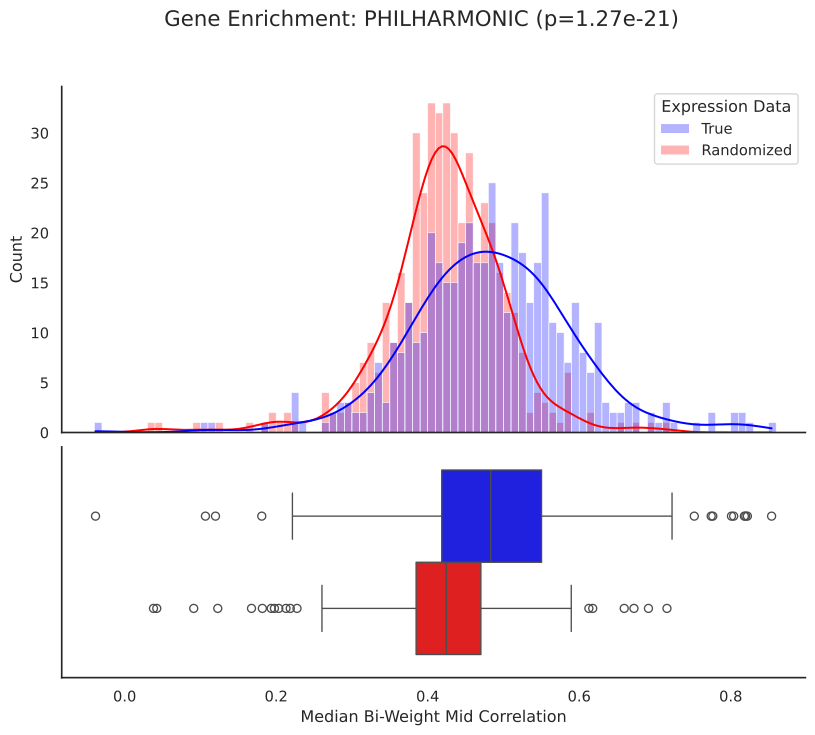
If gene expression data is available for the target species, we can check that proteins clustered together have correlated expression, and we can visualize where differentially expressed genes localize within the networks and clusters. Here, we use Pocillopora transcriptomic data from Connelly et al. 2022.
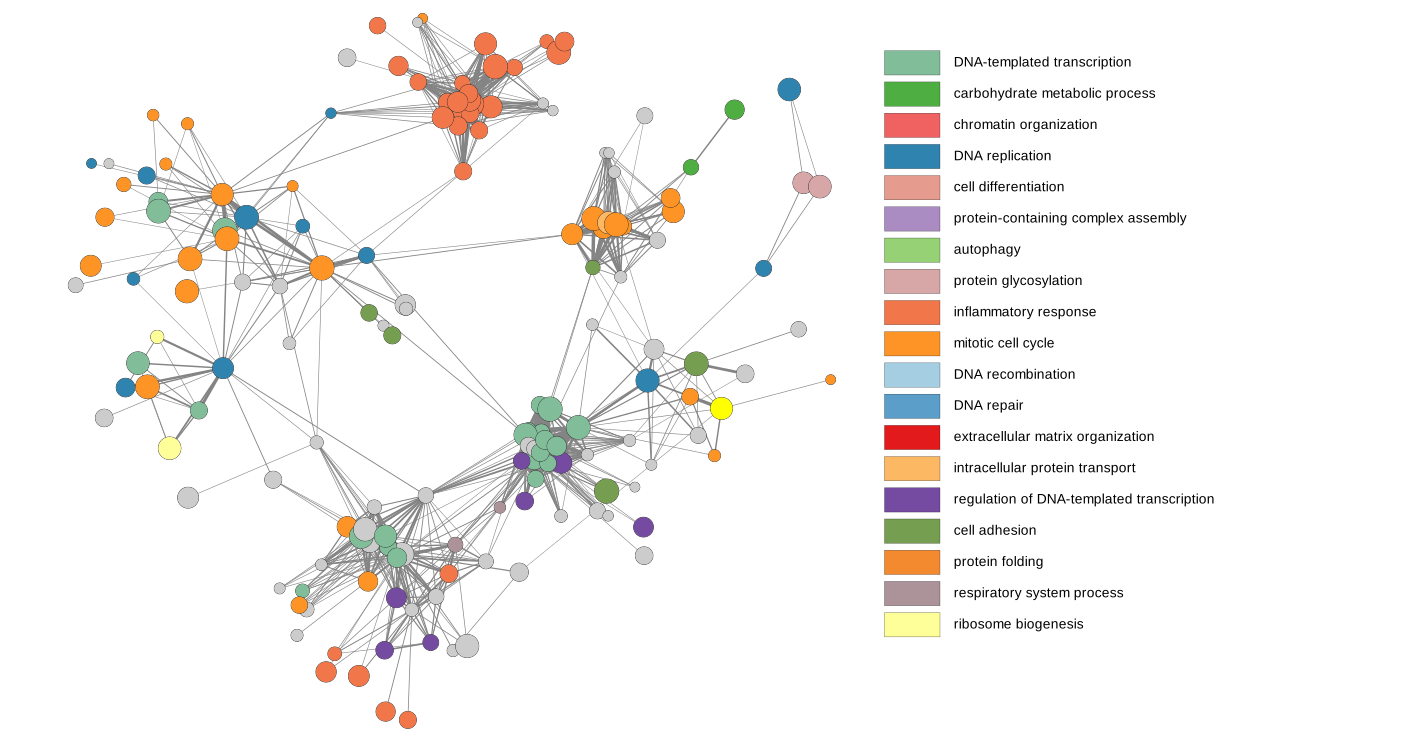
5. View the full network in Cytoscape
- Load
network.positive.tsvusingFile -> Import -> Network from File
6. View the cluster graph in Cytoscape
- Load
cluster_graph.tsvusingFile -> Import -> Network from File - Load
cluster_graph_functions.tsvusingFile -> Import -> Table from File - Add a
Column filteron theEdge: weightattribute, selecting edges greater than ~50-100 weight Select -> Nodes -> Nodes Connected by Selected Edgesto subset the nodes- Create the subgraph with
File -> New Network -> From Selected Nodes, Selected Edges - Layout the network with your layout of choice, we recommend
Layout -> Prefuse Force Directed Layout -> weight - Add node colors using the PHILHARMONIC style, imported with
File -> Import -> Styles from File
Detailed Configuration
The config.yml file contains various parameters that control the behavior of PHILHARMONIC. Below is a detailed explanation of each parameter, including default values:
User Specified
run_name: Identifier for this run [required]sequence_path: Path to protein sequences in .fasta format [required]go_filter_path: Path to list of GO terms to filter candidates (default: "assets/go_filter.txt")work_dir: Path to the working directory where results will be stored (default: "results")use_llm: Boolean flag to enable/disable LLM naming for cluster summarization (default: true)
Note: if you set use_llm with an OpenAI model, make sure that you have set the environment variable OPENAI_API_KEY prior to running.
General Parameters
seed: Random seed for reproducibility (default: 42)
hmmscan Parameters
hmmscan.path: Path to the hmmscan executable (default: "hmmscan")hmmscan.threads: Number of threads to use for hmmscan (default: 32)
D-SCRIPT Parameters
dscript.path: Path to the D-SCRIPT executable (default: "dscript")dscript.n_pairs: Number of protein pairs to predict (-1 for all pairs) (default: -1)dscript.model: Pre-trained D-SCRIPT model to use. (default: "samsl/dscripthumanv1")dscript.device: GPU device to use (-1 for CPU) (default: 0)
DSD Parameters
dsd.path: Path to the FastDSD executable (default: "fastdsd")dsd.t: Edge existence threshold for DSD algorithm (default: 0.5)dsd.confidence: Boolean flag to use confidence scores (default: true)
Clustering Parameters
clustering.init_k: Initial number of clusters for spectral clustering (default: 500)clustering.min_cluster_size: Minimum size of a cluster (default: 3)clustering.cluster_divisor: Divisor used to determine the final number of clusters (default: 20)clustering.sparsity_thresh: Sparsity threshold for filtering edges (default: 1e-5)
ReCIPE Parameters
recipe.lr: Linear ratio for ReCIPE algorithm (default: 0.1)recipe.cthresh: Connectivity threshold to add proteins until for ReCIPE (default: 0.75)recipe.max_proteins: Maximum number of proteins to add to a cluster in ReCIPE (default: 20)recipe.metric: Metric to use for ReCIPE (default: "degree")
Langchain Parameters
llm.model: Language model to use for cluster summarization (default: "gpt-4o")
Citation
bibtex
@article {sledzieski2024decoding,
    author = {Sledzieski, Samuel and Versavel, Charlotte and Singh, Rohit and Ocitti, Faith and Devkota, Kapil and Kumar, Lokender and Shpilker, Polina and Roger, Liza and Yang, Jinkyu and Lewinski, Nastassja and Putnam, Hollie M and Berger, Bonnie and Klein-Seetharaman, Judith and Cowen, Lenore},
    title = {Decoding the Functional Interactome of Non-Model Organisms with PHILHARMONIC},
    elocation-id = {2024.10.25.620267},
    year = {2024},
    doi = {10.1101/2024.10.25.620267},
    publisher = {Cold Spring Harbor Laboratory},
    URL = {https://www.biorxiv.org/content/10.1101/2024.10.25.620267v1},
    eprint = {https://www.biorxiv.org/content/10.1101/2024.10.25.620267v1.full.pdf},
    journal = {bioRxiv}
}
Issues
- On Linux, the package
placmay not install properly with the includedenvironment.yml. If you are seeing the errorNo module names 'asyncore', try runningmamba update plac
Contributing
bash
mamba create -n philharmonic python==3.11
pip install poetry
git clone https://github.com/samsledje/philharmonic.git
cd philharmonic
poetry install
pre-commit install
git checkout -b [feature branch]
Owner
- Name: Samuel Sledzieski
- Login: samsledje
- Kind: user
- Location: Cambridge, MA
- Company: Massachusetts Institute of Technology
- Website: samsl.io
- Twitter: samsledzieski
- Repositories: 4
- Profile: https://github.com/samsledje
PhD student @ MIT. Studying computational biology and bioinformatics.
Citation (CITATION.cff)
cff-version: 1.2.0
message: "If you use this software, please cite it as below."
title: "PHILHARMONIC"
version: 0.8.2
date-released: 2024-10-30
license: MIT
url: "https://github.com/samsledje/philharmonic"
preferred-citation:
  type: article
  title: "Decoding the Functional Interactome of Non-Model Organisms with PHILHARMONIC"
  authors:
  - family-names: "Sledzieski"
    given-names: "Samuel"
  - family-names: "Versavel"
    given-names: "Charlotte"
  - family-names: "Singh"
    given-names: "Rohit"
  - family-names: "Ocitti"
    given-names: "Faith"
  - family-names: "Devkota"
    given-names: "Kapil"
  - family-names: "Kumar"
    given-names: "Lokender"
  - family-names: "Shpilker"
    given-names: "Polina"
  - family-names: "Roger"
    given-names: "Liza"
  - family-names: "Yang"
    given-names: "Jinkyu"
  - family-names: "Lewinski"
    given-names: "Nastassja"
  - family-names: "Putnam"
    given-names: "Hollie"
  - family-names: "Berger"
    given-names: "Bonnie"
  - family-names: "Klein-Seetharaman"
    given-names: "Judith"
  - family-names: "Cowen"
    given-names: "Lenore"
  year: 2024
  journal: "bioRxiv"
  publisher: "Cold Spring Harbor Laboratory"
  doi: "10.1101/2024.10.25.620267"
  bibtext-cite-key: "sledzieski2024decoding"
GitHub Events
Total
- Release event: 4
- Watch event: 10
- Delete event: 1
- Issue comment event: 1
- Push event: 81
- Pull request review comment event: 1
- Pull request review event: 2
- Pull request event: 11
- Fork event: 1
- Create event: 6
Last Year
- Release event: 4
- Watch event: 10
- Delete event: 1
- Issue comment event: 1
- Push event: 81
- Pull request review comment event: 1
- Pull request review event: 2
- Pull request event: 11
- Fork event: 1
- Create event: 6
Packages
- Total packages: 1
-
Total downloads:
- pypi 56 last-month
- Total dependent packages: 0
- Total dependent repositories: 0
- Total versions: 4
- Total maintainers: 1
pypi.org: philharmonic
Decoding functional organization in non-model organisms
- Documentation: https://philharmonic.readthedocs.io/
- License: MIT
-
Latest release: 0.8.1
published almost 2 years ago