fhir-pyrate
FHIR-PYrate is a package that provides a high-level API to query FHIR Servers for bundles of resources and return the structured information as pandas DataFrames. It can also be used to filter resources using RegEx and SpaCy and download DICOM studies and series.
Science Score: 67.0%
This score indicates how likely this project is to be science-related based on various indicators:
-
✓CITATION.cff file
Found CITATION.cff file -
✓codemeta.json file
Found codemeta.json file -
✓.zenodo.json file
Found .zenodo.json file -
✓DOI references
Found 2 DOI reference(s) in README -
✓Academic publication links
Links to: zenodo.org -
○Academic email domains
-
○Institutional organization owner
-
○JOSS paper metadata
-
○Scientific vocabulary similarity
Low similarity (12.9%) to scientific vocabulary
Keywords
Repository
FHIR-PYrate is a package that provides a high-level API to query FHIR Servers for bundles of resources and return the structured information as pandas DataFrames. It can also be used to filter resources using RegEx and SpaCy and download DICOM studies and series.
Basic Info
Statistics
- Stars: 68
- Watchers: 4
- Forks: 14
- Open Issues: 12
- Releases: 23
Topics
Metadata Files
README.md






This package is meant to provide a simple abstraction to query and structure FHIR resources as pandas DataFrames. Want to use R instead? Try out fhircrackr!
If you use this package, please cite:
Hosch, R., Baldini, G., Parmar, V. et al. FHIR-PYrate: a data science friendly Python package to query FHIR servers. BMC Health Serv Res 23, 734 (2023). https://doi.org/10.1186/s12913-023-09498-1
There are four main classes: * Ahoy: Authenticate on the FHIR API (Example 1, 2), at the moment only BasicAuth and token authentication are supported. * Pirate: Extract and search for data via FHIR API (Example 1, 2, 3 & 4). * Miner: Search for keywords or phrases within Diagnostic Report (Example 4). * DicomDownloader: Download complete studies or series (Example 2).
DISCLAIMER: We have tried to add tests for some public FHIR servers. However, because of the quality and quantity of resources we could not test as much as we have tested with the local FHIR server at our institute. If there is anything in the code that only applies to our server, or you have problems with the authentication (or anything else really), please just create an issue or email us.
Table of Contents:
- Install
- Run Tests
- Explanations & Examples
- Contributing
- Authors and acknowledgment
- License
- Project status
Install
Either Pip
The package can be installed using PyPi
bash
pip install fhir-pyrate
or using GitHub (always the newest version).
bash
pip install git+https://github.com/UMEssen/FHIR-PYrate.git
These two commands only install the packages needed for Pirate. If you also want to use the Miner or the DicomDownloader, then you need to install them as extra dependencies with
bash
pip install "fhir-pyrate[miner]" # only for miner
pip install "fhir-pyrate[downloader]" # only for downloader
pip install "fhir-pyrate[all]" # for both
Or Within Poetry
We can also use poetry for this same purpose. Using PyPi we need to run the following commands.
bash
poetry add fhir-pyrate
poetry install
Whereas to add it from GitHub, we have different options, because until recently
poetry used to exclusively install from the master branch.
Poetry 1.2.0a2+:
bash
poetry add git+https://github.com/UMEssen/FHIR-PYrate.git
poetry install
For the previous versions you need to add the following line to your pyproject.toml file:
bash
fhir-pyrate = {git = "https://github.com/UMEssen/FHIR-PYrate.git", branch = "main"}
and then run
bash
poetry lock
Also in poetry, the above only installs the packages for Pirate. If you also want to use the Miner or the DicomDownloader, then you need to install them as extra dependencies with
bash
poetry add "fhir-pyrate[miner]" # only for miner
poetry add "fhir-pyrate[downloader]" # only for downloader
poetry add "fhir-pyrate[all]" # for both
or by adding the following to your pyproject.toml file:
bash
fhir-pyrate = {git = "https://github.com/UMEssen/FHIR-PYrate.git", branch = "main", extras = ["all"]}
Run Tests
When implementing new features, make sure that the existing ones have not been broken by using our
unit tests. First set the FHIR_USER and FHIR_PASSWORD environment variables with your
username and password for the FHIR server and then run the tests.
bash
poetry run python -m unittest discover tests
If you implement a new feature, please add a small test for it in tests. You can also use the tests as examples.
Explanations & Examples
Please look at the examples folder for complete examples.
Ahoy
The Ahoy class is used to authenticate and is needed for the Pirate and DicomDownloader classes.
```python from fhir_pyrate import Ahoy
Authorize via password
auth = Ahoy( username="yourusername", authmethod="password", authurl="auth-url", # Your URL for authentication refreshurl="refresh-url", # Your URL to refresh the authentication token (if available) ) ```
We accept the following authentication methods:
- token: Pass your already generated token as a constructor argument.
- password: Enter your password via prompt.
- env: Use the
FHIR_USERandFHIR_PASSWORDenvironment variables (mostly used for the unit tests). You can also change their names with thechange_environment_variable_namefunction. - keyring: To Be Implemented.
Pirate
The Pirate can query any resource implemented within the FHIR API and is initialized as follows:
```python from fhir_pyrate import Pirate
auth = ...
Init Pirate
search = Pirate( auth=auth, baseurl="fhir-url", # e.g. "http://hapi.fhir.org/baseDstu2" printrequest_url=False, # If set to true, you will see all requests ) ```
The Pirate functions do one of three things:
1. They run the query and collect the resources and store them in a generator of bundles.
* steal_bundles: single process, no timespan to specify
* sail_through_search_space: multiprocess, divide&conquer with many smaller timespans
* trade_rows_for_bundles: multiprocess, takes DataFrame as input and runs one query per row
2. They take a generator of bundles and build a DataFrame.
* bundles_to_dataframe: multiprocess, builds the DataFrame from the bundles.
3. They are wrapper that combine the functionalities of 1&2, or that set some particular parameters.
* steal_bundles_to_dataframe: single process, executes steal_bundles and then runs bundles_to_dataframe on the result.
* sail_through_search_space_to_dataframe: multiprocess, executes sail_through_search_space and then runs bundles_to_dataframe on the result.
* trade_rows_for_dataframe: multiprocess, executes trade_rows_for_bundles and then runs bundles_to_dataframe on the result, it is also possible to add columns from the original DataFrame to the result
| Name | Type | Multiprocessing | DF Input? | Output | |:----------------------------------------|:----:|:---------------:|:---------:|:--------------------:| | stealbundles | 1 | No | No | Generator of FHIRObj | | sailthroughsearchspace | 1 | Yes | No | Generator of FHIRObj | | traderowsforbundles | 1 | Yes | Yes | Generator of FHIRObj | | bundlestodataframe | 2 | Yes | / | DataFrame | | stealbundlestodataframe | 3 | No | No | DataFrame | | sailthroughsearchspacetodataframe | 3 | Yes | No | DataFrame | | traderowsfordataframe | 3 | Yes | Yes | DataFrame |
CACHING: It is also possible to cache the bundles using the cache_folder parameter.
This unfortunately does not currently work with multiprocessing, but saves a lot of time if you
need to download a lot of data and you are always doing the same requests.
You can also specify how long the cache should be valid with the cache_expiry_time parameter.
Additionally, you can also specify whether the requests should be retried using the retry_requests
parameter. There is an example of this in the docstrings of the Pirate class.
A toy request for ImagingStudy:
```python search = ...
Make the FHIR call
bundles = search.sailthroughsearchspacetodataframe( resourcetype="ImagingStudy", dateinit="2021-04-01", timeattributename="started", requestparams={ "modality": "CT", "_count": 5000, } ) ```
The argument request_params is a dictionary that takes a string as key (the FHIR identifier) and anything as value.
If the value is a list or tuple, then all values will be used to build the request to the FHIR API.
sail_through_search_space_to_dataframe is a wrapper function that directly converts the result of
sail_through_search_space into a DataFrame.
sail_through_search_space
The sail_through_search_space function uses the multiprocessing module to speed up some queries.
The multiprocessing is done as follows:
The time frame is divided into multiple time spans (as many as there are processes) and each smaller
time frame is investigated simultaneously. This is why it is necessary to give a date_init
and date_end param to the sail_through_search_space function.
Note that if the date_init or date_end parameters are given as strings, they will be converted
to datetime.datetime objects, so any non specified parameters (month, day or time) will be assumed
according to the datetime workflow, and then converted to string according to the time_format
specified in the Pirate constructor.
A problematic aspect of the resources is that the date in which the resource was acquired is defined
using different attributes. Also, some resources use a fixed date, other use a time period.
You can specify the date attribute that you want to use with time_attribute_name.
The resources where the date is based on a period (such as Encounter or Procedure) may cause
duplicates in the multiprocessing because one entry may belong to multiple time spans that are
generated. You can drop the ID duplicates once you have built a DataFrame with your data.
trade_rows_for_bundles
In case we already have an Excel sheet or CSV file with fhir_patient_ids or any other
identifier), and we want to request resources based on those
identifiers we can use the function trade_rows_for_bundles:
```python search = ...
DataFrame containing FHIR patient IDs
patient_df = ...
Collect all imaging studies defined within df_reports
drbundles = search.traderowsforbundles( patientdf, resourcetype="DiagnosticReport", requestparams={"count": "100", "status": "final"}, dfconstraints={"subject": "fhirpatient_id"}, ) ```
We only have to define the resource_type and the constraints that we want to enforce from the
DataFrame in df_constraints. This dictionary should contain pairs of (fhir_identifier,
identifier_column) where fhir_identifier is the API search parameter and identifier_column
is the column where the values that we want to search for are stored.
Additionally, a system can be used to better identify the constraints of the DataFrame.
For example, let us assume that we have a column of the DataFrame (called loinc_code that
contains a bunch of different LOINC codes. Our df_constraints could look as follows:
df_constraints={"code": ("http://loinc.org", "loinc_code")}
This function also uses multiprocessing, but differently from before, it will process the rows of the DataFrame in parallel.
bundles_to_dataframe
The two functions described above return a generator of FHIRObj bundles which can then be
converted to a DataFrame using this function.
The bundles_to_dataframe has three options on how to handle and extract the relevant information
from the bundles:
1. Extract everything, in this case you can use the
flatten_data
function, which is already the default for process_function, so you do not actually need to
specify anything.
```python
Create bundles with Pirate
search = ... bundles = ...
Convert the returned bundles to a dataframe
df = search.bundlestodataframe(
bundles=bundles,
)
2. Use a processing function where you define exactly which attributes are needed by iterating
   through the entries and selecting the elements. The values that will be added to the
   dictionary represent the columns of the DataFrame. For an example of when it might make sense
   to do this, check [Example 3](https://github.com/UMEssen/FHIR-PYrate/blob/main/examples/3-patients-for-condition.ipynb).
python
from typing import List, Dict
from fhir_pyrate.util.fhirobj import FHIRObj
Create bundles with Pirate
search = ... bundles = ... def getdiagnostictext(bundle: FHIRObj) -> List[Dict]: records = [] for entry in bundle.entry or []: resource = entry.resource records.append( { "fhirdiagnosticreportid": resource.id, "reportstatus": resource.text.status, "report_text": resource.text.div, } ) return records
Convert the returned bundles to a dataframe
df = search.bundlestodataframe(
bundles=bundles,
processfunction=getdiagnostictext,
)
``
3. Extract only part of the information using thefhirpathsargument. Here you can put a list
of string that follow the [FHIRPath](https://hl7.org/fhirpath/) standard. For this purpose, we
use the [fhirpath-py](https://github.com/beda-software/fhirpath-py) package, which uses the
[antr4](https://github.com/antlr/antlr4) parser. Additionally, you can use tuples like(key,
fhir_path), wherekeywill be the name of the column the information derived from that
FHIRPath will be stored.
``python
Create bundles with Pirate
search = ... bundles = ...
Convert the returned bundles to a dataframe
df = search.bundlestodataframe(
bundles=bundles,
fhir_paths=["id", ("code", "code.coding"), ("identifier", "identifier[0].code")],
)
``
**NOTE 1 on FHIR paths**: The standard also allows some primitive math operations such as modulus
(mod) or integer division (div), and this may be problematic if there are fields of the
resource that use these terms as attributes.
It is actually the case in many generated [public FHIR resources](https://hapi.fhir.org/baseDstu2/DiagnosticReport/133015).
In this case the termtext.div` cannot be used, and you should use a processing function
instead (as in 2.).
NOTE 2 on FHIR paths: Since it is possible to specify the column name with a tuple
(key, fhir_path), it is important to know that if a key is used multiple times for different
pieces of information but for the same resource, the field will be only filled with the first
occurence that is not None.
python
df = search.steal_bundles_to_dataframe(
    resource_type="DiagnosticReport",
    request_params={
        "_count": 1,
        "_include": "DiagnosticReport:subject",
    },
    # CORRECT EXAMPLE
    # In this case subject.reference is None for patient, so all patients will have their Patient.id
    fhir_paths=[("patient", "subject.reference"), ("patient", "Patient.id")],
    # And Patient.id is None for DiagnosticReport, so they will have their subject.reference
    fhir_paths=[("patient", "Patient.id"), ("patient", "subject.reference")],
    # WRONG EXAMPLE
    # In this case, only the first code will be stored
    fhir_paths=[("code", "code.coding[0].code"), ("code", "code.coding[1].code")],
    # CORRECT EXAMPLE
    # Whenever we are working with codes, it is usually better to use the `where` argument and
    # to store the values using a meaningful name
    fhir_paths=[
        ("code_abc", "code.coding.where(system = 'ABC').code"),
        ("code_def", "code.coding.where(system = 'DEF').code"),
    ],
    num_pages=1,
)
***_dataframe
The steal_bundles_to_dataframe, sail_through_search_space_to_dataframe and trade_rows_for_dataframe
are facade functions which retrieve the bundles and then run bundles_to_dataframe.
In trade_rows_for_dataframe you can also specify the with_ref parameter to also add the
parameters specified in df_constraints as columns of the final DataFrame.
You can find an example in Example 3.
Additionally, you can specify the with_columns parameter, which can add any columns from the original
DataFrame. The columns can be either specified as a list of columns [col1, col2, ...] or as a
list of tuples [(new_name_for_col1, col1), (new_name_for_col2, col2), ...].
Currently, whenever a column is completely empty (i.e., no resources have a corresponding value for that column), it is just removed from the DataFrame. This is to ensure that we output clean DataFrames when we are handling multiple resources. More on that in the following section.
Note on Querying Multiple Resources
Not all FHIR servers allow this (at least not the public ones that we have tried),
but it is also possible to obtain multiple resources with just one query:
python
search = ...
result_dfs = search.steal_bundles_to_dataframe(
    resource_type="ImagingStudy",
    request_params={
        "_lastUpdated": "ge2022-12",
        "_count": "3",
        "_include": "ImagingStudy:subject",
    },
    fhir_paths=[
        "id",
        "started",
        ("modality", "modality.code"),
        ("procedureCode", "procedureCode.coding.code"),
        (
            "study_instance_uid",
            "identifier.where(system = 'urn:dicom:uid').value.replace('urn:oid:', '')",
        ),
        ("series_instance_uid", "series.uid"),
        ("series_code", "series.modality.code"),
        ("numberOfInstances", "series.numberOfInstances"),
        ("family_first", "name[0].family"),
        ("given_first", "name[0].given"),
    ],
    num_pages=1,
)
In this case, a dictionary of DataFrames is returned, where the keys are the resource types.
You can then select the single dictionary by doing result_dfs["ImagingStudy"]
or result_dfs["Patient"].
You can find an example of this in Example 2
where the ImagingStudy resource is queried.
In theory, it would be smarter to specify the resource name in front of the FHIRPaths,
e.g. ImagingStudy.series.uid instead of series.uid, and for each DataFrame only return the
corresponding attributes.
However, we do not want to force the user to always specify the resource type, and in the current
version the DataFrames
coming from multiple resources have the same columns, because
we cannot filter which resource was actually intended.
Currently, we solved this by just removing all columns that do not have any results.
Which means however, that if you are actually requesting an attribute for a specific resource and it
is not found, that that column will not appear.
In the future, we plan to do a smarter filtering of the FHIRPaths,
such that only the ones containing
the actual resource name are kept if the resource name is specified in the path,
and that a column full of Nones is obtained in case no resource type is specified.
Miner
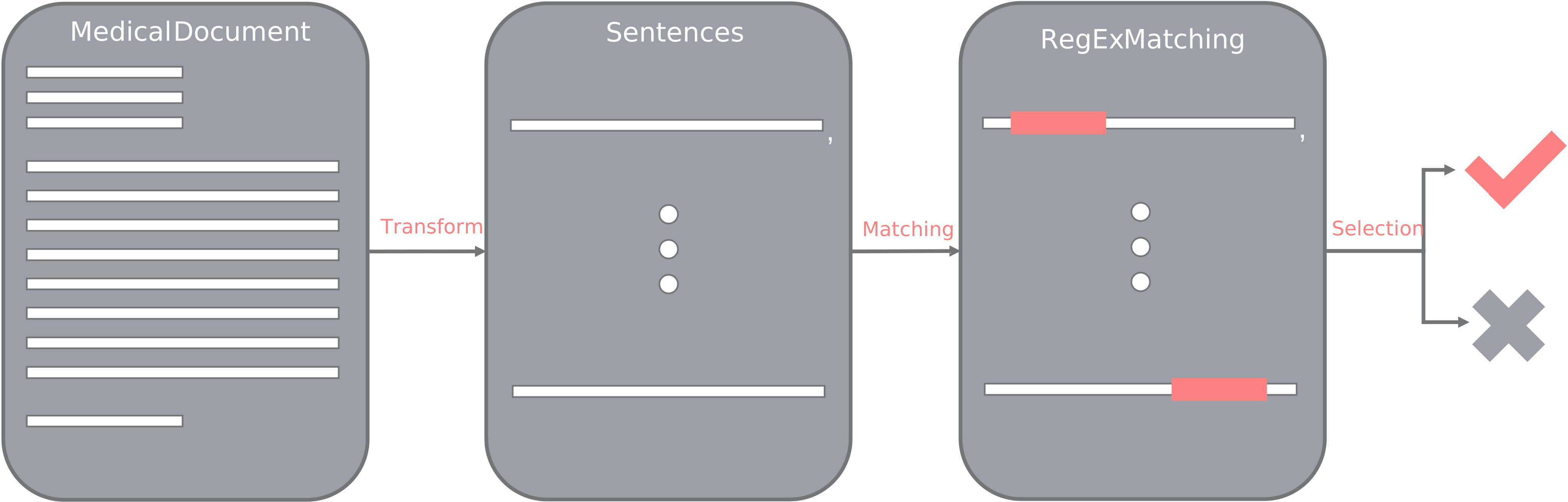
The Miner takes a DataFrame and searches it for a particular regular expression with the help of SpaCy. It is also possible to add a regular expression for the text that should be excluded. Please use a RegEx checker (e.g. https://regex101.com/) to build your regular expressions.
```python from fhir_pyrate import Miner
dfdiagnosticreports = ... # Get a DataFrame
Search for text where the word "Tumor" is present
miner = Miner( targetregex="Tumor*", decodetext=...# Here you can write a function that processes each single text (e.g. stripping, decoding) ) dffiltered = miner.nlpondataframe( dfdiagnosticreports, textcolumnname="reporttext", newcolumnname="text_found" ) ```
DicomDownloader
At our institute we have a DicomWebAdapter app that can be used to download studies and series from the PACS system of our hospital. The DicomDownloader uses the DicomWebClient with a specific internal URL for each PACS to connect and download the images. We could not find a public system that was offering anything similar, so this class has only been tested on our internal FHIR server. In case you have questions or you would like some particular features to be able to use this at your institute, please do not hesitate and contact us, or write a pull request!
The DicomDownloader downloads a complete Study (StudyInstanceUID) or a specific series ( StudyInstanceUID + SeriesInstanceUID).
The relevant data can be downloaded either es DICOM (.dcm) or NIfTI (.nii.gz).
In the NIfTI case there will be an additional .dcm file to store some metadata.
Using the function download_data_from_dataframe it is possible to download studies and series
directly from the data of a given dataframe. The column that contain the study/series
information can be specified. To have an example of how the DataFrame should look like, please
refer to Example 2.
A DataFrame will be returned which specifies the successfully downloaded Study/Series ID, the
deidentified IDs and the download folder name. Additionally, a DataFrame containing the failed
studies will also be returned, together with the kind of error and the traceback.
```python from fhir_pyrate import DicomDownloader
auth = ...
Initialize the Study Downloader
Decide to download the data as NIfTis, set it to "dicom" for DICOMs
downloader = DicomDownloader( auth=auth, outputformat="nifti", dicomweburl=DICOMWEB_URL, # Specify a URL of your DICOM Web Adapter )
Get some studies
df_studies = ...
Download the series
successfuldf, errordf = downloader.downloaddatafromdataframe( dfstudies, outputdir="out", studyuidcol="studyinstanceuid", seriesuidcol="seriesinstanceuid", downloadfullstudy=False, # If we download the entire study, seriesinstance_uid will not be used ) ```
Additionally, it is also possible to use the download_data function to download a single study or
series given as parameter.
In this case, the mapping information will be returned as a list of dictionaries that can be used
to build a mapping file.
```python
Download only one series and get some download information
downloadinfo = downloader.downloaddata( studyuid="1.2.826.0.1.3680043.8.498.24222694654806877939684038520520717689", seriesuid="1.2.826.0.1.3680043.8.498.33463995182843850024561469634734635961", outputdir="out", savemetadata=True, )
Download only one full study
downloadinfostudy = downloader.downloaddata( studyuid="1.2.826.0.1.3680043.8.498.24222694654806877939684038520520717689", seriesuid=None, outputdir="out", save_metadata=True, ) ```
Contributing
Contributions are what make the open source community such an amazing place to learn, inspire, and create. Any contributions you make are greatly appreciated. If you have a suggestion that would make this better, please fork the repo and create a pull request. You can also simply open an issue with the tag "enhancement".
- Fork the Project
- Create your Feature Branch (git checkout -b feature/AmazingFeature)
- Commit your Changes (git commit -m 'Add some AmazingFeature')
- Push to the Branch (git push origin feature/AmazingFeature)
- Open a Pull Request
Authors and acknowledgment
This package was developed by the SHIP-AI group at the Institute for Artificial Intelligence in Medicine.
- goku1110: initial idea, development, logo & figures
- giuliabaldini: development, tests, new features
We would like to thank razorx89, butterpear, vkyprmr, Wizzzard93, karzideh and luckfamousa for their input, time and effort.
License
This project is licenced under the MIT Licence.
Project status
The project is in active development.
Owner
- Name: University Medicine Essen
- Login: UMEssen
- Kind: organization
- Repositories: 13
- Profile: https://github.com/UMEssen
Citation (CITATION.cff)
cff-version: 1.2.0
title: >-
  FHIR-PYrate: A Data Science Friendly Python Package to Query FHIR Servers
message: 'If you use FHIR-PYrate, please cite it as below.'
type: software
doi: 10.1186/s12913-023-09498-1
authors:
  - family-names: Hosch
    given-names: René
    orcid: 'https://orcid.org/0000-0003-1760-2342'
  - family-names: Baldini
    given-names: Giulia
    orcid: 'https://orcid.org/0000-0002-5929-0271'
  - family-names: Parmar
    given-names: Vicky
    orcid: 'https://orcid.org/0000-0002-0383-0435'
  - family-names: Borys
    given-names: Katarzyna
    orcid: 'https://orcid.org/0000-0001-6987-6041'
  - family-names: Koitka
    given-names: Sven
    orcid: 'https://orcid.org/0000-0001-9704-1180'
  - family-names: Arzideh
    given-names: Kamyar
  - family-names: Engelke
    given-names: Merlin
    orcid: 'https://orcid.org/0000-0002-8463-8786'
  - family-names: Ulrich
    given-names: Moritz
  - family-names: Nensa
    given-names: Felix
    orcid: 'https://orcid.org/0000-0002-5811-7100'
GitHub Events
Total
- Create event: 6
- Release event: 2
- Issues event: 5
- Watch event: 10
- Delete event: 4
- Issue comment event: 2
- Push event: 8
- Pull request event: 10
- Fork event: 4
Last Year
- Create event: 6
- Release event: 2
- Issues event: 5
- Watch event: 10
- Delete event: 4
- Issue comment event: 2
- Push event: 8
- Pull request event: 10
- Fork event: 4
Issues and Pull Requests
Last synced: 11 months ago
All Time
- Total issues: 63
- Total pull requests: 66
- Average time to close issues: 21 days
- Average time to close pull requests: 3 months
- Total issue authors: 6
- Total pull request authors: 4
- Average comments per issue: 0.33
- Average comments per pull request: 0.08
- Merged pull requests: 54
- Bot issues: 0
- Bot pull requests: 8
Past Year
- Issues: 4
- Pull requests: 10
- Average time to close issues: 34 minutes
- Average time to close pull requests: 2 minutes
- Issue authors: 1
- Pull request authors: 2
- Average comments per issue: 0.0
- Average comments per pull request: 0.0
- Merged pull requests: 8
- Bot issues: 0
- Bot pull requests: 0
Top Authors
Issue Authors
- giuliabaldini (53)
- JannisStraus (4)
- christiangentges (2)
- haemka (1)
- Goku1110 (1)
- vkyprmr (1)
Pull Request Authors
- giuliabaldini (48)
- JannisStraus (8)
- dependabot[bot] (8)
- luckfamousa (2)
Top Labels
Issue Labels
Pull Request Labels
Packages
- Total packages: 1
-
Total downloads:
- pypi 754 last-month
- Total docker downloads: 8
- Total dependent packages: 0
- Total dependent repositories: 1
- Total versions: 23
- Total maintainers: 2
pypi.org: fhir-pyrate
FHIR-PYrate is a package that provides a high-level API to query FHIR Servers for bundles of resources and return the structured information as pandas DataFrames. It can also be used to filter resources using RegEx and SpaCy and download DICOM studies and series.
- Homepage: https://github.com/UMEssen/FHIR-PYrate
- Documentation: https://fhir-pyrate.readthedocs.io/
- License: MIT
-
Latest release: 0.2.3
published about 1 year ago