Science Score: 36.0%
This score indicates how likely this project is to be science-related based on various indicators:
-
○CITATION.cff file
-
✓codemeta.json file
Found codemeta.json file -
○.zenodo.json file
-
✓DOI references
Found 3 DOI reference(s) in README -
○Academic publication links
-
✓Committers with academic emails
2 of 6 committers (33.3%) from academic institutions -
○Institutional organization owner
-
○JOSS paper metadata
-
○Scientific vocabulary similarity
Low similarity (11.5%) to scientific vocabulary
Keywords
Repository
📊 Circular and Rectangular Manhattan Plot
Statistics
- Stars: 588
- Watchers: 14
- Forks: 119
- Open Issues: 104
- Releases: 0
Topics
Metadata Files
README.md
CMplot



A high-quality drawing tool designed for Manhattan plot of genomic analysis
:toolbox: Relevant software tools for genetic analyses and genomic breeding
Installation
CMplot is available on CRAN, so it can be installed with the following R code:
```r
install.packages("CMplot") library("CMplot")
if you want to use the latest version on GitHub:
source("https://raw.githubusercontent.com/YinLiLin/CMplot/master/R/CMplot.r") ```
There are two example datasets attached in CMplot, users can export and view the details by following R code:
```r
data(pig60K) #calculated p-values by MLM data(cattle50K) #calculated SNP effects by rrblup head(pig60K)
SNP Chromosome Position trait1 trait2 trait3
1 ALGA0000009 1 52297 0.7738187 0.51194318 0.51194318 2 ALGA0000014 1 79763 0.7738187 0.51194318 0.51194318 3 ALGA0000021 1 209568 0.7583016 0.98405289 0.98405289 4 ALGA0000022 1 292758 0.7200305 0.48887140 0.48887140 5 ALGA0000046 1 747831 0.9736840 0.22096836 0.22096836 6 ALGA0000047 1 761957 0.9174565 0.05753712 0.05753712
head(cattle50K)
SNP chr pos Somatic cell score Milk yield Fat percentage 1 SNP1 1 59082 0.000244361 0.000484255 0.001379210 2 SNP2 1 118164 0.000532272 0.000039800 0.000598951 3 SNP3 1 177246 0.001633058 0.000311645 0.000279427 4 SNP4 1 236328 0.001412865 0.000909370 0.001040161 5 SNP5 1 295410 0.000090700 0.002202973 0.000351394 6 SNP6 1 354493 0.000110681 0.000342628 0.000105792
``` As the example datasets, the first three columns are names, chromosome, position of SNPs respectively, the rest of columns are the pvalues of GWAS or effects of GS/GP for traits, the number of traits is unlimited. Note: if plotting SNP_Density, only the first three columns are needed.
Now CMplot could handle not only Genome-wide association study results, but also SNP effects, Fst, tajima's D and so on.
Total 50~ parameters are available in CMplot, typing ?CMplot can get the detail function of all parameters.
Citation
CMplot has been integrated into our developed GWAS package rMVP, please cite the following paper:
Yin, L. et al. rMVP: A Memory-efficient, Visualization-enhanced, and Parallel-accelerated tool for Genome-Wide Association Study, Genomics, Proteomics & Bioinformatics (2021), doi: 10.1016/j.gpb.2020.10.007.
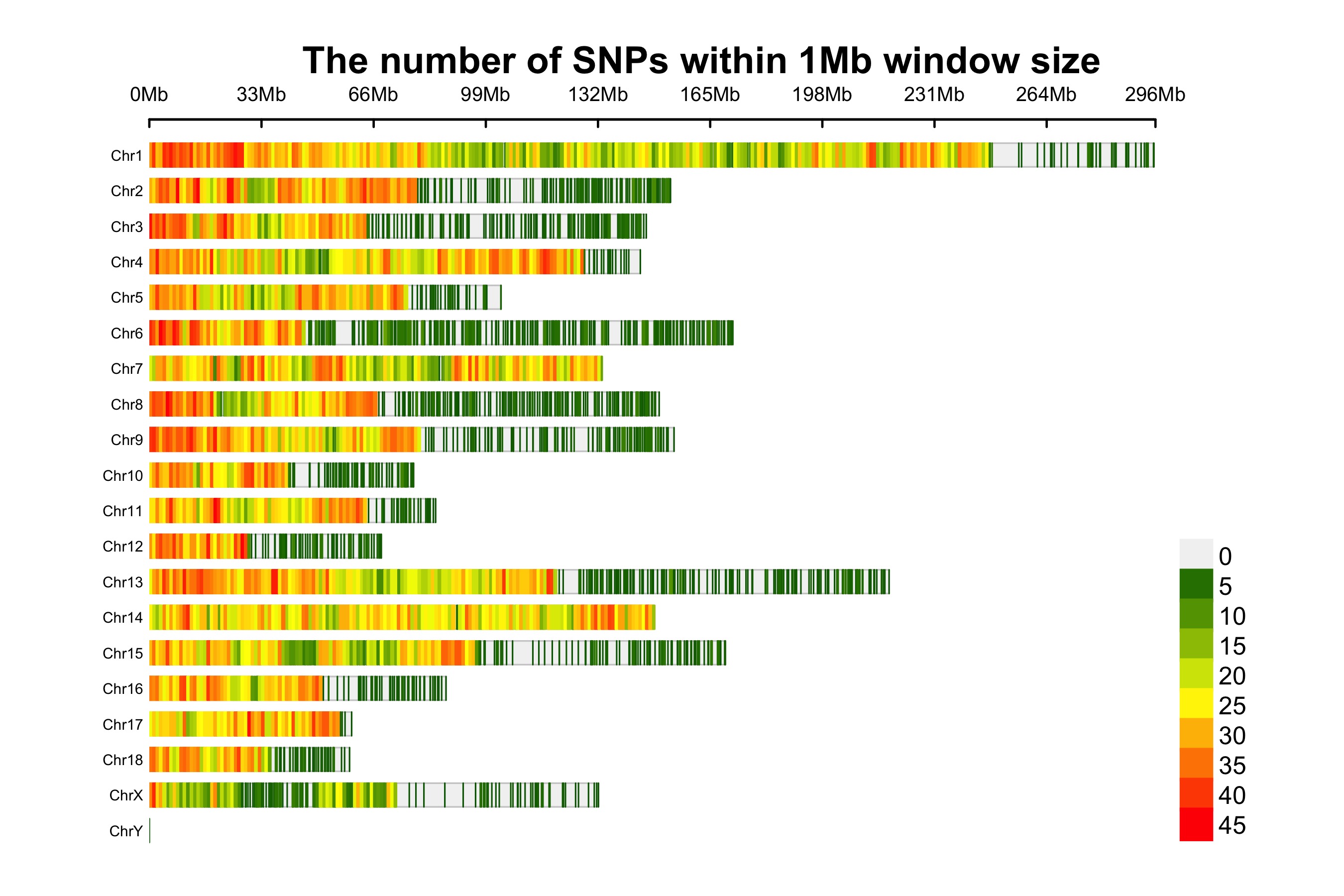
SNP-density plot
```r
CMplot(pig60K,plot.type="d",bin.size=1e6,chr.den.col=c("darkgreen", "yellow", "red"),file="jpg",file.name=NULL,dpi=300, main="illumilla_60K",file.output=TRUE,verbose=TRUE,width=9,height=6)
set the window size: bin.size=1e6
set the legend breaks by: bin.breaks=seq(min, max, step), e.g., bin.breaks=seq(0, 50, 10), the windows out of the breaks will be plotted in the same color as min or max.
get the detailed information of all windows: "windinfo <- CMplot(pig60K, plot.type="d", ...)"
file: the format of the output file, if file="png", CMplot will output a transparent background file
file.name: specify the output file name, the default is corresponding column name when setting file.name=NULL
chr.labels: change the chromosome names
main: change the title of the plots
NOTE: to show the full length of each chromosome, users can manually add every chromosome with one SNP, whose
position equals to the length of corresponding chromosome, then specify the parameter: CMplot(..., chr.pos.max=TRUE).
```
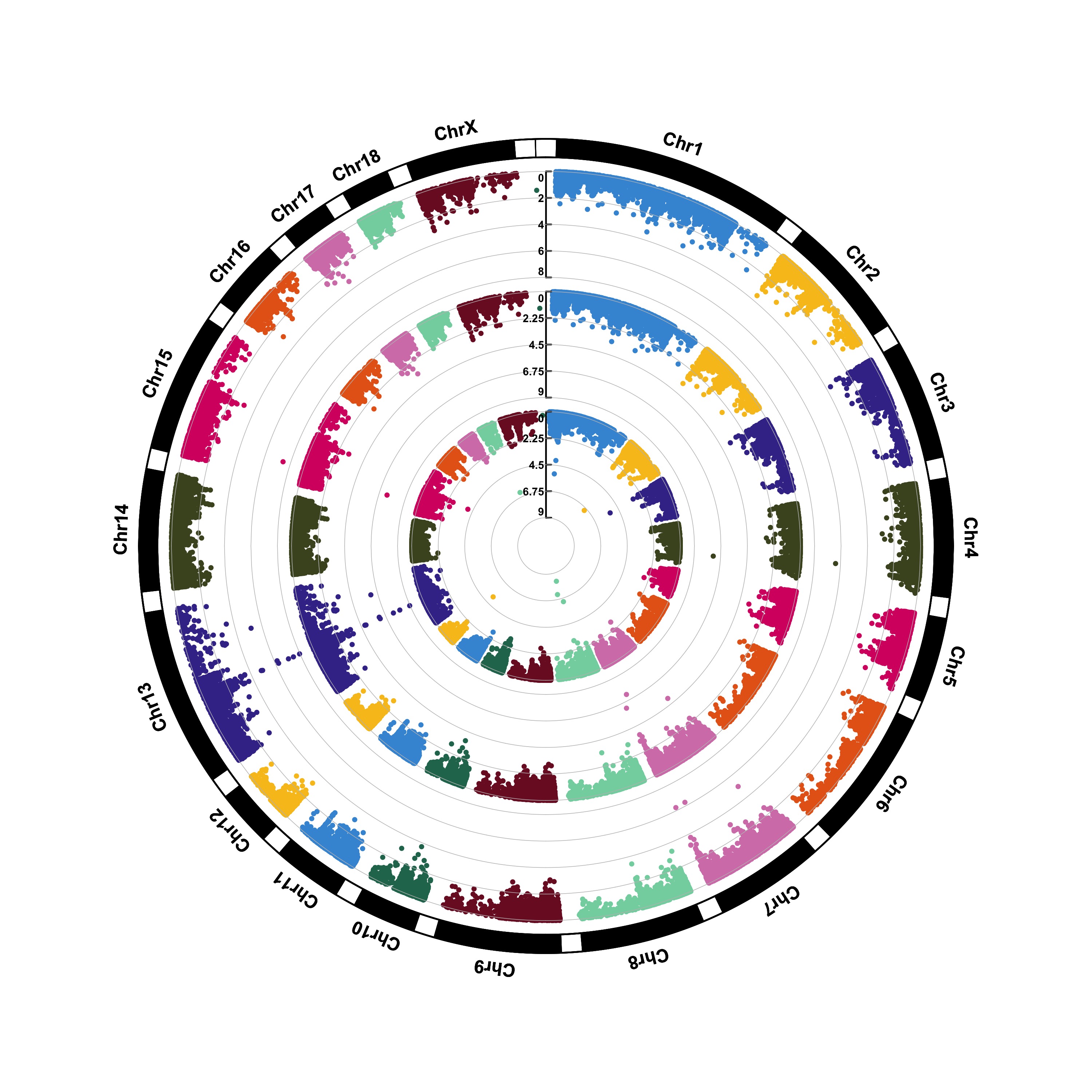
Circular-Manhattan plot
(1) Genome-wide association study(GWAS)
```r
CMplot(pig60K,type="p",plot.type="c",chr.labels=paste("Chr",c(1:18,"X","Y"),sep=""),r=0.4,cir.axis=TRUE, outward=FALSE,cir.axis.col="black",cir.chr.h=1.3,chr.den.col="black",file="jpg", file.name=NULL,dpi=300,file.output=TRUE,verbose=TRUE,width=10,height=10)
to remove the grid line in circles, add parameter cir.axis.grid=FALSE
file.name: specify the output file name, the default is corresponding column name
```

```r
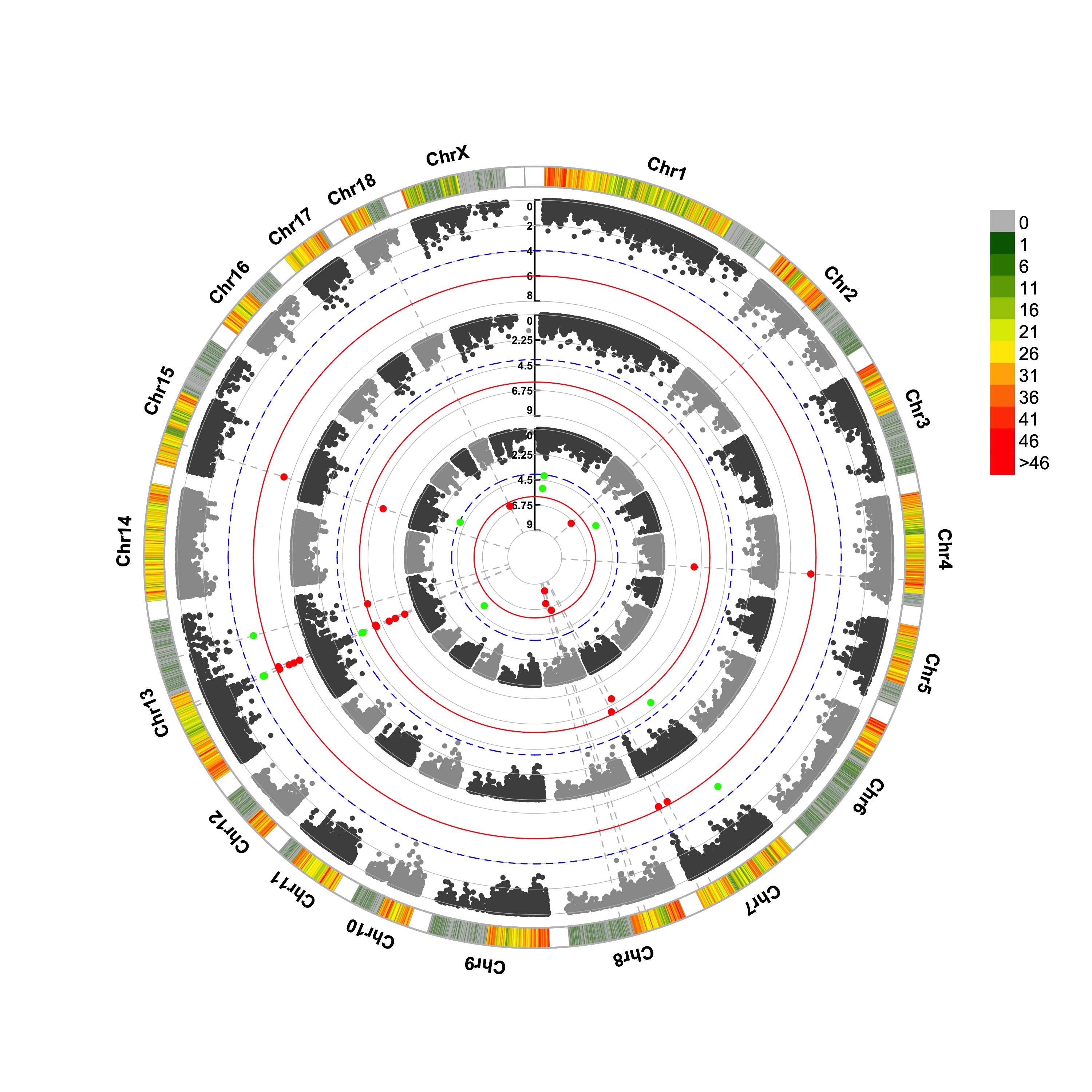
CMplot(pig60K,type="p",plot.type="c",r=0.4,col=c("grey30","grey60"),chr.labels=paste("Chr",c(1:18,"X","Y"),sep=""), threshold=c(1e-6,1e-4),cir.chr.h=1.5,amplify=TRUE,threshold.lty=c(1,2),threshold.col=c("red", "blue"),signal.line=1,signal.col=c("red","green"),chr.den.col=c("darkgreen","yellow","red"), bin.size=1e6,outward=FALSE,file="jpg",file.name=NULL,dpi=300,file.output=TRUE,verbose=TRUE,width=10,height=10)
Note:
- if signal.line=NULL, the lines that crosse circles won't be added.
- if the length of parameter 'chr.den.col' is not equal to 1, SNP density that counts the number of SNP within given size('bin.size') will be plotted around the circle. ```
(2) Genomic Selection/Prediction(GS/GP)
```r
CMplot(cattle50K,type="p",plot.type="c",LOG10=FALSE,outward=TRUE,col=matrix(c("#4DAF4A",NA,NA,"dodgerblue4", "deepskyblue",NA,"dodgerblue1", "olivedrab3", "darkgoldenrod1"), nrow=3, byrow=TRUE), chr.labels=paste("Chr",c(1:29),sep=""),threshold=NULL,r=1.2,cir.chr.h=1.5,axis.cex=1, cir.band=1,file="jpg", file.name=NULL,dpi=300,chr.den.col="black",file.output=TRUE,verbose=TRUE, width=10,height=10)
parameter 'col' can be either vector or matrix, if a matrix, each trait can be plotted in different colors.
file.name: specify the output file name, the default is corresponding column name when setting ' file.name=NULL '
```

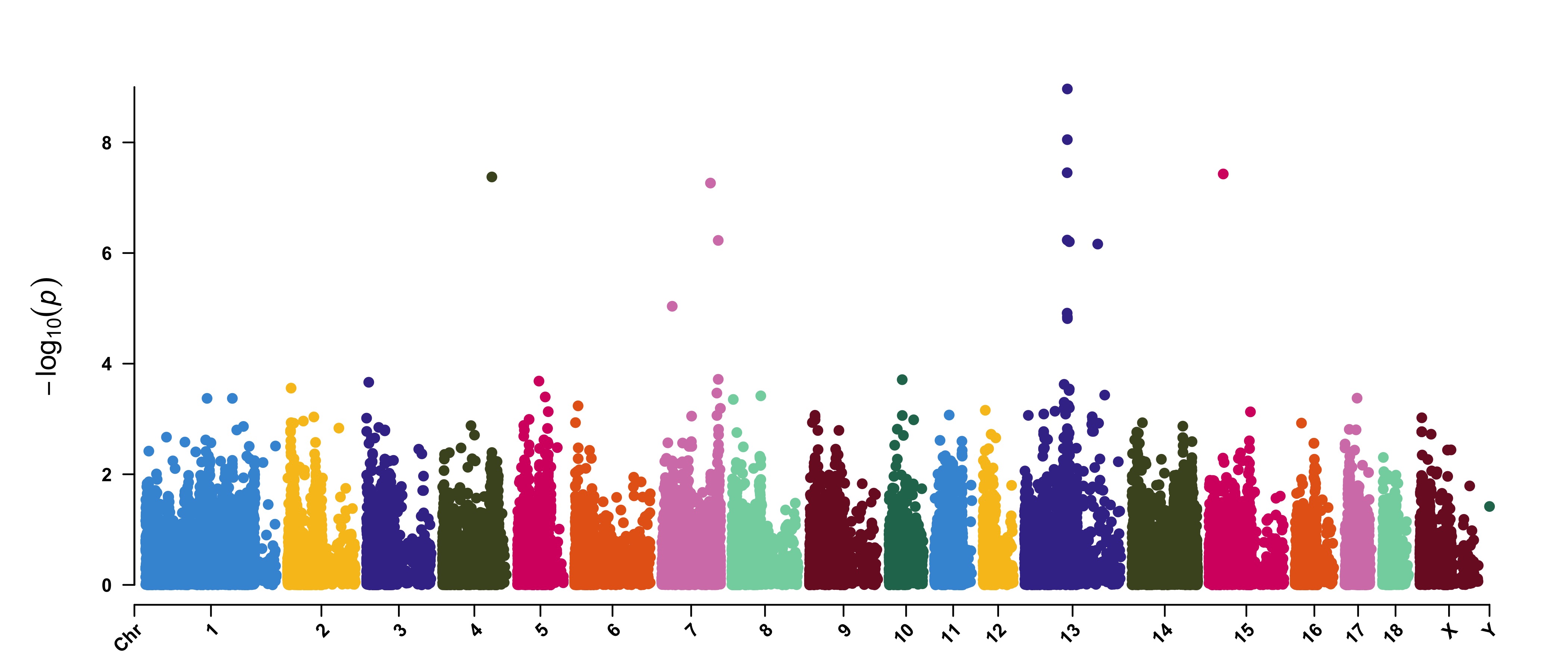
Rectangular-Manhattan plot
Genome-wide association study(GWAS)
```r
CMplot(pig60K,type="p",plot.type="m",LOG10=TRUE,threshold=NULL,file="jpg",file.name=NULL,dpi=300, file.output=TRUE,verbose=TRUE,width=14,height=6,chr.labels.angle=45)
'chr.labels.angle': adjust the angle of labels of x-axis (-90 < chr.labels.angle < 90).
file.name: specify the output file name, the default is corresponding column name when setting ' file.name=NULL '.
```
Amplify signals on pch, cex and col
```r
CMplot(pig60K, plot.type="m", col=c("grey30","grey60"), LOG10=TRUE, ylim=c(2,12), threshold=c(1e-6,1e-4), threshold.lty=c(1,2), threshold.lwd=c(1,1), threshold.col=c("black","grey"), amplify=TRUE, chr.den.col=NULL, signal.col=c("red","green"), signal.cex=c(1.5,1.5),signal.pch=c(19,19), file="jpg",file.name=NULL,dpi=300,file.output=TRUE,verbose=TRUE,width=14,height=6)
Note: if the ylim is setted, then CMplot will only plot the points among this interval,
ylim can be vector or list, if it is a list, different traits can be assigned with
different range at y-axis.
'threshold' can be set for different traits, for example: threshold=list(c(1e-6,1e-4), NULL, 1e-5),
each list contains a vector of thresholds for each trait, NULL means no threshold for corresponding trait.
```

Attach chromosome density on the bottom of Manhattan plot
```r
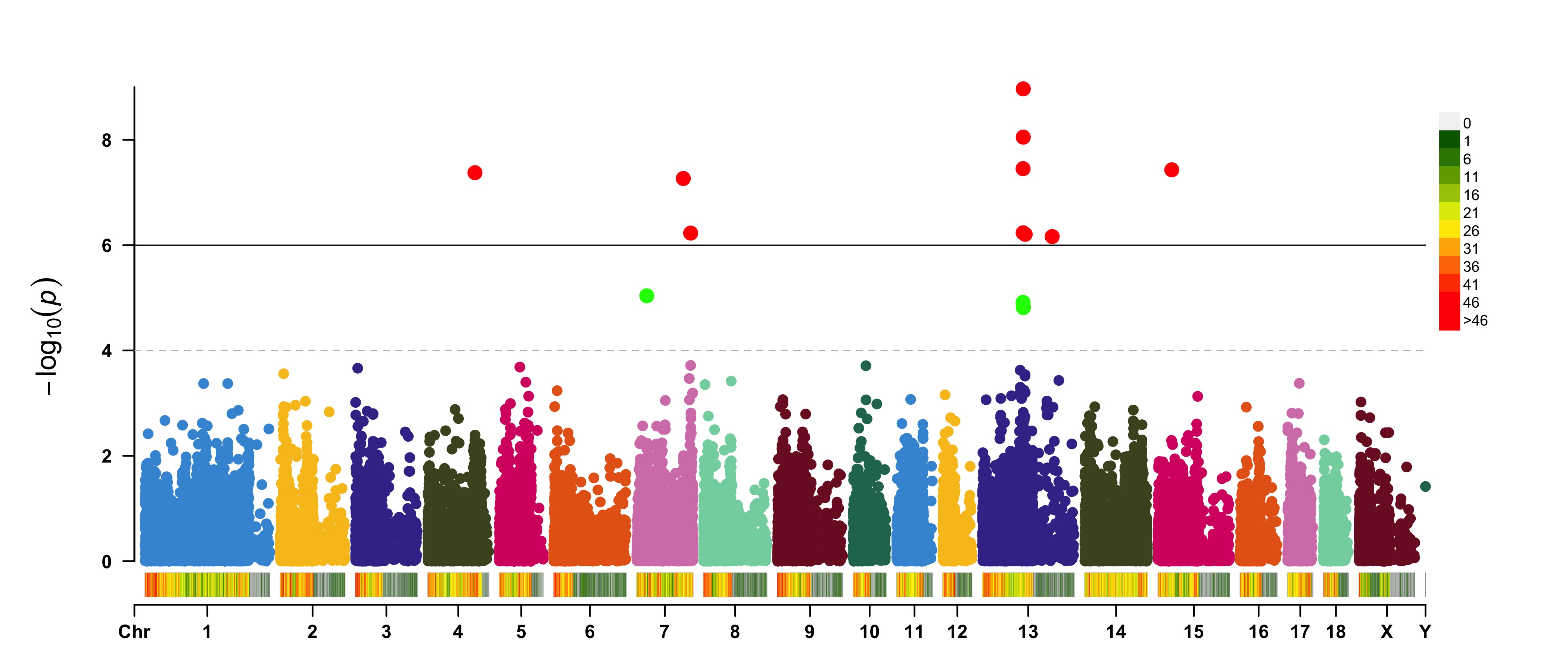
CMplot(pig60K, plot.type="m", LOG10=TRUE, ylim=NULL, threshold=c(1e-6,1e-4),threshold.lty=c(1,2), threshold.lwd=c(1,1), threshold.col=c("black","grey"), amplify=TRUE,bin.size=1e6, chr.den.col=c("darkgreen", "yellow", "red"),signal.col=c("red","green"),signal.cex=c(1.5,1.5), signal.pch=c(19,19),file="jpg",file.name=NULL,dpi=300,file.output=TRUE,verbose=TRUE, width=14,height=6)
Note: if the length of parameter 'chr.den.col' is bigger than 1, SNP density that counts
the number of SNP within given size('bin.size') will be plotted.
file.name: specify the output file name, the default is corresponding column name when setting file.name=NULL
```
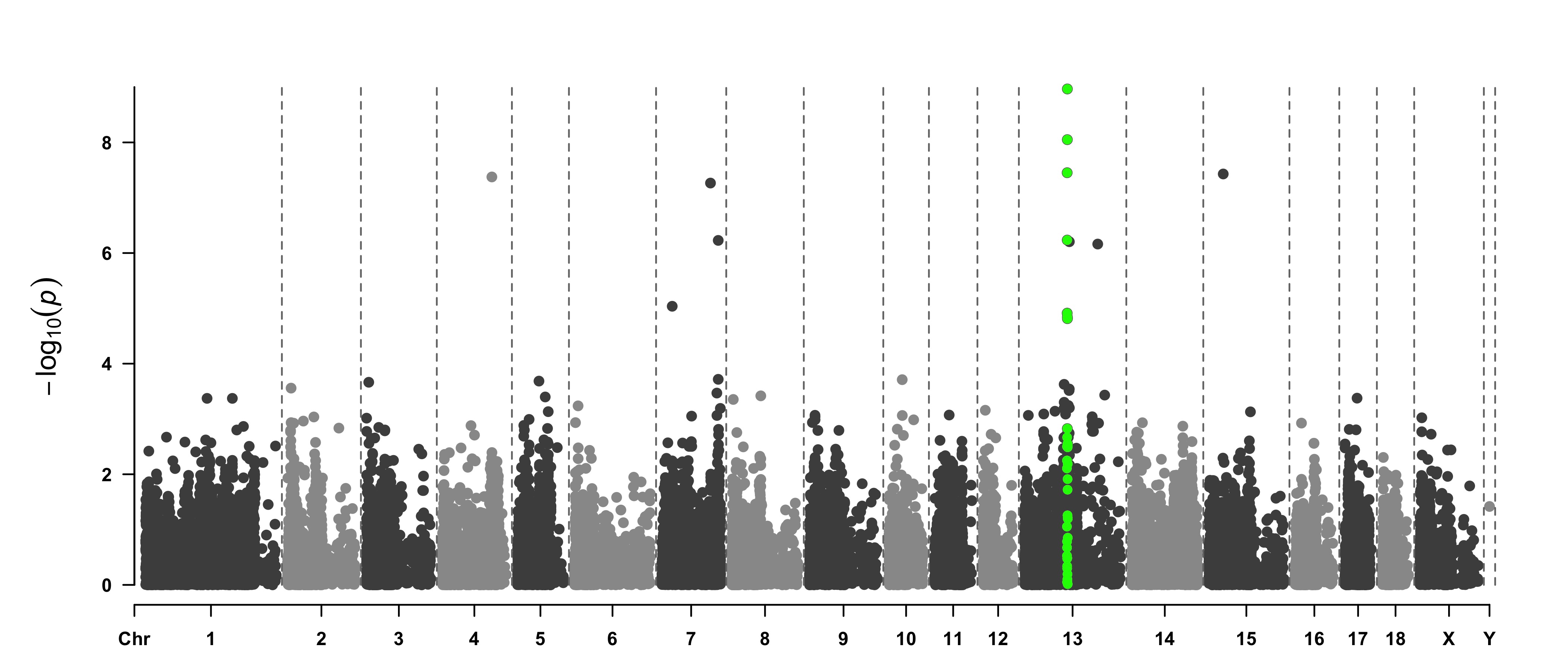
Highlight a group of SNPs on pch, cex, type, and col
```r
signal <- pig60K$Position[which.min(pig60K$trait2)] SNPs <- pig60K$SNP[pig60K$Chromosome==13 & pig60K$Position<(signal+1000000)&pig60K$Position>(signal-1000000)] CMplot(pig60K, plot.type="m",LOG10=TRUE,col=c("grey30","grey60"),highlight=SNPs, highlight.col="green",highlight.cex=1,highlight.pch=19,file="jpg",file.name=NULL, chr.border=TRUE,dpi=300,file.output=TRUE,verbose=TRUE,width=14,height=6)
Note:
'highlight' could be vector or list, if it is a vector, all traits will use the same highlighted SNPs index,
if it is a list, the length of the list should equal to the number of traits.
highlight.col, highlight.cex, highlight.pch can be value or vector, if its length equals to the length of highlighted SNPs,
each SNPs have its special colour, size and shape.
```
```r
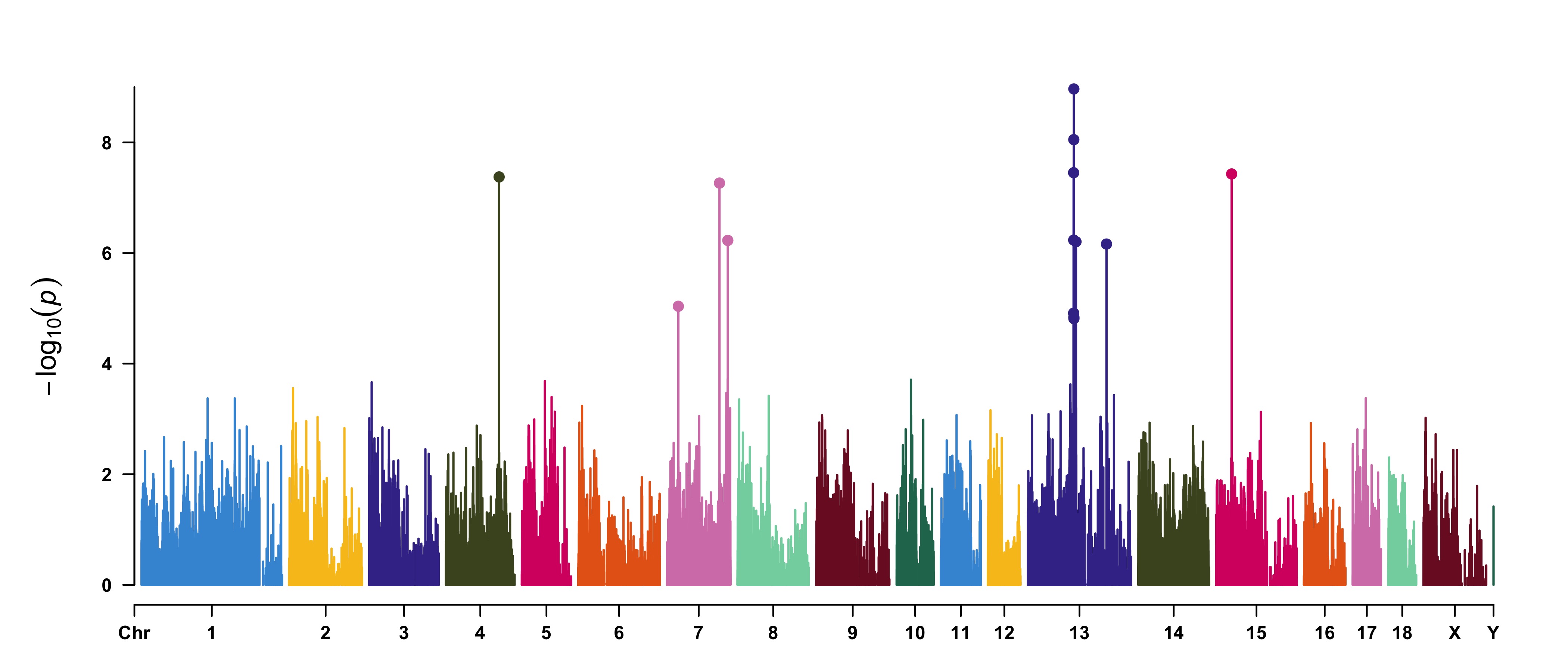
SNPs <- pig60K[pig60K$trait2 < 1e-4, 1] CMplot(pig60K,type="h",plot.type="m",LOG10=TRUE,highlight=SNPs,highlight.type="p", highlight.col=NULL,highlight.cex=1.2,highlight.pch=19,file="jpg",file.name=NULL, dpi=300,file.output=TRUE,verbose=TRUE,width=14,height=6,band=0.6) ```
```r
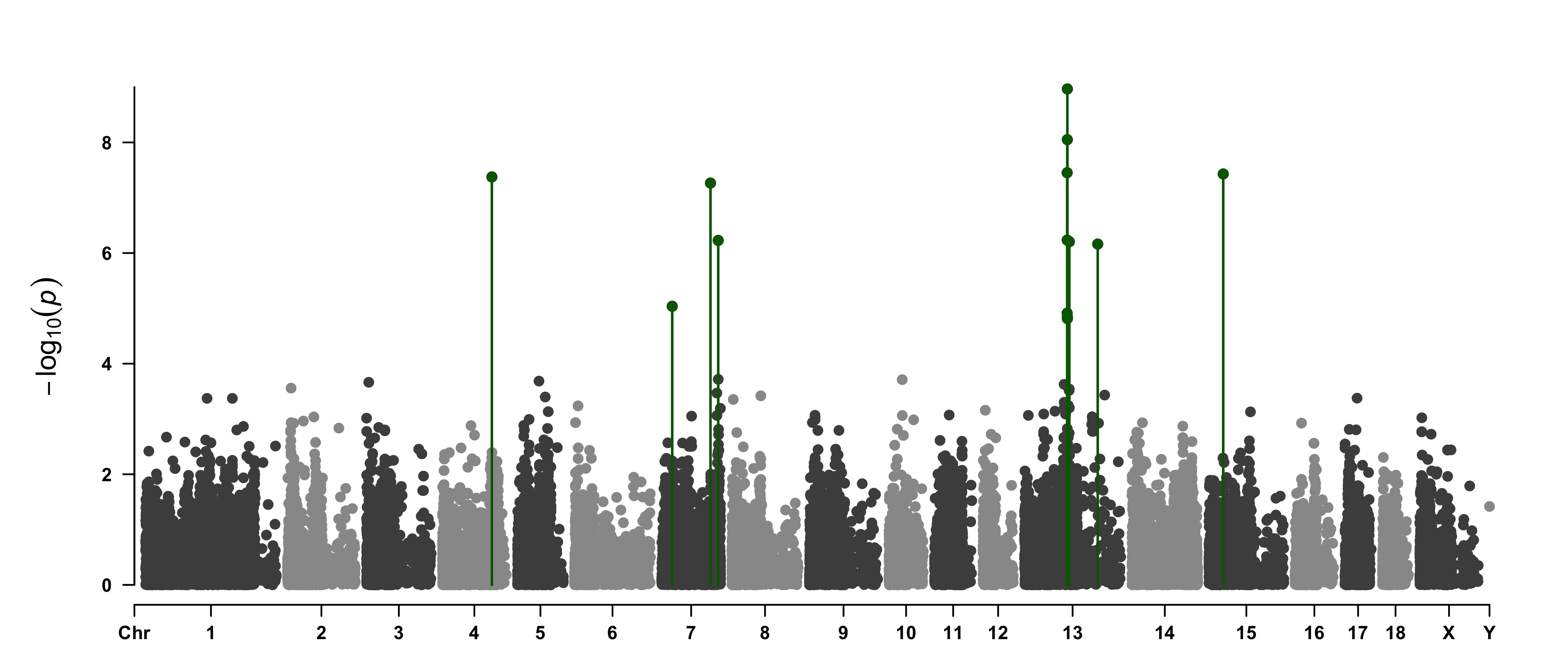
SNPs <- pig60K[pig60K$trait2 < 1e-4, 1] CMplot(pig60K,type="p",plot.type="m",LOG10=TRUE,highlight=SNPs,highlight.type="h", col=c("grey30","grey60"),highlight.col="darkgreen",highlight.cex=1.2,highlight.pch=19, file="jpg",dpi=300,file.output=TRUE,verbose=TRUE,width=14,height=6) ```
```r
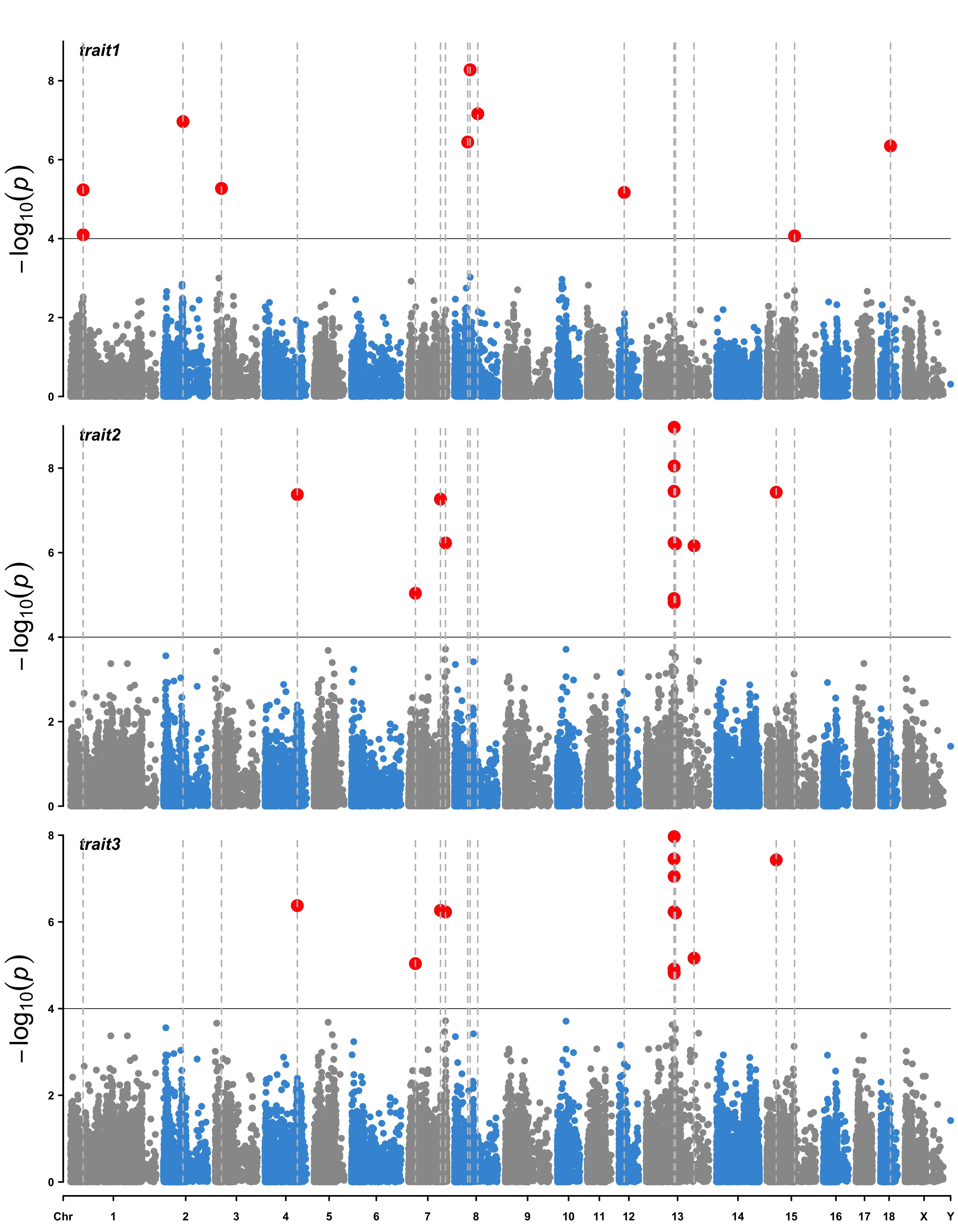
SNPs <- pig60K[ pig60K$trait1 < 1e-4 | pig60K$trait2 < 1e-4 | pig60K$trait3 < 1e-4, 1] CMplot(pig60K,type="p",plot.type="m",LOG10=TRUE,highlight=SNPs,highlight.type="l", threshold=1e-4,threshold.col="black",threshold.lty=1,col=c("grey60","#4197d8"), signal.cex=1.2, signal.col="red", highlight.col="grey",highlight.cex=0.7, file="jpg",dpi=300,file.output=TRUE,verbose=TRUE,multracks=TRUE)
```
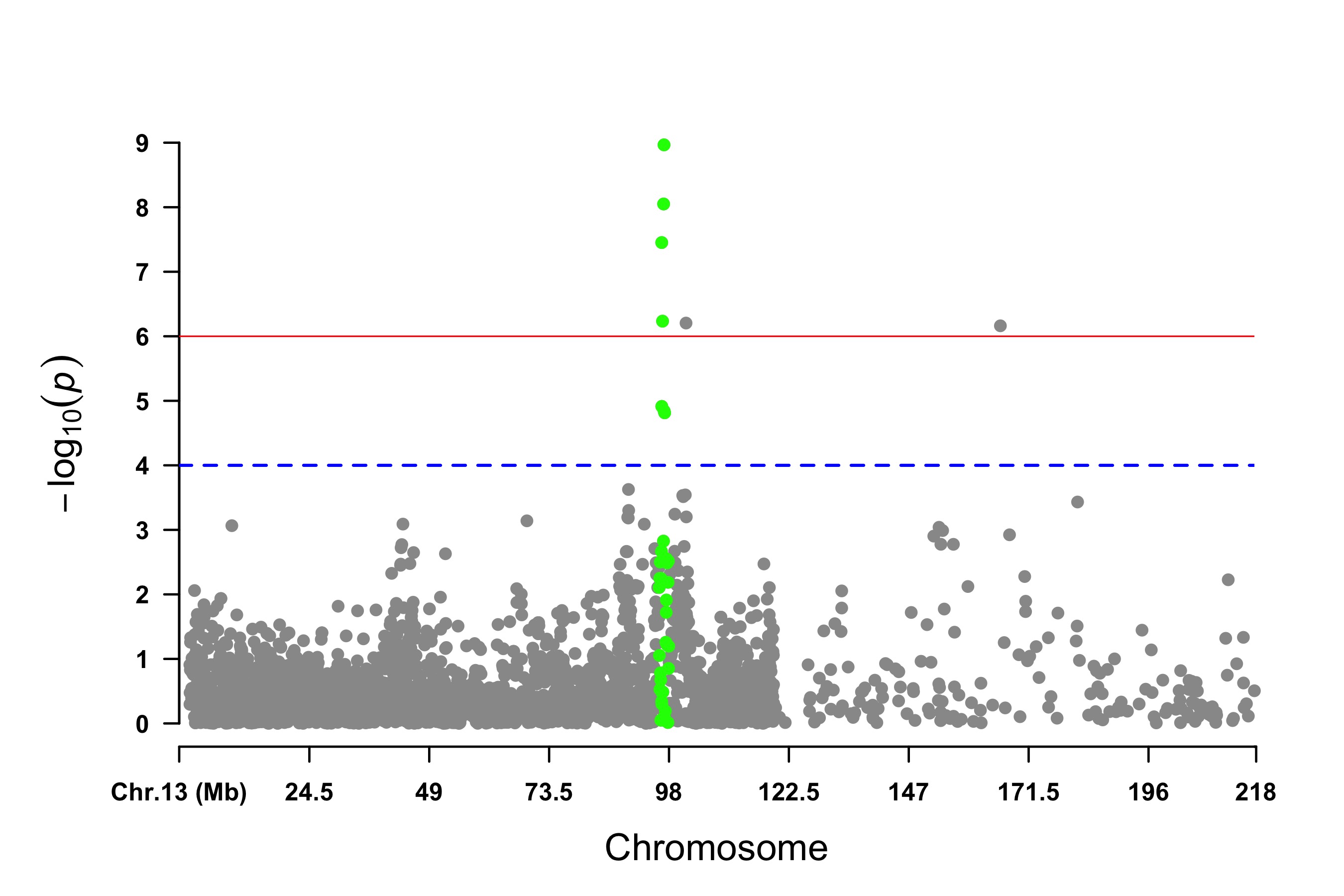
Visualize only one chromosome
```r
CMplot(pig60K[pig60K$Chromosome==13, ], plot.type="m",LOG10=TRUE,col=c("grey60"),highlight=SNPs, highlight.col="green",highlight.cex=1,highlight.pch=19,file="jpg",file.name=NULL, threshold=c(1e-6,1e-4),threshold.lty=c(1,2),threshold.lwd=c(1,2), width=9,height=6, threshold.col=c("red","blue"),amplify=FALSE,dpi=300,file.output=TRUE,verbose=TRUE) ```
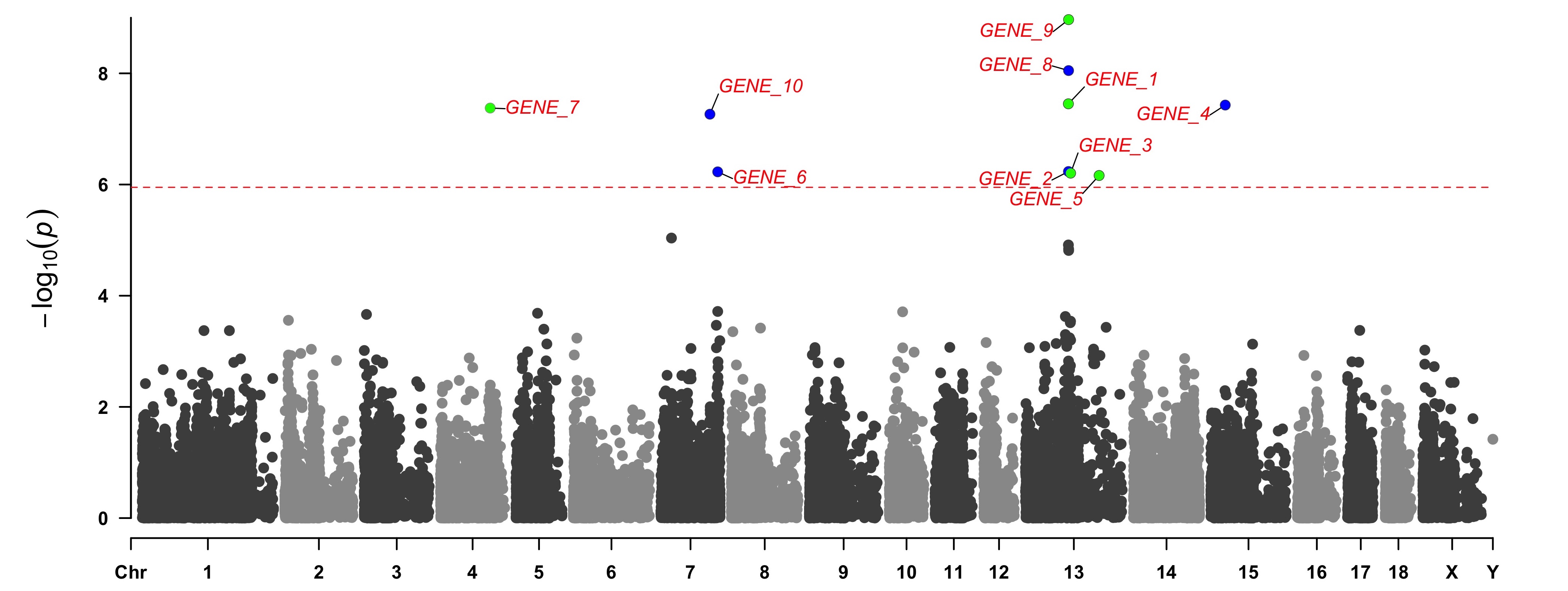
add genes or SNP names around the highlighted SNPs
```r
SNPs <- pig60K[pig60K[,5] < (0.05 / nrow(pig60K)), 1] genes <- paste("GENE", 1:length(SNPs), sep="_") set.seed(666666) CMplot(pig60K[,c(1:3,5)], plot.type="m",LOG10=TRUE,col=c("grey30","grey60"),highlight=SNPs, highlight.col=rep(c("green","blue"),length=length(SNPs)),highlight.cex=1, highlight.text=genes,
highlight.text.col=rep("red",length(SNPs)),threshold=0.05/nrow(pig60K),threshold.lty=2,
amplify=FALSE,file="jpg",file.name=NULL,dpi=300,file.output=TRUE,verbose=TRUE,width=14,height=6)Note:
'highlight', 'highlight.text' could be vector or list, if it is a vector, all traits will
use the same highlighted SNPs index and text, if it is a list, the length of the list should equal to the number of traits.
the order of 'highlight.text' must be consistent with 'highlight'
highlight.text.cex: value or vecter, control the size of added text
highlight.text.font: value or vecter, control the font of added text
```
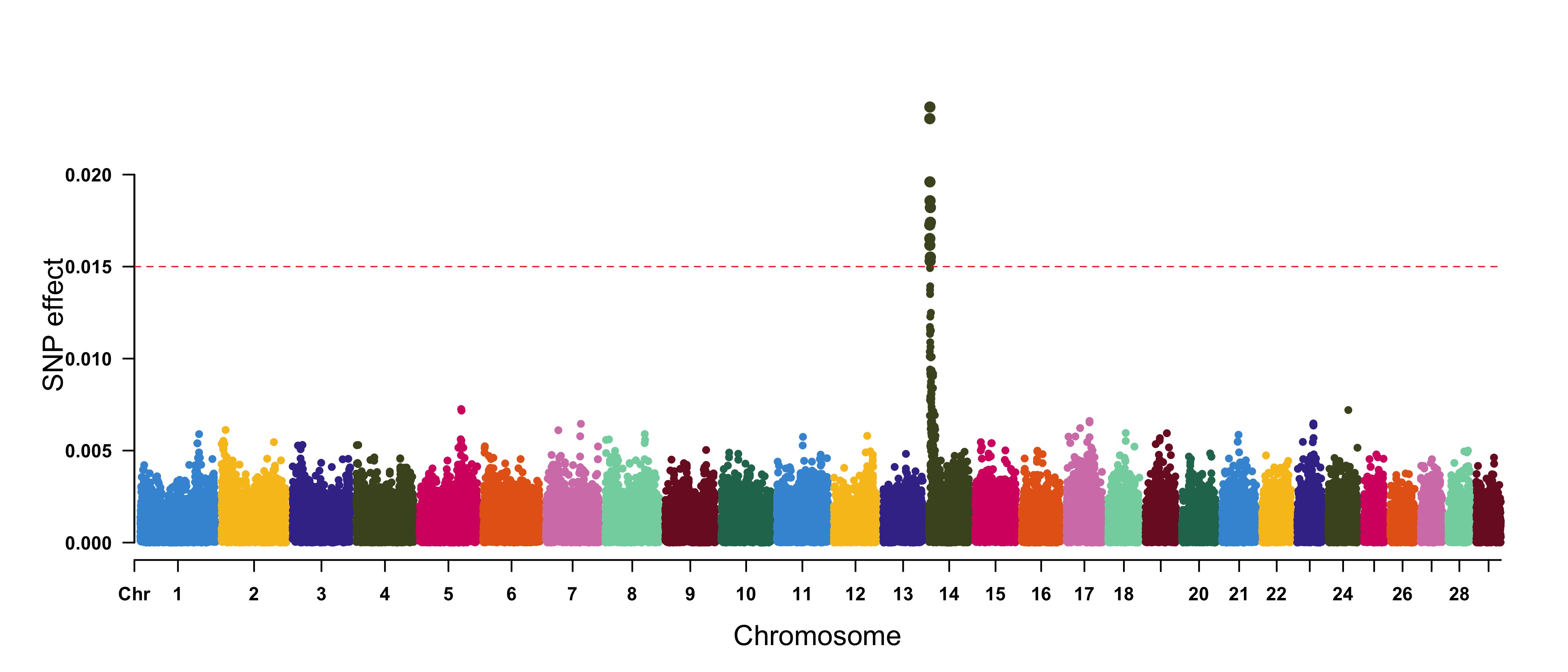
Genomic Selection/Prediction(GS/GP) or other none p-values
```r
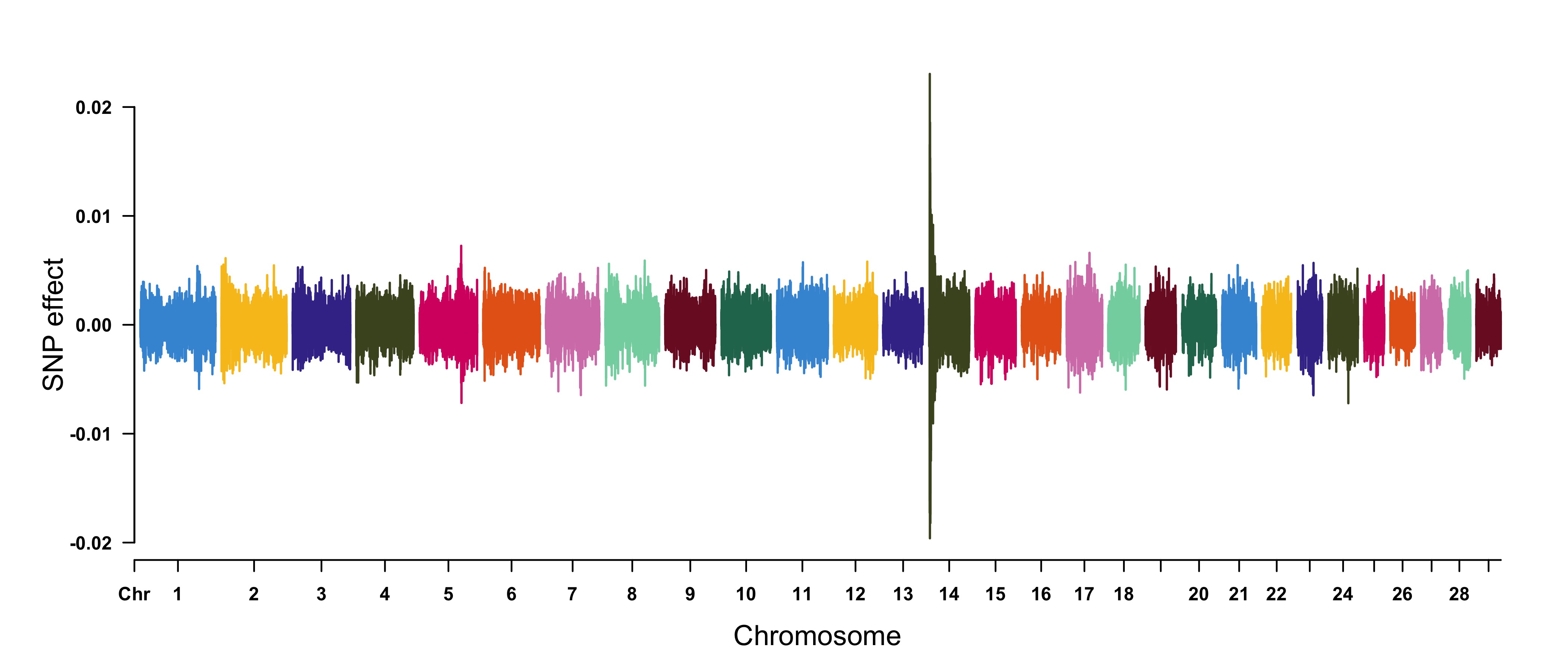
CMplot(cattle50K, plot.type="m", band=0.5, LOG10=FALSE, ylab="SNP effect",threshold=0.015, threshold.lty=2, threshold.lwd=1, threshold.col="red", amplify=TRUE, width=14,height=6, signal.col=NULL, chr.den.col=NULL, file="jpg",file.name=NULL,dpi=300,file.output=TRUE, verbose=TRUE,cex=0.8)
Note: if signal.col=NULL, the significant SNPs will be plotted with original colors.
```
```r
cattle50K[,4:ncol(cattle50K)] <- apply(cattle50K[,4:ncol(cattle50K)], 2, function(x) x*sample(c(1,-1), length(x), rep=TRUE)) CMplot(cattle50K, type="h",plot.type="m", band=0.5, LOG10=FALSE, ylab="SNP effect",ylim=c(-0.02,0.02), threshold.lty=2, threshold.lwd=1, threshold.col="red", amplify=FALSE,cex=0.6, chr.den.col=NULL, file="jpg",file.name=NULL,dpi=300,file.output=TRUE,verbose=TRUE)
Note: Positive and negative values are acceptable.
```
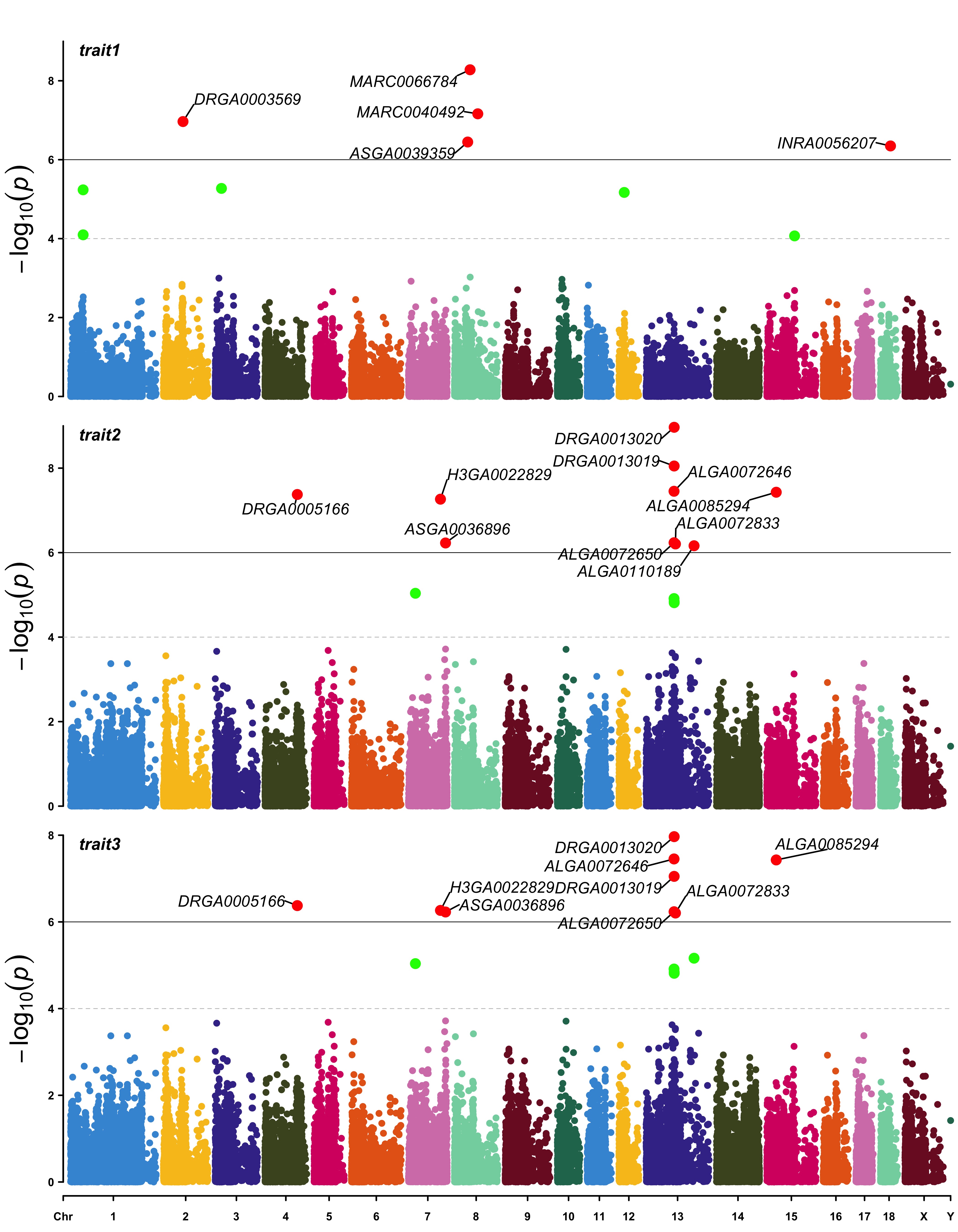
Multiple tracks Rectangular-Manhattan plot
```r
SNPs <- list( pig60K$SNP[pig60K$trait1<1e-6], pig60K$SNP[pig60K$trait2<1e-6], pig60K$SNP[pig60K$trait3<1e-6] ) CMplot(pig60K, plot.type="m",multracks=TRUE,threshold=c(1e-6,1e-4),threshold.lty=c(1,2), threshold.lwd=c(1,1), threshold.col=c("black","grey"), amplify=TRUE, signal.col= c("red","green"), signal.cex=1, file="jpg",file.name=NULL,dpi=300,file.output=TRUE, verbose=TRUE, highlight=SNPs, highlight.text=SNPs, highlight.text.cex=1.4)
Note: if you are not supposed to change the color of signal,
please set signal.col=NULL and highlight.col=NULL.
```
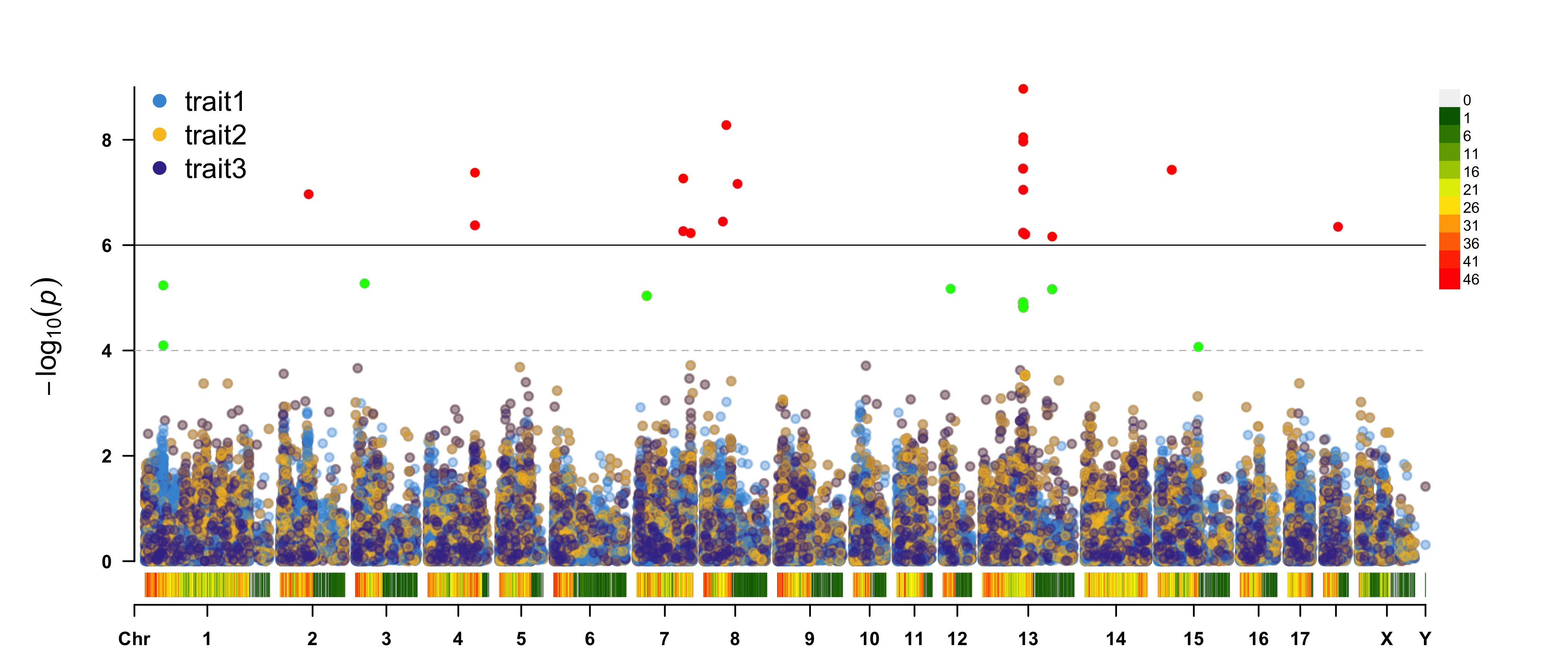
Multiple traits Rectangular-Manhattan plot
```r
CMplot(pig60K, plot.type="m",multraits=TRUE,threshold=c(1e-6,1e-4),threshold.lty=c(1,2), threshold.lwd=c(1,1), threshold.col=c("black","grey"), amplify=TRUE,bin.size=1e6, chr.den.col=c("darkgreen", "yellow", "red"), signal.col=c("red","green"), signal.cex=1, file="jpg",file.name=NULL,dpi=300,file.output=TRUE,verbose=TRUE, points.alpha=100,legend.ncol=1, legend.pos="left") ```
```r
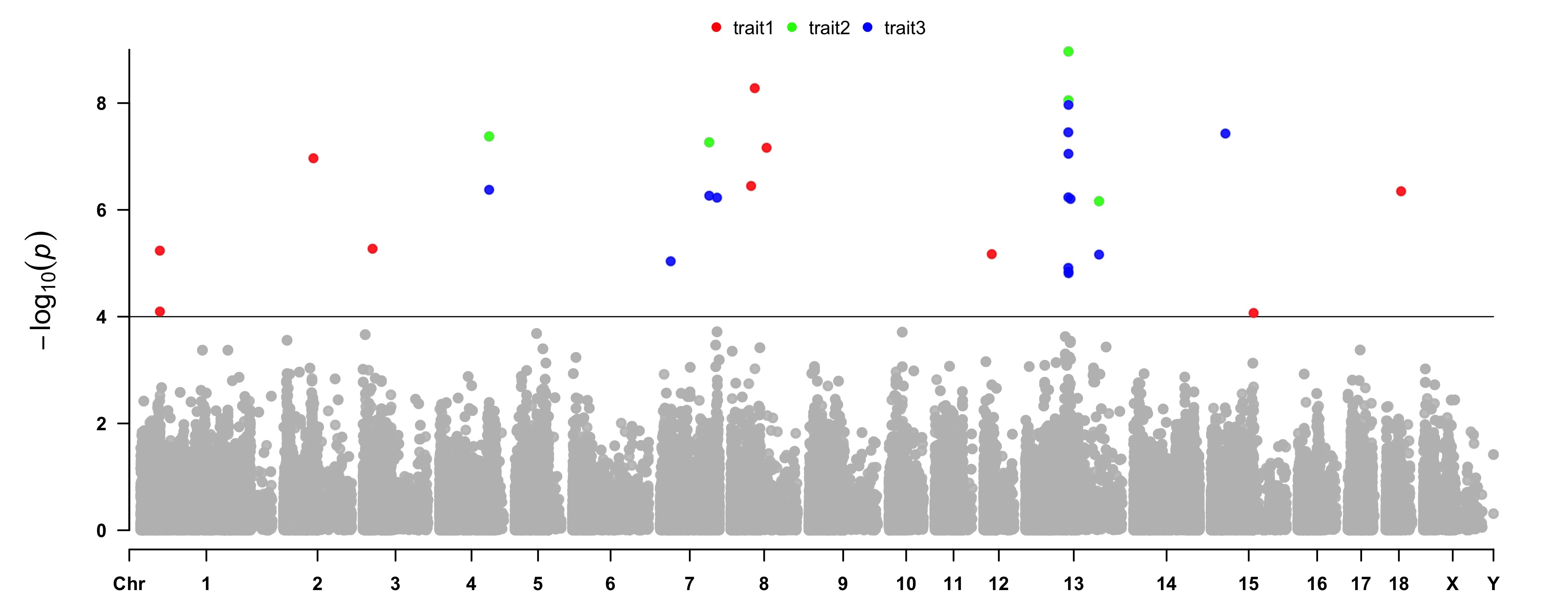
CMplot(pig60K, plot.type="m",col="grey",multraits=TRUE,threshold=1e-4,threshold.lty=1, threshold.lwd=c(1,1), threshold.col=c("black","grey"),amplify=TRUE, chr.den.col=NULL, signal.col=c("red","green","blue"),signal.cex=1, file="jpg",file.name=NULL,dpi=300,file.output=TRUE,verbose=TRUE, points.alpha=225,legend.ncol=3, legend.pos="middle")
note: length of 'col' should be equal to 1 for this case.
```
 ---
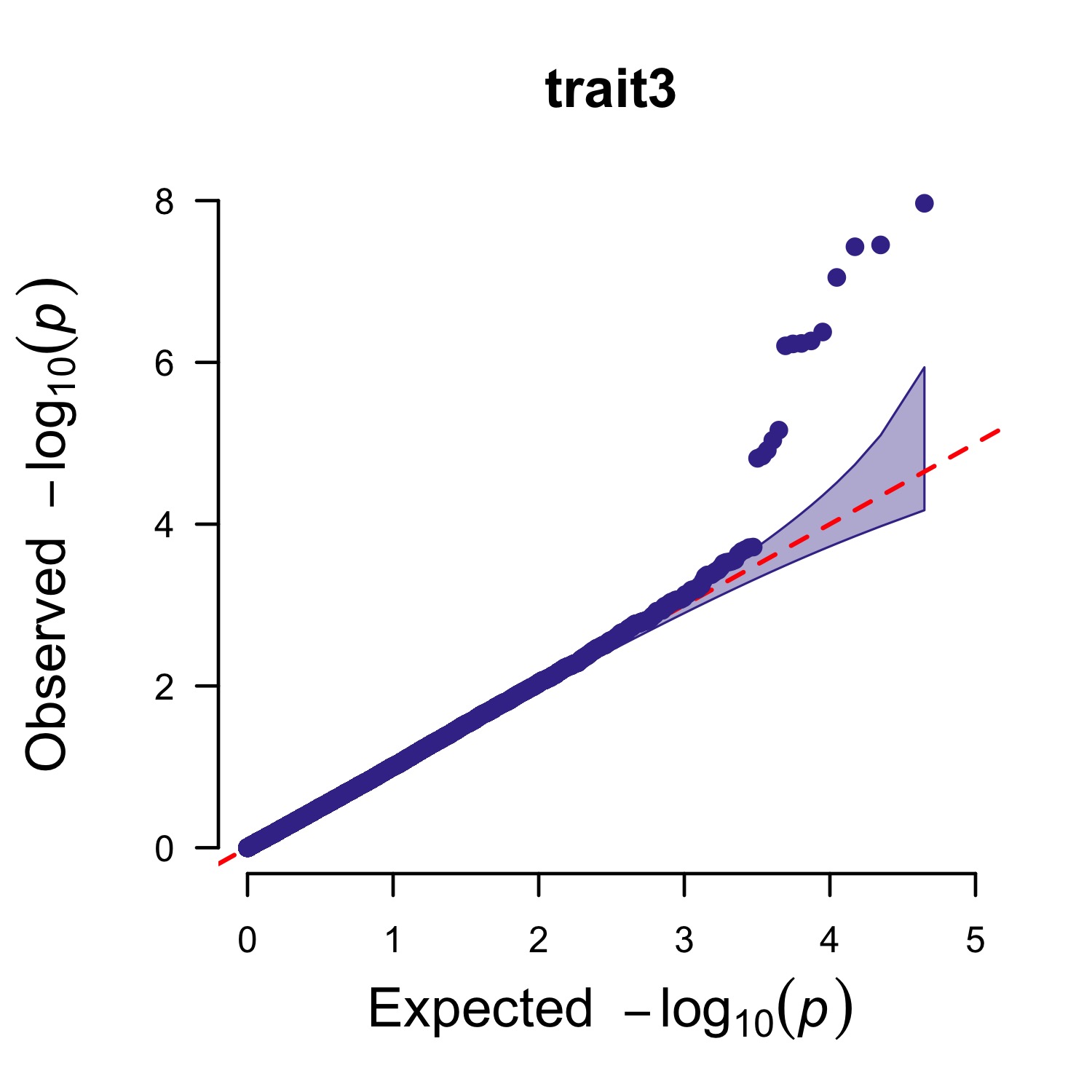
### Q-Q plot
```r
> CMplot(pig60K,plot.type="q",box=FALSE,file="jpg",file.name=NULL,dpi=300,
conf.int=TRUE,conf.int.col=NULL,threshold.col="red",threshold.lty=2,
file.output=TRUE,verbose=TRUE,width=5,height=5)
```
---
### Q-Q plot
```r
> CMplot(pig60K,plot.type="q",box=FALSE,file="jpg",file.name=NULL,dpi=300,
conf.int=TRUE,conf.int.col=NULL,threshold.col="red",threshold.lty=2,
file.output=TRUE,verbose=TRUE,width=5,height=5)
```
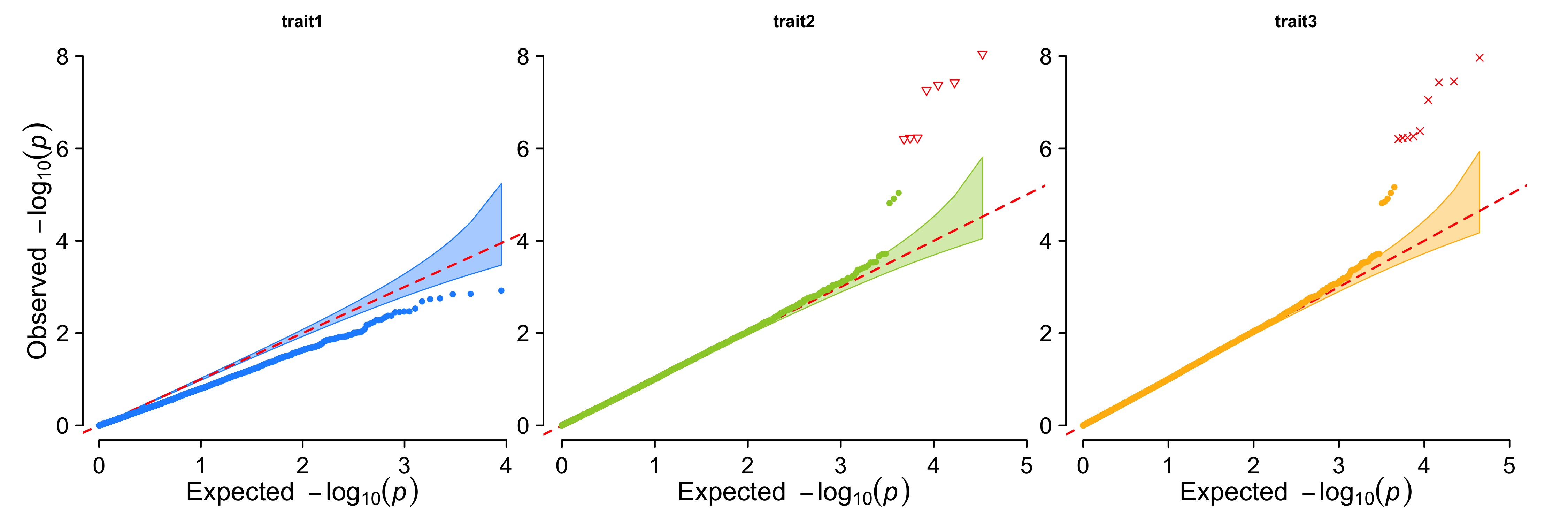
Multiple tracks Q-Q plot
```r
pig60K$trait1[sample(1:nrow(pig60K), round(nrow(pig60K)0.80))] <- NA pig60K$trait2[sample(1:nrow(pig60K), round(nrow(pig60K)0.25))] <- NA CMplot(pig60K,plot.type="q",col=c("dodgerblue1", "olivedrab3", "darkgoldenrod1"),multracks=TRUE, threshold=1e-6,ylab.pos=2,signal.pch=c(19,6,4),signal.cex=1.2,signal.col="red", conf.int=TRUE,box=FALSE,axis.cex=2,file="jpg",file.name=NULL,dpi=300,file.output=TRUE, verbose=TRUE,ylim=c(0,8),width=5,height=5) ```
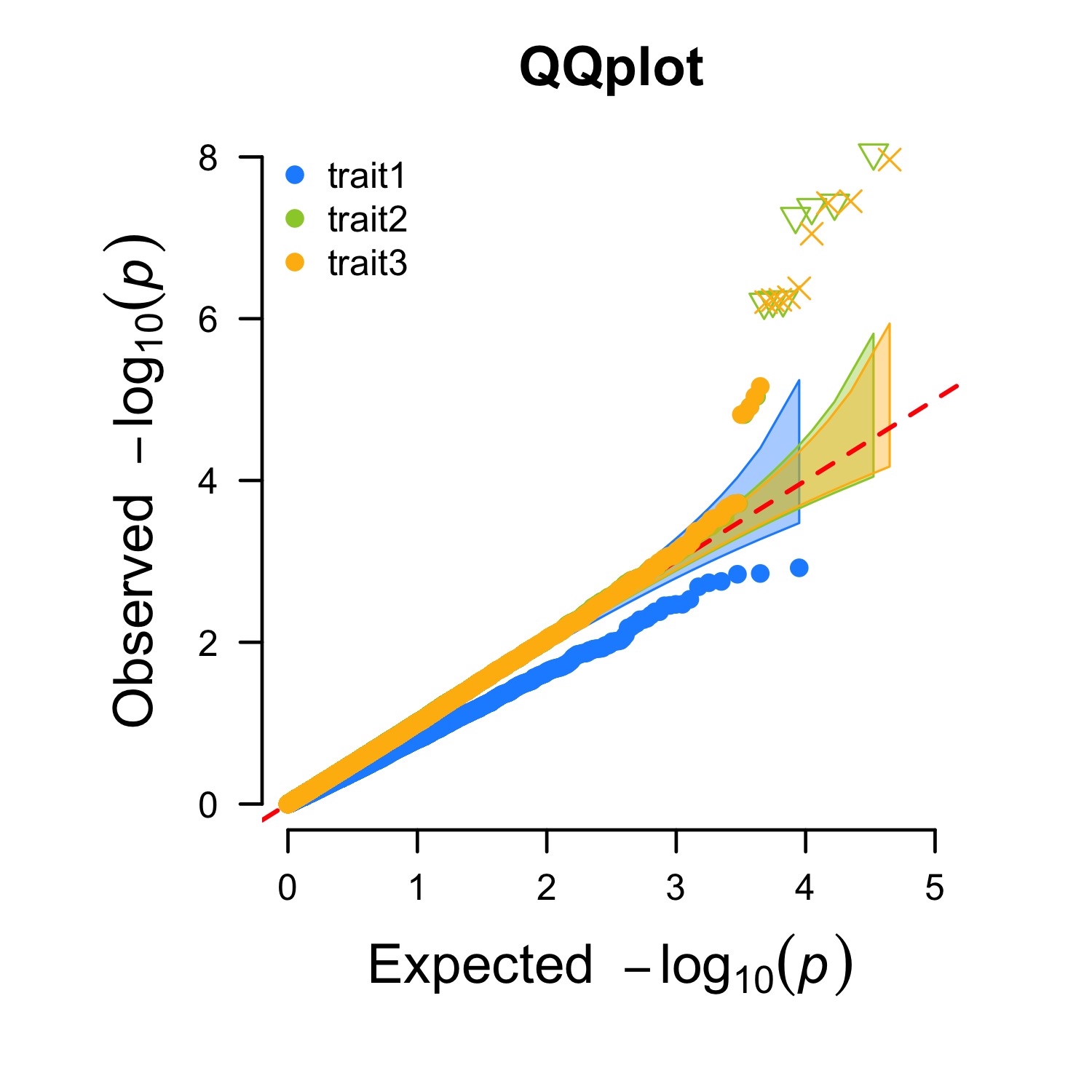
Multiple traits Q-Q plot
```r
CMplot(pig60K,plot.type="q",col=c("dodgerblue1", "olivedrab3", "darkgoldenrod1"),multraits=TRUE, threshold=1e-6,ylab.pos=2,signal.pch=c(19,6,4),signal.cex=1.2,signal.col="red", conf.int=TRUE,box=FALSE,axis.cex=1,file="jpg",file.name=NULL,dpi=300,file.output=TRUE, verbose=TRUE,ylim=c(0,8),width=5,height=5) ```
Contact
Questions, suggestions, and bug reports are welcome and appreciated. - Author: Lilin Yin - Contact: ylilin@163.com - QQ group: 166305848 - Institution: Huazhong agricultural university
Owner
- Name: Lilin Yin
- Login: YinLiLin
- Kind: user
- Company: Huazhong Agricultural University
- Website: https://scholar.google.com/citations?user=i8XyQQMAAAAJ&hl=en
- Repositories: 3
- Profile: https://github.com/YinLiLin
Quantitative Genetics and Statistical Genomics -- Keep smile to life & stay hungry for knowledge
GitHub Events
Total
- Issues event: 5
- Watch event: 54
- Issue comment event: 19
- Push event: 6
- Fork event: 6
Last Year
- Issues event: 5
- Watch event: 54
- Issue comment event: 19
- Push event: 6
- Fork event: 6
Committers
Last synced: over 2 years ago
Top Committers
| Name | Commits | |
|---|---|---|
| Lilin Yin | 1****9@q****m | 366 |
| Lilin Yin | y****n@1****m | 20 |
| haohao | h****z@f****m | 4 |
| Marcel Schilling | m****g@u****e | 2 |
| mnahinkhan | m****1@a****u | 1 |
| Darío Hereñú | m****a@g****m | 1 |
Committer Domains (Top 20 + Academic)
Issues and Pull Requests
Last synced: 10 months ago
All Time
- Total issues: 137
- Total pull requests: 5
- Average time to close issues: 3 months
- Average time to close pull requests: about 20 hours
- Total issue authors: 113
- Total pull request authors: 4
- Average comments per issue: 2.68
- Average comments per pull request: 0.6
- Merged pull requests: 4
- Bot issues: 0
- Bot pull requests: 0
Past Year
- Issues: 11
- Pull requests: 0
- Average time to close issues: 9 minutes
- Average time to close pull requests: N/A
- Issue authors: 9
- Pull request authors: 0
- Average comments per issue: 0.36
- Average comments per pull request: 0
- Merged pull requests: 0
- Bot issues: 0
- Bot pull requests: 0
Top Authors
Issue Authors
- manjusst (3)
- michaelofrancis (3)
- sa-9263 (3)
- koujiaodahan (3)
- hatre0 (2)
- rbutleriii (2)
- sariya (2)
- YannLeGuen (2)
- swvanderlaan (2)
- seisland1 (2)
- eightYao2 (2)
- kaanokay (2)
- Yung-Chien (2)
- orijitghosh (2)
- mverocai (2)
Pull Request Authors
- mschilli87 (2)
- mnahinkhan (1)
- kant (1)
- pagnasok (1)
Top Labels
Issue Labels
Pull Request Labels
Packages
- Total packages: 1
-
Total downloads:
- cran 2,103 last-month
- Total docker downloads: 49
- Total dependent packages: 3
- Total dependent repositories: 1
- Total versions: 24
- Total maintainers: 1
cran.r-project.org: CMplot
Circle Manhattan Plot
- Homepage: https://github.com/YinLiLin/CMplot
- Documentation: http://cran.r-project.org/web/packages/CMplot/CMplot.pdf
- License: GPL-2 | GPL-3 [expanded from: GPL (≥ 2)]
-
Latest release: 4.5.1
published over 2 years ago