prisma
Prisma Client Python is an auto-generated and fully type-safe database client designed for ease of use
Science Score: 36.0%
This score indicates how likely this project is to be science-related based on various indicators:
-
○CITATION.cff file
-
✓codemeta.json file
Found codemeta.json file -
✓.zenodo.json file
Found .zenodo.json file -
○DOI references
-
○Academic publication links
-
✓Committers with academic emails
2 of 34 committers (5.9%) from academic institutions -
○Institutional organization owner
-
○JOSS paper metadata
-
○Scientific vocabulary similarity
Low similarity (15.9%) to scientific vocabulary
Keywords
Keywords from Contributors
Repository
Prisma Client Python is an auto-generated and fully type-safe database client designed for ease of use
Basic Info
- Host: GitHub
- Owner: RobertCraigie
- License: apache-2.0
- Language: Python
- Default Branch: main
- Homepage: https://prisma-client-py.readthedocs.io
- Size: 54.9 MB
Statistics
- Stars: 2,008
- Watchers: 16
- Forks: 83
- Open Issues: 254
- Releases: 37
Topics
Metadata Files
README.md
Prisma Client Python
Type-safe database access for Python







[!WARNING] Prisma Client Python is no longer being maintained. See this issue for more information.
What is Prisma Client Python?
Prisma Client Python is a next-generation ORM built on top of Prisma that has been designed from the ground up for ease of use and correctness.
Prisma is a TypeScript ORM with zero-cost type safety for your database, although don't worry, Prisma Client Python interfaces with Prisma using Rust, you don't need Node or TypeScript.
Prisma Client Python can be used in any Python backend application. This can be a REST API, a GraphQL API or anything else that needs a database.
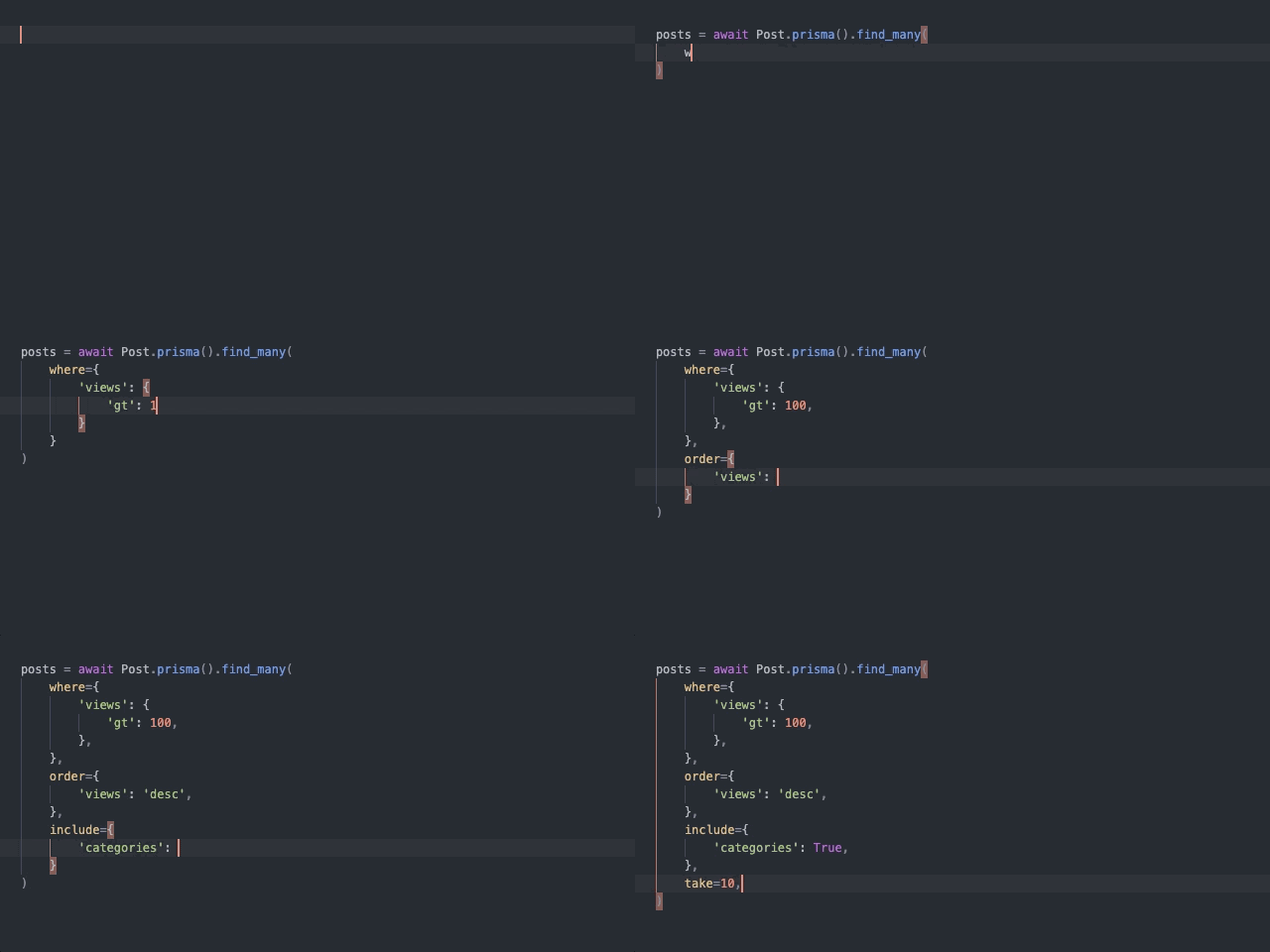
Note that the only language server that is known to support this form of autocompletion is Pylance / Pyright.
Why should you use Prisma Client Python?
Unlike other Python ORMs, Prisma Client Python is fully type safe and offers native support for usage with and without async. All you have to do is specify the type of client you would like to use for your project in the Prisma schema file.
However, the arguably best feature that Prisma Client Python provides is autocompletion support (see the GIF above). This makes writing database queries easier than ever!
Core features:
- Prisma Migrate
- Full type safety
- With / without async
- Recursive and pseudo-recursive types
- Atomic updates
- Complex cross-relational queries
- Partial type generation
- Batching write queries
Supported database providers:
- PostgreSQL
- MySQL
- SQLite
- CockroachDB
- MongoDB (experimental)
- SQL Server (experimental)
Support
Have any questions or need help using Prisma? Join the community discord!
If you don't want to join the discord you can also:
- Create a new discussion
- Ping me on the Prisma Slack
@Robert Craigie
How does Prisma work?
This section provides a high-level overview of how Prisma works and its most important technical components. For a more thorough introduction, visit the documentation.
The Prisma schema
Every project that uses a tool from the Prisma toolkit starts with a Prisma schema file. The Prisma schema allows developers to define their application models in an intuitive data modeling language. It also contains the connection to a database and defines a generator:
```prisma // database datasource db { provider = "sqlite" url = "file:database.db" }
// generator generator client { provider = "prisma-client-py" recursivetypedepth = 5 }
// data models model Post { id Int @id @default(autoincrement()) title String content String? views Int @default(0) published Boolean @default(false) author User? @relation(fields: [authorid], references: [id]) authorid Int? }
model User { id Int @id @default(autoincrement()) email String @unique name String? posts Post[] } ```
In this schema, you configure three things:
- Data source: Specifies your database connection. In this case we use a local SQLite database however you can also use an environment variable.
- Generator: Indicates that you want to generate Prisma Client Python.
- Data models: Defines your application models.
On this page, the focus is on the generator as this is the only part of the schema that is specific to Prisma Client Python. You can learn more about Data sources and Data models on their respective documentation pages.
Prisma generator
A prisma schema can define one or more generators, defined by the generator block.
A generator determines what assets are created when you run the prisma generate command. The provider value defines which Prisma Client will be created. In this case, as we want to generate Prisma Client Python, we use the prisma-client-py value.
You can also define where the client will be generated to with the output option. By default Prisma Client Python will be generated to the same location it was installed to, whether that's inside a virtual environment, the global python installation or anywhere else that python packages can be imported from.
For more options see configuring Prisma Client Python.
Accessing your database with Prisma Client Python
Just want to play around with Prisma Client Python and not worry about any setup? You can try it out online on gitpod.
Installing Prisma Client Python
The first step with any python project should be to setup a virtual environment to isolate installed packages from your other python projects, however that is out of the scope for this page.
In this example we'll use an asynchronous client, if you would like to use a synchronous client see setting up a synchronous client.
sh
pip install -U prisma
Generating Prisma Client Python
Now that we have Prisma Client Python installed we need to actually generate the client to be able to access the database.
Copy the Prisma schema file shown above to a schema.prisma file in the root directory of your project and run:
sh
prisma db push
This command will add the data models to your database and generate the client, you should see something like this:
``` Prisma schema loaded from schema.prisma Datasource "db": SQLite database "database.db" at "file:database.db"
SQLite database database.db created at file:database.db
🚀 Your database is now in sync with your schema. Done in 26ms
✔ Generated Prisma Client Python to ./.venv/lib/python3.9/site-packages/prisma in 265ms ```
It should be noted that whenever you make changes to your schema.prisma file you will have to re-generate the client, you can do this automatically by running prisma generate --watch.
The simplest asynchronous Prisma Client Python application will either look something like this:
```py import asyncio from prisma import Prisma
async def main() -> None: prisma = Prisma() await prisma.connect()
# write your queries here
user = await prisma.user.create(
    data={
        'name': 'Robert',
        'email': 'robert@craigie.dev'
    },
)

await prisma.disconnect()
if name == 'main': asyncio.run(main()) ```
or like this:
```py import asyncio from prisma import Prisma from prisma.models import User
async def main() -> None: db = Prisma(auto_register=True) await db.connect()
# write your queries here
user = await User.prisma().create(
    data={
        'name': 'Robert',
        'email': 'robert@craigie.dev'
    },
)

await db.disconnect()
if name == 'main': asyncio.run(main()) ```
Query examples
For a more complete list of queries you can perform with Prisma Client Python see the documentation.
All query methods return pydantic models.
Retrieve all User records from the database
py
users = await db.user.find_many()
Include the posts relation on each returned User object
py
users = await db.user.find_many(
    include={
        'posts': True,
    },
)
Retrieve all Post records that contain "prisma"
py
posts = await db.post.find_many(
    where={
        'OR': [
            {'title': {'contains': 'prisma'}},
            {'content': {'contains': 'prisma'}},
        ]
    }
)
Create a new User and a new Post record in the same query
py
user = await db.user.create(
    data={
        'name': 'Robert',
        'email': 'robert@craigie.dev',
        'posts': {
            'create': {
                'title': 'My first post from Prisma!',
            },
        },
    },
)
Update an existing Post record
py
post = await db.post.update(
    where={
        'id': 42,
    },
    data={
        'views': {
            'increment': 1,
        },
    },
)
Usage with static type checkers
All Prisma Client Python methods are fully statically typed, this means you can easily catch bugs in your code without having to run it!
For more details see the documentation.
How does Prisma Client Python interface with Prisma?
Prisma Client Python connects to the database and executes queries using Prisma's rust-based Query Engine, of which the source code can be found here: https://github.com/prisma/prisma-engines.
Prisma Client Python exposes a CLI interface which wraps the Prisma CLI. This works by downloading a Node binary, if you don't already have Node installed on your machine, installing the CLI with npm and running the CLI using Node.
The CLI interface is the exact same as the standard Prisma CLI with some additional commands.
Affiliation
Prisma Client Python is not an official Prisma product although it is very generously sponsored by Prisma.
Room for improvement
Prisma Client Python is a fairly new project and as such there are some features that are missing or incomplete.
Auto completion for query arguments
Prisma Client Python query arguments make use of TypedDict types. Support for completion of these types within the Python ecosystem is now fairly widespread. This section is only here for documenting support.
Supported editors / extensions:
- VSCode with pylance v2021.9.4 or higher
- Sublime Text with LSP-Pyright v1.1.196 or higher
- PyCharm 2022.1 EAP 3 added support for completing
TypedDicts- This does not yet work for Prisma Client Python unfortunately, see this issue
- Any editor that supports the Language Server Protocol and has an extension supporting Pyright v1.1.196 or higher
py
user = await db.user.find_first(
    where={
        '|'
    }
)
Given the cursor is where the | is, an IDE should suggest the following completions:
- id
- name
- posts
Performance
While there has currently not been any work done on improving the performance of Prisma Client Python queries, they should be reasonably fast as the core query building and connection handling is performed by Prisma. Performance is something that will be worked on in the future and there is room for massive improvements.
Supported platforms
Windows, MacOS and Linux are all officially supported.
Version guarantees
Prisma Client Python is not stable.
Breaking changes will be documented and released under a new MINOR version following this format.
MAJOR.MINOR.PATCH
New releases are scheduled bi-weekly, however as this is a solo project, no guarantees are made that this schedule will be stuck to.
Contributing
We use conventional commits (also known as semantic commits) to ensure consistent and descriptive commit messages.
See the contributing documentation for more information.
Attributions
This project would not be possible without the work of the amazing folks over at prisma.
Massive h/t to @steebchen for his work on prisma-client-go which was incredibly helpful in the creation of this project.
This README is also heavily inspired by the README in the prisma/prisma repository.
Owner
- Name: Robert Craigie
- Login: RobertCraigie
- Kind: user
- Location: Scotland
- Company: @stainless-api
- Website: craigie.dev
- Twitter: probablyrobert
- Repositories: 59
- Profile: https://github.com/RobertCraigie
Creator of Prisma Client Python - the first fully typed ORM for Python! Founding Engineer, @stainless-api
GitHub Events
Total
- Issues event: 25
- Watch event: 172
- Delete event: 1
- Issue comment event: 52
- Push event: 56
- Pull request review event: 2
- Pull request review comment event: 2
- Pull request event: 8
- Fork event: 11
- Create event: 1
Last Year
- Issues event: 25
- Watch event: 172
- Delete event: 1
- Issue comment event: 52
- Push event: 56
- Pull request review event: 2
- Pull request review comment event: 2
- Pull request event: 8
- Fork event: 11
- Create event: 1
Committers
Last synced: over 1 year ago
Top Committers
| Name | Commits | |
|---|---|---|
| Robert Craigie | r****0@g****m | 461 |
| Robert Craigie | r****t@c****v | 283 |
| dependabot[bot] | 4****] | 75 |
| renovate[bot] | 2****] | 67 |
| Leejay Hsu | 3****u | 6 |
| Adeel Khan | a****l@d****o | 2 |
| Jacob Roberts | j****r@g****m | 2 |
| Matyáš Richter | m****s@m****z | 2 |
| Eduard Zorita | e****a@g****m | 1 |
| Fai | l****7@g****m | 1 |
| Johnny Lim | i****e@n****m | 1 |
| Bulygin Evgeny | 4****1 | 1 |
| Bryan Chen | 6****y | 1 |
| Astrea | 2****S | 1 |
| Anand | 4****2 | 1 |
| Adrian Garcia Badaracco | 1****b | 1 |
| q0w | 4****w | 1 |
| pre-commit-ci[bot] | 6****] | 1 |
| dv1x3r | 3****r | 1 |
| M#3 | z****e | 1 |
| Leon | L****4 | 1 |
| Kyler | 3****0 | 1 |
| Horu | 7****c | 1 |
| Kevin Hill | k****0@g****m | 1 |
| Kevin Tewouda | r****v@y****r | 1 |
| Kurtis Fields | k****s@g****m | 1 |
| Timothy Choi | t****3@t****o | 1 |
| Yasser Tahiri | y****9@g****m | 1 |
| Eduard Zorita | e****a@e****m | 1 |
| AuroraTea | 1****9@q****m | 1 |
| and 4 more... | ||
Committer Domains (Top 20 + Academic)
Issues and Pull Requests
Last synced: 10 months ago
All Time
- Total issues: 192
- Total pull requests: 220
- Average time to close issues: 4 months
- Average time to close pull requests: about 1 month
- Total issue authors: 116
- Total pull request authors: 29
- Average comments per issue: 2.03
- Average comments per pull request: 0.55
- Merged pull requests: 161
- Bot issues: 2
- Bot pull requests: 74
Past Year
- Issues: 27
- Pull requests: 10
- Average time to close issues: 5 days
- Average time to close pull requests: 4 months
- Issue authors: 25
- Pull request authors: 8
- Average comments per issue: 0.78
- Average comments per pull request: 0.7
- Merged pull requests: 1
- Bot issues: 0
- Bot pull requests: 2
Top Authors
Issue Authors
- RobertCraigie (59)
- vikyw89 (5)
- rijenkii (3)
- De-y (3)
- renovate[bot] (3)
- ezorita (3)
- Saya47 (2)
- marcovc (2)
- krrishdholakia (2)
- Gnosnay (2)
- ethanabrooks (2)
- Ali-Parandeh (2)
- braindevices (2)
- Bewinxed (2)
- TBxy (1)
Pull Request Authors
- RobertCraigie (149)
- renovate[bot] (116)
- jonathanblade (6)
- AdeelK93 (5)
- lxxonx (4)
- AmaseCocoa (3)
- ezorita (3)
- jacobdr (3)
- AstreaTSS (2)
- LucaTabone (2)
- ProgramRipper (2)
- AuroraTea (2)
- fisher60 (2)
- arthur-fontaine (2)
- msabramo (2)
Top Labels
Issue Labels
Pull Request Labels
Packages
- Total packages: 5
-
Total downloads:
- pypi 438,950 last-month
- Total docker downloads: 14,706
-
Total dependent packages: 15
(may contain duplicates) -
Total dependent repositories: 1,022
(may contain duplicates) - Total versions: 125
- Total maintainers: 2
pypi.org: prisma
Prisma Client Python is an auto-generated and fully type-safe database client
- Homepage: https://github.com/RobertCraigie/prisma-client-py
- Documentation: https://prisma-client-py.readthedocs.io
- License: APACHE
-
Latest release: 0.15.0
published almost 2 years ago
Rankings
Maintainers (1)
proxy.golang.org: github.com/robertcraigie/prisma-client-py
- Documentation: https://pkg.go.dev/github.com/robertcraigie/prisma-client-py#section-documentation
- License: apache-2.0
-
Latest release: v0.15.0
published almost 2 years ago
Rankings
proxy.golang.org: github.com/RobertCraigie/prisma-client-py
- Documentation: https://pkg.go.dev/github.com/RobertCraigie/prisma-client-py#section-documentation
- License: apache-2.0
-
Latest release: v0.15.0
published almost 2 years ago
Rankings
pypi.org: prisma-client
Prisma Client Python is an auto-generated and fully type-safe database client
- Homepage: https://github.com/RobertCraigie/prisma-client-py
- Documentation: https://prisma-client-py.readthedocs.io
- License: APACHE
-
Latest release: 0.2.1
published over 4 years ago
Rankings
Maintainers (1)
pypi.org: prisma-pynext
Prisma Client Python is an auto-generated and fully type-safe database client
- Homepage: https://github.com/RobertCraigie/prisma-client-py
- Documentation: https://prisma-client-py.readthedocs.io
- License: APACHE
-
Latest release: 0.8.14
published about 3 years ago
Rankings
Maintainers (1)
Dependencies
- actions/checkout v4 composite
- actions/setup-python v4 composite
- amannn/action-semantic-pull-request v5.2.0 composite
- actions/checkout v4 composite
- actions/setup-python v4 composite
- actions/cache v3 composite
- actions/checkout v4 composite
- actions/download-artifact v3 composite
- actions/setup-python v4 composite
- actions/upload-artifact v3 composite
- docker/build-push-action v5 composite
- docker/setup-buildx-action v3 composite
- docker/setup-qemu-action v3 composite
- geekyeggo/delete-artifact v2 composite
- mariadb 10
- mysql 8.0.28
- postgres 11
- postgres 10
- postgres 15
- postgres 12
- postgres 13
- postgres 14
- prismagraphql/cockroachdb-custom 22.1.0
- coverage ==7.2.7
- dirty-equals ==0.6.0
- distro *
- python ${PYTHON_VERSION}-${OS_DISTRO} build
- discord.py ==1.7.1
- prisma *
- fastapi ==0.65.2
- prisma *
- uvicorn ==0.13.3
- flask ==2.0.1
- hashids ==1.3.1
- prisma *
- kivy ==2.0.0
- kivymd ==0.104.2
- prisma *
- pygame ==2.1.0
- GitPython * development
- blue ==0.9.1 development
- distro * development
- nox ==2022.11.21 development
- pre-commit ==2.21.0 development
- rtoml ==0.9.0 development
- twine ==4.0.2 development
- typer ==0.9.0 development
- wheel ==0.42.0 development
- mkdocs ==1.5.3
- mkdocs-material ==9.4.14
- interrogate ==1.5.0
- slotscheck ==0.17.1
- types-mock *
- nodejs-bin ==16.15.1a4
- mock ==5.1.0 test
- pytest-subprocess ==1.5.0 test
- pytest-sugar * test
- pytest-mypy-plugins ==3.0.0
- pytest-pyright ==0.0.4
- StrEnum *
- cached-property *
- click >=7.1.2
- httpx >=0.19.0
- jinja2 >=2.11.2
- nodeenv *
- pydantic >=1.8.0,<3
- python-dotenv >=0.12.0
- tomlkit *
- typing-extensions >=4.0.1
- nodejs-bin *