Recent Releases of prisma
prisma - v0.15.0
What's Changed
Fixed regression with optional raw query fields
The last release, v0.14.0, included a regression with the handling of optional values for BigInt, Decimal & Json fields where an error would be raised if the value was None.
Massive thank you to @AstreaTSS for a very detailed bug report and contributing a fix!
Support for .create_many() for SQLite
The create_many() method is now supported in SQLite!
```py total = await client.user.create_many([{'name': 'Robert'}, {'name': 'Tegan'}])
2
```
However the skip_duplicates argument is unfortunately not supported yet.
Massive thank you to @AdeelK93 for contributing this feature!
Support for connect_or_create
You can now connect or create a relational record through the .create() method, for example:
py
post = await client.post.create(
     data={
         'title': 'Post 1',
         'published': True,
         'author': {
             'connect_or_create': {
                 'where': {
                     'id': user.id,
                 },
                 'create': {
                     'name': 'Robert',
                 },
             },
         },
     },
     include={
         'author': True,
     },
 )
Thanks to @AdeelK93 for contributing this feature!
Preview support for full text search
A new search parameter has been added for string field filters in PostgreSQL and MySQL. The syntax within the string is entirely dependent on the underlying database.
For example, in PostgreSQL, a filter for all posts where the title contains "cat" or "dog" would look like this:
py
posts = await client.post.find_many(
     where={
         'title': {
             'search': 'cats | dogs',
         },
     }
 )
To use full text search you'll need to add it as a preview feature
prisma
generator client {
  provider        = "prisma-client-py"
  previewFeatures = ["fullTextSearch"]
}
See these docs for more details on full text search.
Massive thank you again(!) to @AdeelK93 for contirbuting this feature.
- Python
Published by RobertCraigie almost 2 years ago

prisma - v0.14.0
What's Changed
Support for Prisma Schema Folder
Prisma now has preview support for splitting your schema.prisma file into multiple separate files!
For more information see their docs.
Dropped support for Python 3.7
Python 3.7 has been EOL for a while now and accounts for less than 1% of the downloads of Prisma Client Python, as such, support was dropped in this release.
Prisma Upgrades
The internal Prisma version has been updated from v5.11.0 to v5.17.0 which includes a lot of improvements, see the Prisma release notes for more information.
- Python
Published by RobertCraigie almost 2 years ago
prisma - v0.13.0
What's changed
Customisation of client model instance names
Up until now, if you had a schema like this defined:
prisma
model OrgMember {
  // ...
}
You would have to access it like this:
```py from prisma import Prisma
client = Prisma() member = client.orgmember.find_unique(...) ```
With this release you can customise the instance name on the client, e.g. orgmember, to whatever you would like! For example:
prisma
/// @Python(instance_name: "org_member")
model OrgMember {
  // ...
}
The OrgMember model can now be accessed through the client like so:
py
client = Prisma()
client.org_member.find_unique(...)
A future release will also add support for changing the default casing implementation used in the client!
Prisma upgrades
The internal Prisma version has been bumped from 5.8.0 to 5.11.0, you can find the release notes for each version below:
- 5.9.0
- 5.9.1
- 5.10.0
- 5.11.0
Official support for Python 3.12
Up until now Prisma Client Python didn't declare support for Python 3.12 but it will have worked at runtime. The only user facing changes in this release are to the python -m prisma_cleanup script to avoid a deprecation warning.
Minor internal breaking changes
Some minor changes were made to modules that were intended to be private but were not marked with a preceding _.
prisma.builderhas been moved toprisma._builder- The main export from the
prisma.buildermodule,QueryBuilder, has new required constructor arguments
Misc changes
I've also started laying the ground work for usage of both the async client and the sync client at the same time and hope to support this in the next release!
- fix(node): bump minimum node version to v16
- fix(generator): remove use of deprecated pydantic methods
- fix(types): remove definition of StrEnum as Enum
- fix(requirements): set minimum pydantic version to 1.10.0
New Contributors
- @fisher60 made their first contribution in https://github.com/RobertCraigie/prisma-client-py/pull/881
Sponsors
- Python
Published by RobertCraigie about 2 years ago
prisma - v0.12.0
What's Changed
This release bumps the internal Prisma version from 5.4.2 to 5.8.0 bringing major preview improvements to distinct & joins.
This release also ensures we use a consistent enum format on Python 3.11 upwards, see this issue for more details.
Misc changes
- Minor improvements to docs thanks to @Oreoxmt & @tooruu!
Sponsors
- Python
Published by RobertCraigie over 2 years ago
prisma - v0.11.0
What's Changed
This release bumps the internal Prisma version from 4.15.2 to 5.4.2 bringing major performance improvements.
This release also adds support for retrieving metrics, e.g.
```py from prisma import Prisma
client = Prisma()
metrics = client.get_metrics() print(metrics.counters[0]) ```
See the docs for more information.
Misc changes
Sponsors
- Python
Published by RobertCraigie over 2 years ago
prisma - v0.10.0
What's Changed
This release adds support for Pydantic v2 while maintaining backwards compatibility with Pydantic v1.
This should be a completely transparent change for the majority of users with one exception regarding prisma.validate.
Due to this bug we can't use the new TypeAdapter concept in v2 and instead rely on the v1 re-exports, this has the implication that any errors raised by the validator will need to be caught using the v1 ValidationError type instead, e.g.
```py from pydantic.v1 import ValidationError import prisma
try: prisma.validate(...) except ValidationError: ... ```
Improved timeouts inputs
All timeout arguments now accept a datetime.timedelta instance as well as the previously accepted int / float types, however support for int / float has been deprecated and will be removed in a future release.
The previous values were used inconsistently, sometimes it meant seconds and sometimes it meant milliseconds. This new structure is more flexible and allows you to specify the time in whatever format you'd like. Thanks @jonathanblade!
```py from datetime import timedelta from prisma import Prisma
db = Prisma( connect_timeout=timedelta(seconds=20), ) ```
Misc Changes
- docs: typos
- feat(client): add support for using model queries within transactions
- feat(client): add is_registered() method
Thanks @zspine and @jonathanblade for contributing!
- Python
Published by RobertCraigie almost 3 years ago
prisma - v0.9.1
This release pins pydantic to < 2 as v2.0.0 is not yet compatible with Prisma.
Misc Changes
- fix(client): ensure engine protocol is properly set
- docs: add missing code block close tag
- docs: polishes & typos
Thanks to @izeye and @Leon0824 for contributing!
Sponsors
- Python
Published by RobertCraigie almost 3 years ago
prisma - v0.9.0
What's Changed
Support for Interactive Transactions
This release adds support for interactive transactions! This means you can safely group sets of queries into a single atomic transaction that will be rolled back if any step fails.
Quick example:
```py from prisma import Prisma
prisma = Prisma() await prisma.connect()
async with prisma.tx() as transaction: user = await transaction.user.update( where={'id': fromuserid}, data={'balance': {'decrement': 50}} ) if user.balance < 0: raise ValueError(f'{user.name} does not have enough balance')
await transaction.user.update(
    where={'id': to_user_id},
    data={'balance': {'increment': 50}}
)
```
For more information see the docs.
Support for find_unique_or_raise & find_first_or_raise
This release adds two new client methods, find_unique_or_raise & find_first_or_raise which are the exact same as the respective find_unique & find_first methods but will raise an error if a record could not be found.
This is useful when you know that you should always find a given record as you won't have to explicitly handle the case where it isn't found anymore:
py
user = await db.user.find_unique_or_raise(
    where={
        'id': '...',
    },
    include={
        'posts': True,
    },
)
Prisma updates
This release bumps the internal Prisma version from v4.11.0 to v4.15.0.
Some of the highlights:
- Introspection warnings for unsupported database features
- Support for passing custom arguments to prisma db seed
For the full release notes, see the v4.12.0, v4.13.0, v4.14.0 and v4.15.0 release notes.
Miscellaneous Changes
- Bumped minimum required
typing-extensionsversion from3.7to4.0.1 - Added support for the
--generatoroption toprisma py generateas well - Improved internal testing for the synchronous client
- Improved error message for missing engine binary
- Improved error message for usage of unsupported composite types
Sponsors
Huge thank you to @isometric & @techied for their continued support!
- Python
Published by RobertCraigie almost 3 years ago
prisma - v0.8.2
Prisma updates
This release bumps the internal Prisma version from v4.10.1 to v4.11.0, although there aren't any major changes here for Prisma Client Python users.
The full release notes can be found here.
Bug fIxes
- Fixed crash when using default values for arrays
- Fixed incorrect CLI binary caching detection mechanism
- Python
Published by RobertCraigie about 3 years ago
prisma - v0.8.1
Support for selecting fields
This release adds support for selecting fields at the database level!
This currently only works for queries using model based access either by defining your own model classes or generating them using partial types.
Quick example:
```py from prisma.bases import BaseUser
class UserWithName(BaseUser): name: str
this query will only select the name field at the database level!
user = await UserWithName.prisma().find_first( where={ 'country': 'Scotland', }, ) print(user.name) ```
For a more detailed guide see the docs.
Support for distinct filters
You can now pass in a distinct filter to find_first() and find_many() queries.
For example, the following query will find all Profile records that have a distinct, or unique, city field.
```py profiles = await db.profiles.find_many( distinct=['city'], )
[
{ city: 'Paris' },
{ city: 'Lyon' },
]
```
You can also filter by distinct combinations, for example the following query will return all records that have a distinct city and country combination.
```py profiles = await db.profiles.find_many( distinct=['city', 'country'], )
[
{ city: 'Paris', country: 'France' },
{ city: 'Paris', country: 'Denmark' },
{ city: 'Lyon', country: 'France' },
]
```
CLI support for specifying the generator to use
Thanks to @yukukotani's great work on the CLI you can now ergonomically share the same schema between multiple languages, for example with the following schema:
```prisma datasource db { provider = "sqlite" url = "file:./dev.db" }
generator node { provider = "prisma-client-js" }
generator python { provider = "prisma-client-py" }
model User { id Int @id name String } ```
You can now skip the generation of the Node client with the --generator argument:
prisma generate --generator=python
See the generate documentation for more details.
Bug fixes
- Ensure the SIGINT signal is unblocked before forking the query engine process, thanks to @ezorita!
Prisma updates
This release bumps the internal Prisma version from v4.8.0 to v4.10.1
- Multi-schema support for SQL Server (Preview)
- Improved CLI support for connection proxies
- Improved introspection support for unsupported features
- Smaller engine size in the CLI
For the full release notes, see the v4.9.0 release notes and the v4.10.0 release notes.
Minimum required type checker version
Before this release there were no explicit compatibility requirements for type checkers. From now on we will only support the latest versions of Mypy and Pyright.
In the next release the mypy plugin will be deprecated and later removed entirely. There is a bug in the plugin API in the latest versions of mypy that completely breaks the plugin and seems impossible to fix. See #683 for more information.
Sponsors
Massive thank you to @prisma, @techied, @exponential-hq and @danburonline for their continued support! Thank you to @paudrow for becoming a sponsor!

- Python
Published by RobertCraigie over 3 years ago
prisma - v0.8.0
⚠️ Prisma Schema Breaking Changes
This release contains some changes to the format of the Prisma Schema.
Most of these changes are due to a conceptual shift from allowing implicit behaviour to forcing verboseness to reduce the amount of under the hood magic that Prisma does, thankfully this means that a lot of the changes that you will be required to make should be pretty straightforward and easily fixable by running prisma format which will show you all the places that need changed in your schema.
Changes:
- Explicit unique constraints for 1:1 relations
- Removed support for usage of references on implicit m:n relations
- Enforcing uniqueness of referenced fields in the references argument in 1:1 and 1:m relations for MySQL
- Removal of the sqlite:// URL prefix, you should now use file:// instead
- Improved grammar for string literals
For more details see the Prisma v4.0.0 upgrade path.
⚠️ Internal Raw Query Changes
This release includes an internal restructuring of how raw queries are deserialized. While all these changes should be completely backwards compatible, there may be edge cases that have changed. If you encounter one of these edge cases please open an issue and it will be fixed ASAP.
For some additional context, this restructuring means that most fields will internally be returned as strings until Prisma Client Python deserializes them (previously this was done at the query engine level).
CLI Improvements
This release completely refactors how the Prisma CLI is downloaded and ran. The previous implementation relied on downloading a single pkg binary, this worked but had several limitations which means we now:
- Support ARM architectures & certain Linux distributions
- Support running Prisma Studio from the CLI
- Support generating the JS Client
- No longer have to maintain a separate implementation from Prisma for detecting the current platform & logic for downloading engines
- As a user this means that more platforms & architectures will be supported faster!
The new solution is involves directly downloading a Node.js binary (if you don't already have it installed) and directly installing the Prisma ClI through npm. Note that this does not pollute your userspace and does not make Node available to the rest of your system.
This will result in a small size increase (~150MB) in the case where Node is not already installed on your machine, if this matters to you you can install Prisma Client Python with the node extra, e.g. pip install prisma[node], which will install a Node binary to your site-packages that results in the same storage requirements as the previous pkg solution. You can also directly install nodejs-bin yourself. It's also worth noting that this release includes significant (~50%) reduction in the size of the Prisma Engine binaries which makes the default Node binary size increase less impactful.
Prisma Studio
With this release you can now run Prisma Studio from the CLI which makes it incredibly easy to view & edit the data in your database. Simply run the following command
$ prisma studio
Or
$ prisma studio --schema=backend/schema.prisma
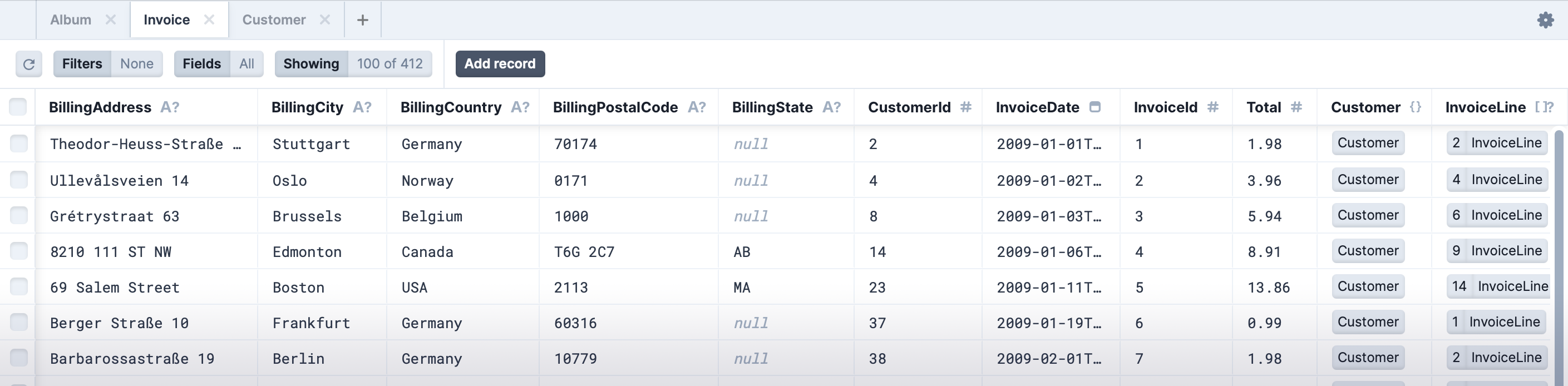
Note that there is also a dark mode available
Support for CockroachDB
This release adds official support for CockroachDB. You could've used CockroachDB previously by setting provider to postgresql but now you can explicitly specify CockroachDB in your Prisma Schema:
prisma
datasource db {
  provider = "cockroachdb"
  url      = env("COCKROACHDB_URL")
}
It should be noted that there are a couple of edge cases:
- BigInt ID fields cannot be atomically updated
- BigInt & Int fields cannot be atomically divided
- Array push operation is not supported
Prisma Updates
TL;DR for improvements made by Prisma that will now be in Prisma Client Python
- [3.14.0] PostgreSQL extended indexes support (now generally available)
- [4.0.0] Defaults for scalar lists
- [4.3.0] Prisma CLI exit code fixes
- [4.5.0] PostgreSQL extension management
- [4.7.0] Prisma Schema relationMode is now generally available
- [4.7.0] Query across multiple database schemas in PostgreSQL
- [4.8.0] Decreased the size of the Query Engine binary ~50%
- [4.8.0] Improved support for OpenSSL 3.x
Full list of changes: - https://github.com/prisma/prisma/releases/tag/3.14.0 - https://github.com/prisma/prisma/releases/tag/3.15.0 - https://github.com/prisma/prisma/releases/tag/3.15.1 - https://github.com/prisma/prisma/releases/tag/3.15.2 - https://github.com/prisma/prisma/releases/tag/4.0.0 - https://github.com/prisma/prisma/releases/tag/4.1.0 - https://github.com/prisma/prisma/releases/tag/4.1.1 - https://github.com/prisma/prisma/releases/tag/4.2.0 - https://github.com/prisma/prisma/releases/tag/4.2.1 - https://github.com/prisma/prisma/releases/tag/4.3.0 - https://github.com/prisma/prisma/releases/tag/4.3.1 - https://github.com/prisma/prisma/releases/tag/4.4.0 - https://github.com/prisma/prisma/releases/tag/4.5.0 - https://github.com/prisma/prisma/releases/tag/4.6.0 - https://github.com/prisma/prisma/releases/tag/4.7.0 - https://github.com/prisma/prisma/releases/tag/4.7.1 - https://github.com/prisma/prisma/releases/tag/4.8.0
Miscellaneous Changes
- Added tests for MariaDB
- Add validation to ensure model names do not clash with reserved keywords
- Removed dev dependencies from the package distribution
- Fixed incorrect type references under certain conditions for partial models
- Added tests to ensure unsupported features for a given database do not pass type checks
- Fixed docs typo - thanks @HigherOrderLogic!
- Moved binaries outside of
/tmpby default
Public Roadmap
Going forward we will now use a GitHub Project to track state and relative priority of certain issues. If you'd like to increase the priority of issues that would benefit you please add 👍 reactions.
This is less of a roadmap per se but will hopefully give you some insight into the priority of given issues / features.
Attributions
Thank you to @kfields for helping with raw query deserialization!
Massive thank you to @prisma & @techied for their continued support and @exponential-sponsorship for becoming a sponsor!

- Python
Published by RobertCraigie over 3 years ago
prisma - v0.7.1
What's Changed
Bug Fixes
- Argument list too long when connecting to a database with a large schema error
- Generator exit codes and error messages are not propagated on windows
- Prevent the accidental stripping of sqlite database names that contain the phrase sqlite
- Mypy Plugin: Removed UnicodeExpr as it is no longer supported
- Do not copy schema file if generating to the current dir
Windows Support
This release adds official support for the Windows platform!
The main fix that comes with this release is a workaround for the missing error messages issue that has plagued so many.
Internal Improvements
A lot of the effort that went into this release was improving our internal testing strategies. This involved a major overhaul of our testing suite so that we can easily test multiple different database providers. This means we will be less likely to ship bugs and will be able to develop database specific features much faster!
In addition to the refactored test suite we also have new docker-based tests for ensuring compatibility with multiple platforms and environments that were previously untested. @jacobdr deserves a massive thank you for this!
Sponsors

- Python
Published by RobertCraigie over 3 years ago
prisma - v0.7.0
Breaking Changes
Path resolution for relative SQLite databases fixed
Previously there was a mismatch between the resolution algorithm for relative SQLite paths which could cause the Client and the CLI to point to different databases.
The mismatch is caused by the CLI using the path to the Prisma Schema file as the base path whereas the Client used the current working directory as the base path.
The Client will now use the path to the Prisma Schema file as the base path for all relative SQLite paths, absolute paths are unchanged.
What's Changed
Add support for configuration through the pyproject.toml file
You can now configure Prisma Client Python using an entry in your pyproject.toml file instead of having to set environment variables, e.g.
toml
[tool.prisma]
binary_cache_dir = '.binaries'
It should be noted that you can still use environment variables if you so desire, e.g.
sh
PRISMA_BINARY_CACHE_DIR=".binaries"
This will also be useful as a workaround for #413 until the default behaviour is changed in the next release.
See the documentation for more information.
Fix .env files overriding environment variables
Previously any environment variables present in the .env or prisma/.env file would take precedence over the environment variables set at the system level. This behaviour was not correct as it does not match what the Prisma CLI does. This has now been changed such that any environment variables in the .env file will only be set if there is not an environment variable already present.
Add support for Python 3.11
Python 3.11 is now officially supported and tested!
It should be noted that you may encounter some deprecation warnings from the transitive dependencies we use.
Add support for generating JSON Schema for Bytes types
You can now generate JSON Schemas / OpenAPI Schemas for models that use the Bytes type.
```py from prisma import Base64 from pydantic import BaseModel
class MyModel(BaseModel): image: Base64
print(MyModel.schema_json(indent=2)) ```
json
{
  "title": "MyModel",
  "type": "object",
  "properties": {
    "image": {
      "title": "Image",
      "type": "string",
      "format": "byte"
    }
  },
  "required": [
    "image"
  ]
}
Add support for using the Base64 type in custom pydantic models
You can now use the Base64 type in your own Pydantic models and benefit from all the advanced type coercion that Pydantic provides! Previously you would have to manually construct the Base64 instances yourself, now Pydantic will do that for you!
```py from prisma import Base64 from pydantic import BaseModel
class MyModel(BaseModel): image: Base64
pass in a raw base64 encoded string and it will be transformed to a Base64 instance!
model = MyModel.parse_obj({'image': 'SGV5IHRoZXJlIGN1cmlvdXMgbWluZCA6KQ=='}) print(repr(model.image)) # Base64(b'SGV5IHRoZXJlIGN1cmlvdXMgbWluZCA6KQ==') ```
It should be noted that this assumes that the data you pass is a valid base64 string, it does not do any conversion or validation for you.
Add support for unregistering a client instance
You can now unregister a client instance, this can be very useful for writing tests that interface with Prisma Client Python. However, you shouldn't ever have to use this outside of a testing context as you should only be creating a single Prisma instance for each Python process unless you are supporting multi-tenancy. Thanks @leejayhsu for this!
```py from prisma.testing import unregister_client
unregister_client() ```
Access the location of the Prisma Schema file
You can now access the location of the Prisma Schema file used to generate Prisma Client Python.
```py from prisma import SCHEMA_PATH
print(SCHEMA_PATH) # Path('/absolute/path/prisma/schema.prisma') ```
Other Changes
- Refactor internal types to point to the
builtinsmodule, thanks @leejayhsu! - Do not do not copy
*.pycand__pycache__files during client generation - Fix getting started documentation examples, thanks @lewoudar!
- Fix missing required field in README examples, thanks @nesb1!
- Fix Python syntax error when schema path includes a
\ - Fix partial type generation when
excludeandexclude_relational_fieldsare given - Fix package installs in non utf-8 environments, thanks @tyteen4a03!
Contributors
Many thanks to @leejayhsu, @lewoudar, @tyteen4a03 and @nesb1 for contributing to this release!
Sponsors
A massive thank you to @prisma and @techied for their continued support! It is incredibly appreciated 💜
I'd also like to thank GitHub themselves for sponsoring me as part of Maintainer Month!

- Python
Published by RobertCraigie over 3 years ago
prisma - v0.6.6
This release is a patch release to fix a regression, #402, introduced by the latest Pydantic release.
- Python
Published by RobertCraigie about 4 years ago
prisma - v0.6.5
What's Changed
Raw queries are now typed with LiteralString
This change is only applied when generating recursive types as mypy does not support
LiteralStringyet.
PEP 675 introduces a new string type, LiteralString, this type is a supertype of literal string types that allows functions to accept any arbitrary literal string type such as 'foo' or 'bar' for example.
All raw query methods, namely execute_raw, query_raw and query_first now take the LiteralString type as the query argument instead of str. This change means that any static type checker thats supports PEP 675 will report an error if you try and pass a string that cannot be defined statically, for example:
py
await User.prisma().query_raw(f'SELECT * FROM User WHERE id = {user_id}')
This change has been made to help prevent SQL injection attacks.
Thank you to @leejayhsu for contributing this feature!
Basic support for filtering by None values
You can now filter records to remove or include occurrences where a field is None or not. For example, the following query will return all User records with an email that is not None:
py
await client.user.find_many(
    where={
        'NOT': [{'email': None}]
    },
)
It should be noted that nested None checks are not supported yet, for example this is not valid:
py
await client.user.find_many(
    where={
        'NOT': [{'email': {'equals': None}}]
    },
)
It should also be noted that this does not change the return type and you will still have to perform not None checks to appease type checkers. e.g.
py
users = await client.user.find_many(
    where={
        'NOT': [{'email': None}]
    },
)
for user in users:
    assert user.email is not None
    print(user.email.split('@'))
New exception classes
There are two new exception classes, ForeignKeyViolationError and FieldNotFoundError.
The ForeignKeyViolationError is raised when a foreign key field has been provided but is not valid, for example, trying to create a post and connecting it to a non existent user:
py
await client.post.create(
    data={
        'title': 'My first post!',
        'published': True,
        'author_id': '<unknown user ID>',
    }
)
The FieldNotFoundError is raised when a field has been provided but is not valid in that context, for example, creating a record and setting a field that does not exist on that record:
py
await client.post.create(
    data={
        'title': 'foo',
        'published': True,
        'non_existent_field': 'foo',
    }
)
Added scalar relational fields in create input
The type definitions for creating records now contain the scalar relational fields as well as an alternative to the longer form for connecting relational fields, for example:
```prisma model User { id String @id @default(cuid()) name String email String @unique posts Post[] }
model Post { id String @id @default(cuid()) author User? @relation(fields: [authorid], references: [id]) authorid String? } ```
With the above schema and an already existent User record. You can now create a new Post record and connect it to the user by directly setting the author_id field:
py
await Post.prisma().create(
  data={
      'author_id': '<existing user ID>',
      'title': 'My first post!',
  },
)
This is provided as an alternative to this query:
py
await Post.prisma().create(
    data={
        'title': 'My first post!',
        'author': {
            'connect': {
                'id': '<existing user ID>'
            }
        }
    },
)
Although the above query should be preferred as it also exposes other methods, such as creating the relational record inline or connecting based on other unique fields.
Prisma Upgrade
The internal Prisma binaries that Prisma Python makes use of have been upgraded from v3.11.1 to v3.13.0. For a full changelog see the v3.12.0 release notes and v3.13.0 release notes.
Minor Changes
- Fixed typos / outdated commands in the documentation
- Fixed long standing style issue with dark mode in the documentation
New Contributors
Many thanks to @q0w and @leejayhsu for their first contributions!
Sponsors

- Python
Published by RobertCraigie about 4 years ago
prisma - v0.6.4
What's Changed
Experimental support for the Decimal type
Experimental support for the Decimal type has been added. The reason that support for this type is experimental is due to a missing internal feature in Prisma that means we cannot provide the same guarantees when working with the Decimal API as we can with the API for other types. For example, we cannot:
- Raise an error if you attempt to pass a
Decimalvalue with a greater precision than the database supports, leading to implicit truncation which may cause confusing errors - Set the precision level on the returned
decimal.Decimalobjects to match the database level, potentially leading to even more confusing errors.
If you need to use Decimal and are happy to work around these potential footguns then you must explicitly specify that you are aware of the limitations by setting a flag in the Prisma Schema:
```prisma generator py { provider = "prisma-client-py" enableexperimentaldecimal = true }
model User { id String @id @default(cuid()) balance Decimal } ```
The Decimal type maps to the standard library's Decimal class. All available query operations can be found below:
```py from decimal import Decimal from prisma import Prisma
prisma = Prisma() user = await prisma.user.findfirst( where={ 'balance': Decimal(1), # or 'balance': { 'equals': Decimal('1.23823923283'), 'in': [Decimal('1.3'), Decimal('5.6')], 'notin': [Decimal(10), Decimal(20)], 'gte': Decimal(5), 'gt': Decimal(11), 'lt': Decimal(4), 'lte': Decimal(3), 'not': Decimal('123456.28'), }, }, ) ```
Updates on the status of support for Decimal will be posted in #106.
Add triple-slash comments to generated models
You can now add comments to your Prisma Schema and have them appear in the docstring for models and fields! For example:
prisma
/// The User model
model User {
  /// The user's email address
  email String
}
Will generate a model that looks like this:
```py class User(BaseModel): """The User model"""
email: str
"""The user's email address"""
```
Improved import error message if the client has not been generated
If you try to import Prisma or Client before you've run prisma generate then instead of getting an opaque error message:
```
from prisma import Prisma Traceback (most recent call last): File "
", line 1, in ImportError: cannot import name 'Prisma' from 'prisma' (/prisma/init.py) ```
you will now get an error like this:
```
from prisma import Prisma Traceback (most recent call last): ... RuntimeError: The Client hasn't been generated yet, you must run
prisma generatebefore you can use the client. See https://prisma-client-py.readthedocs.io/en/stable/reference/troubleshooting/#client-has-not-been-generated-yet ```
The query batcher is now publicly exposed
You can now import the query batcher directly from the root package, making it much easier to type hint and providing support for an alternative API style:
```py from prisma import Prisma, Batch
prisma = Prisma() async with Batch(prisma) as batcher: ...
def takes_batcher(batcher: Batch) -> None: ... ```
Prisma upgrade
The internal Prisma binaries that Prisma Python makes use of have been upgraded from v3.10.0 to v3.11.1. For a full changelog see the v3.11.0 release notes and v3.11.1 release notes.
Sponsors
This project is now being sponsored by @prisma and @techied. I am so incredibly grateful to both for supporting Prisma Client Python 💜
- Python
Published by RobertCraigie about 4 years ago
prisma - v0.6.3
What's Changed
This release is a patch release to fix incompatibilities between the documented MongoDB Prisma Schema and our version. In v3.10.0 Prisma made some breaking changes to MongoDB schemas, for example:
- Replacing
@default(dbgenerated())with@default(auto()) - Replacing
@db.Array(ObjectId)with@db.ObjectId
This caused some confusion as following an official Prisma guide in their documentation resulted in an error (#326).
Bug Fixes
- Disable raw queries for MongoDB as they are not officially supported yet (#324)
- Python
Published by RobertCraigie about 4 years ago
prisma - v0.6.2
Bug Fixes
In v0.6.0 we renamed Prisma to Client, in doing so we accidentally removed the export for the previous Client name which was kept for backwards compatibility. This release re-exports it so the following code will no longer raise an error:
py
from prisma import Client
What's Changed
Support for filtering by in and not_in for Bytes fields
For example the following query will find the first record where binary_data is either my binary data or my other binary data.
```py from prisma import Base64 from prisma.models import Data
await Data.prisma().findfirst( where={ 'binarydata': { 'in': [ Base64.encode(b'my binary data'), Base64.encode(b'my other binary data'), ], }, }, ) ```
And if you want to find a record that doesn't match any of the arguments you can use not_in
```py from prisma import Base64 from prisma.models import Data
await Data.prisma().findfirst( where={ 'binarydata': { 'not_in': [ Base64.encode(b'my binary data'), Base64.encode(b'my other binary data'), ], }, }, ) ```
Added __slots__ definitions
All applicable classes now define the __slots__ attribute for improved performance and memory usage, for more information on what this means, see the Python documentation.
New Contributors
Thank you to @matyasrichter 💜
- Python
Published by RobertCraigie about 4 years ago
prisma - v0.6.1
What's Changed
Support for removing all auto-generated files
Although very rare, it is sometimes possible to get your Prisma Client Python installation into a corrupted state when upgrading to a newer version. In this situation you could try uninstalling and reinstalling Prisma Client Python however doing so will not always fix the client state, in this case you have to remove all of the files that are auto-generated by Prisma Client Python. To achieve this you would either have to manually remove them or download and run a script that we use internally.
With this release you can now automatically remove all auto-generated files by running the following command:
python -m prisma_cleanup
This will find your installed prisma package and remove the auto-generated files.
If you're using a custom output location then all you need to do is pass the import path, the same way you do to use the client in your code, for example:
python -m prisma_cleanup app.prisma
Project name change
The name change that occurred in the last release has been reverted, see #300 for reasoning.
- Python
Published by RobertCraigie about 4 years ago
prisma - v0.6.0
Bug Fixes
- Fix transformation of fields nested within a list (#264)
What's Changed
Client renamed to Prisma
In order to improve readability, the recommended method to import the client has changed from Client to Prisma. However, for backwards compatibility you can still import Client.
```py from prisma import Prisma
prisma = Prisma() ```
Removed redundant subclass warning when using FastAPI
By default a warning is raised when you attempt to subclass a model while using pseudo-recursive types, see the documentation for more information.
This warning was raised when using a Prisma model in a FastAPI response model as FastAPI implicitly subclasses the given model. This means that the warning was actually redundant and as such has been removed, the following code snippet will no longer raise a warning:
```py from fastapi import FastAPI from prisma.models import User
app = FastAPI()
@app.get('/foo', responsemodel=User) async def getfoo() -> User: ...
```
Prisma upgrade
The internal Prisma binaries that Prisma Python makes use of have been upgraded from v3.8.1 to v3.9.1. For a full changelog see the v3.9.0 release notes and v3.9.1 release notes.
Removing the HTTP timeout
You can now completely remove the internal HTTP timeout
```py from prisma import Prisma
prisma = Prisma( http={ 'timeout': None, }, ) ```
Project Name Change
This project has been renamed from Prisma Client Python to Prisma Python
Attributions
Thanks to @ghandic for the bug report and thanks to @kivo360 for contributing!
- Python
Published by RobertCraigie over 4 years ago
prisma - v0.5.0
Bug Fixes
- Removed relational fields from
update_manymutation data, updating relational fields fromupdate_manyis not supported yet (https://github.com/prisma/prisma/issues/3143). - Fixed relational ordering typing, this was typed to order by the parent model, not the relational model (#234)
- Fixed ordering typing to signify that only one field can be ordered by at once (pass a list if you need to order by multiple fields)
What's Changed
Dropped support for Python 3.6
Python 3.6 reached its end of life on the 23rd of December 2021. You now need Python 3.7 or higher to use Prisma Client Python.
Grouping records
You can now group records by one or more field values and perform aggregations on each group!
It should be noted that the structure of the returned data is different to most other action methods, returning a TypedDict instead of a BaseModel.
For example:
```py results = await Profile.prisma().group_by( by=['country'], sum={ 'views': True, }, )
[
{"country": "Canada", "_sum": {"views": 23}},
{"country": "Scotland", "_sum": {"views": 143}},
]
```
For more examples see the documentation: https://prisma-client-py.readthedocs.io/en/stable/reference/operations/#grouping-records
While the syntax is slightly different the official Prisma documentation is also a good reference: https://www.prisma.io/docs/concepts/components/prisma-client/aggregation-grouping-summarizing#group-by
Improve support for custom generator options
You can now easily (and with full type-safety) define custom options for your own Prisma Generators!
```py from pydantic import BaseModel from prisma.generator import GenericGenerator, GenericData, Manifest
custom options must be defined using a pydantic BaseModel
class Config(BaseModel): my_option: int
we don't technically need to define our own Data class
but it makes typing easier
class Data(GenericData[Config]): pass
the GenericGenerator[Data] part is what tells Prisma Client Python to use our
custom Data class with our custom Config class
class MyGenerator(GenericGenerator[Data]): def getmanifest(self) -> Manifest: return Manifest( name='My Custom Generator Options', defaultoutput='schema.md', )
def generate(self, data: Data) -> None:
    # generate some assets here
    pass
if name == 'main': MyGenerator.invoke() ```
Removal of deprecated arguments
There are two arguments that were deprecated in previous releases that have now been removed:
- The redundant
encodingargument toBase64.decode() - The redundant
orderargument toactions.count()
Support for updating unique fields
You can now update fields that are marked as @unique or @id:
py
user = await User.prisma().update(
    where={
        'email': 'robert@craigie.dev',
    },
    data={
        'email': 'new@craigie.dev',
    },
)
Custom CLI binary
You can now easily replace the Prisma CLI binary that Prisma Client Python makes use of by overriding the PRISMA_CLI_BINARY environment variable. This shouldn't be necessary for the vast majority of users however as some platforms are not officially supported yet, binaries must be built manually in these cases.
Prisma upgrade
The internal Prisma binaries that Prisma Client Python makes use of have been upgraded from v3.7.0 to v3.8.1. For a full changelog see the v3.8.0 release notes.
Miscellaneous changes
- The Prisma Studio CLI entrypoint is not supported, the error message for this has been improved and points out the two solutions.
- Python
Published by RobertCraigie over 4 years ago
prisma - v0.4.3
Bug fixes
- Correctly render Enum fields within compound keys (#190)
What's Changed
Subclassing pseudo-recursive models
Subclassing pseudo-recursive models will now raise a warning instead of crashing, static types will still not respect the subclass, for example:
```py from prisma.models import User
class MyUser(User): @property def fullname(self) -> str: return f'{self.name} {self.surname}'
static type checkers will think that user is an instance of User when it is actually MyUser at runtime
you can fix this by following the steps here:
https://prisma-client-py.readthedocs.io/en/stable/reference/limitations/#removing-limitations
user = MyUser.prisma().create( data={ 'name': 'Robert', 'surname': 'Craigie', }, ) ```
For more details, see the documentation
Default HTTP timeout increased
The default HTTP timeout used to communicate with the internal Query Engine has been increased from 5 seconds to 30 seconds, this means you should no longer encounter timeout errors when executing very large queries.
Customise the internal HTTPX Client
You can now customise the HTTPX Client used to communicate with the internal query engine, this could be useful if you need to increase the http timeout, for full reference see the documentation.
py
client = Client(
    http={
        'timeout': 100,
    },
)
Prisma Upgrade
The internal Prisma binaries that Prisma Client Python makes use of have been upgraded from v3.4.0 to v3.7.0 for a full changelog see:
- v3.5.0 changelog
- v3.6.0 changelog
- v3.7.0 changelog
Create partial models without any relational fields
Instead of having to manually update the list of excluded fields when creating partial models whenever a new relation is added you can now just use exclude_relational_fields=True!
py
from prisma.models import User
User.create_partial('UserWithoutRelations', exclude_relational_fields=True)
py
class UserWithoutRelations:
  id: str
  name: str
  email: Optional[str]
- Python
Published by RobertCraigie over 4 years ago
prisma - v0.4.1
What's Changed
Custom Prisma Python Generators
You can now easily write your own Prisma generators in Python!
For example:
generator.py
```py
from pathlib import Path
from prisma.generator import BaseGenerator, Manifest, models
class MyGenerator(BaseGenerator): def getmanifest(self) -> Manifest: return Manifest( name='My Prisma Generator', defaultoutput=Path(file).parent / 'generated.md', )
def generate(self, data: Data) -> None:
    lines = [
        '# My Prisma Models!\n',
    ]
    for model in data.dmmf.datamodel.models:
        lines.append(f'- {model.name}')

    output = Path(data.generator.output.value)
    output.write_text('\n'.join(lines))
if name == 'main': MyGenerator.invoke() ```
Then you can add the generator to your Prisma Schema file like so:
prisma
generator custom {
  provider = "python generator.py"
}
Your custom generator will then be invoked whenever you run prisma generate
```
$ prisma generate
Prisma schema loaded from tests/data/schema.prisma
✔ Generated My Prisma Generator to ./generated.md in 497ms ```
For more details see the documentation: https://prisma-client-py.readthedocs.io/en/latest/reference/custom-generators/
Connect with a Context Manager
You can now use the Client as a context manager to automatically connect and disconnect from the database, for example:
```py from prisma import Client
async with Client() as client: await client.user.create( data={ 'name': 'Robert', }, ) ```
For more information see the documentation: https://prisma-client-py.readthedocs.io/en/stable/reference/client/#context-manager
Automatically register the Client instance
You can now automatically register the Client when it is created:
```py from prisma import Client
client = Client(auto_register=True) ```
Which is equivalent to:
```py from prisma import Client, register
client = Client() register(client) ```
Support for setting a default connection timeout
The default timeout used for connecting to the database can now be set at the client level, for example:
```py from prisma import Client
client = Client(connect_timeout=5) ```
You can still explicitly specify the timeout when connecting, for example:
```py from prisma import Client
client = Client(connect_timeout=5) client.connect() # timeout: 5 client.connect(timeout=10) # timeout: 10 ```
Bug Fixes
- Fixed unintentional blocking IO when decoding HTTP responses when using async (#169)
DateTimemicrosecond precision is now truncated to 3 places (#129)
- Python
Published by RobertCraigie over 4 years ago
prisma - v0.4.0
Breaking Changes
The following field names are now restricted and attempting to generate the client with any of them will now raise an error:
startswithendswithorder_bynot_inis_not
What's Changed
Support for the Bytes type
You can now create models that make use of binary data, this is stored in the underlying database as Base64 data, for example:
prisma
model User {
  id     Int @id @default(autoincrement())
  name   String
  binary Bytes
}
```py
from prisma import Base64
from prisma.models import User
user = await User.prisma().create( data={ 'name': 'Robert', 'binary': Base64.encode(b'my binary data'), }, ) print(f'binary data: {user.binary.decode()}') ```
Support for scalar list fields
You can now query for and update scalar list fields, for example:
prisma
model User {
  id     Int @id @default(autoincrement())
  emails String[]
}
py
user = await client.user.find_first(
    where={
        'emails': {
            'has': 'robert@craigie.dev',
        },
    },
)
For more details, visit the documentation: https://prisma-client-py.readthedocs.io/en/latest/reference/operations/#lists-fields
Argument deprecations
The order argument to the count() method has been deprecated, this will be removed in the next release.
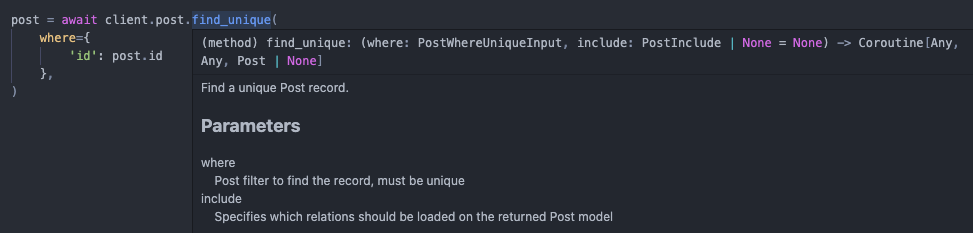
Action Docstrings
All query action methods now have auto-generated docstrings specific for each model, this means that additional documentation will be shown when you hover over the method call in your IDE, for example:
Other Changes
typing-extensionsis now a required dependency
- Python
Published by RobertCraigie over 4 years ago
prisma - v0.3.0
Breaking Changes
The prisma field name is now reserved, trying to generate a model that has a field called prisma will raise an error.
You can, however, still create a model that uses the prisma field name at the database level.
prisma
model User {
  id           String @id @default(cuid())
  prisma_field String @map("prisma")
}
What's Changed
Querying from Model Classes
You can now run prisma queries directly from model classes, for example:
```py from prisma.models import User
user = await User.prisma().create( data={ 'name': 'Robert', }, ) ```
This API is exactly the same as the previous client-based API.
To get starting running queries from model classes, you must first register the prisma client instance that will be used to communicate with the database.
```py from prisma import Client, register
client = Client() register(client) await client.connect() ```
For more details, visit the documentation.
Count non-null fields
You can now select which fields are returned by count().
This returns a dictionary matching the fields that are passed in the select argument.
```py from prisma.models import Post
results = await Post.prisma().count( select={ '_all': True, 'description': True, }, )
{'_all': 3, 'description': 2}
```
Support for Python 3.10
Python 3.10 is now officially supported.
Prisma Update
The internal Prisma binaries that Prisma Client Python uses have been upgraded from 3.3.0 to 3.4.0.
- Support for PostgreSQL 14
prisma db pushsupport for MongoDB
Improved Client Generation Message
The current version of the client will now be displayed post-generation:
``` Prisma schema loaded from schema.prisma
✔ Generated Prisma Client Python (v0.3.0) to ./.venv/lib/python3.9/site-packages/prisma in 765ms ```
Improved Generation Error Message
An explicit and helpful message is now shown when attempting to generate the Python Client using an unexpected version of Prisma.
Environment variables loaded from .env
Prisma schema loaded from tests/data/schema.prisma
Error:
  Prisma Client Python expected Prisma version: 1c9fdaa9e2319b814822d6dbfd0a69e1fcc13a85 but got: da6fafb57b24e0b61ca20960c64e2d41f9e8cff1
  If this is intentional, set the PRISMA_PY_DEBUG_GENERATOR environment variable to 1 and try again.
  Are you sure you are generating the client using the python CLI?
  e.g. python3 -m prisma generate (type=value_error)
Other Changes
- added
--type-depthoption toprisma py generate
- Python
Published by RobertCraigie over 4 years ago
prisma - v0.2.3
🚨 DO NOT INSTALL FROM THIS VERSION 🚨
This release has been yanked from PyPi as it contained auto-generated files, please install using 0.2.4 or greater.
Bug Fixes
- Partial types with enum fields are now correctly generated (#84)
Prisma Update
The internal Prisma binaries that Prisma Client Python uses have been upgraded from 3.1.1 to 3.3.0.
- MongoDB introspection support is in preview
For a full list of changes see https://github.com/prisma/prisma/releases/tag/3.2.0 and https://github.com/prisma/prisma/releases/tag/3.3.0
- Python
Published by RobertCraigie over 4 years ago
prisma - v0.2.2
Package Rename
The python package has been renamed from prisma-client to prisma!
You can now install the client like so:
pip install prisma
You can still install using the old package name, however no new releases will be published.
Datasource Overriding
The datasource can be dynamically overriden when the client is instantiated:
```py from prisma import Client
client = Client( datasource={ 'url': 'file:./dev_qa.db', }, ) ```
This is especially useful for testing purposes.
- Python
Published by RobertCraigie over 4 years ago
prisma - v0.2.1
New features
Support for case insensitive string filtering
This feature is only supported when using PostgreSQL and MongoDB.
py
user = await client.user.find_first(
    where={
        'name': {
            'contains': 'robert',
            'mode': 'insensitive',
        },
    },
)
Prisma Update
The internal Prisma binaries that Prisma Client Python uses have been upgraded from 2.30.0 to 3.1.1.
This brings with it a lot of new features and improvements:
- Referential Actions
- Named Constraints
- Microsoft SQL Server and Azure SQL Connector
For a full list of changes see https://github.com/prisma/prisma/releases/tag/3.1.1 and https://github.com/prisma/prisma/releases/tag/3.0.1
Type Validator
Prisma Client Python now comes bundled with a type validator, this makes it much easier to pass untrusted / untyped arguments to queries in a robust and type safe manner:
```py import prisma from prisma.types import UserCreateInput
def getuntrustedinput(): return {'points': input('Enter how many points you have: ')}
data = prisma.validate(UserCreateInput, getuntrustedinput()) await client.user.create(data=data) ```
Any invalid input would then raise an easy to understand error (note: edited for brevity):
Enter how many points you have: a lot
Traceback:
pydantic.error_wrappers.ValidationError: 1 validation error for UserCreateInput
points
  value is not a valid integer (type=type_error.integer)
Minor Changes
- Improved supported for the windows platform (not officially supported yet)
- Python
Published by RobertCraigie over 4 years ago
prisma - v0.2.0
🚨 This release contains breaking changes 🚨
Filtering field types by NOT and IN has been renamed to not and in.
For example:
py
post = await client.post.find_first(
    where={
        'title': {
            'NOT': 'Exclude title',
        },
    },
)
Must now be written as:
py
post = await client.post.find_first(
    where={
        'title': {
            'not': 'Exclude title',
        },
    },
)
Bug fixes
- Fixes filtering records by
NOT(#70)
- Python
Published by RobertCraigie over 4 years ago
prisma - v0.0.4
🚨 This release contains breaking changes 🚨
Removal of aiohttp and requests
Support for aiohttp and requests has been removed in favour of httpx, as httpx supports both asynchronous and synchronous clients within the same library there is no reason to use aiohttp or requests anymore.
This means that the way you install Prisma Client Python will change. You now no longer need to specify an extra, for example
pip install prisma-client[aiohttp]
turns into
pip install prisma-client
Config changes
The http option has been replaced with the interface option. The new interface option is used to control whether or not the generated client is asynchronous.
Migrating
If you used aiohttp before you should use the following:
prisma
generator client {
  provider  = "prisma-client-py"
  interface = "asyncio"
}
If you used requests before you should use the following:
prisma
generator client {
  provider  = "prisma-client-py"
  interface = "sync"
}
Changes
Support for Json types
You can now make use of Prisma's Json type.
prisma
model User {
  id   Int @default(autoincrement())
  meta Json
}
You can create and search for Json values like so:
```py from prisma import Json
user = await client.user.create( data={ 'meta': Json.keys(country='Scotland'), } ) ```
```py from prisma import Json
user = await client.user.find_first( where={ 'meta': Json({'country': 'Scotland'}) # or 'meta': { 'equals': Json.keys(country='Scotland'), 'NOT': Json(['foo']), } } ) ```
Other changes
- Adds support for
BigInttypes. - Improves error message for unsupported types.
- Improves type safety for atomic updates.
- Python
Published by RobertCraigie over 4 years ago
prisma - Initial Public Release
This release is the first public release.
Features can be found in the documentation: https://prisma-client-py.readthedocs.io/
- Python
Published by RobertCraigie almost 5 years ago