blscraper
A tool to gather, analyze and visualize data from the Bureau of Labor Statistics (BLS) API. Functions include segmentation, geographic analysis and visualization.
Science Score: 13.0%
This score indicates how likely this project is to be science-related based on various indicators:
-
○CITATION.cff file
-
✓codemeta.json file
Found codemeta.json file -
○.zenodo.json file
-
○DOI references
-
○Academic publication links
-
○Committers with academic emails
-
○Institutional organization owner
-
○JOSS paper metadata
-
○Scientific vocabulary similarity
Low similarity (17.3%) to scientific vocabulary
Keywords
Repository
A tool to gather, analyze and visualize data from the Bureau of Labor Statistics (BLS) API. Functions include segmentation, geographic analysis and visualization.
Basic Info
- Host: GitHub
- Owner: keberwein
- License: other
- Language: R
- Default Branch: master
- Homepage: https://github.com/keberwein/blscrapeR
- Size: 25.8 MB
Statistics
- Stars: 114
- Watchers: 9
- Forks: 12
- Open Issues: 2
- Releases: 14
Topics
Metadata Files
README.md
blscrapeR 


Designed to be a tidy API wrapper for the Bureau of Labor Statistics (BLS.) The package has additional functions to help parse, analyze and visualize the data. The package utilizes "tidyverse" concepts for internal functionality and encourages the use of those concepts with the output data.
Install
- Stable version from CRAN:
r
install.packages("blscrapeR")
- The latest development version from GitHub:
r
devtools::install_github("keberwein/blscrapeR")
Before getting started, you’ll probably want to head over to the BLS and get set up with an API key. While an API key is not required to use the package, the query limits are much higher if you have a key and you’ll have access to more data. Plus, it’s free (as in beer), so why not?
Basic Usage
For “quick and dirty” type of analysis, the package has some quick functions that will pull metrics from the API without series numbers. These quick functions include unemployment, employment, and civilian labor force on a national level.
``` r library(blscrapeR)
Grab the Unemployment Rate (U-3)
df <- quickunemprate() head(df, 5)
> # A tibble: 5 x 6
> year period periodName value footnotes seriesID
>
> 1 2017 4.1
> 2 2017 4.2
> 3 2017 4.4
> 4 2017 4.3
> 5 2017 4.4
```
Search BLS IDs
Some knowledge of BLS ids are needed to query the API. The package includes a "fuzzy search" function to help find these ids. There are currently more than 75,000 series ids in the package's internal data set, series_ids. While these aren't all the series ids the BLS offers, it contains the most popular. The BLS Data Finder is another good resource for finding series ids, that may not be in the internal data set.
``` r library(blscrapeR)
Find series ids relating to the total labor force in LA.
ids <- search_ids(keyword = c("Labor Force", "Los Angeles")) head(ids)
> # A tibble: 6 x 4
> series_title
>
> 1 Labor Force: Balance Of California, State Less Los Angeles-Long Beach-Glend
> 2 Labor Force: Los Angeles-Long Beach-Glendale, Ca Metropolitan Division (S)
> 3 Labor Force: Balance Of California, State Less Los Angeles-Long Beach-Glend
> 4 Labor Force: Los Angeles-Long Beach, Ca Combined Statistical Area (U)
> 5 Labor Force: Los Angeles County, Ca (U)
> 6 Labor Force: Los Angeles City, Ca (U)
> # ... with 3 more variables: series_id , seasonal ,
> # periodicity_code
```
``` r library(blscrapeR)
Find series ids relating to median weekly earnings of women software developers.
ids <- search_ids(keyword = c("Earnings", "Software", "Women")) head(ids)
> # A tibble: 1 x 4
> series_title
>
> 1 (Unadj)- Median Usual Weekly Earnings (Second Quartile), Employed Full Time
> # ... with 3 more variables: series_id , seasonal ,
> # periodicity_code
```
API Keys
You should consider getting an API key form the BLS. The package has a function to install your key in your .Renviron so you’ll only have to worry about it once. Plus, it will add extra security by not having your key hard-coded in your scripts for all the world to see.
From the BLS:
| Service | Version 2.0 (Registered) | Version 1.0 (Unregistered) | |--------------------------|--------------------------|----------------------------| | Daily query limit | 500 | 25 | | Series per query limit | 50 | 25 | | Years per query limit | 20 | 10 | | Net/Percent Changes | Yes | No | | Optional annual averages | Yes | No | | Series descriptions | Yes | No |
Download Multiple BLS Series at Once
``` r library(blscrapeR)
Grab several data sets from the BLS at onece.
NOTE on series IDs:
EMPLOYMENT LEVEL - Civilian labor force - LNS12000000
UNEMPLOYMENT LEVEL - Civilian labor force - LNS13000000
UNEMPLOYMENT RATE - Civilian labor force - LNS14000000
df <- blsapi(c("LNS12000000", "LNS13000000", "LNS14000000"), startyear = 2008, endyear = 2017, Sys.getenv("BLSKEY")) %>% # Add time-series dates dateCast() ```
``` r
Plot employment level
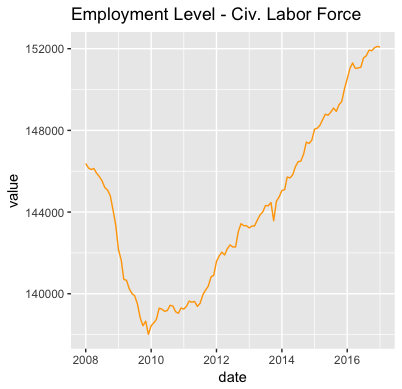
library(ggplot2) gg1200 <- subset(df, seriesID=="LNS12000000") library(ggplot2) ggplot(gg1200, aes(x=date, y=value)) + geom_line() + labs(title = "Employment Level - Civ. Labor Force") ```
Median Weekly Earnings
``` r library(blscrapeR) library(tidyverse)
Median Usual Weekly Earnings by Occupation, Unadjusted Second Quartile.
In current dollars
df <- blsapi(c("LEU0254530800", "LEU0254530600"), startyear = 2000, endyear = 2016, registrationKey = Sys.getenv("BLSKEY")) %>% spread(seriesID, value) %>% dateCast() ```
``` r
A little help from ggplot2!
library(ggplot2) ggplot(data = df, aes(x = date)) + geomline(aes(y = LEU0254530800, color = "Database Admins.")) + geomline(aes(y = LEU0254530600, color = "Software Devs.")) + labs(title = "Median Weekly Earnings by Occupation") + ylab("value") + theme(legend.position="top", plot.title = element_text(hjust = 0.5)) ```

For more advanced usage, please see the package vignettes.
Inflation and Consumer Price Index (CPI)
Although there are many measures of inflation, the CPI's "Consumer Price Index for All Urban Consumers: All Items" is normally the headline inflation rate one would hear about on the news (see FRED).
Getting these data from the blscrapeR package is easy enough:
{r eval=FALSE}
library(blscrapeR)
df <- bls_api("CUSR0000SA0")
head(df)
Due to the limitations of the API, we are only able to gather twenty years of data per request. However the formula for calculating inflation is based on the 1980 dollar, so the data from the API aren't sufficient.
The package includes a function that collects information form the CPI beginning at 1947 and calculates inflation.
To find out the value of a January 2015 dollar in January 2023, we just make a simple function call. Looking at the adj_dollar_value column. We can see that the value of a 2015 dollar in 2023 was approximately $1.32.
```{r eval=FALSE} df <- inflation_adjust("2015-01-01") %>% arrange(desc(date)) head(df)
library(blscrapeR)
A tibble: 6 × 7
date period year value basedate adjdollarvalue monthovrmonthpct_change
```
If we want to check our results, we can head over to the CPI Inflation Calculator on the BLS website.
Annual Inflation Percentage Increase
```{r eval=FALSE} library(blscrapeR) library(ggplot2)
ggplot(data = df, aes(x = date)) + geomline(aes(y = adjdollarvalue, color = "2015 Adjusted Dollar Value")) + labs(title = "Inflation Since 2015") + ylab("2015 Adjusted Dollar Value") + theme(legend.position="top", plot.title = elementtext(hjust = 0.5))
ggplot(data = df, aes(x = date)) + geomline(aes(y = monthovrmonthpctchange, color = "MoM Pct Change")) + labs(title = "Month over Month Inflation Pct Change") + ylab("MoM Pct Change") + theme(legend.position="top", plot.title = elementtext(hjust = 0.5))
```


CPI: Tracking Escalation
Another typical use of the CPI is to determine price escalation. This is especially common in escalation contracts. While there are many different ways one could calculate escalation below is a simple example. Note: the BLS recommends using non-seasonally adjusted data for escalation calculations.
Suppose we want the price escalation of $100 investment we made in January 2014 to February 2015:
Disclaimer: Escalation is normally formulated by lawyers and bankers, the author(s) of this package are neither, so the above should only be considered a code example.
```{r eval=FALSE} library(blscrapeR) library(dplyr) df <- bls_api("CUSR0000SA0", startyear = 2014, endyear = 2015) head(df)
A tibble: 6 × 6
year period periodName value footnotes seriesID
1 2015 M12 December 238. "" CUSR0000SA0
2 2015 M11 November 238. "" CUSR0000SA0
3 2015 M10 October 238. "" CUSR0000SA0
4 2015 M09 September 237. "" CUSR0000SA0
5 2015 M08 August 238. "" CUSR0000SA0
6 2015 M07 July 238. "" CUSR0000SA0
Set base value.
base_value <- 100
Get CPI from base period (January 2014).
base_cpi <- subset(df, year==2014 & periodName=="January", select = "value")
Get the CPI for the new period (February 2015).
new_cpi <- subset(df, year==2015 & periodName=="February", select = "value")
Calculate the updated value of our $100 investment.
round((basevalue / basecpi) * new_cpi, 2) value 1 100.02
Huzzah! We made 2 cents on our $100 investment.
```
Owner
- Name: Kris Eberwein
- Login: keberwein
- Kind: user
- Location: Orlando, FL
- Website: http://www.datascienceriot.com/
- Repositories: 47
- Profile: https://github.com/keberwein
Big Data Engineer: Spark, Python, HiveQL, and Bash scripts all day long!
GitHub Events
Total
- Issues event: 1
- Watch event: 2
- Fork event: 1
Last Year
- Issues event: 1
- Watch event: 2
- Fork event: 1
Issues and Pull Requests
Last synced: 11 months ago
All Time
- Total issues: 43
- Total pull requests: 2
- Average time to close issues: 5 months
- Average time to close pull requests: 9 days
- Total issue authors: 23
- Total pull request authors: 2
- Average comments per issue: 2.4
- Average comments per pull request: 0.5
- Merged pull requests: 1
- Bot issues: 0
- Bot pull requests: 0
Past Year
- Issues: 2
- Pull requests: 0
- Average time to close issues: 1 day
- Average time to close pull requests: N/A
- Issue authors: 2
- Pull request authors: 0
- Average comments per issue: 1.0
- Average comments per pull request: 0
- Merged pull requests: 0
- Bot issues: 0
- Bot pull requests: 0
Top Authors
Issue Authors
- keberwein (15)
- adhi-r (4)
- cdeterman (3)
- AHoerner (1)
- kerr14333 (1)
- bobweeks (1)
- albertostefanelli (1)
- wbk39 (1)
- alexetalbott (1)
- camille-s (1)
- asavagar (1)
- Emman-Lopez-Oso (1)
- jdsher (1)
- arthurgailes (1)
- KevinCPhelps (1)
Pull Request Authors
- bwu62 (1)
- jacobkap (1)
Top Labels
Issue Labels
Pull Request Labels
Packages
- Total packages: 1
-
Total downloads:
- cran 446 last-month
- Total dependent packages: 0
- Total dependent repositories: 1
- Total versions: 19
- Total maintainers: 1
cran.r-project.org: blscrapeR
An API Wrapper for the United States Bureau of Labor Statistics
- Homepage: https://github.com/keberwein/blscrapeR
- Documentation: http://cran.r-project.org/web/packages/blscrapeR/blscrapeR.pdf
- License: MIT + file LICENSE
-
Latest release: 4.0.1
published over 2 years ago
Rankings
Maintainers (1)
Dependencies
- R >= 3.5.0 depends
- dplyr * imports
- ggplot2 * imports
- grDevices * imports
- httr * imports
- jsonlite * imports
- magrittr * imports
- purrr * imports
- stats * imports
- stringr * imports
- tibble * imports
- utils * imports
- knitr * suggests
- rmarkdown * suggests
- testthat * suggests
- actions/checkout v4 composite
- r-lib/actions/check-r-package v2 composite
- r-lib/actions/setup-pandoc v2 composite
- r-lib/actions/setup-r v2 composite
- r-lib/actions/setup-r-dependencies v2 composite