thermopack
Thermopack is a thermodynamic model library for fluid properties and PVT calculations
Science Score: 49.0%
This score indicates how likely this project is to be science-related based on various indicators:
-
○CITATION.cff file
-
✓codemeta.json file
Found codemeta.json file -
✓.zenodo.json file
Found .zenodo.json file -
✓DOI references
Found 24 DOI reference(s) in README -
○Academic publication links
-
✓Committers with academic emails
4 of 19 committers (21.1%) from academic institutions -
○Institutional organization owner
-
○JOSS paper metadata
-
○Scientific vocabulary similarity
Low similarity (13.9%) to scientific vocabulary
Repository
Thermopack is a thermodynamic model library for fluid properties and PVT calculations
Basic Info
Statistics
- Stars: 74
- Watchers: 6
- Forks: 21
- Open Issues: 2
- Releases: 4
Metadata Files
README.md
ThermoPack homepage
For the full documentation and user guide to ThermoPack, see the ThermoPack homepage.
If you are running ThermoPack installed via pip, make sure to check the documentation for the correct version by selecting
the version number in the sidebar.
About
Thermopack is a thermodynamics library for multi-component and multi-phase thermodynamics developed at SINTEF Energy Research and NTNU Department of Chemistry. Through decades of research, we have developed a software that performs thermodynamic calculations. A large selection of equations of state has been implemented in this software. Most of these equations of state have been developed by other research groups around the world, but some of them have been developed by us. Thermopack has been a much-appreciated in-house powerhouse.
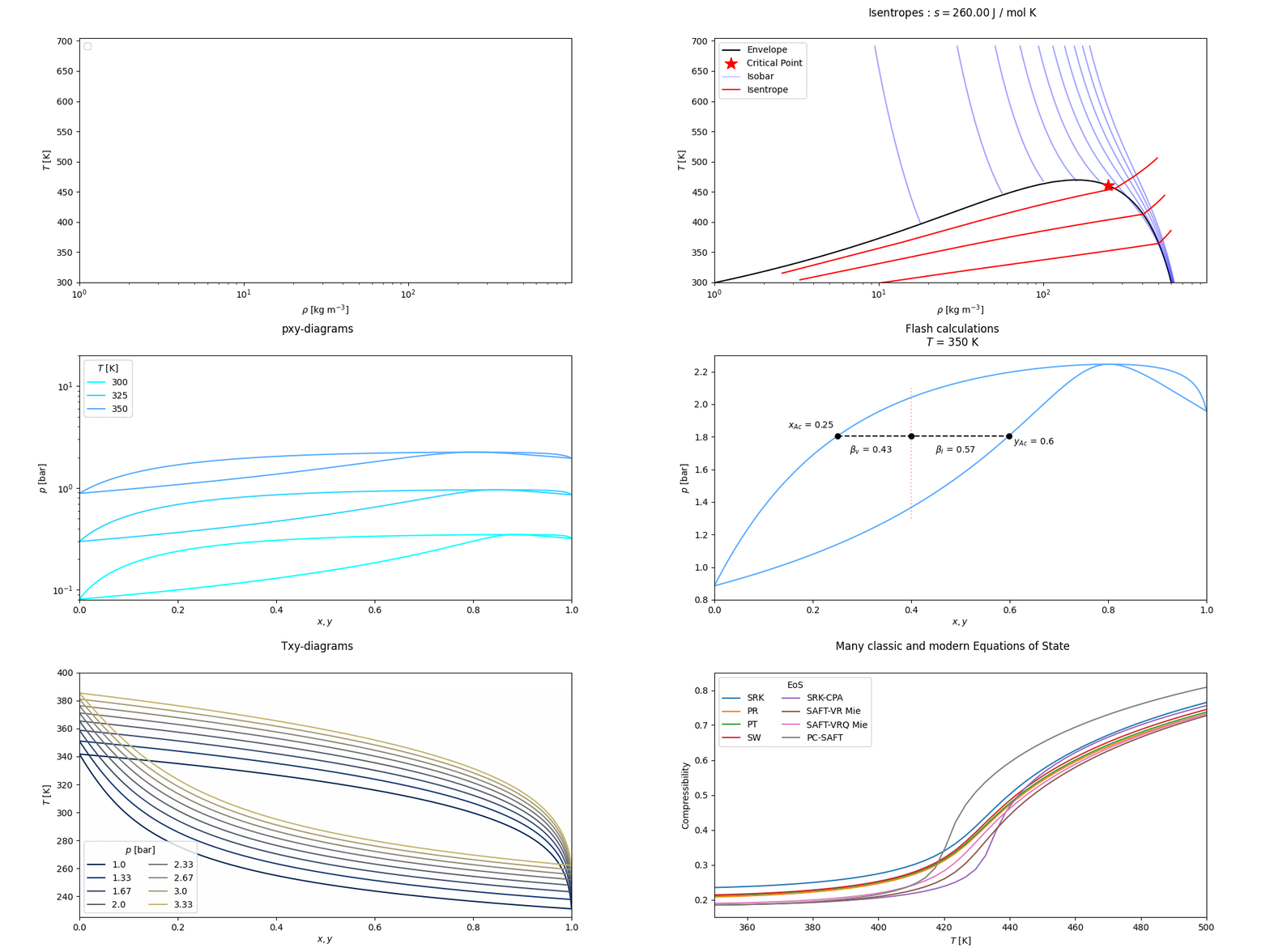
Thermopack is available for everybody, free of charge under the Apache 2.0 open-source licenses. Thermopack is written in FORTRAN to handle heavy numerical computations associated with process and computational fluid dynamics (CFD) simulations. The thermodynamic framework is easily interfaced from C/C++ and also contains a flexible Python wrapper to make scripting easy.
Table of contents
- Please cite
- Authors and contact persons
- License
- Acknowledgments
- Program structure
- Building from Source
- Getting started - Python
- Doing calculations
- Advanced usage - Python
- Component identifiers
Please Cite
Thermopack has been developed through many projects, and have produced many articles. If you are writing academic publications, please cite one or more of the following articles:
For general usage:
Thermodynamic Modeling with Equations of State: Present Challenges with Established MethodsQuantum cubic:
Accurate quantum-corrected cubic equations of state for helium, neon, hydrogen, deuterium and their mixturesSAFT-VR Mie and SAFT-VRQ Mie:
Equation of state and force fields for Feynman--Hibbs-corrected Mie fluids. I. Application to pure helium, neon, hydrogen, and deuterium
Equation of state and force fields for FeynmanHibbs-corrected Mie fluids. II. Application to mixtures of helium, neon, hydrogen, and deuterium
Choice of reference, the influence of non-additivity and challenges in thermodynamic perturbation theory for mixturesCPA, PC-SAFT or cubic models with WongSandler, HuronVidal or UNIFAC mixing rules:
Thermodynamic models to accurately describe the PVTxy-behavior of water/carbon dioxide mixturesUsing dry-ice and water-ice model or the tc-PR/tc-RK:
Depressurization of CO2-N2 and CO2-He in a pipe: Experiments and modelling of pressure and temperature dynamicsEnergy-density and entropy-density flashes:
The influence of CO2 mixture composition and equations of state on simulations of transient pipeline decompressionMapping spinodals or critical points:
The spinodal of single-and multi-component fluids and its role in the development of modern equations of state
Predicting triggering and consequence of delayed LNG RPTPerturbation theories for Lennard-Jones spline fluid:
Perturbation theories for fluids with short-ranged attractive forces: A case study of the Lennard-Jones spline fluid
Thermodynamic properties of the 3D Lennard-Jones/spline model
License
Thermopack is distributed under the Apache 2.0.
Acknowledgments
A number of colleagues at SINTEF Energy Research and NTNU have contributed to the development of thermopack. We gratefully acknowledge their contributions.
Program structure
Each EoS in thermopack is a class, which inherits from the thermopack class found in thermo.py. The primary documentation
for the thermopack python wrapper consists of the docstrings of the thermopack class.
This class contains all generic methods used to compute thermodynamic properties, phase equilibria, etc. The inheriting
classes simply ensure that the correct part of the Fortran-module is linked when performing calculations, and provide
some extended functionality for handling EoS parameters and such. See the wiki
for more information on this.
Fluid parameters are compiled into the Fortran-module, and are not directly accessible through the Python-wrapper.
The entire fluid parameter database used by thermopack may be found in the /fluids directory
in the GitHub repo. In order to model fluids not currently supported in the module available through pip, thermopack
must be compiled from source with the new parameters. See the wiki
for information on how to add new fluids, and the GitHub README for a guide
on how to compile from source. Please feel free to leave a PR for new parameter sets such that these can be included in
future releases of thermopack.
File System
Brief description of file structure:
thermopack/: Main library folder containing make scripts etc.thermopack/src/: Main path for Fortran source codethermopack/unittest/: Test files written for pFUunitthermopack/bin/: Compiled binaries and librariesthermopack/doc/: Memos and doxygen documentationthermopack/fluids/: Pure fluid filesthermopack/binaries/: Files containing binary interaction parameters etc.thermopack/MSVStudio/: Microsoft Visual Studio project and solution filesthermopack/include/: C/C++ include filethermopack/pyplot/: Example plot-scripts (Plotting text files generated by Thermopack)thermopack/addon/: Add-on functionalitythermopack/addon/pycThermopack/: Python interfacethermopack/addon/pyUtils/: Python utilities for generating fortran code and makefile input.
Installing the latest version of ThermoPack
Using pip
Thermopack has been compiled for Windows, Linux and macOS and made available on the Python Package Index (pypi), and can be installed using pip
bash
pip3 install thermopack
For documentation on the version available on pypi, refer to the appropriate version number in the sidebar.
Installing from wheels
Pre-built wheels for the latest version of ThermoPack on GitHub are available for download here. Refer to the linked page for instructions on how to install packages directly from a python wheel. Please note that the latest version on GitHub may be less stable, tested, and well documented than the versions distributed on PyPI.
Building from source
The following sections show how to fetch, compile and install Thermopack and the Python frontend pycThermopack. When things are properly installed, it may be useful to look into the examples provided in the getting started guide, and the pyExamples.
Prerequisites
Thermopack source code can be compiled with the GNU Fortran compiler or Intel FORTRAN and is dependent on the LAPACK and BLAS libraries. On the Windows OS the code can be compiled using Microsoft Visual Studio. A solution file is found in thermopack/MSVStudio, assuming that the Intel Fortran compiler is integrated with Microsoft Visual Studio.
For macOS and Linux, Lapack and Blas can likely be installed using apt, brew, or similar. For windows, Lapack will need to be built from source. The CMake setup for Windows is configured to handle this automatically.
CMake setup (macOS and Linux)
The cmake-based build system assumes that you have Lapack and gfortran installed, see above instructions for more on that.
Build and install thermopack by running
bash
mkdir build
cd build
cmake ..
make install
This will ensure that the thermopack dynamic library is properly installed to thermopack/installed and thermopack/addon/pycThermopack/thermopack.
To set up the python wrapper,
bash
python addon/pycThermopack/map_platform_specifics.py
pip install addon/pycThermopack/
this will generate the file addon/pycThermopack/thermopack/platform_specifics.py and install thermopack to your activated virtual environment.
ThermoPack can be configured to return computed properties as either tuples (v2) or using the Property struct (v3), this is toggled with
the -diffs flag when running map_platform_specifics.py as
bash
python map_platform_specifics.py --diffs=v2 # Use tuples
python map_platform_specifics.py --diffs=v3 # use Property
the default value is --diffs=v3. After running this command you should recieve a confirmation message that thermopack was successfully configured.
CMake setup (Windows)
To compile thermopack (and Lapack) with Intel FORTRAN and MSVS, first run
git submodule update --init --recursive
from within the thermopack direcory, in order to clone Lapack. Then, run
mkdir build
cd build
cmake .. -DCMAKE_Fortran_COMPILER=ifort -DCMAKE_BUILD_TYPE=Release
cmake --build . --config=Release --target install
Compile and install Lapack, and install the thermopack dynamic library to thermopack/installed and thermopack/addon/pycThermopack/thermopack.
To configure and install the python-wrapper, run
python addon/pycThermopack/map_platform_specifics.py
pip install addon/pycThermopack/
Note: If your thermopack dynamic library is called libthermopack.dll, and not thermopack.dll, you will instead need to run
python addon/pycThermopack/map_platform_specifics.py --ifort=True
pip install addon/pycThermopack/
Legacy build system (without CMake)
Linux setup
The Thermopack source code is downloaded by cloning the library to your local
computer. The following commands assume that you have a local installation of
Git, gfortran and
Python 3 with pip.
To compile using Intel FORTRAN, use make optim_ifort.
```bash
Fetch and compile
git clone https://github.com/thermotools/thermopack.git cd thermopack make optim
Prepare and install pycThermopack, aka "thermopack"
Remark: On some systems, Python 3 is installed as python, not python3. If so,
you can replace "python3" with "python" and perhaps also "pip3" with "pip" in
the below.
cd addon/pycThermopack python3 makescript.py optim pip3 install --user . ```
If you are working actively with the Thermopack code, either the Fortran
backend or the Python frontend, then it may be useful to install in editable
mode (aka develop mode). This will install a link to the develop files
instead of copying the files when installing. This can be done with the -e
option, i.e.:
bash
pip3 install -e --user .
See also addon/pycThermopack/README.md for more details on pycThermopack.
MacOS setup
The easiest way to get started is via Homebrew. After
following the instructions on their website to set it up, install gcc
and make. Open a terminal (e.g. the default Terminal.app), and type:
brew install gcc make
Then follow the Linux instructions above (you may need to replace make with gmake).
Some additional packages like git and python can also be installed via
Homebrew before you start, but if you use a recent version of MacOS (e.g.
Catalina), then the versions installed by default should be sufficient.
Windows setup
Download and compile LAPACK and BLAS libraries (you will need CMake and a working compiler).
To be compatible with the current settings, you need to compile using Intel Fortran with Visual Studio, and configure as follows:
- Fortran/Data/Default Real KIND = 8
- Fortran/External Procedures/Calling Convention = cref
- Fortran/External Procedures/Name Case Interpretation = lowercase
- Fortran/External Procedures/String Length Argument Parsing = After All Arguments
- Fortran/External Procedures/Append Underscore to External Names = Yes
- Fortran/Floating Point/Floating Point Model = precise
Copy LAPACK and BLAS libraries to the paths:
- thermopack\lapack\lib\Debug
- thermopack\lapack\lib\Release
Open thermopack\MSVStudio\thermopack.sln using Visual Studio, and compile the wanted configuration.
See addon/pycThermopack/README.md for how to install pycThermopack.
MSYS2/Mingw-W64 setup
Thermopack can also be compiled using gfortran in the MSYS2 environment. Download MSYS2 from https://www.msys2.org, and install and update the package system following the instructions given. Avoid having spaces in the MSYS2 installation directory path, as the Makefile might not work. Having a working MSYS2 installation, thermopack can be compiled after installing the following packages:
bash
pacman -S git
pacman -S mingw-w64-x86_64-gcc-fortran
pacman -S mingw-w64-x86_64-openblas
pacman -S mingw-w64-x86_64-make
pacman -S mingw-w64-x86_64-dlfcn
Open the MSYS2 MinGW 64-bit application, and enter the following in the terminal:
bash
git clone https://github.com/thermotools/thermopack.git
cd thermopack
mingw32-make.exe optim
See addon/pycThermopack/README.md for how to install pycThermopack for the MSYS2 environment.
Docker setup
See addon/docker/README.md for available Dockerfiles to run Thermopack with docker.
Getting Started - Python
Getting started - Python
This is a short introduction to thermopack. Once you've gotten started, we recommend a look at the Examples in the GitHub repo. Comprehensive documentation for the methods available through the python interface can also be found in the doc page for the thermo class.. For more advanced users, a look at the more advanced page may also be useful.
Note: This guide applies to the most recent version of ThermoPack og GitHub. For guides applicable to versions found on PyPI, find the appropriate version in the sidebar on the ThermoPack homepage.
Equations of State (EoS's) in ThermoPack are classes. To do calculations for a given mixture an EoS object must first be initialized for that mixture, as demonstrated in the Initializing an EoS section. Then, a wide variety of thermodynamic computations can be done, as demonstrated in the remaining sections.
Contents
Initialising an equation of state
An overview of available equations of state can be found here.
An EoS is initialized by passing in the fluid identifiers of the mixture, for example
Python
from thermopack.saftvrmie import saftvrmie
eos = saftvrmie('C1,CO2')
will initialize a SAFT-VR Mie EoS for a mixture of methane and CO2. The complete list of component identifiers is in the Fluid identifiers list. PC-SAFT, SAFT-VRQ Mie and Lee-Kesler EoS are initialized in the same way, as
Python
from thermopack import saftvrmie, saftvrqmie, pcsaft, lee_kesler
svrm = saftvrmie.saftvrmie('AR,KR') # SAFT-VR Mie EoS for Ar/Kr mixture
svrqm = saftvrqmie.saftvrqmie('HE') # SAFT-VRQ Mie EoS for pure He
pcs = pcsaft.pcsaft('BENZENE,NC6,NC12') # PC-SAFT EoS for ternary benzene/hexane/dodecane mixture
lk = lee_kesler.lee_kesler('N2,O2') # Lee-Kesler EoS for nitrogen/oxygen mixture
For PC-SAFT, both the simplified PC-SAFT (SPC-SAFT) and Polar PC-SAFT (PCP-SAFT) are available
Python
from thermopack.pcsaft import SPC_SAFT, PCP_SAFT
spcs = SPC_SAFT('NC6,NC12') # Simplified PC-SAFT
pcps = PCP_SAFT('H2O,MEOH') # Polar PC-SAFT
The cubic equations of state are found in the cubic module. Available cubic EoS's and more information on the individual cubics, mixing rules, etc. can be found on the cubic page.
Python
from thermopack.cubic import SoaveRedlichKwong, RedlichKwong, PengRobinson, PengRobinson78
from thermopack.cubic import SchmidtWensel, PatelTeja, VanDerWaals
srk = SoaveRedlichKwong('NH3,C2') # SRK EoS for ammonia/ethane mixture
rk = RedlichKwong('NC6,CO2,NC12') # Redlich-Kwong EoS
pr = PengRobinson('IC4,NC10') # PR EoS for isobutane/decane mixture
pr78 = PengRobinson78('N2,O2,CO2') # # PR-78 EoS for isobutane/decane mixture
vdw = VanDerWaals('C1,C2,C3,N2,O2') # VdW EoS for methane/ethane/propane/nitrogen/oxygen mixture
sw = SchmidtWensel('R11,R12') # Schmidt-Wensel EoS for FCl3C/F2Cl2C mixture
pt = PatelTeja('PRLN') # Patel-Teja EoS for pure propylene
In addition to these, the Translated-Consisten Peng-Robinson is available as
Python
from thermopack.tcPR import tcPR
tcpr = tcPR('F6S,SO2') # Translated-Consistent PR EoS for SF6/SO2 mixture
For more fine-tuned control of the cubic EoS, the parent class cubic can be initialised directly, to explicitly
set mixing rules, alpha-correlation etc.
Cubic-plus association EoS's are available for the SRK and PR EoS through the cpa module as
Python
from thermopack.cpa import SRK_CPA, PR_CPA
srk_cpa = SRK_CPA('H2O,ETOH,PROP1OL') # SRK-CPA EoS for water/ethanol/propanol mixture
Several multiparameter EoS's can interfaced through the multiparameter.multiparam class. The available multiparameter EoS's are NIST-MEOS, MBWR16 and MBWR32. These are initialized as
Python
from thermopack.multiparameter import multiparam
nist = multiparam('C3', 'NIST_MEOS') # NIST-MEOS EoS for propane
mbwr19 = multiparam('C1', 'MBWR19') # MBWR19 EoS for methane
mbwr32 = multiparam('C2', 'MBWR32') # MBWR32 EoS for ethane
please note that not all fluids are supported for multiparameter equations of state, depending on what parameters are available in the fluid database.
Finally, the Extended-corresponding state EoS is available through the extended_csp.ext_csp class as
Python
from thermopack.extended_csp import ext_csp
eos = ext_csp('C1,C2,C3,NC4', sh_eos='SRK', sh_alpha='Classic',
              sh_mixing='vdW', ref_eos='NIST_MEOS', ref_comp='C3')
For more information on the extended-csp EoS please see the Examples and the memo.
Doing calculations
Now that we have an EoS initialized we can start computing stuff. The primary source on how to use individual methods in thermopack are the specific documentation of the thermo class. Here, a small subset of the functionality is demonstrated.
Note that all input is in SI units (moles/kelvin/pascal/cubic meters/joule)
pVT-properties
Specific volume, given temperature, pressure and composition is computed as
python
from thermopack.saftvrmie import saftvrmie
eos = saftvrmie('NC6,NC10') # Hexane/decane mixture
T = 300 # Kelvin
p = 1e5 # Pascal
x = [0.2, 0.8] # Molar composition
vg, = eos.specific_volume(T, p, x, eos.VAPPH) # Molar volume of gas phase (NB: Notice the comma)
vl, = eos.specific_volume(T, p, x, eos.LIQPH) # Molar volume of liquid phase (NB: Notice the comma)
where eos.VAPPH and eos.LIQPH are phase flags used to identify different phases. The commas are necessary because all output from thermopack methods are as tuples.
Similarly, pressure, internal energy, enthalpy, entropy, etc. and associated differentials can be computed via the methods chemical_potential_tv(T, V, n), internal_energy_tv(T, V, n), enthalpy_tv(T, V, n), helmholtz_tv(T, V, n), entropy_tv(T, V, n). For a full overview of the available property calculations see the TV-property interfaces and the Tp-property interfaces of the thermo class
Differentials
If we want volume differentials, we use the same method, but set the flags to calculate differentials to True:
```python
Continued
vg, dvdp = eos.specificvolume(T, p, x, eos.VAPPH, dvdp=True) # Vapour phase molar volume and pressure differential vl, dvdT = eos.specificvolume(T, p, x, eos.LIQPH, dvdt=True) # Liquid phase molar volume and temperature differential , dvdn = eos.specificvolume(T, p, x, eos.LIQPH, dvdn=True) # Liquid phase partial molar volumes ```
Differentials can be computed as functions of $(T, V, n)$ or as functions of $(T, p, n)$. For an overview of the different methods, see Advanced usage: Different property interfaces. A short example is given here as:
```Python
Continued
ntot = 15 # Total number of moles n = ntot * x H, dHdnTV = eos.enthalpytv(T, vg, n, dhdn=True) # Compute enthalpy and derivative of enthalpy wrt. mole numbers at constant (T, V) hvap, dhvapdnTp = eos.enthalpy(T, p, x, eos.VAPPH, dhdn=True) # Compute molar vapour phase enthalpy and derivative of molar vapour phase enthalpy wrt. mole numbers at constant (T, p) hliq, dliqdnTp = eos.enthalpy(T, p, x, eos.LIQPH, dhdn=True) # Compute molar liquid phase enthalpy and derivative of molar liquid phase enthalpy wrt. mole numbers at constant (T, p) H, dHdnTp = eos.enthalpytvp(T, vg, n, dhdn=True) # Compute enthalpy and derivative of enthalpy wrt. mole numbers at constant (T, p) ```
Please note that heat capacities are not available directly, but must be computed as derivatives of enthalpy and internal energy, as
```Python from thermopack.cubic import cubic eos = cubic('C1,C3,NC6', 'SRK') # SRK EoS for a mixture of methane, propane and n-hexane
T = 300 # Kelvin p = 1e5 # Pascal x = [0.2, 0.1, 0.7] # Molar composition , Cpvap = eos.enthalpy(T, p, x, eos.VAPPH, dhdt=True) # Vapour phase heat capacity at constant pressure, computed as (dH/dT){p,n} _, Cpliq = eos.enthalpy(T, p, x, eos.LIQPH, dhdt=True) # Liquid phase heat capacity at constant pressure, computed as (dH/dT)_{p,n}
vg, = eos.specificvolume(T, p, x, eos.VAPPH) # Computing vapour phase specific volume vl, = eos.specificvolume(T, p, x, eos.LIQPH) # Liquid phase specific volume
, Cvvap = eos.internalenergytv(T, vg, x, dedt=True) # Vapour phase heat capacity at constant volume, computed as (dU/dT){V,n} _, Cvliq = eos.internalenergytv(T, vl, x, dedt=True) # Liquid phase heat capacity at constant volume, computed as (dU/dT)_{V,n} ```
Phase diagrams and Equilibria
As with other calculations, the primary source on how available methods for flash- and equilibria calculations and how to use them is the documentation of the thermo class.. Here we give a short introduction, for more extensive examples see the pyExamples directory.
Flash calculations
Flash calculations of several kinds are handled by the methods twophase_tpflash(), twophase_psflash(), twophase_phflash() and twophase_uvflash().
See the Flash interfaces in the documentation of the thermo class for the specifics on the different flash routines.
An example calculation using twophase_tpflash() may be done as
```python
from thermopack.saftvrqmie import saftvrqmie
SAFT-VRQ Mie for Hydrogen/Helium/Neon mixture
eos = saftvrqmie('H2,HE,NE', minimumtemperature=20) # NB: Set minimum temperature low enough when working at very low temperatures T = 35 # Kelvin p = 3e6 # Pascal (30 bar) z = [0.1, 0.25, 0.65] # Molar composition flsh = eos.twophase_tpflash(T, p, z) # flsh is a FlashResult object print(flsh)
Output:
FlashResult object for Tp-flash
Containing the attributes (description, name, value):
Flash type flash_type : Tp
Total composition z : [0.1, 0.25, 0.65]
Temperature [K] T : 35
pressure [Pa] p : 3000000.0
Liquid phase composition x : [0.05407302 0.03859287 0.90733411]
Vapour phase composition y : [0.14642524 0.46370066 0.3898741 ]
Vapour fraction betaV : 0.497302408174766
Liquid fraction betaL : 0.5026975918252341
Phase indentifier index phase : 0
the result of the flash is accessed from the attributes of the [`FlashResult`](utility_structs.html#flashresult) object, found in [`utils.py`](https://github.com/thermotools/thermopack/blob/main/addon/pycThermopack/thermopack/utils.py), as
Python
Continued
x = flsh.x # Liquid composition y = flsh.y # Vapour composition betaL = flsh.betaL # Liquid fraction
... etc
```
The FlashResult object returned by the different flash routines all contain the same attributes.
Phase envelopes
ThermoPack has interfaces to trace (T,p)-, (T,v)- and (p,x,y)-phase envelopes. For the full documentation, see the docs of the thermo class. For more comprehensive examples, see the Examples.
Tp- and Tv- phase envelopes
Phase envelopes can be generated directly with the method get_envelope_twophase() as
```python
Continued
T, p = eos.getenvelopetwophase(1e5, x) # arrays of temperature and pressure for phase envelope, starting at 1 bar. plt.plot(p, T) # Tp-projection of phase envelope
T, p, v = eos.getenvelopetwophase(1e5, x, calc_v=True) # Also return the specific volume at each point along the phase envelope plt.plot(1 / v, T) # rho-T projection of the phase envelope ```
pxy- and txy- phase envelopes
To compute pxy-type phase envelopes, we use the get_binary_pxy() method. This method returns a XYDiagram struct, which
holds the composition and pressure / temperature of each equilibrium phase.
The XYDiagram struct has the attributes lle, l1ve and l2ve, where
* lle holds the composition and pressure / temperature of the Liquid 1 - Liquid 2 equilibria
* lle.x1 is the composition of Liquid 1 (mole fraction of species 1)
* lle.x2 is the composition of Liquid 2 (mole fraction of species 1)
* lle.p / lle.T is the pressure / temperature along the phase boundary
* l1ve holds the composition and pressure / temperature of the Liquid 1 - Vapour equilibria
* l1ve.x is the composition of Liquid 1 (mole fraction of species 1)
* l1ve.y is the composition of the vapour (mole fraction of species 1)
* l1ve.p / l1ve.T is the pressure / temperature along the phase boundary
* l2ve holds the composition and pressure / temperature of the Liquid 2 - Vapour equilibria
* l2ve.x is the composition of Liquid 2 (mole fraction of species 1)
* l2ve.y is the composition of the vapour (mole fraction of species 1)
* l2ve.p / l2ve.T is the pressure / temperature along the phase boundary
We get the phase diagram as
```python from thermopack.cpa import SRK_CPA
eos = SRKCPA('NC6,H2O') # CPA-SRK eos for Hexane/water mixture T = 350 pxy = eos.getbinary_pxy(T) # Returns a XYDiagram struct print(pxy)
Result:
XYDiagram object with attributes (name : description)
lle : Liquid 1 - Liquid 2 Equilibrium
PxyEquilibrium object with attributes (description, name, value)
Type of equilibrium type : lle
Liquid 1 mole fraction, species 1 x1 : [4.278e-07 ... 4.145e-07], len(x1) = 457
Liquid 2 mole fraction, species 1 x2 : [9.969e-01 ... 9.974e-01], len(x2) = 457
Pressure p : [1.648e+05 ... 1.500e+07], len(p) = 457
l1ve : Liquid 1 - Vapour Equilibrium
PxyEquilibrium object with attributes (description, name, value)
Type of equilibrium type : lve
Liquid mole fraction, species 1 x : [4.278e-07 ... 2.197e-07], len(x) = 66
Vapour mole fraction, species 1 y : [7.880e-01 ... 6.461e-01], len(y) = 66
Pressure p : [1.648e+05 ... 1.000e+05], len(p) = 66
l2ve : Liquid 2 - Vapour Equilibrium
PxyEquilibrium object with attributes (description, name, value)
Type of equilibrium type : lve
Liquid mole fraction, species 1 x : [9.969e-01 ... 1.000e+00], len(x) = 100
Vapour mole fraction, species 1 y : [7.880e-01 ... 1.000e+00], len(y) = 100
Pressure p : [1.648e+05 ... 1.289e+05], len(p) = 100
```
For ease of use, the XYDiagram struct is iterable, such that we can unpack it efficiently as
lle, l1ve, l2ve = pxy
Now, we can plot the phase diagram as
```python
Continued
import matplotlib.pyplot as plt
Liquid-liquid phase boundaries
pxy.lle holds the composition and pressure of the liquid phases
plt.plot(pxy.lle.x1, pxy.lle.p, label='Liquid 1 composition') # lle.x1 is the mole fraction of component 1 (NC12) in Liquid 1 along the phase boundary plt.plot(pxy.lle.x2, pxy.lle.p, label='Liquid 2 composition') # lle.x2 is the mole fraction of component 1 (NC12) in Liquid 2 along the phase boundary
Liquid 1-vapour phase boundaries
pxy.l2ve holds composition and pressure along the Liquid 1 - Vapour phase boundary
plt.plot(pxy.l1ve.x, pxy.l1ve.p, label='Liquid 1 bubble line') # l1ve.x is the mole fraction of component 1 (NC12) in Liquid 1 along the Liquid 1 - Vapour phase boundary plt.plot(pxy.l1ve.y, pxy.l1ve.p, label='Liquid 1 dew line') # l1ve.y is the mole fraction of component 1 (NC12) in the Vapour phase along the Liquid 1 - Vapour phase boundary
Liquid 2-vapour phase boundaries
L2VE[2] is the pressure along the Liquid 2 - Vapour phase boundary
plt.plot(pxy.l2ve.x, pxy.l2ve.p, label='Liquid 2 bubble line') # l2ve.x is the mole fraction of component 1 (NC12) in Liquid 2 along the Liquid 2 - Vapour phase boundary plt.plot(pxy.l2ve.y, pxy.l2ve.p, label='Liquid 2 dew line') # l2ve.y is the mole fraction of component 1 (NC12) in the Vapour phase along the Liquid 2 - Vapour phase boundary
plt.ylabel('Pressure [Pa]') # The third element in each tuple is the pressure along the phase boundary plt.xlabel('Molar composition') ```
The method get_binary_txy works in the same way, only replacing the p attribute with T, such that we can compute
``` p = 1e5 lle, l1ve, l2ve = eos.getbinarytxy(p) # Unpacking the XYDiagram
Liquid-liquid phase boundaries
l1ve holds the composition and pressure of Liquid 1 and Vapour along the phase boundary
plt.plot(l1ve.x, l1ve.T, label='Liquid 1 composition') # l1ve.x is the mole fraction of component 1 (NC12) in Liquid 1 along the phase boundary plt.plot(l1ve.y, l1ve.T, label='Vapour composition') # l1ve.y is the mole fraction of component 1 (NC12) in Vapour along the phase boundary
... etc ...
```
If an equilibrium is not found, for example there is only one vapour-liquid equilibria, and no liquid-liquid equilibria,
the arrays corresponding to the non-existent equilibria are empty, i.e.
T = 300
pxy = get_binary_pxy(T) # Some mixture that has only one vapour - liquid equilibria at 300 K
print(len(pxy.lle.x1) == 0) # True
print(len(pxy.lle.x2) == 0) # True
print(len(pxy.lle.p) == 0) # True
print(len(pxy.l1ve.x) == 0) # False
print(len(pxy.l1ve.y) == 0) # False
print(len(pxy.l1ve.p) == 0) # False
print(len(pxy.l2ve.x) == 0) # True
print(len(pxy.l2ve.y) == 0) # True
print(len(pxy.l2ve.p) == 0) # True
Dew- and bubble points
We can also compute the bubble-temperature, pressure etc. directly using the methods bubble_temperature(p, z), bubble_pressure(T, z), dew_temperature(p, z) and dew_pressure(T, z), where z is the composition of the mixture, as
Python
eos = cubic('CO2,C1', 'SRK')
x = [0.5, 0.5] # Total composition of the mixture
p_dew, y_dew = eos.dew_pressure(250, x) # Calculates dew pressure and dew composition at 250 K
T_dew, y_dew = eos.dew_temperature(1e5, x) # Calculates dew temperature and dew composition at 1 bar
p_bub, x_bub = eos.bubble_pressure(230, x) # Calculates bubble pressure and bubble composition at 230 K
T_bub, x_bub = eos.bubble_temperature(1e5, x) # Calculates bubble temperature and bubble composition at 1 bar
Isolines
Various isolines can be computed using the methods get_isotherm, get_isobar, get_isentrope and get_isenthalp. In the following code snippet, the default values of the keyword arguments are indicated.
```Python from thermopack.pcsaft import pcsaft eos = pcsaft('NC6,NC12') x = [0.2, 0.8]
Calculate pressure, specific volume, specific entropy and specific enthalpy along the isotherm at 300 K
from p = minimumpressure to p = maximumpressure. Compute at most nmax points.
pisoT, visoT, sisoT, hisoT = eos.getisotherm(300, x, minimumpressure=1e5, maximum_pressure=1.5e7, nmax=100)
Calculate temperature, specific volume, specific entropy and specific enthalpy along the isobar at 1 bar
from T = minimumtemperature to T = maximumtemperature. Compute at most nmax points.
Tisop, visop, sisop, hisop = eos.getisobar(1e5, x, minimumtemperature=200, maximum_temperature=500, nmax=100)
Calculate temperature, pressure, specific volume and specific entropy along the isenthalp at 1 kJ / mol
Start at the upper of (minimumpressure, minimumtemperature)
End at the lower of (maximumpressure, maximumtemperature)
Tisoh, pisoh, visoh, sisoh = eos.getisenthalp(1e3, x, minimumpressure=1e5, maximumpressure=1.5e7, minimumtemperature=200, maximum_temperature=500, nmax=100)
Calculate temperature, pressure, specific volume and specific enthalpy along the isentrope at 5 J / mol K
Start at the upper of (minimumpressure, minimumtemperature)
End at the lower of (maximumpressure, maximumtemperature)
Tisos, pisos, visos, hisos = eos.getisentrope(5, x, minimumpressure=1e5, maximumpressure=1.5e7, minimumtemperature=200, maximum_temperature=500, nmax=100) ```
Critical point
Thermopack has a critical point solver, which is called as
Python
eos = saftvrqmie('HE,NE') # Use FH-corrected Mie potentials for Helium calculations!
n = [5, 10]
Tc, Vc, pc = eos.critical(n) # Compute the critical temperature, pressure and volume given mole numbers
vc = Vc / sum(n) # Critical specific volume computed from critical volume and mole numbers.
The solver accepts initial guesses for the critical values through the kwargs temp, and v. The error tolerance can be set via the tol kwarg (default is tol=1e-7).
More advanced usage
Interaction parameters
In thermopack we're able to both set and get a wide array of coefficients and parameters depending on the models we are utilizing.
Cubic equations of state
Setting and getting the attractive energy interaction parameter $k{ij}$ and co-volume interaction parameter $l{ij}$
Starting with the attractive energy interaction parameter (kij). The parameter can be set using the function set_kij after initialising the equation and state. The function requires that you first write in the number of the components and subsequently the new interaction parameter i.e. (component number 1, component number 2, new kij value). If we're curious as to what parameter the EOS is already using we can see this by using the function get_kij which returns the value as a float given the component numbers as input i.e. (component number 1, component number 2).
```Python
cs = cubic('CO2,N2',"SRK","Classic","Classic")
We set the interaction parameter to be -0.032
cs.set_kij(1,2,-0.032)
We want to see what the interaction parameter is which returns that kij = -0.032
kij = cs.getkij(1,2)
``
The procedure for setting and getting co-volume interaction parameters is analogous to the getting and setting of attractive energy parameters. Simply use the functionssetlijandget_lijinstead.
``Python
We set the parameter to be -0.032
cs.set_lij(1,2,-0.032)
We want to see what the parameter is which returns that lij = -0.032
lij = cs.get_lij(1,2) ```
Tuning Cubics
Cubic Equations of state implemented in ThermoPack can be accessed through the generic cubic class.
This class also offers a variety of methods to tune the alpha-function, mixing rules etc. See the documentation for
the cubic class for more information.
The different property interfaces (TV-) (Tp-) and (TVp-)
Property calculations in ThermoPack can be done either through the TV-interfaces, the Tp-interfaces or the TVp-interfaces.
The difference between the TV- and Tp- interface is only what variables the properties are computed as functions of, and what variables are held constant in the derivatives. TV-interface methods compute properties as functions of $(T, V, n)$, while Tp-interface methods compute properties as functions of $(T, p, n)$.
The TVp-interface methods on the other hand take $(T, V, n)$ as arguments, and evaluate derivatives as functions of $(T, p, n)$. To demonstrate with an example:
```Python import numpy as np from thermopack.cubic import cubic
eos = cubic('O2,N2', 'PR') # PR EoS for O2/N2 mixture
T = 300 # Kelvin p = 1e5 # Pascal x = np.array([0.21, 0.79]) # Molar composition (of air) ntot = 10 # Total number of moles n = ntot * x # Vector of mole numbers
v, = eos.specificvolume(T, p, x, eos.VAPPH) # Compute specific volume of vapour phase V = v * ntot # Total volume
Computing the TOTAL Enthalpy (J), given (T, V, n)
The differentials are computed for H = H(T, V, n), with
"subscripts" indicating the variables held constant
Htvn, dHdTVn, dHdnTV = eos.enthalpytv(T, V, n, dhdt=True, dhdn=True)
Computing the SPECIFIC VAPOUR phase enthalpy (J / mol), given (T, p, n)
The differentials are computed for hvap = hvap(T, p, n), with the
"subscripts" indicating the variables held constant
hvaptpn, dhvapdtpn, dhvapdnTp = eos.enthalpy(T, p, n, eos.VAPPH, dhdt=True, dhdn=True)
Computing the SPECIFIC LIQUID phase enthalpy (J / mol), given (T, p, n)
The differentials are computed for hliq = hliq(T, p, n), with the
"subscripts" indicating the variables held constant
hliqtpn, dhliqdtpn, dhliqdnTp = eos.enthalpy(T, p, n, eos.LIQPH, dhdt=True, dhdn=True)
Computing the TOTAL Enthalpy (J), given (T, V, n)
NOTE : The differentials are computed for H = H(T, p, n)
NOT for H = H(T, V, n)
Htpn, dHdtpn, dHdnTp = eos.enthalpytvp(T, V, n, dhdt=True, dhdn=True) ```
Besides enthalpy_tvp, there are currently available TVp-interfaces for entropy_tvp and thermo_tvp (logarithm of fugacity coefficients).
Adding new fluids
The fluid database consists of a set of
.json-files in the
fluids directory. These files are
are used to auto-generate the FORTRAN-files
compdatadb.f90 and
saftvrmie_datadb.f90 by running
the respective python scripts
compdata.py and
saftvrmie.py found in the
directory addon/pyUtils/datadb/.
The files are generated in the current working directory and must be
copied to the src-directory
before recompiling ThermoPack to make the fluids available.
A <fluid\>.json file must
contain a minimal set of data to be valid. This includes the critical
point, accentric factor, mole weight and ideal gas heat capacity.
Ideal gas heat capacity
Several different correlations for the heat capacity are available, selected by the "correlation"-key in the "ideal-heat-capacity-1" field of the fluid files. These are summarized in the table below.
Ideal gas heat capacity correlations, and the corresponding keys used in the fluid-database.
| Key | Correlation | Equation | Unit | |-----|-------------------------------------|---------------------------------------------------------------|-----------------------| | 1 | Sherwood, Reid & Prausnitz(a) | $A + BT + CT^2 + DT^3$ | $\text{cal mol}^{-1} \rm{K}^{-1}$ | | 2 | API-Project | 44 | - | | 3 | Hypothetic components | - | - | | 4 | Sherwood, Reid & Prausnitz(b) | $A + BT + CT^2 + DT^3$ | $\rm{J mol}^{-1} \rm{K}^{-1}$ | | 5 | Ici (Krister Strm) | $A + BT + CT^2 + DT^3 + ET^{-2}$ | $\rm{J g}^{-1} \rm{K}^{-1}$ | | 6 | Chen, Bender (Petter Neks) | $A + BT + CT^2 + DT^3 + ET^4$ | $\rm{J g}^{-1} \rm{K}^{-1}$ | | 7 | Aiche, Daubert & Danner(c) | $A + B [ (C / T) \sinh(C/T) ]^2 + D [ (E / T) \cosh(E / T) ]^2$ | $\rm{J kmol}^{-1} \rm{K}^{-1}$ | | 8 | Poling, Prausnitz & OConnel(d) | $R ( A + BT + CT^2 + DT^3 + ET^4 )$ | $\rm{J mol}^{-1} \rm{K}^{-1}$ | | 9 | Linear function and fraction | $A + BT + C(T + D)^{-1}$ | $\rm{J mol}^{-1} \rm{K}^{-1}$ | | 10 | Leachman & Valenta for H2 | - | - | | 11 | Use TREND model | - | - | | 12 | Shomate equation $^{(*)}$ | $A + B T{\rm{s}} + C T{\rm{s}}^2 + D T{\rm{s}}^3 + E T{\rm{s}}^{-2}$ | $\rm{J mol}^{-1} \rm{K}^{-1}$ | | 13 | Einstein equation sum | $R (A + \sumi Bi (Ci / T)^2 \exp[Ci / T] / (\exp[C_i / T] - 1)^2)$ | $\rm{J mol}^{-1} \rm{K}^{-1}$ |
(a)3rd ed.(c)DIPPR-database
(b)4th ed.(d)5th ed.
${(*)}$ Note:$T_{\rm{s}}= 10^{-3} T$
Melting and sublimation curve correlations
$T{\rm{reducing}} (K), p{\rm{reducing}} (Pa), \mathbf{a}, \mathbf{c}, n, n1, n2$ and $n3$ are read from the <fluid\>.json file, while $n4 = n-n1- n2-n3$. Currently a maximum of 6 parameters can be given, $n \leq 6$. The correlation type is defined by a four character string with the format XX-X, where ML-X and SL-X are the default melting curve ($\sigma{\rm{melt}}$) and sublimation curve ($\sigma{\rm{sub}}$) correlations, respectively. See the Methane.json file for an working example of both the *meltingcurve* and sublimation_curve parameters.
The reduced temperature used in the correlations is defined as
$$ \tau = \frac{T}{T_{\rm{reducing}}}. $$
The last character in the correlation string defines how the reducing pressure combines with $\sigma$ to give the melting/sublimation pressure,
$$ p(\sigma) = p_{\rm{reducing}} \times \begin{cases} \sigma & \text{correlation is XX-1} \\ \exp(\sigma) & \text{correlation is XX-2}\\ \exp(\frac{\sigma}{\tau}) & \text{correlation is XX-3} \end{cases} $$
For the melting curve calculation $\sigma$ is calculated from
$$ \sigma{\rm{melt}} = \sum{i=1}^{n1} ai \tau^{ci} + \sum{j=1}^{n2} aj (\tau-1)^{cj} + \sum{k=1}^{n3} ak (\ln \tau)^{ck} + \sum{l=1}^{n4} al (\tau^{c_l} - 1) $$
For the sublimation curve calculation $\sigma$ is calculated from
$$ \sigma{\rm{sub}} = \sum{i=1}^{n1} ai \tau^{ci} + \sum{j=1}^{n2} aj (1-\tau)^{cj} + \sum{k=1}^{n3} ak (\ln \tau)^{ck} + \sum{l=1}^{n4} al (\tau^{c_l} - 1) $$
The melting/sublimation curves can be scaled to match the saturation pressure at the triple temperature, $p{\rm{sat}}(T{\rm{triple}})$. The scaled pressure, $\tilde{p}(\sigma)$, is then calculated as
$$ \tilde{p}(\sigma) = \frac{p{\rm{sat}}(T{\rm{triple}}) }{p(\sigma(T_{\rm{triple}}))} p(\sigma)$$
Component identifiers
Fluid name to fluid identifier mapping
In order to specify fluids in Thermopack you need to use fluid identifiers as shown in the table below. The 'SAFT-VR', 'PC-SAFT' and 'CPA' columns indicate which fluids SAFT-EoS and CPA parameters are available for.
You may have to scroll right to view the whole table.
| Fluid name | CAS Number |Fluid identifyer | SAFT-VR | PC-SAFT | CPA | | ------------------------ | ---- | ----------- | ---- | ---- | ---- | | 1,1,1,2-Tetrafluoroethane | 811-97-2 | R134a | | | | | 1,1,1-Trifluoroethane | 420-46-2 | R143a | | | | | 1,1-Difluoroethane | 75-37-6 | R152a | | | | | 1,1-Difluoroethylene | 75-38-7 | R1132a | | | | | 1,2-Dichlorotetrafluoroethane | 76-14-2 | R114 | | | | | 1,3-Butadiene | 106-99-0 | 13BD | | | | | 1-Butanol | 71-36-3 | BUT1OL | | ✔ | ✔ | | 1-Chloro-1,1,2,2-tetrafluoroethane | 354-25-6 | R124a | | | | | 1-Chloro-1,1-difluoroethane | 75-68-3 | R142b | | | | | 1-Hexanol | 111-27-3 | HEX1OL | | ✔ | ✔ | | 1-Pentanol | 71-41-0 | PENT1OL | | ✔ | ✔ | | 1-Propanol | 71-23-8 | PROP1OL | | ✔ | ✔ | | 2,3,3,3-Tetrafluoropropene | 754-12-1 | R1234yf | | | | | 2-Chloro-1,1,1,2-tetrafluoroethane | 2837-89-0 | R124 | | | | | 2-Methylhexane | 591-76-4 | 2MHX | | | | | 3-Methylpentane | 96-14-0 | 3MP | | | | | Acetone | 67-64-1 | ACETONE | | ✔ | | | Acetylene | 74-86-2 | ACETYLENE | | ✔ | | | Ammonia | 7664-41-7 | NH3 | ✔ | ✔ | ✔ | | Argon | 7440-37-1 | AR | ✔ | ✔ | | | Benzene | 71-43-2 | BENZENE | | ✔ | | | Butanal | 123-72-8 | BUTANAL | | ✔ | | | Carbon dioxide | 124-38-9 | CO2 | ✔ | ✔ | ✔ | | Carbon monoxide | 630-08-0 | CO | | | | | Carbon tetrafluoride | 75-73-0 | R14 | | | | | Chlorine | 7782-50-5 | CL2 | | ✔ | | | Chlorodifluoromethane | 75-45-6 | R22 | | | | | Chloropentafluoroethane | 76-15-3 | R115 | | | | | Chlorotrifluoromethane | 75-72-9 | R13 | | | | | Chlorotrifluorosilane | 14049-36-6 | ClF3Si | | | | | Cyclohexane | 110-82-7 | CYCLOHEX | | ✔ | | | Cyclopropane | 75-19-4 | C31 | | | | | Deuterium | 7782-39-0 | D2 | ✔ | | | | Di-methyl ether | 115-10-6 | DME | | ✔ | | | Di-n-hexyl ether | 112-58-3 | S434 | | | | | Dichlorodifluoromethane | 75-71-8 | R12 | | | | | Dichlorofluoromethane | 75-43-4 | R21 | | | | | Difluoromethane | 75-10-5 | R32 | | | | | Dinitrogen tetroxide | 10544-72-6 | N2O4 | | | | | Equilibrium-hydrogen | 1333-74-0 | E-H2 | | | | | Ethane | 74-84-0 | C2 | ✔ | ✔ | | | Ethanol | 64-17-5 | ETOH | ✔ | ✔ | ✔ | | Ethylbenzene | 100-41-4 | EBZN | | | | | Ethylene glycol | 107-21-1 | MEG | | | | | Ethylene | 74-85-1 | C21 | | ✔ | | | Helium-4 | 7440-59-7 | HE | ✔ | | | | Hexafluoroethane | 76-16-4 | R116 | | | | | Hydrazine | 302-01-2 | N2H4 | ✔ | | | | Hydrogen peroxide | 7722-84-1 | H2O2 | | | | | Hydrogen sulfide | 7783-06-4 | H2S | ✔ | ✔ | | | Hydrogen | 1333-74-0 | H2 | ✔ | | | | Isobutane | 75-28-5 | IC4 | | ✔ | | | Isopentane | 78-78-4 | IC5 | | ✔ | | | Krypton | 7439-90-9 | KR | ✔ | ✔ | | | Lennard-jones_fluid | | LJF | ✔ | | | | Methane | 74-82-8 | C1 | ✔ | ✔ | | | Methanol | 67-56-1 | MEOH | ✔ | ✔ | ✔ | | Methyl fluoride | 593-53-3 | R41 | | | | | Methylcyclopentane | 96-37-7 | MTC5 | | | | | Neon | 7440-01-9 | NE | ✔ | | | | Nitric oxide | 10102-43-9 | NO | | | | | Nitrogen | 7727-37-9 | N2 | ✔ | ✔ | | | Nitrous oxide | 10024-97-2 | N2O | | | | | Octafluoropropane | 76-19-7 | R218 | | | | | Ortho-hydrogen | 1333-74-0 | O-H2 | ✔ | | | | Oxygen | 7782-44-7 | O2 | ✔ | ✔ | | | Para-hydrogen | 1333-74-0 | P-H2 | ✔ | | | | Pentafluoroethane | 354-33-6 | R125 | | | | | Propadiene | 463-49-0 | ALLENE | | | | | Propane | 74-98-6 | C3 | ✔ | ✔ | ✔ | | Propylene | 115-07-1 | PRLN | | | | | Pseudo | XXX | PSEUDO | | | | | Sulfur dioxide | 7446-09-5 | SO2 | | | | | Sulfur hexafluoride | 2551-62-4 | F6S | | | | | Tetrafluoroethylene | 116-14-3 | R1114 | | | | | Tetrafluorohydrazine | 10036-47-2 | F4N2 | | | | | Toluene | 108-88-3 | TOLU | | ✔ | | | Trans-1,3,3,3-tetrafluoropropene | 29118-24-9 | R1234ze | | | | | Trichlorofluoromethane | 75-69-4 | R11 | | | | | Trifluoroamine oxide | 13847-65-9 | F3NO | | | | | Trifluoromethane | 75-46-7 | R23 | | | | | Water | 7732-18 | H2O | ✔ | ✔ | ✔ | | Xenon | 7440-63-3 | XE | ✔ | | | | m-Xylene | 108-38-3 | MXYL | | | | | n-Butane | 106-97-8 | NC4 | ✔ | ✔ | ✔ | | n-Decane | 124-18-5 | NC10 | ✔ | ✔ | ✔ | | n-Docosane | 629-97-0 | NC22 | ✔ | ✔ | | | n-Dodecane | 112-40-3 | NC12 | | ✔ | | | n-Eicosane | 112-95-8 | NC20 | ✔ | ✔ | | | n-Heneicosane | 629-94-7 | NC21 | | ✔ | | | n-Heptadecane | 629-78-7 | NC17 | | ✔ | | | n-Heptane | 142-82-5 | NC7 | ✔ | ✔ | ✔ | | n-Hexadecane | 544-76-3 | NC16 | | ✔ | | | n-Hexane | 110-54-3 | NC6 | ✔ | ✔ | ✔ | | n-Hydrogen | 1333-74-0 | N-H2 | | | | | n-Nonadecane | 629-92-5 | NC19 | | ✔ | | | n-Nonane | 111-84-2 | NC9 | ✔ | ✔ | ✔ | | n-Octadecane | 593-45-3 | NC18 | | ✔ | | | n-Octane | 111-65-9 | NC8 | ✔ | ✔ | ✔ | | n-Pentacosane | 629-99-2 | NC25 | | ✔ | | | n-Pentadecane | 629-62-9 | NC15 | ✔ | ✔ | | | n-Pentan | 109-66-0 | NC5 | ✔ | ✔ | ✔ | | n-Tetracosane | 646-31-1 | NC24 | | ✔ | | | n-Tetradecane | 629-59-4 | NC14 | | ✔ | | | n-Tricosane | 638-67-5 | NC23 | | ✔ | | | n-Tridecane | 629-50-5 | NC13 | | ✔ | | | n-Undecane | 1120-21-4 | NC11 | | ✔ | | | o-Xylene | 95-47-6 | OXYL | | | | | p-Xylene | 106-42-3 | PXYL | | | |
Owner
- Name: thermotools
- Login: thermotools
- Kind: organization
- Repositories: 2
- Profile: https://github.com/thermotools
GitHub Events
Total
- Create event: 22
- Issues event: 5
- Release event: 2
- Watch event: 22
- Delete event: 19
- Issue comment event: 14
- Push event: 56
- Pull request event: 45
- Pull request review event: 23
- Fork event: 10
Last Year
- Create event: 22
- Issues event: 5
- Release event: 2
- Watch event: 22
- Delete event: 19
- Issue comment event: 14
- Push event: 56
- Pull request event: 45
- Pull request review event: 23
- Fork event: 10
Committers
Last synced: 11 months ago
Top Committers
| Name | Commits | |
|---|---|---|
| Morten Hammer | m****r@s****o | 391 |
| Vegard Gjeldvik Jervell | v****j@i****m | 318 |
| Morten Hammer | m****r@n****o | 297 |
| Ailo Aasen | a****n@s****o | 56 |
| Ailo Aasen | a****n@n****o | 43 |
| bendiks | b****s@s****o | 36 |
| Karl Yngve Lervåg | k****t@g****m | 30 |
| BjornAStrom | b****m@s****o | 15 |
| Bendik Støa Sannes | b****s@s****o | 13 |
| morteham | M****r@n****o | 5 |
| Tage Maltby | t****y@n****o | 5 |
| Geir Ove Myhr | g****r@s****o | 4 |
| Jabir Ali Ouassou | j****i@s****h | 3 |
| Lars Hov Odsæter | l****r@d****m | 1 |
| Morten Hammer | m****m@M****l | 1 |
| Øivind Wilhelmsen | o****n@s****o | 1 |
| Stig Helgeland | sh@e****o | 1 |
| Ian Bell | i****l@g****m | 1 |
| Hans Skarsvåg | h****g@s****o | 1 |
Committer Domains (Top 20 + Academic)
Issues and Pull Requests
Last synced: 10 months ago
All Time
- Total issues: 24
- Total pull requests: 170
- Average time to close issues: about 2 months
- Average time to close pull requests: 10 days
- Total issue authors: 15
- Total pull request authors: 7
- Average comments per issue: 1.75
- Average comments per pull request: 0.63
- Merged pull requests: 159
- Bot issues: 0
- Bot pull requests: 0
Past Year
- Issues: 2
- Pull requests: 35
- Average time to close issues: 3 days
- Average time to close pull requests: 10 days
- Issue authors: 2
- Pull request authors: 5
- Average comments per issue: 1.0
- Average comments per pull request: 0.49
- Merged pull requests: 31
- Bot issues: 0
- Bot pull requests: 0
Top Authors
Issue Authors
- vegardjervell (7)
- laods (3)
- morteham (2)
- ffraile (1)
- ailoa (1)
- jenrei (1)
- kotvkvante (1)
- tlorance (1)
- kristinekruken (1)
- flst01 (1)
- Ayman15 (1)
- helleopd (1)
- emmett-b (1)
- iboisvert (1)
- RPeter18 (1)
Pull Request Authors
- morteham (111)
- vegardjervell (64)
- ailoa (29)
- BjornAStrom (6)
- laods (2)
- stigh (1)
- kosbreiev (1)
- gomyhr (1)
Top Labels
Issue Labels
Pull Request Labels
Packages
- Total packages: 1
-
Total downloads:
- pypi 601 last-month
- Total dependent packages: 1
- Total dependent repositories: 1
- Total versions: 7
- Total maintainers: 2
pypi.org: thermopack
Python interface to thermopack
- Homepage: https://github.com/thermotools/thermopack
- Documentation: https://thermopack.readthedocs.io/
- License: MIT License
-
Latest release: 2.2.3
published about 2 years ago